nav VOLVO XC60 2013 Owner´s Manual
[x] Cancel search | Manufacturer: VOLVO, Model Year: 2013, Model line: XC60, Model: VOLVO XC60 2013Pages: 382, PDF Size: 7.08 MB
Page 15 of 382
Introduction
Important warnings
13 Driver distraction
A driver has a responsibility to do everything
possible to ensure his or her own safety and
the safety of passengers in the vehicle and oth-
ers sharing the roadway. Avoiding distractions
is part of that responsibility.
Driver distraction results from driver activities
that are not directly related to controlling the
vehicle in the driving environment. Your new
Volvo is, or can be, equipped with many fea-
ture-rich entertainment and communication
systems. These include hands-free cellular tel-
ephones, navigation systems, and multipur-
pose audio systems. You may also own other
portable electronic devices for your own con-
venience. When used properly and safely, they
enrich the driving experience. Improperly used,
any of these could cause a distraction.
For all of these systems, we want to provide the
following warning that reflects the strong Volvo
concern for your safety. Never use these devi-
ces or any feature of your vehicle in a way that
distracts you from the task of driving safely.
Distraction can lead to a serious accident. In
addition to this general warning, we offer the
following guidance regarding specific newer
features that may be found in your vehicle:
•Never use a hand-held cellular telephone
while driving. Some jurisdictions prohibitcellular telephone use by a driver while the
vehicle is moving.
•If your vehicle is equipped with a naviga-
tion system, set and make changes to your
travel itinerary only with the vehicle parked.
•Never program your audio system while
the vehicle is moving. Program radio pre-
sets with the vehicle parked, and use your
programmed presets to make radio use
quicker and simpler.
•Never use portable computers or personal
digital assistants while the vehicle is mov-
ing.
Accessory installation
•We strongly recommend that Volvo owners
install only genuine, Volvo-approved
accessories, and that accessory installa-
tions be performed only by a trained and
qualified Volvo service technician.
•Genuine Volvo accessories are tested to
ensure compatibility with the performance,
safety, and emission systems in your vehi-
cle. Additionally, a trained and qualified
Volvo service technician knows where
accessories may and may not be safely
installed in your Volvo. In all cases, please
consult a trained and qualified Volvo serv-
ice technician before installing any acces-
sory in or on your vehicle.
•Accessories that have not been approved
by Volvo may or may not be specifically
tested for compatibility with your vehicle.
Additionally, an inexperienced installer
may not be familiar with some of your car's
systems.
•Any of your car's performance and safety
systems could be adversely affected if you
install accessories that Volvo has not tes-
ted, or if you allow accessories to be instal-
led by someone unfamiliar with your vehi-
cle.
•Damage caused by unapproved or
improperly installed accessories may not
be covered by your new vehicle warranty.
See your Warranty and Service Records
Information booklet for more warranty
information. Volvo assumes no responsi-
bility for death, injury, or expenses that
may result from the installation of non-gen-
uine accessories.
Page 86 of 382
03 Your driving environment
Ignition modes
03
84* Option/accessory, for more information, see Introduction.
Inserting and removing the remote key
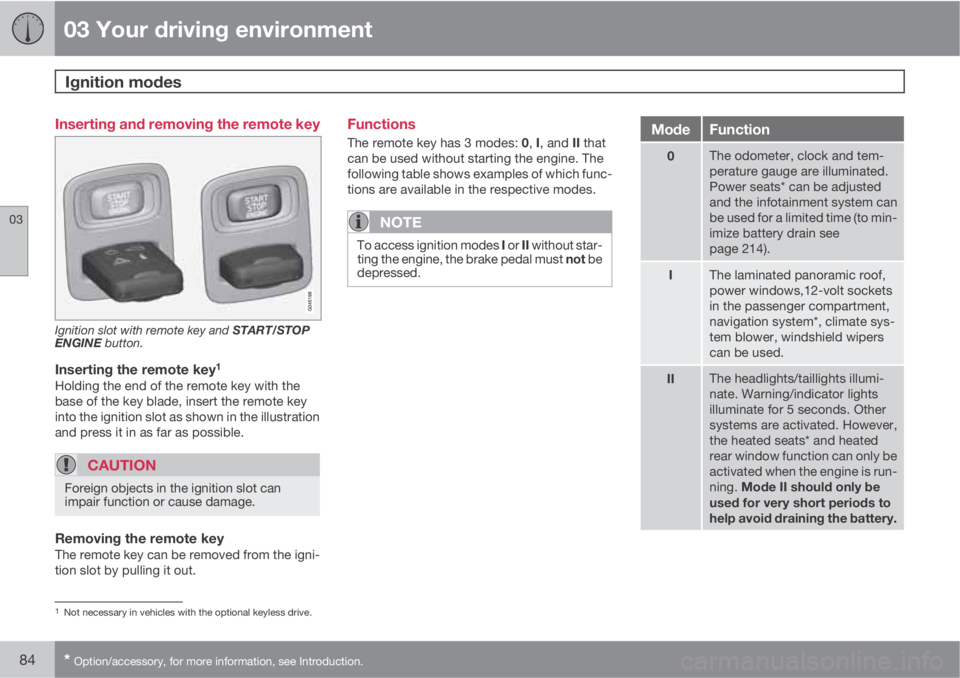
Ignition slot with remote key and START/STOP
ENGINE button.
Inserting the remote key1
Holding the end of the remote key with the
base of the key blade, insert the remote key
into the ignition slot as shown in the illustration
and press it in as far as possible.
CAUTION
Foreign objects in the ignition slot can
impair function or cause damage.
Removing the remote keyThe remote key can be removed from the igni-
tion slot by pulling it out.
Functions
The remote key has 3 modes: 0, I, and II that
can be used without starting the engine. The
following table shows examples of which func-
tions are available in the respective modes.
NOTE
To access ignition modes I or II without star-
ting the engine, the brake pedal must not be
depressed.
ModeFunction
0The odometer, clock and tem-
perature gauge are illuminated.
Power seats* can be adjusted
and the infotainment system can
be used for a limited time (to min-
imize battery drain see
page 214).
IThe laminated panoramic roof,
power windows,12-volt sockets
in the passenger compartment,
navigation system*, climate sys-
tem blower, windshield wipers
can be used.
IIThe headlights/taillights illumi-
nate. Warning/indicator lights
illuminate for 5 seconds. Other
systems are activated. However,
the heated seats* and heated
rear window function can only be
activated when the engine is run-
ning. Mode II should only be
used for very short periods to
help avoid draining the battery.
1Not necessary in vehicles with the optional keyless drive.
Page 98 of 382
03 Your driving environment
Lighting
03
96* Option/accessory, for more information, see Introduction.
Active high beams – AHB*AHB is a feature that uses a camera at the
upper edge of the windshield to detect the
headlights of oncoming vehicles or the tail-
lights of a vehicle directly ahead. When this
happens, the headlights will automatically
switch from high beams to low beams. When
the camera no longer detects the headlights/
taillights of other vehicles, your headlights will
switch back to high beams after several sec-
onds.
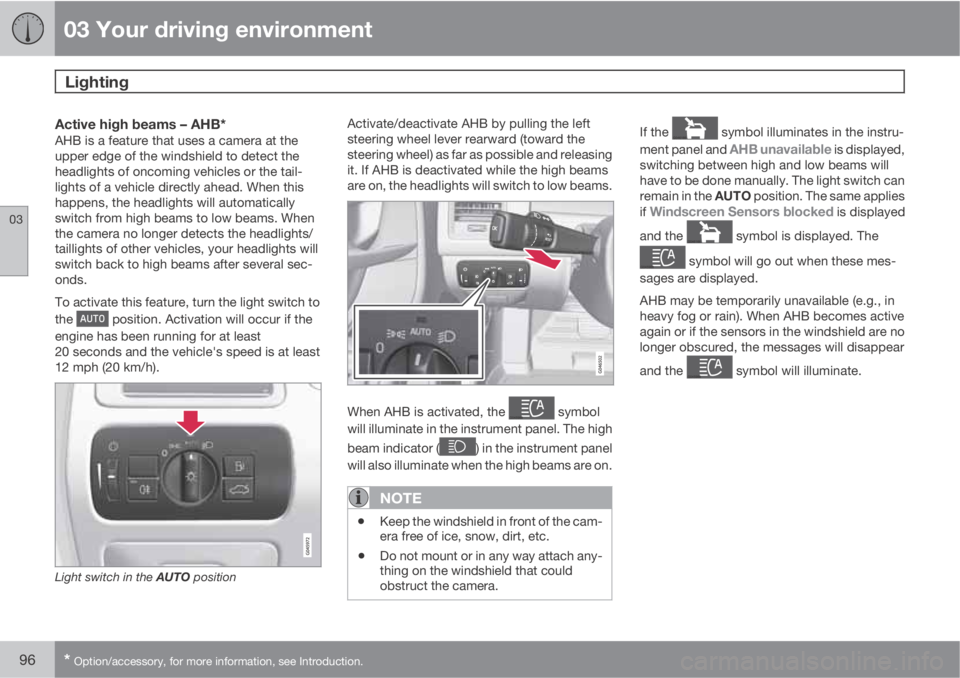
To activate this feature, turn the light switch to
the
position. Activation will occur if the
engine has been running for at least
20 seconds and the vehicle's speed is at least
12 mph (20 km/h).
Light switch in the AUTO position
Activate/deactivate AHB by pulling the left
steering wheel lever rearward (toward the
steering wheel) as far as possible and releasing
it. If AHB is deactivated while the high beams
are on, the headlights will switch to low beams.
When AHB is activated, the symbol
will illuminate in the instrument panel. The high
beam indicator (
) in the instrument panel
will also illuminate when the high beams are on.
NOTE
•Keep the windshield in front of the cam-
era free of ice, snow, dirt, etc.
•Do not mount or in any way attach any-
thing on the windshield that could
obstruct the camera.
If the symbol illuminates in the instru-
ment panel and
AHB unavailable is displayed,
switching between high and low beams will
have to be done manually. The light switch can
remain in the AUTO position. The same applies
if
Windscreen Sensors blocked is displayed
and the
symbol is displayed. The
symbol will go out when these mes-
sages are displayed.
AHB may be temporarily unavailable (e.g., in
heavy fog or rain). When AHB becomes active
again or if the sensors in the windshield are no
longer obscured, the messages will disappear
and the
symbol will illuminate.
Page 145 of 382
04 Driver support
Adaptive Cruise Control (ACC)*
04
* Option/accessory, for more information, see Introduction.143
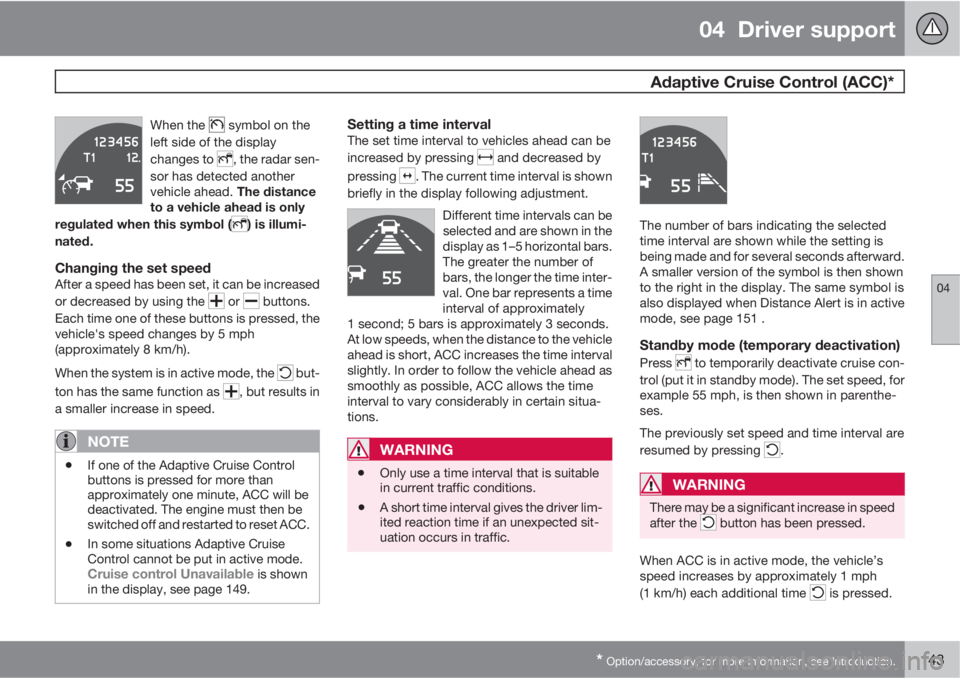
When the symbol on the
left side of the display
changes to
, the radar sen-
sor has detected another
vehicle ahead. The distance
to a vehicle ahead is only
regulated when this symbol (
) is illumi-
nated.
Changing the set speedAfter a speed has been set, it can be increased
or decreased by using the
or buttons.
Each time one of these buttons is pressed, the
vehicle's speed changes by 5 mph
(approximately 8 km/h).
When the system is in active mode, the
but-
ton has the same function as
, but results in
a smaller increase in speed.
NOTE
•If one of the Adaptive Cruise Control
buttons is pressed for more than
approximately one minute, ACC will be
deactivated. The engine must then be
switched off and restarted to reset ACC.
•In some situations Adaptive Cruise
Control cannot be put in active mode.
Cruise control Unavailable is shown
in the display, see page 149.
Setting a time intervalThe set time interval to vehicles ahead can be
increased by pressing
and decreased by
pressing
. The current time interval is shown
briefly in the display following adjustment.
Different time intervals can be
selected and are shown in the
display as 1–5 horizontal bars.
The greater the number of
bars, the longer the time inter-
val. One bar represents a time
interval of approximately
1 second; 5 bars is approximately 3 seconds.
At low speeds, when the distance to the vehicle
ahead is short, ACC increases the time interval
slightly. In order to follow the vehicle ahead as
smoothly as possible, ACC allows the time
interval to vary considerably in certain situa-
tions.
WARNING
•Only use a time interval that is suitable
in current traffic conditions.
•A short time interval gives the driver lim-
ited reaction time if an unexpected sit-
uation occurs in traffic.
The number of bars indicating the selected
time interval are shown while the setting is
being made and for several seconds afterward.
A smaller version of the symbol is then shown
to the right in the display. The same symbol is
also displayed when Distance Alert is in active
mode, see page 151 .
Standby mode (temporary deactivation)
Press to temporarily deactivate cruise con-
trol (put it in standby mode). The set speed, for
example 55 mph, is then shown in parenthe-
ses.
The previously set speed and time interval are
resumed by pressing
.
WARNING
There may be a significant increase in speed
after the button has been pressed.
When ACC is in active mode, the vehicle’s
speed increases by approximately 1 mph
(1 km/h) each additional time
is pressed.
Page 152 of 382
04 Driver support
Adaptive Cruise Control (ACC)*
04
150* Option/accessory, for more information, see Introduction.
SymbolMessageDescription
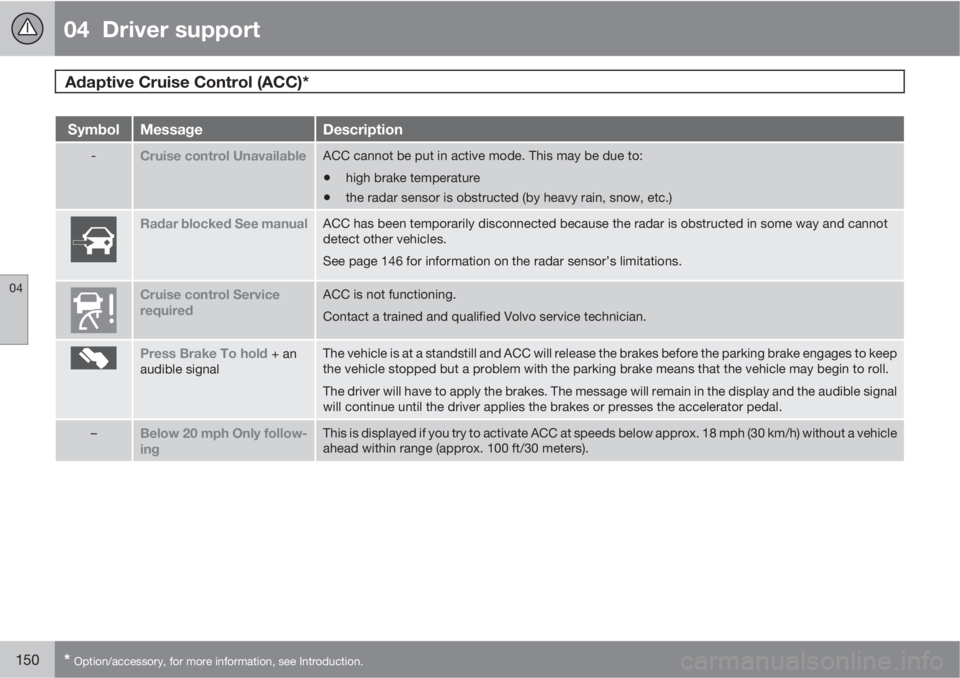
-Cruise control UnavailableACC cannot be put in active mode. This may be due to:
•high brake temperature
•the radar sensor is obstructed (by heavy rain, snow, etc.)
Radar blocked See manualACC has been temporarily disconnected because the radar is obstructed in some way and cannot
detect other vehicles.
See page 146 for information on the radar sensor’s limitations.
Cruise control Service
requiredACC is not functioning.
Contact a trained and qualified Volvo service technician.
Press Brake To hold + an
audible signalThe vehicle is at a standstill and ACC will release the brakes before the parking brake engages to keep
the vehicle stopped but a problem with the parking brake means that the vehicle may begin to roll.
The driver will have to apply the brakes. The message will remain in the display and the audible signal
will continue until the driver applies the brakes or presses the accelerator pedal.
–Below 20 mph Only follow-
ingThis is displayed if you try to activate ACC at speeds below approx. 18 mph (30 km/h) without a vehicle
ahead within range (approx. 100 ft/30 meters).
Page 168 of 382
04 Driver support
Collision warning with Full Auto-brake and Pedestrian Detection*
04
166* Option/accessory, for more information, see Introduction.
CauseAction
The surface of the windshield in front of the camera is dirty or covered
with ice or snow.Clean or clear the section of the windshield in front of the camera.
Fog, heavy rain or snow is interfering with the function of the camera.No action possible. Heavy precipitation may affect the function of the
camera.
The surface of the windshield is clean but the message remains in the
display.Wait a short time. It may take several minutes for the camera to register
visibility.
The surface between the inside of the windshield and the camera is dirty.Contact an authorized Volvo retailer or service technician to have this
surface cleaned.
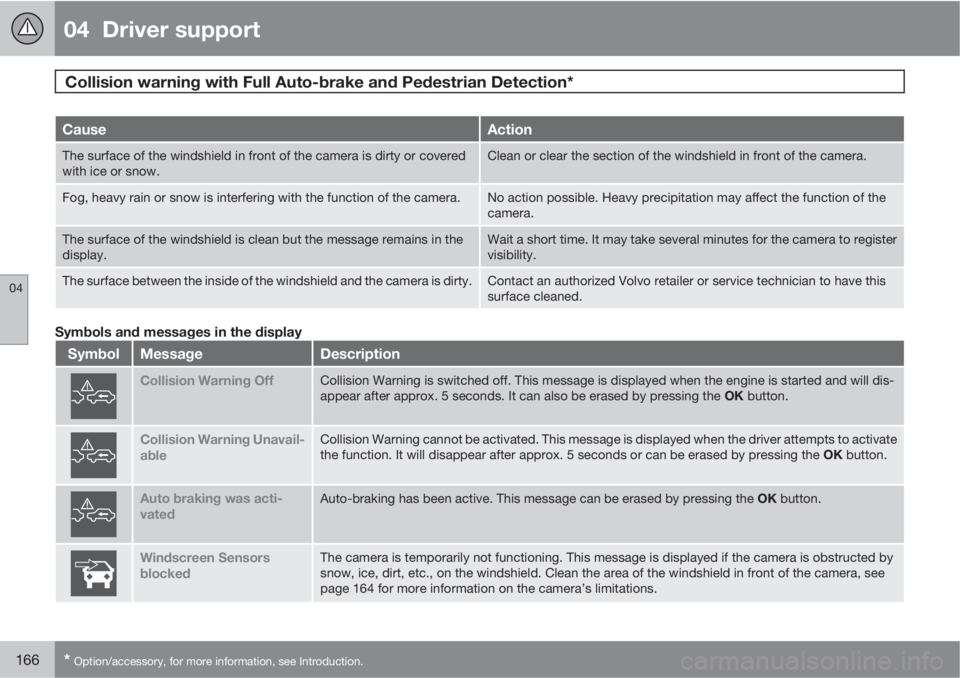
Symbols and messages in the display
SymbolMessageDescription
Collision Warning OffCollision Warning is switched off. This message is displayed when the engine is started and will dis-
appear after approx. 5 seconds. It can also be erased by pressing the OK button.
Collision Warning Unavail-
ableCollision Warning cannot be activated. This message is displayed when the driver attempts to activate
the function. It will disappear after approx. 5 seconds or can be erased by pressing the OK button.
Auto braking was acti-
vatedAuto-braking has been active. This message can be erased by pressing the OK button.
Windscreen Sensors
blockedThe camera is temporarily not functioning. This message is displayed if the camera is obstructed by
snow, ice, dirt, etc., on the windshield. Clean the area of the windshield in front of the camera, see
page 164 for more information on the camera’s limitations.
Page 171 of 382
04 Driver support
Driver Alert System*
04
* Option/accessory, for more information, see Introduction.169 Operating DAC
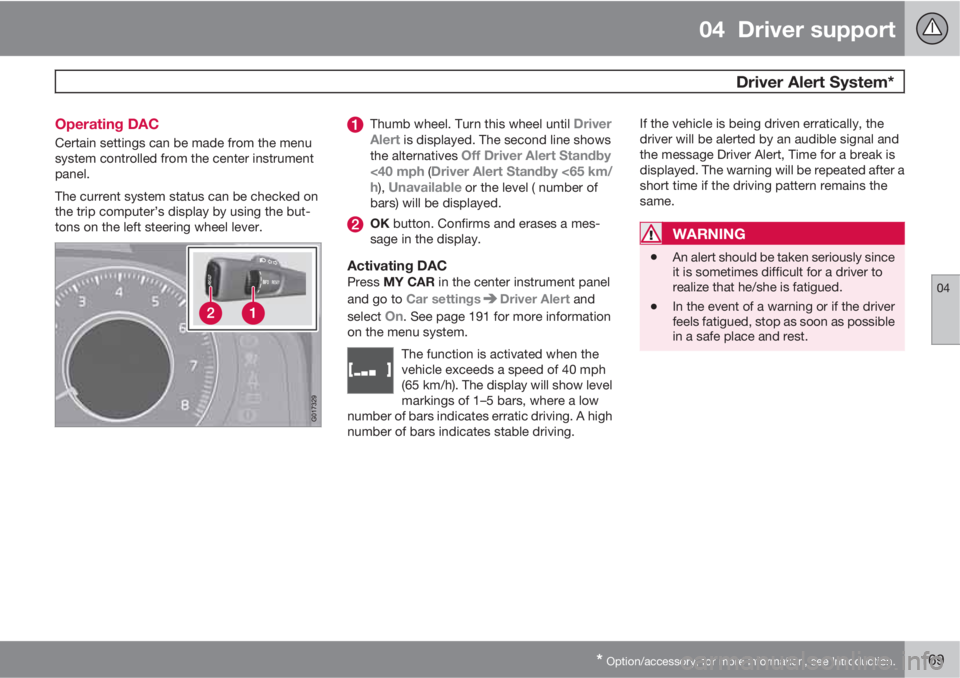
Certain settings can be made from the menu
system controlled from the center instrument
panel.
The current system status can be checked on
the trip computer’s display by using the but-
tons on the left steering wheel lever.
Thumb wheel. Turn this wheel until Driver
Alert is displayed. The second line shows
the alternatives Off Driver Alert Standby
<40 mph (Driver Alert Standby <65 km/
h), Unavailable or the level ( number of
bars) will be displayed.
OK button. Confirms and erases a mes-
sage in the display.
Activating DACPress MY CAR in the center instrument panel
and go to Car settings
Driver Alert and
select
On. See page 191 for more information
on the menu system.
The function is activated when the
vehicle exceeds a speed of 40 mph
(65 km/h). The display will show level
markings of 1–5 bars, where a low
number of bars indicates erratic driving. A high
number of bars indicates stable driving.
If the vehicle is being driven erratically, the
driver will be alerted by an audible signal and
the message Driver Alert, Time for a break is
displayed. The warning will be repeated after a
short time if the driving pattern remains the
same.
WARNING
•An alert should be taken seriously since
it is sometimes difficult for a driver to
realize that he/she is fatigued.
•In the event of a warning or if the driver
feels fatigued, stop as soon as possible
in a safe place and rest.
Page 172 of 382
04 Driver support
Driver Alert System*
04
170* Option/accessory, for more information, see Introduction.
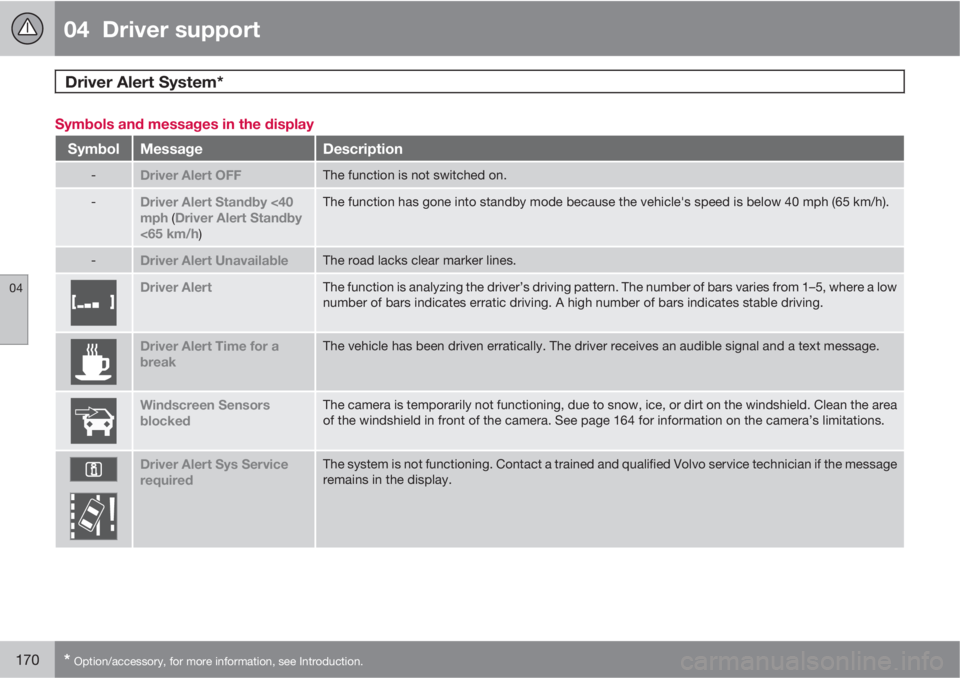
Symbols and messages in the display
SymbolMessageDescription
-Driver Alert OFFThe function is not switched on.
-Driver Alert Standby <40
mph (Driver Alert Standby
<65 km/h)
The function has gone into standby mode because the vehicle's speed is below 40 mph (65 km/h).
-Driver Alert UnavailableThe road lacks clear marker lines.
Driver AlertThe function is analyzing the driver’s driving pattern. The number of bars varies from 1–5, where a low
number of bars indicates erratic driving. A high number of bars indicates stable driving.
Driver Alert Time for a
breakThe vehicle has been driven erratically. The driver receives an audible signal and a text message.
Windscreen Sensors
blockedThe camera is temporarily not functioning, due to snow, ice, or dirt on the windshield. Clean the area
of the windshield in front of the camera. See page 164 for information on the camera’s limitations.
Driver Alert Sys Service
requiredThe system is not functioning. Contact a trained and qualified Volvo service technician if the message
remains in the display.
Page 173 of 382
04 Driver support
Driver Alert System*
04
* Option/accessory, for more information, see Introduction.171 Lane Departure Warning (LDW)–
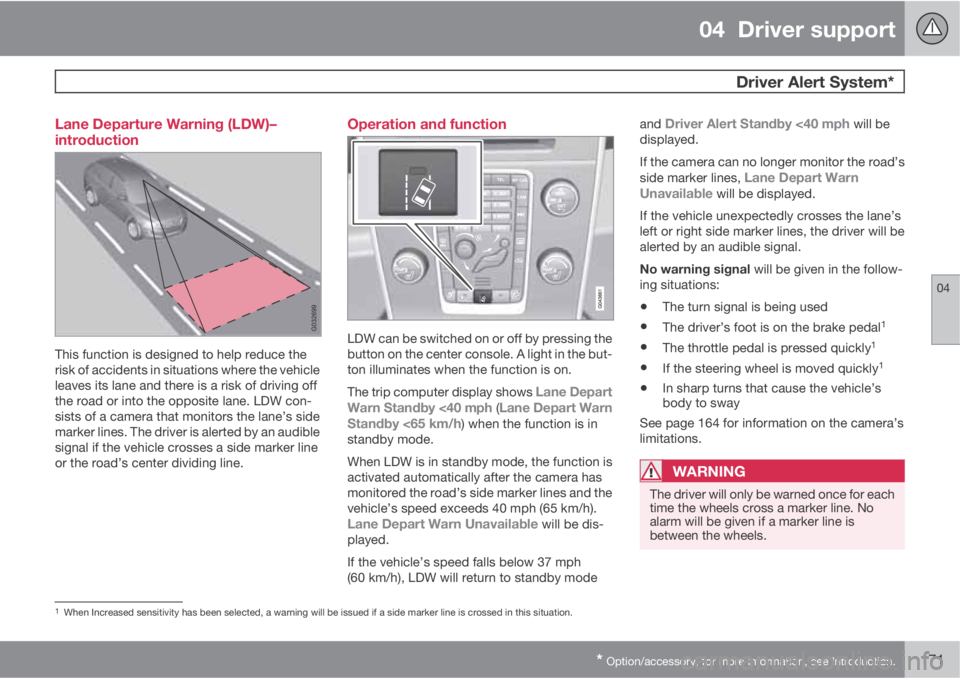
introduction
This function is designed to help reduce the
risk of accidents in situations where the vehicle
leaves its lane and there is a risk of driving off
the road or into the opposite lane. LDW con-
sists of a camera that monitors the lane’s side
marker lines. The driver is alerted by an audible
signal if the vehicle crosses a side marker line
or the road’s center dividing line.
Operation and function
LDW can be switched on or off by pressing the
button on the center console. A light in the but-
ton illuminates when the function is on.
The trip computer display shows
Lane Depart
Warn Standby <40 mph (Lane Depart Warn
Standby <65 km/h) when the function is in
standby mode.
When LDW is in standby mode, the function is
activated automatically after the camera has
monitored the road’s side marker lines and the
vehicle’s speed exceeds 40 mph (65 km/h).
Lane Depart Warn Unavailable will be dis-
played.
If the vehicle’s speed falls below 37 mph
(60 km/h), LDW will return to standby modeand
Driver Alert Standby <40 mph will be
displayed.
If the camera can no longer monitor the road’s
side marker lines,
Lane Depart Warn
Unavailable will be displayed.
If the vehicle unexpectedly crosses the lane’s
left or right side marker lines, the driver will be
alerted by an audible signal.
No warning signal will be given in the follow-
ing situations:
•The turn signal is being used
•The driver’s foot is on the brake pedal1
•The throttle pedal is pressed quickly1
•If the steering wheel is moved quickly1
•In sharp turns that cause the vehicle’s
body to sway
See page 164 for information on the camera’s
limitations.
WARNING
The driver will only be warned once for each
time the wheels cross a marker line. No
alarm will be given if a marker line is
between the wheels.
1When Increased sensitivity has been selected, a warning will be issued if a side marker line is crossed in this situation.
Page 174 of 382
04 Driver support
Driver Alert System*
04
172* Option/accessory, for more information, see Introduction.
Settings
Settings for Lane Departure Warning can be
made in the menu system by pressing My
Car. Go to Settings
Car settingsDriver
support systems
Lane Departure
Warning.
There are two alternatives:
On at start-up: This selection switches LDW
on each time the engine is started. Otherwise,the system will be in the mode that it was in
when the engine was switched off.
Increased sensitivity: This selection increa-
ses the function’s sensitivity. Warnings will be
given at an earlier stage and fewer limitations
apply. When this setting is being used, the sys-
tem only needs to monitor lane marker lines on
one side of the vehicle to change status to
Lane Depart Warn Available.
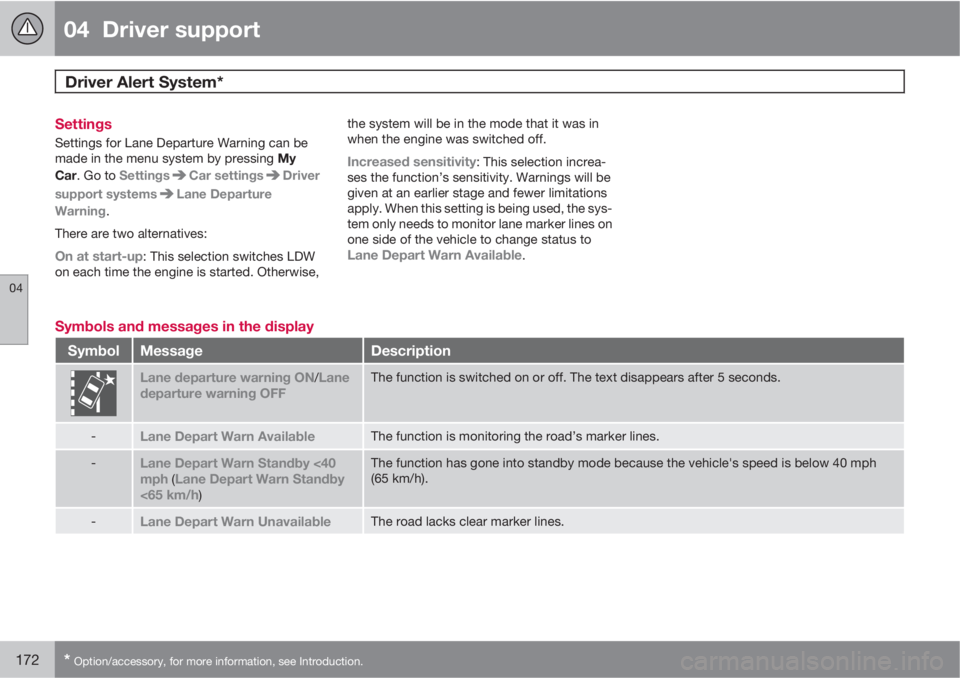
Symbols and messages in the display
SymbolMessageDescription
Lane departure warning ON/Lane
departure warning OFFThe function is switched on or off. The text disappears after 5 seconds.
-Lane Depart Warn AvailableThe function is monitoring the road’s marker lines.
-Lane Depart Warn Standby <40
mph (Lane Depart Warn Standby
<65 km/h)
The function has gone into standby mode because the vehicle's speed is below 40 mph
(65 km/h).
-Lane Depart Warn UnavailableThe road lacks clear marker lines.