instrument panel VOLVO XC60 2016 Owner´s Manual
[x] Cancel search | Manufacturer: VOLVO, Model Year: 2016, Model line: XC60, Model: VOLVO XC60 2016Pages: 398, PDF Size: 9.98 MB
Page 91 of 398
03 Instruments and controls
03
89
Lighting panel
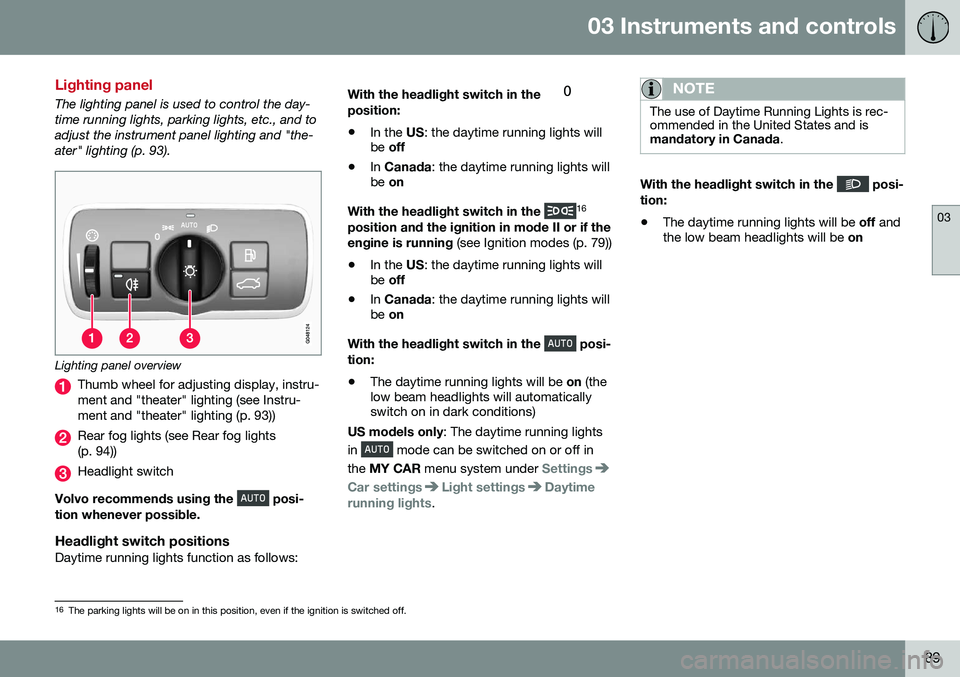
The lighting panel is used to control the day- time running lights, parking lights, etc., and toadjust the instrument panel lighting and "the-ater" lighting (p. 93).
Lighting panel overview
Thumb wheel for adjusting display, instru- ment and "theater" lighting (see Instru-ment and "theater" lighting (p. 93))
Rear fog lights (see Rear fog lights (p. 94))
Headlight switch
Volvo recommends using the
posi-
tion whenever possible.
Headlight switch positionsDaytime running lights function as follows: With the headlight switch in the
position:
• In the
US: the daytime running lights will
be off
• In
Canada : the daytime running lights will
be on
With the headlight switch in the
16
position and the ignition in mode II or if the engine is running (see Ignition modes (p. 79))
• In the
US: the daytime running lights will
be off
• In
Canada : the daytime running lights will
be on
With the headlight switch in the
posi-
tion:
• The daytime running lights will be
on (the
low beam headlights will automatically switch on in dark conditions)
US models only : The daytime running lights
in
mode can be switched on or off in
the MY CAR menu system under
Settings
Car settingsLight settingsDaytime
running lights.
NOTE
The use of Daytime Running Lights is rec- ommended in the United States and ismandatory in Canada .
With the headlight switch in the posi-
tion:
• The daytime running lights will be
off and
the low beam headlights will be on
16
The parking lights will be on in this position, even if the ignition is switched off.
Page 92 of 398
03 Instruments and controls
03
90* Option/accessory, for more information, see Introduction.
High/low beam headlights
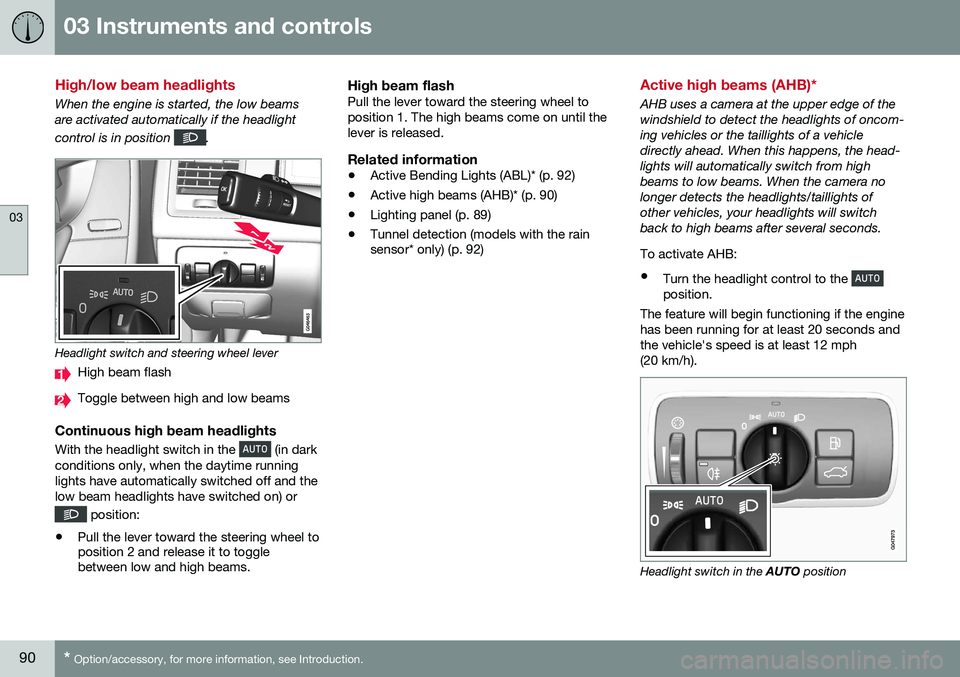
When the engine is started, the low beams are activated automatically if the headlight control is in position
.
Headlight switch and steering wheel lever
High beam flash
Toggle between high and low beams
Continuous high beam headlights
With the headlight switch in the (in dark
conditions only, when the daytime running lights have automatically switched off and thelow beam headlights have switched on) or
position:
• Pull the lever toward the steering wheel to position 2 and release it to togglebetween low and high beams.
High beam flashPull the lever toward the steering wheel to position 1. The high beams come on until thelever is released.
Related information
•Active Bending Lights (ABL)* (p. 92)
• Active high beams (AHB)* (p. 90)
• Lighting panel (p. 89)
• Tunnel detection (models with the rain sensor* only) (p. 92)
Active high beams (AHB)*
AHB uses a camera at the upper edge of the windshield to detect the headlights of oncom-ing vehicles or the taillights of a vehicledirectly ahead. When this happens, the head-lights will automatically switch from highbeams to low beams. When the camera nolonger detects the headlights/taillights ofother vehicles, your headlights will switchback to high beams after several seconds. To activate AHB:
• Turn the headlight control to the
position.
The feature will begin functioning if the engine has been running for at least 20 seconds andthe vehicle's speed is at least 12 mph(20 km/h).
Headlight switch in the AUTO position
Page 93 of 398
03 Instruments and controls
03
91
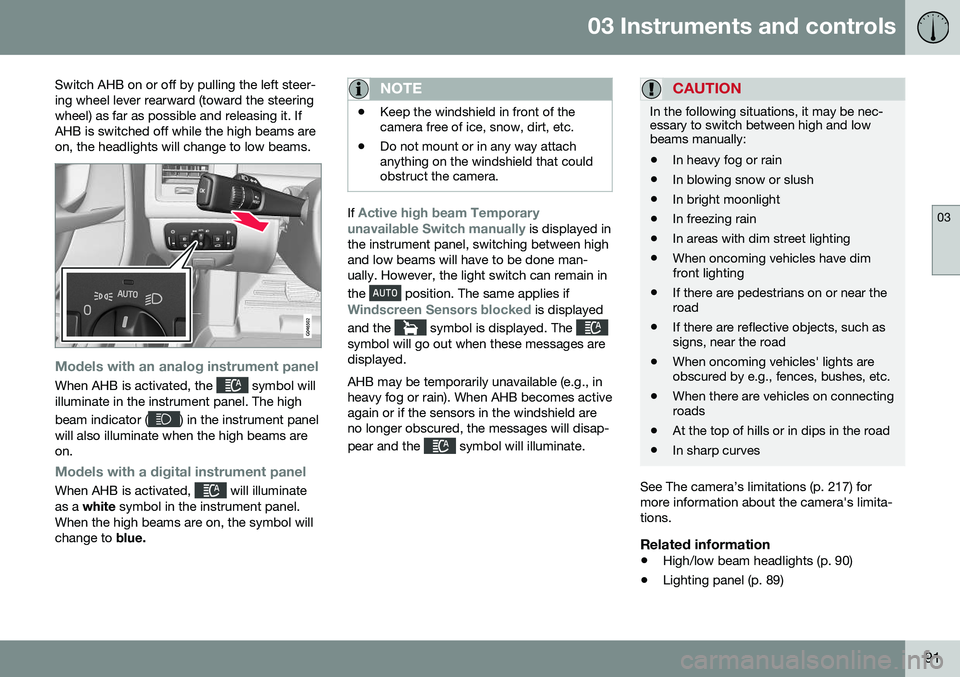
Switch AHB on or off by pulling the left steer- ing wheel lever rearward (toward the steeringwheel) as far as possible and releasing it. IfAHB is switched off while the high beams areon, the headlights will change to low beams.
Models with an analog instrument panel
When AHB is activated, the symbol will
illuminate in the instrument panel. The high beam indicator (
) in the instrument panel
will also illuminate when the high beams are on.
Models with a digital instrument panel
When AHB is activated, will illuminate
as a white symbol in the instrument panel.
When the high beams are on, the symbol will change to blue.
NOTE
•Keep the windshield in front of the camera free of ice, snow, dirt, etc.
• Do not mount or in any way attachanything on the windshield that couldobstruct the camera.
If Active high beam Temporary
unavailable Switch manually is displayed in
the instrument panel, switching between high and low beams will have to be done man-ually. However, the light switch can remain in the
position. The same applies if
Windscreen Sensors blocked is displayed
and the
symbol is displayed. The symbol will go out when these messages are displayed. AHB may be temporarily unavailable (e.g., in heavy fog or rain). When AHB becomes activeagain or if the sensors in the windshield areno longer obscured, the messages will disap- pear and the
symbol will illuminate.
CAUTION
In the following situations, it may be nec- essary to switch between high and lowbeams manually:
• In heavy fog or rain
• In blowing snow or slush
• In bright moonlight
• In freezing rain
• In areas with dim street lighting
• When oncoming vehicles have dim front lighting
• If there are pedestrians on or near theroad
• If there are reflective objects, such assigns, near the road
• When oncoming vehicles' lights areobscured by e.g., fences, bushes, etc.
• When there are vehicles on connectingroads
• At the top of hills or in dips in the road
• In sharp curves
See The camera’s limitations (p. 217) for more information about the camera's limita-tions.
Related information
•
High/low beam headlights (p. 90)
• Lighting panel (p. 89)
Page 94 of 398
03 Instruments and controls
03
92* Option/accessory, for more information, see Introduction.
Tunnel detection (models with the rain sensor* only)
For models without automatic low beams, tunnel detection activates the low beamswhen the vehicle enters a tunnel. The lowbeams are switched off approx. 20 secondsafter the vehicle leaves the tunnel. The rain sensor reacts to the change in light- ing conditions when, for example, the vehicleenters a tunnel and the tunnel detection fea-ture will then activate the low beam head-lights. The low beams will be switched offapprox. 20 seconds after the vehicle leavesthe tunnel. The rain sensor does not have to be activated for tunnel detection to function.
Related information
• Lighting panel (p. 89)
• High/low beam headlights (p. 90)
Active Bending Lights (ABL)*
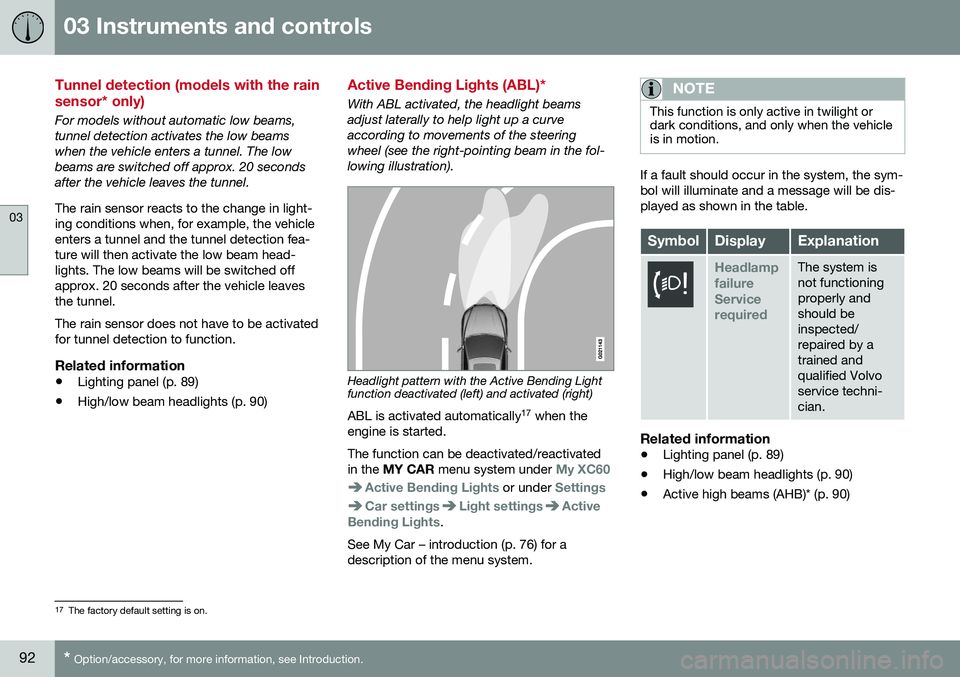
With ABL activated, the headlight beams adjust laterally to help light up a curveaccording to movements of the steeringwheel (see the right-pointing beam in the fol-lowing illustration).
Headlight pattern with the Active Bending Light function deactivated (left) and activated (right)
ABL is activated automatically 17
when the
engine is started. The function can be deactivated/reactivated in the MY CAR menu system under
My XC60
Active Bending Lights or under Settings
Car settingsLight settingsActive
Bending Lights.
See My Car – introduction (p. 76) for a description of the menu system.
NOTE
This function is only active in twilight or dark conditions, and only when the vehicleis in motion.
If a fault should occur in the system, the sym- bol will illuminate and a message will be dis-played as shown in the table.
SymbolDisplayExplanation
Headlamp failureServicerequiredThe system is not functioningproperly andshould beinspected/repaired by atrained andqualified Volvoservice techni-cian.
Related information
• Lighting panel (p. 89)
• High/low beam headlights (p. 90)
• Active high beams (AHB)* (p. 90)
17
The factory default setting is on.
Page 95 of 398
03 Instruments and controls
03
* Option/accessory, for more information, see Introduction.93
Auxiliary lights*
If the vehicle is fitted with auxiliary lights, the driver can use the MY CAR menu system to
choose to deactivate and turn these lights onand off along with the high beam headlights. The auxiliary lights must be connected to the vehicle's electrical system, which should onlybe done by a trained and authorized Volvoservice technician. See My Car – introduction(p. 76) for more information about the menusystem.
Instrument and "theater" lighting
Instrument lightingIllumination of the display and instrument lights will vary, depending on ignition mode. The display lighting is automatically subdued in darkness and the sensitivity is set with thethumb wheel. The intensity of the instrument lighting is adjusted with the thumb wheel.
"Theater" lightingWhen the overhead courtesy lighting hasgone out and the engine is running, severalLEDs located near the roof console illuminateto provide faint lighting for the occupants ofthe front seats. This lighting goes out justafter the overhead courtesy lighting when thevehicle is locked.
Related information
• Lighting panel (p. 89)
• Front interior lighting (p. 96)
• Rear interior lighting (p. 97)
• Ignition modes (p. 79)
Parking lights
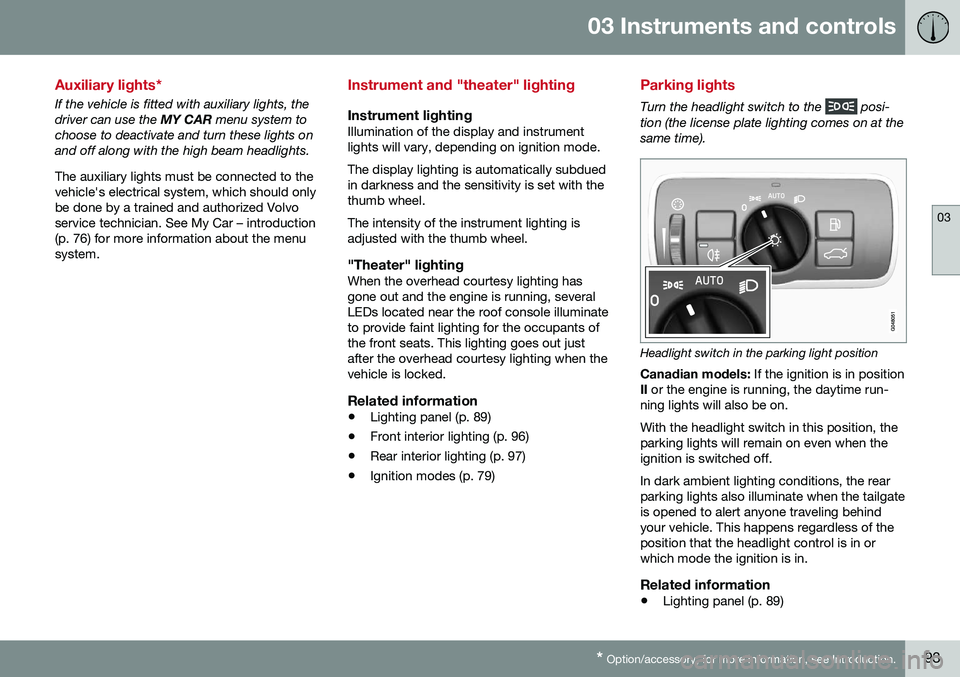
Turn the headlight switch to the posi-
tion (the license plate lighting comes on at the same time).
Headlight switch in the parking light position
Canadian models: If the ignition is in position
II or the engine is running, the daytime run-
ning lights will also be on. With the headlight switch in this position, the parking lights will remain on even when theignition is switched off. In dark ambient lighting conditions, the rear parking lights also illuminate when the tailgateis opened to alert anyone traveling behindyour vehicle. This happens regardless of theposition that the headlight control is in orwhich mode the ignition is in.
Related information
• Lighting panel (p. 89)
Page 96 of 398
03 Instruments and controls
03
94
Rear fog lights
The rear fog lights are considerably brighter than the normal taillights and should be usedonly when conditions such as fog, rain, snow,smoke or dust reduce visibility for other vehi-cles to less than 500 ft. (150 meters).
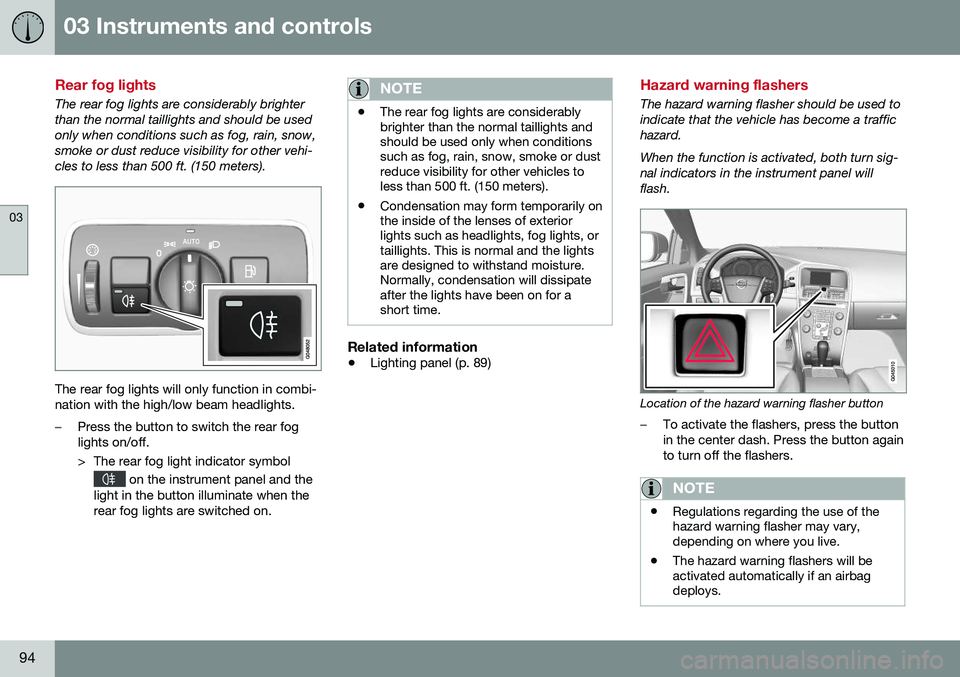
The rear fog lights will only function in combi- nation with the high/low beam headlights.
–Press the button to switch the rear fog lights on/off.
> The rear fog light indicator symbol
on the instrument panel and the
light in the button illuminate when the rear fog lights are switched on.
NOTE
• The rear fog lights are considerably brighter than the normal taillights andshould be used only when conditionssuch as fog, rain, snow, smoke or dustreduce visibility for other vehicles toless than 500 ft. (150 meters).
• Condensation may form temporarily onthe inside of the lenses of exteriorlights such as headlights, fog lights, ortaillights. This is normal and the lightsare designed to withstand moisture.Normally, condensation will dissipateafter the lights have been on for ashort time.
Related information
•
Lighting panel (p. 89)
Hazard warning flashers
The hazard warning flasher should be used to indicate that the vehicle has become a traffichazard. When the function is activated, both turn sig- nal indicators in the instrument panel willflash.
Location of the hazard warning flasher button
–To activate the flashers, press the button in the center dash. Press the button againto turn off the flashers.
NOTE
•Regulations regarding the use of the hazard warning flasher may vary,depending on where you live.
• The hazard warning flashers will beactivated automatically if an airbagdeploys.
Page 100 of 398
03 Instruments and controls
03
98* Option/accessory, for more information, see Introduction.
Windshield wipers
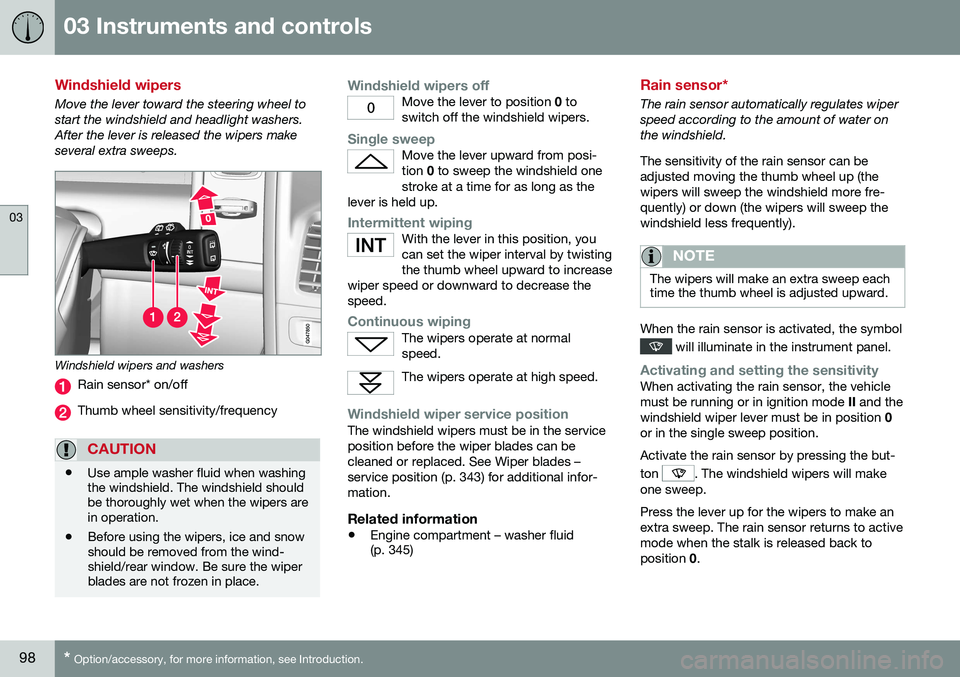
Move the lever toward the steering wheel to start the windshield and headlight washers.After the lever is released the wipers makeseveral extra sweeps.
Windshield wipers and washers
Rain sensor* on/off
Thumb wheel sensitivity/frequency
CAUTION
• Use ample washer fluid when washing the windshield. The windshield shouldbe thoroughly wet when the wipers arein operation.
• Before using the wipers, ice and snowshould be removed from the wind-shield/rear window. Be sure the wiperblades are not frozen in place.
Windshield wipers offMove the lever to position
0 to
switch off the windshield wipers.
Single sweepMove the lever upward from posi- tion 0 to sweep the windshield one
stroke at a time for as long as the
lever is held up.
Intermittent wipingWith the lever in this position, you can set the wiper interval by twistingthe thumb wheel upward to increase
wiper speed or downward to decrease thespeed.
Continuous wipingThe wipers operate at normal speed.
The wipers operate at high speed.
Windshield wiper service positionThe windshield wipers must be in the service position before the wiper blades can becleaned or replaced. See Wiper blades –service position (p. 343) for additional infor-mation.
Related information
• Engine compartment – washer fluid (p. 345)
Rain sensor*
The rain sensor automatically regulates wiper speed according to the amount of water onthe windshield. The sensitivity of the rain sensor can be adjusted moving the thumb wheel up (thewipers will sweep the windshield more fre-quently) or down (the wipers will sweep thewindshield less frequently).
NOTE
The wipers will make an extra sweep each time the thumb wheel is adjusted upward.
When the rain sensor is activated, the symbol
will illuminate in the instrument panel.
Activating and setting the sensitivityWhen activating the rain sensor, the vehicle must be running or in ignition mode
II and the
windshield wiper lever must be in position 0
or in the single sweep position. Activate the rain sensor by pressing the but- ton
. The windshield wipers will make
one sweep. Press the lever up for the wipers to make an extra sweep. The rain sensor returns to activemode when the stalk is released back toposition 0.
Page 102 of 398
03 Instruments and controls
03
100* Option/accessory, for more information, see Introduction.
Tailgate wiper/washer
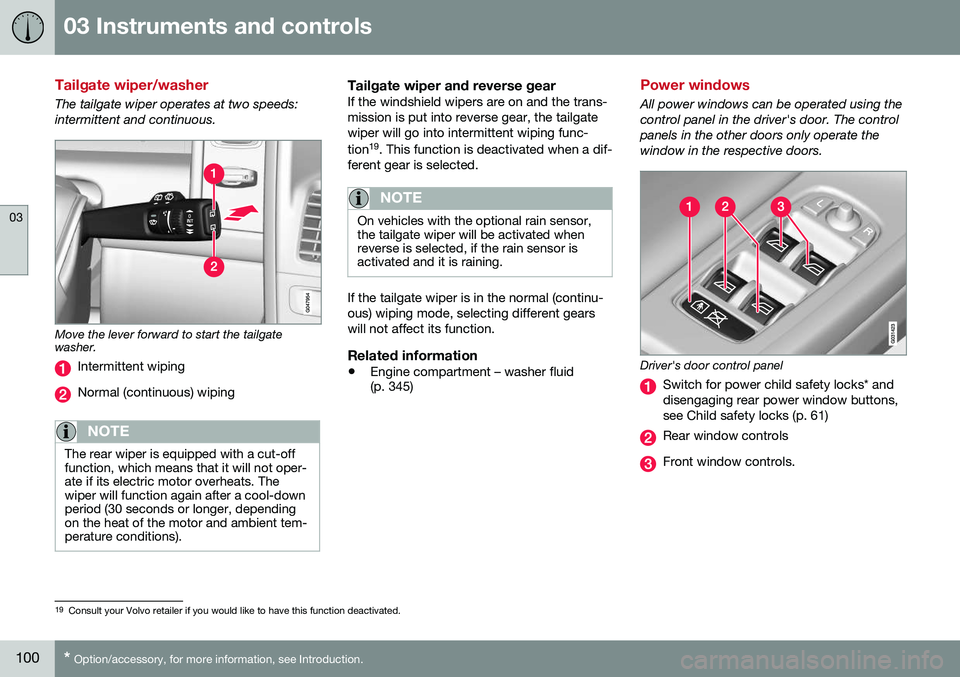
The tailgate wiper operates at two speeds: intermittent and continuous.
Move the lever forward to start the tailgate washer.
Intermittent wiping
Normal (continuous) wiping
NOTE
The rear wiper is equipped with a cut-off function, which means that it will not oper-ate if its electric motor overheats. Thewiper will function again after a cool-downperiod (30 seconds or longer, dependingon the heat of the motor and ambient tem-perature conditions).
Tailgate wiper and reverse gearIf the windshield wipers are on and the trans- mission is put into reverse gear, the tailgatewiper will go into intermittent wiping func- tion 19
. This function is deactivated when a dif-
ferent gear is selected.
NOTE
On vehicles with the optional rain sensor, the tailgate wiper will be activated whenreverse is selected, if the rain sensor isactivated and it is raining.
If the tailgate wiper is in the normal (continu- ous) wiping mode, selecting different gearswill not affect its function.
Related information
• Engine compartment – washer fluid (p. 345)
Power windows
All power windows can be operated using the control panel in the driver's door. The controlpanels in the other doors only operate thewindow in the respective doors.
Driver's door control panel
Switch for power child safety locks* and disengaging rear power window buttons,see Child safety locks (p. 61)
Rear window controls
Front window controls.
19
Consult your Volvo retailer if you would like to have this function deactivated.
Page 115 of 398
03 Instruments and controls
03
* Option/accessory, for more information, see Introduction.113
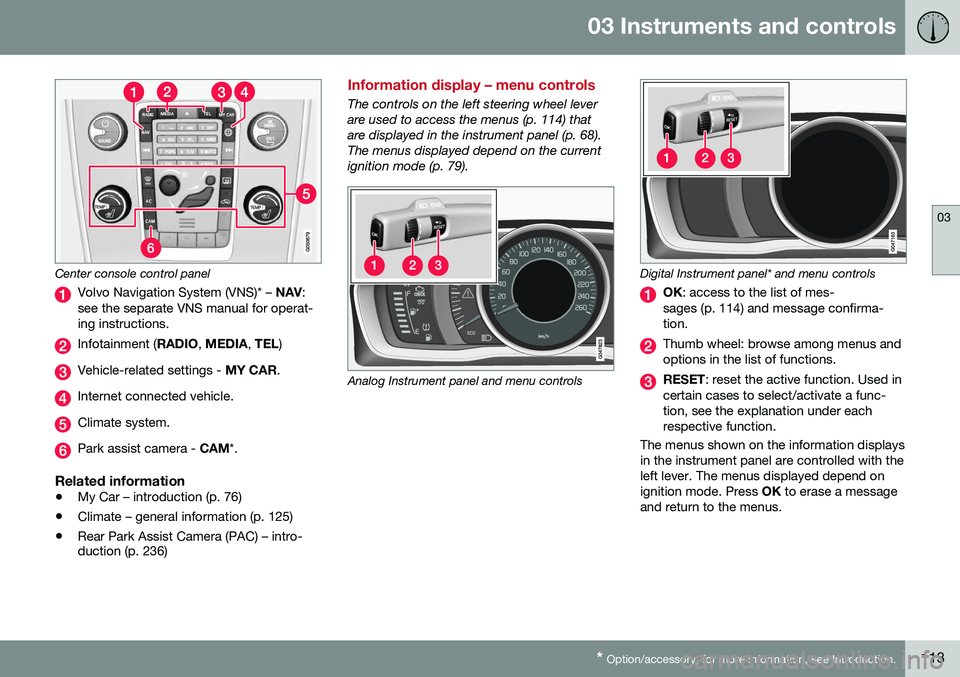
Center console control panel
Volvo Navigation System (VNS)* – NAV:
see the separate VNS manual for operat- ing instructions.
Infotainment ( RADIO, MEDIA , TEL )
Vehicle-related settings - MY CAR.
Internet connected vehicle.
Climate system.
Park assist camera - CAM*.
Related information
•My Car – introduction (p. 76)
• Climate – general information (p. 125)
• Rear Park Assist Camera (PAC) – intro- duction (p. 236)
Information display – menu controls
The controls on the left steering wheel lever are used to access the menus (p. 114) thatare displayed in the instrument panel (p. 68).The menus displayed depend on the currentignition mode (p. 79).
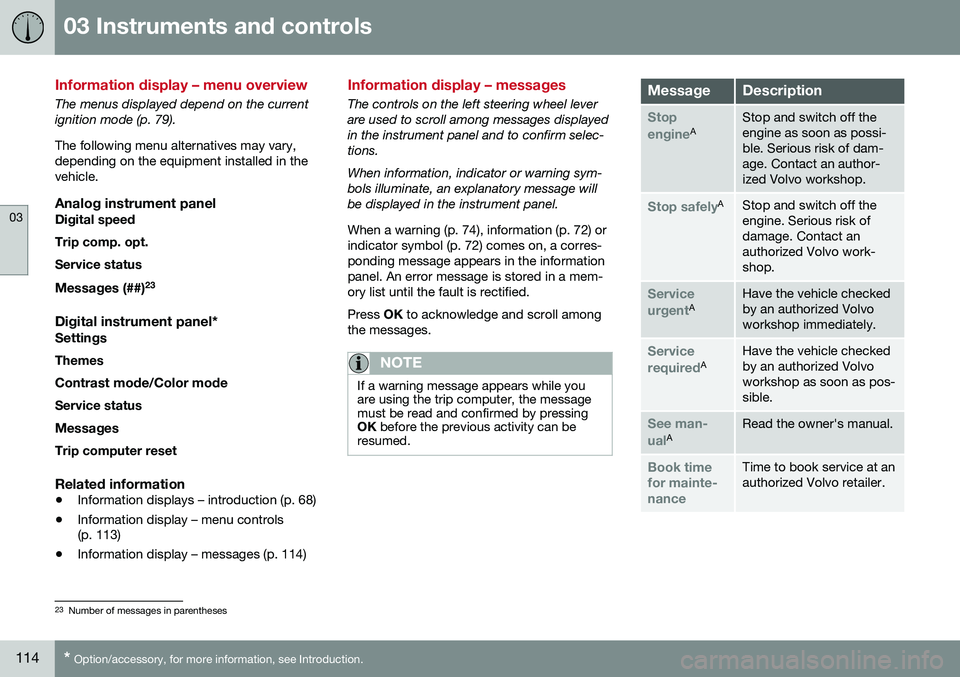
Analog Instrument panel and menu controls
Digital Instrument panel* and menu controls
OK
: access to the list of mes-
sages (p. 114) and message confirma- tion.
Thumb wheel: browse among menus and options in the list of functions.
RESET : reset the active function. Used in
certain cases to select/activate a func- tion, see the explanation under eachrespective function.
The menus shown on the information displaysin the instrument panel are controlled with theleft lever. The menus displayed depend onignition mode. Press OK to erase a message
and return to the menus.
Page 116 of 398
03 Instruments and controls
03
114* Option/accessory, for more information, see Introduction.
Information display – menu overview
The menus displayed depend on the current ignition mode (p. 79). The following menu alternatives may vary, depending on the equipment installed in thevehicle.
Analog instrument panelDigital speed Trip comp. opt.Service status
Messages (##) 23
Digital instrument panel*
Settings
Themes
Contrast mode /Color mode
Service status
Messages Trip computer reset
Related information
• Information displays – introduction (p. 68)
• Information display – menu controls (p. 113)
• Information display – messages (p. 114)
Information display – messages
The controls on the left steering wheel lever are used to scroll among messages displayedin the instrument panel and to confirm selec-tions. When information, indicator or warning sym- bols illuminate, an explanatory message willbe displayed in the instrument panel. When a warning (p. 74), information (p. 72) or indicator symbol (p. 72) comes on, a corres-ponding message appears in the informationpanel. An error message is stored in a mem-ory list until the fault is rectified. Press
OK to acknowledge and scroll among
the messages.
NOTE
If a warning message appears while you are using the trip computer, the messagemust be read and confirmed by pressingOK before the previous activity can be
resumed.
MessageDescription
Stop engineAStop and switch off the engine as soon as possi-ble. Serious risk of dam-age. Contact an author-ized Volvo workshop.
Stop safelyAStop and switch off the engine. Serious risk ofdamage. Contact anauthorized Volvo work-shop.
Service urgentAHave the vehicle checked by an authorized Volvoworkshop immediately.
Service requiredAHave the vehicle checked by an authorized Volvoworkshop as soon as pos-sible.
See man- ualARead the owner's manual.
Book time for mainte-nanceTime to book service at an authorized Volvo retailer.
23 Number of messages in parentheses