parking brake VOLVO XC60 2016 Owner´s Manual
[x] Cancel search | Manufacturer: VOLVO, Model Year: 2016, Model line: XC60, Model: VOLVO XC60 2016Pages: 398, PDF Size: 9.98 MB
Page 270 of 398
08 Starting and driving
08
268
Brakes – symbols
Symbols in the instrument panel
SymbolSpecification
Steady glow – Check the brake fluid level. If the level is low, fillwith brake fluid and check forthe cause of the brake fluidloss.
Automatic function check: steady glow for two secondswhen the engine is started.
WARNING
If and come on at the
same time and the brake level is below the MIN mark in the reservoir or if a brake sys-
tem-related message is shown in the infor-mation display: DO NOT DRIVE . Have the
vehicle towed to a trained and qualifiedVolvo service technician and have thebrake system inspected.
Related information
• Brakes – general (p. 266)
• Parking brake – general information (p. 269)
Anti-lock braking system (ABS)
The ABS system helps to improve vehicle control (stopping and steering) during severebraking conditions by limiting brake lockup. When the system "senses" impending lockup, braking pressure is automatically modulatedin order to help prevent lockup that couldlead to a skid. The system performs a brief self-diagnostic test when the engine has been started anddriver releases the brake pedal. Another auto-matic test may be performed when the vehi-cle first reaches a speed of approximately6 mph (10 km/h). The brake pedal will pulsateseveral times and a sound may be audiblefrom the ABS control module, which is nor-mal.
Related information
• Parking brake – general information (p. 269)
• Emergency Brake Assistance (EBA)(p. 269)
• Brakes – general (p. 266)
Brake lights
The brake lights come on automatically when the brakes are applied.
Adaptive brake lightsThe adaptive brake lights activate in the event of sudden braking or if the ABS system isactivated. This function causes an additionaltaillight on each side of the vehicle to illumi-nate to help alert vehicles traveling behind. The adaptive brake lights activate if: • The ABS system activates for more than approximately a half second
• In the event of sudden braking while thevehicle is moving at speeds aboveapproximately 6 mph (10 km/h).
When the vehicle has come to a stop, the brake lights and additional taillights remain onfor as long as the brake pedal is depressed oruntil braking force on the vehicle is reduced.
Related information
• Brakes – general (p. 266)
• Parking brake – general information (p. 269)
Page 271 of 398
08 Starting and driving
08
}}
269
Emergency Brake Assistance (EBA)
EBA is designed to provide full brake effect immediately in the event of sudden, hardbraking.
Emergency Brake AssistanceThe EBA system is activated by the speedwith which the brake pedal is depressed. When the EBA system is activated, the brake pedal will go down and pressure in the brakesystem immediately increases to the maxi-mum level. Maintain full pressure on thebrake pedal in order to utilize the systemcompletely. EBA is automatically deactivatedwhen the brake pedal is released.
NOTE
•When the EBA system is activated, the brake pedal will go down and pressurein the brake system immediatelyincreases to the maximum level. Youmust maintain full pressure on thebrake pedal in order to utilize the sys-tem completely. There will be no brak-ing effect if the pedal is released. EBAis automatically deactivated when thebrake pedal is released.
• When the vehicle has been parked forsome time, the brake pedal may sinkmore than usual when the engine isstarted. This is normal and the pedalwill return to its usual position when itis released.
Related information
•
Parking brake – general information (p. 269)
• Brakes – general (p. 266)
• Anti-lock braking system (ABS) (p. 268)
Parking brake – general information
The electric parking brake helps to keep the vehicle stationary when it is parked.
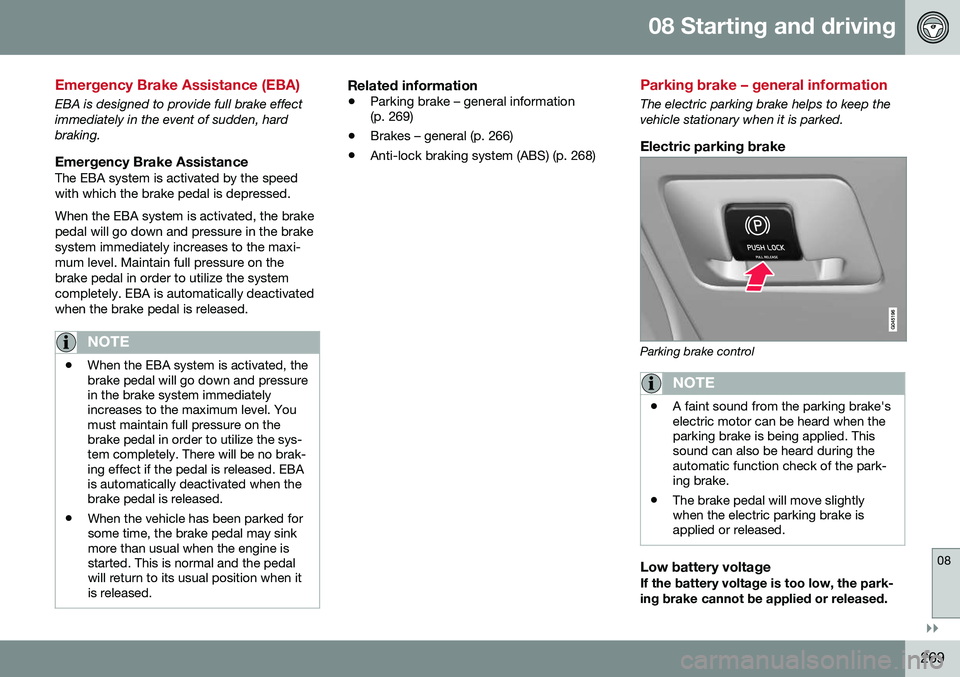
Electric parking brake
Parking brake control
NOTE
•A faint sound from the parking brake's electric motor can be heard when theparking brake is being applied. Thissound can also be heard during theautomatic function check of the park-ing brake.
• The brake pedal will move slightlywhen the electric parking brake isapplied or released.
Low battery voltageIf the battery voltage is too low, the park- ing brake cannot be applied or released.
Page 272 of 398
||
08 Starting and driving
08
270
Connect an auxiliary battery if the battery voltage is too low, see Jump starting (p. 251).
Parking on a hill
•If the vehicle is pointing uphill, turn the front wheels so that they point away fromthe curb.
• If the vehicle is pointing downhill, turn thefront wheels so that they point toward thecurb.
The parking brake should also be applied.
Related information
• Parking brake – applying (p. 270)
• Parking brake – releasing (p. 271)
• Parking brake – symbols and messages(p. 272)
• Brakes – general (p. 266)
Parking brake – applying
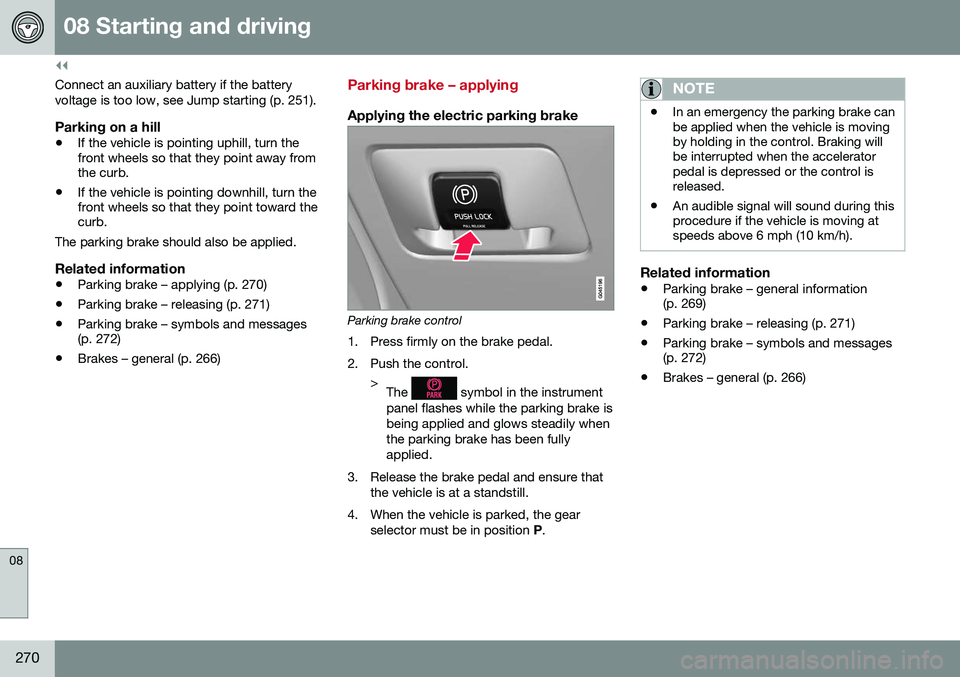
Applying the electric parking brake
Parking brake control
1. Press firmly on the brake pedal.
2. Push the control. >The
symbol in the instrument
panel flashes while the parking brake is being applied and glows steadily whenthe parking brake has been fullyapplied.
3. Release the brake pedal and ensure that the vehicle is at a standstill.
4. When the vehicle is parked, the gear selector must be in position P.
NOTE
• In an emergency the parking brake can be applied when the vehicle is movingby holding in the control. Braking willbe interrupted when the acceleratorpedal is depressed or the control isreleased.
• An audible signal will sound during thisprocedure if the vehicle is moving atspeeds above 6 mph (10 km/h).
Related information
•
Parking brake – general information (p. 269)
• Parking brake – releasing (p. 271)
• Parking brake – symbols and messages(p. 272)
• Brakes – general (p. 266)
Page 273 of 398
08 Starting and driving
08
271
Parking brake – releasing
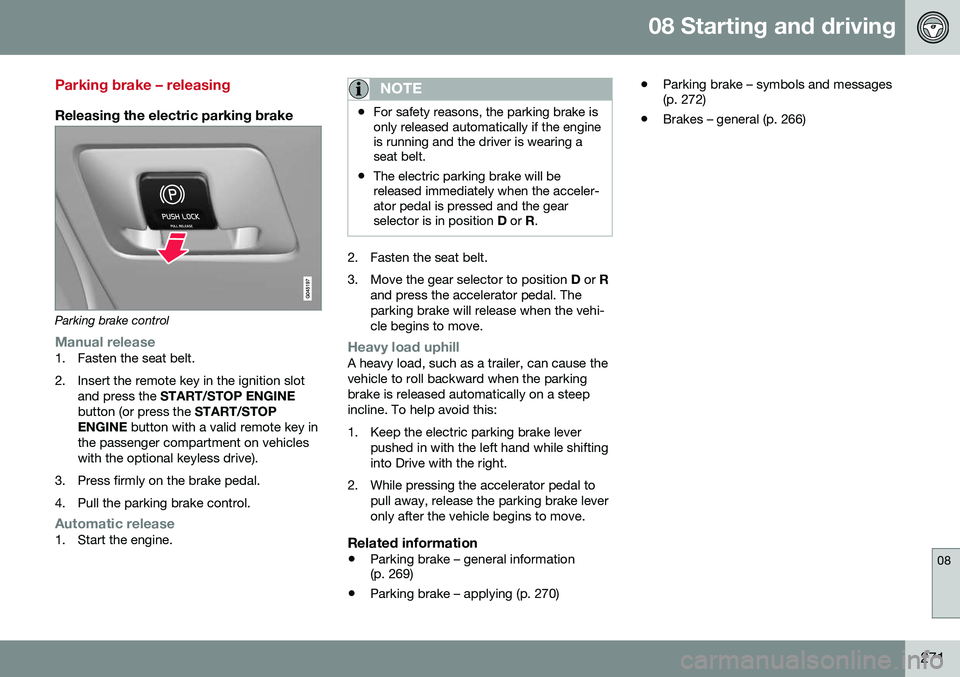
Releasing the electric parking brake
Parking brake control
Manual release1. Fasten the seat belt.
2. Insert the remote key in the ignition slotand press the START/STOP ENGINE
button (or press the START/STOP
ENGINE button with a valid remote key in
the passenger compartment on vehicles with the optional keyless drive).
3. Press firmly on the brake pedal.
4. Pull the parking brake control.
Automatic release1. Start the engine.
NOTE
• For safety reasons, the parking brake is only released automatically if the engineis running and the driver is wearing aseat belt.
• The electric parking brake will bereleased immediately when the acceler-ator pedal is pressed and the gearselector is in position
D or R.
2. Fasten the seat belt.
3. Move the gear selector to position D or R
and press the accelerator pedal. The parking brake will release when the vehi-cle begins to move.
Heavy load uphillA heavy load, such as a trailer, can cause the vehicle to roll backward when the parkingbrake is released automatically on a steepincline. To help avoid this:
1. Keep the electric parking brake lever pushed in with the left hand while shifting into Drive with the right.
2. While pressing the accelerator pedal to pull away, release the parking brake leveronly after the vehicle begins to move.
Related information
• Parking brake – general information (p. 269)
• Parking brake – applying (p. 270) •
Parking brake – symbols and messages(p. 272)
• Brakes – general (p. 266)
Page 274 of 398
08 Starting and driving
08
272
Parking brake – symbols and messages
A text message can be erased by pressing briefly on the OK button on the turn signal
lever.
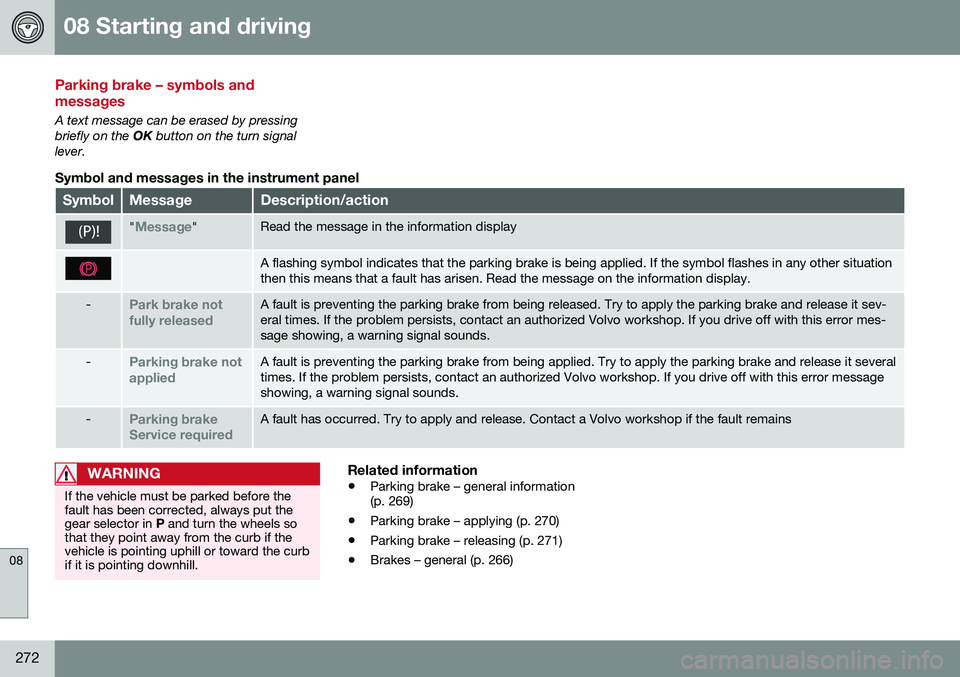
Symbol and messages in the instrument panel
SymbolMessageDescription/action
"Message"Read the message in the information display
A flashing symbol indicates that the parking brake is being applied. If the symbol flashes in any other situation then this means that a fault has arisen. Read the message on the information display.
-Park brake not fully releasedA fault is preventing the parking brake from being released. Try to apply the parking brake and release it sev- eral times. If the problem persists, contact an authorized Volvo workshop. If you drive off with this error mes-sage showing, a warning signal sounds.
-Parking brake not appliedA fault is preventing the parking brake from being applied. Try to apply the parking brake and release it several times. If the problem persists, contact an authorized Volvo workshop. If you drive off with this error messageshowing, a warning signal sounds.
-Parking brake Service requiredA fault has occurred. Try to apply and release. Contact a Volvo workshop if the fault remains
WARNING
If the vehicle must be parked before the fault has been corrected, always put thegear selector in P and turn the wheels so
that they point away from the curb if thevehicle is pointing uphill or toward the curbif it is pointing downhill.
Related information
• Parking brake – general information (p. 269)
• Parking brake – applying (p. 270)
• Parking brake – releasing (p. 271)
• Brakes – general (p. 266)
Page 284 of 398
08 Starting and driving
08
282
Towing a trailer
When towing a trailer, always observe the legal requirements of the state/province.
NOTE
For the maximum trailer and tongue weights recommended by Volvo, seeWeights (p. 374).
•All Volvo models are equipped with energy-absorbing shock-mounted bump-ers. Trailer hitch installation should notinterfere with the proper operation of thisbumper system.
Trailer towing does not normally present any particular problems, but take into considera-tion: • Increase tire pressure to recommended full pressure, see Tire inflation – pressuretable (p. 301).
• When your vehicle is new, avoid towingheavy trailers during the first 620 miles(1,000 km).
• Maximum speed when towing a trailer:50 mph (80 km/h).
• Engine and transmission are subject toincreased loads. Therefore, engine cool-ant temperature should be closelywatched when driving in hot climates orhilly terrain. Use a lower gear and turn offthe air conditioner if the temperaturegauge needle enters the red range. •
If the automatic transmission begins tooverheat, a message will be displayed inthe text window.
• Avoid overload and other abusive opera-tion.
• Hauling a trailer affects handling, durabil-ity, and economy.
• It is necessary to balance trailer brakeswith the towing vehicle brakes to providea safe stop (check and observe state/local regulations).
• Do not connect the trailer's brake systemdirectly to the vehicle's brake system.
• More frequent vehicle maintenance isrequired.
• Remove the ball holder when the hitch isnot being used.
NOTE
• When parking the vehicle with a trailer on a hill, apply the parking brakebefore putting the gear selector in
P.
Always follow the trailer manufactur-er's recommendations for wheelchocking.
• When starting on a hill, put the gearselector in
D before releasing the park-
ing brake.
• If you use the manual (Geartronic) shiftpositions while towing a trailer, makesure the gear you select does not puttoo much strain on the engine (usingtoo high a gear).
• The drawbar assembly/trailer hitchmay be rated for trailers heavier thanthe vehicle is designed to tow. Pleaseadhere to Volvo's recommended trailerweights.
• Avoid driving with a trailer on inclinesof more than 15%.
Page 287 of 398
08 Starting and driving
08
}}
285
Towing the vehicle
Always check with state and local authorities before attempting to tow another vehiclebecause this type of towing is subject to reg-ulations regarding maximum towing speed,length and type of towing device, lighting, etc.
1. With the remote key fully pressed into theignition slot 22
, press START/STOP
ENGINE for approximately 2 seconds to
activate ignition mode II.
2. The remote key must remain in the igni- tion slot 23
for the entire time that the vehi-
cle is being towed.
3. Keep the tow rope taut when the towing vehicle slows down by applying light pressure on the brake pedal. This willhelp prevent jarring movements of thevehicle being towed.
4. Be prepared to apply the brakes to stop the vehicle being towed.CAUTION
General towing precautions:
• Please check with state and local authorities before attempting this typeof towing, as vehicles being towed aresubject to regulations regarding maxi-mum towing speed, length and type oftowing device, lighting, etc.
• If the vehicle's battery is dead, seeJump starting (p. 251) to provide cur-rent for releasing the electric parkingbrake and to move the gear selectorfrom the
P position to N. If this is not
possible, see Transmission – shiftlockoverride (p. 256) for information aboutmanually overriding the shiftlock sys-tem to move the gear selector from P
to N.
• Maximum speed: 50 mph (80 km/h).Do not exceed the maximum allowabletowing speed.
• Maximum distance with front wheelson ground: 50 miles (80 km).
• The vehicle should only be towed inthe forward direction.
Related information
•
Towing eyelet (p. 285)
• Remote key – functions (p. 153)
Towing eyelet
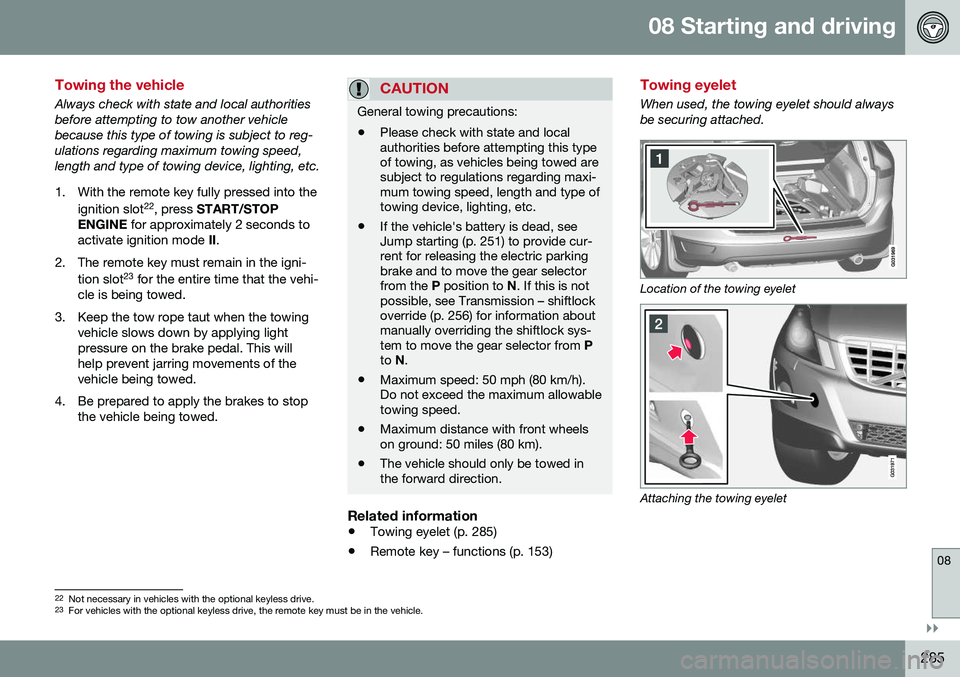
When used, the towing eyelet should always be securing attached.
Location of the towing eyelet
Attaching the towing eyelet
22
Not necessary in vehicles with the optional keyless drive.
23 For vehicles with the optional keyless drive, the remote key must be in the vehicle.
Page 295 of 398
09 Wheels and tires
09
}}
* Option/accessory, for more information, see Introduction.293
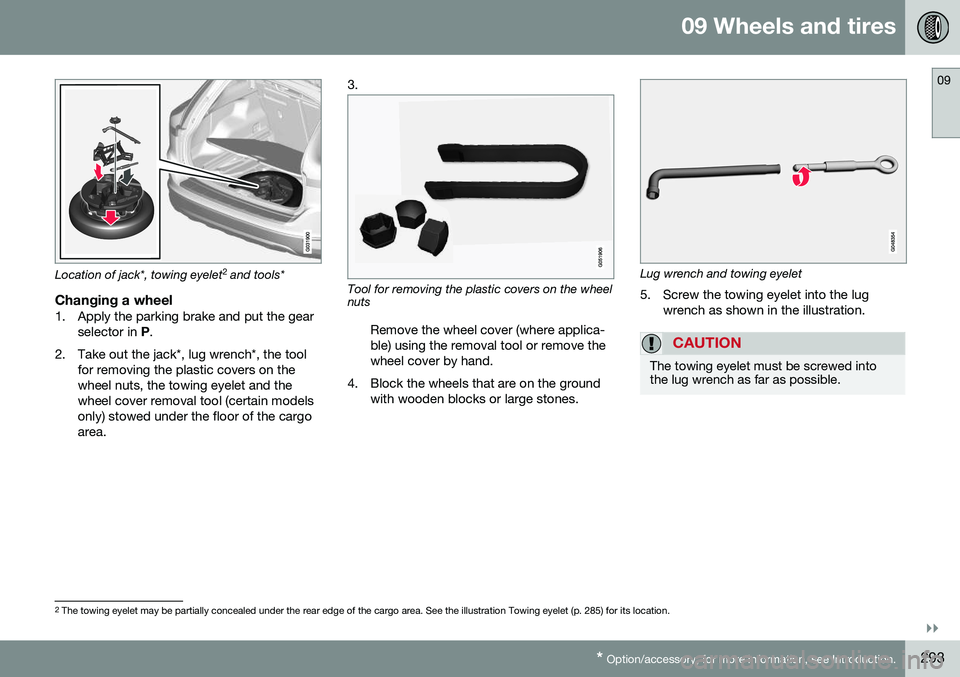
Location of jack*, towing eyelet 2
and tools*
Changing a wheel1. Apply the parking brake and put the gear
selector in P.
2. Take out the jack*, lug wrench*, the tool for removing the plastic covers on the wheel nuts, the towing eyelet and thewheel cover removal tool (certain modelsonly) stowed under the floor of the cargoarea. 3.
Tool for removing the plastic covers on the wheel nuts
Remove the wheel cover (where applica- ble) using the removal tool or remove thewheel cover by hand.
4. Block the wheels that are on the ground with wooden blocks or large stones.Lug wrench and towing eyelet
5. Screw the towing eyelet into the lug wrench as shown in the illustration.
CAUTION
The towing eyelet must be screwed into the lug wrench as far as possible.
2The towing eyelet may be partially concealed under the rear edge of the cargo area. See the illustration Towing eyelet (p. 285) for its location.
Page 296 of 398
||
09 Wheels and tires
09
294
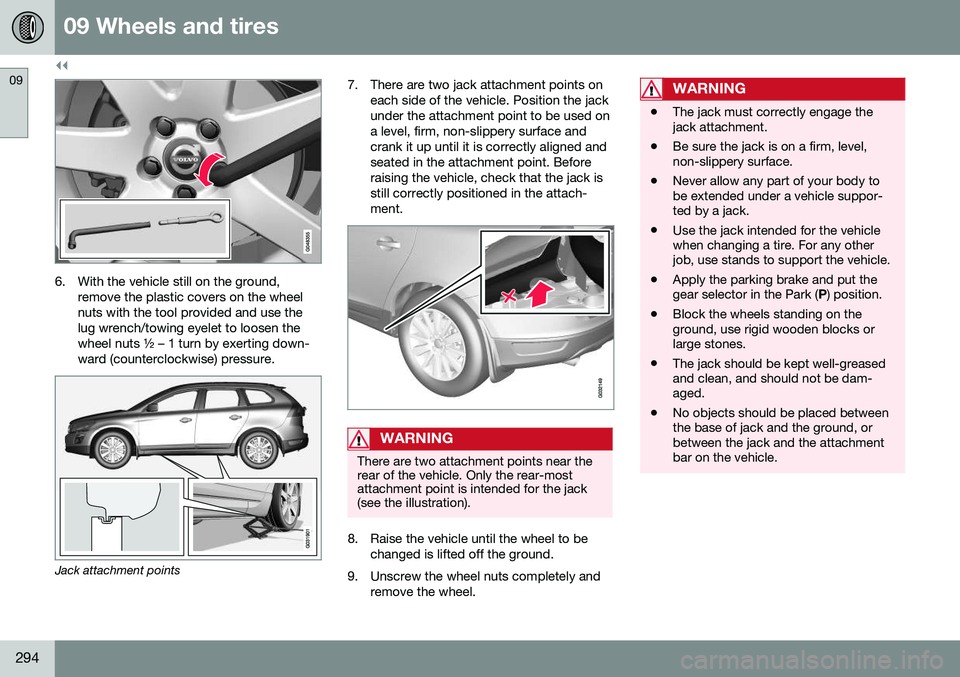
6. With the vehicle still on the ground,remove the plastic covers on the wheel nuts with the tool provided and use thelug wrench/towing eyelet to loosen thewheel nuts ½ – 1 turn by exerting down-ward (counterclockwise) pressure.
Jack attachment points 7. There are two jack attachment points on
each side of the vehicle. Position the jack under the attachment point to be used ona level, firm, non-slippery surface andcrank it up until it is correctly aligned andseated in the attachment point. Beforeraising the vehicle, check that the jack isstill correctly positioned in the attach-ment.
WARNING
There are two attachment points near the rear of the vehicle. Only the rear-mostattachment point is intended for the jack(see the illustration).
8. Raise the vehicle until the wheel to bechanged is lifted off the ground.
9. Unscrew the wheel nuts completely and remove the wheel.
WARNING
•The jack must correctly engage the jack attachment.
• Be sure the jack is on a firm, level,non-slippery surface.
• Never allow any part of your body tobe extended under a vehicle suppor-ted by a jack.
• Use the jack intended for the vehiclewhen changing a tire. For any otherjob, use stands to support the vehicle.
• Apply the parking brake and put thegear selector in the Park (
P) position.
• Block the wheels standing on theground, use rigid wooden blocks orlarge stones.
• The jack should be kept well-greasedand clean, and should not be dam-aged.
• No objects should be placed betweenthe base of jack and the ground, orbetween the jack and the attachmentbar on the vehicle.
Page 318 of 398
||
09 Wheels and tires
09
316* Option/accessory, for more information, see Introduction.
NOTE
Do not remove any foreign objects (nails, etc.) from the tire before using the sealingsystem.
• Stage 2:
The tire’s inflation pressure is
checked and adjusted if necessary.
WARNING
• Never leave the tire sealing system unattended when it is operating.
• Keep the tire sealing system awayfrom children.
• Be sure the vehicle is parked safely offthe road and away from moving traffic.
• Apply the parking brake.
Related information
•
Tire sealing system* – overview (p. 316)
• Tire sealing system* – inflating tires (p. 320)
• Tire sealing system* – sealing compoundcontainer (p. 321)
• Tire sealing system* – sealing hole(p. 317)
• Tire sealing system – checking inflationpressure (p. 319)
• Tunnel console – 12-volt sockets (p. 140)
• 12-volt socket in the cargo area* (p. 141)
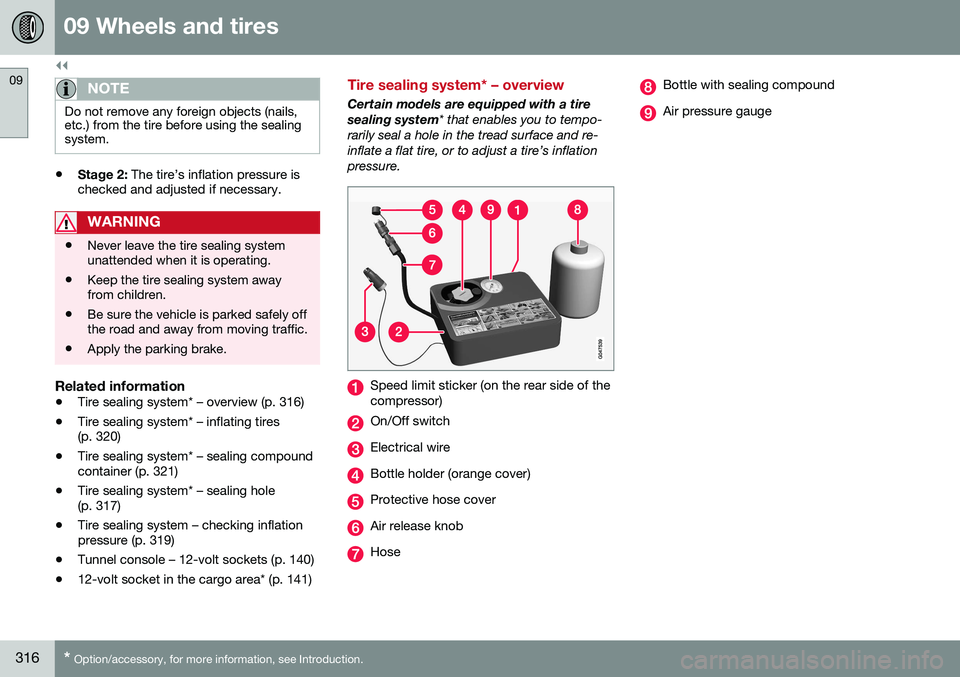
Tire sealing system* – overview
Certain models are equipped with a tire sealing system
* that enables you to tempo-
rarily seal a hole in the tread surface and re-inflate a flat tire, or to adjust a tire’s inflationpressure.
Speed limit sticker (on the rear side of the compressor)
On/Off switch
Electrical wire
Bottle holder (orange cover)
Protective hose cover
Air release knob
Hose
Bottle with sealing compound
Air pressure gauge