tailgate VOLVO XC60 2016 Owner´s Manual
[x] Cancel search | Manufacturer: VOLVO, Model Year: 2016, Model line: XC60, Model: VOLVO XC60 2016Pages: 398, PDF Size: 9.98 MB
Page 169 of 398
06 Locks and alarm
06
}}
167
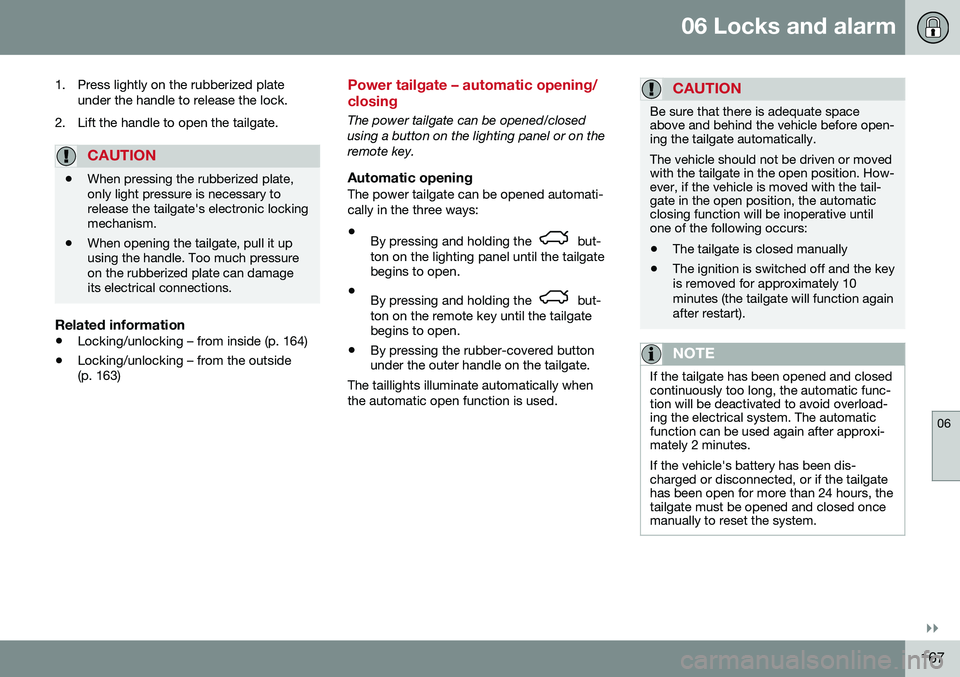
1. Press lightly on the rubberized plate
under the handle to release the lock.
2. Lift the handle to open the tailgate.
CAUTION
• When pressing the rubberized plate, only light pressure is necessary torelease the tailgate's electronic lockingmechanism.
• When opening the tailgate, pull it upusing the handle. Too much pressureon the rubberized plate can damageits electrical connections.
Related information
•
Locking/unlocking – from inside (p. 164)
• Locking/unlocking – from the outside (p. 163)
Power tailgate – automatic opening/ closing
The power tailgate can be opened/closed using a button on the lighting panel or on theremote key.
Automatic openingThe power tailgate can be opened automati-cally in the three ways:
• By pressing and holding the
but-
ton on the lighting panel until the tailgate begins to open.
• By pressing and holding the
but-
ton on the remote key until the tailgate begins to open.
• By pressing the rubber-covered buttonunder the outer handle on the tailgate.
The taillights illuminate automatically when the automatic open function is used.
CAUTION
Be sure that there is adequate space above and behind the vehicle before open-ing the tailgate automatically. The vehicle should not be driven or moved with the tailgate in the open position. How-ever, if the vehicle is moved with the tail-gate in the open position, the automaticclosing function will be inoperative untilone of the following occurs:
• The tailgate is closed manually
• The ignition is switched off and the key is removed for approximately 10minutes (the tailgate will function againafter restart).
NOTE
If the tailgate has been opened and closed continuously too long, the automatic func-tion will be deactivated to avoid overload-ing the electrical system. The automaticfunction can be used again after approxi-mately 2 minutes. If the vehicle's battery has been dis- charged or disconnected, or if the tailgatehas been open for more than 24 hours, thetailgate must be opened and closed oncemanually to reset the system.
Page 170 of 398
||
06 Locks and alarm
06
168
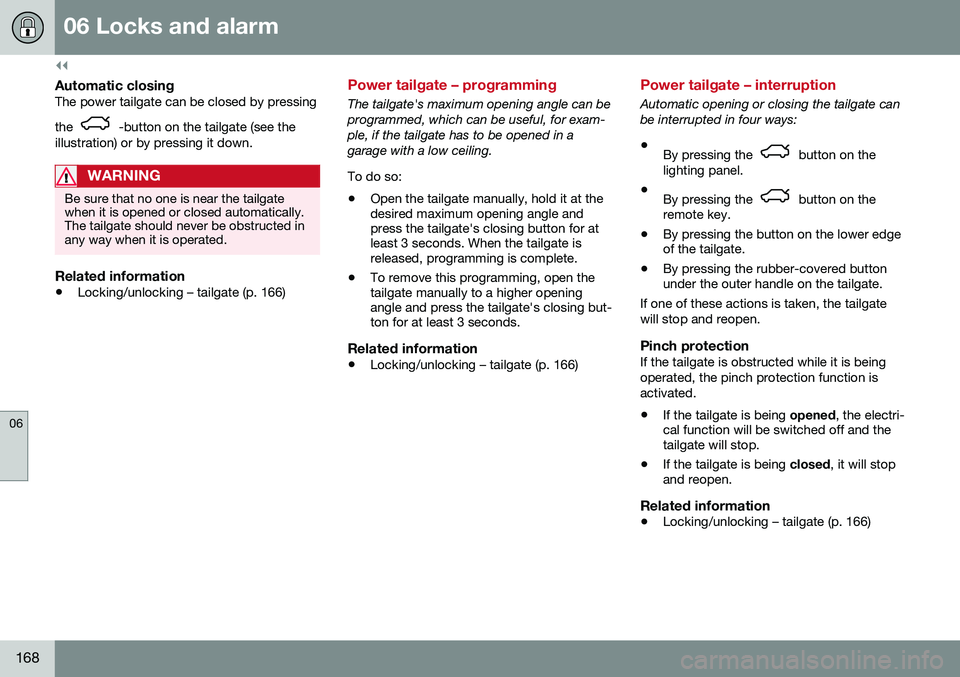
Automatic closingThe power tailgate can be closed by pressing the
-button on the tailgate (see the
illustration) or by pressing it down.
WARNING
Be sure that no one is near the tailgate when it is opened or closed automatically.The tailgate should never be obstructed inany way when it is operated.
Related information
• Locking/unlocking – tailgate (p. 166)
Power tailgate – programming
The tailgate's maximum opening angle can be programmed, which can be useful, for exam-ple, if the tailgate has to be opened in agarage with a low ceiling. To do so:
• Open the tailgate manually, hold it at the desired maximum opening angle andpress the tailgate's closing button for atleast 3 seconds. When the tailgate isreleased, programming is complete.
• To remove this programming, open thetailgate manually to a higher openingangle and press the tailgate's closing but-ton for at least 3 seconds.
Related information
•Locking/unlocking – tailgate (p. 166)
Power tailgate – interruption
Automatic opening or closing the tailgate can be interrupted in four ways:
• By pressing the
button on the
lighting panel.
• By pressing the
button on the
remote key.
• By pressing the button on the lower edge of the tailgate.
• By pressing the rubber-covered buttonunder the outer handle on the tailgate.
If one of these actions is taken, the tailgate will stop and reopen.
Pinch protectionIf the tailgate is obstructed while it is beingoperated, the pinch protection function isactivated.
• If the tailgate is being
opened, the electri-
cal function will be switched off and the tailgate will stop.
• If the tailgate is being
closed, it will stop
and reopen.
Related information
• Locking/unlocking – tailgate (p. 166)
Page 171 of 398
06 Locks and alarm
06
169
Power tailgate – manual opening/ closing
The power tailgate can be disconnected from the vehicle’s electrical system. This is done by quickly pulling the outer han- dle twice. The tailgate can then be opened/closed manually.
Related information
•Locking/unlocking – tailgate (p. 166)
Alarm – general information
The alarm system provides a warning if an attempt is made to break into the vehicle. The alarm is automatically armed (p. 170) whenever the vehicle is locked with theremote key. When armed, the alarm continuously monitors a number of points on the vehicle. The follow-ing conditions will trigger the alarm:
• The hood is forced open.
• The tailgate is forced open.
• A door is forced open.
• The ignition slot is tampered with.
• An attempt is made to start the vehicle with a non-approved key (a key notcoded to the car's ignition).
• The battery is disconnected (while thealarm is armed).
• The siren is disconnected when the alarmis disarmed.
A message will appear in the information dis- play if a fault should occur in the alarm sys-tem. Contact a trained and qualified Volvoservice technician.
NOTE
Do not attempt to repair any of the compo- nents in the alarm system yourself. Thiscould affect the insurance policy on thevehicle.
Related information
• Alarm – turning off (p. 171)
• Alarm signal (p. 171)
• Alarm indicator (p. 170)
Page 173 of 398
06 Locks and alarm
06
}}
171
Alarm signal
An audible (p. 169) signal is given by a battery powered siren. The alarm cycle lasts for30 seconds. The visual alarm signal is given by flashing all turn signals for approximately 5 minutes oruntil the alarm is turned off.
Related information
•Alarm indicator (p. 170)
• Alarm – arming/disarming (p. 170)
• Alarm – turning off (p. 171)
Alarm – turning off
The alarm system provides a warning if an attempt is made to break into the vehicle. If the alarm is sounding, it can be stopped by pressing the Unlock button on the remote keyor by inserting the remote key in the ignitionslot. Two short flashes from the car's turn sig-nals confirm that the alarm has been turnedoff.
Related information
•Alarm indicator (p. 170)
• Alarm – arming/disarming (p. 170)
• Remote key – replacing the battery (p. 157)
Alarm-related functions
The following is general information regarding the alarm system in your vehicle.
Automatic re-armingIf the doors are unlocked, the locks will auto-matically re-engage (re-lock) and the alarmwill re-arm after 2 minutes unless a door orthe tailgate has been opened.
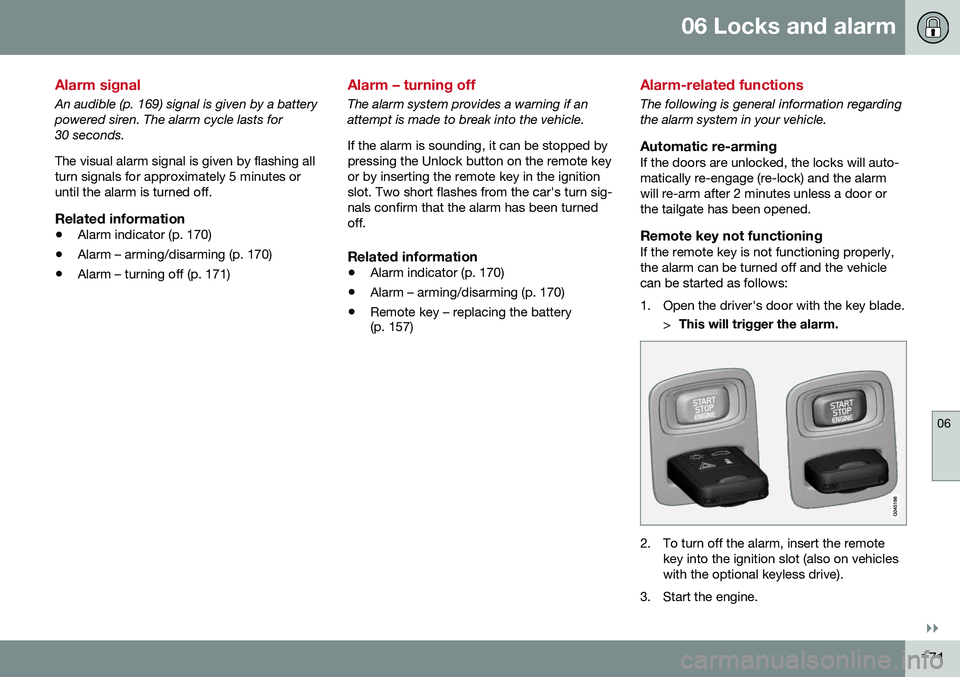
Remote key not functioningIf the remote key is not functioning properly,the alarm can be turned off and the vehiclecan be started as follows:
1. Open the driver's door with the key blade.
>This will trigger the alarm.
2. To turn off the alarm, insert the remote
key into the ignition slot (also on vehicles with the optional keyless drive).
3. Start the engine.
Page 239 of 398
07 Driver support
07
}}
237
Rear Park Assist Camera (PAC) – function
Function
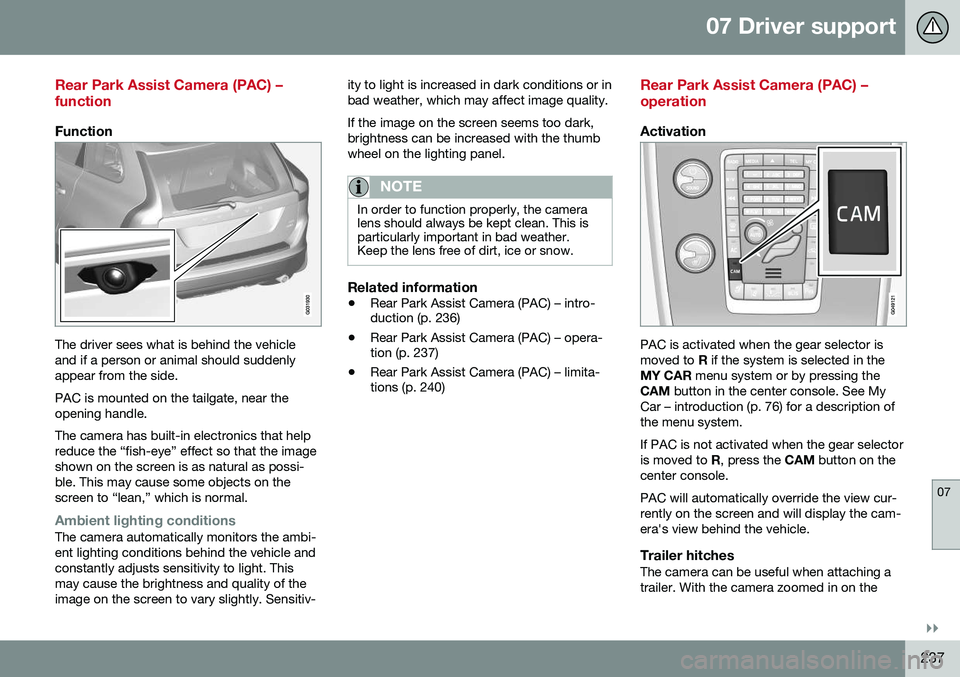
The driver sees what is behind the vehicle and if a person or animal should suddenlyappear from the side. PAC is mounted on the tailgate, near the opening handle. The camera has built-in electronics that help reduce the “fish-eye” effect so that the imageshown on the screen is as natural as possi-ble. This may cause some objects on thescreen to “lean,” which is normal.
Ambient lighting conditionsThe camera automatically monitors the ambi- ent lighting conditions behind the vehicle andconstantly adjusts sensitivity to light. Thismay cause the brightness and quality of theimage on the screen to vary slightly. Sensitiv-ity to light is increased in dark conditions or inbad weather, which may affect image quality. If the image on the screen seems too dark, brightness can be increased with the thumbwheel on the lighting panel.
NOTE
In order to function properly, the camera lens should always be kept clean. This isparticularly important in bad weather.Keep the lens free of dirt, ice or snow.
Related information
•
Rear Park Assist Camera (PAC) – intro- duction (p. 236)
• Rear Park Assist Camera (PAC) – opera-tion (p. 237)
• Rear Park Assist Camera (PAC) – limita-tions (p. 240)
Rear Park Assist Camera (PAC) – operation
Activation
PAC is activated when the gear selector is moved to
R if the system is selected in the
MY CAR menu system or by pressing the
CAM button in the center console. See My
Car – introduction (p. 76) for a description ofthe menu system. If PAC is not activated when the gear selector is moved to R, press the CAM button on the
center console. PAC will automatically override the view cur- rently on the screen and will display the cam-era's view behind the vehicle.
Trailer hitchesThe camera can be useful when attaching atrailer. With the camera zoomed in on the
Page 242 of 398
||
07 Driver support
07
240* Option/accessory, for more information, see Introduction.
ColorDistance to object
Orange1–1.6 ft (0.3–0.5 m)
Red0–1 ft (0–0.3 m)
Related information
• Rear Park Assist Camera (PAC) – opera- tion (p. 237)
• Rear Park Assist Camera (PAC) – limita-tions (p. 240)
Rear Park Assist Camera (PAC) – limitations
LimitationsEven if a fairly small section of the screen image appears to be obstructed, this maymean that a relatively large area behind thevehicle is hidden and objects there may notbe detected until they are very near the vehi-cle.
NOTE
Bicycle carriers or other accessories mounted on the tailgate may obstruct thecamera's field of view.
Keep in mind
•Keep the camera's lens free of dirt, ice and snow. Remove ice and snow care-fully to avoid scratching the lens.
• Clean the lens regularly with warm waterand a suitable car washing detergent.
Related information
•Rear Park Assist Camera (PAC) – intro-duction (p. 236)
• Rear Park Assist Camera (PAC) – opera-tion (p. 237)
• Park assist – introduction (p. 232)
BLIS* – introduction
The Blind Spot Information System (BLIS) is an information system that indicates the pres-ence of another vehicle moving in the samedirection as your vehicle on roads with severallanes.
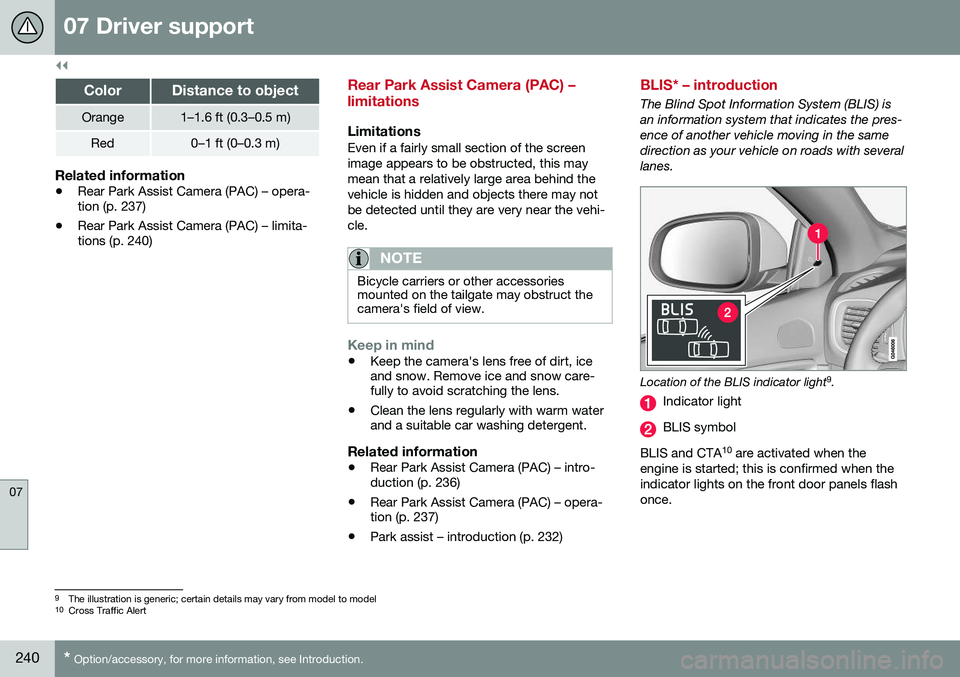
Location of the BLIS indicator light 9
.
Indicator light
BLIS symbol
BLIS and CTA 10
are activated when the
engine is started; this is confirmed when the indicator lights on the front door panels flashonce.
9 The illustration is generic; certain details may vary from model to model
10 Cross Traffic Alert
Page 280 of 398
||
08 Starting and driving
08
278
WARNING
Never carry a cell phone that is switched
on while refueling your vehicle. If the
phone rings, this may cause a spark that could ignite gasoline fumes, resulting infire and injury.
WARNING
Carbon monoxide is a poisonous, color- less, and odorless gas. It is present in allexhaust gases. If you ever smell exhaustfumes inside the vehicle, make sure thepassenger compartment is ventilated, andimmediately return the vehicle to a trainedand qualified Volvo service technician forcorrection.
Related information
• Refueling – fuel requirements (p. 276)
Refueling – opening/closing fuel filler door
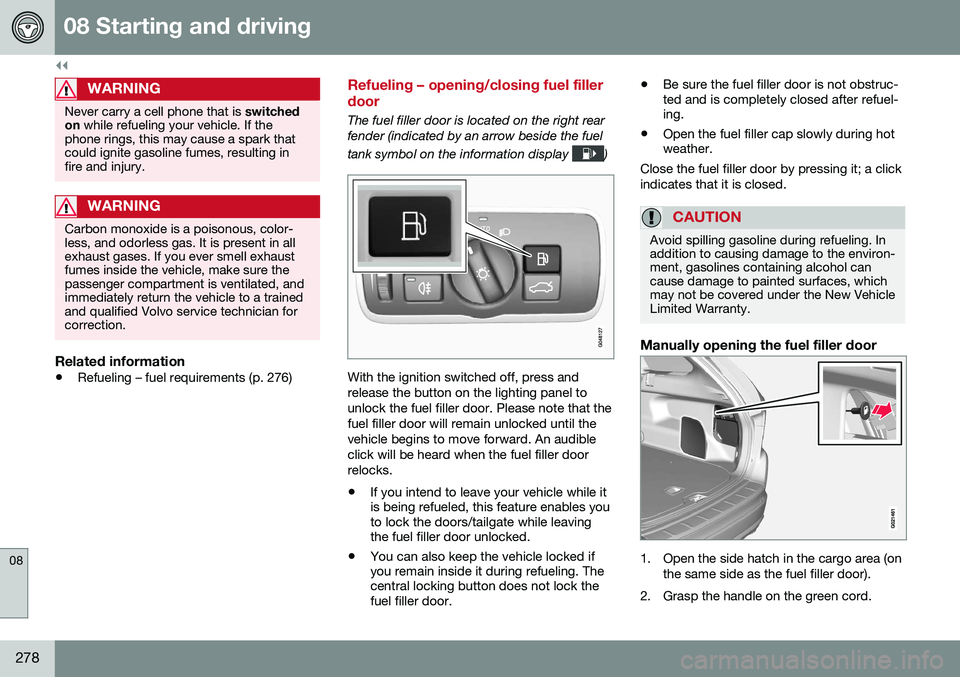
The fuel filler door is located on the right rear fender (indicated by an arrow beside the fuel tank symbol on the information display
)
With the ignition switched off, press and release the button on the lighting panel tounlock the fuel filler door. Please note that thefuel filler door will remain unlocked until thevehicle begins to move forward. An audibleclick will be heard when the fuel filler doorrelocks. •If you intend to leave your vehicle while it is being refueled, this feature enables youto lock the doors/tailgate while leavingthe fuel filler door unlocked.
• You can also keep the vehicle locked ifyou remain inside it during refueling. Thecentral locking button does not lock thefuel filler door. •
Be sure the fuel filler door is not obstruc-ted and is completely closed after refuel-ing.
• Open the fuel filler cap slowly during hotweather.
Close the fuel filler door by pressing it; a click indicates that it is closed.
CAUTION
Avoid spilling gasoline during refueling. In addition to causing damage to the environ-ment, gasolines containing alcohol cancause damage to painted surfaces, whichmay not be covered under the New VehicleLimited Warranty.
Manually opening the fuel filler door
1. Open the side hatch in the cargo area (on the same side as the fuel filler door).
2. Grasp the handle on the green cord.
Page 283 of 398
08 Starting and driving
08
* Option/accessory, for more information, see Introduction.281
•
Using the engine's optional Eco func- tion20
can help improve fuel economy. For
additional information, see ECO* (p. 262).
• Using the transmission's Sport mode 21
may increase fuel consumption some- what. Use the transmission's Drive ( D)
position as often as possible. For addi-tional information about Sport mode, seeTransmission – Geartronic (p. 254).
• Do not exceed posted speed limits.
• Avoid carrying unnecessary items (extraload) in the vehicle.
• Maintain correct tire pressure. Check tirepressure regularly (when tires are cold).
• Remove snow tires when threat of snowor ice has ended.
• Note that roof racks, ski racks, etc,increase air resistance and also fuel con-sumption.
• At highway driving speeds, fuel consump-tion will be lower with the air conditioningon and the windows closed than with theair conditioning off and the windowsopen.
• Using the onboard trip computer's fuelconsumption modes can help you learnhow to drive more economically.
Other factors that decrease gas mileage are: •
Dirty air cleaner
• Dirty engine oil and clogged oil filter
• Dragging brakes
• Incorrect front end alignment
Some of the above mentioned items and oth-ers are checked at the standard maintenanceintervals.
WARNING
Driving with the tailgate open: Driving
with the tailgate open could lead to poi- sonous exhaust gases entering the pas-senger compartment. If the tailgate mustbe kept open for any reason, proceed asfollows: • Close the windows
• Set the ventilation system control to air flow to floor, windshield and side win-dows and the blower control to itshighest setting.
Handling and roadholdingAt the specified curb weight your vehicle has a tendency to understeer, which means thatthe steering wheel has to be turned morethan might seem appropriate for the curva-ture of a bend. This ensures good stabilityand reduces the risk of rear wheel skid.Remember that these properties can alter with the vehicle load. The heavier the load inthe cargo area, the less the tendency toundersteer. •
Vehicle load, tire design and inflation pressure all affect vehicle handling.Therefore, check that the tires are inflatedto the recommended pressure accordingto the vehicle load. Loads should be dis-tributed so that capacity weight or maxi-mum permissible axle loads are notexceeded.
• At the specified curb weight your vehiclehas a tendency to understeer, whichmeans that the steering wheel has to beturned more than might seem appropriatefor the curvature of a bend. This ensuresgood stability and reduces the risk of rearwheel skid. Remember that these proper-ties can alter with the vehicle load. Theheavier the load in the cargo compart-ment, the less the tendency to under-steer.
Related information
• Climate – general information (p. 125)
20
Available on certain 4-cyl. engines
21 Models with the T6 turbo engine only.
Page 343 of 398
10 Maintenance and servicing
10
341
Bulbs – brake lights and taillights
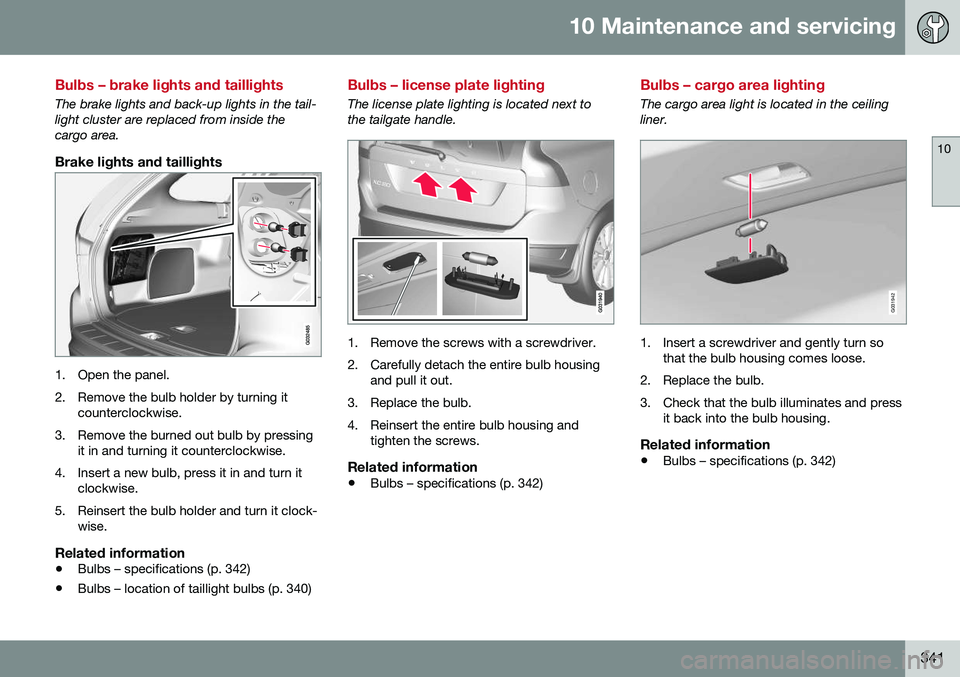
The brake lights and back-up lights in the tail- light cluster are replaced from inside thecargo area.
Brake lights and taillights
1. Open the panel.
2. Remove the bulb holder by turning itcounterclockwise.
3. Remove the burned out bulb by pressing it in and turning it counterclockwise.
4. Insert a new bulb, press it in and turn it clockwise.
5. Reinsert the bulb holder and turn it clock- wise.
Related information
• Bulbs – specifications (p. 342)
• Bulbs – location of taillight bulbs (p. 340)
Bulbs – license plate lighting
The license plate lighting is located next to the tailgate handle.
1. Remove the screws with a screwdriver.
2. Carefully detach the entire bulb housing
and pull it out.
3. Replace the bulb.
4. Reinsert the entire bulb housing and tighten the screws.
Related information
• Bulbs – specifications (p. 342)
Bulbs – cargo area lighting
The cargo area light is located in the ceiling liner.
G031942
1. Insert a screwdriver and gently turn so
that the bulb housing comes loose.
2. Replace the bulb.
3. Check that the bulb illuminates and press it back into the bulb housing.
Related information
• Bulbs – specifications (p. 342)
Page 347 of 398
10 Maintenance and servicing
10
345
Wiper blades – tailgate
The wiper blades should be replaced regularly for best effect.
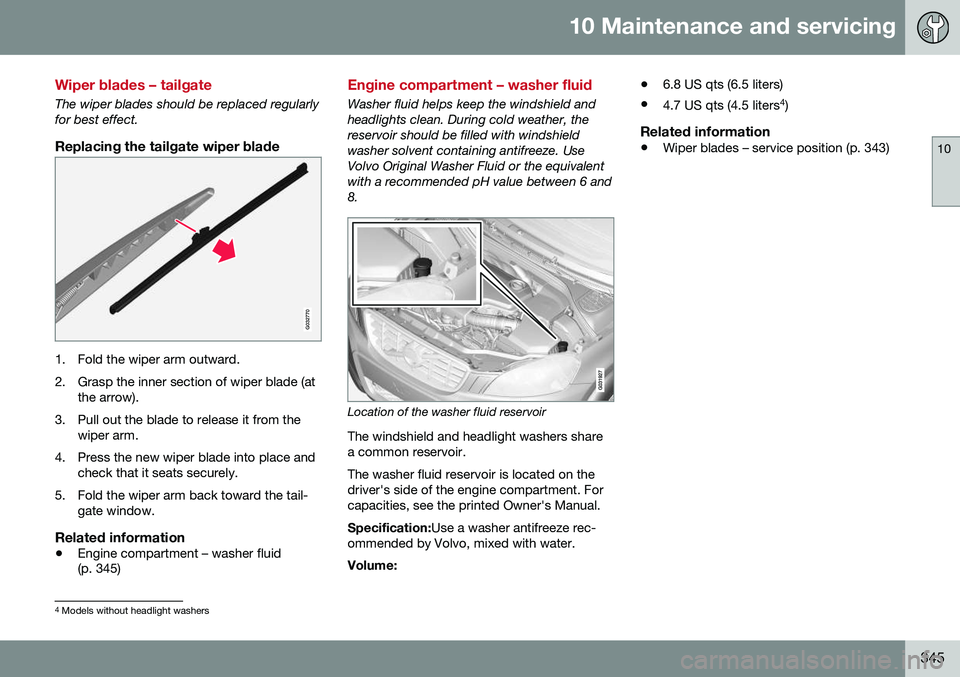
Replacing the tailgate wiper blade
G032770
1. Fold the wiper arm outward.
2. Grasp the inner section of wiper blade (atthe arrow).
3. Pull out the blade to release it from the wiper arm.
4. Press the new wiper blade into place and check that it seats securely.
5. Fold the wiper arm back toward the tail- gate window.
Related information
• Engine compartment – washer fluid (p. 345)
Engine compartment – washer fluid
Washer fluid helps keep the windshield and headlights clean. During cold weather, thereservoir should be filled with windshieldwasher solvent containing antifreeze. UseVolvo Original Washer Fluid or the equivalentwith a recommended pH value between 6 and8.
Location of the washer fluid reservoir
The windshield and headlight washers share a common reservoir. The washer fluid reservoir is located on the driver's side of the engine compartment. Forcapacities, see the printed Owner's Manual. Specification: Use a washer antifreeze rec-
ommended by Volvo, mixed with water. Volume: •
6.8 US qts (6.5 liters)
• 4.7 US qts (4.5 liters 4
)
Related information
• Wiper blades – service position (p. 343)
4
Models without headlight washers