brake light VOLVO XC60 2016 Owner´s Manual
[x] Cancel search | Manufacturer: VOLVO, Model Year: 2016, Model line: XC60, Model: VOLVO XC60 2016Pages: 398, PDF Size: 9.98 MB
Page 267 of 398
08 Starting and driving
08
}}
265
Related information
•Hill Descent Control (HDC) – operation (p. 265)
• Brakes – general (p. 266)Hill Descent Control (HDC) 14
–
operation
Function
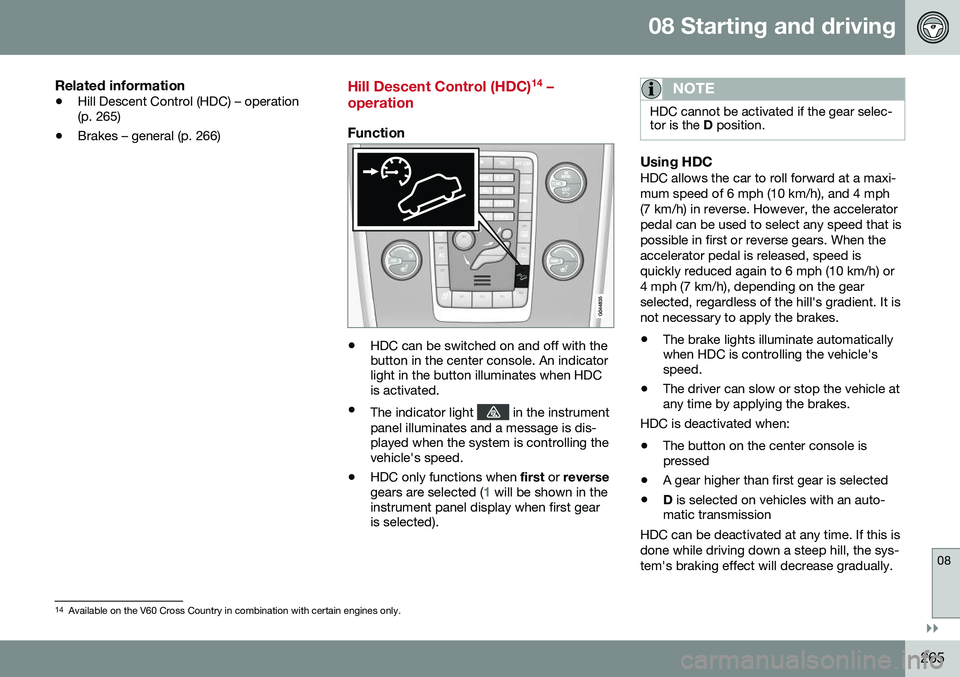
• HDC can be switched on and off with the button in the center console. An indicatorlight in the button illuminates when HDCis activated.
• The indicator light
in the instrument
panel illuminates and a message is dis- played when the system is controlling thevehicle's speed.
• HDC only functions when
first or reverse
gears are selected (
1 will be shown in the
instrument panel display when first gear is selected).
NOTE
HDC cannot be activated if the gear selec- tor is the D position.
Using HDCHDC allows the car to roll forward at a maxi- mum speed of 6 mph (10 km/h), and 4 mph(7 km/h) in reverse. However, the acceleratorpedal can be used to select any speed that ispossible in first or reverse gears. When theaccelerator pedal is released, speed isquickly reduced again to 6 mph (10 km/h) or4 mph (7 km/h), depending on the gearselected, regardless of the hill's gradient. It isnot necessary to apply the brakes.
• The brake lights illuminate automatically when HDC is controlling the vehicle'sspeed.
• The driver can slow or stop the vehicle atany time by applying the brakes.
HDC is deactivated when:
• The button on the center console ispressed
• A gear higher than first gear is selected
• D
is selected on vehicles with an auto-
matic transmission
HDC can be deactivated at any time. If this is done while driving down a steep hill, the sys-tem's braking effect will decrease gradually.
14 Available on the V60 Cross Country in combination with certain engines only.
Page 268 of 398
||
08 Starting and driving
08
266* Option/accessory, for more information, see Introduction.
NOTE
Engine response to pressure on the accel- erator pedal may be slightly slower thannormal when HDC is activated.
Related information
• Hill Descent Control (HDC) – introduction (p. 264)
• Brakes – general (p. 266)
Brakes – general
The brake system is a hydraulic system con- sisting of two separate brake circuits. If aproblem should occur in one of these circuits,it is still possible to stop the vehicle with theother brake circuit. If the brake pedal must be depressed farther than normal and requires greater foot pres-sure, the stopping distance will be longer. A warning light in the instrument panel will light up to warn the driver that a fault hasoccurred. If this light comes on while driving or braking, stop immediately and check the brake fluidlevel in the reservoir.
NOTE
Press the brake pedal hard and maintain pressure on the pedal – do not pump thebrakes.
WARNING
If the fluid level is below the
MIN mark in
the reservoir or if a brake system message is shown in the information display: DO
NOT DRIVE . Have the vehicle towed to a
trained and qualified Volvo service techni-cian and have the brake system inspected.
Brake pad inspectionOn vehicles equipped with a jack*, the condi- tion of the brake pads can be checked byraising the vehicle (see Changing a wheel –removing wheel (p. 292) for informationabout using the jack and removing a wheel)and performing a visual inspection of thebrake pads.
WARNING
• If the vehicle has been driven immedi- ately prior to a brake pad inspection,the wheel hub, brake components,etc., will be very hot. Allow time forthese components to cool before car-rying out the inspection.
• Apply the parking brake and put thegear selector in the Park (
P) position.
• Block the wheels standing on theground, use rigid wooden blocks orlarge stones.
Page 270 of 398
08 Starting and driving
08
268
Brakes – symbols
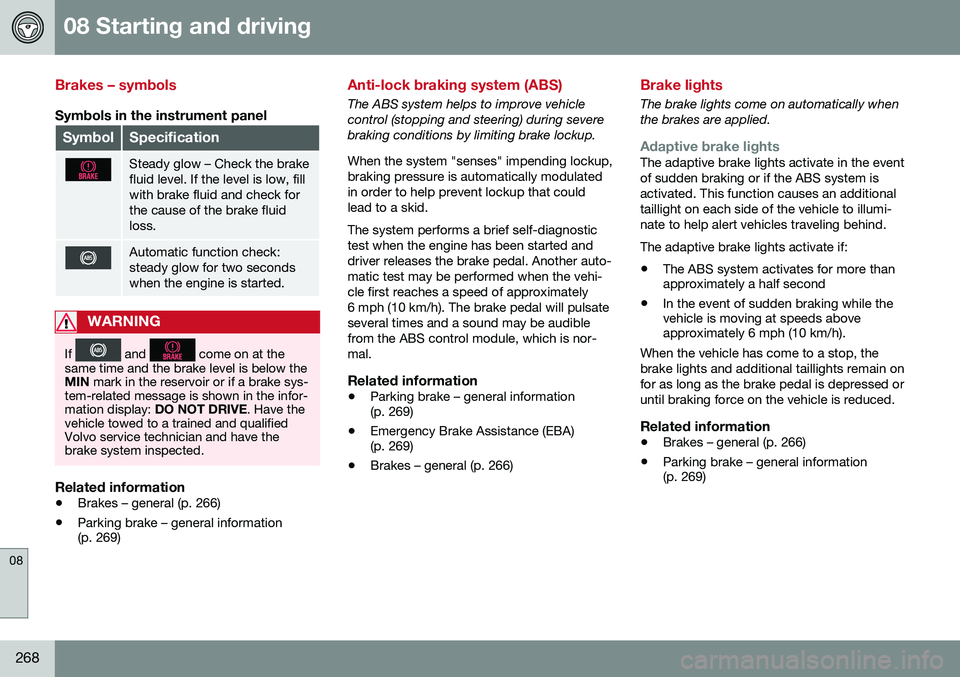
Symbols in the instrument panel
SymbolSpecification
Steady glow – Check the brake fluid level. If the level is low, fillwith brake fluid and check forthe cause of the brake fluidloss.
Automatic function check: steady glow for two secondswhen the engine is started.
WARNING
If and come on at the
same time and the brake level is below the MIN mark in the reservoir or if a brake sys-
tem-related message is shown in the infor-mation display: DO NOT DRIVE . Have the
vehicle towed to a trained and qualifiedVolvo service technician and have thebrake system inspected.
Related information
• Brakes – general (p. 266)
• Parking brake – general information (p. 269)
Anti-lock braking system (ABS)
The ABS system helps to improve vehicle control (stopping and steering) during severebraking conditions by limiting brake lockup. When the system "senses" impending lockup, braking pressure is automatically modulatedin order to help prevent lockup that couldlead to a skid. The system performs a brief self-diagnostic test when the engine has been started anddriver releases the brake pedal. Another auto-matic test may be performed when the vehi-cle first reaches a speed of approximately6 mph (10 km/h). The brake pedal will pulsateseveral times and a sound may be audiblefrom the ABS control module, which is nor-mal.
Related information
• Parking brake – general information (p. 269)
• Emergency Brake Assistance (EBA)(p. 269)
• Brakes – general (p. 266)
Brake lights
The brake lights come on automatically when the brakes are applied.
Adaptive brake lightsThe adaptive brake lights activate in the event of sudden braking or if the ABS system isactivated. This function causes an additionaltaillight on each side of the vehicle to illumi-nate to help alert vehicles traveling behind. The adaptive brake lights activate if: • The ABS system activates for more than approximately a half second
• In the event of sudden braking while thevehicle is moving at speeds aboveapproximately 6 mph (10 km/h).
When the vehicle has come to a stop, the brake lights and additional taillights remain onfor as long as the brake pedal is depressed oruntil braking force on the vehicle is reduced.
Related information
• Brakes – general (p. 266)
• Parking brake – general information (p. 269)
Page 271 of 398
08 Starting and driving
08
}}
269
Emergency Brake Assistance (EBA)
EBA is designed to provide full brake effect immediately in the event of sudden, hardbraking.
Emergency Brake AssistanceThe EBA system is activated by the speedwith which the brake pedal is depressed. When the EBA system is activated, the brake pedal will go down and pressure in the brakesystem immediately increases to the maxi-mum level. Maintain full pressure on thebrake pedal in order to utilize the systemcompletely. EBA is automatically deactivatedwhen the brake pedal is released.
NOTE
•When the EBA system is activated, the brake pedal will go down and pressurein the brake system immediatelyincreases to the maximum level. Youmust maintain full pressure on thebrake pedal in order to utilize the sys-tem completely. There will be no brak-ing effect if the pedal is released. EBAis automatically deactivated when thebrake pedal is released.
• When the vehicle has been parked forsome time, the brake pedal may sinkmore than usual when the engine isstarted. This is normal and the pedalwill return to its usual position when itis released.
Related information
•
Parking brake – general information (p. 269)
• Brakes – general (p. 266)
• Anti-lock braking system (ABS) (p. 268)
Parking brake – general information
The electric parking brake helps to keep the vehicle stationary when it is parked.
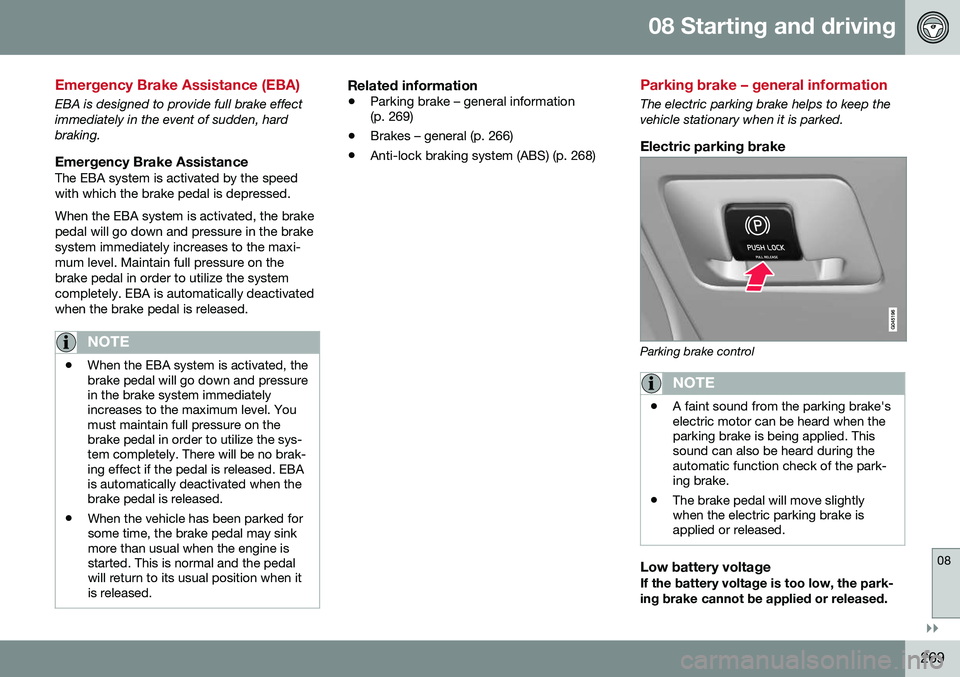
Electric parking brake
Parking brake control
NOTE
•A faint sound from the parking brake's electric motor can be heard when theparking brake is being applied. Thissound can also be heard during theautomatic function check of the park-ing brake.
• The brake pedal will move slightlywhen the electric parking brake isapplied or released.
Low battery voltageIf the battery voltage is too low, the park- ing brake cannot be applied or released.
Page 275 of 398
08 Starting and driving
08
273
Driving through water
The vehicle should be driven with extreme caution if it is necessary to drive throughstanding water. The vehicle can be driven through water up to a depth of approximately 13 in. (35 cm) atwalking speed to help prevent water fromentering the differential and the transmission.Water reduces the oil's lubricating capacityand may shorten the service life of thesecomponents.
• Take particular care when driving through flowing water.
• Clean the electrical connections for trailerwiring after driving in mud or water.
• When driving through water, maintain lowspeed and do not stop in the water.WARNING
•Avoid driving through standing or rushing water. Doing so can be dan-gerous and it may also be difficult todetermine the actual depth of thewater.
• If water cannot be avoided, after driv-ing through the water, press lightly onthe brake pedal to ensure that thebrakes are functioning normally. Wateror mud can make the brake liningsslippery, resulting in delayed brakingeffect.
CAUTION
•
Engine damage will occur if water is drawn into the air cleaner.
• If the vehicle is driven through waterdeeper than approximately 13 in.(35 cm), water may enter the differen-tial and the transmission. This reducesthe oil's lubricating capacity and mayshorten the service life of these com-ponents.
• Damage to any components, theengine, transmission, turbo-charger,differential or its internal componentscaused by flooding, vapor lock orinsufficient oil is not covered underwarranty.
• Do not allow the vehicle to stand inwater up to the door sills longer thanabsolutely necessary. This could resultin electrical malfunctions.
• If the engine has been stopped whilethe vehicle is in water, do not attemptto restart it. Have the vehicle towedout of the water.
Related information
•
Towing the vehicle (p. 285)
• Towing by tow truck (p. 286)
Page 276 of 398
08 Starting and driving
08
274
Engine and cooling system
Under special conditions, for example when driving in hilly terrain, extreme heat or withheavy loads, there is a risk that the engine andcooling system will overheat. Proceed as follows to avoid overheating the engine. •Maintain a low speed when driving with a trailer up long, steep hills. For informa-tion, see Towing a trailer (p. 282)
• Do not turn the engine off immediatelywhen stopping after a hard drive.
WARNING
The cooling fan may start or continue to operate (for up to 6 minutes) after theengine has been switched off.
•
Remove any auxiliary lights from in front of the grille when driving in hot weatherconditions.
• Do not exceed engine speeds of4500 rpm if driving with a trailer in hillyterrain. The oil temperature could becometoo high.
Conserving electrical current
Keep the following in mind to help minimize battery drain:
• When the engine is not running, avoid using ignition mode
II. Many electrical
systems (the audio system, the optionalnavigation system, power windows, etc)will function in ignition modes 0 and I.
These modes reduce drain on the battery.
• Please keep in mind that using systems,accessories, etc., that consume a greatdeal of current when the engine is notrunning could result in the battery beingcompletely drained. Driving or having theengine running for approximately15 minutes will help keep the batterycharged.
• The optional 12-volt socket in the cargoarea (p. 141) area provides electrical cur-rent even with the ignition switched off,which drains the battery.
Before a long distance trip
It is always worthwhile to have your vehicle checked by a trained and qualified Volvo serv-ice technician before driving long distances.Your retailer will also be able to supply youwith bulbs, fuses, spark plugs and wiperblades for your use in the event that problemsoccur. As a minimum, the following items should be checked before any long trip:
• Check that engine runs smoothly and that fuel consumption is normal.
• Check for fuel, oil, and fluid leakage.
• Have the transmission oil level (p. 380)checked.
• Check condition of drive belts.
• Check state of the battery's charge.
• Examine tires carefully (the spare tire aswell), and replace those that areworn (p. 291). Check tire pres-sure (p. 298).
• The brakes, front wheel alignment, andsteering gear should be checked by atrained and qualified Volvo service techni-cian only.
• Check all lights, including high beams.
• Reflective warning triangles are legallyrequired in some states/provinces.
• Have a word with a trained and qualifiedVolvo service technician if you intend to
Page 285 of 398
08 Starting and driving
08
}}
283
CAUTION
The maximum trailer weights listed are only applicable for altitudes up to 3,280 ft(1000 m) above sea level. With increasingaltitude the engine power and thereforethe car's climbing ability are impairedbecause of the reduced air density, so themaximum trailer weight has to be reducedaccordingly. The weight of the vehicle andtrailer must be reduced by 10% for everyfurther 3,280 ft (1000 m) (or part thereof).When towing 5,950 lbs (2,700kg) hill incli-nation is restricted to 14%.
WARNING
•Bumper-attached trailer hitches must not be used on Volvos, nor shouldsafety chains be attached to thebumper.
• Trailer hitches attaching to the vehiclerear axle must not be used.
• Never connect a trailer's hydraulicbrake system directly to the vehiclebrake system, nor a trailer's lightingsystem directly to the vehicle lightingsystem. Consult your nearest author-ized Volvo retailer for correct installa-tion.
• When towing a trailer, the trailer'ssafety chains or wire must be correctlyfastened to the attachment points pro-vided in the trailer hitch on the vehicle.The safety chain or wire must never befastened to or wound around the tow-ing ball.
Trailer cableAn adapter is required if the vehicle's trailer hitch has a 13-pin connector and the trailerhas 7 pins. Use an adapter cable approvedby Volvo. Make sure the cable does not dragon the ground.
Related information
•
Detachable trailer hitch (p. 283)
• Loading – general (p. 142)
Detachable trailer hitch
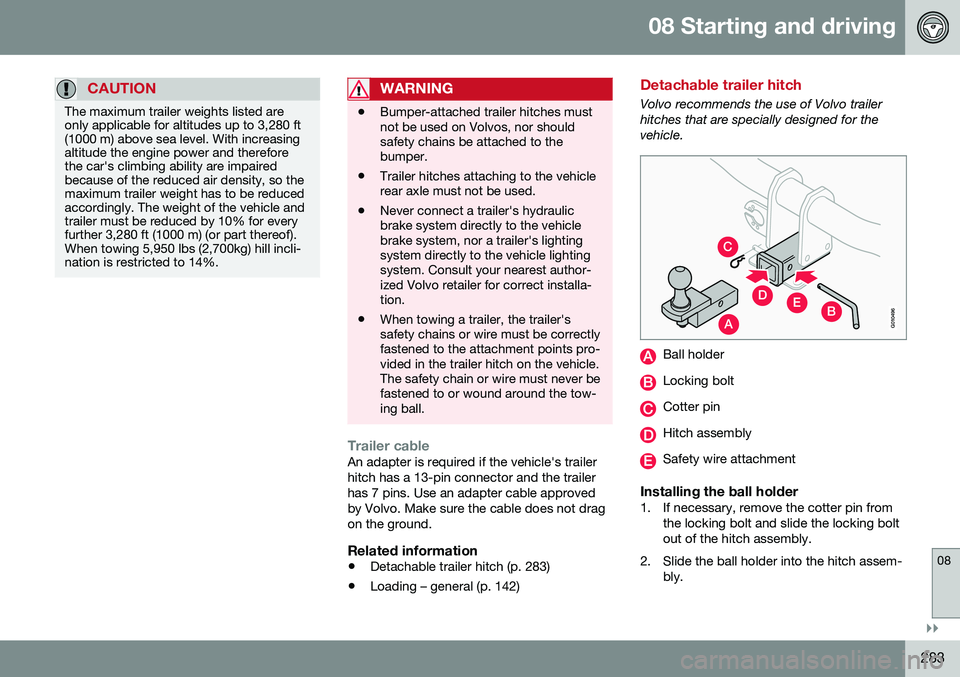
Volvo recommends the use of Volvo trailer hitches that are specially designed for thevehicle.
A
C
EDBG010496
Ball holder
Locking bolt
Cotter pin
Hitch assembly
Safety wire attachment
Installing the ball holder1. If necessary, remove the cotter pin from
the locking bolt and slide the locking bolt out of the hitch assembly.
2. Slide the ball holder into the hitch assem- bly.
Page 287 of 398
08 Starting and driving
08
}}
285
Towing the vehicle
Always check with state and local authorities before attempting to tow another vehiclebecause this type of towing is subject to reg-ulations regarding maximum towing speed,length and type of towing device, lighting, etc.
1. With the remote key fully pressed into theignition slot 22
, press START/STOP
ENGINE for approximately 2 seconds to
activate ignition mode II.
2. The remote key must remain in the igni- tion slot 23
for the entire time that the vehi-
cle is being towed.
3. Keep the tow rope taut when the towing vehicle slows down by applying light pressure on the brake pedal. This willhelp prevent jarring movements of thevehicle being towed.
4. Be prepared to apply the brakes to stop the vehicle being towed.CAUTION
General towing precautions:
• Please check with state and local authorities before attempting this typeof towing, as vehicles being towed aresubject to regulations regarding maxi-mum towing speed, length and type oftowing device, lighting, etc.
• If the vehicle's battery is dead, seeJump starting (p. 251) to provide cur-rent for releasing the electric parkingbrake and to move the gear selectorfrom the
P position to N. If this is not
possible, see Transmission – shiftlockoverride (p. 256) for information aboutmanually overriding the shiftlock sys-tem to move the gear selector from P
to N.
• Maximum speed: 50 mph (80 km/h).Do not exceed the maximum allowabletowing speed.
• Maximum distance with front wheelson ground: 50 miles (80 km).
• The vehicle should only be towed inthe forward direction.
Related information
•
Towing eyelet (p. 285)
• Remote key – functions (p. 153)
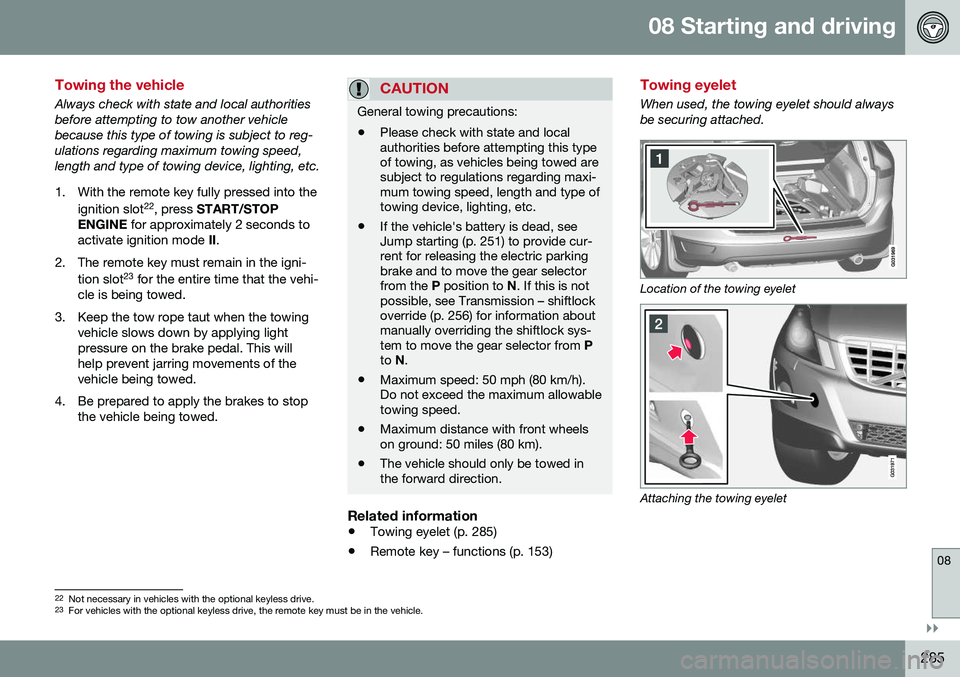
Towing eyelet
When used, the towing eyelet should always be securing attached.
Location of the towing eyelet
Attaching the towing eyelet
22
Not necessary in vehicles with the optional keyless drive.
23 For vehicles with the optional keyless drive, the remote key must be in the vehicle.
Page 342 of 398
||
10 Maintenance and servicing
10
340
6. Reinsert the bulb holder into the headlighthousing and turn it clockwise.
7. Reinstall the headlight housing.
Related information
• Bulbs – specifications (p. 342)
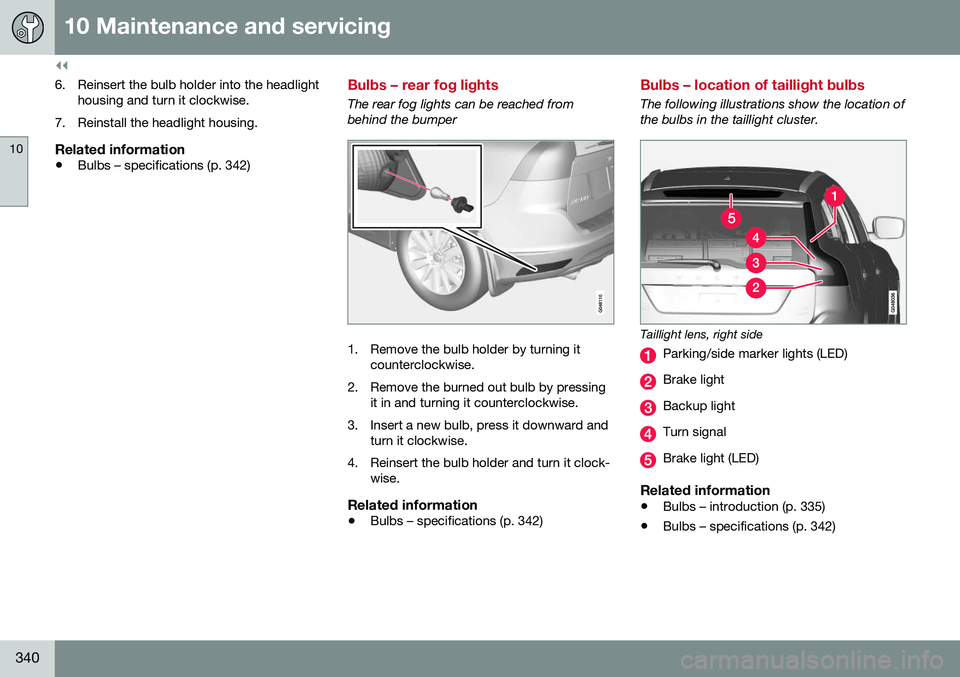
Bulbs – rear fog lights
The rear fog lights can be reached from behind the bumper
1. Remove the bulb holder by turning it
counterclockwise.
2. Remove the burned out bulb by pressing it in and turning it counterclockwise.
3. Insert a new bulb, press it downward and turn it clockwise.
4. Reinsert the bulb holder and turn it clock- wise.
Related information
• Bulbs – specifications (p. 342)
Bulbs – location of taillight bulbs
The following illustrations show the location of the bulbs in the taillight cluster.
Taillight lens, right side
Parking/side marker lights (LED)
Brake light
Backup light
Turn signal
Brake light (LED)
Related information
• Bulbs – introduction (p. 335)
• Bulbs – specifications (p. 342)
Page 343 of 398
10 Maintenance and servicing
10
341
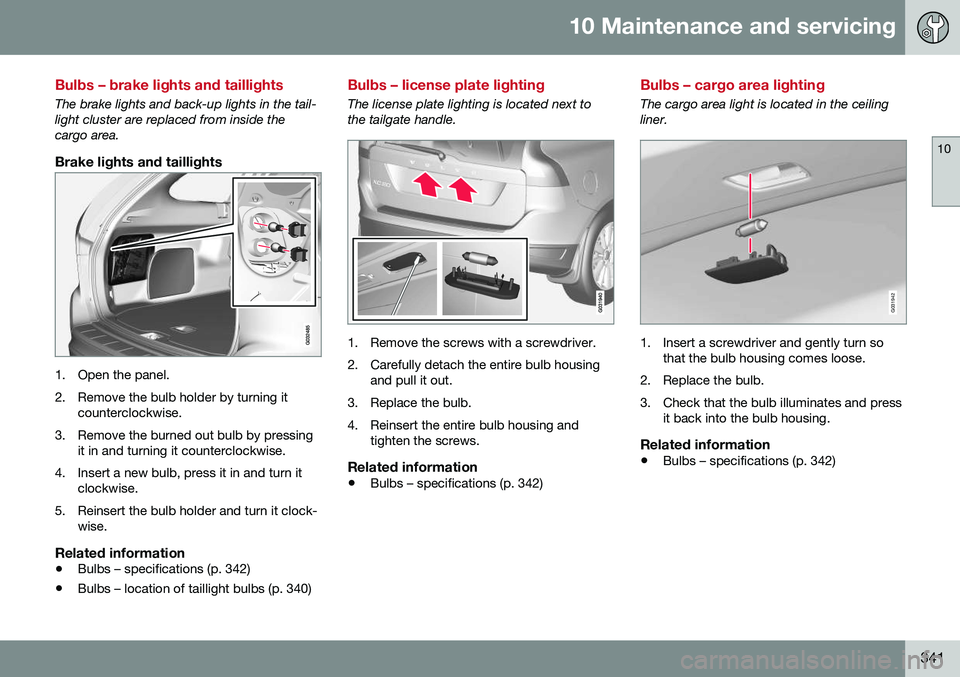
Bulbs – brake lights and taillights
The brake lights and back-up lights in the tail- light cluster are replaced from inside thecargo area.
Brake lights and taillights
1. Open the panel.
2. Remove the bulb holder by turning itcounterclockwise.
3. Remove the burned out bulb by pressing it in and turning it counterclockwise.
4. Insert a new bulb, press it in and turn it clockwise.
5. Reinsert the bulb holder and turn it clock- wise.
Related information
• Bulbs – specifications (p. 342)
• Bulbs – location of taillight bulbs (p. 340)
Bulbs – license plate lighting
The license plate lighting is located next to the tailgate handle.
1. Remove the screws with a screwdriver.
2. Carefully detach the entire bulb housing
and pull it out.
3. Replace the bulb.
4. Reinsert the entire bulb housing and tighten the screws.
Related information
• Bulbs – specifications (p. 342)
Bulbs – cargo area lighting
The cargo area light is located in the ceiling liner.
G031942
1. Insert a screwdriver and gently turn so
that the bulb housing comes loose.
2. Replace the bulb.
3. Check that the bulb illuminates and press it back into the bulb housing.
Related information
• Bulbs – specifications (p. 342)