turn signal VOLVO XC60 2016 Owner´s Manual
[x] Cancel search | Manufacturer: VOLVO, Model Year: 2016, Model line: XC60, Model: VOLVO XC60 2016Pages: 398, PDF Size: 9.98 MB
Page 245 of 398
07 Driver support
07
}}
* Option/accessory, for more information, see Introduction.243
BLIS* – Cross Traffic Alert (CTA)
Cross Traffic Alert (CTA) is a supplementary BLIS 12
function intended to detect vehicles
crossing behind your vehicle while you are backing up.
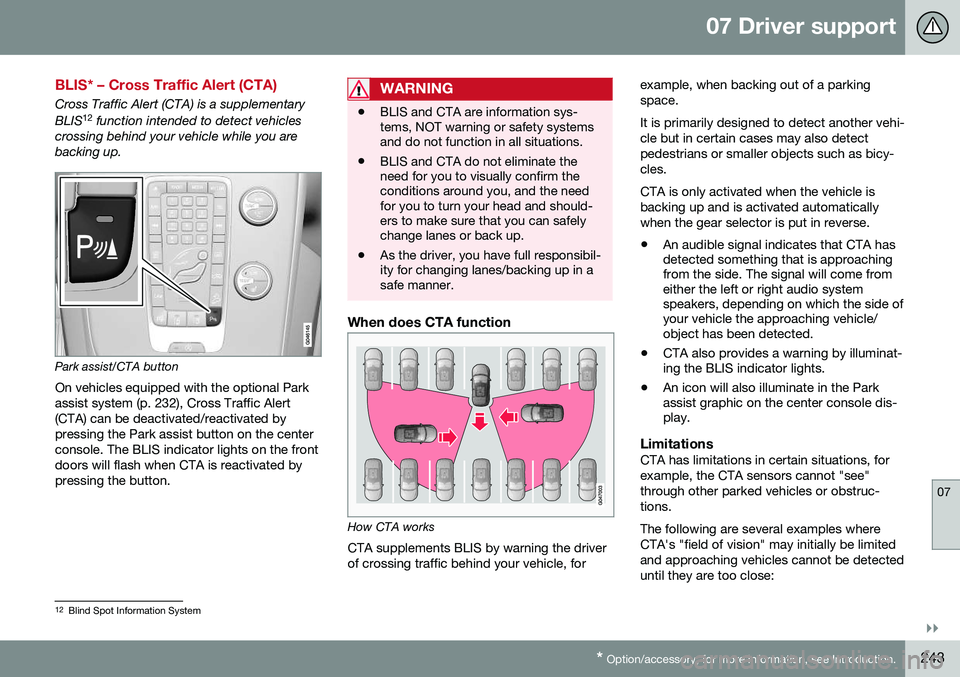
Park assist/CTA button On vehicles equipped with the optional Park assist system (p. 232), Cross Traffic Alert(CTA) can be deactivated/reactivated bypressing the Park assist button on the centerconsole. The BLIS indicator lights on the frontdoors will flash when CTA is reactivated bypressing the button.
WARNING
• BLIS and CTA are information sys- tems, NOT warning or safety systemsand do not function in all situations.
• BLIS and CTA do not eliminate theneed for you to visually confirm theconditions around you, and the needfor you to turn your head and should-ers to make sure that you can safelychange lanes or back up.
• As the driver, you have full responsibil-ity for changing lanes/backing up in asafe manner.
When does CTA function
How CTA works
CTA supplements BLIS by warning the driver of crossing traffic behind your vehicle, for example, when backing out of a parkingspace. It is primarily designed to detect another vehi- cle but in certain cases may also detectpedestrians or smaller objects such as bicy-cles. CTA is only activated when the vehicle is backing up and is activated automaticallywhen the gear selector is put in reverse.
• An audible signal indicates that CTA has detected something that is approachingfrom the side. The signal will come fromeither the left or right audio systemspeakers, depending on which the side ofyour vehicle the approaching vehicle/object has been detected.
• CTA also provides a warning by illuminat-ing the BLIS indicator lights.
• An icon will also illuminate in the Parkassist graphic on the center console dis-play.
LimitationsCTA has limitations in certain situations, for example, the CTA sensors cannot "see"through other parked vehicles or obstruc-tions. The following are several examples where CTA's "field of vision" may initially be limitedand approaching vehicles cannot be detecteduntil they are too close:
12
Blind Spot Information System
Page 252 of 398
08 Starting and driving
08
250* Option/accessory, for more information, see Introduction.
Engine Remote Start (ERS)* – starting the engine
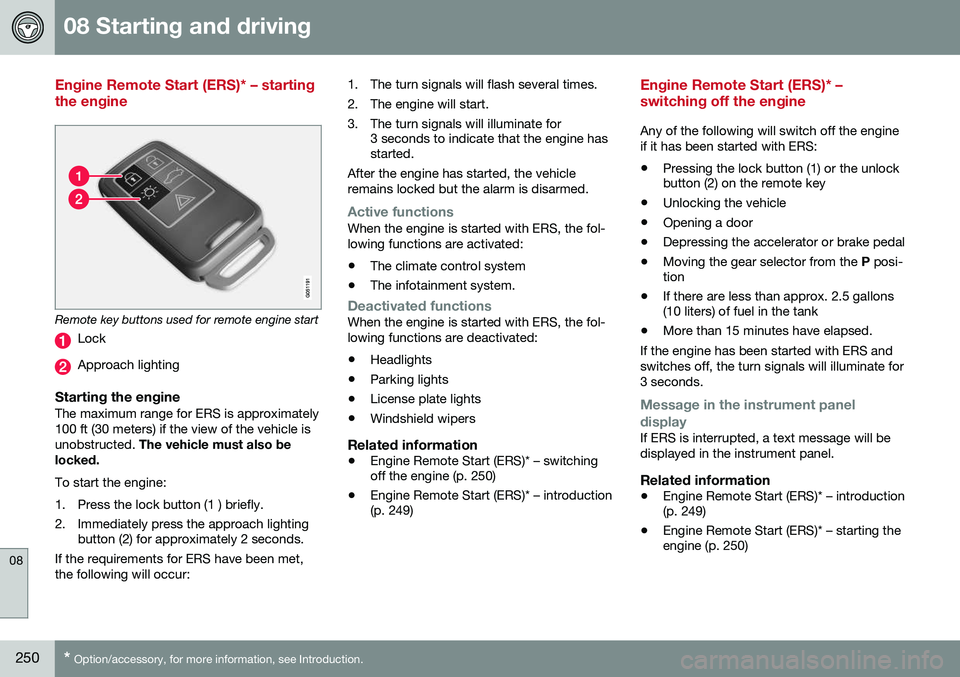
Remote key buttons used for remote engine start
Lock
Approach lighting
Starting the engineThe maximum range for ERS is approximately 100 ft (30 meters) if the view of the vehicle isunobstructed. The vehicle must also be
locked. To start the engine:
1. Press the lock button (1 ) briefly.
2. Immediately press the approach lighting button (2) for approximately 2 seconds.
If the requirements for ERS have been met, the following will occur: 1. The turn signals will flash several times.
2. The engine will start.
3. The turn signals will illuminate for
3 seconds to indicate that the engine has started.
After the engine has started, the vehicle remains locked but the alarm is disarmed.
Active functionsWhen the engine is started with ERS, the fol- lowing functions are activated: • The climate control system
• The infotainment system.
Deactivated functionsWhen the engine is started with ERS, the fol- lowing functions are deactivated: •Headlights
• Parking lights
• License plate lights
• Windshield wipers
Related information
•
Engine Remote Start (ERS)* – switching off the engine (p. 250)
• Engine Remote Start (ERS)* – introduction(p. 249)
Engine Remote Start (ERS)* – switching off the engine
Any of the following will switch off the engine if it has been started with ERS:
• Pressing the lock button (1) or the unlock button (2) on the remote key
• Unlocking the vehicle
• Opening a door
• Depressing the accelerator or brake pedal
• Moving the gear selector from the
P posi-
tion
• If there are less than approx. 2.5 gallons(10 liters) of fuel in the tank
• More than 15 minutes have elapsed.
If the engine has been started with ERS and switches off, the turn signals will illuminate for3 seconds.
Message in the instrument panel
display
If ERS is interrupted, a text message will be displayed in the instrument panel.
Related information
• Engine Remote Start (ERS)* – introduction (p. 249)
• Engine Remote Start (ERS)* – starting theengine (p. 250)
Page 272 of 398
||
08 Starting and driving
08
270
Connect an auxiliary battery if the battery voltage is too low, see Jump starting (p. 251).
Parking on a hill
•If the vehicle is pointing uphill, turn the front wheels so that they point away fromthe curb.
• If the vehicle is pointing downhill, turn thefront wheels so that they point toward thecurb.
The parking brake should also be applied.
Related information
• Parking brake – applying (p. 270)
• Parking brake – releasing (p. 271)
• Parking brake – symbols and messages(p. 272)
• Brakes – general (p. 266)
Parking brake – applying
Applying the electric parking brake
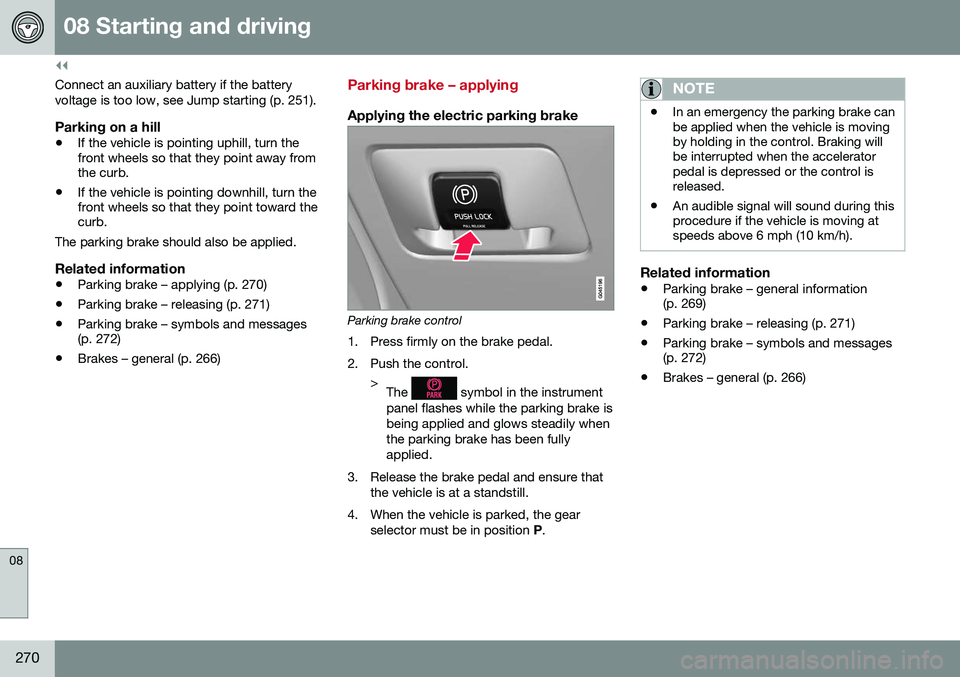
Parking brake control
1. Press firmly on the brake pedal.
2. Push the control. >The
symbol in the instrument
panel flashes while the parking brake is being applied and glows steadily whenthe parking brake has been fullyapplied.
3. Release the brake pedal and ensure that the vehicle is at a standstill.
4. When the vehicle is parked, the gear selector must be in position P.
NOTE
• In an emergency the parking brake can be applied when the vehicle is movingby holding in the control. Braking willbe interrupted when the acceleratorpedal is depressed or the control isreleased.
• An audible signal will sound during thisprocedure if the vehicle is moving atspeeds above 6 mph (10 km/h).
Related information
•
Parking brake – general information (p. 269)
• Parking brake – releasing (p. 271)
• Parking brake – symbols and messages(p. 272)
• Brakes – general (p. 266)
Page 274 of 398
08 Starting and driving
08
272
Parking brake – symbols and messages
A text message can be erased by pressing briefly on the OK button on the turn signal
lever.
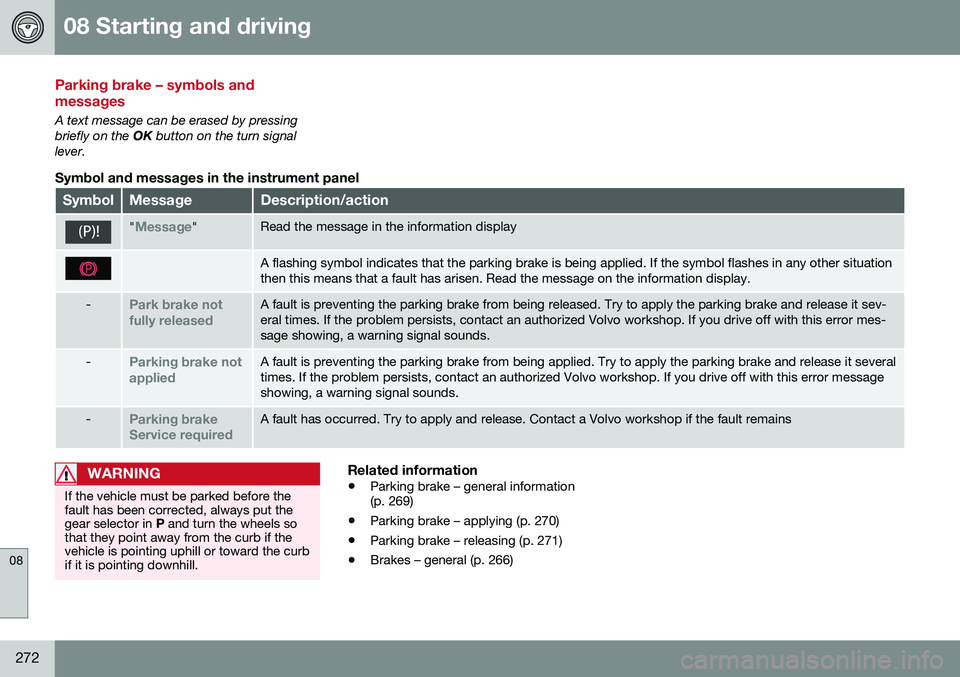
Symbol and messages in the instrument panel
SymbolMessageDescription/action
"Message"Read the message in the information display
A flashing symbol indicates that the parking brake is being applied. If the symbol flashes in any other situation then this means that a fault has arisen. Read the message on the information display.
-Park brake not fully releasedA fault is preventing the parking brake from being released. Try to apply the parking brake and release it sev- eral times. If the problem persists, contact an authorized Volvo workshop. If you drive off with this error mes-sage showing, a warning signal sounds.
-Parking brake not appliedA fault is preventing the parking brake from being applied. Try to apply the parking brake and release it several times. If the problem persists, contact an authorized Volvo workshop. If you drive off with this error messageshowing, a warning signal sounds.
-Parking brake Service requiredA fault has occurred. Try to apply and release. Contact a Volvo workshop if the fault remains
WARNING
If the vehicle must be parked before the fault has been corrected, always put thegear selector in P and turn the wheels so
that they point away from the curb if thevehicle is pointing uphill or toward the curbif it is pointing downhill.
Related information
• Parking brake – general information (p. 269)
• Parking brake – applying (p. 270)
• Parking brake – releasing (p. 271)
• Brakes – general (p. 266)
Page 337 of 398
10 Maintenance and servicing
10
}}
335
CAUTION
Keep the area around the power steering fluid reservoir clean when checking.
Bulbs – introduction
Certain bulbs can be replaced by the vehicle's owner. However, the bulbs on the followinglist should only be replaced by a trained andqualified Volvo service technician. All bulb specifications are listed in Bulbs – specifications (p. 342).• Active Bending Lights
• Daytime running lights, front parking lights
• Front side marker lights
• Turn signals in the door mirrors
• Approach lighting in the door mirrors
• Interior lighting (except for the front foot-well lighting)
• Rear parking lights
• Rear side marker lights
• Rear turn signals
• LED bulbsNOTE
•For information regarding any bulbs not mentioned in this section, pleasecontact your Volvo retailer or a trainedand authorized Volvo service techni-cian.
• Always switch off the ignition beforestarting to replace a bulb.
• If an error message remains in the dis-play after a faulty bulb has beenreplaced, contact an authorized Volvoworkshop.
• Condensation may form temporarily onthe inside of the lenses of exteriorlights such as headlights, fog lights, ortaillights. This is normal and the lightsare designed to withstand moisture.Normally, condensation will dissipateafter the lights have been on for ashort time.
• The optional Active Bending Lightbulbs contain trace amounts of mer-cury. These bulbs should always bedisposed of by a trained and qualifiedVolvo service technician.
Page 341 of 398
10 Maintenance and servicing
10
}}
339
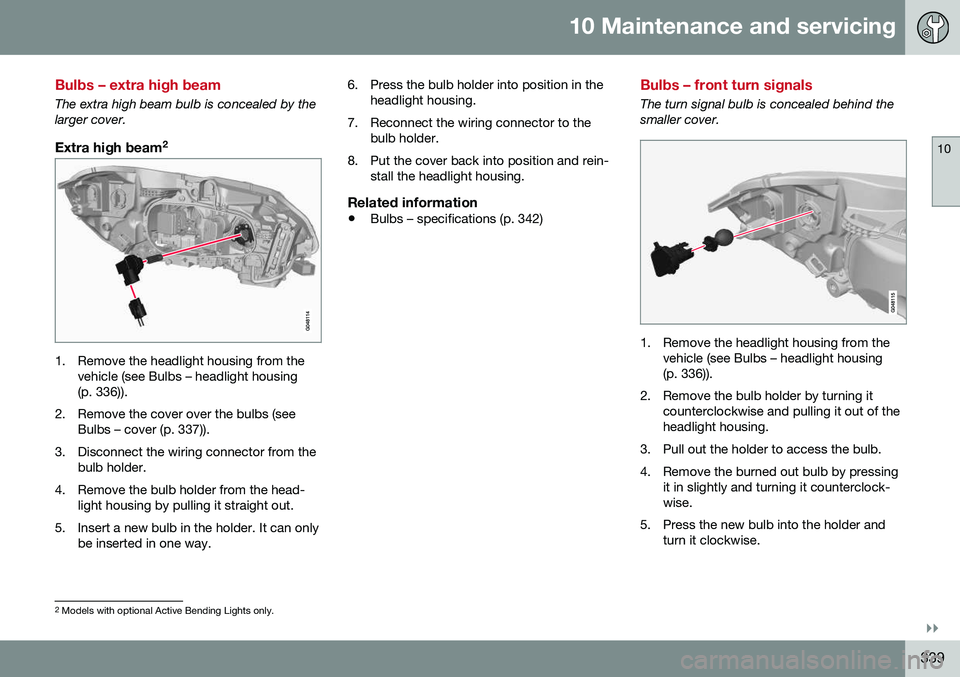
Bulbs – extra high beam
The extra high beam bulb is concealed by the larger cover.
Extra high beam2
1. Remove the headlight housing from the
vehicle (see Bulbs – headlight housing (p. 336)).
2. Remove the cover over the bulbs (see Bulbs – cover (p. 337)).
3. Disconnect the wiring connector from the bulb holder.
4. Remove the bulb holder from the head- light housing by pulling it straight out.
5. Insert a new bulb in the holder. It can only be inserted in one way. 6. Press the bulb holder into position in the
headlight housing.
7. Reconnect the wiring connector to the bulb holder.
8. Put the cover back into position and rein- stall the headlight housing.
Related information
• Bulbs – specifications (p. 342)
Bulbs – front turn signals
The turn signal bulb is concealed behind the smaller cover.
1. Remove the headlight housing from the
vehicle (see Bulbs – headlight housing (p. 336)).
2. Remove the bulb holder by turning it counterclockwise and pulling it out of theheadlight housing.
3. Pull out the holder to access the bulb.
4. Remove the burned out bulb by pressing it in slightly and turning it counterclock- wise.
5. Press the new bulb into the holder and turn it clockwise.
2Models with optional Active Bending Lights only.
Page 342 of 398
||
10 Maintenance and servicing
10
340
6. Reinsert the bulb holder into the headlighthousing and turn it clockwise.
7. Reinstall the headlight housing.
Related information
• Bulbs – specifications (p. 342)
Bulbs – rear fog lights
The rear fog lights can be reached from behind the bumper
1. Remove the bulb holder by turning it
counterclockwise.
2. Remove the burned out bulb by pressing it in and turning it counterclockwise.
3. Insert a new bulb, press it downward and turn it clockwise.
4. Reinsert the bulb holder and turn it clock- wise.
Related information
• Bulbs – specifications (p. 342)
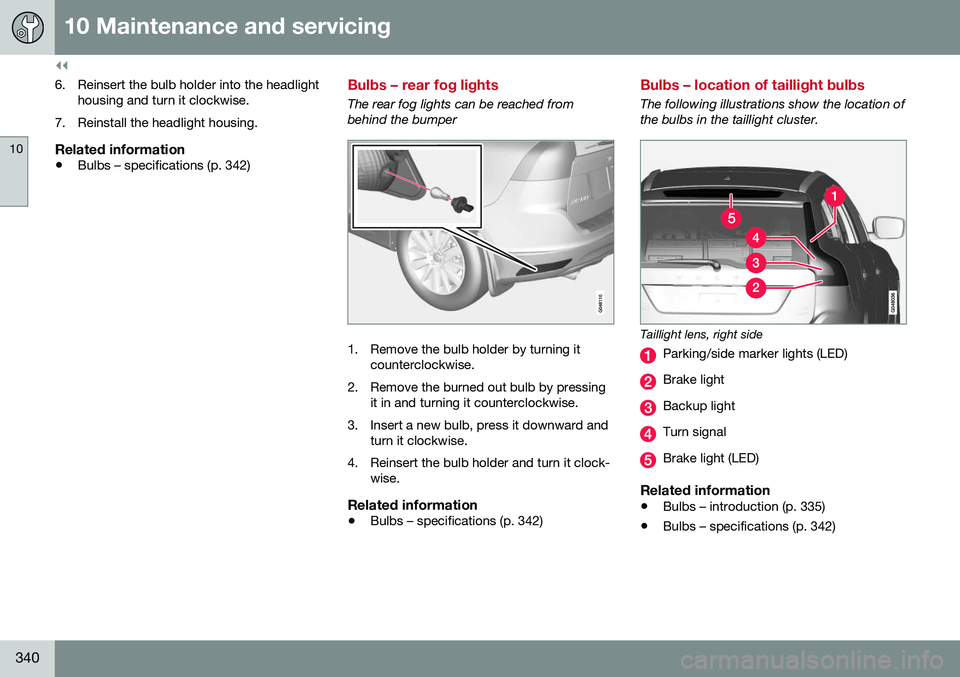
Bulbs – location of taillight bulbs
The following illustrations show the location of the bulbs in the taillight cluster.
Taillight lens, right side
Parking/side marker lights (LED)
Brake light
Backup light
Turn signal
Brake light (LED)
Related information
• Bulbs – introduction (p. 335)
• Bulbs – specifications (p. 342)
Page 385 of 398
11 Specifications
11
* Option/accessory, for more information, see Introduction.383
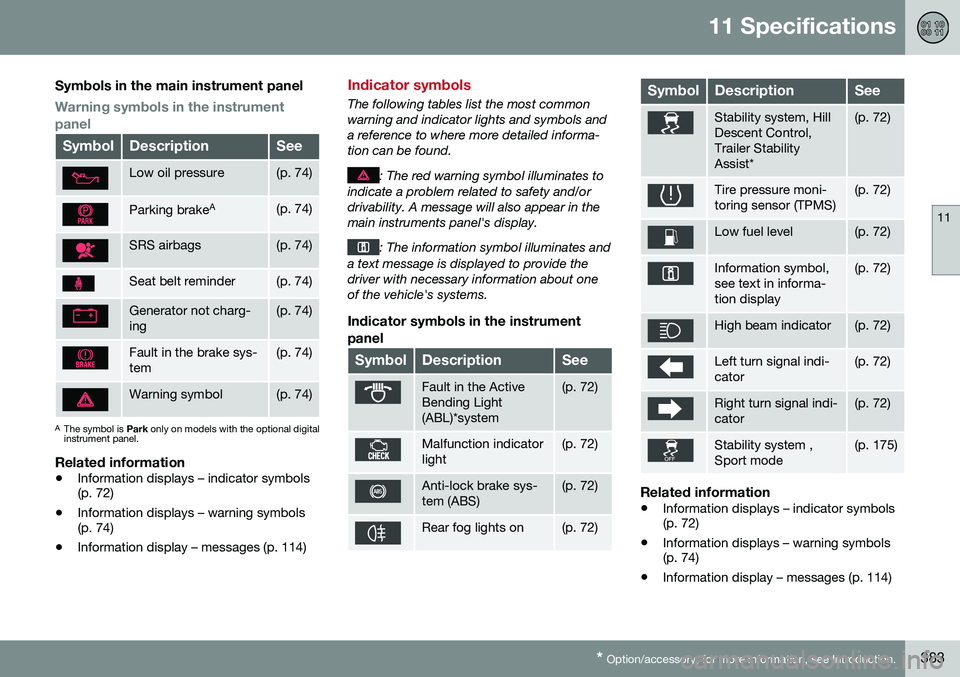
Symbols in the main instrument panel
Warning symbols in the instrument panel
SymbolDescriptionSee
Low oil pressure(p. 74)
Parking brake A(p. 74)
SRS airbags(p. 74)
Seat belt reminder(p. 74)
Generator not charg- ing(p. 74)
Fault in the brake sys- tem(p. 74)
Warning symbol(p. 74)
A
The symbol is Park only on models with the optional digital
instrument panel.
Related information
• Information displays – indicator symbols (p. 72)
• Information displays – warning symbols(p. 74)
• Information display – messages (p. 114)
Indicator symbols
The following tables list the most common warning and indicator lights and symbols anda reference to where more detailed informa-tion can be found.
: The red warning symbol illuminates to
indicate a problem related to safety and/or drivability. A message will also appear in themain instruments panel's display.
: The information symbol illuminates and
a text message is displayed to provide the driver with necessary information about oneof the vehicle's systems.
Indicator symbols in the instrument
panel
SymbolDescriptionSee
Fault in the Active Bending Light(ABL)*system(p. 72)
Malfunction indicator light(p. 72)
Anti-lock brake sys- tem (ABS)(p. 72)
Rear fog lights on(p. 72)
SymbolDescriptionSee
Stability system, Hill Descent Control,Trailer StabilityAssist*(p. 72)
Tire pressure moni- toring sensor (TPMS)(p. 72)
Low fuel level(p. 72)
Information symbol, see text in informa-tion display(p. 72)
High beam indicator(p. 72)
Left turn signal indi- cator(p. 72)
Right turn signal indi- cator(p. 72)
Stability system , Sport mode(p. 175)
Related information
• Information displays – indicator symbols (p. 72)
• Information displays – warning symbols(p. 74)
• Information display – messages (p. 114)
Page 395 of 398
12 Index
12
393
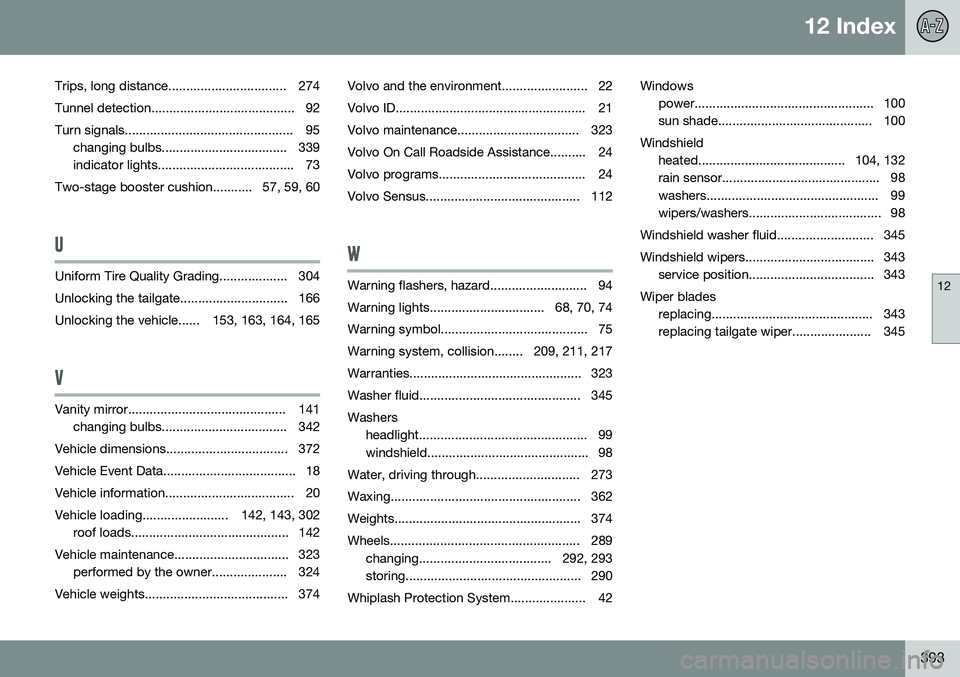
Trips, long distance................................. 274
Tunnel detection........................................ 92
Turn signals............................................... 95 changing bulbs................................... 339
indicator lights...................................... 73
Two-stage booster cushion........... 57, 59, 60
U
Uniform Tire Quality Grading................... 304
Unlocking the tailgate.............................. 166
Unlocking the vehicle...... 153, 163, 164, 165
V
Vanity mirror............................................ 141 changing bulbs................................... 342
Vehicle dimensions.................................. 372
Vehicle Event Data..................................... 18
Vehicle information.................................... 20
Vehicle loading........................ 142, 143, 302 roof loads............................................ 142
Vehicle maintenance................................ 323 performed by the owner..................... 324
Vehicle weights........................................ 374 Volvo and the environment........................ 22
Volvo ID..................................................... 21
Volvo maintenance.................................. 323
Volvo On Call Roadside Assistance.......... 24
Volvo programs......................................... 24
Volvo Sensus........................................... 112
W
Warning flashers, hazard........................... 94
Warning lights................................ 68, 70, 74
Warning symbol......................................... 75
Warning system, collision........ 209, 211, 217
Warranties................................................ 323
Washer fluid............................................. 345Washers
headlight............................................... 99
windshield............................................. 98
Water, driving through............................. 273
Waxing..................................................... 362
Weights.................................................... 374
Wheels..................................................... 289 changing..................................... 292, 293
storing................................................. 290
Whiplash Protection System..................... 42 Windows
power.................................................. 100
sun shade........................................... 100
Windshield heated......................................... 104, 132
rain sensor............................................ 98
washers................................................ 99
wipers/washers..................................... 98
Windshield washer fluid........................... 345
Windshield wipers.................................... 343 service position................................... 343
Wiper blades replacing............................................. 343
replacing tailgate wiper...................... 345