warning light VOLVO XC60 2016 Owner´s Manual
[x] Cancel search | Manufacturer: VOLVO, Model Year: 2016, Model line: XC60, Model: VOLVO XC60 2016Pages: 398, PDF Size: 9.98 MB
Page 330 of 398
||
10 Maintenance and servicing
10
328
where any retailer can access or search for this information using your vehicle's VIN num-ber. This number can be found in your war-ranty booklet or on the dashboard at thelower left corner of the windshield.
–Select Maintenance & repairSend
vehicle data.
Booking information and vehicle dataWhen you opt to book service from your vehi- cle, booking information and vehicle data willbe transmitted. Vehicle data consists of anumber of parameters in the following areas:
• Service requirements
• Function status
• Fluid levels
• Odometer reading (mileage)
• Vehicle Identification Number (VIN)
• The vehicle's software version
Related information
•Volvo ID (p. 21)
Maintenance – opening/closing hood
The hood is opened by first releasing the lock from the passenger compartment and thenpressing the release control.
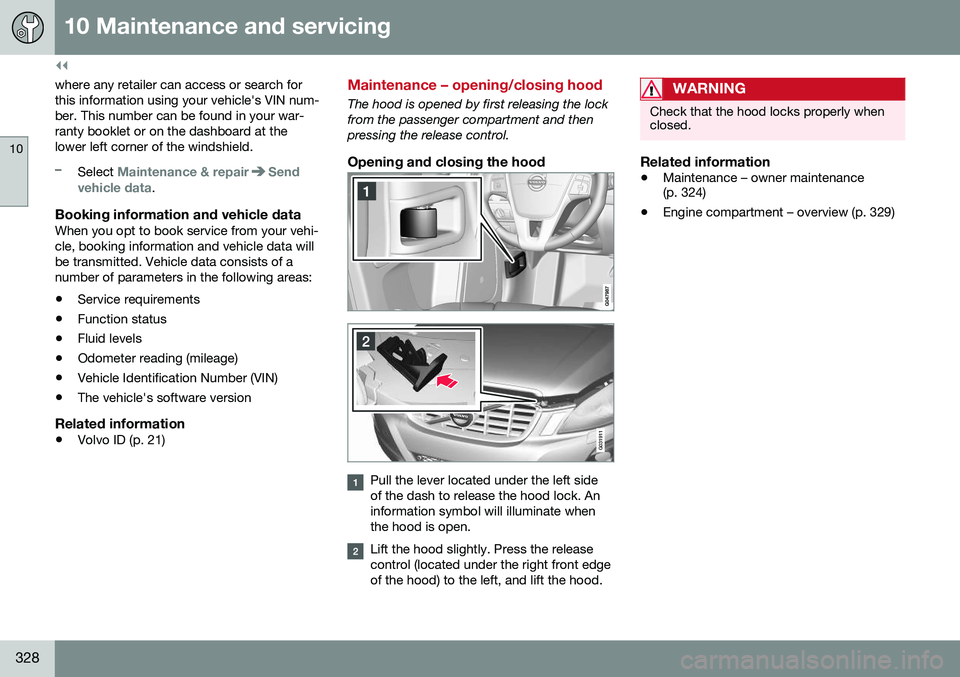
Opening and closing the hood
G031911
Pull the lever located under the left side of the dash to release the hood lock. Aninformation symbol will illuminate whenthe hood is open.
Lift the hood slightly. Press the release control (located under the right front edgeof the hood) to the left, and lift the hood.
WARNING
Check that the hood locks properly when closed.
Related information
•Maintenance – owner maintenance (p. 324)
• Engine compartment – overview (p. 329)
Page 338 of 398
||
10 Maintenance and servicing
10
336* Option/accessory, for more information, see Introduction.
CAUTION
Never touch the glass of bulbs with your fingers. Grease and oils from your fingersvaporize in the heat and will leave adeposit on the reflector, which will damageit.
WARNING
• The engine should not be running when changing bulbs.
• If the engine has been running justprior to replacing bulbs in the head-light housing, please keep in mind thatcomponents in the engine compart-ment will be hot.
WARNING
•
Active Bending Lights* – due to the high voltage used by these headlights,these bulbs should only be replacedby a trained and qualified Volvo serv-ice technician.
• Turn off the lights and remove theremote key from the ignition beforechanging any bulbs.
Related information
•
Bulbs – headlight housing (p. 336)
• Bulbs – vanity mirror lighting (p. 342)
• Bulbs – cargo area lighting (p. 341)
• Bulbs – license plate lighting (p. 341)
Bulbs – headlight housing
The entire headlight housing must be lifted out when replacing all front bulbs.
Removing the headlight housing
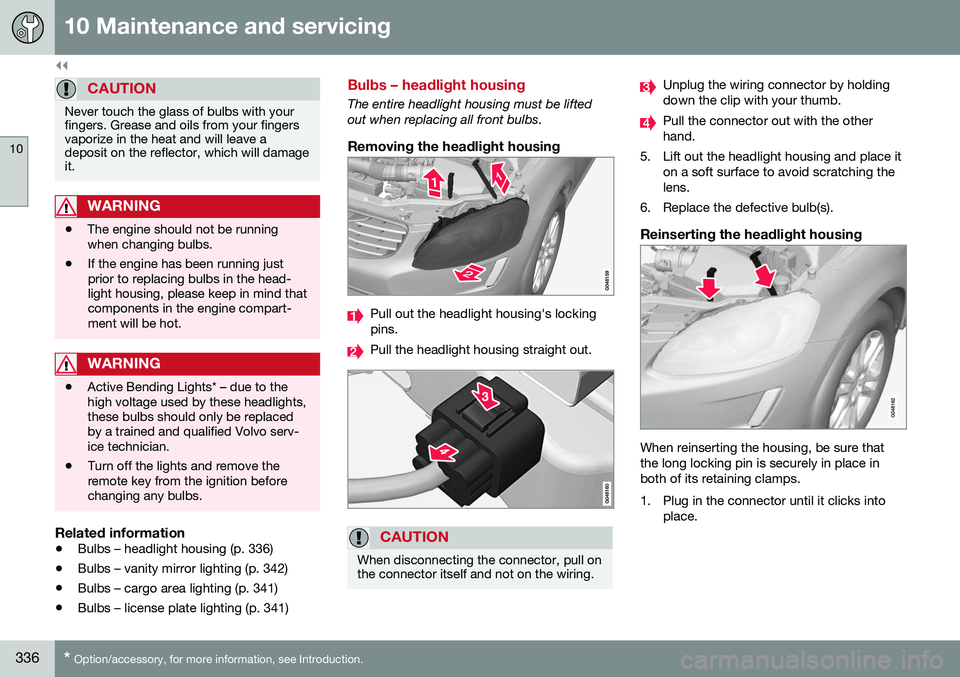
Pull out the headlight housing's locking pins.
Pull the headlight housing straight out.
CAUTION
When disconnecting the connector, pull on the connector itself and not on the wiring.
Unplug the wiring connector by holding down the clip with your thumb.
Pull the connector out with the other hand.
5. Lift out the headlight housing and place it on a soft surface to avoid scratching thelens.
6. Replace the defective bulb(s).
Reinserting the headlight housing
When reinserting the housing, be sure that the long locking pin is securely in place inboth of its retaining clamps.
1. Plug in the connector until it clicks into place.
Page 349 of 398
10 Maintenance and servicing
10
}}
347
CAUTION
The infotainment system's energy-saving feature may not function correctly or at all,and/or a message may be displayed if abattery charger or jumper cables are notconnected properly.
• The negative terminal on the battery must
never be used to connect a
jumper cable or a battery charger.Only the ground point on the chassismay be used.
See Jump starting (p. 251) for an illustra- tion and additional information.
WARNING
• Never expose the battery to open flame or electric spark.
• Do not smoke near the battery.
• Battery fluid contains sulfuric acid. Donot allow battery fluid to contact eyes,skin, fabrics or painted surfaces. Ifcontact occurs, flush the affected areaimmediately with water. Obtain medi-cal help immediately if eyes are affec-ted.
NOTE
The life of the battery is shortened if it becomes discharged repeatedly.
Related information
•
Battery – changing (p. 348)
• Battery – maintenance (p. 347)
• Battery – symbols (p. 346)
Battery – maintenance
Proper battery maintenance can help prolong its service life.
Maintenance
• Use a screw driver to open the caps or cover and a flashlight to inspect the level.
• If necessary, add distilled water. The levelshould never be above the indicator.
• The fluid level should be checked if thebattery has been recharged.
• After inspection, be sure the cap overeach battery cell or the cover is securelyin place.
• Check that the battery cables are cor-rectly connected and properly tightened.
• Never disconnect the battery when theengine is running, or when the key is inthe ignition. This could damage the vehi-cle's electrical system.
• The battery should be disconnected fromthe vehicle when a battery charger isused directly on the battery.
• To help keep the battery in good condi-tion, the vehicle should be driven for atleast 15 minutes a week or connected toa charger with an automatic chargingfunction.
• If the battery is fully discharged a numberof times, this may shorten its service life.Keeping the battery fully charged helpsprolong its service life.
Page 358 of 398
||
10 Maintenance and servicing
10
356* Option/accessory, for more information, see Introduction.
PosFunctionA
Controls in left rear passeng- er's door20
Keyless drive*20
Power driver's seat*20
Power front passenger's seat*20
-
Infotainment system display5
Infotainment system: amplifier, SiriusXM ™ satellite radio*10
Sensus control module15
Bluetooth hands-free system5
-
Laminated panoramic roof* Courtesy lighting, climate sys- tem sensor5
12-volt sockets in tunnel con- sole15
Heated rear seat* (passenger's side)15
Heated rear seat* (driver's side)15
PosFunctionA
-
Heated front passenger's seat*15
Heated driver's seat*15
Park assist* Blind Spot Information System (BLIS)*, park assist camera*5
All Wheel Drive* control mod- ule15
Active chassis system*10
Positions: fusebox B
PosFunctionA
Tailgate wiper15
-
Front courtesy lighting, driv- er's door power window con-trols, power seat(s)*,7.5
Instrument panel5
Adaptive cruise control/colli- sion warning*10
PosFunctionA
Courtesy lighting, rain sen- sor*, HomeLInk ®
Wireless
Control System*7.5
Steering wheel module7.5
Cental locking: fuel filler door10
Electrically heated steering wheel*15
Electrically heated windshield*15
Tailgate unlock10
Electrical folding rear seat outboard head restraints*10
Fuel pump20
Climate system control panel5
-
Alarm, On-board diagnostic system5
Satellite radio *, audio system amplifier10
Airbag system, occupant weight sensor10
Collision warning system*5
Page 364 of 398
10 Maintenance and servicing
10
362
Automatic car wash
The vehicle should be washed at regular inter- vals since dirt, dust, insects and tar spotsadhere to the paint and may cause damage.To help prevent corrosion, it is particularlyimportant to wash the car frequently in thewintertime.• We do NOT recommend washing your car in an automatic wash during the firstfew months (because the paint will nothave hardened sufficiently).
• An automatic wash is a simple and quickway to clean your car, but it is worthremembering that it may not be as thor-ough as when you yourself go over thecar with sponge and water. Keeping theunderbody clean is most important, espe-cially in the winter. Some automaticwashers do not have facilities for washingthe underbody.
NOTE
Condensation may form temporarily on the inside of the lenses of exterior lights suchas headlights, fog lights, or taillights. Thisis normal and the lights are designed towithstand moisture. Normally, condensa-tion will dissipate after the lights have beenon for a short time.
CAUTION
• Before driving into an automatic car wash, turn off the optional rain sensorto avoid damaging the windshield wip-ers.
• Make sure that side view mirrors, aux-iliary lamps, etc, are secure, and thatany antenna(s) are retracted orremoved. Otherwise there is risk of themachine dislodging them.
• Chromed wheels:
Clean chrome-
plated wheels using the same deter-gents used for the body of the vehicle.Aggressive wheel-cleaning agents canpermanently stain chrome-platedwheels.
WARNING
• When the vehicle is driven immediately after being washed, apply the brakes,including the parking brake, severaltimes in order to remove any moisturefrom the brake linings.
• Engine cleaning agents should not beused when the engine is warm. Thisconstitutes a fire risk.
Related information
•
Polishing and waxing (p. 362)
• Cleaning the interior (p. 363)
• Washing the car (p. 361)
Polishing and waxing
Normally, polishing is not required during the first year after delivery, however, waxing maybe beneficial.
• Before applying polish or wax the vehicle must be washed and dried. Tar spots canbe removed with kerosene or tar remover.Difficult spots may require a fine rubbingcompound.
• After polishing use liquid or paste wax.
• Several commercially available productscontain both polish and wax.
• Waxing alone does not substitute for pol-ishing a dull surface.
• A wide range of polymer-based waxescan be purchased today. These waxesare easy to use and produce a long-last-ing, high-gloss finish that protects thebodywork against oxidation, road dirt andfading.
• Do not polish or wax your vehicle in directsunlight (the surface of the vehicle shouldnot be warmer than 113 °F (45 °C).
Page 384 of 398
11 Specifications
11
382
Symbols – general information
The following tables list the most common warning and indicator lights and symbols anda reference to where more detailed informa-tion can be found.
IntroductionThe symbols in the vehicle's various displaysare divided into three main categories:• Warning symbols
• Indicator symbols
• Information symbols
The following tables list the most commonsymbols, their meaning and the pages in thismanual that provide more detailed informa-tion.
NOTE
Not all of the symbols shown in the related articles are available in all models or on allmarkets. Local variations may occur.
Warning symbol
: The red warning symbol illuminates to
indicate a problem related to safety and/or drivability. A message will also appear in themain instruments panel's display.
Information symbol
: The information symbol illuminates and
a text message is displayed to provide the driver with necessary information about one of the vehicle's systems.
Related information
•
Information displays – indicator symbols (p. 72)
• Information displays – warning symbols(p. 74)
• Information display – messages (p. 114)
Warning symbols
The following tables list the most common warning and indicator lights and symbols anda reference to where more detailed informa-tion can be found.
: The red warning symbol illuminates to
indicate a problem related to safety and/or drivability. A message will also appear in themain instruments panel's display.
: The information symbol illuminates and
a text message is displayed to provide the driver with necessary information about oneof the vehicle's systems.
Page 385 of 398
11 Specifications
11
* Option/accessory, for more information, see Introduction.383
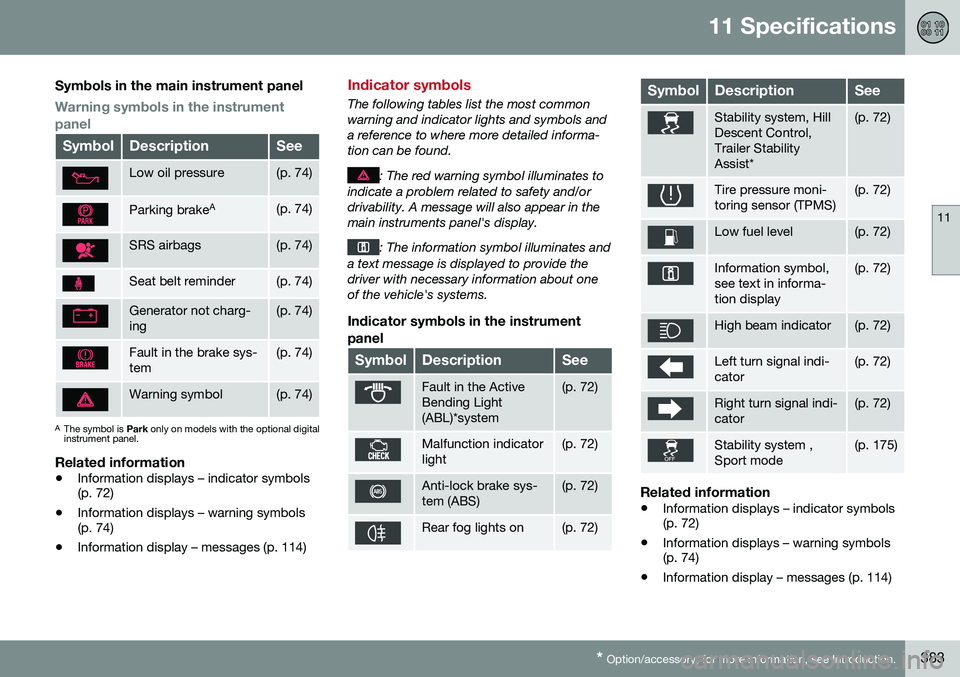
Symbols in the main instrument panel
Warning symbols in the instrument panel
SymbolDescriptionSee
Low oil pressure(p. 74)
Parking brake A(p. 74)
SRS airbags(p. 74)
Seat belt reminder(p. 74)
Generator not charg- ing(p. 74)
Fault in the brake sys- tem(p. 74)
Warning symbol(p. 74)
A
The symbol is Park only on models with the optional digital
instrument panel.
Related information
• Information displays – indicator symbols (p. 72)
• Information displays – warning symbols(p. 74)
• Information display – messages (p. 114)
Indicator symbols
The following tables list the most common warning and indicator lights and symbols anda reference to where more detailed informa-tion can be found.
: The red warning symbol illuminates to
indicate a problem related to safety and/or drivability. A message will also appear in themain instruments panel's display.
: The information symbol illuminates and
a text message is displayed to provide the driver with necessary information about oneof the vehicle's systems.
Indicator symbols in the instrument
panel
SymbolDescriptionSee
Fault in the Active Bending Light(ABL)*system(p. 72)
Malfunction indicator light(p. 72)
Anti-lock brake sys- tem (ABS)(p. 72)
Rear fog lights on(p. 72)
SymbolDescriptionSee
Stability system, Hill Descent Control,Trailer StabilityAssist*(p. 72)
Tire pressure moni- toring sensor (TPMS)(p. 72)
Low fuel level(p. 72)
Information symbol, see text in informa-tion display(p. 72)
High beam indicator(p. 72)
Left turn signal indi- cator(p. 72)
Right turn signal indi- cator(p. 72)
Stability system , Sport mode(p. 175)
Related information
• Information displays – indicator symbols (p. 72)
• Information displays – warning symbols(p. 74)
• Information display – messages (p. 114)
Page 386 of 398
11 Specifications
11
384* Option/accessory, for more information, see Introduction.
Information symbols
The following tables list the most common warning and indicator lights and symbols anda reference to where more detailed informa-tion can be found.
: The red warning symbol illuminates to
indicate a problem related to safety and/or drivability. A message will also appear in themain instruments panel's display.
: The information symbol illuminates and
a text message is displayed to provide the driver with necessary information about oneof the vehicle's systems.
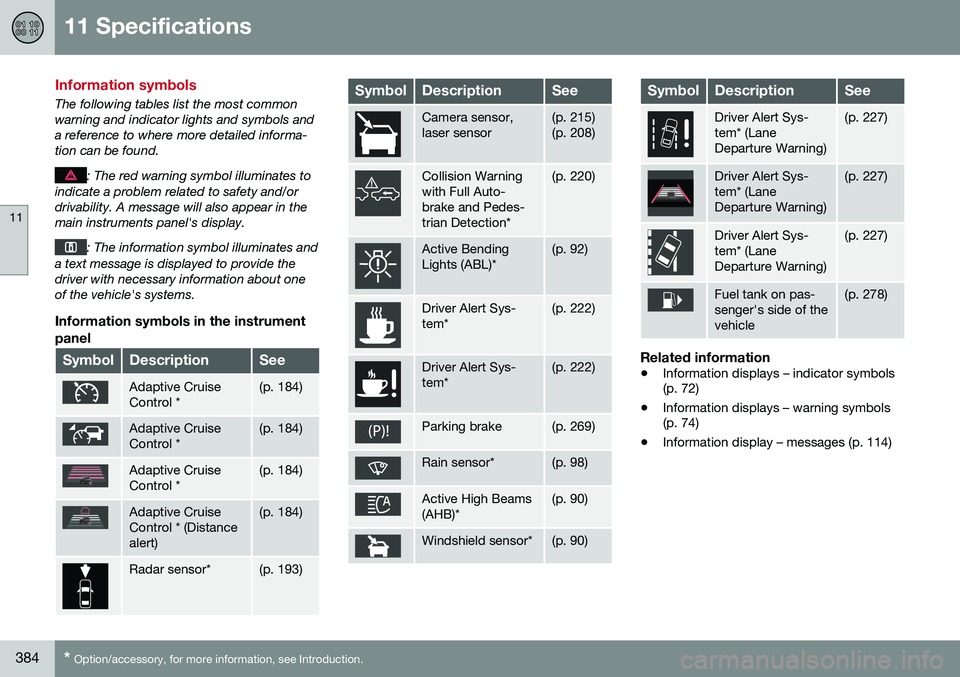
Information symbols in the instrument
panel
SymbolDescriptionSee
Adaptive Cruise Control *(p. 184)
Adaptive Cruise Control *(p. 184)
Adaptive Cruise Control *(p. 184)
Adaptive Cruise Control * (Distancealert)(p. 184)
Radar sensor*(p. 193)
SymbolDescriptionSee
Camera sensor, laser sensor(p. 215) (p. 208)
Collision Warning with Full Auto-brake and Pedes-trian Detection*(p. 220)
Active Bending Lights (ABL)*(p. 92)
Driver Alert Sys- tem*(p. 222)
Driver Alert Sys- tem*(p. 222)
Parking brake(p. 269)
Rain sensor*(p. 98)
Active High Beams (AHB)*(p. 90)
Windshield sensor*(p. 90)
SymbolDescriptionSee
Driver Alert Sys- tem* (LaneDeparture Warning)(p. 227)
Driver Alert Sys- tem* (LaneDeparture Warning)(p. 227)
Driver Alert Sys- tem* (LaneDeparture Warning)(p. 227)
Fuel tank on pas- senger's side of thevehicle(p. 278)
Related information
• Information displays – indicator symbols (p. 72)
• Information displays – warning symbols(p. 74)
• Information display – messages (p. 114)
Page 387 of 398
11 Specifications
11
* Option/accessory, for more information, see Introduction.385
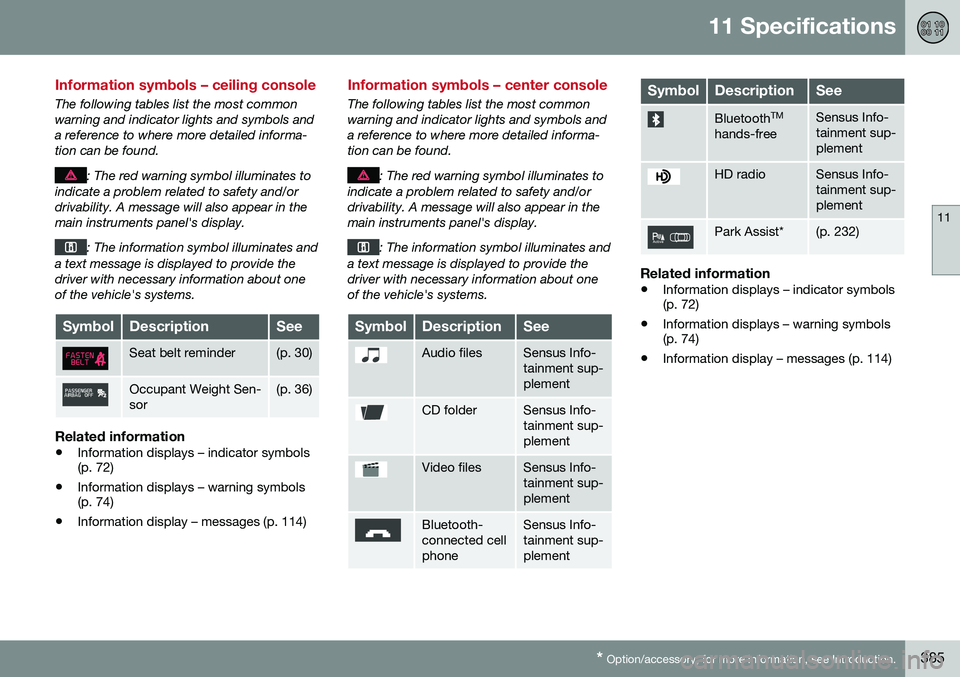
Information symbols – ceiling console
The following tables list the most common warning and indicator lights and symbols anda reference to where more detailed informa-tion can be found.
: The red warning symbol illuminates to
indicate a problem related to safety and/or drivability. A message will also appear in themain instruments panel's display.
: The information symbol illuminates and
a text message is displayed to provide the driver with necessary information about oneof the vehicle's systems.
SymbolDescriptionSee
Seat belt reminder(p. 30)
Occupant Weight Sen- sor(p. 36)
Related information
• Information displays – indicator symbols (p. 72)
• Information displays – warning symbols(p. 74)
• Information display – messages (p. 114)
Information symbols – center console
The following tables list the most common warning and indicator lights and symbols anda reference to where more detailed informa-tion can be found.
: The red warning symbol illuminates to
indicate a problem related to safety and/or drivability. A message will also appear in themain instruments panel's display.
: The information symbol illuminates and
a text message is displayed to provide the driver with necessary information about oneof the vehicle's systems.
SymbolDescriptionSee
Audio filesSensus Info- tainment sup-plement
CD folderSensus Info- tainment sup-plement
Video filesSensus Info- tainment sup-plement
Bluetooth- connected cellphoneSensus Info- tainment sup-plement
SymbolDescriptionSee
Bluetooth TM
hands-freeSensus Info- tainment sup-plement
HD radioSensus Info- tainment sup-plement
Park Assist*(p. 232)
Related information
• Information displays – indicator symbols (p. 72)
• Information displays – warning symbols(p. 74)
• Information display – messages (p. 114)
Page 388 of 398
12 Index
12
386
A
ABS (anti-lock brake system).................. 268
Accessory installation warning.................. 23
Active chassis system............................. 174
Active high beams..................................... 90Active yaw control........................... 174, 175
Adaptive brake lights............................... 268
Adaptive cruise control.................... 184, 185Airbags disconnecting the front passenger’s
side....................................................... 36
front...................................................... 32
inflatable curtain................................... 41
side impact........................................... 39
Air conditioning................................ 131, 132
Air distribution.................................. 127, 133
Air distribution table................................. 135
Air vents................................................... 127
Alarm........................................ 169, 170, 171
All Wheel Drive......................................... 264
Ambient temperature sensor..................... 77
Anti-freeze....................................... 275, 332Anti-lock brake system warning light......................................... 73
Anti-lock Brake System (ABS)................. 268 Approach lighting.............................. 97, 153
Auto-dim rearview mirror......................... 104
Automatic locking retractor....................... 47Automatic transmission
Eco (driving function).......................... 262
Geartronic........................................... 254
general description..................... 252, 254
oil........................................................ 379
shiftlock override................................ 256
Axle weight.............................................. 302
B
Battery maintenance............................... 347, 348
remote key, replacing......................... 158
replacing............................................. 348
specifications...................................... 381
start/stop............................................ 381
warning symbols................................. 346
Blind Spot Information System (BLIS)..... 240 Cross Traffic Alert (CTA)..................... 243
Booster cushion, integrated.......... 57, 59, 60
Booster cushions....................................... 54
Brake lights.............................................. 268 Brake system
ABS..................................................... 268
Brake pad inspection.......................... 266
checking fluid level............................. 333
emergency brake assistance.............. 269
fluid..................................................... 379
general information............................. 266
Hill Descent Control.................... 264, 265
Bulbs cargo area lighting.............................. 341
headlights........... 335, 336, 337, 338, 339
introduction......................................... 335
license plate lights.............................. 341
specifications...................................... 342
taillight................................................ 340
C
Camera, Park Assist................................ 236
Capacity weight....................................... 302Cargo area changing bulbs................................... 341
steel grid............................................. 147
Cargo area cover..................................... 147
Cargo area net......................................... 144
Cargo net................................................. 144
Catalytic converter................................... 280