instrument panel VOLVO XC60 2016 Owner´s Manual
[x] Cancel search | Manufacturer: VOLVO, Model Year: 2016, Model line: XC60, Model: VOLVO XC60 2016Pages: 398, PDF Size: 9.98 MB
Page 270 of 398
08 Starting and driving
08
268
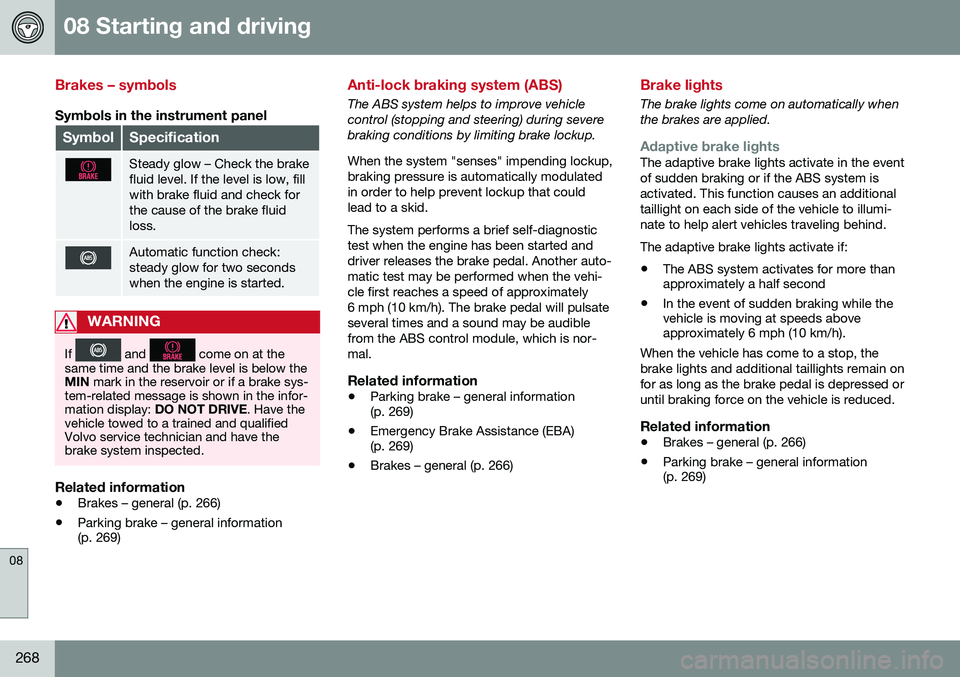
Brakes – symbols
Symbols in the instrument panel
SymbolSpecification
Steady glow – Check the brake fluid level. If the level is low, fillwith brake fluid and check forthe cause of the brake fluidloss.
Automatic function check: steady glow for two secondswhen the engine is started.
WARNING
If and come on at the
same time and the brake level is below the MIN mark in the reservoir or if a brake sys-
tem-related message is shown in the infor-mation display: DO NOT DRIVE . Have the
vehicle towed to a trained and qualifiedVolvo service technician and have thebrake system inspected.
Related information
• Brakes – general (p. 266)
• Parking brake – general information (p. 269)
Anti-lock braking system (ABS)
The ABS system helps to improve vehicle control (stopping and steering) during severebraking conditions by limiting brake lockup. When the system "senses" impending lockup, braking pressure is automatically modulatedin order to help prevent lockup that couldlead to a skid. The system performs a brief self-diagnostic test when the engine has been started anddriver releases the brake pedal. Another auto-matic test may be performed when the vehi-cle first reaches a speed of approximately6 mph (10 km/h). The brake pedal will pulsateseveral times and a sound may be audiblefrom the ABS control module, which is nor-mal.
Related information
• Parking brake – general information (p. 269)
• Emergency Brake Assistance (EBA)(p. 269)
• Brakes – general (p. 266)
Brake lights
The brake lights come on automatically when the brakes are applied.
Adaptive brake lightsThe adaptive brake lights activate in the event of sudden braking or if the ABS system isactivated. This function causes an additionaltaillight on each side of the vehicle to illumi-nate to help alert vehicles traveling behind. The adaptive brake lights activate if: • The ABS system activates for more than approximately a half second
• In the event of sudden braking while thevehicle is moving at speeds aboveapproximately 6 mph (10 km/h).
When the vehicle has come to a stop, the brake lights and additional taillights remain onfor as long as the brake pedal is depressed oruntil braking force on the vehicle is reduced.
Related information
• Brakes – general (p. 266)
• Parking brake – general information (p. 269)
Page 272 of 398
||
08 Starting and driving
08
270
Connect an auxiliary battery if the battery voltage is too low, see Jump starting (p. 251).
Parking on a hill
•If the vehicle is pointing uphill, turn the front wheels so that they point away fromthe curb.
• If the vehicle is pointing downhill, turn thefront wheels so that they point toward thecurb.
The parking brake should also be applied.
Related information
• Parking brake – applying (p. 270)
• Parking brake – releasing (p. 271)
• Parking brake – symbols and messages(p. 272)
• Brakes – general (p. 266)
Parking brake – applying
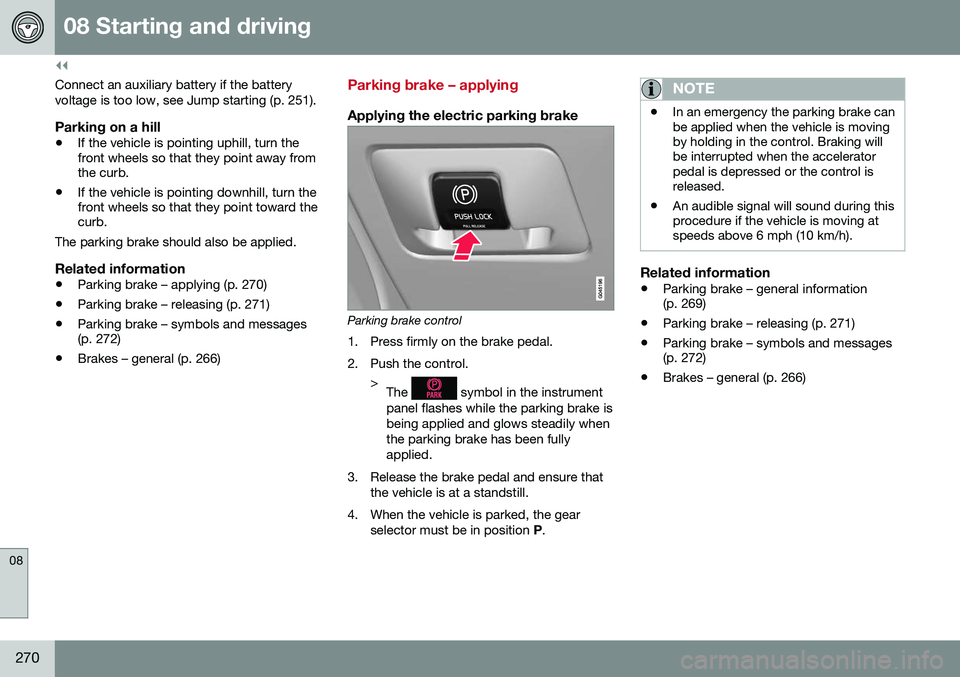
Applying the electric parking brake
Parking brake control
1. Press firmly on the brake pedal.
2. Push the control. >The
symbol in the instrument
panel flashes while the parking brake is being applied and glows steadily whenthe parking brake has been fullyapplied.
3. Release the brake pedal and ensure that the vehicle is at a standstill.
4. When the vehicle is parked, the gear selector must be in position P.
NOTE
• In an emergency the parking brake can be applied when the vehicle is movingby holding in the control. Braking willbe interrupted when the acceleratorpedal is depressed or the control isreleased.
• An audible signal will sound during thisprocedure if the vehicle is moving atspeeds above 6 mph (10 km/h).
Related information
•
Parking brake – general information (p. 269)
• Parking brake – releasing (p. 271)
• Parking brake – symbols and messages(p. 272)
• Brakes – general (p. 266)
Page 274 of 398
08 Starting and driving
08
272
Parking brake – symbols and messages
A text message can be erased by pressing briefly on the OK button on the turn signal
lever.
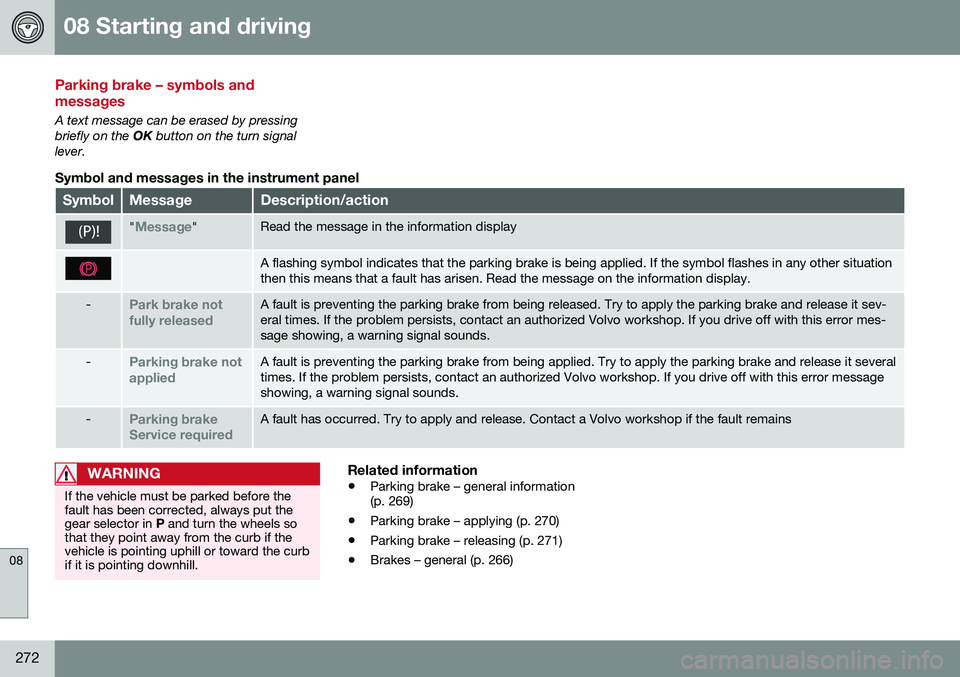
Symbol and messages in the instrument panel
SymbolMessageDescription/action
"Message"Read the message in the information display
A flashing symbol indicates that the parking brake is being applied. If the symbol flashes in any other situation then this means that a fault has arisen. Read the message on the information display.
-Park brake not fully releasedA fault is preventing the parking brake from being released. Try to apply the parking brake and release it sev- eral times. If the problem persists, contact an authorized Volvo workshop. If you drive off with this error mes-sage showing, a warning signal sounds.
-Parking brake not appliedA fault is preventing the parking brake from being applied. Try to apply the parking brake and release it several times. If the problem persists, contact an authorized Volvo workshop. If you drive off with this error messageshowing, a warning signal sounds.
-Parking brake Service requiredA fault has occurred. Try to apply and release. Contact a Volvo workshop if the fault remains
WARNING
If the vehicle must be parked before the fault has been corrected, always put thegear selector in P and turn the wheels so
that they point away from the curb if thevehicle is pointing uphill or toward the curbif it is pointing downhill.
Related information
• Parking brake – general information (p. 269)
• Parking brake – applying (p. 270)
• Parking brake – releasing (p. 271)
• Brakes – general (p. 266)
Page 278 of 398
08 Starting and driving
08
276
Refueling – fuel requirements
Volvo recommends the use of detergent gas- oline to control engine deposits.
Deposit control gasoline (detergentadditives)
Detergent gasoline is effective in keepinginjectors and intake valves clean. Consistentuse of deposit control gasolines will helpensure good drivability and fuel economy. Ifyou are not sure whether the gasoline con-tains deposit control additives, check with theservice station operator.
NOTE
Volvo does not recommend the use of external fuel injector cleaning systems.
Unleaded fuelEach Volvo has a three-way catalytic con- verter and must use only unleaded gasoline.U.S. and Canadian regulations require thatpumps delivering unleaded gasoline belabeled "UNLEADED". Only these pumpshave nozzles which fit your vehicle's fillerinlet. It is unlawful to dispense leaded fuelinto a vehicle labeled "unleaded gasolineonly". Leaded gasoline damages the three-way catalytic converter and the heated oxy-gen sensor system. Repeated use of leadedgasoline will lessen the effectiveness of theemission control system (p. 280) and could result in loss of emission warranty coverage.State and local vehicle inspection programswill make detection of misfueling easier, pos-sibly resulting in emission test failure for mis-fueled vehicles.
NOTE
Some U.S. and Canadian gasolines con- tain an octane enhancing additive calledmethyl-cyclopentadienyl manganese tri-carbonyl (MMT). If such fuels are used,your Emission Control System perform-ance may be affected, and the CheckEngine Light (malfunction indicator light)located on your instrument panel maylight. If this occurs, please return yourvehicle to a trained and qualified Volvoservice technician for service.
Gasoline containing alcohol and ethers, "Oxygenated fuels"
Some fuel suppliers sell gasoline containing "oxygenates" which are usually alcohols orethers. In some areas, state or local lawsrequire that the service pump be marked indi-cating use of alcohols or ethers. However,there are areas in which the pumps areunmarked. If you are not sure whether there isalcohol or ethers in the gasoline you buy,check with the service station operator. Tomeet seasonal air quality standards, someareas require the use of "oxygenated" fuel.
Volvo allows the use of the following "oxy-genated" fuels; however, the octane rat-ings (p. 277) listed must still be met.
Alcohol – EthanolFuels containing up to 10% ethanol by vol- ume may be used. Ethanol may also be refer-red to as Ethyl alcohol, or "Gasohol". Ethers – MTBE: Fuels containing up to 15% MTBE may be used.
MethanolDo not use gasolines containing methanol(methyl alcohol, wood alcohol). This practicecan result in vehicle performance deteriora-tion and can damage critical parts in the fuelsystem. Such damage may not be coveredunder the New Vehicle Limited Warranty.
Page 309 of 398
09 Wheels and tires
09
307
exists. When the malfunction indicator is illu- minated, the system may not be able todetect or signal low tire pressure as intended. System malfunctions may occur for a variety of reasons, including the installation ofreplacement or alternate tires or wheels onthe vehicle that prevent the tire pressuremonitoring system from functioning properly. Always check the system's malfunction tell- tale after replacing one or more tires orwheels on your vehicle to ensure that thereplacement or alternate tires and wheelsallow the system to continue to functionproperly.
NOTE
The system indicates low tire pressure but does not replace normal tire maintenance.For information on correct tire pressure,please refer to the tire inflation pressuretable (see Tire inflation – pressure table(p. 301)), the tire inflation pressure placardlocated on the driver's side B-pillar (thestructural member at the side of the vehi-cle, at the rear of the driver's door open-ing) or consult your Volvo retailer.
WARNING
Incorrect inflation pressure could lead to tire failure, resulting in a loss of control ofthe vehicle.
Tire Pressure Monitoring System (TPMS) – general information
TPMS uses sensors mounted in the tire valves to check inflation pressure levels. When thevehicle is moving at a speed of approximately20 mph (30 km/h) or faster, these sensorstransmit inflation pressure data to a receiverlocated in the vehicle.
NOTE
USA – FCC ID: KR5S180052050 This device complies with part 15 of the FCC rules. Operation is subject to the fol-lowing conditions: (1) This device may notcause harmful interference, and (2) thisdevice must accept any interferencereceived, including interference that maycause undesired operation.
When low inflation pressure is detected or if a sensor is not functioning properly, TPMS will light up the tire pressure warning light (
)
(also referred to as a telltale) in the instrument panel and will display one of the following messages:
Tire pressure low, Tire needs
air now or Tire press. syst Service
required.
NOTE
If a malfunction occurs in the system, the tire pressure warning light will flash forapproximately 1 minute and then remain illuminated.
Tire press. syst Service
required will be displayed.
Related information
• Tire Pressure Monitoring System (TPMS) – recalibrating (p. 309)
• Tire Pressure Monitoring System (TPMS)– messages (p. 310)
• Tire Pressure Monitoring System (TPMS)– activating/deactivating (p. 309)
• Tire Pressure Monitoring System (TPMS)– changing wheels (p. 308)
Page 310 of 398
09 Wheels and tires
09
308
Tire Pressure Monitoring System (TPMS) – changing wheels
Please keep the following in mind when changing or replacing the factory installedTPMS wheels/tires on the vehicle: •Not all aftermarket wheels are equipped with TPMS sensors in the valves.
• If the vehicle is equipped with a tempo-rary spare tire, this tire does not have aTPMS sensor.
• If wheels without TPMS sensors aremounted on the vehicle, a text messagewill displayed in the instrument paneleach time the vehicle is driven above20 mph (30 km/h) for 10 minutes or more.
• Once TPMS sensors are properly instal-led, the warning message should notreappear. If the message is still displayed,drive the vehicle for several minutes at aspeed of 20 mph (30 km/h) or faster toerase the message.
• Volvo recommends that TPMS sensorsbe fitted on all wheels used on the vehi-cle, including winter tires. Volvo does notrecommend moving sensors back andforth between sets of wheels.
CAUTION
When inflating tires with TPMS sensors, press the pump's mouthpiece straightonto the valve to help avoid bending orotherwise damaging the valve.
CAUTION
• After inflating the tires, always reinstall the valve cap to help avoid damage tothe valve from dirt, gravel, etc.
• Use plastic valve caps only. Metalcaps could corrode and become diffi-cult to remove.
NOTE
•
If you change to tires with a different dimension than the factory-installedones, the TPMS system must bereconfigured for these tires. This mustbe done by a trained and qualifiedVolvo service technician.
• If a tire is changed, or if the TPMS sen-sor is moved to another wheel, thesensor's seal, nut, and valve coreshould be replaced.
• When installing TPMS sensors, thevehicle must be parked for at least15 minutes with the ignition off. If thevehicle is driven within 15 minutes, aTPMS error message will be displayed.
Related information
•
Tire Pressure Monitoring System (TPMS) – general information (p. 307)
• Tire Pressure Monitoring System (TPMS)– recalibrating (p. 309)
• Tire Pressure Monitoring System (TPMS)– messages (p. 310)
• Tire Pressure Monitoring System (TPMS)– activating/deactivating (p. 309)
Page 312 of 398
09 Wheels and tires
09
310
Tire Pressure Monitoring System (TPMS) – messages
Erasing warning messagesWhen a low tire pressure warning message has been displayed and the tire pressure warning light in the instrument panell (
)
has come on:
1. Use a tire pressure gauge to check the inflation pressure of all four tires.
2. Re-inflate the tire(s) to the correct pres- sure (consult the tire pressure placard located on the driver's side B-pillar (thestructural member at the side of the vehi-cle, at the rear of the driver's door open-ing) or the inflation pressure table, seeTire inflation – pressure table (p. 301).
3. In certain cases, it may be necessary to drive the vehicle for several minutes at aspeed of 20 mph (30 km/h) or faster. Thiswill erase the warning text and the telltalewill go out.
NOTE
•Tire monitoring systems use a tem- perature compensated pressure value.This pressure value is dependent ontire temperature and ambient tempera-ture, which can differ from the recom-mended cold tire pressure in the tireinflation table and on the tire pressureplacard located on the driver's side B-pillar (the structural member at theside of the vehicle, at the rear of thedriver's door opening). This meansthat it may sometimes be necessary toinflate them slightly above the recom-mended cold pressure value(approx. 3-4 psi or 0.2-0.3 bar) in orderto reset a low tire pressure warning.
• To help avoid incorrect tire inflationpressure, if possible only inflate thetires when they are cold. The tires areconsidered to be cold when they havethe same temperature as the sur-rounding (ambient) air. This tempera-ture is normally reached after the vehi-cle has been parked for at least3 hours. After driving a distance ofapproximately 1 mile (1.6 km), the tiresare considered to be hot.
CAUTION
•
After inflating the tires, always reinstall the valve cap to help avoid damage tothe valve from dirt, gravel, etc.
• Use plastic valve caps only. Metalcaps could corrode and become diffi-cult to remove.
WARNING
•Incorrect inflation pressure could lead to tire failure, resulting in a loss of con-trol of the vehicle.
• Tire monitoring systems cannot indi-cate sudden tire damage caused byexternal factors (e.g., a blowout) inadvance.
Related information
•
Tire Pressure Monitoring System (TPMS) – general information (p. 307)
• Tire Pressure Monitoring System (TPMS)– recalibrating (p. 309)
• Tire Pressure Monitoring System (TPMS)– activating/deactivating (p. 309)
• Tire Pressure Monitoring System (TPMS)– changing wheels (p. 308)
• Tire pressure monitoring - introduction(p. 306)
• Tire inflation – pressure table (p. 301)
Page 313 of 398
09 Wheels and tires
09
}}
311
Tire Monitor - introduction
Tire Monitor uses the rotational speed of the tires in combination with signal analysis of theABS sensor signals to determine if they areproperly inflated. When a tire is under-inflated, its diameter (and consequently also its rotational speed)changes. By comparing the individual tireswith each other it is possible to determine ifone or more tires are under inflated. When low inflation pressure is detected or if the system is not functioning properly, TireMonitor will light up the tire pressure warning light (
) (also referred to as a telltale) in
the instrument panel and will display one of the following messages in the text window, for example:
Tire pressure low Check rear
right tire6 or Tire press. syst Service
required.
If two or more tires have low pressure or if the system cannot determine which tire has low pressure, a general text (
Tire pressure low
Check tires) will be displayed.
NOTE
If a malfunction occurs in the system, the tire pressure warning light will flash forapproximately 1 minute and then remain illuminated.
Tire press. syst Service
required will be displayed.
NOTE
The system indicates low tire pressure but does not replace normal tire maintenance.For information on correct tire pressure,please refer to the tire inflation pressuretable (see Tire inflation – pressure table(p. 301)), the tire inflation pressure placardlocated on the driver's side B-pillar (thestructural member at the side of the vehi-cle, at the rear of the driver's door open-ing) or consult your Volvo retailer.
Related information
• Tire pressure monitoring - introduction (p. 306)
Calibrating Tire Monitor
In order for Tire Monitor to work correctly, tire pressure reference values must be set. Thismust be done each time wheels or tire pres-sures are changed.
Calibration1. Switch off the engine.
2. Inflate the tires to the desired pressure
(consult tire pressure placard located on the driver's side B-pillar (the structuralmember at the side of the vehicle) andput the ignition in mode II, see Ignition
modes (p. 79).
3. Press the MY CAR button on the center
console control panel and select
Settings
Car settingsTire monitoring.
4. Press OK/MENU , select
Calibrate tire
pressure and press OK/MENU again.
5. Drive away. > The calibration process will be comple-ted while driving and will be interrupted if the vehicle is parked and the engineis switched off. Calibration continuesautomatically when driving resumes.The system will not give any confirma-tion when calibration is finishedalthough it will state if calibration fails.
6That last part of this message varies, depending on the tire(s) effected.
Page 314 of 398
09 Wheels and tires
09
312
The new reference values will be used until steps 1-5 stated above are repeated.
NOTE
Always remember to calibrate Tire Monitor when the wheels have been changed orthe tire pressure has been correctedaccording to tire pressure placard or tirepressure table. If correct reference valueshave not been set, the system cannotissue low tire pressure alerts correctly.
Tire Monitor status information
The current status of the system and the tires is indicated by color-coded graphics. This status can be displayed by pressing the MY CAR button on the center console and
going to
SettingsCar settingsTire
monitoring.
The following color-coded graphics indicate:
• All green
: the system is operational and
all tire pressures are at or above the rec- ommended levels.
• One yellow wheel
: the tire indicated is
under-inflated.
• All wheels yellow
: two or more tires are
under-inflated
• All wheels gray
: the system is currently
unavailable. It might be necessary todrive at a speed of at least 20 mph(30 km/h) for several minutes for the sys-tem to become operational.
• All wheels gray in combination with the message
Tire press. syst Service
required and the telltale in the instru-
ment panel (
) is illuminated : the
system is not functioning correctly. Have it checked by a trained and qualifiedVolvo service technician.
• All wheels gray in combination with the message
Tire press. syst currently
unavailable and the telltale in the
instrument panel (
) is illuminated :the system is temporarily unavailable. It should become operational again shortly.
Related information
•
Tire Monitor – messages (p. 313)
Page 315 of 398
09 Wheels and tires
09
313
Tire Monitor – messages
When low tire pressure has been detected, a message will be displayed and the tire pres-sure warning telltale in the instrument panel
will illuminate.
Erasing warning messagesTo erase a low tire pressure message and turn off the telltale:
1. Use a tire pressure gauge to check theinflation pressure of all four tires (see the article "Tire inflation – checking pres-sure").
2. Re-inflate the tires to the correct pressure (consult the tire pressure placard locatedon the driver's side B-pillar (the structuralmember at the side of the vehicle, at therear of the driver's door opening) or theinflation pressure table, see Tire inflation –pressure table (p. 301).
3. Recalibrate Tire Monitor, see Calibrating Tire Monitor (p. 311).
NOTE
To help avoid incorrect tire inflation pres- sure, only inflate the tires when they arecold. The tires are considered to be coldwhen they have the same temperature asthe surrounding (ambient) air. This tem-perature is normally reached after the vehi-cle has been parked for at least 3 hours.After driving a distance of approximately1 mile (1.6 km), the tires are considered tobe hot.
CAUTION
•After inflating the tires, always reinstall the valve cap to help avoid damage tothe valve from dirt, gravel, etc.
• Use plastic valve caps only. Metalcaps could corrode and become diffi-cult to remove.
WARNING
•
Incorrect inflation pressure could lead to tire failure, resulting in a loss of con-trol of the vehicle.
• Tire monitoring systems cannot indi-cate sudden tire damage caused byexternal factors (e.g., a blowout) inadvance.
Related information
•
Tire Monitor – messages (p. 313)
• Tire inflation – checking pressure (p. 298)
• Tire inflation – pressure table (p. 301)