info displays VOLVO XC60 2016 Owner´s Manual
[x] Cancel search | Manufacturer: VOLVO, Model Year: 2016, Model line: XC60, Model: VOLVO XC60 2016Pages: 398, PDF Size: 9.98 MB
Page 5 of 398
Contents
* Option/accessory, for more information, see Introduction.3
03
03 Instruments and controls
Instrument overview ................................. 64
Information displays – introduction........... 68
Eco Guide* and Power Meter*.................. 71
Information displays – indicator symbols. 72
Information displays – warning symbols... 74
My Car – introduction............................... 76Information displays – ambient tempera-
ture sensor................................................ 77 Information displays – trip odometer and
clock......................................................... 78
Inserting/removing remote key................. 78
Ignition modes.......................................... 79
Front seats................................................ 80
Front seats – folding backrest*................. 81
Front seats – power seat.......................... 81Key memory – power driver's seat* and
door mirrors.............................................. 83
Rear seats – head restraints..................... 84
Rear seats – folding backrest................... 86
Steering wheel.......................................... 87
Electrically heated* steering wheel........... 88
Lighting panel........................................... 89
High/low beam headlights........................ 90
Active high beams (AHB)*......................... 90
03
Tunnel detection (models with the rain
sensor* only)............................................. 92
Active Bending Lights (ABL)*.................... 92
Auxiliary lights*.......................................... 93
Instrument and "theater" lighting.............. 93
Parking lights............................................ 93
Rear fog lights........................................... 94
Hazard warning flashers........................... 94
Turn signals............................................... 95
Front interior lighting................................. 96
Rear interior lighting.................................. 97
Home safe lighting.................................... 97
Approach lighting...................................... 97
Windshield wipers..................................... 98
Rain sensor*.............................................. 98
Windshield washer.................................... 99
Tailgate wiper/washer............................. 100
Power windows....................................... 100
Power door mirrors................................. 102Power door mirrors – automatic tilting/
retraction................................................. 103 Heated windshield*, rear window and
door mirror defrosters............................. 104
Interior rearview mirror............................ 104
03
Digital compass*..................................... 105
Panoramic roof* – introduction............... 106
Panoramic roof* – operation................... 107 HomeLink ®
Wireless Control System* –
introduction............................................. 109HomeLink ®
Wireless Control System* –
programming........................................... 110
Volvo Sensus.......................................... 112
Information display – menu controls....... 113
Information display – menu overview..... 114
Information display – messages............. 114
Trip computer – introduction ................. 115Trip computer – functions, analog instru-
ment panel.............................................. 117 Trip computer – functions, digital instru-
ment panel.............................................. 120 Trip computer – Supplementary informa-
tion.......................................................... 122
Trip computer – Trip statistics................ 123
Page 16 of 398
01 Introduction
01
14
About this manual
Reading your owner's manual is a good way to familiarize yourself with the features andsystems in your vehicle.• Before you operate your vehicle for the first time, we recommend that you lookthrough the information found in thechapters "Your Driving Environment" and"During Your Trip."
• Information contained in the balance ofthe manual is extremely useful and shouldbe read after operating the vehicle for thefirst time.
• The manual is structured so that it can beused for reference. For this reason, itshould be kept in the vehicle for readyaccess.
On-board owner's manualWhen the printed manual refers to the on- board owner's manual, this pertains to theinformation displayed on the center consolescreen. The language used on the center console screen and instrument panel can be changed in the
MY CAR system settings menu.
There are four ways of finding information articles in the on-board owner's manual:
•
Searching: search for an article.
•
Categories: All of the articles are sorted
by category. •
Favorites: Quick access to frequently
read articles.
•
Quick Guide: A selection of articles cov-
ering commonly used functions.
Select the symbol in the lower right-hand cor- ner for additional information about the on-board owner's manual.
NOTE
• The on-board owner's manual cannot be accessed while the vehicle is mov-ing.
• Specifications regarding your vehicleare not found in the on-board informa-tion. This information is listed in theprinted owner's manual.
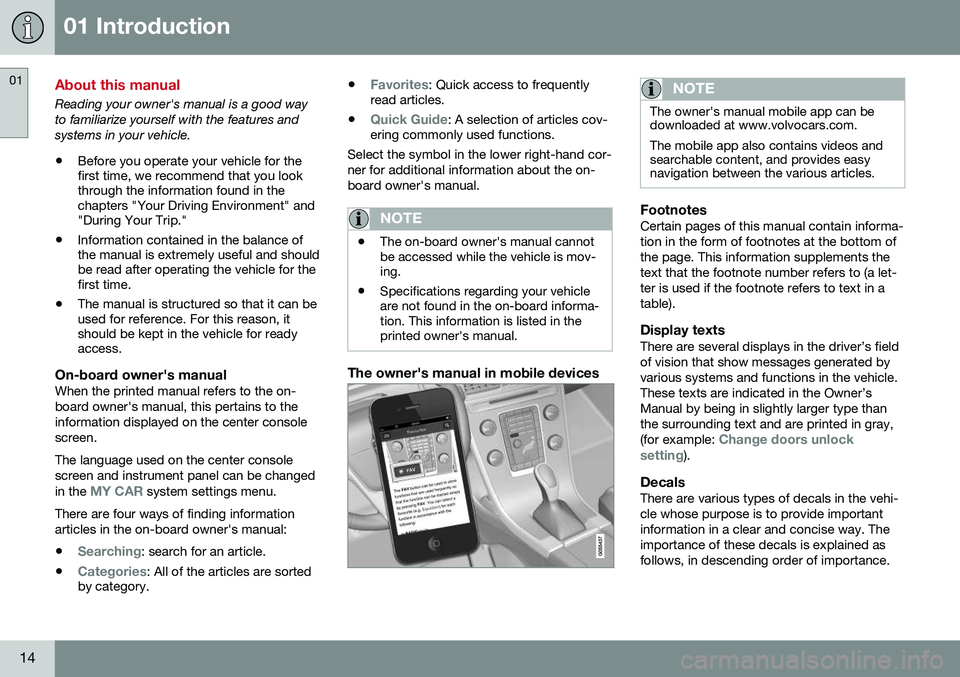
The owner's manual in mobile devices
NOTE
The owner's manual mobile app can be downloaded at www.volvocars.com. The mobile app also contains videos and searchable content, and provides easynavigation between the various articles.
FootnotesCertain pages of this manual contain informa- tion in the form of footnotes at the bottom ofthe page. This information supplements thetext that the footnote number refers to (a let-ter is used if the footnote refers to text in atable).
Display textsThere are several displays in the driver’s fieldof vision that show messages generated byvarious systems and functions in the vehicle.These texts are indicated in the Owner’sManual by being in slightly larger type thanthe surrounding text and are printed in gray, (for example:
Change doors unlock
setting).
DecalsThere are various types of decals in the vehi- cle whose purpose is to provide importantinformation in a clear and concise way. Theimportance of these decals is explained asfollows, in descending order of importance.
Page 33 of 398
02 Safety
02
}}
* Option/accessory, for more information, see Introduction.31
a distance as possible between their belly and the steering wheel.
Related information
•
Seat belts – buckling/unbuckling (p. 29)
• Seat belt reminder (p. 30)
• Child restraints (p. 47)
Supplemental Restraint System (SRS)
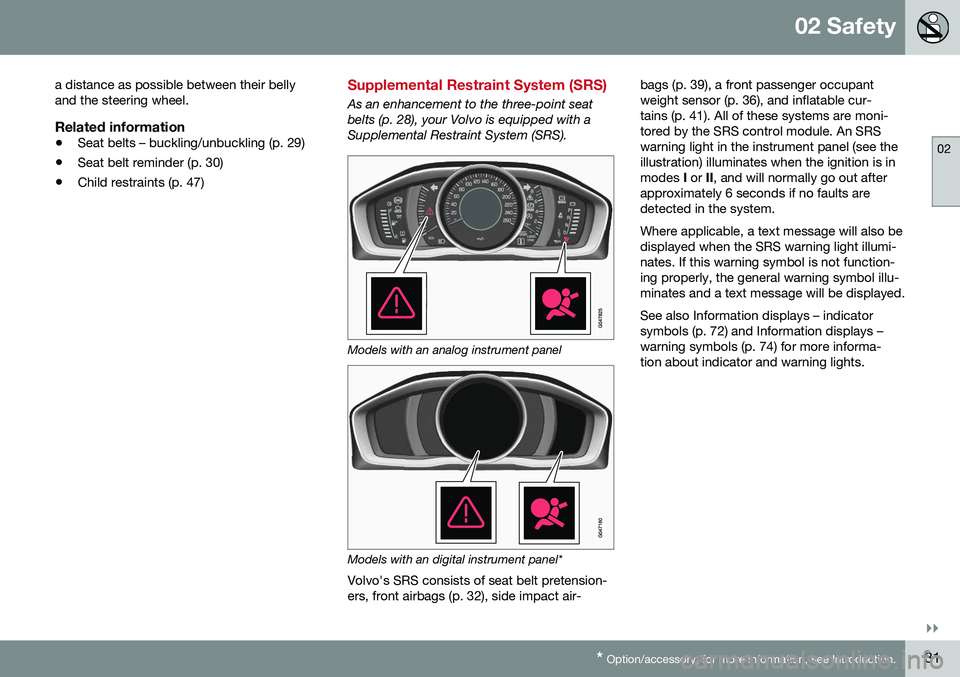
As an enhancement to the three-point seat belts (p. 28), your Volvo is equipped with aSupplemental Restraint System (SRS).
Models with an analog instrument panel
Models with an digital instrument panel*
Volvo's SRS consists of seat belt pretension- ers, front airbags (p. 32), side impact air- bags (p. 39), a front passenger occupantweight sensor (p. 36), and inflatable cur-tains (p. 41). All of these systems are moni-tored by the SRS control module. An SRSwarning light in the instrument panel (see theillustration) illuminates when the ignition is inmodes
I or II, and will normally go out after
approximately 6 seconds if no faults aredetected in the system. Where applicable, a text message will also be displayed when the SRS warning light illumi-nates. If this warning symbol is not function-ing properly, the general warning symbol illu-minates and a text message will be displayed. See also Information displays – indicator symbols (p. 72) and Information displays –warning symbols (p. 74) for more informa-tion about indicator and warning lights.
Page 69 of 398
03 Instruments and controls
03
* Option/accessory, for more information, see Introduction.67
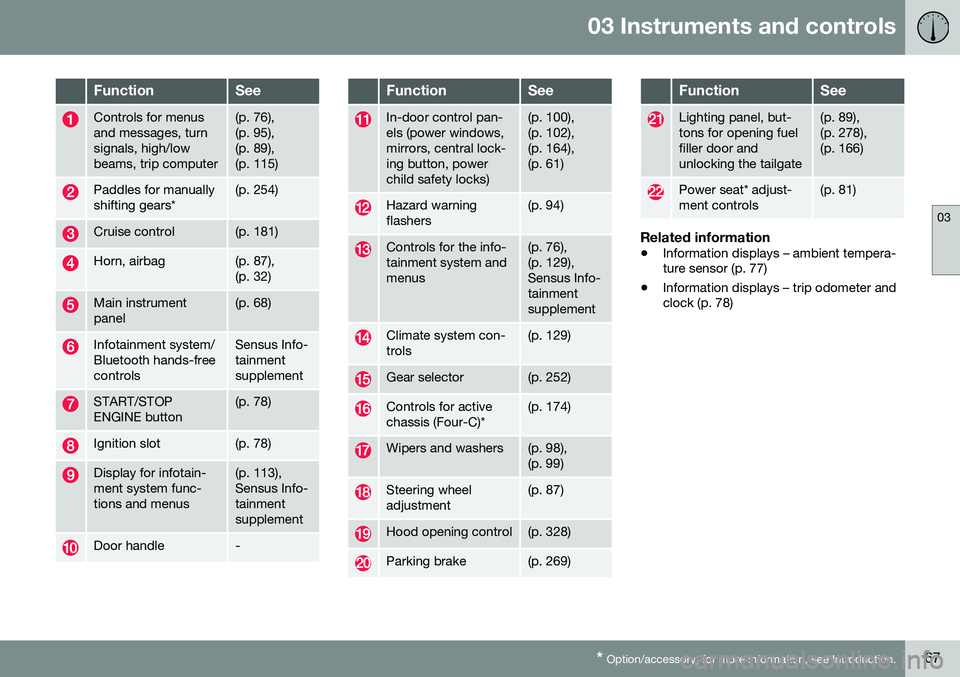
FunctionSee
Controls for menus and messages, turnsignals, high/lowbeams, trip computer(p. 76), (p. 95),(p. 89),(p. 115)
Paddles for manually shifting gears*(p. 254)
Cruise control(p. 181)
Horn, airbag(p. 87), (p. 32)
Main instrument panel(p. 68)
Infotainment system/ Bluetooth hands-freecontrolsSensus Info- tainmentsupplement
START/STOP ENGINE button(p. 78)
Ignition slot(p. 78)
Display for infotain- ment system func-tions and menus(p. 113), Sensus Info-tainmentsupplement
Door handle-
FunctionSee
In-door control pan- els (power windows,mirrors, central lock-ing button, powerchild safety locks)(p. 100), (p. 102),(p. 164),(p. 61)
Hazard warning flashers(p. 94)
Controls for the info- tainment system andmenus(p. 76), (p. 129),Sensus Info-tainmentsupplement
Climate system con- trols(p. 129)
Gear selector(p. 252)
Controls for active chassis (Four-C)*(p. 174)
Wipers and washers(p. 98), (p. 99)
Steering wheel adjustment(p. 87)
Hood opening control(p. 328)
Parking brake(p. 269)
FunctionSee
Lighting panel, but- tons for opening fuelfiller door andunlocking the tailgate(p. 89), (p. 278),(p. 166)
Power seat* adjust- ment controls(p. 81)
Related information
• Information displays – ambient tempera- ture sensor (p. 77)
• Information displays – trip odometer andclock (p. 78)
Page 70 of 398
03 Instruments and controls
03
68* Option/accessory, for more information, see Introduction.
Information displays – introduction
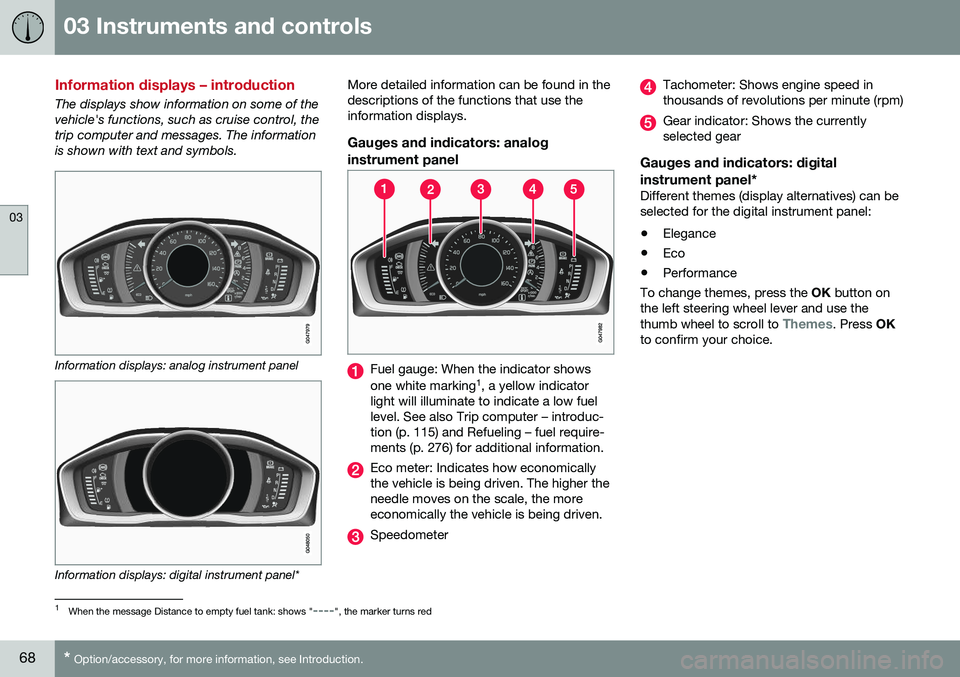
The displays show information on some of the vehicle's functions, such as cruise control, thetrip computer and messages. The informationis shown with text and symbols.
Information displays: analog instrument panel
Information displays: digital instrument panel* More detailed information can be found in the descriptions of the functions that use theinformation displays.
Gauges and indicators: analog
instrument panel
Fuel gauge: When the indicator shows one white marking 1
, a yellow indicator
light will illuminate to indicate a low fuel level. See also Trip computer – introduc-tion (p. 115) and Refueling – fuel require-ments (p. 276) for additional information.
Eco meter: Indicates how economically the vehicle is being driven. The higher theneedle moves on the scale, the moreeconomically the vehicle is being driven.
Speedometer
Tachometer: Shows engine speed in thousands of revolutions per minute (rpm)
Gear indicator: Shows the currently selected gear
Gauges and indicators: digital instrument panel*
Different themes (display alternatives) can be selected for the digital instrument panel: • Elegance
• Eco
• Performance
To change themes, press the OK button on
the left steering wheel lever and use the thumb wheel to scroll to
Themes. Press OK
to confirm your choice.
1 When the message Distance to empty fuel tank: shows "----", the marker turns red
Page 72 of 398
||
03 Instruments and controls
03
70
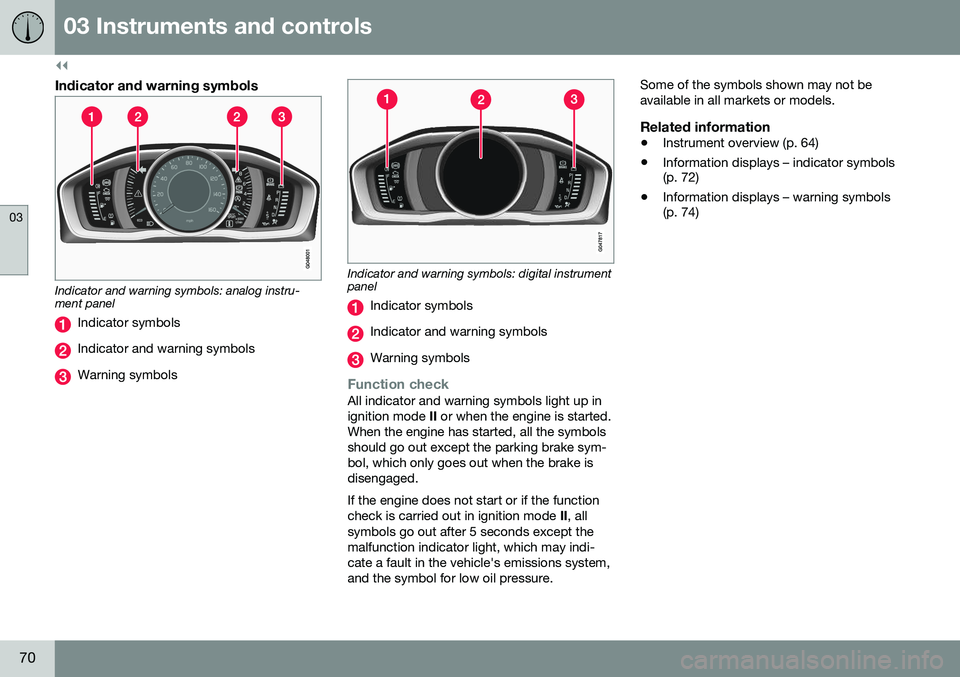
Indicator and warning symbols
Indicator and warning symbols: analog instru- ment panel
Indicator symbols
Indicator and warning symbols
Warning symbols
Indicator and warning symbols: digital instrument panel
Indicator symbols
Indicator and warning symbols
Warning symbols
Function checkAll indicator and warning symbols light up in ignition mode II or when the engine is started.
When the engine has started, all the symbolsshould go out except the parking brake sym-bol, which only goes out when the brake isdisengaged. If the engine does not start or if the function check is carried out in ignition mode II, all
symbols go out after 5 seconds except themalfunction indicator light, which may indi-cate a fault in the vehicle's emissions system,and the symbol for low oil pressure. Some of the symbols shown may not beavailable in all markets or models.
Related information
•
Instrument overview (p. 64)
• Information displays – indicator symbols (p. 72)
• Information displays – warning symbols(p. 74)
Page 73 of 398
03 Instruments and controls
03
}}
* Option/accessory, for more information, see Introduction.71
Eco Guide* and Power Meter*
Eco guide and Power guide are two gauges in the instrument panel that help improve drivingeconomy. The vehicle also stores driving-related statis- tics in the form of a bar graph, see Trip com-puter – Trip statistics (p. 123).
Introduction
To display or remove these functions from theinstrument panel, select the "Eco" theme (seeInformation displays – introduction (p. 68)). Driving statistics are also stored and can be displayed in the form of a bar chart (see Tripcomputer – Trip statistics (p. 123)).
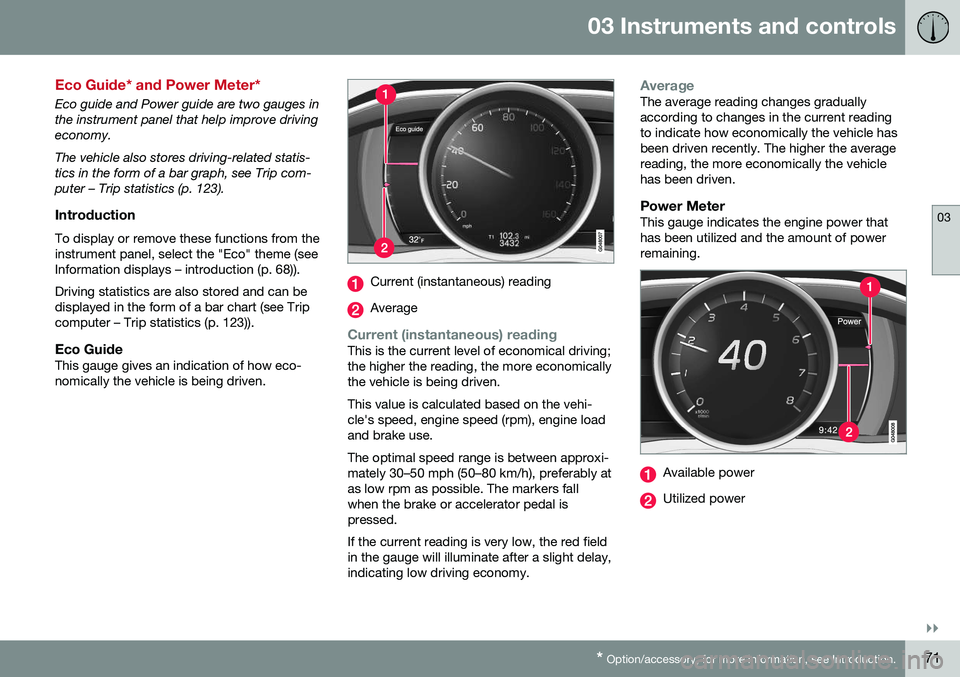
Eco GuideThis gauge gives an indication of how eco-nomically the vehicle is being driven.
Current (instantaneous) reading
Average
Current (instantaneous) readingThis is the current level of economical driving; the higher the reading, the more economicallythe vehicle is being driven. This value is calculated based on the vehi- cle's speed, engine speed (rpm), engine loadand brake use. The optimal speed range is between approxi- mately 30–50 mph (50–80 km/h), preferably atas low rpm as possible. The markers fallwhen the brake or accelerator pedal ispressed. If the current reading is very low, the red field in the gauge will illuminate after a slight delay,indicating low driving economy.
AverageThe average reading changes gradually according to changes in the current readingto indicate how economically the vehicle hasbeen driven recently. The higher the averagereading, the more economically the vehiclehas been driven.
Power MeterThis gauge indicates the engine power thathas been utilized and the amount of powerremaining.
Available power
Utilized power
Page 74 of 398
||
03 Instruments and controls
03
72* Option/accessory, for more information, see Introduction.
Available powerThe smaller, upper indicator shows the engine's available power 2
. The higher the
reading on the scale, the greater the amount of power remaining in the current gear.
Utilized powerThe larger, lower indicator shows the amount of engine power that has been utilized 2
. The
higher the reading on the scale, the greater the amount of power that is being utilized. The larger the gap between the two indica- tors, the greater the amount of power remain-ing.
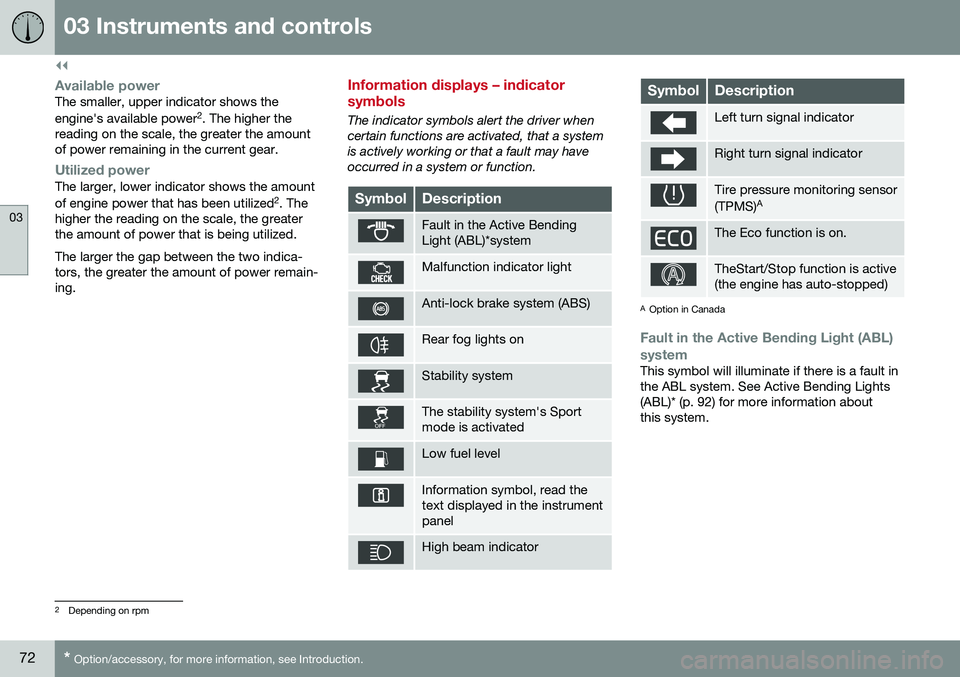
Information displays – indicator symbols
The indicator symbols alert the driver when certain functions are activated, that a systemis actively working or that a fault may haveoccurred in a system or function.
SymbolDescription
Fault in the Active Bending Light (ABL)*system
Malfunction indicator light
Anti-lock brake system (ABS)
Rear fog lights on
Stability system
The stability system's Sport mode is activated
Low fuel level
Information symbol, read the text displayed in the instrumentpanel
High beam indicator
SymbolDescription
Left turn signal indicator
Right turn signal indicator
Tire pressure monitoring sensor (TPMS) A
The Eco function is on.
TheStart/Stop function is active (the engine has auto-stopped)
A
Option in Canada
Fault in the Active Bending Light (ABL)
system
This symbol will illuminate if there is a fault in the ABL system. See Active Bending Lights(ABL)* (p. 92) for more information aboutthis system.
2 Depending on rpm
Page 76 of 398
||
03 Instruments and controls
03
74* Option/accessory, for more information, see Introduction.
Start/stop*The symbol illuminates when the engine has auto-stopped.
Related information
• Information displays – introduction (p. 68)
• Information displays – warning symbols (p. 74)
Information displays – warning symbols
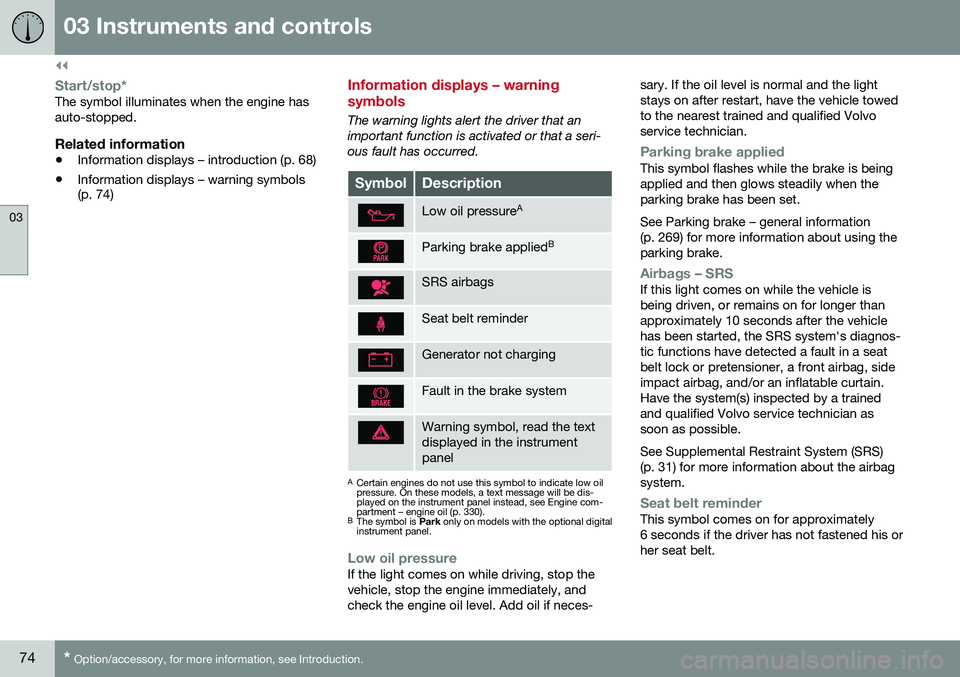
The warning lights alert the driver that an important function is activated or that a seri-ous fault has occurred.
SymbolDescription
Low oil pressure A
Parking brake applied B
SRS airbags
Seat belt reminder
Generator not charging
Fault in the brake system
Warning symbol, read the text displayed in the instrumentpanel
A
Certain engines do not use this symbol to indicate low oil pressure. On these models, a text message will be dis-played on the instrument panel instead, see Engine com-partment – engine oil (p. 330).
B The symbol is Park only on models with the optional digital
instrument panel.
Low oil pressureIf the light comes on while driving, stop the vehicle, stop the engine immediately, andcheck the engine oil level. Add oil if neces- sary. If the oil level is normal and the lightstays on after restart, have the vehicle towedto the nearest trained and qualified Volvoservice technician.
Parking brake appliedThis symbol flashes while the brake is being applied and then glows steadily when theparking brake has been set. See Parking brake – general information (p. 269) for more information about using theparking brake.
Airbags – SRSIf this light comes on while the vehicle is being driven, or remains on for longer thanapproximately 10 seconds after the vehiclehas been started, the SRS system's diagnos-tic functions have detected a fault in a seatbelt lock or pretensioner, a front airbag, sideimpact airbag, and/or an inflatable curtain.Have the system(s) inspected by a trainedand qualified Volvo service technician assoon as possible. See Supplemental Restraint System (SRS) (p. 31) for more information about the airbagsystem.
Seat belt reminderThis symbol comes on for approximately 6 seconds if the driver has not fastened his orher seat belt.
Page 78 of 398
||
03 Instruments and controls
03
76
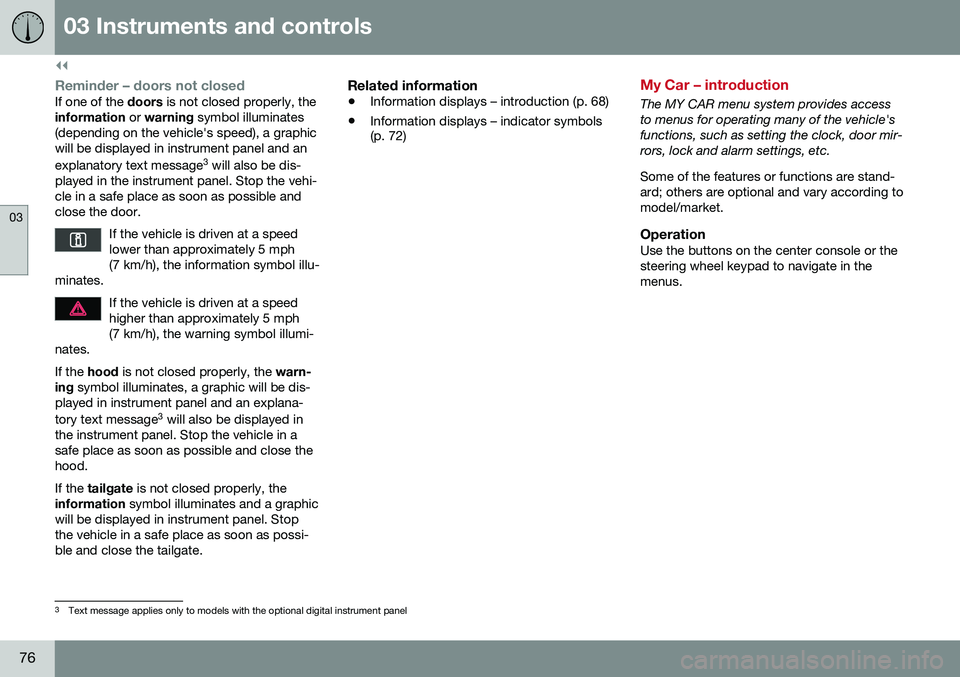
Reminder – doors not closedIf one of the doors is not closed properly, the
information or warning symbol illuminates
(depending on the vehicle's speed), a graphic will be displayed in instrument panel and an explanatory text message 3
will also be dis-
played in the instrument panel. Stop the vehi- cle in a safe place as soon as possible andclose the door.
If the vehicle is driven at a speedlower than approximately 5 mph(7 km/h), the information symbol illu-
minates.
If the vehicle is driven at a speed higher than approximately 5 mph(7 km/h), the warning symbol illumi-
nates.
If the hood is not closed properly, the warn-
ing symbol illuminates, a graphic will be dis-
played in instrument panel and an explana- tory text message 3
will also be displayed in
the instrument panel. Stop the vehicle in a safe place as soon as possible and close thehood. If the tailgate is not closed properly, the
information symbol illuminates and a graphic
will be displayed in instrument panel. Stop the vehicle in a safe place as soon as possi-ble and close the tailgate.
Related information
• Information displays – introduction (p. 68)
• Information displays – indicator symbols (p. 72)
My Car – introduction
The MY CAR menu system provides access to menus for operating many of the vehicle'sfunctions, such as setting the clock, door mir-rors, lock and alarm settings, etc. Some of the features or functions are stand- ard; others are optional and vary according tomodel/market.
OperationUse the buttons on the center console or thesteering wheel keypad to navigate in themenus.
3
Text message applies only to models with the optional digital instrument panel