power steering VOLVO XC60 2016 Owner´s Manual
[x] Cancel search | Manufacturer: VOLVO, Model Year: 2016, Model line: XC60, Model: VOLVO XC60 2016Pages: 398, PDF Size: 9.98 MB
Page 5 of 398
Contents
* Option/accessory, for more information, see Introduction.3
03
03 Instruments and controls
Instrument overview ................................. 64
Information displays – introduction........... 68
Eco Guide* and Power Meter*.................. 71
Information displays – indicator symbols. 72
Information displays – warning symbols... 74
My Car – introduction............................... 76Information displays – ambient tempera-
ture sensor................................................ 77 Information displays – trip odometer and
clock......................................................... 78
Inserting/removing remote key................. 78
Ignition modes.......................................... 79
Front seats................................................ 80
Front seats – folding backrest*................. 81
Front seats – power seat.......................... 81Key memory – power driver's seat* and
door mirrors.............................................. 83
Rear seats – head restraints..................... 84
Rear seats – folding backrest................... 86
Steering wheel.......................................... 87
Electrically heated* steering wheel........... 88
Lighting panel........................................... 89
High/low beam headlights........................ 90
Active high beams (AHB)*......................... 90
03
Tunnel detection (models with the rain
sensor* only)............................................. 92
Active Bending Lights (ABL)*.................... 92
Auxiliary lights*.......................................... 93
Instrument and "theater" lighting.............. 93
Parking lights............................................ 93
Rear fog lights........................................... 94
Hazard warning flashers........................... 94
Turn signals............................................... 95
Front interior lighting................................. 96
Rear interior lighting.................................. 97
Home safe lighting.................................... 97
Approach lighting...................................... 97
Windshield wipers..................................... 98
Rain sensor*.............................................. 98
Windshield washer.................................... 99
Tailgate wiper/washer............................. 100
Power windows....................................... 100
Power door mirrors................................. 102Power door mirrors – automatic tilting/
retraction................................................. 103 Heated windshield*, rear window and
door mirror defrosters............................. 104
Interior rearview mirror............................ 104
03
Digital compass*..................................... 105
Panoramic roof* – introduction............... 106
Panoramic roof* – operation................... 107 HomeLink ®
Wireless Control System* –
introduction............................................. 109HomeLink ®
Wireless Control System* –
programming........................................... 110
Volvo Sensus.......................................... 112
Information display – menu controls....... 113
Information display – menu overview..... 114
Information display – messages............. 114
Trip computer – introduction ................. 115Trip computer – functions, analog instru-
ment panel.............................................. 117 Trip computer – functions, digital instru-
ment panel.............................................. 120 Trip computer – Supplementary informa-
tion.......................................................... 122
Trip computer – Trip statistics................ 123
Page 7 of 398
Contents
* Option/accessory, for more information, see Introduction.5
06
Locking/unlocking – tailgate................... 166 Power tailgate – automatic opening/clos-
ing........................................................... 167
Power tailgate – programming................ 168
Power tailgate – interruption................... 168
Power tailgate – manual opening/closing 169
Alarm – general information.................... 169
Alarm indicator........................................ 170
Alarm – arming/disarming....................... 170
Alarm signal............................................ 171
Alarm – turning off................................... 171
Alarm-related functions........................... 171
07
07 Driver support
Active chassis* (Four C).......................... 174
Stability system – introduction................ 174
Stability system – operation.................... 175Stability system – symbols and mes-
sages....................................................... 177
Adjustable steering force*....................... 179 Road Sign Information (RSI)* – introduc-
tion.......................................................... 179
Road Sign Information (RSI) – operation 180
Road Sign Information (RSI) – limitations 180
Cruise control (CC) – introduction.......... 181Cruise control (CC) – engaging and set-
ting speed............................................... 181 Toggling between ACC and CC (stand-
ard Cruise Control).................................. 183
Cruise control (CC) – deactivating.......... 183
Adaptive Cruise Control – introduction... 184
Adaptive Cruise Control – function......... 185
Adaptive Cruise Control – engaging....... 187
Adaptive Cruise Control – setting speed 188Adaptive Cruise Control – setting time
interval..................................................... 189
Adaptive Cruise Control – deactivating.. 189Adaptive Cruise Control – passing
another vehicle........................................ 191
07
Adaptive Cruise Control (ACC) – Queue
Assist...................................................... 191
Radar sensor........................................... 193
Adaptive Cruise Control – limitations...... 193Adaptive Cruise Control – symbols and
messages................................................ 195 Adaptive Cruise Control – troubleshoot-
ing........................................................... 197
Distance Alert – introduction................... 198
Distance Alert – operation....................... 198
Distance Alert – limitations...................... 199
Distance Alert – symbols and messages 201
City Safety – introduction........................ 202
City Safety – function.............................. 203
City Safety – operation............................ 204
City Safety – limitations.......................... 204
City Safety – troubleshooting.................. 205
City Safety – symbols and messages..... 207
City Safety – Laser sensor...................... 208
Collision warning – introduction.............. 209
Collision warning* – function................... 211
Collision warning* – operation................ 212
Collision warning* – Cyclist detection..... 213Collision warning* – Pedestrian detec-
tion.......................................................... 214
Page 10 of 398
Contents
8* Option/accessory, for more information, see Introduction.
09
Tire Pressure Monitoring System (TPMS)
– changing wheels.................................. 308 Tire Pressure Monitoring System (TPMS)
– recalibrating......................................... 309 Tire Pressure Monitoring System (TPMS)
– activating/deactivating......................... 309 Tire Pressure Monitoring System (TPMS)
– messages............................................. 310
Tire Monitor - introduction...................... 311
Calibrating Tire Monitor.......................... 311
Tire Monitor status information............... 312
Tire Monitor – messages......................... 313
Self-supporting run flat tires (SST).......... 314Tire sealing system* – general informa-
tion.......................................................... 314
Tire sealing system* – overview.............. 316
Tire sealing system* – sealing hole......... 317Tire sealing system – checking inflation
pressure.................................................. 319
Tire sealing system* – inflating tires........ 320Tire sealing system* – sealing compound
container................................................. 321
10
10 Maintenance and servicing
Maintenance – introduction.................... 323
Maintenance – owner maintenance........ 324
Maintenance – hoisting........................... 325
Onboard Diagnostic System................... 326
Booking service and repairs .................. 326
Maintenance – opening/closing hood..... 328
Engine compartment – overview............ 329
Engine compartment – engine oil........... 330
Engine compartment – coolant............... 332
Engine compartment – brake fluid.......... 333Engine compartment – power steering
fluid......................................................... 334
Bulbs – introduction................................ 335
Bulbs – headlight housing....................... 336
Bulbs – cover.......................................... 337
Bulbs – low beam, Halogen.................... 338
Bulbs – high beam, Halogen................... 338
Bulbs – extra high beam......................... 339
Bulbs – front turn signals........................ 339
Bulbs – rear fog lights............................. 340
Bulbs – location of taillight bulbs............ 340
Bulbs – brake lights and taillights........... 341
Bulbs – license plate lighting.................. 341
Bulbs – cargo area lighting..................... 341
10
Bulbs – vanity mirror lighting.................. 342
Bulbs – specifications............................. 342
Wiper blades – service position.............. 343
Wiper blades – windshield...................... 344
Wiper blades – tailgate........................... 345
Engine compartment – washer fluid....... 345
Battery – symbols................................... 346
Battery – handling................................... 346
Battery – maintenance............................ 347
Battery – changing.................................. 348
Fuses – introduction............................... 349
Fuses – engine compartment................. 351
Fuses – glove compartment................... 355
Fuses – cargo area/trunk........................ 358Fuses – engine compartment cold zone
(Start/Stop only)...................................... 359
Washing the car...................................... 361
Automatic car wash................................ 362
Polishing and waxing.............................. 362
Cleaning the interior................................ 363
Touching up paintwork........................... 365
Page 11 of 398
Contents
9
11
11 Specifications
Label information.................................... 368
Dimensions............................................. 371
Weights................................................... 374
Engine specifications.............................. 376
Oil specifications..................................... 377
Oil volume............................................... 378
Coolant – specification and volume........ 379Transmission oil – specification and vol-
umes....................................................... 379
Brake fluid – specification and volume... 379
Power steering – specification................ 380Fuel tank volume – specification and vol-
ume......................................................... 380 Air conditioning – specification and vol-
ume......................................................... 380
Battery specifications............................. 381
Symbols – general information............... 382
Warning symbols.................................... 382
Indicator symbols.................................... 383
Information symbols............................... 384
Information symbols – ceiling console.... 385
Information symbols – center console.... 385
12
12 Index
Index....................................................... 386
Page 69 of 398
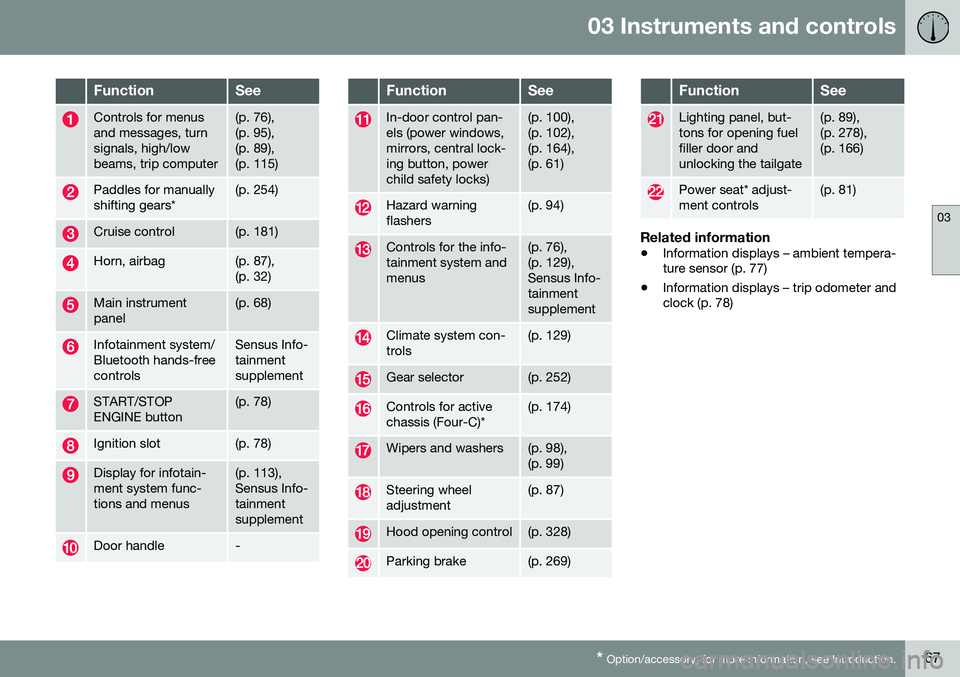
03 Instruments and controls
03
* Option/accessory, for more information, see Introduction.67
FunctionSee
Controls for menus and messages, turnsignals, high/lowbeams, trip computer(p. 76), (p. 95),(p. 89),(p. 115)
Paddles for manually shifting gears*(p. 254)
Cruise control(p. 181)
Horn, airbag(p. 87), (p. 32)
Main instrument panel(p. 68)
Infotainment system/ Bluetooth hands-freecontrolsSensus Info- tainmentsupplement
START/STOP ENGINE button(p. 78)
Ignition slot(p. 78)
Display for infotain- ment system func-tions and menus(p. 113), Sensus Info-tainmentsupplement
Door handle-
FunctionSee
In-door control pan- els (power windows,mirrors, central lock-ing button, powerchild safety locks)(p. 100), (p. 102),(p. 164),(p. 61)
Hazard warning flashers(p. 94)
Controls for the info- tainment system andmenus(p. 76), (p. 129),Sensus Info-tainmentsupplement
Climate system con- trols(p. 129)
Gear selector(p. 252)
Controls for active chassis (Four-C)*(p. 174)
Wipers and washers(p. 98), (p. 99)
Steering wheel adjustment(p. 87)
Hood opening control(p. 328)
Parking brake(p. 269)
FunctionSee
Lighting panel, but- tons for opening fuelfiller door andunlocking the tailgate(p. 89), (p. 278),(p. 166)
Power seat* adjust- ment controls(p. 81)
Related information
• Information displays – ambient tempera- ture sensor (p. 77)
• Information displays – trip odometer andclock (p. 78)
Page 89 of 398
03 Instruments and controls
03
}}
* Option/accessory, for more information, see Introduction.87
NOTE
It may be necessary to move the front seats forward or put their backrests in amore upright position before folding downthe rear seat backrests.
WARNING
• When one or more sections of the backrest is returned to the uprightposition, check that it is properlylocked in place by pushing and pullingit. The red indicators should also notbe visible.
• Return the outboard head restraints tothe upright position.
• Long loads should always be securelyanchored to help avoid injury in theevent of a sudden stop.
• Always turn the engine off and applythe parking brake when loading/unloading the vehicle.
• Place the transmission in the Park (
P)
position to help prevent inadvertentmovement of the gear selector.
• On hot days, the temperature in thevehicle interior can rise very quickly.Exposure of people to these high tem-peratures for even a short period oftime can cause heat-related injury ordeath. Small children are particularly atrisk.
Related information
•
Front seats (p. 80)
• Front seats – power seat (p. 81)
• Rear seats – head restraints (p. 84)
Steering wheel
The steering wheel can be adjusted to various positions and has controls for the horn, cruisecontrol*, menus, the infotainment system and Bluetooth
®-connected cell phone.
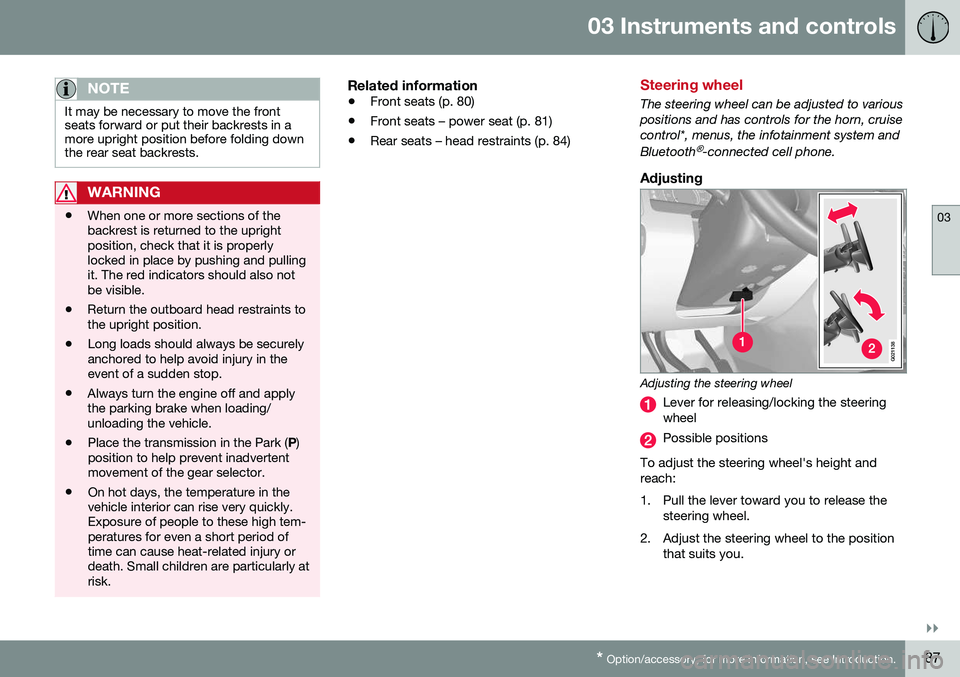
Adjusting
G021138
Adjusting the steering wheel
Lever for releasing/locking the steering wheel
Possible positions
To adjust the steering wheel's height and reach:
1. Pull the lever toward you to release the steering wheel.
2. Adjust the steering wheel to the position that suits you.
Page 90 of 398
||
03 Instruments and controls
03
88* Option/accessory, for more information, see Introduction.
3. Push back the lever to lock the steering
wheel in place. If the lever is difficult to push into place, press the steering wheellightly at the same time as you push thelever.
WARNING
Never adjust the steering wheel while driv- ing.
With the optional speed-dependent power steering the level of steering force can beadjusted, see Active chassis* (Four C)(p. 174).
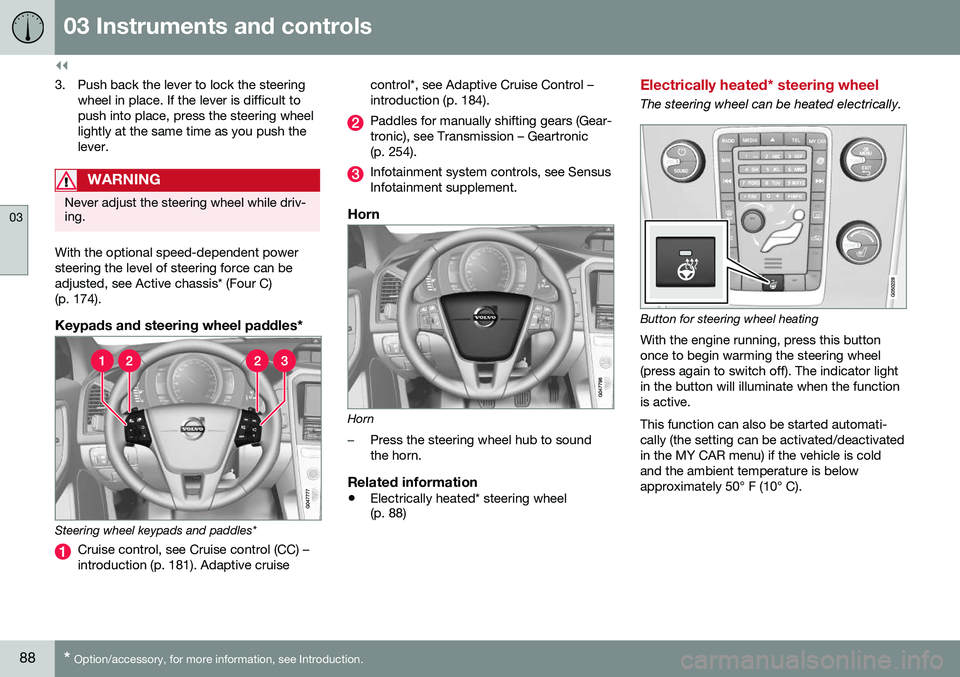
Keypads and steering wheel paddles*
Steering wheel keypads and paddles*
Cruise control, see Cruise control (CC) – introduction (p. 181). Adaptive cruise control*, see Adaptive Cruise Control –introduction (p. 184).
Paddles for manually shifting gears (Gear- tronic), see Transmission – Geartronic(p. 254).
Infotainment system controls, see Sensus Infotainment supplement.
Horn
Horn
–Press the steering wheel hub to sound the horn.
Related information
•
Electrically heated* steering wheel (p. 88)
Electrically heated* steering wheel
The steering wheel can be heated electrically.
Button for steering wheel heating
With the engine running, press this button once to begin warming the steering wheel(press again to switch off). The indicator lightin the button will illuminate when the functionis active. This function can also be started automati- cally (the setting can be activated/deactivatedin the MY CAR menu) if the vehicle is coldand the ambient temperature is belowapproximately 50° F (10° C).
Page 156 of 398
||
06 Locks and alarm
06
154* Option/accessory, for more information, see Introduction.
After a short pause, press the Unlock button a second time within 10 seconds to unlockthe other doors and the tailgate. This function can be changed so that all doors unlock at the same time by pressing My Car and going to
SettingsCar
settings
Lock settingsChange doors
unlock setting. For a description of the menu
system, see My Car – introduction (p. 76).
Approach lighting – As you approach
the vehicle, press the button on the remote key to light the interior lighting, parking lights,license plate lighting and the lights in the doormirrors*. These lights will switch off automatically after 30, 60 or 90 seconds. For a description of themenu system, see My Car – introduction(p. 76).
Unlock tailgate – Press the button twice
within several seconds to disarm the alarm system (the alarm indicator light on the dash-board will go out), and unlock only the tail-gate. Pressing this button for several seconds also opens the tailgate on models equipped withthe optional power tailgate.
NOTE
As an added safety precaution, the parking lights will come on automatically for ashort period when the tailgate has beenopened.
After closing, the tailgate will not automati- cally relock. Press Lock to relock it and rearmthe alarm. For information on opening the tailgate from the passenger compartment, see Locking/unlocking – tailgate (p. 166)
Panic alarm – This button can be used
to attract attention during emergency situa- tions. To activate the panic alarm, press and hold this button for at least 3 seconds or press ittwice within 3 seconds. The turn signals andhorn will be activated. The panic alarm willstop automatically after 2 minutes and45 seconds. To deactivate, wait approximately 5 seconds and press the button again. The Panic alarm button will not unlock the vehicle.
Related information
• Locking/unlocking – from inside (p. 164)
• Locking/unlocking – from the outside (p. 163)
• Locking/unlocking confirmation (p. 151)
Remote key – range
The remote key has a range of approximately 60 ft. (20 m) from the vehicle.
NOTE
Buildings or other obstacles may interfere with the function of the remote key. Thevehicle can also be locked or unlockedwith the key blade, see Alarm-related func-tions (p. 171).
If the remote key is removed from the vehicle while the engine is running or if the ignition isin mode
I or II and all of the doors are closed,
a message will appear in the instrument paneldisplay and there will be an audible signal. When the remote key is returned to the vehi- cle, the message will be erased and the audi-ble signal will stop after one of the followinghas been done: • The remote key is inserted in the ignition slot
• The vehicle's speed exceeds 20 mph(30 km/h)
• The
OK button on the left steering wheel
lever is pressed
Related information
• Remote key – functions (p. 153)
Page 177 of 398
07 Driver support
07
}}
175
Traction Control (TC)This function is designed to help reduce wheel spin at low speeds by transferringpower from a drive wheel that begins to losetraction to the wheel on the opposite side ofthe vehicle (on the same axle).
Spin Control (SC)The SC function is designed to help prevent the drive wheels from spinning while the vehi-cle is accelerating.
Active Yaw Control (AYC)This function helps maintain directional stabil- ity, for example when cornering, by brakingone or more of the wheels if the vehicleshows a tendency to skid or slide laterally.
Corner Traction Control (CTC)CTC compensates for understeering and helps provide additional stability when accel-erating through a curve by preventing theinside wheel from spinning. This is particularlyuseful when accelerating on a curving high-way on-ramp. CTC is most effective if the stability system's Sport mode is selected. See the section
about Sport mode.
Engine Drag Control (EDC)EDC helps keep the engine running if the wheels show a tendency to lock, e.g., whenshifting down in the Geartronic manual shift-ing mode or while using the engine's brakingfunction on a slippery surface. If the engine were to stop, power steering would not func-tion, making the vehicle more difficult tosteer.
Trailer Stability Assist (TSA)
1The TSA helps stabilize a vehicle that is tow- ing a trailer when the vehicle and trailer havebegun to sway. See Trailer Stability Assist(TSA) (p. 284) for more information. This system is automatically deactivated if the driver selects
Sport mode.
Related information
•Stability system – operation (p. 175)
• Stability system – symbols and messages (p. 177)
• Trailer Stability Assist (TSA) (p. 284)
Stability system – operation
Operation
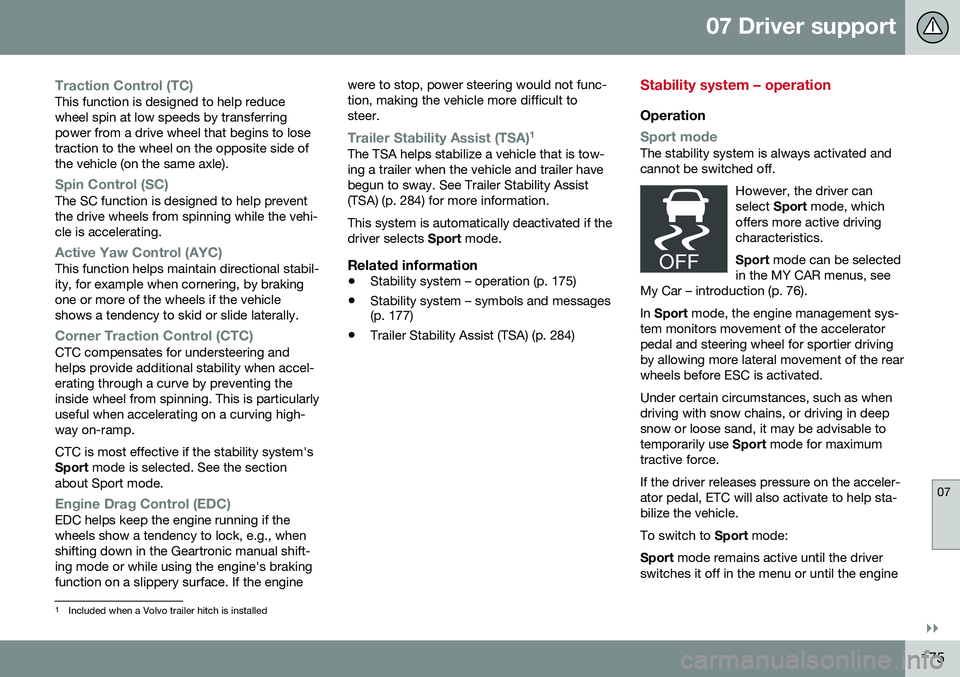
Sport modeThe stability system is always activated and cannot be switched off.
However, the driver canselect Sport mode, which
offers more active drivingcharacteristics. Sport mode can be selected
in the MY CAR menus, see
My Car – introduction (p. 76).
In Sport mode, the engine management sys-
tem monitors movement of the accelerator pedal and steering wheel for sportier drivingby allowing more lateral movement of the rearwheels before ESC is activated. Under certain circumstances, such as when driving with snow chains, or driving in deepsnow or loose sand, it may be advisable totemporarily use Sport mode for maximum
tractive force. If the driver releases pressure on the acceler- ator pedal, ETC will also activate to help sta-bilize the vehicle. To switch to Sport mode:
Sport mode remains active until the driver
switches it off in the menu or until the engine
1 Included when a Volvo trailer hitch is installed
Page 181 of 398
07 Driver support
07
* Option/accessory, for more information, see Introduction.179
Adjustable steering force*
Steering force increases with the speed of the vehicle to give the driver enhanced sense ofcontrol and stability. At low speed the vehicleis easy to steer in order to facilitate parking,etc.
Adjustable steering force*Steering force can be changed under MY
CAR
Car settingsSteering wheel
force
. Select Low, Medium or High. For a
description of the menu system, My Car – introduction (p. 76).
NOTE
This steering force level menu function cannot be accessed when the vehicle is inmotion.
NOTE
In certain situations, the power steering may become too warm and will have to betemporarily cooled down. While this ishappening, the power steering effect willbe reduced slightly and somewhat moreeffort may be required to turn the steeringwheel. If this occurs, a message will be displayed in the instrument panel.
Related information
• Active chassis* (Four C) (p. 174)
Road Sign Information (RSI)* – introduction
RSI is a feature that helps the driver see road signs with the posted speed limit.
Introduction
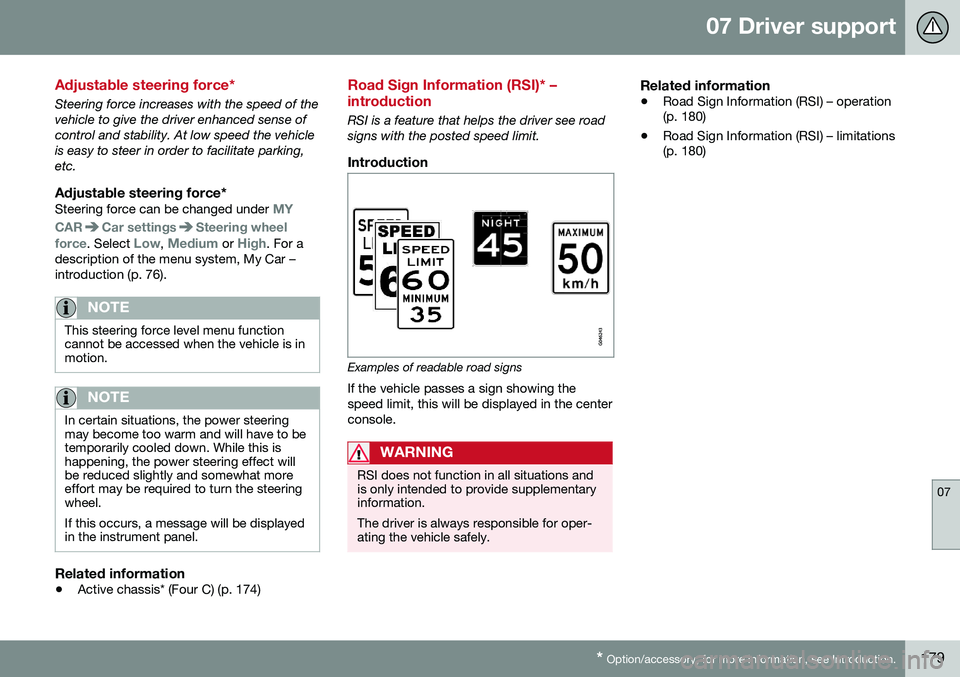
Examples of readable road signs If the vehicle passes a sign showing the speed limit, this will be displayed in the centerconsole.
WARNING
RSI does not function in all situations and is only intended to provide supplementaryinformation. The driver is always responsible for oper- ating the vehicle safely.
Related information
•Road Sign Information (RSI) – operation (p. 180)
• Road Sign Information (RSI) – limitations(p. 180)