navigation system VOLVO XC60 2018 Owner´s Manual
[x] Cancel search | Manufacturer: VOLVO, Model Year: 2018, Model line: XC60, Model: VOLVO XC60 2018Pages: 660, PDF Size: 11.77 MB
Page 145 of 660
DISPLAYS AND VOICE CONTROL
}}
* Option/accessory.143
Lowering position
Confirm
The brightness of the graphic is automatically adapted to the light conditions in its background.Brightness is also affected by adjustments to thebrightness of the other displays in the vehicle. The height position can be stored in the front power seat's * memory function.
Calibrating the horizontal positionIf the windshield or display unit has been replaced, the head-up display's horizontal posi-tion may need to be calibrated. Calibration meansthat the projected image is rotated clockwise orcounterclockwise. 1.
Tap
Settings in the center display's Top
view.
2. Select
My CarDisplaysHead-Up
Display Options
Head-Up Display
Calibration.
3. Calibrate the horizontal position of the image using the right-side steering wheel keypad.
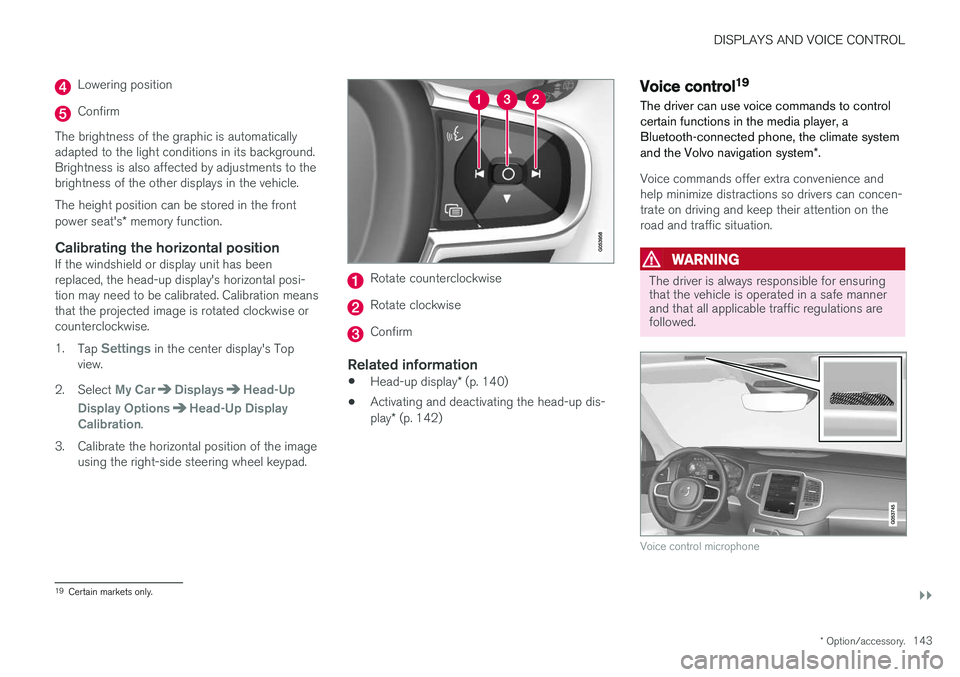
Rotate counterclockwise
Rotate clockwise
Confirm
Related information
• Head-up display
* (p. 140)
• Activating and deactivating the head-up dis- play
* (p. 142)
Voice control19
The driver can use voice commands to control certain functions in the media player, aBluetooth-connected phone, the climate system and the Volvo navigation system *.
Voice commands offer extra convenience and help minimize distractions so drivers can concen-trate on driving and keep their attention on theroad and traffic situation.
WARNING
The driver is always responsible for ensuring that the vehicle is operated in a safe mannerand that all applicable traffic regulations arefollowed.
Voice control microphone
19
Certain markets only.
Page 476 of 660
AUDIO, MEDIA AND INTERNET
* Option/accessory.
474
SiriusXM Travel Link®
*
SiriusXM Travel Link is a feature offered by
SiriusXM ®
Satellite radio * that can provide infor-
mation about e.g., weather forecasts, weather alerts, service stations, sports, etc. in the vicinityof the vehicle.
Starting SiriusXM Travel Link
NOTE
SiriusXM Travel Link services are only availa- ble in vehicles equipped with the SensusNavigation system.
From the center display's App view, tap Travel
Link to activate the feature. A disclaimer text will
be displayed. Tap OK to display a list of SiriusXM
Travel Link services: •
Alerts
•Fuel
•Sports
•Weather
•Favorites
In order to use one or more of these services, the user has to subscribe to the ones desired. To subscribe to a SiriusXM Travel Link service:
1. Open the center display's Top view.2. Tap
Settings. 3.
Press
SiriusXM Travel Link andSubscription Status.
> To subscribe, call the phone number listed on the screen.
Any services not subscribed will be grayed out and contain the text
Service not subscribed.
When the services have been activated (subscri- bed), tap the one of your choice to start it. The following applies for all of the
SiriusXM
Travel Link services:
• Pressing the
Back button will take you back
to the previous screen
• Pressing the
Close button will take you to
the SiriusXM Travel Link home screen.
NOTE
If the Close button is used to return to theSiriusXM Travel Link home screen, the fol-
lowing applies (the Weather service is used
here as an example):
• If you have already used the
Weatherfunction, tapping Weather again in theSiriusXM Travel Link home screen
before using any other SiriusXM
Travel Link service will return you to the
point where you left the Weather service.
• If another
SiriusXM Travel Link service
is used (e.g., Fuel, Sports, etc.) before
you return to the Weather service, you
will be returned to the default Weatherview (in this case, Local).
The same principle applies to all of the
SiriusXM Travel Link services.
FavoritesMany SiriusXM Travel Link selections can be saved for easy access as favorites by tapping the"star" icon next to the selection where applicable. To display a list of your favorites, tap the
Favorites application in the SiriusXM Travel Link
home screen.
Related information
• SiriusXM ®
Satellite radio * (p. 470)
• SiriusXM Travel Link ®
* - Fuel (p. 477)
Page 480 of 660
||
AUDIO, MEDIA AND INTERNET
* Option/accessory.
478 the Sensus Navigation
* supplement for additional
information about using the navigation system.
RecommendedTap for a list of service stations near the vehicle, displayed according to the price of regular gaso-line (unless another grade/type of fuel has been selected in
Select fuel type) or of stations
offering the greatest number of available charg- ing ports for electric vehicles/hybrids. The stationoffering the lowest price/most available chargingports will be displayed at the top of the list. Tapthe name of a service station to display moredetailed information.
FavoritesTap for a list of service stations that have beenstored as favorites. See also the heading
Favorites in the article "SiriusXM Travel Link" for
information explaining how to create favorites. Tap the name of a service station to display moredetailed information. In addition to the
Select fuel type button at the
bottom of the screen, tap the Edit button to
delete individual stations from the list or tap
Delete to clear the list. Tap Done to return to
the previous screen.
Brands1. Tap Brands to display a list of service sta-
tion brands in the area. 2. Tap a brand to display a list of service sta-
tions affiliated with that brand (BP, Exxon, etc.).
3. Tap the name of a service station to display more detailed information.
In addition to the
Select fuel type button at the
bottom of the screen, tap the Sort button to
arrange the list according to Nearest orCheapest/Recommended. Tap Done to
return to the previous screen.
Related information
• SiriusXM Travel Link ®
* (p. 474)
• SiriusXM Travel Link ®
* - Notifications
(p. 476)
• SiriusXM Travel Link ®
* - Sports (p. 478)
• SiriusXM Travel Link ®
* - Weather (p. 475)
SiriusXM Travel Link®
* - Sports
This SiriusXM Travel Link service provides infor- mation about sporting events, tournaments,teams, leagues, etc.
From the SiriusXM Travel Link home screen, to display sports information:
–Tap the Sports button to display the main
sports screen.
A number of sports categories will be listed (Football, Baseball, Basketball, etc.) Tap a sport to select a league in that sport (NFL, MLB, etc.) or a sport organization (PGA, LPGA, etc.). The following is an example of the result of tapping Baseball :
1. MLB (Major League Baseball) will be dis- played.
2. Tap MLB to display the two leagues in Major League Baseball (American League orNational League).
3. Tap one of the league names to display the divisions in the league.
Page 489 of 660
AUDIO, MEDIA AND INTERNET
}}
* Option/accessory.487
Apple® CarPlay®
*
With CarPlay, you can listen to music, make phone calls, get driving instructions, send/receive messages and use Siri, all while remain-ing focused on driving.
CarPlay works with select Apple devices. If the car doesnot already support CarPlay,this can be retrofitted. Contacta Volvo retailer to installCarPlay.
Information about supported apps and compati- ble phones is available on the Apple website:www.apple.com/ios/carplay/. Using apps that arenot compatible with CarPlay could cause the con-nection between iPhone and the vehicle to belost. Please note that Volvo is not responsible forthe content of CarPlay. When using map navigation via CarPlay, guidance will only be shown on the center display and notin the instrument panel or head-up display. CarPlay apps can be controlled from the center display, a phone or with the right-side steeringwheel keypad (for certain functions). The appscan also be voice-controlled using Siri. Press and hold the
button on the steering wheel to
start voice control with Siri. Press briefly to acti- vate the vehicle's own voice control system. If Siri cuts off too soon, press and hold the
6
but-
ton on the steering wheel.
By using Apple CarPlay you acknowledge the following: Apple CarPlay is a serviceprovided by Apple Inc. under its terms andconditions. Volvo Cars is thus notresponsible for Apple CarPlay or itsfeatures/applications. When using AppleCarPlay, certain information from your car(including its position) is transferred to youriPhone. In relation to Volvo Cars, you arefully responsible for your and any othersperson
Page 577 of 660
MAINTENANCE AND SERVICE
}}
* Option/accessory.575
Download Center
With the vehicle connected to the Internet 1
,
updates for a number of the vehicle's systems can be downloaded from the center display.
The Download Center app is
started from the center display and makes it possible to:
• search for and update system software
• update Sensus Navigation
* map data
• download, update and delete apps.
Related information
•
Handling system updates via Download Cen- ter (p. 575)
• Download apps (p. 460)
• Updating apps (p. 461)
• Deleting apps (p. 462)
• Internet-connected vehicle
* (p. 501)
• Navigating in the center display's views(p. 113)
Handling system updates viaDownload Center
System updates are available for infotainment and Internet-related functions and systems in thevehicle. If system software updates are available,they can be downloaded all at once or sepa-rately.
Searching for updateIn order for system updates to be possible, the vehicle must have an Internet connection 2
.
System updates are handled through the
Download
Center app in the center dis-
play's App view. If no search for updates has been performed since the last time the infotain-ment system was started, a search will be initi-ated. No search will begin if a software download is in progress. A number in the
System updatesbutton shows how many updates are available. Tap the button to display a list of updates thatcan be installed in the vehicle. If an update is available, the message
New software updates
available will also be displayed in the center dis-
play's status field.
NOTE
Data downloading can affect other services such as transfer data, e.g. web radio. If theaffect on other services is experienced asproblematic, the download can be interrupted.Alternatively, it may be appropriate to switchoff or cancel other services.
NOTE
An update can be interrupted when the igni- tion is switched off and the vehicle is left. However, the update does not have to be completed before the vehicle is left as theupdate is resumed the next time the vehicle isused.
Updating all system software
–Select Install all at the bottom of the list.
To avoid displaying a list, select
Install all via theSystem updates button.
Updating individual system software
–Select Install to choose the software you
would like to download.
1 There may be a charge for transmitting data over the Internet, depending on your service plan.
2 There may be a charge for transmitting data over the Internet, depending on your service plan.
Page 579 of 660
MAINTENANCE AND SERVICE
* Option/accessory.577
the instrument panel and at the top of the center display.
1.
Open the Car status app from App view in
the center display.
2. Tap the
Appointments button.
3. Tap the
Request appointment button.
4. Check that your
Volvo ID is correct.
5. Make sure your preferred
Workshop is cor-
rect.
6. In the
Tap to write information to the
Workshop field, you can provide details on
what you would like performed during the visit or other important information to yourworkshop. 7.
Tap the
Send appointment request but-
ton.
> You will receive an appointment sugges- tion to your vehicle within a couple of days 6
. You will also receive the same
message via email and when you log in to www.volvocars.com. On some markets, the message in the instrument panel indicating that the vehi-cle requires service will go out once theappointment request has been sent.
8. Tap
Cancel request if you would like to
cancel your request.
The appointment request contains information about your vehicle that helps the workshop planfor your visit. The retailer will send you a digital appointment suggestion. Information about your retailer is alsoavailable in the vehicle so that you can contactyour workshop at any time.
Accepting an appointment suggestionWhen the vehicle has received an appointmentsuggestion, a message will be displayed at thetop of the center display.
1. Tap the message. 2. To accept the suggested appointment, tap
Accept. To decline the suggested appoint-
ment, tap Send new proposal or Decline.
For some markets, the system reminds you when an appointment time is approaching and the navi- gation system 7
can also guide you to the work-
shop at the appointed time.
Related information
• Vehicle status (p. 576)
• Sending vehicle information to the workshop (p. 578)
• Navigating in the center display's views (p. 113)
• Volvo ID (p. 26)
• Internet-connected vehicle
* (p. 501)
6
Timespan may vary depending on market.
7 For vehicles with Sensus Navigation *.
Page 655 of 660

INDEX
653
memory function front seat 186, 187
power front seats 185
ventilation 216
whiplash protection 46
Sensors air quality 205
climate 201
Sensus connection and entertainment 30
Sensus Navigation 352
Service position 625
Service program 572
Set time interval 285
settings 133 Categories 134
contextual 131
resetting 133
settings menu 133
Shiftlock 415 deactivate 415
Side airbag 59
Side Impact Protection System 59, 60
SIM card 505
SIPS (Side Impact Protection System) 59, 60Sirius Satellite radio Travel link 474
SiriusXM ® Satellite radio
traffic information 470, 471, 472
Ski hatch 564
Slippery conditions 434
Slippery road conditions 434
Software updates 33
Sound settings 458, 499 phone 500
playing media 480, 481
text message 499
Spare tire 541, 542
Speed camera 354
Speed Limiter 270, 273, 274, 277 getting started 271
shut down 273
temporary deactivation 272
Speed symbols, tires 526
Spin control 266
Stability and traction control system 266, 269 operation 267, 268
Stability system 266
Stains 609, 611, 612, 613, 614
Start/Stop 422 deactivate 424
Driving 422
limitations 424Start and lock systemtype designations 244
Start battery 441, 592 overload 441
Start engine 398 Starting the engine after a collision 62
Start the vehicle 398
Steel cargo grid 567 Steering assistance at risk of colli-
sion 365, 366, 367, 368, 369, 370, 371, 373 Steering assistance at risk of rear-end col-
lision 370, 371 Steering power level, see Steering wheel
resistance 264 Steering resistance at risk of head-on colli-
sion 368, 369
Steering wheel 196, 197 heating 217, 218
keypad 196
paddle 196
steering wheel adjustment 197
Steering wheel keypad 196
Steering wheel paddles 413Steering wheel resistance, speed-depend- ent 264
Stone chips and scratches 621, 622