park assist VOLVO XC60 2018 Owner´s Manual
[x] Cancel search | Manufacturer: VOLVO, Model Year: 2018, Model line: XC60, Model: VOLVO XC60 2018Pages: 660, PDF Size: 11.77 MB
Page 316 of 660
DRIVER SUPPORT
314
Switching target vehicles with PilotAssist
At certain speeds, models with automatic trans-
missions and Pilot Assist can switch target vehi-cles.
Switching target vehicles
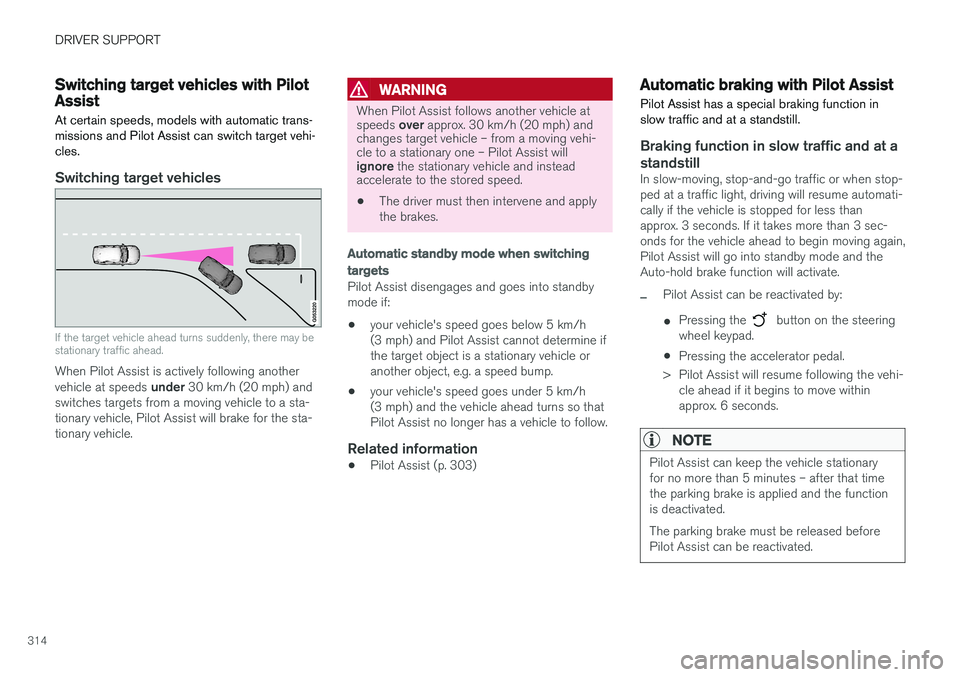
If the target vehicle ahead turns suddenly, there may be stationary traffic ahead.
When Pilot Assist is actively following another vehicle at speeds under 30 km/h (20 mph) and
switches targets from a moving vehicle to a sta-
tionary vehicle, Pilot Assist will brake for the sta-tionary vehicle.
WARNING
When Pilot Assist follows another vehicle at speeds over approx. 30 km/h (20 mph) and
changes target vehicle – from a moving vehi- cle to a stationary one – Pilot Assist will ignore the stationary vehicle and instead
accelerate to the stored speed.
• The driver must then intervene and apply the brakes.
Automatic standby mode when switching
targets
Pilot Assist disengages and goes into standby mode if:
• your vehicle's speed goes below 5 km/h(3 mph) and Pilot Assist cannot determine ifthe target object is a stationary vehicle oranother object, e.g. a speed bump.
• your vehicle's speed goes under 5 km/h(3 mph) and the vehicle ahead turns so thatPilot Assist no longer has a vehicle to follow.
Related information
•Pilot Assist (p. 303)
Automatic braking with Pilot Assist
Pilot Assist has a special braking function in slow traffic and at a standstill.
Braking function in slow traffic and at a standstill
In slow-moving, stop-and-go traffic or when stop- ped at a traffic light, driving will resume automati-cally if the vehicle is stopped for less thanapprox. 3 seconds. If it takes more than 3 sec-onds for the vehicle ahead to begin moving again,Pilot Assist will go into standby mode and theAuto-hold brake function will activate.
–Pilot Assist can be reactivated by:
• Pressing the
button on the steering
wheel keypad.
• Pressing the accelerator pedal.
> Pilot Assist will resume following the vehi- cle ahead if it begins to move within approx. 6 seconds.
NOTE
Pilot Assist can keep the vehicle stationary for no more than 5 minutes – after that timethe parking brake is applied and the functionis deactivated. The parking brake must be released before Pilot Assist can be reactivated.
Page 317 of 660
DRIVER SUPPORT
}}}}
315
Deactivation of the Auto-hold brake function
In certain situations, Auto-hold will be deactivated when the vehicle is at a standstill and Pilot Assistwill go into standby mode. This means that thebrakes will be released and the vehicle couldbegin to roll. The driver must actively apply thebrakes to keep the vehicle stationary. This can occur if:
• the driver depresses the brake pedal
• the parking brake is applied
• the gear selector is moved to the
P, N or R
positions
• the driver puts Pilot Assist in standby mode.
Auto Activate Parking BrakeIn certain situations, the parking brake will be applied to keep the vehicle at a standstill. This occurs if Pilot Assist is keeping the vehicle stationary using the brakes and:
• the driver opens the door or unbuckleshis/her seat belt
• Pilot Assist has kept the vehicle at a stand-still for more than approx. 5 minutes
• the brakes overheat
• the driver switches off the engine manually.
Related information
•Pilot Assist (p. 303)
Pilot Assist limitations
Pilot Assist functionality may be reduced in cer- tain situations.
Pilot Assist is a driver support function designed to simplify driving and assist the driver in manysituations. However, the driver is always responsi-ble for maintaining a suitable distance to vehiclesor objects around it and ensuring that the vehicleis correctly positioned in the traffic lane.
WARNING
In some situations, Pilot Assist may have trou- ble helping the driver properly or may bedeactivated automatically – we advise againstusing Pilot Assist in such cases. Examples ofsuch situations include:
• the lane markings are worn, missing or cross each other.
• lane division is unclear, for example, whenthe lanes divide or merge or at exits orwhen there are multiple sets of markings.
• edges or other lines than lane markingsare present on or near the road, e.g.curbs, joints or repairs to the road sur-face, edges of barriers, roadside edges orstrong shadows.
• the lane is narrow or winding.
• the lane contains ridges or holes.
• weather conditions are poor, e.g. rain,snow or fog or slush or reduced visibilitywith poor light conditions, backlighting,wet road surface, etc.
The driver should also note that Pilot Assist has the following limitations: • High curbs, roadside barriers, temporary obstacles (traffic cones, safety barriers,etc.) are not detected. Alternatively, theymay be detected incorrectly as lane mark-ings, with a subsequent risk of contactbetween the vehicle and such obstacles.
Page 348 of 660

DRIVER SUPPORT
* Option/accessory.
346
Cross Traffic Alert *
CTA 85
is a supplementary driver support system
to BLIS 86
that is intended to help the driver
detect vehicles crossing behind the vehicle while backing up.
CTA overview.
CTA supplements BLIS by detecting traffic cross- ing from the side, e.g. when backing out of aparking space. CTA is primarily designed to detect vehicles, but in certain cases can also detect pedestrians orsmaller objects such as bicycles. CTA is only active when the vehicle is moving backward or if reverse gear is engaged. If CTA detects that something is approachingyour vehicle from the side:
• an audible signal will sound from either theleft or right speaker, depending on whichside of your vehicle the object is approachingfrom.
• an icon will illuminate in the PAS 87
graphic
on the screen.
• an icon will appear in the Park Assist Cam-era's Top view.
Illuminated CTA icon in the PAS 87
graphic 88
on the
screen.
WARNING
• The Cross Traffic Alert function is supple- mentary driver support intended to facili-tate driving and make it safer – it cannothandle all situations in all traffic, weatherand road conditions.
• The responsibility for reversing the vehiclesafely and using good judgment alwaysrests with the driver.
• Cross Traffic Alert is not a substitute forthe driver's attention and judgment. Thedriver is always responsible for ensuringthe vehicle is driven in a safe manner, atthe appropriate speed, with an appropri-ate distance to other vehicles, and inaccordance with current traffic rules andregulations.
Related information
•
Activating/deactivating Cross Traffic Alert(p. 347)
• Cross Traffic Alert limitations (p. 347)
• Recommended maintenance for CrossTraffic Alert (p. 348)
• Cross Traffic Alert messages (p. 349)
85
Cross Traffic Alert
86 Blind Spot Information
87 Park Assist System: Parking assistance with reversing sensors
88 Note: This illustration is general and details may vary depending on model.
Page 376 of 660
DRIVER SUPPORT
* Option/accessory.
374
Park Assist *
The Park Assist function can help the driver
when maneuvering in tight spaces by indicating distances to obstacles using audible signals andgraphics in the center display.
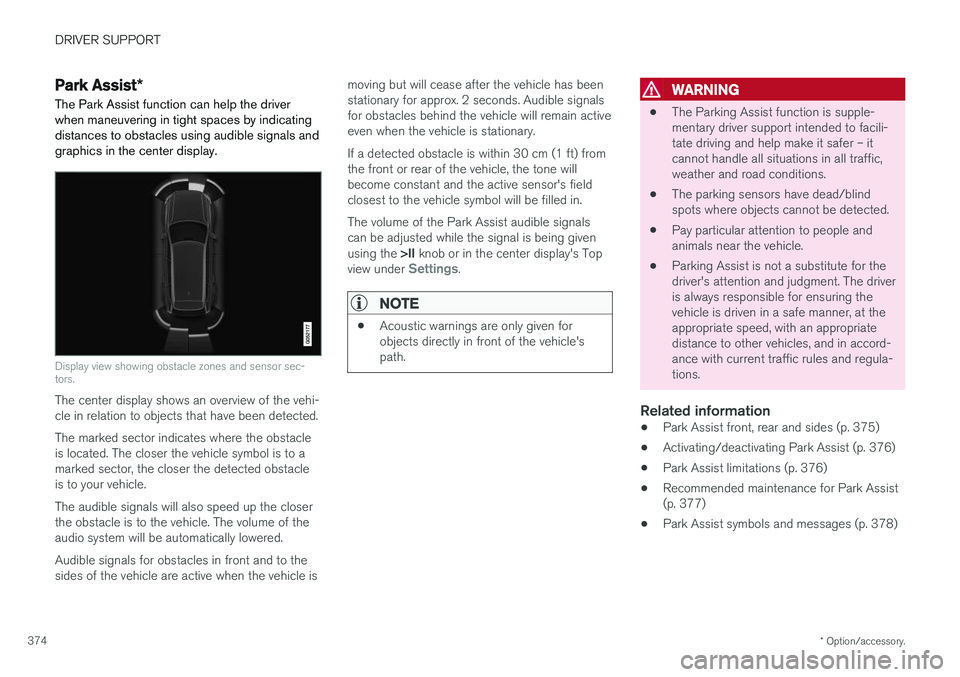
Display view showing obstacle zones and sensor sec- tors.
The center display shows an overview of the vehi- cle in relation to objects that have been detected. The marked sector indicates where the obstacle is located. The closer the vehicle symbol is to amarked sector, the closer the detected obstacleis to your vehicle. The audible signals will also speed up the closer the obstacle is to the vehicle. The volume of theaudio system will be automatically lowered. Audible signals for obstacles in front and to the sides of the vehicle are active when the vehicle is moving but will cease after the vehicle has beenstationary for approx. 2 seconds. Audible signalsfor obstacles behind the vehicle will remain activeeven when the vehicle is stationary. If a detected obstacle is within 30 cm (1 ft) from the front or rear of the vehicle, the tone willbecome constant and the active sensor's fieldclosest to the vehicle symbol will be filled in. The volume of the Park Assist audible signals can be adjusted while the signal is being given using the
>II knob or in the center display's Top
view under
Settings.
NOTE
• Acoustic warnings are only given for objects directly in front of the vehicle'spath.
WARNING
•The Parking Assist function is supple- mentary driver support intended to facili-tate driving and help make it safer – itcannot handle all situations in all traffic,weather and road conditions.
• The parking sensors have dead/blindspots where objects cannot be detected.
• Pay particular attention to people andanimals near the vehicle.
• Parking Assist is not a substitute for thedriver's attention and judgment. The driveris always responsible for ensuring thevehicle is driven in a safe manner, at theappropriate speed, with an appropriatedistance to other vehicles, and in accord-ance with current traffic rules and regula-tions.
Related information
•Park Assist front, rear and sides (p. 375)
• Activating/deactivating Park Assist (p. 376)
• Park Assist limitations (p. 376)
• Recommended maintenance for Park Assist(p. 377)
• Park Assist symbols and messages (p. 378)
Page 377 of 660
DRIVER SUPPORT
}}
375
Park Assist front, rear and sides
Park Assist has different parameters depending on which part of the vehicle is approaching anobstacle.
Back
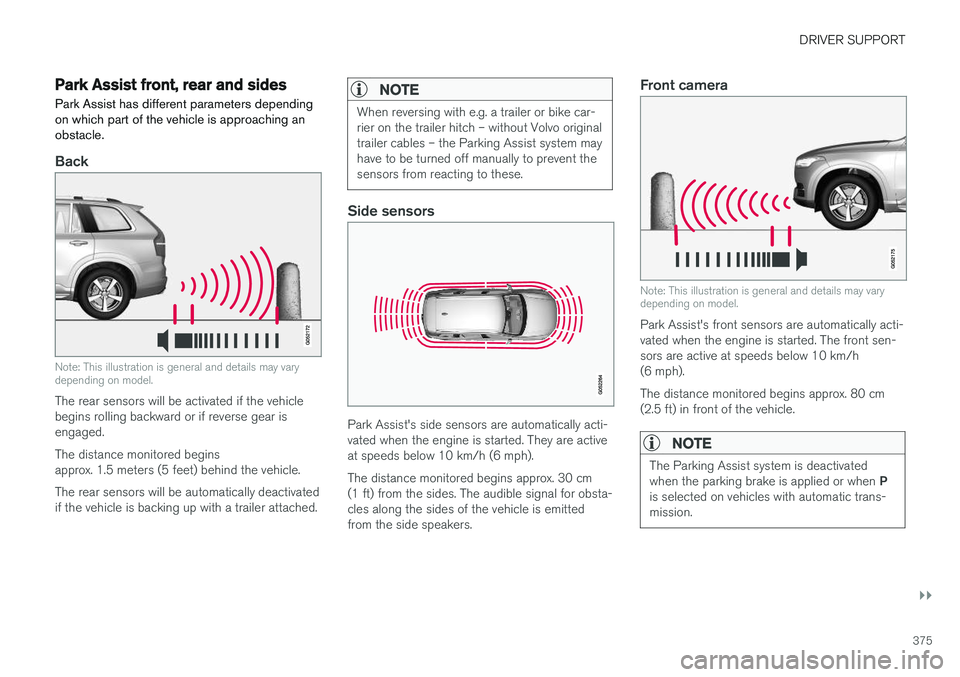
Note: This illustration is general and details may vary depending on model.
The rear sensors will be activated if the vehicle begins rolling backward or if reverse gear isengaged. The distance monitored begins approx. 1.5 meters (5 feet) behind the vehicle. The rear sensors will be automatically deactivated if the vehicle is backing up with a trailer attached.
NOTE
When reversing with e.g. a trailer or bike car- rier on the trailer hitch – without Volvo originaltrailer cables – the Parking Assist system mayhave to be turned off manually to prevent thesensors from reacting to these.
Side sensors
Park Assist's side sensors are automatically acti- vated when the engine is started. They are activeat speeds below 10 km/h (6 mph). The distance monitored begins approx. 30 cm (1 ft) from the sides. The audible signal for obsta-cles along the sides of the vehicle is emittedfrom the side speakers.
Front camera
Note: This illustration is general and details may vary depending on model.
Park Assist's front sensors are automatically acti- vated when the engine is started. The front sen-sors are active at speeds below 10 km/h(6 mph). The distance monitored begins approx. 80 cm (2.5 ft) in front of the vehicle.
NOTE
The Parking Assist system is deactivated when the parking brake is applied or when P
is selected on vehicles with automatic trans- mission.
Page 378 of 660
||
DRIVER SUPPORT
* Option/accessory.
376
CAUTION
When installing auxiliary lights: Make sure these do not obscure the sensors – the auxili-ary lights could be perceived as an obstacle.
Related information
• Park Assist
* (p. 374)
Activating/deactivating Park Assist
The Park Assist Pilot function can be activated/ deactivated.
On/OffPark Assist's front and side sensors are automat- ically activated when the engine is started. Therear sensors are activated if the vehicle is movingbackward or reverse gear is engaged.
The function can be activated/deactivated in the center dis-play's Function view.
–Tap the Park Assist button in Function view.
> The Park Assist Pilot indicator light shows the status of the function: GREEN (on) or GRAY (off).
In vehicles equipped with Park Assist Camera,Park Assist can also be activated/deactivatedfrom the relevant camera view.
Related information
• Park Assist
* (p. 374)
Park Assist limitations
Park Assist may not be able to detect all condi- tions in all situations and functionality may there-fore be limited in certain cases.
The driver should be aware of the following limi- tations for Park Assist:
WARNING
Be extra cautious when reversing if this symbol isshown when a trailer, bikecarrier or similar is attachedand electrically connectedto the vehicle. The symbol indicates that
the rear parking assist sensors are deacti-
vated and will not warn of any obstacles.
Page 379 of 660
DRIVER SUPPORT
* Option/accessory.377
CAUTION
Objects such as chains, thin and glossy poles or low obstacles may end up in the "signalshadow" and then go temporarily undetectedby the sensors – the pulsating tone may thenunexpectedly stop instead of becoming aconstant tone as expected. The sensors cannot detect high objects, such as protruding ramps.
• In such situations, pay extra attention andmaneuver/drive the vehicle very slowly orstop the current parking maneuver –there may be a high risk of damage tothe vehicle or other objects since infor-mation from the sensors is not alwaysreliable in such situations.
CAUTION
In some circumstances, the Park Assist Sys- tem may produce false warnings due to exter-nal sound sources with the same ultrasonicfrequencies as those the system works with. Examples of such sources are horns, wet tires on asphalt, pneumatic brakes, exhaust noisefrom motorcycles, etc.
NOTE
When a trailer hitch is configured with the vehicle electrical system, the trailer hitch pro-trusion is included when the function meas-ures the distance to objects behind the vehi-cle.
Related information
•
Park Assist
* (p. 374)
Recommended maintenance forPark Assist
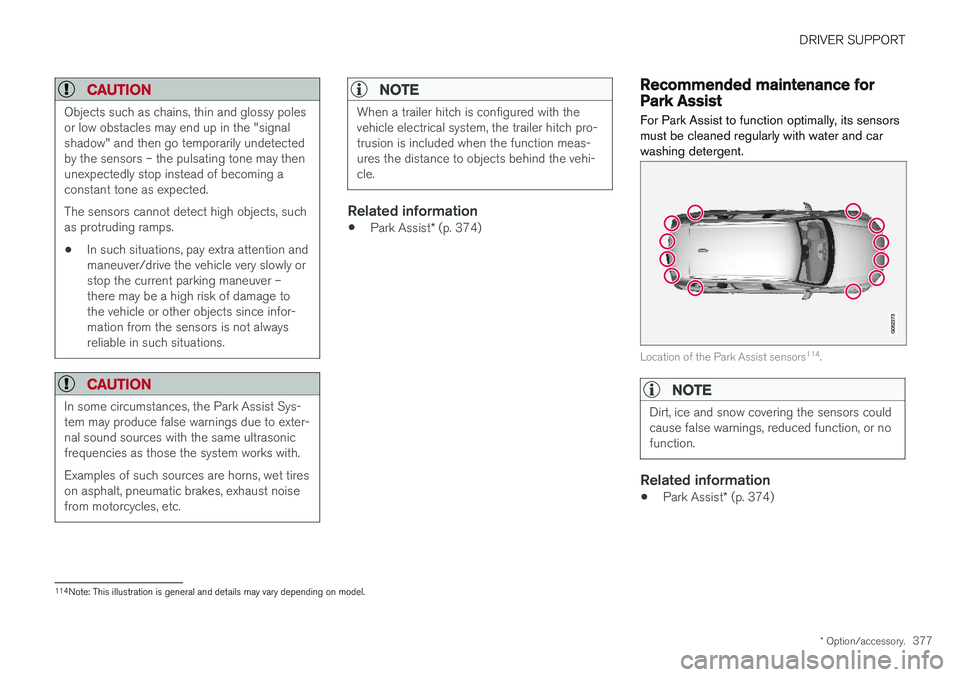
For Park Assist to function optimally, its sensors must be cleaned regularly with water and carwashing detergent.
Location of the Park Assist sensors 114
.
NOTE
Dirt, ice and snow covering the sensors could cause false warnings, reduced function, or nofunction.
Related information
• Park Assist
* (p. 374)
114
Note: This illustration is general and details may vary depending on model.
Page 380 of 660
DRIVER SUPPORT
* Option/accessory.
378
Park Assist symbols and messages
Symbols and messages for the Park Assist may be displayed in the instrument panel and/or thecenter display.
Some examples of symbols and messages are shown in the table below.
SymbolMessageMeaning
The rear Park Assist sensors are turned off and no acoustic warnings for obstacles/objects will
be provided.
Park Assist System Sensors blocked, cleaning nee- dedOne or more of the sensors are blocked. Check and clean/remove the obstacle as soon as pos- sible.
Park Assist System Unavailable Service requiredThe system is not functioning as intended. Contact a workshop ‒ an authorized Volvo workshop
is recommended.
A text message can be erased by briefly pressing the
button in the center of the right-side
steering wheel keypad. If the message persists: Contact a workshop ‒ an
authorized Volvo workshop is recommended.
Related information
• Park Assist
* (p. 374)
Page 381 of 660
DRIVER SUPPORT
* Option/accessory.379
Park Assist Camera *
The Park Assist Camera can help provide the driver when maneuvering in tight spaces by alert-ing the driver to obstacles using the camerascreen and graphics in the center display.
The Park Assist Camera is a support function that is automatically activated when reverse gearis engaged. It can also be started manually fromthe center display.
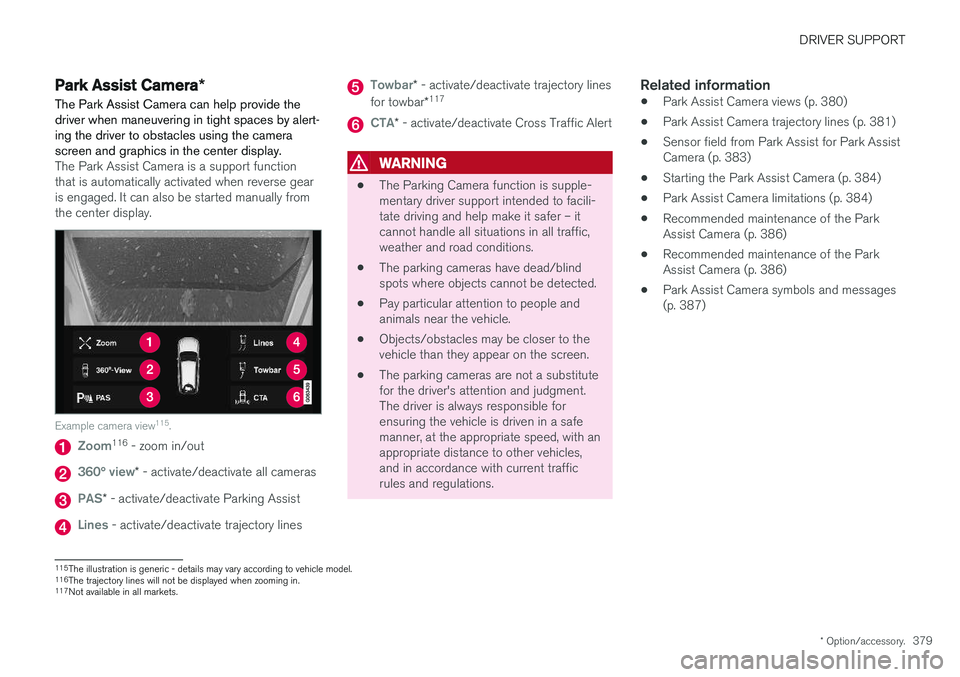
Example camera view 115
.
Zoom116
- zoom in/out
360° view* - activate/deactivate all cameras
PAS* - activate/deactivate Parking Assist
Lines - activate/deactivate trajectory lines
Towbar* - activate/deactivate trajectory lines
for towbar *117
CTA*
- activate/deactivate Cross Traffic Alert
WARNING
• The Parking Camera function is supple- mentary driver support intended to facili-tate driving and help make it safer – itcannot handle all situations in all traffic,weather and road conditions.
• The parking cameras have dead/blindspots where objects cannot be detected.
• Pay particular attention to people andanimals near the vehicle.
• Objects/obstacles may be closer to thevehicle than they appear on the screen.
• The parking cameras are not a substitutefor the driver's attention and judgment.The driver is always responsible forensuring the vehicle is driven in a safemanner, at the appropriate speed, with anappropriate distance to other vehicles,and in accordance with current trafficrules and regulations.
Related information
•Park Assist Camera views (p. 380)
• Park Assist Camera trajectory lines (p. 381)
• Sensor field from Park Assist for Park AssistCamera (p. 383)
• Starting the Park Assist Camera (p. 384)
• Park Assist Camera limitations (p. 384)
• Recommended maintenance of the ParkAssist Camera (p. 386)
• Recommended maintenance of the ParkAssist Camera (p. 386)
• Park Assist Camera symbols and messages(p. 387)
115
The illustration is generic - details may vary according to vehicle model.
116 The trajectory lines will not be displayed when zooming in.
117 Not available in all markets.
Page 382 of 660
DRIVER SUPPORT
* Option/accessory.
380
Park Assist Camera views
PAC can display a 360° panoramic view as well as separate views for each of the other cameras:rear, front, left and right.
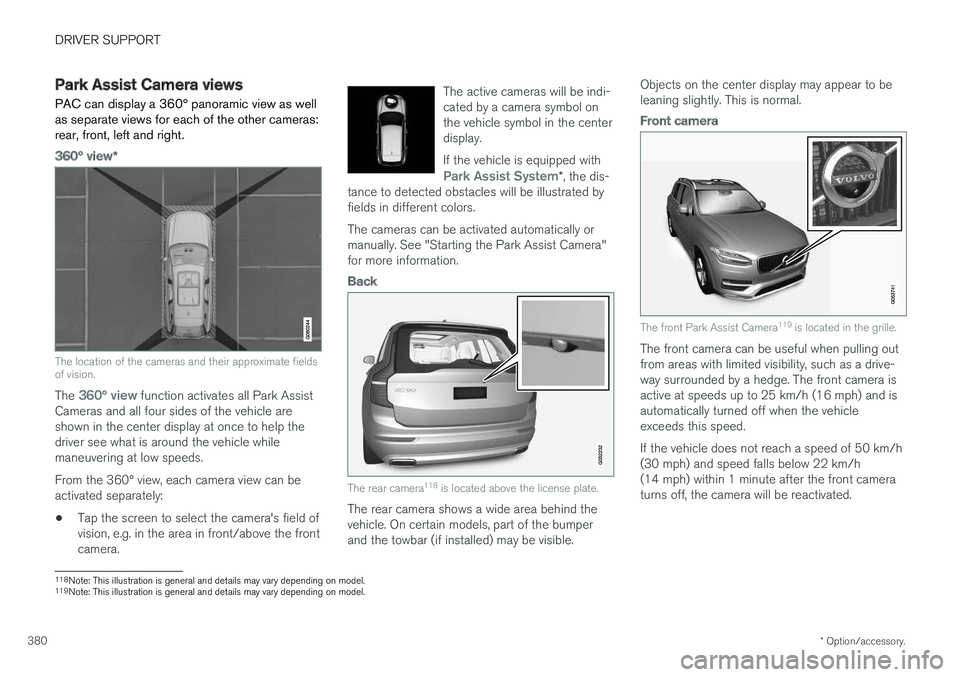
360° view *
The location of the cameras and their approximate fields of vision.
The 360° view function activates all Park Assist
Cameras and all four sides of the vehicle are shown in the center display at once to help thedriver see what is around the vehicle whilemaneuvering at low speeds. From the 360° view, each camera view can be activated separately:
• Tap the screen to select the camera's field ofvision, e.g. in the area in front/above the frontcamera. The active cameras will be indi-cated by a camera symbol onthe vehicle symbol in the centerdisplay. If the vehicle is equipped with
Park Assist System*
, the dis-
tance to detected obstacles will be illustrated by fields in different colors.
The cameras can be activated automatically or manually. See "Starting the Park Assist Camera"for more information.
Back
The rear camera 118
is located above the license plate.
The rear camera shows a wide area behind the vehicle. On certain models, part of the bumperand the towbar (if installed) may be visible. Objects on the center display may appear to beleaning slightly. This is normal.
Front camera
The front Park Assist Camera
119
is located in the grille.
The front camera can be useful when pulling out from areas with limited visibility, such as a drive-way surrounded by a hedge. The front camera isactive at speeds up to 25 km/h (16 mph) and isautomatically turned off when the vehicleexceeds this speed. If the vehicle does not reach a speed of 50 km/h (30 mph) and speed falls below 22 km/h(14 mph) within 1 minute after the front cameraturns off, the camera will be reactivated.
118Note: This illustration is general and details may vary depending on model.
119 Note: This illustration is general and details may vary depending on model.