ESP VOLVO XC60 2018 Owner´s Manual
[x] Cancel search | Manufacturer: VOLVO, Model Year: 2018, Model line: XC60, Model: VOLVO XC60 2018Pages: 660, PDF Size: 11.77 MB
Page 171 of 660
WINDOWS, GLASS AND MIRRORS
* Option/accessory.169
WARNING
Make sure that no child or other passenger comes into contact with the windows as they are closing with keyless closing *.
NOTE
One way to reduce the pulsating wind noise heard when the rear windows are open is toalso open the front windows slightly.
NOTE
The windows cannot be opened at speeds over approx. 180 km/h (ca112 mph), but theycan be closed. The driver is always responsible for following applicable traffic regulations.
Related information
• Power windows (p. 167)
• Pinch protection for windows and sun cur- tains (p. 166)
• Reset procedure for pinch protection(p. 167)
• Keyless locking and unlocking
* (p. 246)
• Locking and unlocking using the remote key(p. 233)
• Locking and unlocking from inside the vehi-cle (p. 249)
Rearview/door mirrors
The rearview mirror and door mirrors can be used to improve the driver's visibility behind thevehicle.
Rearview mirrorThe rearview mirror can be easily adjusted man- ually. The rearview mirror can be equipped with HomeLink *, auto-dim * and compass *.
Door mirrors
WARNING
The door mirror on the passenger side is curved to improve visibility. Objects in the mir-ror may appear farther away than they actuallyare.
The joystick in the drivers' door control panel is used to adjust the position of the door mirrors.There are also several automatic settings thatcan also be connected to the memory function buttons for the power seat *.
Related information
•
HomeLink ®
* (p. 450)
• Compass (p. 454)
• Adjusting the rearview mirror dimming func- tion (p. 170)
• Adjusting the door mirrors (p. 170) •
Storing memory settings in power front seats
* (p. 186)
• Activating and deactivating the heated rear window and door mirrors (p. 222)
Page 233 of 660
KEY, LOCKS AND ALARM
}}
* Option/accessory.231
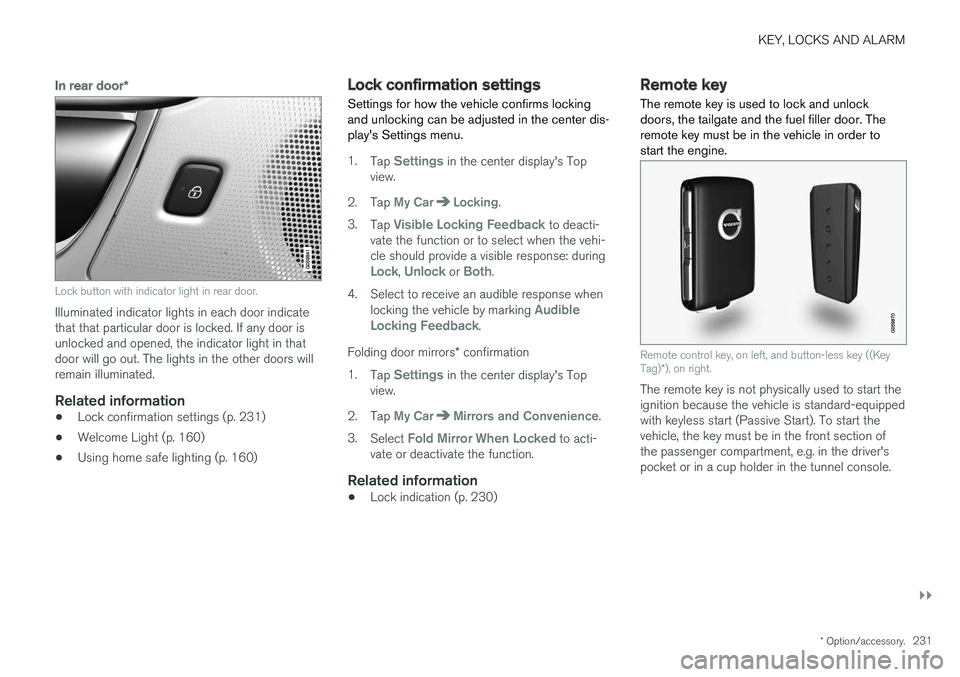
In rear door*
Lock button with indicator light in rear door.
Illuminated indicator lights in each door indicate that that particular door is locked. If any door isunlocked and opened, the indicator light in thatdoor will go out. The lights in the other doors willremain illuminated.
Related information
•Lock confirmation settings (p. 231)
• Welcome Light (p. 160)
• Using home safe lighting (p. 160)
Lock confirmation settings Settings for how the vehicle confirms locking and unlocking can be adjusted in the center dis-play's Settings menu.
1.
Tap Settings in the center display's Top
view.
2. Tap
My CarLocking.
3. Tap
Visible Locking Feedback to deacti-
vate the function or to select when the vehi- cle should provide a visible response: during
Lock, Unlock or Both.
4. Select to receive an audible response when locking the vehicle by marking
Audible
Locking Feedback.
Folding door mirrors * confirmation
1. Tap
Settings in the center display's Top
view.
2. Tap
My CarMirrors and Convenience.
3. Select
Fold Mirror When Locked to acti-
vate or deactivate the function.
Related information
• Lock indication (p. 230)
Remote key
The remote key is used to lock and unlock doors, the tailgate and the fuel filler door. Theremote key must be in the vehicle in order tostart the engine.
Remote control key, on left, and button-less key ((Key Tag) *), on right.
The remote key is not physically used to start the ignition because the vehicle is standard-equippedwith keyless start (Passive Start). To start thevehicle, the key must be in the front section ofthe passenger compartment, e.g. in the driver'spocket or in a cup holder in the tunnel console.
Page 247 of 660
KEY, LOCKS AND ALARM
}}
* Option/accessory.245
(2) this device must accept any interference received, including interference that may causeundesired operation. Any changes or modification not expressly approved by the party responsible for compliancecould void the user's authority to operate thisequipment. Canada Volvo Standard Key IC: 4008C-HUF8423 Volvo Tag ID IC: 4008C-HUF8432This device complies with Industry Canada license-exempt RSS standards. Operation is sub-ject to the following two conditions: (1) This device may not cause harmful interfer- ence, and (2) this device must accept any inter-ference received, including interference that maycause undesired operation.
Immobilizer and Passive entry/Passive
start * systems
USA-FCC ID: LTQVO3134 This device complies with part 15 of the FCC rules. Operation is subject to the following twoconditions: (1) This device may not cause harmful interfer- ence, and (2) this device must accept any interference received, including interference that may causeundesired operation. Any changes or modification not expresslyapproved by the party responsible for compliancecould void the user's authority to operate thisequipment. Canada-IC:3659A-VO3134This device complies with Industry Canada license-exempt RSS standards. Operation is sub-ject to the following two conditions: (1) This device may not cause harmful interfer- ence, and (2) this device must accept any inter-ference received, including interference that maycause undesired operation.
Related information
•
Remote key (p. 231)
Keyless and touch-sensitive
surfaces
*
If the vehicle is equipped with keyless locking and unlocking, it is only necessary to have theremote key within range, e.g. in a pocket or bag,which makes it easier to open the vehicle if yourhands are full.
Page 268 of 660
DRIVER SUPPORT
* Option/accessory.
266
Electronic Stability Control
The Electronic Stability Control (ESC 2
) function
helps the driver avoid skidding and improves the vehicle's directional stability.
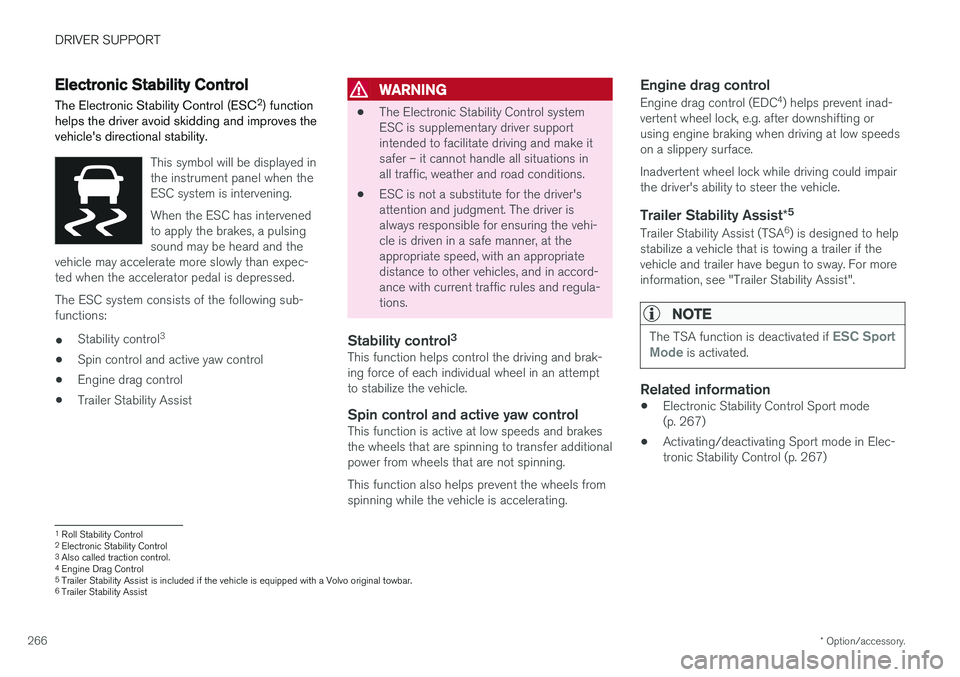
This symbol will be displayed in the instrument panel when theESC system is intervening. When the ESC has intervened to apply the brakes, a pulsingsound may be heard and the
vehicle may accelerate more slowly than expec-ted when the accelerator pedal is depressed.
The ESC system consists of the following sub- functions: • Stability control 3
• Spin control and active yaw control
• Engine drag control
• Trailer Stability Assist
WARNING
•The Electronic Stability Control system ESC is supplementary driver supportintended to facilitate driving and make itsafer – it cannot handle all situations inall traffic, weather and road conditions.
• ESC is not a substitute for the driver'sattention and judgment. The driver isalways responsible for ensuring the vehi-cle is driven in a safe manner, at theappropriate speed, with an appropriatedistance to other vehicles, and in accord-ance with current traffic rules and regula-tions.
Stability control 3This function helps control the driving and brak-ing force of each individual wheel in an attemptto stabilize the vehicle.
Spin control and active yaw controlThis function is active at low speeds and brakesthe wheels that are spinning to transfer additionalpower from wheels that are not spinning. This function also helps prevent the wheels from spinning while the vehicle is accelerating.
Engine drag control
Engine drag control (EDC
4
) helps prevent inad-
vertent wheel lock, e.g. after downshifting orusing engine braking when driving at low speedson a slippery surface. Inadvertent wheel lock while driving could impair the driver's ability to steer the vehicle.
Trailer Stability Assist *5
Trailer Stability Assist (TSA
6
) is designed to help
stabilize a vehicle that is towing a trailer if thevehicle and trailer have begun to sway. For moreinformation, see "Trailer Stability Assist".
NOTE
The TSA function is deactivated if ESC Sport
Mode is activated.
Related information
• Electronic Stability Control Sport mode (p. 267)
• Activating/deactivating Sport mode in Elec-tronic Stability Control (p. 267)
1
Roll Stability Control
2 Electronic Stability Control
3 Also called traction control.
4 Engine Drag Control
5Trailer Stability Assist is included if the vehicle is equipped with a Volvo original towbar.6
Trailer Stability Assist
Page 272 of 660
DRIVER SUPPORT
270
Speed limiterA Speed Limiter (SL 11
) could be described as a
reverse cruise control. The driver regulates the vehicle's speed using the accelerator pedal, butis prevented by the Speed Limiter from inadver-tently exceeding a preset maximum speed.
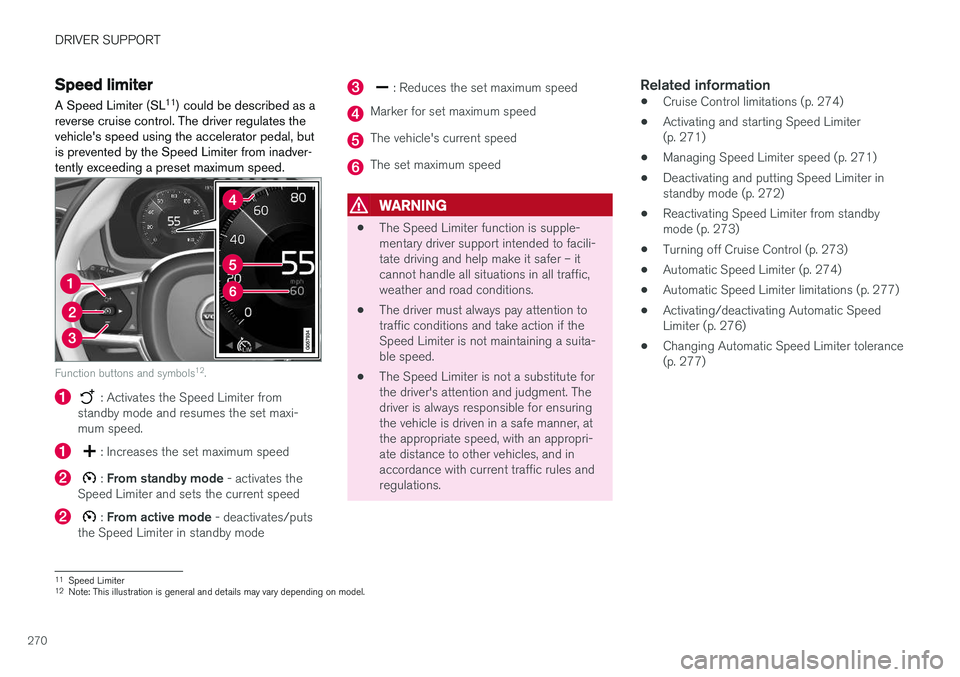
Function buttons and symbols 12
.
: Activates the Speed Limiter from
standby mode and resumes the set maxi- mum speed.
: Increases the set maximum speed
: From standby mode - activates the
Speed Limiter and sets the current speed
: From active mode - deactivates/puts
the Speed Limiter in standby mode
: Reduces the set maximum speed
Marker for set maximum speed
The vehicle's current speed
The set maximum speed
WARNING
• The Speed Limiter function is supple- mentary driver support intended to facili-tate driving and help make it safer – itcannot handle all situations in all traffic,weather and road conditions.
• The driver must always pay attention totraffic conditions and take action if theSpeed Limiter is not maintaining a suita-ble speed.
• The Speed Limiter is not a substitute forthe driver's attention and judgment. Thedriver is always responsible for ensuringthe vehicle is driven in a safe manner, atthe appropriate speed, with an appropri-ate distance to other vehicles, and inaccordance with current traffic rules andregulations.
Related information
•Cruise Control limitations (p. 274)
• Activating and starting Speed Limiter(p. 271)
• Managing Speed Limiter speed (p. 271)
• Deactivating and putting Speed Limiter instandby mode (p. 272)
• Reactivating Speed Limiter from standbymode (p. 273)
• Turning off Cruise Control (p. 273)
• Automatic Speed Limiter (p. 274)
• Automatic Speed Limiter limitations (p. 277)
• Activating/deactivating Automatic SpeedLimiter (p. 276)
• Changing Automatic Speed Limiter tolerance(p. 277)
11
Speed Limiter
12 Note: This illustration is general and details may vary depending on model.
Page 274 of 660
||
DRIVER SUPPORT
272
Related information
•Speed limiter (p. 270)
Deactivating and putting SpeedLimiter in standby mode
The Speed Limiter (SL 15
) can be temporarily
deactivated and put in standby mode.
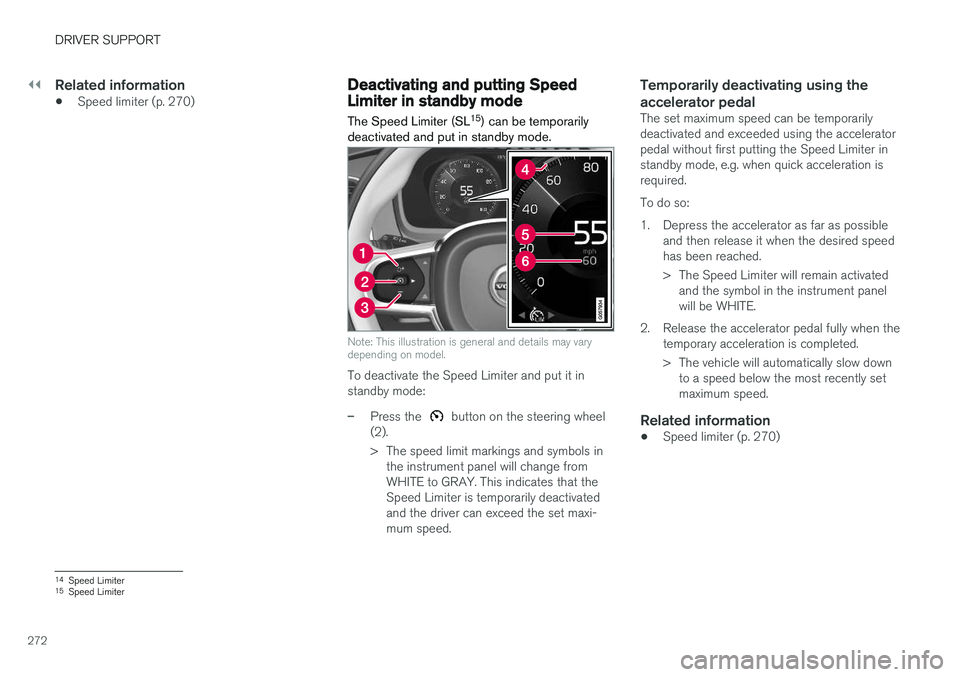
Note: This illustration is general and details may vary depending on model.
To deactivate the Speed Limiter and put it in standby mode:
–Press the button on the steering wheel
(2).
> The speed limit markings and symbols in the instrument panel will change from WHITE to GRAY. This indicates that theSpeed Limiter is temporarily deactivatedand the driver can exceed the set maxi-mum speed.
Temporarily deactivating using the accelerator pedal
The set maximum speed can be temporarily deactivated and exceeded using the acceleratorpedal without first putting the Speed Limiter instandby mode, e.g. when quick acceleration isrequired. To do so:
1. Depress the accelerator as far as possible and then release it when the desired speed has been reached.
> The Speed Limiter will remain activatedand the symbol in the instrument panel will be WHITE.
2. Release the accelerator pedal fully when the temporary acceleration is completed.
> The vehicle will automatically slow downto a speed below the most recently set maximum speed.
Related information
• Speed limiter (p. 270)
14
Speed Limiter
15 Speed Limiter
Page 275 of 660
DRIVER SUPPORT
}}
273
Reactivating Speed Limiter fromstandby modeSpeed Limiter (SL 16
) can be reactivated after
having been temporarily deactivated and put in standby mode.
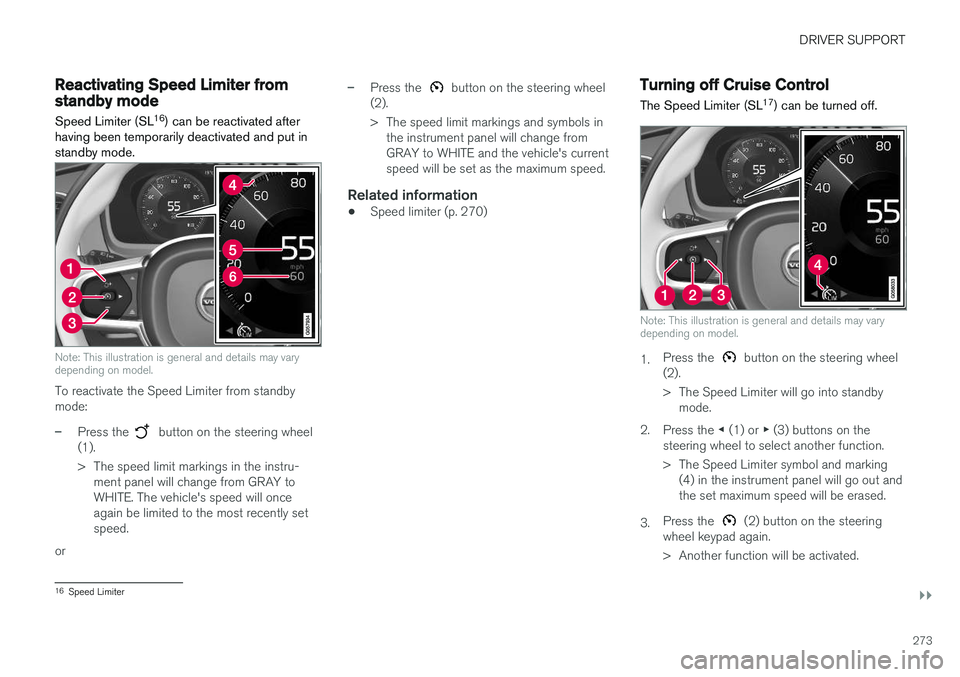
Note: This illustration is general and details may vary depending on model.
To reactivate the Speed Limiter from standby mode:
–Press the button on the steering wheel
(1).
> The speed limit markings in the instru- ment panel will change from GRAY to WHITE. The vehicle's speed will onceagain be limited to the most recently setspeed.
or
–Press the button on the steering wheel
(2).
> The speed limit markings and symbols in the instrument panel will change from GRAY to WHITE and the vehicle's currentspeed will be set as the maximum speed.
Related information
• Speed limiter (p. 270)
Turning off Cruise Control
The Speed Limiter (SL 17
) can be turned off.
Note: This illustration is general and details may vary depending on model.
1. Press the button on the steering wheel
(2).
> The Speed Limiter will go into standby mode.
2. Press the ◀ (1) or ▶ (3) buttons on the
steering wheel to select another function.
> The Speed Limiter symbol and marking (4) in the instrument panel will go out and the set maximum speed will be erased.
3. Press the
(2) button on the steering
wheel keypad again.
> Another function will be activated.
16 Speed Limiter
Page 277 of 660
DRIVER SUPPORT
275
WARNING
•The ASL function is supplementary driver support intended to facilitate driving andhelp make it safer – it cannot handle allsituations in all traffic, weather and roadconditions.
• Even if the driver can clearly see thespeed limit sign, the speed informationfrom the Road Sign Information (RSI)function to ASL may be incorrect. In suchcases, the driver must intervene andaccelerate or brake to an appropriatespeed.
• ASL is not a substitute for the driver'sattention and judgment. The driver isalways responsible for ensuring the vehi-cle is driven in a safe manner, at theappropriate speed, with an appropriatedistance to other vehicles, and in accord-ance with current traffic rules and regula-tions.
• See also the heading "Road Sign Infor-mation limitations".
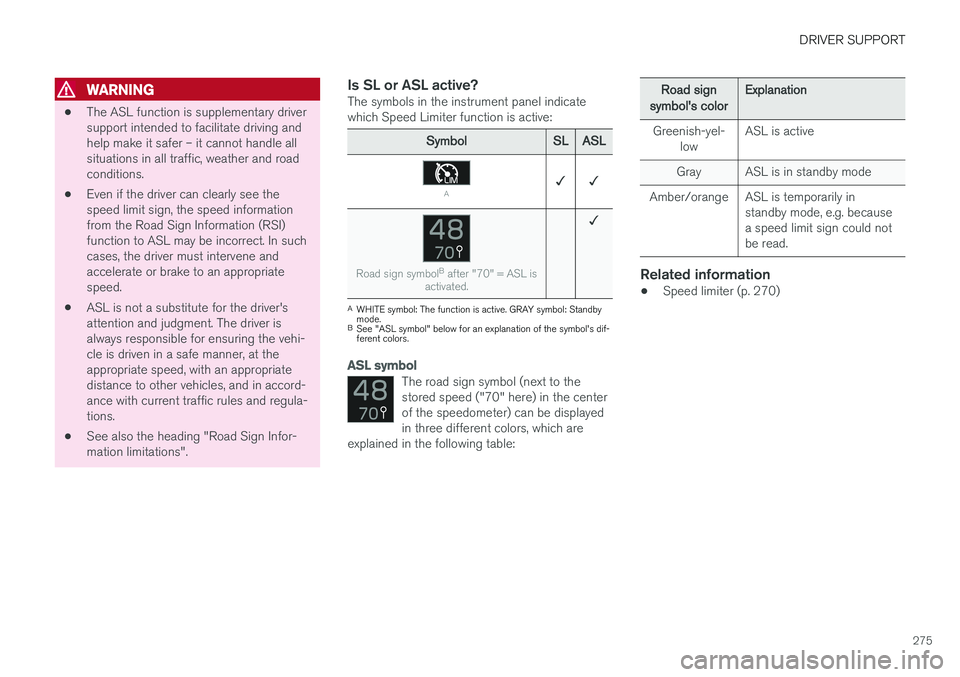
Is SL or ASL active?The symbols in the instrument panel indicatewhich Speed Limiter function is active:
SymbolSLASL
A✓ ✓
Road sign symbol B
after "70" = ASL is
activated.
✓
A WHITE symbol: The function is active. GRAY symbol: Standby mode.
B See "ASL symbol" below for an explanation of the symbol's dif-ferent colors.
ASL symbol
The road sign symbol (next to the stored speed ("70" here) in the centerof the speedometer) can be displayedin three different colors, which are
explained in the following table:
Road signsymbol's colorExplanation
Greenish-yel- low ASL is active
Gray ASL is in standby mode
Amber/orange ASL is temporarily in standby mode, e.g. because a speed limit sign could notbe read.
Related information
•Speed limiter (p. 270)
Page 280 of 660
DRIVER SUPPORT
* Option/accessory.
278
Cruise control
Cruise Control (CC 26
) helps the driver maintain
an even speed to provide a more relaxing driving experience on highways and long, straight roadswith even traffic flows.
Overview
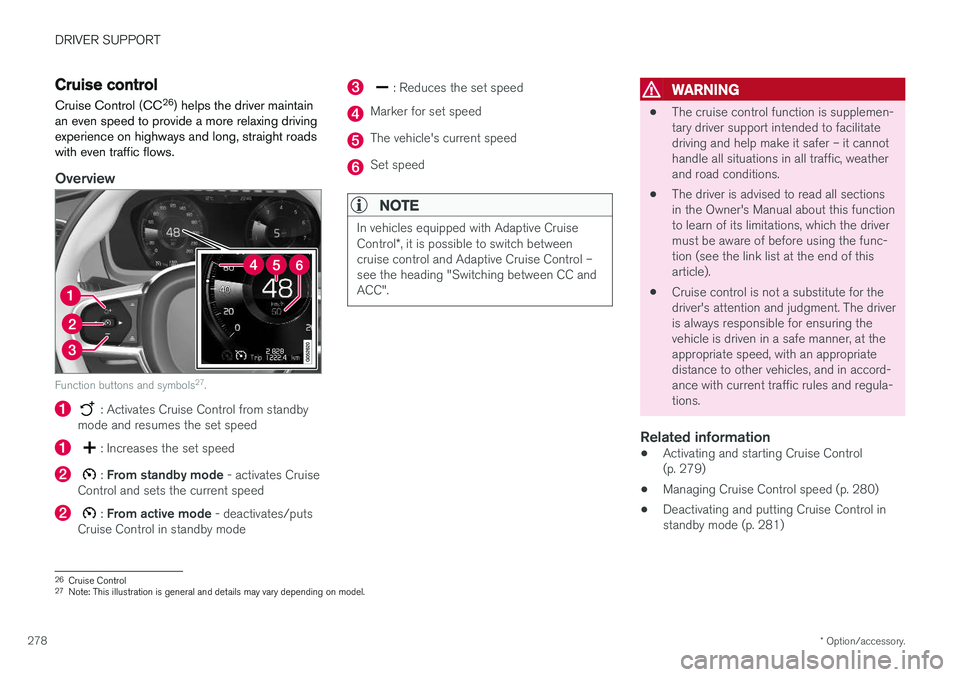
Function buttons and symbols 27
.
: Activates Cruise Control from standby
mode and resumes the set speed
: Increases the set speed
: From standby mode - activates Cruise
Control and sets the current speed
: From active mode - deactivates/puts
Cruise Control in standby mode
: Reduces the set speed
Marker for set speed
The vehicle's current speed
Set speed
NOTE
In vehicles equipped with Adaptive Cruise Control *, it is possible to switch between
cruise control and Adaptive Cruise Control – see the heading "Switching between CC andACC".
WARNING
• The cruise control function is supplemen- tary driver support intended to facilitatedriving and help make it safer – it cannothandle all situations in all traffic, weatherand road conditions.
• The driver is advised to read all sectionsin the Owner's Manual about this functionto learn of its limitations, which the drivermust be aware of before using the func-tion (see the link list at the end of thisarticle).
• Cruise control is not a substitute for thedriver's attention and judgment. The driveris always responsible for ensuring thevehicle is driven in a safe manner, at theappropriate speed, with an appropriatedistance to other vehicles, and in accord-ance with current traffic rules and regula-tions.
Related information
• Activating and starting Cruise Control(p. 279)
• Managing Cruise Control speed (p. 280)
• Deactivating and putting Cruise Control instandby mode (p. 281)
26
Cruise Control
27 Note: This illustration is general and details may vary depending on model.
Page 288 of 660
||
DRIVER SUPPORT
* Option/accessory.
286
NOTE
• The greater the vehicles' speed, the greater the distance between them for aset time interval.
• Only use the time intervals permitted bylocal traffic regulations.
• The set time interval is also used by theAdaptive Cruise Control and Pilot Assistfunctions.
WARNING
•Only use a time interval suitable for the current traffic conditions.
• The driver should be aware that shorttime intervals give them limited time toreact and act to any unforeseen trafficsituation.
Related information
•
Distance Alert
* (p. 283)
Distance Alert limitations39
Distance Alert functionality may be reduced in certain situations.WARNING
• The radar sensor has a limited field of vision. In some situations, it may detect avehicle later than expected or not detectother vehicles at all.
• The radar sensor cannot cover all drivingsituations and traffic, weather and roadconditions.
• The driver is responsible for maintaining asafe distance and speed and must inter-vene if the various driver support systemsdo not maintain a suitable speed or suita-ble distance to the vehicle ahead.
• Maintenance of radar sensor componentsmay only be performed by a trained andqualified Volvo technician.
• Strong sunlight, reflections from the roadsurface, strong lighting contrasts or usingsunglasses may make the warning light inthe windshield difficult to see. Poorweather or winding roads can affect theradar sensor's capacity to detect vehiclesahead.
• A vehicle's size (e.g., a motorcycle) canalso affect the radar sensor's capacity todetect another vehicle. This may result inthe warning light illuminating at a shorter
39
The Distance Alert function is only available in vehicles that can display information on the windshield with a head-up display.