engine VOLVO XC60 2018 Owner´s Manual
[x] Cancel search | Manufacturer: VOLVO, Model Year: 2018, Model line: XC60, Model: VOLVO XC60 2018Pages: 660, PDF Size: 11.77 MB
Page 155 of 660
LIGHTING
}}
* Option/accessory.153
With the steering wheel lever's lighting ring in the
position, the daytime running lights (DRL
1
)
will illuminate when the vehicle is driven in day- light conditions. The headlights will switch auto-matically from daytime running lights to lowbeams in weak daylight or dark conditions. Theheadlights will also switch to low beams if the front fog lights * and/or rear fog light are acti-
vated. US models : When
mode is selected, the
daytime running lights can be deactivated in the center display. The parking lights will also bedeactivated. In weak daylight or dark conditions,the parking lights and low beams will be illumi-nated. In the US: With the lighting ring in the
or
position, the daytime running lights will be
off .
In Canada : With the lighting ring in the
or
position, the daytime running lights will be
on.
NOTE
Volvo recommends use of Daytime Running Lights in the US. Its use is mandatory in Can-ada.
WARNING
The system is an energy saving aid – it cannot in all situations determine when the daylight istoo weak or not strong enough, e.g. whenthere is fog or rain. The driver is always responsible for driving the vehicle with lighting that is safe for the trafficconditions and as specified by applicable traf-fic regulations.
Related information
• Lighting panel and controls (p. 150)
• Ignition modes (p. 401)
• Low beams (p. 153)
• Replacing daytime running lights/front park- ing light bulbs (p. 590)
Low beams
When driving with the lighting ring in the
position, low beam will be automatically acti- vated in weak daylight or dark conditions, whenthe ignition is in II position or when the engine is
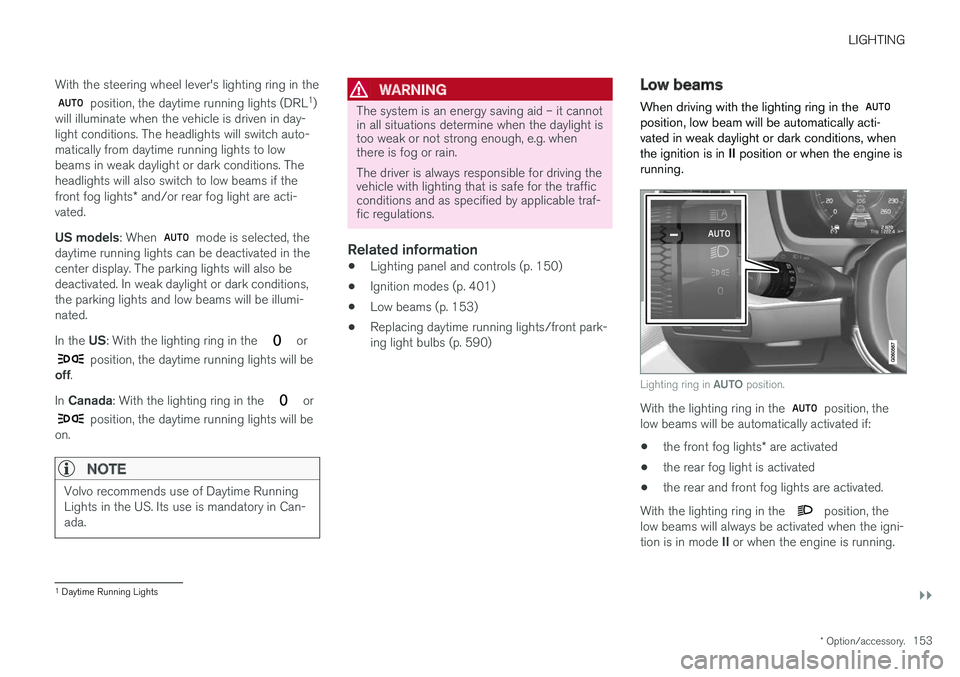
running.
Lighting ring in AUTO position.
With the lighting ring in the position, the
low beams will be automatically activated if:
• the front fog lights
* are activated
• the rear fog light is activated
• the rear and front fog lights are activated.
With the lighting ring in the
position, the
low beams will always be activated when the igni- tion is in mode II or when the engine is running.
1
Daytime Running Lights
Page 159 of 660
LIGHTING
}}
* Option/accessory.157
Active Bending Lights *
Active Bending Lights (ABL) are designed to help provide maximum illumination in curves andintersections. Depending on equipment level, vehicles with LED 5
headlights * may be equipped
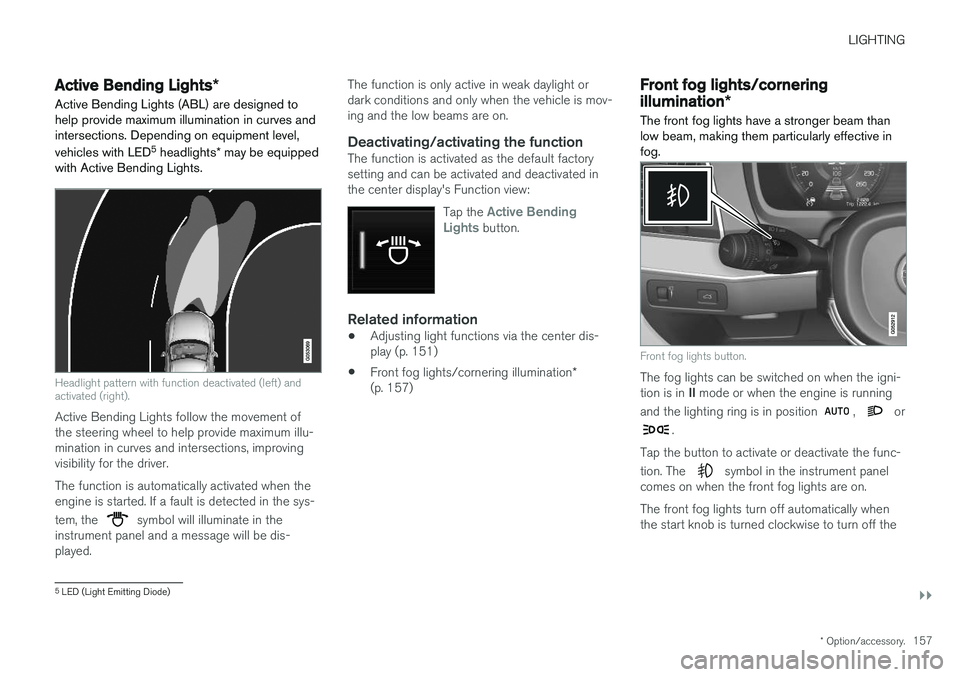
with Active Bending Lights.
Headlight pattern with function deactivated (left) and activated (right).
Active Bending Lights follow the movement of the steering wheel to help provide maximum illu-mination in curves and intersections, improvingvisibility for the driver. The function is automatically activated when the engine is started. If a fault is detected in the sys- tem, the
symbol will illuminate in the
instrument panel and a message will be dis- played. The function is only active in weak daylight ordark conditions and only when the vehicle is mov-ing and the low beams are on.
Deactivating/activating the functionThe function is activated as the default factorysetting and can be activated and deactivated inthe center display's Function view:
Tap the
Active Bending
Lights button.
Related information
• Adjusting light functions via the center dis- play (p. 151)
• Front fog lights/cornering illumination
*
(p. 157)
Front fog lights/cornering
illumination *
The front fog lights have a stronger beam than low beam, making them particularly effective infog.
Front fog lights button.
The fog lights can be switched on when the igni- tion is in II mode or when the engine is running
and the lighting ring is in position
, or
.
Tap the button to activate or deactivate the func- tion. The
symbol in the instrument panel
comes on when the front fog lights are on. The front fog lights turn off automatically when the start knob is turned clockwise to turn off the
5 LED (Light Emitting Diode)
Page 160 of 660
||
LIGHTING
* Option/accessory.
158 ignition or when the lighting ring is turned to the
position.
NOTE
Regulations concerning fog light use vary from country to country.
Cornering illumination
*The front fog lamps can include the cornering lights function, which temporarily illuminates thearea diagonally in front of the car in the directionthe steering wheel is turned on a sharp bend, orin the direction shown by the direction indicators. The function is activated in weak daylight or dark conditions when the lighting ring is in
or
mode and the vehicle speed is less than
about 30 km/h (about 20 mph). Both cornering illumination are also illuminated as a complement to the taillights when reversing. The function is activated as the default factory setting and can be activated and deactivatedusing the center display.
Related information
• Lighting panel and controls (p. 150)
• Ignition modes (p. 401)
• Rear fog light (p. 158)
• Active Bending Lights
* (p. 157) •
Adjusting light functions via the center dis-play (p. 151)
Rear fog light
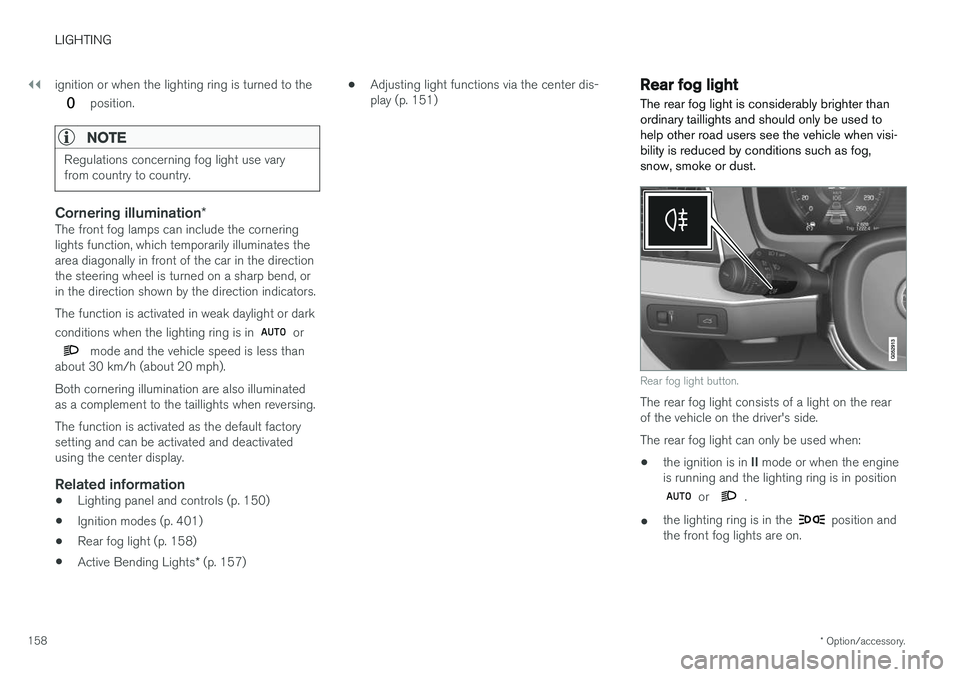
The rear fog light is considerably brighter than ordinary taillights and should only be used tohelp other road users see the vehicle when visi-bility is reduced by conditions such as fog,snow, smoke or dust.
Rear fog light button.
The rear fog light consists of a light on the rear of the vehicle on the driver's side. The rear fog light can only be used when:
• the ignition is in
II mode or when the engine
is running and the lighting ring is in position
or .
• the lighting ring is in the
position and
the front fog lights are on.
Page 163 of 660

LIGHTING
}}
* Option/accessory.161
Interior Lighting
The interior is equipped with several different types of lighting to improve the experience. Thisincludes reading lamps, glove box lighting andground lighting.
All lighting in the passenger compartment can be turned on and off manually within 5 minutesafter:
• the engine has been switched off and the ignition is in mode
0.
• the vehicle is unlocked but the engine has not been started.
Front ceiling lighting
The controls in the ceiling console for the front reading lights and courtesy lighting.
Reading light left side
Passenger compartment lighting
Courtesy lighting auto switch
Reading light right side
Reading lights
The reading lights on the right and left sides are switched on and off by briefly pressing the but-tons in the ceiling console. To adjust the bright-ness, press and hold the button.
Passenger compartment lighting
Briefly press the button in the ceiling console to switch on or off the footwell lighting and ceilinglighting.
Courtesy lighting auto switch
Activate the auto switch by briefly pressing the AUTO
button in the ceiling console. With Auto
activated, the indicator light in the button and the courtesy lighting come on and are turned off asfollows. The courtesy lighting: • comes on when the vehicle is unlocked and when the ignition is switched off
• goes off when the engine is started andwhen the vehicle is locked
• comes on or goes off when a side door isopened or closed
• remains on for 2 minutes if any of the sidedoors are open.
Rear roof lighting
*Reading lights are located in the rear section ofthe vehicle and can also be used as passengercompartment lighting.
Reading lights over the rear seat.
In vehicles with panoramic roofs *, there are two lamp
units, one on each side of the ceiling.
Page 164 of 660
||
LIGHTING
* Option/accessory.
162 Briefly press the button on the light to turn on or off the reading lights. To adjust the brightness,press and hold the button.
Glove compartment lightingThe glove compartment lighting comes on orgoes off when the glove compartment is openedor closed.
Vanity mirror lighting
*The vanity mirror lighting comes on or goes offwhen the cover over the mirror is opened orclosed.
Ground lighting*The ground lighting comes on or goes off when adoor is opened or closed.
Cargo compartment lightingThe cargo compartment lighting comes on orgoes off when the tailgate is opened or closed.
Ambient LightingThe ambient lighting comes on when the doorsare opened and goes out when the vehicle islocked. Ambient lighting brightness can beadjusted in the center display and also fine-tuned using the thumb wheel in the dashboard.
Mood lighting*The vehicle is equipped with several LEDs that provide faint lighting in various colors. This light-ing is on when the engine is running. Mood light-ing can be adjusted in the center display and also fine-tuned using the thumb wheel in the dash-board.
Lighting in the door storage compartments
Lighting in the door storage compartments comes on when the doors are opened and goesout when the vehicle is locked. The brightnesscan be adjusted using the thumb wheel in thedashboard.
Lighting in the front tunnel console
cupholders
The lighting in front console cupholders switcheson when the vehicle is unlocked and off when thevehicle is locked. The brightness can be adjustedusing the thumb wheel in the dashboard.
Related information
• Adjusting interior lighting (p. 162)
• Lighting panel and controls (p. 150)
• Ignition modes (p. 401)
• Passenger compartment interior (p. 554)
Adjusting interior lighting
Illumination in the vehicle varies depending on ignition mode. The interior lighting can beadjusted with a thumb wheel in the dashboardand certain light functions can also be adjustedvia the center display.
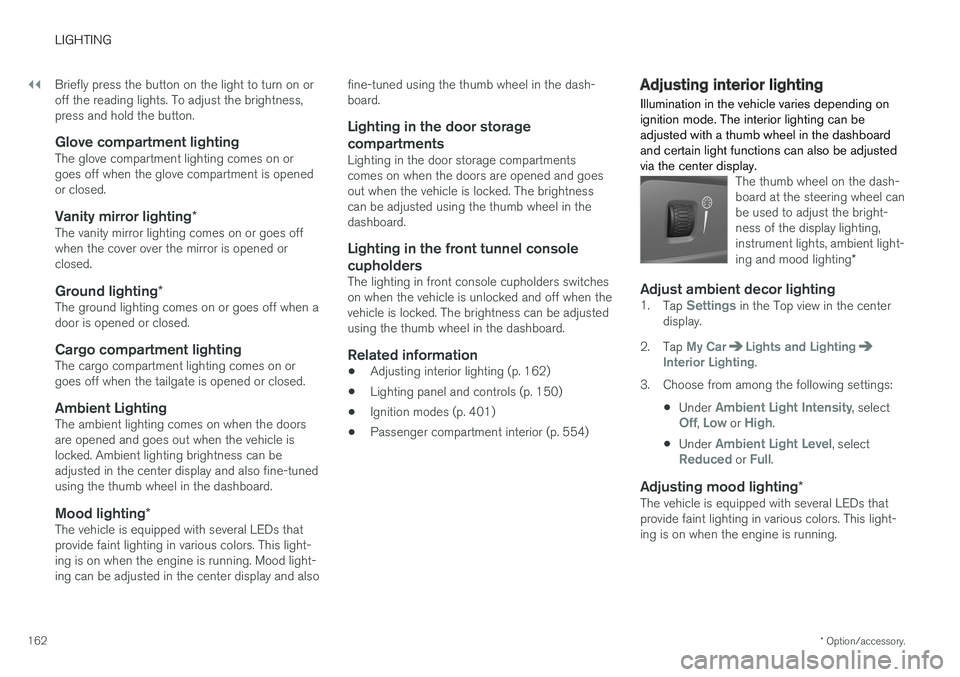
The thumb wheel on the dash- board at the steering wheel canbe used to adjust the bright-ness of the display lighting,instrument lights, ambient light- ing and mood lighting *
Adjust ambient decor lighting1.
Tap Settings in the Top view in the center
display.
2. Tap
My CarLights and LightingInterior Lighting.
3. Choose from among the following settings:
•Under
Ambient Light Intensity, selectOff, Low or High.
• Under
Ambient Light Level, selectReduced or Full.
Adjusting mood lighting
*The vehicle is equipped with several LEDs that provide faint lighting in various colors. This light-ing is on when the engine is running.
Page 172 of 660
WINDOWS, GLASS AND MIRRORS
* Option/accessory.
170
Adjusting the rearview mirrordimming function
Bright light entering the vehicle from behind, e.g. from the headlights of following vehicles, couldreflect in the rearview mirror and door mirrorsand cause a glare. Use the dimming functionwhen light from behind is distracting.
Auto-dimIf bright light enters the vehicle from behind, the door mirrors will automatically dim. Auto-dim isalways active when the engine is running, exceptwhen reverse gear is engaged.
NOTE
When the level of sensitivity is changed, this change will not be noticeable immediately butwill instead take effect after a short period oftime.
The sensitivity level for dimming will affect both the rearview mirror and door mirrors. 1. Tap
Settings in the Top view in the center
display.
2. Tap
My CarMirrors and Convenience.
3. Under
Rearview Mirror Auto Dimming,
select Normal, Dark or Light.
The rearview mirror instead has two sensors - one pointing forward and one pointing rearward -which work together to identify and eliminate glare. The forward-pointing sensor monitorsambient light, while the rearward-pointing sensormonitors light from the headlights of followingvehicles. For the door mirrors to be equipped with auto- dim, the rearview mirror must also be equippedwith auto-dim.
NOTE
If the sensors are obstructed by e.g. a parking permit, transponder, sunshade or objects onthe seats or in the cargo compartment in away that prevents light from reaching the sen-sors, the auto-dim function in the door andrearview mirrors will be reduced.
Related information
•
Rearview/door mirrors (p. 169)
• Adjusting the door mirrors (p. 170)
Adjusting the door mirrors
To improve visibility to the rear, the door mirrors need to be adjusted to the driver's height andseating position. There are several automaticsettings that can also be connected to the mem- ory function buttons for the power seat *.
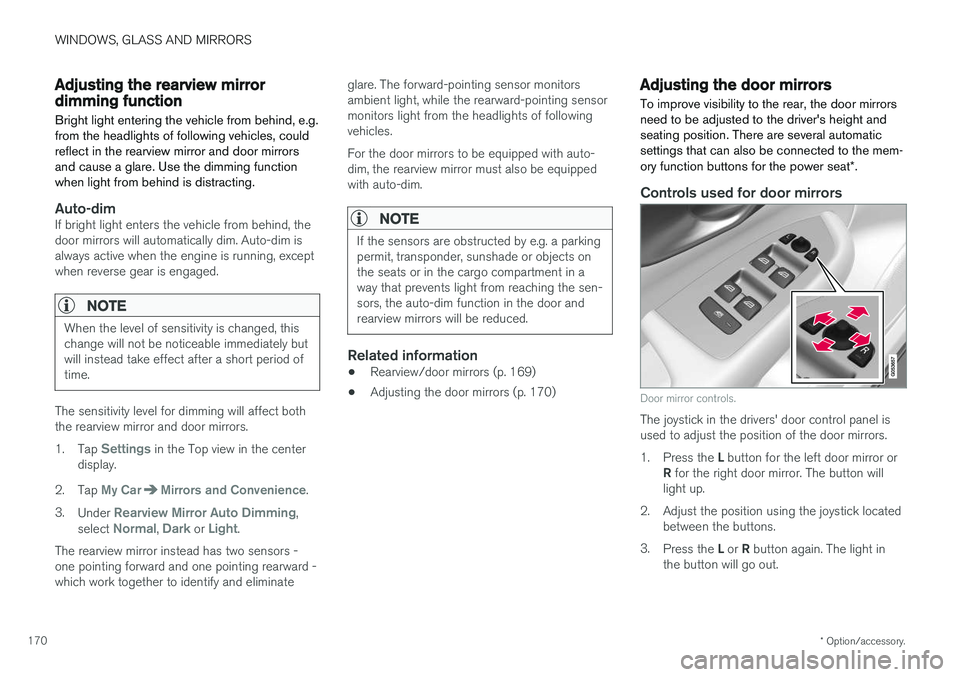
Controls used for door mirrors
Door mirror controls.
The joystick in the drivers' door control panel is used to adjust the position of the door mirrors. 1.
Press the L button for the left door mirror or
R for the right door mirror. The button will
light up.
2. Adjust the position using the joystick located between the buttons.
3. Press the L or R button again. The light in
the button will go out.
Page 179 of 660
WINDOWS, GLASS AND MIRRORS
}}
* Option/accessory.177
Heated windshield washer nozzles *
The washer nozzles are heated automatically in cold weather to prevent the washer fluid fromfreezing.
Related information
• Using the rain sensor (p. 177)
• Using the windshield and headlight washers (p. 179)
• Using automatic rear window wiping whenbacking up (p. 180)
• Using the rain sensor's memory function(p. 178)
• Using the rear window wiper/washer(p. 180)
• Filling washer fluid (p. 626)
• Windshield wipers in the service position(p. 625)
• Replacing windshield wiper blades (p. 624)
• Changing rear window wipers (p. 623)
• Using the windshield wipers (p. 176)
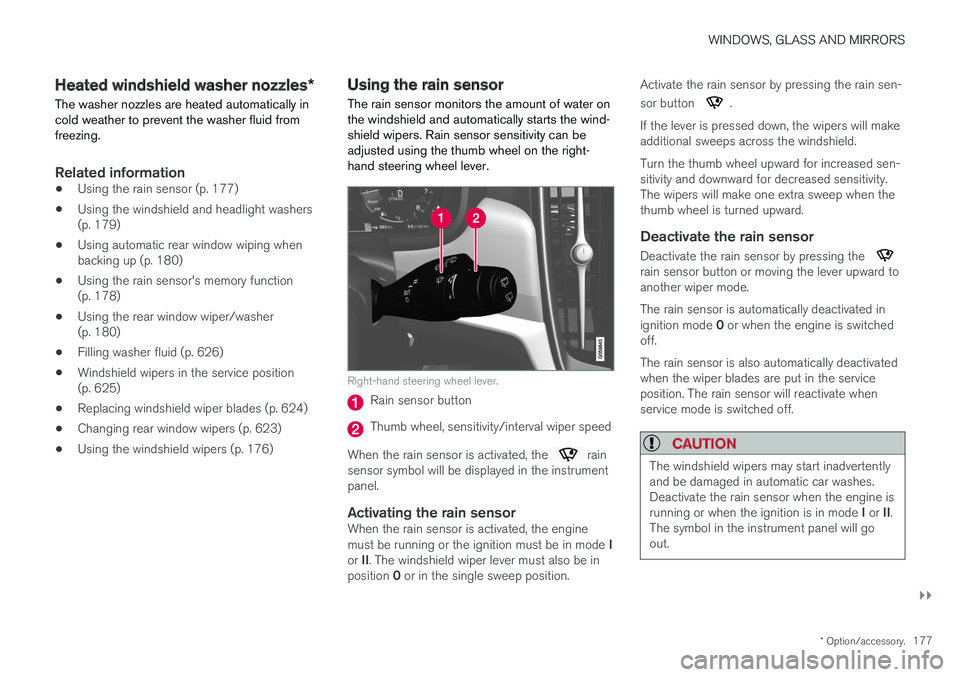
Using the rain sensor The rain sensor monitors the amount of water on the windshield and automatically starts the wind-shield wipers. Rain sensor sensitivity can beadjusted using the thumb wheel on the right-hand steering wheel lever.
Right-hand steering wheel lever.
Rain sensor button
Thumb wheel, sensitivity/interval wiper speed
When the rain sensor is activated, the
rain
sensor symbol will be displayed in the instrument panel.
Activating the rain sensorWhen the rain sensor is activated, the engine must be running or the ignition must be in mode I
or II. The windshield wiper lever must also be in
position 0 or in the single sweep position. Activate the rain sensor by pressing the rain sen- sor button
.
If the lever is pressed down, the wipers will make additional sweeps across the windshield. Turn the thumb wheel upward for increased sen- sitivity and downward for decreased sensitivity.The wipers will make one extra sweep when thethumb wheel is turned upward.
Deactivate the rain sensor
Deactivate the rain sensor by pressing the rain sensor button or moving the lever upward to another wiper mode. The rain sensor is automatically deactivated in ignition mode 0 or when the engine is switched
off. The rain sensor is also automatically deactivated when the wiper blades are put in the serviceposition. The rain sensor will reactivate whenservice mode is switched off.
CAUTION
The windshield wipers may start inadvertently and be damaged in automatic car washes.Deactivate the rain sensor when the engine is running or when the ignition is in mode I or II.
The symbol in the instrument panel will go out.
Page 180 of 660
||
WINDOWS, GLASS AND MIRRORS
* Option/accessory.
178
Related information
• Using the windshield and headlight washers (p. 179)
• Using automatic rear window wiping whenbacking up (p. 180)
• Heated windshield washer nozzles
* (p. 177)
• Using the rain sensor's memory function(p. 178)
• Using the rear window wiper/washer (p. 180)
• Filling washer fluid (p. 626)
• Windshield wipers in the service position (p. 625)
• Replacing windshield wiper blades (p. 624)
• Changing rear window wipers (p. 623)
• Using the windshield wipers (p. 176)
Using the rain sensor's memoryfunction The rain sensor monitors the amount of water on the windshield and automatically starts the wind-shield wipers.
Activating/deactivating memory function
The rain sensor's memory function can be set to activate so that the rain sensor button does notneed to be pressed each time the engine isstarted: 1.
Tap
Settings in the Top view in the center
display.
2. Tap
My CarWipers.
3. Select
Rain Sensor Memory to activate/
deactivate the memory function.
Related information
• Using the rain sensor (p. 177)
• Using the windshield and headlight washers (p. 179)
• Using automatic rear window wiping whenbacking up (p. 180)
• Heated windshield washer nozzles
* (p. 177)
• Using the rear window wiper/washer(p. 180)
• Filling washer fluid (p. 626) •
Windshield wipers in the service position(p. 625)
• Replacing windshield wiper blades (p. 624)
• Changing rear window wipers (p. 623)
• Using the windshield wipers (p. 176)
Page 187 of 660
SEATS AND STEERING WHEEL
}}
* Option/accessory.185
Power front seats *
The power front seats can be adjusted in a num- ber of different ways for optimal comfort andergonomics. The power seats can be moved for-ward/backward and up/down. The height and length * of the seat cushion and the tilt of the
backrest can be adjusted. Lumbar support can be adjusted up, down, forward and backward.
The power seats have an overload protector that is triggered if a seat is blocked by any object. Ifthis occurs, remove the object and attempt toadjust the seat again. The power seats can be adjusted for a certain period of time after the door is unlocked withoutthe engine running. The seats can always beadjusted while the engine is running. They canalso be adjusted for a short period after theengine is turned off.
Related information
• Manual front seats (p. 184)
• Adjusting the power front seats
* (p. 185)
• Storing memory settings in power front seats
* (p. 186)
• Using stored memory in a powered front seat (p. 187)
• Adjusting front seat massage settings
*
(p. 188)
• Adjusting front seat cushion length (p. 189)
• Front seat massage settings
* (p. 188) •
Adjusting front seat side bolster settings
*
(p. 190)
• Adjusting front seat lumbar support
* (p. 190)
• Adjusting the passenger seat from the driv- er's seat
* (p. 191)
Adjusting the power front seats *
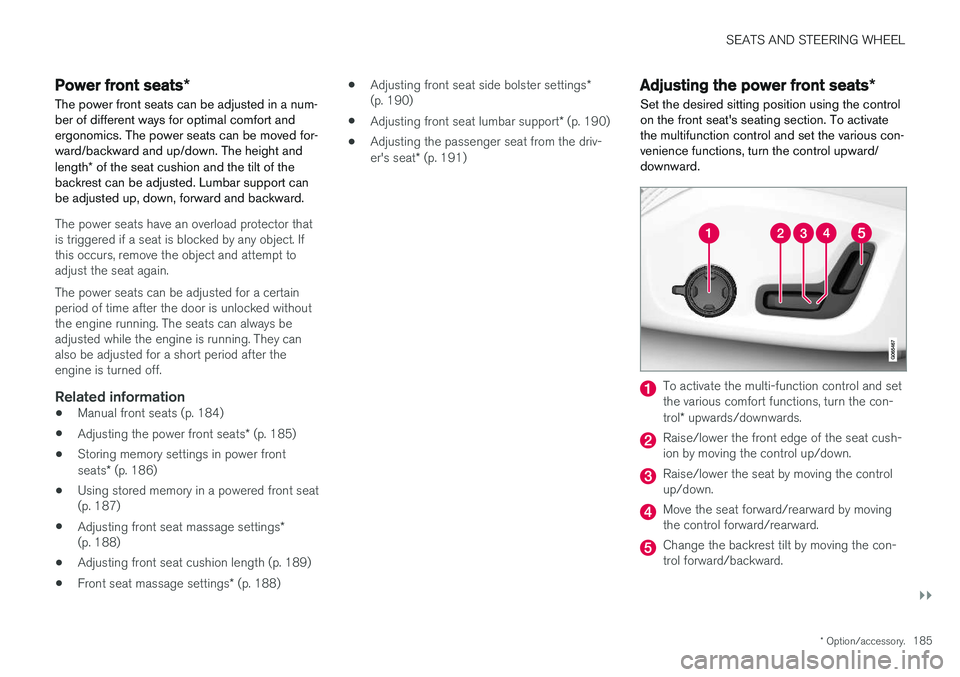
Set the desired sitting position using the control on the front seat's seating section. To activatethe multifunction control and set the various con-venience functions, turn the control upward/downward.
To activate the multi-function control and set the various comfort functions, turn the con- trol * upwards/downwards.
Raise/lower the front edge of the seat cush- ion by moving the control up/down.
Raise/lower the seat by moving the control up/down.
Move the seat forward/rearward by moving the control forward/rearward.
Change the backrest tilt by moving the con- trol forward/backward.
Page 190 of 660
SEATS AND STEERING WHEEL
* Option/accessory.
188
Front seat massage settings *
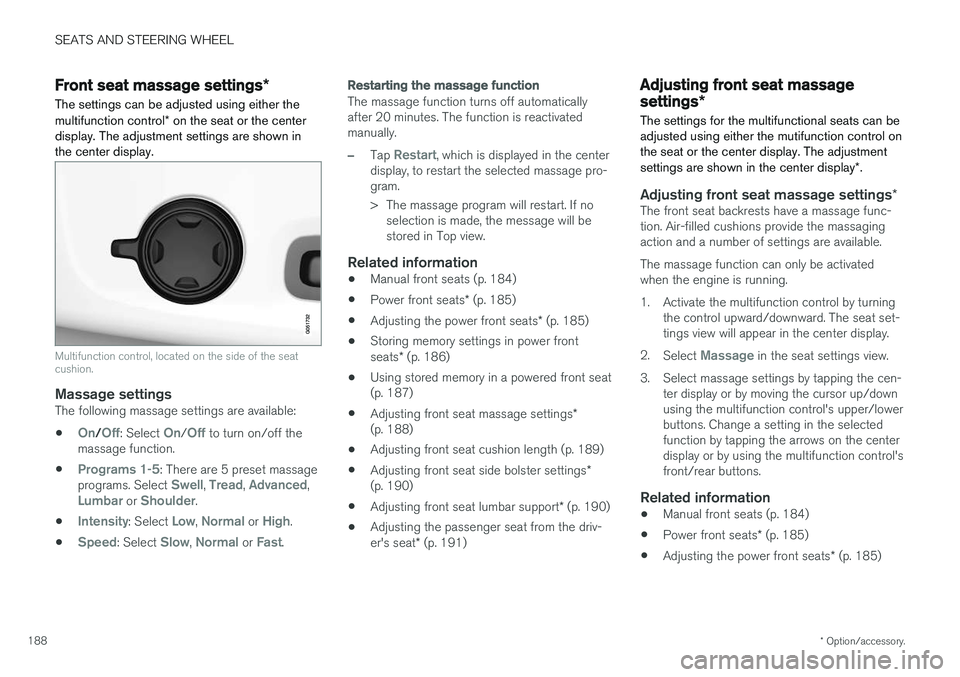
The settings can be adjusted using either the multifunction control * on the seat or the center
display. The adjustment settings are shown in the center display.
Multifunction control, located on the side of the seat cushion.
Massage settingsThe following massage settings are available:
•
On/Off: Select On/Off to turn on/off the
massage function.
•
Programs 1-5: There are 5 preset massage
programs. Select Swell, Tread, Advanced,Lumbar or Shoulder.
•
Intensity: Select Low, Normal or High.
•
Speed: Select Slow, Normal or Fast.
Restarting the massage function
The massage function turns off automatically after 20 minutes. The function is reactivatedmanually.
–Tap Restart, which is displayed in the center
display, to restart the selected massage pro- gram.
> The massage program will restart. If no selection is made, the message will be stored in Top view.
Related information
• Manual front seats (p. 184)
• Power front seats
* (p. 185)
• Adjusting the power front seats
* (p. 185)
• Storing memory settings in power front seats
* (p. 186)
• Using stored memory in a powered front seat (p. 187)
• Adjusting front seat massage settings
*
(p. 188)
• Adjusting front seat cushion length (p. 189)
• Adjusting front seat side bolster settings
*
(p. 190)
• Adjusting front seat lumbar support
* (p. 190)
• Adjusting the passenger seat from the driv- er's seat
* (p. 191)
Adjusting front seat massage
settings *
The settings for the multifunctional seats can be adjusted using either the mutifunction control onthe seat or the center display. The adjustment settings are shown in the center display *.
Adjusting front seat massage settings *The front seat backrests have a massage func- tion. Air-filled cushions provide the massagingaction and a number of settings are available. The massage function can only be activated when the engine is running.
1. Activate the multifunction control by turning
the control upward/downward. The seat set- tings view will appear in the center display.
2. Select
Massage in the seat settings view.
3. Select massage settings by tapping the cen- ter display or by moving the cursor up/down using the multifunction control's upper/lowerbuttons. Change a setting in the selectedfunction by tapping the arrows on the centerdisplay or by using the multifunction control'sfront/rear buttons.
Related information
• Manual front seats (p. 184)
• Power front seats
* (p. 185)
• Adjusting the power front seats
* (p. 185)