rear view mirror VOLVO XC60 2018 Owner´s Manual
[x] Cancel search | Manufacturer: VOLVO, Model Year: 2018, Model line: XC60, Model: VOLVO XC60 2018Pages: 660, PDF Size: 11.77 MB
Page 431 of 660
STARTING AND DRIVING
}}
* Option/accessory.429
Leveling control settings *
The vehicle can be lowered or raised to make it easier to load or for passengers to get in andout. Turn off leveling control before lifting the vehicle with a jack to help avoid problems with thepneumatic suspension.
Adjusting loading mode
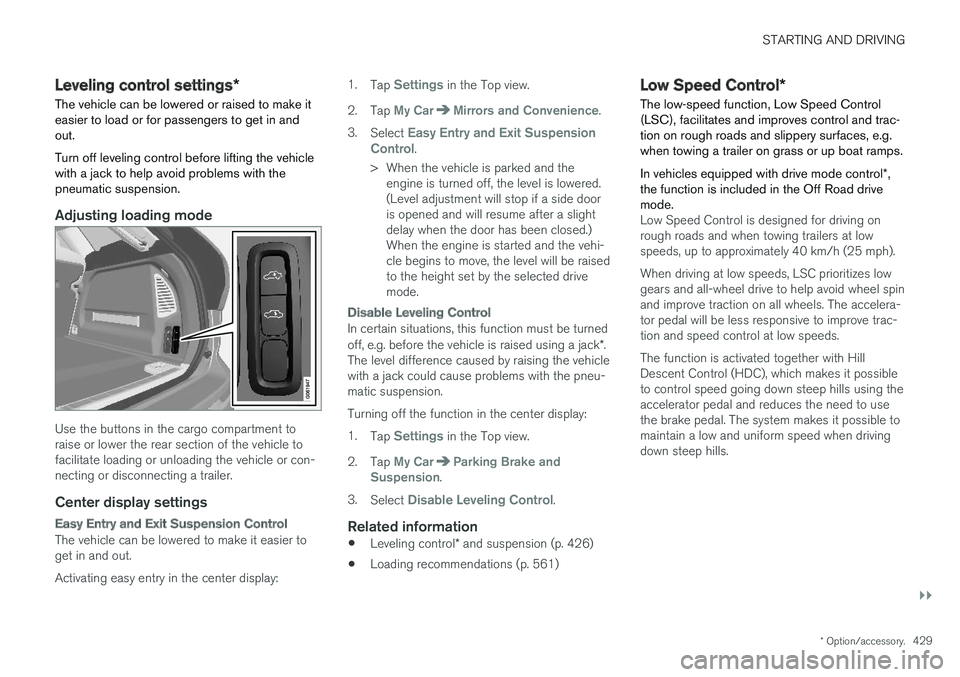
Use the buttons in the cargo compartment to raise or lower the rear section of the vehicle tofacilitate loading or unloading the vehicle or con-necting or disconnecting a trailer.
Center display settings
Easy Entry and Exit Suspension Control
The vehicle can be lowered to make it easier to get in and out. Activating easy entry in the center display: 1.
Tap
Settings in the Top view.
2. Tap
My CarMirrors and Convenience.
3. Select
Easy Entry and Exit Suspension
Control.
> When the vehicle is parked and the engine is turned off, the level is lowered. (Level adjustment will stop if a side dooris opened and will resume after a slightdelay when the door has been closed.)When the engine is started and the vehi-cle begins to move, the level will be raisedto the height set by the selected drivemode.
Disable Leveling Control
In certain situations, this function must be turned off, e.g. before the vehicle is raised using a jack *.
The level difference caused by raising the vehicle with a jack could cause problems with the pneu-matic suspension. Turning off the function in the center display:1. Tap
Settings in the Top view.
2. Tap
My CarParking Brake and
Suspension.
3. Select
Disable Leveling Control.
Related information
• Leveling control
* and suspension (p. 426)
• Loading recommendations (p. 561)
Low Speed Control
*
The low-speed function, Low Speed Control (LSC), facilitates and improves control and trac-tion on rough roads and slippery surfaces, e.g.when towing a trailer on grass or up boat ramps. In vehicles equipped with drive mode control *,
the function is included in the Off Road drive mode.
Low Speed Control is designed for driving on rough roads and when towing trailers at lowspeeds, up to approximately 40 km/h (25 mph). When driving at low speeds, LSC prioritizes low gears and all-wheel drive to help avoid wheel spinand improve traction on all wheels. The accelera-tor pedal will be less responsive to improve trac-tion and speed control at low speeds. The function is activated together with Hill Descent Control (HDC), which makes it possibleto control speed going down steep hills using theaccelerator pedal and reduces the need to usethe brake pedal. The system makes it possible tomaintain a low and uniform speed when drivingdown steep hills.
Page 453 of 660
STARTING AND DRIVING
}}
* Option/accessory.451
HomeLink
®
is delivered integrated in the rearview
mirror. The HomeLink ®
panel consists of three
programmable buttons and an indicator light in the mirror. For more information about HomeLink ®
, please
visit www.HomeLink.com, www.youtube.com/ HomeLinkGentex or call 1-800-355-3515. Save the original remote controls for future pro- gramming (e.g. for use in another vehicle). It isalso advisable to delete the button programmingif the vehicle is sold.
Related information
• Using HomeLink (p. 452)
• Programming HomeLink ®
* (p. 451)
• Type approval for HomeLink ®
* (p. 453)
Programming HomeLink®
*13
Follow these instructions to program HomeLink ®
, reset all programming, or program
individual buttons.
NOTE
In some vehicles, the ignition must be on or in the "accessory position" before HomeLink ®
can be programmed or used. It can be a good idea to put new batteries in the remote con- trol being replaced by HomeLink ®
for faster
programming and better radio signal trans-mission. The HomeLink ®
buttons should be
reset before programming.
WARNING
While HomeLink ®
is being programmed, the
garage door or gate being programmed may be activated. Make sure that no one is nearthe door or gate during programming. Whenprogramming a garage door opener, it isadvised to park outside of the garage. 1.
Point the remote control at the HomeLink ®
button to be programmed and hold it about 2-8 cm (1-3 inches) from the button. Do not obstruct the HomeLink ®
indicator light.
Note: Some remote controls are more effec-
tive at programming HomeLink ®
from a dis-
tance of about 15-20 cm (6-12 inches). Try moving the remote control closer or furtheraway if you are experiencing any difficultiesprogramming.
2. Press and hold both the remote control but- ton and the HomeLink ®
button to be pro-
grammed.
3. Do not release the buttons until the indicator light has stopped flashing slowly (about oncea second) and either flashes quickly (about10 times a second) or glows steadily. >Steady glow: Indication that program-
ming is complete. Press the programmed button twice to activate. Flashing quickly: The device being pro-
grammed with HomeLink ®
may have a
security function that requires an extra step. Try pressing the programmed buttontwice to see whether the programmingworks. Otherwise, continue with the fol-lowing steps.
12 HomeLink and the HomeLink house symbol are registered trademarks of Gentex Corporation.
13 Certain markets only.
Page 456 of 660
STARTING AND DRIVING
454
Compass
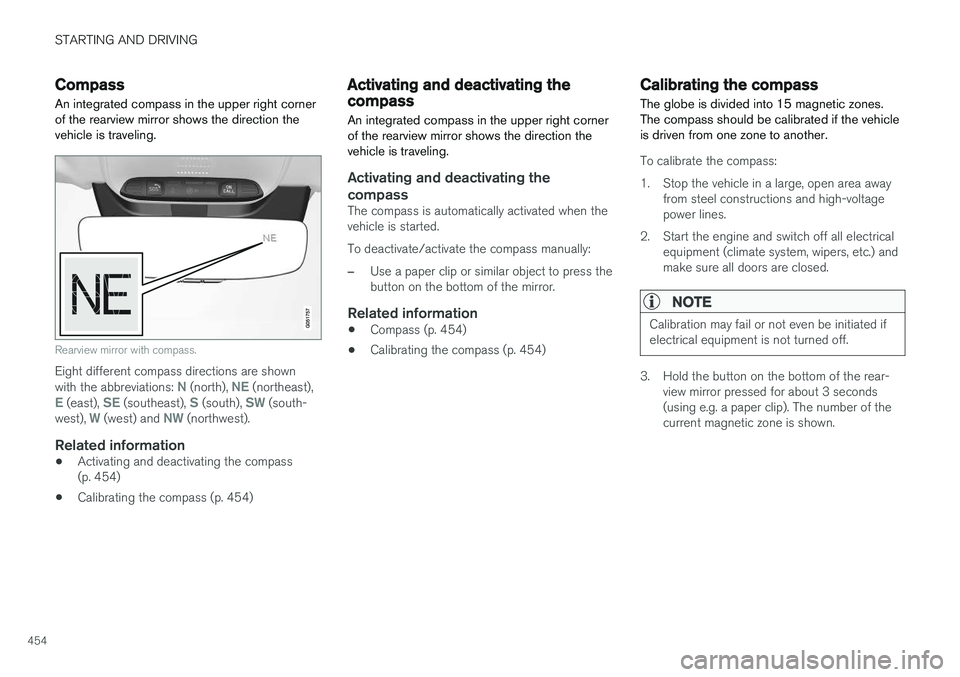
An integrated compass in the upper right corner of the rearview mirror shows the direction thevehicle is traveling.
Rearview mirror with compass.
Eight different compass directions are shown with the abbreviations: N (north), NE (northeast),E (east), SE (southeast), S (south), SW (south-
west), W (west) and NW (northwest).
Related information
• Activating and deactivating the compass (p. 454)
• Calibrating the compass (p. 454)
Activating and deactivating thecompass
An integrated compass in the upper right corner of the rearview mirror shows the direction thevehicle is traveling.
Activating and deactivating the compass
The compass is automatically activated when the vehicle is started. To deactivate/activate the compass manually:
–Use a paper clip or similar object to press the button on the bottom of the mirror.
Related information
• Compass (p. 454)
• Calibrating the compass (p. 454)
Calibrating the compass
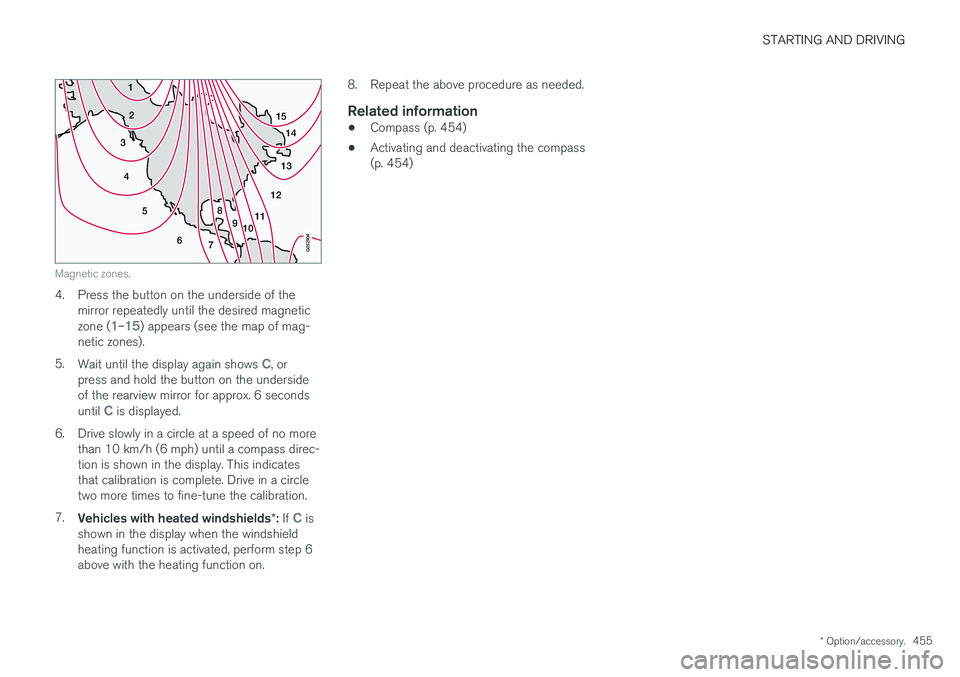
The globe is divided into 15 magnetic zones. The compass should be calibrated if the vehicleis driven from one zone to another.
To calibrate the compass:
1. Stop the vehicle in a large, open area away from steel constructions and high-voltage power lines.
2. Start the engine and switch off all electrical equipment (climate system, wipers, etc.) andmake sure all doors are closed.
NOTE
Calibration may fail or not even be initiated if electrical equipment is not turned off.
3. Hold the button on the bottom of the rear-view mirror pressed for about 3 seconds (using e.g. a paper clip). The number of thecurrent magnetic zone is shown.
Page 457 of 660
STARTING AND DRIVING
* Option/accessory.455
15
14
13
12
11
9
8
7
6
5
4
3
2
1
10
Magnetic zones.
4. Press the button on the underside of themirror repeatedly until the desired magnetic zone (
1–15) appears (see the map of mag-
netic zones).
5. Wait until the display again shows
C, or
press and hold the button on the underside of the rearview mirror for approx. 6 seconds until
C is displayed.
6. Drive slowly in a circle at a speed of no more than 10 km/h (6 mph) until a compass direc- tion is shown in the display. This indicatesthat calibration is complete. Drive in a circletwo more times to fine-tune the calibration.
7. Vehicles with heated windshields *: If
C is
shown in the display when the windshield heating function is activated, perform step 6above with the heating function on. 8. Repeat the above procedure as needed.
Related information
•
Compass (p. 454)
• Activating and deactivating the compass(p. 454)
Page 605 of 660
MAINTENANCE AND SERVICE
}}
* Option/accessory.603
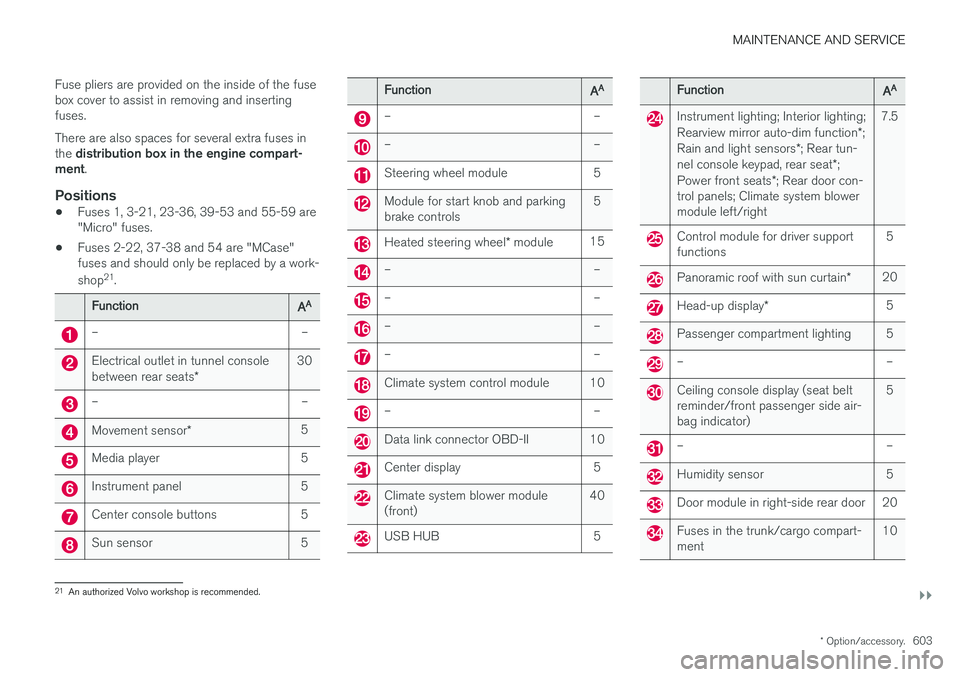
Fuse pliers are provided on the inside of the fuse box cover to assist in removing and insertingfuses. There are also spaces for several extra fuses in the
distribution box in the engine compart-
ment .
Positions
•Fuses 1, 3-21, 23-36, 39-53 and 55-59 are "Micro" fuses.
• Fuses 2-22, 37-38 and 54 are "MCase"fuses and should only be replaced by a work- shop 21
.
FunctionAA
– –
Electrical outlet in tunnel console between rear seats * 30
– –
Movement sensor
* 5
Media player 5
Instrument panel 5
Center console buttons 5
Sun sensor 5
FunctionAA
– –
– –
Steering wheel module 5
Module for start knob and parking brake controls 5
Heated steering wheel
* module 15
– –
– –
– –
– –
Climate system control module 10
– –
Data link connector OBD-II 10
Center display 5
Climate system blower module (front) 40
USB HUB 5
FunctionAA
Instrument lighting; Interior lighting; Rearview mirror auto-dim function
*;
Rain and light sensors *; Rear tun-
nel console keypad, rear seat *;
Power front seats *; Rear door con-
trol panels; Climate system blower module left/right 7.5
Control module for driver support functions
5
Panoramic roof with sun curtain
*20
Head-up display
* 5
Passenger compartment lighting 5
– –
Ceiling console display (seat belt reminder/front passenger side air-bag indicator) 5
– –
Humidity sensor 5
Door module in right-side rear door 20
Fuses in the trunk/cargo compart- ment
10
21
An authorized Volvo workshop is recommended.
Page 636 of 660
||
SPECIFICATIONS
634
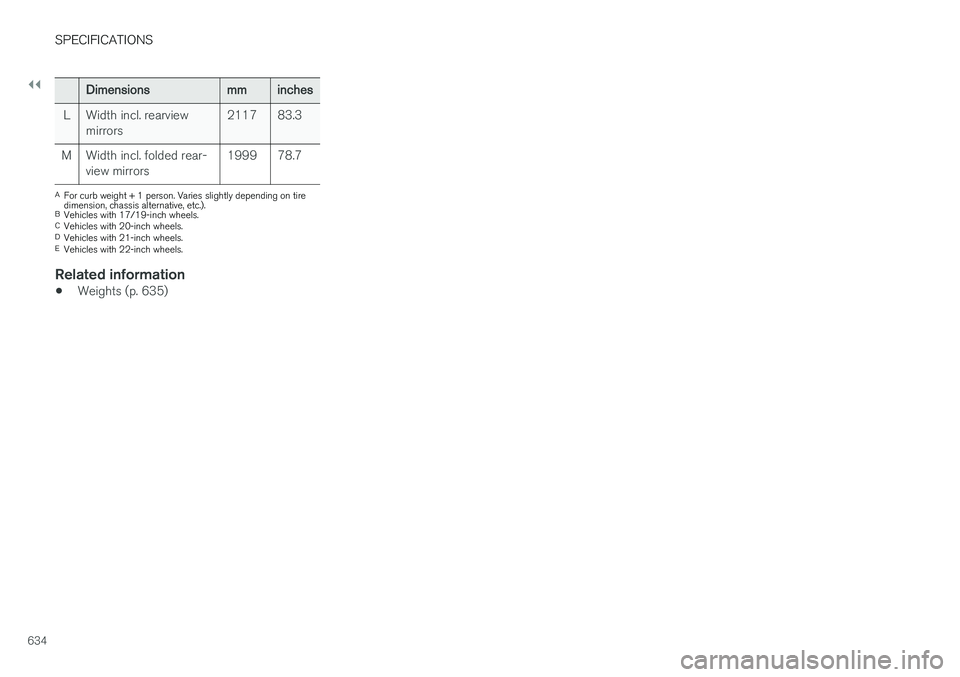
Dimensionsmminches
L Width incl. rearview mirrors 2117 83.3
M Width incl. folded rear- view mirrors 1999 78.7
A
For curb weight + 1 person. Varies slightly depending on tire dimension, chassis alternative, etc.).
B Vehicles with 17/19-inch wheels.
C Vehicles with 20-inch wheels.
D Vehicles with 21-inch wheels.
E Vehicles with 22-inch wheels.
Related information
• Weights (p. 635)
Page 654 of 660

INDEX
652Rain sensor 177, 178
Rain sensor's memory function 178
Raise the rear end 562
Rear camera 379, 380, 381, 383, 384,
386, 387
Rear seat blower 224
climate 212
folding backrest 192
head restraint 195
heating 215
temperature 226
Rear sensors 374, 375, 376, 377, 378 Rearview/door mirrors dimming 170
heating 222
interior 169
Rearview mirror 169 dimming 170
Rear window heating 222
washers 180
wipers 180
Recalls 45
Recommendations when driving 433
Recommendations when loading 561
Recovery 450
Red Key 240 settings 241
Refrigerant 582 climate system 640
Refueling filling 436
fuel filler door, fuel flap 435
Remote immobilizer 244
Remote key 231 battery replacement 236
connecting to driver profile 137
detachable key blade 242
loss 240
Range 235
Remote updates 575
Reporting safety defects 44
Resetting door mirrors 170
Resetting settings 133 change of owner 132
Driver profile 137
Resetting trip odometer 88
Road Sign Information 350, 351, 352 limitations 354
operation 351, 352, 353, 354
Road trip 433
Roll Stability Control 265
Roof load, max. weight 635RSC (Roll Stability Control) 265
Run-off Mitigation 366, 367
S
Safety 42 pregnancy 43
Safety belt, see Seat belt 47
Safety defects, reporting 44
Safety mode 61 starting/moving 62
Sealing compound 545
Seat, see Seats 184
Seat belt reminder 51
Seat belts 47 Automatic locking retractor/Emergency
locking retractor 65
buckling/unbuckling 48
pregnancy 43
seat belt reminder 51
seat belt tensioner 50
securing child restraint systems 67, 69, 71
Seat belt tensioner 50 resetting 51
Seats heating 214, 215
manual front seat 184