steering VOLVO XC60 2018 Owner´s Manual
[x] Cancel search | Manufacturer: VOLVO, Model Year: 2018, Model line: XC60, Model: VOLVO XC60 2018Pages: 660, PDF Size: 11.77 MB
Page 90 of 660
||
DISPLAYS AND VOICE CONTROL
88
Related information
•Trip computer (p. 85)
• Resetting the trip odometer (p. 88)
Resetting the trip odometer
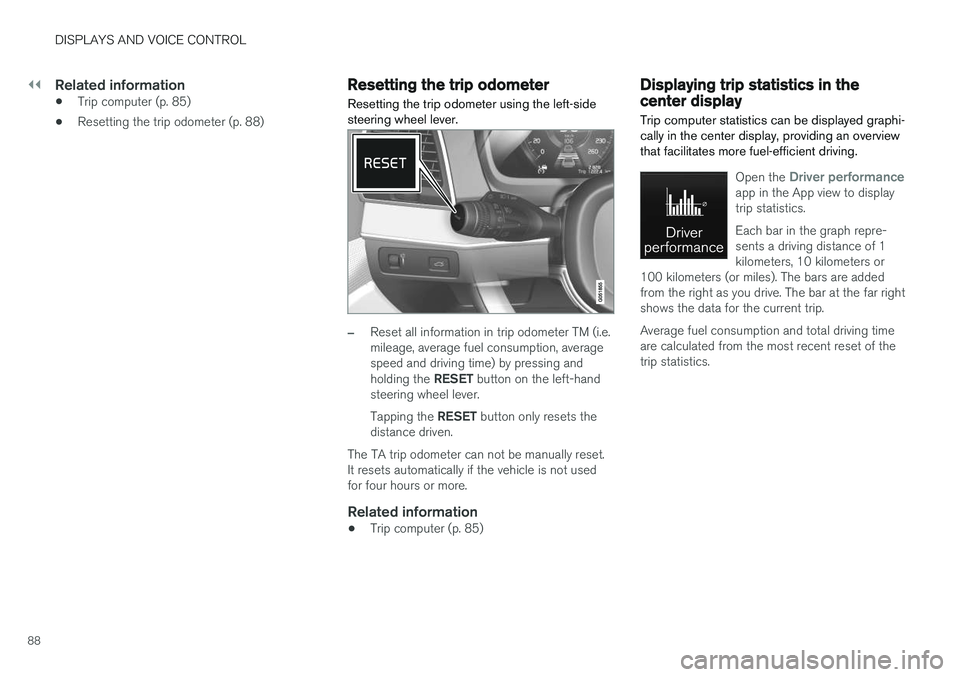
Resetting the trip odometer using the left-side steering wheel lever.
–Reset all information in trip odometer TM (i.e. mileage, average fuel consumption, averagespeed and driving time) by pressing and holding the RESET button on the left-hand
steering wheel lever. Tapping the RESET button only resets the
distance driven.
The TA trip odometer can not be manually reset. It resets automatically if the vehicle is not usedfor four hours or more.
Related information
• Trip computer (p. 85)
Displaying trip statistics in thecenter display
Trip computer statistics can be displayed graphi- cally in the center display, providing an overviewthat facilitates more fuel-efficient driving.
Open the Driver performanceapp in the App view to display trip statistics. Each bar in the graph repre- sents a driving distance of 1kilometers, 10 kilometers or
100 kilometers (or miles). The bars are addedfrom the right as you drive. The bar at the far rightshows the data for the current trip. Average fuel consumption and total driving time are calculated from the most recent reset of thetrip statistics.
Page 95 of 660
DISPLAYS AND VOICE CONTROL
}}
93
SymbolMeaning
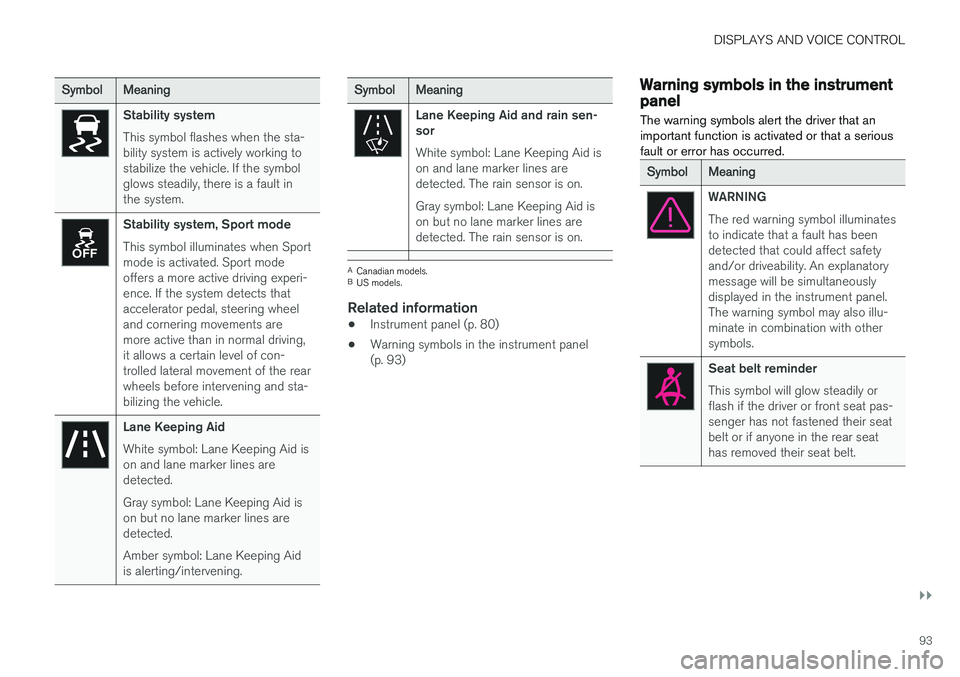
Stability system This symbol flashes when the sta- bility system is actively working tostabilize the vehicle. If the symbolglows steadily, there is a fault inthe system.
Stability system, Sport mode This symbol illuminates when Sport mode is activated. Sport modeoffers a more active driving experi-ence. If the system detects thataccelerator pedal, steering wheeland cornering movements aremore active than in normal driving,it allows a certain level of con-trolled lateral movement of the rearwheels before intervening and sta-bilizing the vehicle.
Lane Keeping Aid White symbol: Lane Keeping Aid is on and lane marker lines aredetected. Gray symbol: Lane Keeping Aid is on but no lane marker lines aredetected. Amber symbol: Lane Keeping Aid is alerting/intervening.
SymbolMeaning
Lane Keeping Aid and rain sen- sor White symbol: Lane Keeping Aid is on and lane marker lines aredetected. The rain sensor is on. Gray symbol: Lane Keeping Aid is on but no lane marker lines aredetected. The rain sensor is on.
ACanadian models.
B US models.
Related information
• Instrument panel (p. 80)
• Warning symbols in the instrument panel (p. 93)
Warning symbols in the instrumentpanel
The warning symbols alert the driver that an important function is activated or that a seriousfault or error has occurred.
SymbolMeaning
WARNING The red warning symbol illuminates to indicate that a fault has beendetected that could affect safetyand/or driveability. An explanatorymessage will be simultaneouslydisplayed in the instrument panel.The warning symbol may also illu-minate in combination with othersymbols.
Seat belt reminder This symbol will glow steadily or flash if the driver or front seat pas-senger has not fastened their seatbelt or if anyone in the rear seathas removed their seat belt.
Page 102 of 660
||
DISPLAYS AND VOICE CONTROL
100
zlib License
The zlib/libpng License Copyright (c)
< copyright holders >
This software is provided 'as-is', without any express or implied warranty. In no event will theauthors be held liable for any damages arisingfrom the use of this software. Permission is granted to anyone to use this software for any purpose, including commercialapplications, and to alter it and redistribute itfreely, subject to the following restrictions:
1. The origin of this software must not be misrepresented; you must not claim that you wrote the original software. If you use thissoftware in a product, an acknowledgment inthe product documentation would beappreciated but is not required.
2. Altered source versions must be plainly marked as such, and must not bemisrepresented as being the originalsoftware.
3. This notice may not be removed or altered from any source distribution.
SGI Free Software B License Version 2.0.
SGI FREE SOFTWARE LICENSE B (Version 2.0, Sept. 18, 2008) Copyright (C) [dates of first publication] Silicon Graphics, Inc. All Rights Reserved. Permission ishereby granted, free of charge, to any personobtaining a copy of this software and associated documentation files (the "Software"), to deal inthe Software without restriction, including withoutlimitation the rights to use, copy, modify, merge,publish, distribute, sublicense, and/or sell copiesof the Software, and to permit persons to whomthe Software is furnished to do so, subject to thefollowing conditions: The above copyright noticeincluding the dates of first publication and eitherthis permission notice or a reference to http://oss.sgi.com/projects/FreeB/ shall be included inall copies or substantial portions of the Software. THE SOFTWARE IS PROVIDED "AS IS", WITHOUT WARRANTY OF ANY KIND,EXPRESS OR IMPLIED, INCLUDING BUT NOTLIMITED TO THE WARRANTIES OFMERCHANTABILITY, FITNESS FOR APARTICULAR PURPOSE ANDNONINFRINGEMENT. IN NO EVENT SHALLSILICON GRAPHICS, INC. BE LIABLE FOR ANYCLAIM, DAMAGES OR OTHER LIABILITY,WHETHER IN AN ACTION OF CONTRACT,TORT OR OTHERWISE, ARISING FROM, OUTOF OR IN CONNECTION WITH THE SOFTWAREOR THE USE OR OTHER DEALINGS IN THESOFTWARE. Except as contained in this notice, the name of Silicon Graphics, Inc. shall not be used inadvertising or otherwise to promote the sale, useor other dealings in this Software without priorwritten authorization from Silicon Graphics, Inc.
Related information
•
Instrument panel (p. 80)
App menu in instrument panel
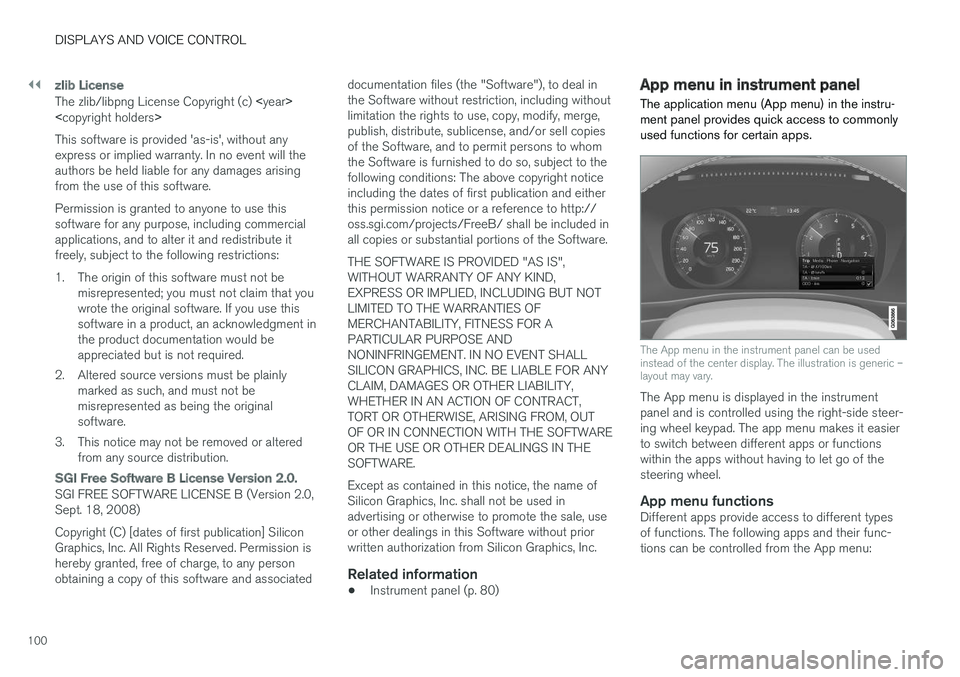
The application menu (App menu) in the instru- ment panel provides quick access to commonlyused functions for certain apps.
The App menu in the instrument panel can be used instead of the center display. The illustration is generic –layout may vary.
The App menu is displayed in the instrument panel and is controlled using the right-side steer-ing wheel keypad. The app menu makes it easierto switch between different apps or functionswithin the apps without having to let go of thesteering wheel.
App menu functionsDifferent apps provide access to different typesof functions. The following apps and their func-tions can be controlled from the App menu:
Page 103 of 660
DISPLAYS AND VOICE CONTROL
}}
101
AppFunctions
Trip com- puter Select a trip odometer, changeinstrument panel display set-tings, etc.
Media player Select active source for media player.
Phone Call a contact from the call list.
Navigation Guide to destination, etc.
Related information
• Instrument panel (p. 80)
• Center display overview (p. 107)
• Handling the App menu in the instrument panel (p. 101)
Handling the App menu in theinstrument panel
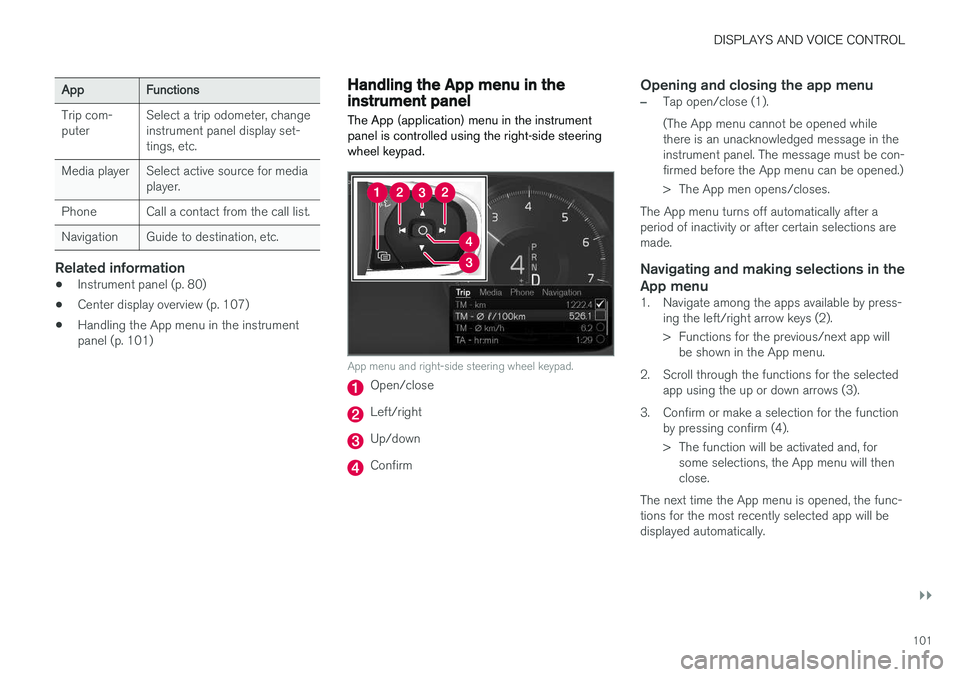
The App (application) menu in the instrument panel is controlled using the right-side steeringwheel keypad.
App menu and right-side steering wheel keypad.
Open/close
Left/right
Up/down
Confirm
Opening and closing the app menu
–Tap open/close (1). (The App menu cannot be opened while there is an unacknowledged message in theinstrument panel. The message must be con-firmed before the App menu can be opened.)
> The App men opens/closes.
The App menu turns off automatically after a period of inactivity or after certain selections aremade.
Navigating and making selections in the
App menu
1. Navigate among the apps available by press- ing the left/right arrow keys (2).
> Functions for the previous/next app willbe shown in the App menu.
2. Scroll through the functions for the selected app using the up or down arrows (3).
3. Confirm or make a selection for the function by pressing confirm (4).
> The function will be activated and, forsome selections, the App menu will then close.
The next time the App menu is opened, the func-tions for the most recently selected app will bedisplayed automatically.
Page 105 of 660
DISPLAYS AND VOICE CONTROL
}}
103
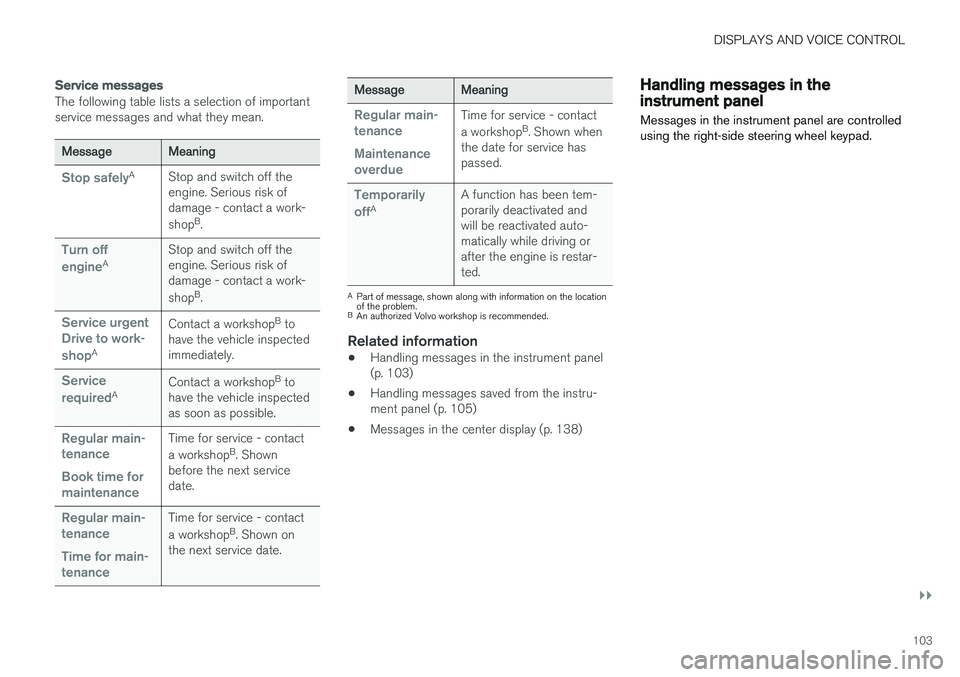
Service messages
The following table lists a selection of important service messages and what they mean.
MessageMeaning
Stop safelyAStop and switch off the engine. Serious risk ofdamage - contact a work- shopB
.
Turn off engineA Stop and switch off the engine. Serious risk ofdamage - contact a work- shop
B
.
Service urgent Drive to work- shop
A Contact a workshop
B
to
have the vehicle inspected immediately.
Service requiredA Contact a workshop
B
to
have the vehicle inspected as soon as possible.
Regular main- tenance Book time for maintenanceTime for service - contact a workshop B
. Shown
before the next service date.
Regular main- tenance Time for main- tenanceTime for service - contact a workshop B
. Shown on
the next service date.
MessageMeaning
Regular main- tenance Maintenance overdueTime for service - contact a workshop B
. Shown when
the date for service has passed.
Temporarily offA A function has been tem- porarily deactivated andwill be reactivated auto-matically while driving orafter the engine is restar-ted.
A
Part of message, shown along with information on the location of the problem.
B An authorized Volvo workshop is recommended.
Related information
• Handling messages in the instrument panel (p. 103)
• Handling messages saved from the instru-ment panel (p. 105)
• Messages in the center display (p. 138)
Handling messages in theinstrument panel
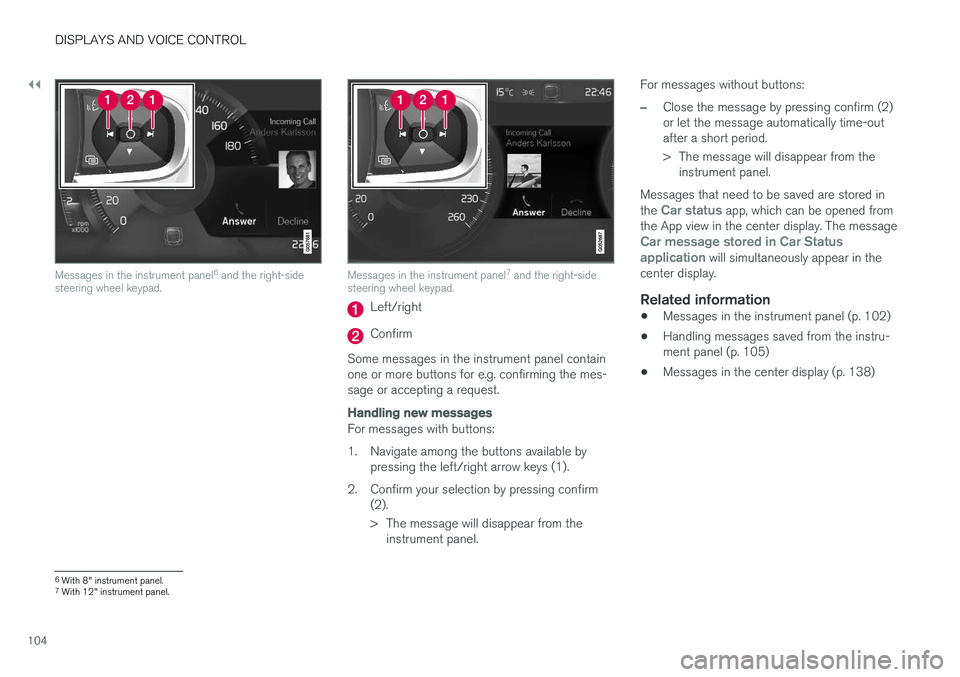
Messages in the instrument panel are controlled using the right-side steering wheel keypad.
Page 106 of 660
||
DISPLAYS AND VOICE CONTROL
104
Messages in the instrument panel6
and the right-side
steering wheel keypad.Messages in the instrument panel 7
and the right-side
steering wheel keypad.
Left/right
Confirm
Some messages in the instrument panel contain one or more buttons for e.g. confirming the mes-sage or accepting a request.
Handling new messages
For messages with buttons:
1. Navigate among the buttons available by pressing the left/right arrow keys (1).
2. Confirm your selection by pressing confirm (2).
> The message will disappear from theinstrument panel. For messages without buttons:
–Close the message by pressing confirm (2) or let the message automatically time-outafter a short period.
> The message will disappear from the
instrument panel.
Messages that need to be saved are stored in the
Car status app, which can be opened from
the App view in the center display. The message
Car message stored in Car Status application will simultaneously appear in the
center display.
Related information
• Messages in the instrument panel (p. 102)
• Handling messages saved from the instru- ment panel (p. 105)
• Messages in the center display (p. 138)
6
With 8" instrument panel.
7 With 12" instrument panel.
Page 111 of 660
DISPLAYS AND VOICE CONTROL
* Option/accessory.109
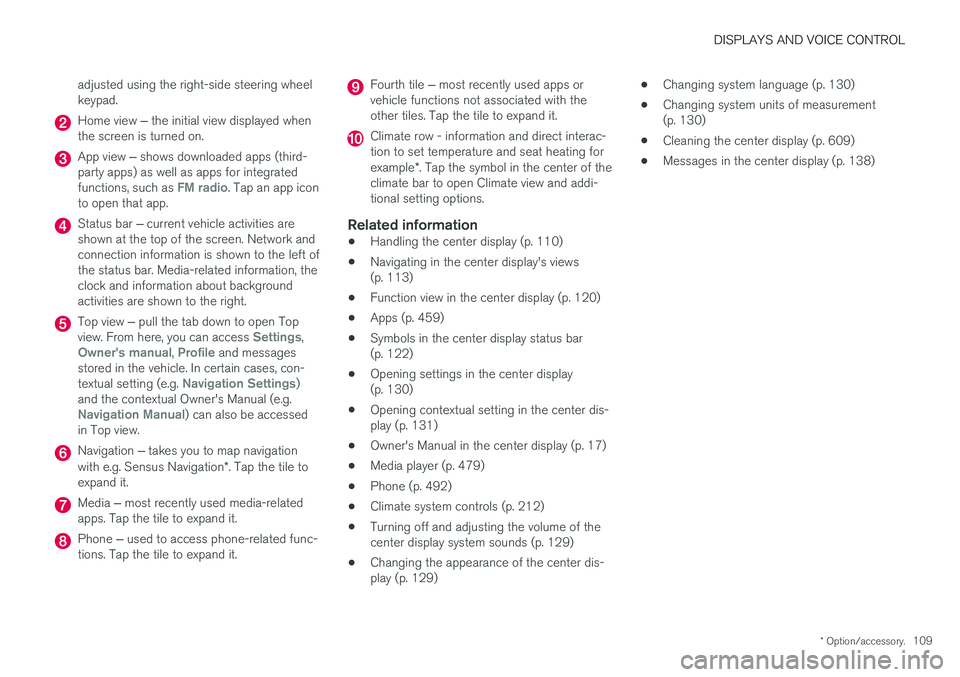
adjusted using the right-side steering wheel keypad.
Home view
‒ the initial view displayed when
the screen is turned on.
App view ‒ shows downloaded apps (third-
party apps) as well as apps for integrated functions, such as
FM radio. Tap an app icon
to open that app.
Status bar ‒ current vehicle activities are
shown at the top of the screen. Network and connection information is shown to the left ofthe status bar. Media-related information, theclock and information about backgroundactivities are shown to the right.
Top view ‒ pull the tab down to open Top
view. From here, you can access Settings,Owner's manual, Profile and messages
stored in the vehicle. In certain cases, con- textual setting (e.g.
Navigation Settings)
and the contextual Owner's Manual (e.g.
Navigation Manual) can also be accessed
in Top view.
Navigation ‒ takes you to map navigation
with e.g. Sensus Navigation *. Tap the tile to
expand it.
Media ‒ most recently used media-related
apps. Tap the tile to expand it.
Phone ‒ used to access phone-related func-
tions. Tap the tile to expand it.
Fourth tile ‒ most recently used apps or
vehicle functions not associated with the other tiles. Tap the tile to expand it.
Climate row - information and direct interac- tion to set temperature and seat heating for example *. Tap the symbol in the center of the
climate bar to open Climate view and addi- tional setting options.
Related information
• Handling the center display (p. 110)
• Navigating in the center display's views(p. 113)
• Function view in the center display (p. 120)
• Apps (p. 459)
• Symbols in the center display status bar(p. 122)
• Opening settings in the center display(p. 130)
• Opening contextual setting in the center dis-play (p. 131)
• Owner's Manual in the center display (p. 17)
• Media player (p. 479)
• Phone (p. 492)
• Climate system controls (p. 212)
• Turning off and adjusting the volume of thecenter display system sounds (p. 129)
• Changing the appearance of the center dis-play (p. 129) •
Changing system language (p. 130)
• Changing system units of measurement(p. 130)
• Cleaning the center display (p. 609)
• Messages in the center display (p. 138)
Page 144 of 660
DISPLAYS AND VOICE CONTROL
* Option/accessory.
142
Activating and deactivating the
head-up display *
The head-up display can be activated and deac- tivated when the vehicle has been started.
Press the Head-up Displaybutton in the center display's Function view. An indicator lightin the button will illuminatewhen the function is activated.
Related information
• Head-up display settings
* (p. 142)
• Head-up display
* (p. 140)
Head-up display settings *
Adjusting settings for the head-up display.
Settings can be adjusted in the center display's Settings menu when the vehicle is started and aprojected image is displayed on the windshield. This setting is stored as a personal setting in the driver profile.
Selecting display optionsSelect the functions to be shown in the head-updisplay. 1. Tap
Settings in the center display's Top
view.
2. Tap
My CarDisplaysHead-Up
Display Options.
3. Select one or more functions:
•
Show Navigation
•Show Road Sign Information
•Show Driver Support
•Show Phone.
Adjusting brightness and height position
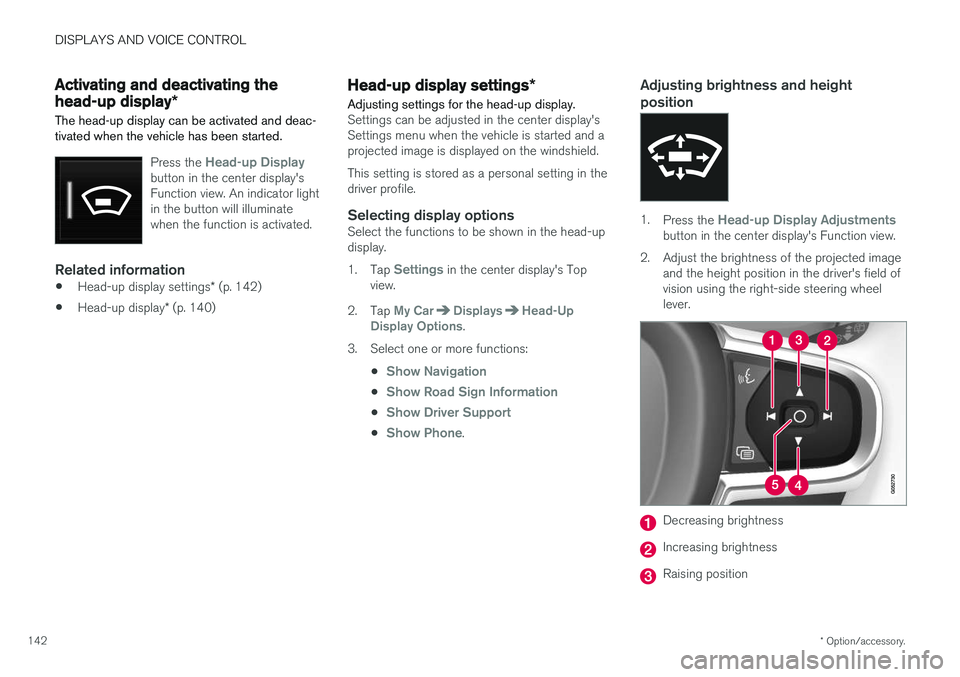
1.Press the Head-up Display Adjustmentsbutton in the center display's Function view.
2. Adjust the brightness of the projected image and the height position in the driver's field of vision using the right-side steering wheellever.
Decreasing brightness
Increasing brightness
Raising position
Page 145 of 660
DISPLAYS AND VOICE CONTROL
}}
* Option/accessory.143
Lowering position
Confirm
The brightness of the graphic is automatically adapted to the light conditions in its background.Brightness is also affected by adjustments to thebrightness of the other displays in the vehicle. The height position can be stored in the front power seat's * memory function.
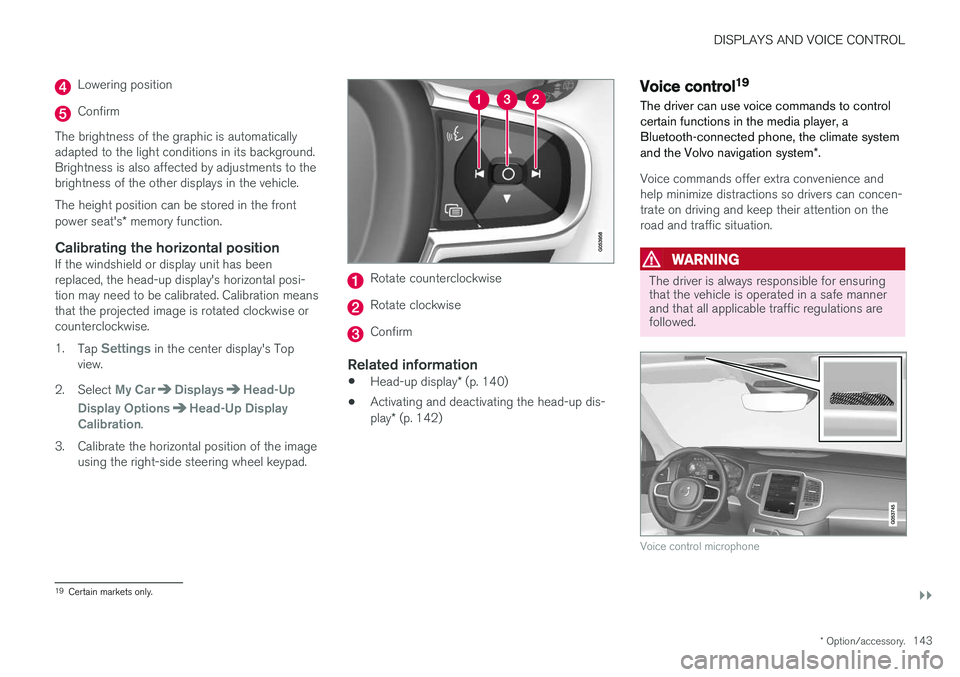
Calibrating the horizontal positionIf the windshield or display unit has been replaced, the head-up display's horizontal posi-tion may need to be calibrated. Calibration meansthat the projected image is rotated clockwise orcounterclockwise. 1.
Tap
Settings in the center display's Top
view.
2. Select
My CarDisplaysHead-Up
Display Options
Head-Up Display
Calibration.
3. Calibrate the horizontal position of the image using the right-side steering wheel keypad.
Rotate counterclockwise
Rotate clockwise
Confirm
Related information
• Head-up display
* (p. 140)
• Activating and deactivating the head-up dis- play
* (p. 142)
Voice control19
The driver can use voice commands to control certain functions in the media player, aBluetooth-connected phone, the climate system and the Volvo navigation system *.
Voice commands offer extra convenience and help minimize distractions so drivers can concen-trate on driving and keep their attention on theroad and traffic situation.
WARNING
The driver is always responsible for ensuring that the vehicle is operated in a safe mannerand that all applicable traffic regulations arefollowed.
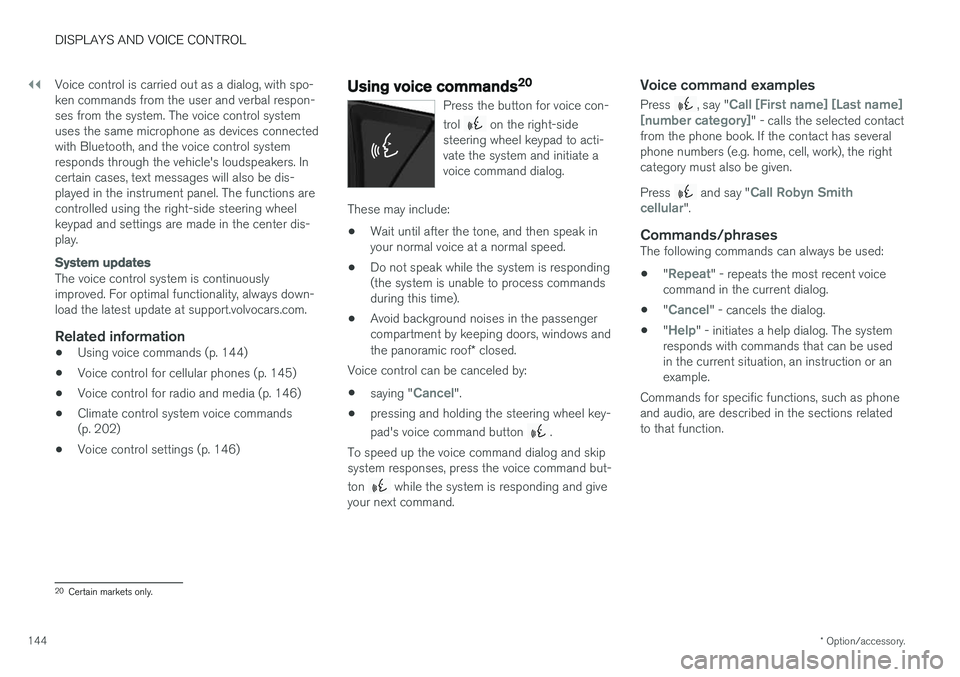
Voice control microphone
19
Certain markets only.
Page 146 of 660
||
DISPLAYS AND VOICE CONTROL
* Option/accessory.
144 Voice control is carried out as a dialog, with spo- ken commands from the user and verbal respon-ses from the system. The voice control systemuses the same microphone as devices connectedwith Bluetooth, and the voice control systemresponds through the vehicle's loudspeakers. Incertain cases, text messages will also be dis-played in the instrument panel. The functions arecontrolled using the right-side steering wheelkeypad and settings are made in the center dis-play.
System updates
The voice control system is continuously improved. For optimal functionality, always down-load the latest update at support.volvocars.com.
Related information
•
Using voice commands (p. 144)
• Voice control for cellular phones (p. 145)
• Voice control for radio and media (p. 146)
• Climate control system voice commands(p. 202)
• Voice control settings (p. 146)
Using voice commands20
Press the button for voice con- trol
on the right-side
steering wheel keypad to acti- vate the system and initiate avoice command dialog.
These may include:
• Wait until after the tone, and then speak in your normal voice at a normal speed.
• Do not speak while the system is responding(the system is unable to process commandsduring this time).
• Avoid background noises in the passengercompartment by keeping doors, windows and the panoramic roof
* closed.
Voice control can be canceled by:
• saying "
Cancel".
• pressing and holding the steering wheel key- pad's voice command button
.
To speed up the voice command dialog and skip system responses, press the voice command but- ton
while the system is responding and give
your next command.
Voice command examples
Press , say "Call [First name] [Last name]
[number category]" - calls the selected contact
from the phone book. If the contact has several phone numbers (e.g. home, cell, work), the rightcategory must also be given. Press
and say "Call Robyn Smith
cellular".
Commands/phrasesThe following commands can always be used: • "
Repeat" - repeats the most recent voice
command in the current dialog.
• "
Cancel" - cancels the dialog.
• "
Help" - initiates a help dialog. The system
responds with commands that can be used in the current situation, an instruction or anexample.
Commands for specific functions, such as phoneand audio, are described in the sections relatedto that function.
20 Certain markets only.