tow VOLVO XC60 2018 Owner´s Manual
[x] Cancel search | Manufacturer: VOLVO, Model Year: 2018, Model line: XC60, Model: VOLVO XC60 2018Pages: 660, PDF Size: 11.77 MB
Page 609 of 660
MAINTENANCE AND SERVICE
}}
* Option/accessory.607
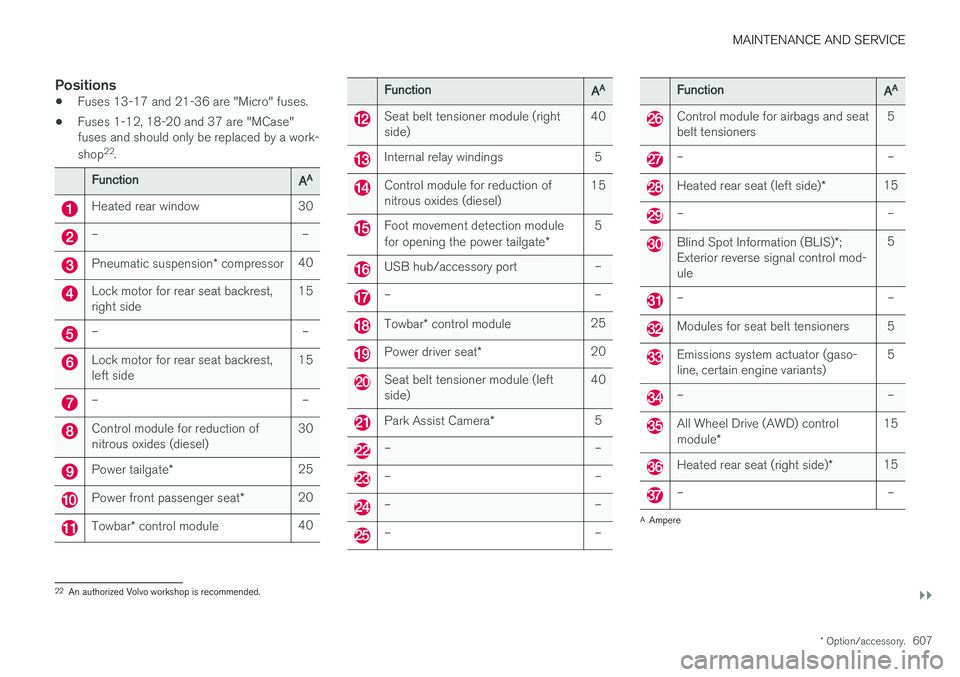
Positions
•Fuses 13-17 and 21-36 are "Micro" fuses.
• Fuses 1-12, 18-20 and 37 are "MCase" fuses and should only be replaced by a work- shop 22
.
FunctionAA
Heated rear window 30
– –
Pneumatic suspension * compressor 40
Lock motor for rear seat backrest, right side 15
– –
Lock motor for rear seat backrest, left side15
– –
Control module for reduction of nitrous oxides (diesel)30
Power tailgate
* 25
Power front passenger seat
*20
Towbar
* control module 40
FunctionAA
Seat belt tensioner module (right side) 40
Internal relay windings 5
Control module for reduction of nitrous oxides (diesel)15
Foot movement detection module for opening the power tailgate
*5
USB hub/accessory port –
– –
Towbar
* control module 25
Power driver seat
* 20
Seat belt tensioner module (left side) 40
Park Assist Camera
*5
– –
– –
– –
– –
FunctionAA
Control module for airbags and seat belt tensioners 5
– –
Heated rear seat (left side)
*15
– –
Blind Spot Information (BLIS)
*;
Exterior reverse signal control mod- ule 5
– –
Modules for seat belt tensioners 5
Emissions system actuator (gaso- line, certain engine variants)
5
– –
All Wheel Drive (AWD) control module
* 15
Heated rear seat (right side)
*15
– –
A
Ampere
22 An authorized Volvo workshop is recommended.
Page 612 of 660
||
MAINTENANCE AND SERVICE
* Option/accessory.
610
CAUTION
The microfiber cloth must be free of sand and dirt when cleaning the center display.
CAUTION
When cleaning the center display, apply only light pressure to the screen. Pressing toohard could damage the screen.
CAUTION
Do not spray liquid or corrosive chemicals directly onto the center display. Do not usewindow cleaners, cleaning agents, aerosolsprays, solvents, alcohol, ammonia or deter-gents that contain abrasives. Never use abrasive cloths, paper towels or tis- sue paper, as these may scratch the centerdisplay.
Related information
• Cleaning the interior (p. 609)
• Cleaning fabric upholstery and ceiling liner (p. 611)
• Cleaning the seat belt (p. 611)
• Cleaning floor mats and inlay mats (p. 611)
• Cleaning leather upholstery (p. 612) •
Cleaning the leather steering wheel(p. 613)
• Cleaning interior plastic, metal and wood sur-faces (p. 614)
Cleaning the head-up display
*
Carefully wipe the glass covering the head-up display unit with a clean and dry microfiber cloth.If necessary, the cloth may be slightly moistened.
Never use strong stain removers. For difficult cleaning conditions, a special cleaning agent canbe purchased at a Volvo retailer.
Related information
• Activating and deactivating the head-up dis- play
* (p. 142)
• Head-up display
* (p. 140)
Page 615 of 660
MAINTENANCE AND SERVICE
613
Cleaning the leather upholstery
1. Apply the leather cleaner to a damp spongeand squeeze it until the cleaner foams.
2. Move the sponge in circular motions to apply the foam to the stain.
3. Dampen the stain thoroughly with the sponge. Let the sponge absorb the stain and do not rub.
4. Dry the stain using a soft towel and let the leather dry completely.
Protecting the leather upholstery
1. Apply a small amount of leather protector toa cloth and then apply the protector to the leather using light circular movements.
2. Let it dry for approximately 20 minutes. Protecting the leather upholstery makes it better able to withstand sunlight's harmful UV rays.
Related information
• Cleaning the interior (p. 609)
• Cleaning the center display (p. 609)
• Cleaning fabric upholstery and ceiling liner(p. 611)
• Cleaning the seat belt (p. 611)
• Cleaning floor mats and inlay mats (p. 611)
• Cleaning the leather steering wheel(p. 613)
• Cleaning interior plastic, metal and wood sur-faces (p. 614)
Cleaning the leather steering wheel
Only use cleaning agents and car care products recommended by Volvo. Clean regularly andtreat stains immediately for best results. It isimportant to vacuum before using a cleaningagent.
Leather steering wheelLeather needs to breathe. Never cover the leather steering wheel with a plastic protector.Volvo Leather Care Kit 951 0251 and LeatherSoftener 943 7429 are recommended for clean-ing the leather steering wheel. First, remove dirt,dust, etc. with a damp sponge or cloth.
CAUTION
Sharp objects such as rings could damage the leather on the steering wheel.
If there are stains on the steering wheel:
Type 1 (ink, wine, coffee, milk, sweat or blood)
–Use a soft cloth or sponge. Wipe the steering wheel using a solution of 5% ammonia. Forblood stains, mix approximately 2 dl(1 cup) ofwater with 25 g (one ounce) of salt and wipethe stain.
Type 2 (grease, oil, sauces or chocolate)
1. Same procedure as for Type 1 stains.
2. Finish by wiping the wheel with an absorbent paper or towel. Type 3
(dry dirt or dust)
1. Remove the dirt/dust using a soft brush.
2. Same procedure as for Type 1 stains.
Related information
• Cleaning the interior (p. 609)
• Cleaning the center display (p. 609)
• Cleaning fabric upholstery and ceiling liner (p. 611)
• Cleaning the seat belt (p. 611)
• Cleaning floor mats and inlay mats (p. 611)
• Cleaning leather upholstery (p. 612)
• Cleaning interior plastic, metal and wood sur-faces (p. 614)
Page 625 of 660
MAINTENANCE AND SERVICE
}}
623
It is important to use the right color.
Related information
•
Paintwork (p. 621)
• Touching up minor paint damage (p. 621)
Changing rear window wipers
The wiper blades help remove water from the windshield and rear window. Along with thewasher fluid, they clean the glass and helpimprove visibility while driving. The windshieldand rear window wiper blades can be replaced.
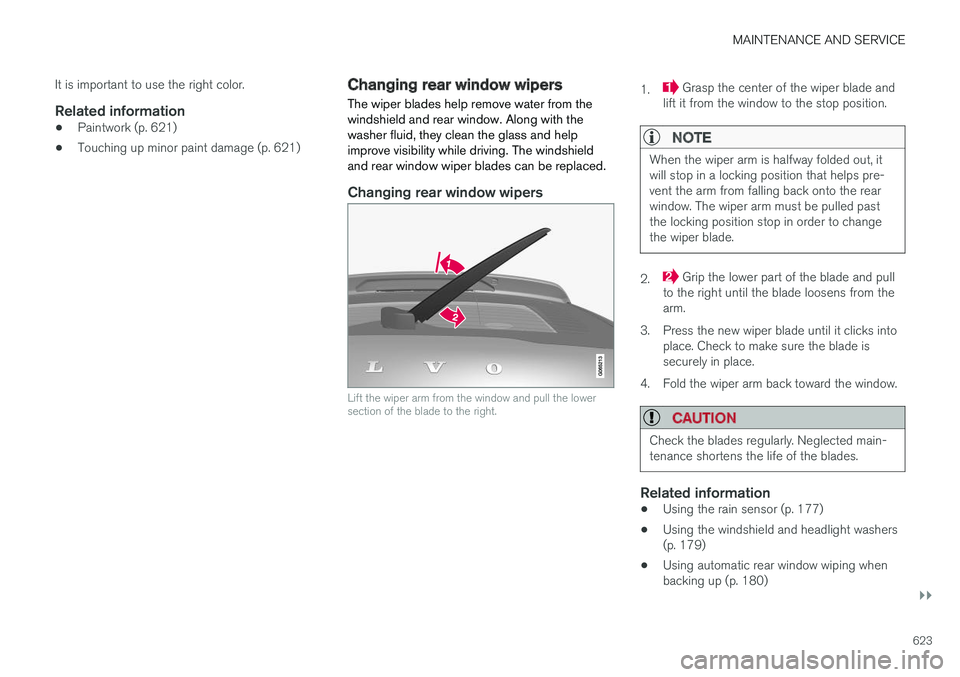
Changing rear window wipers
Lift the wiper arm from the window and pull the lower section of the blade to the right.
1. Grasp the center of the wiper blade and
lift it from the window to the stop position.
NOTE
When the wiper arm is halfway folded out, it will stop in a locking position that helps pre-vent the arm from falling back onto the rearwindow. The wiper arm must be pulled pastthe locking position stop in order to changethe wiper blade.
2. Grip the lower part of the blade and pull
to the right until the blade loosens from the arm.
3. Press the new wiper blade until it clicks into place. Check to make sure the blade issecurely in place.
4. Fold the wiper arm back toward the window.
CAUTION
Check the blades regularly. Neglected main- tenance shortens the life of the blades.
Related information
• Using the rain sensor (p. 177)
• Using the windshield and headlight washers (p. 179)
• Using automatic rear window wiping whenbacking up (p. 180)
Page 626 of 660
MAINTENANCE AND SERVICE
* Option/accessory.
624 •
Heated windshield washer nozzles
* (p. 177)
• Using the rain sensor's memory function (p. 178)
• Using the rear window wiper/washer(p. 180)
• Filling washer fluid (p. 626)
• Windshield wipers in the service position(p. 625)
• Replacing windshield wiper blades (p. 624)
• Using the windshield wipers (p. 176)
Replacing windshield wiper blades
The wiper blades help remove water from the windshield and rear window. Along with thewasher fluid, they clean the glass and helpimprove visibility while driving. The windshieldand rear window wiper blades can be replaced.
Replacing wiper blades
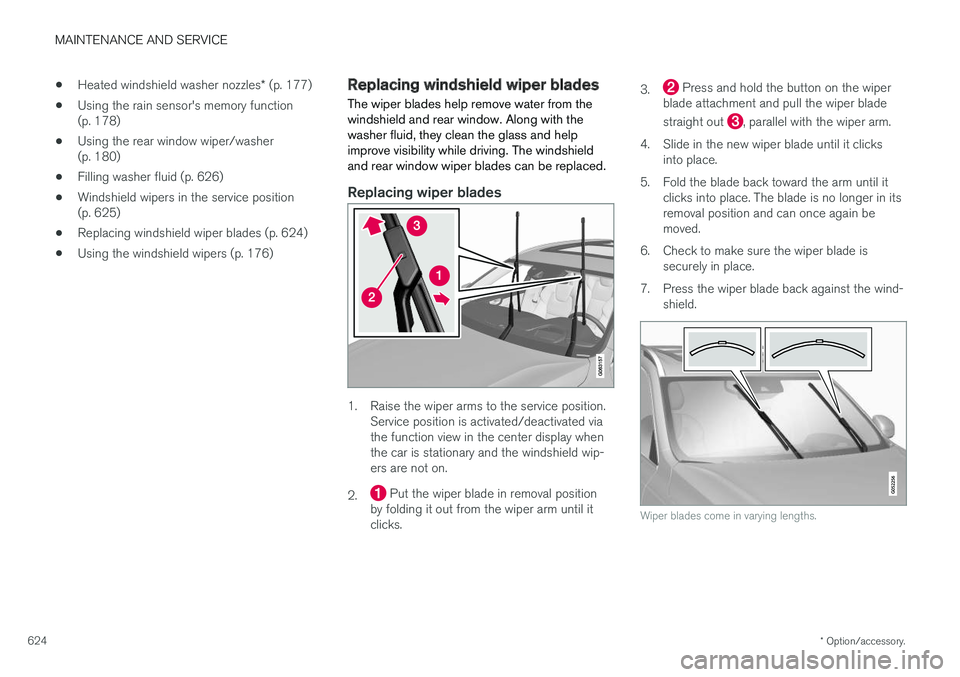
1. Raise the wiper arms to the service position. Service position is activated/deactivated via the function view in the center display whenthe car is stationary and the windshield wip-ers are not on.
2.
Put the wiper blade in removal position
by folding it out from the wiper arm until it clicks. 3.
Press and hold the button on the wiper
blade attachment and pull the wiper blade straight out
, parallel with the wiper arm.
4. Slide in the new wiper blade until it clicks into place.
5. Fold the blade back toward the arm until it clicks into place. The blade is no longer in its removal position and can once again bemoved.
6. Check to make sure the wiper blade is securely in place.
7. Press the wiper blade back against the wind- shield.
Wiper blades come in varying lengths.
Page 637 of 660
SPECIFICATIONS
635
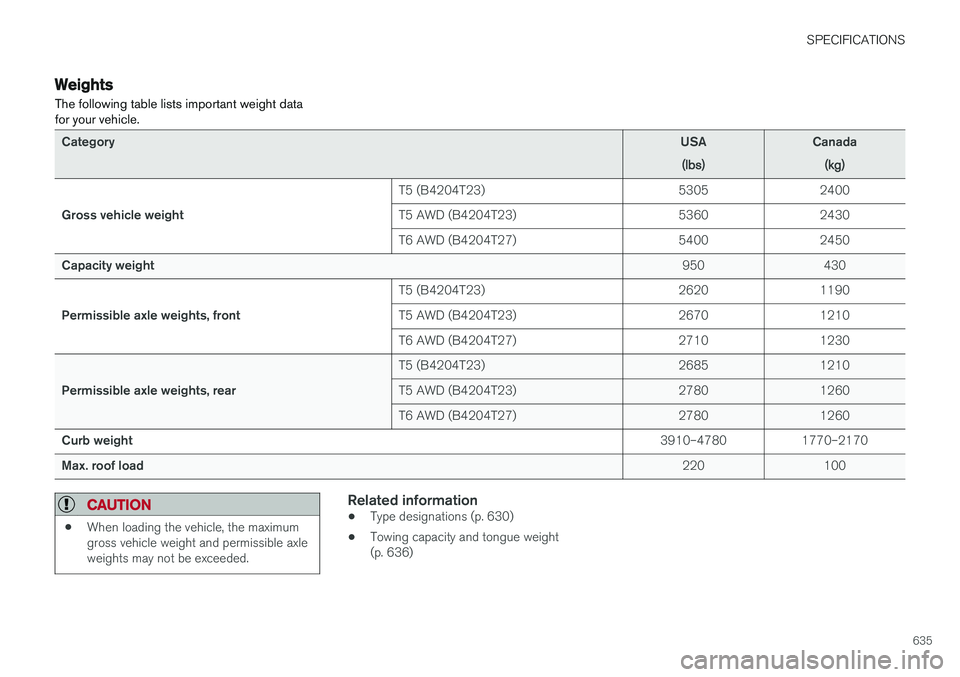
Weights The following table lists important weight data for your vehicle.
CategoryUSA
(lbs)Canada(kg)
Gross vehicle weight T5 (B4204T23) 5305 2400
T5 AWD (B4204T23) 5360 2430
T6 AWD (B4204T27) 5400 2450
Capacity weight 950 430
Permissible axle weights, front T5 (B4204T23) 2620 1190
T5 AWD (B4204T23) 2670 1210
T6 AWD (B4204T27) 2710 1230
Permissible axle weights, rear T5 (B4204T23) 2685 1210
T5 AWD (B4204T23) 2780 1260
T6 AWD (B4204T27) 2780 1260
Curb weight 3910–4780 1770–2170
Max. roof load 220 100
CAUTION
•When loading the vehicle, the maximum gross vehicle weight and permissible axleweights may not be exceeded.
Related information
•Type designations (p. 630)
• Towing capacity and tongue weight (p. 636)
Page 638 of 660
SPECIFICATIONS
* Option/accessory.
636
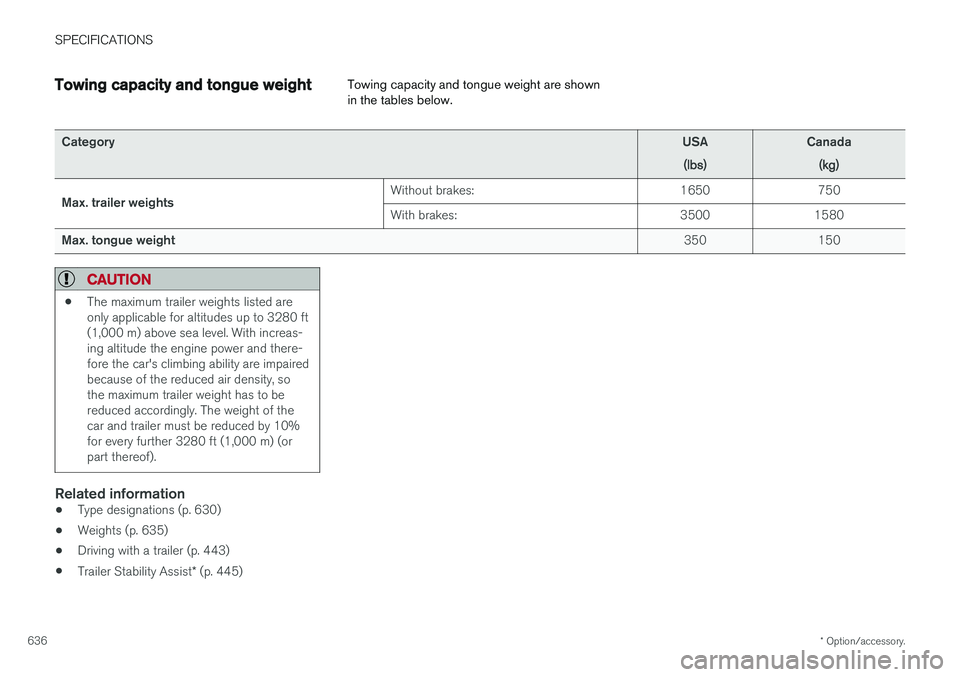
Towing capacity and tongue weight Towing capacity and tongue weight are shown in the tables below.
Category
USA
(lbs)Canada(kg)
Max. trailer weights Without brakes: 1650 750 With brakes:
3500 1580
Max. tongue weight 350 150
CAUTION
•The maximum trailer weights listed are only applicable for altitudes up to 3280 ft(1,000 m) above sea level. With increas-ing altitude the engine power and there-fore the car's climbing ability are impairedbecause of the reduced air density, sothe maximum trailer weight has to bereduced accordingly. The weight of thecar and trailer must be reduced by 10%for every further 3280 ft (1,000 m) (orpart thereof).
Related information
•
Type designations (p. 630)
• Weights (p. 635)
• Driving with a trailer (p. 443)
• Trailer Stability Assist
* (p. 445)
Page 648 of 660
INDEX
646CZIP (Clean Zone Interior Package) 204
D
Data
recording 33 transferring between vehicle and work-
shop 574
Data sharing 508
Daytime running lights 152Decals location of 630
Defrosting 220
Detection of cyclist 331
Dimensions 633
Dipstick, electronic 584
Direction of rotation 524
Disengaging the shiftlock 415
Display lighting 162
Distance Alert 283, 284, 285 limitations 286
DivX ®
484
Door mirrors 169, 170 compass 454
dimming 170
outer 169, 170
power folding 170
resetting 170
Driveline transmission 411
Drive mode 417 changing 419
Driver Alert Control 355 operation 356, 357
Driver Alert Control limitations 357
Driver performance 88, 89
Driver profile 135 edit 137
select 136
Driver support system 264 Driving cooling system 440
with a trailer 443
Driving economy 432
Driving through standing water 435 driving with a trailer towball load 636
towing capacity 636E
ECO climate 420
ECO mode 420
activate with function button 422
Economical driving 420, 432
Electrical outlet 556 use 558
Electrical system 592
Electric parking brake 405
Electronic immobilizer 244
emergency brake lights 159
Emission inspection readiness 572 Engine overheating 440
start 398
Start/Stop 422
turn off 400
Engine braking, automatic 431 Engine compartment coolant 586
engine oil 583
overview 583
Engine drag control 266
Engine oil 583 filling 584
Page 656 of 660
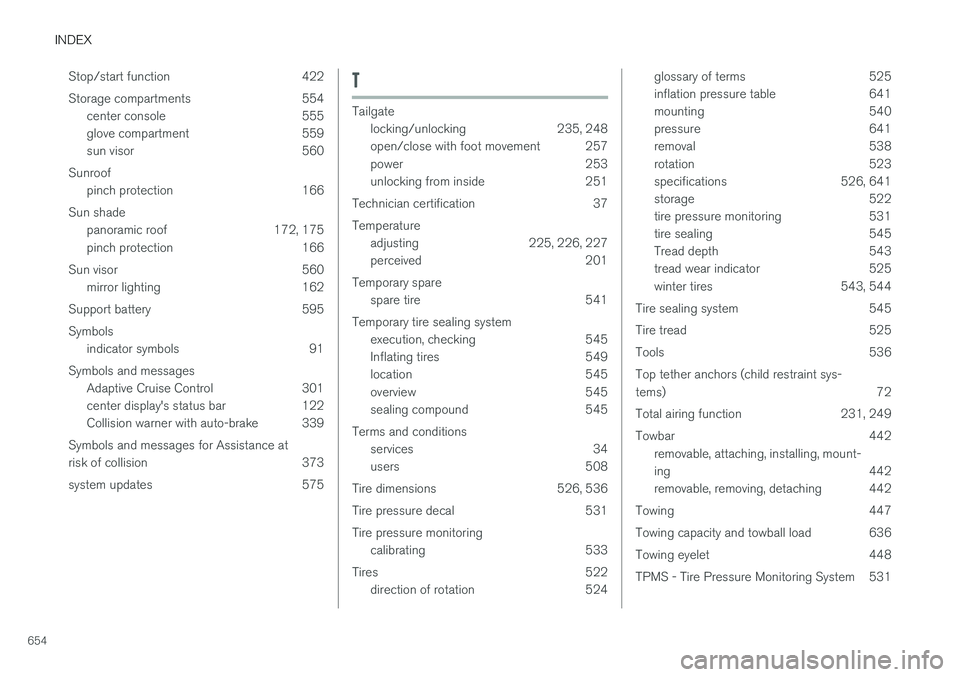
INDEX
654Stop/start function 422
Storage compartments 554
center console 555
glove compartment 559
sun visor 560
Sunroof pinch protection 166
Sun shade panoramic roof 172, 175
pinch protection 166
Sun visor 560 mirror lighting 162
Support battery 595 Symbols indicator symbols 91
Symbols and messages Adaptive Cruise Control 301
center display's status bar 122
Collision warner with auto-brake 339
Symbols and messages for Assistance at
risk of collision 373
system updates 575
T
Tailgate locking/unlocking 235, 248
open/close with foot movement 257
power 253
unlocking from inside 251
Technician certification 37 Temperature adjusting 225, 226, 227
perceived 201
Temporary spare spare tire 541
Temporary tire sealing system execution, checking 545
Inflating tires 549
location 545
overview 545
sealing compound 545
Terms and conditions services 34
users 508
Tire dimensions 526, 536
Tire pressure decal 531 Tire pressure monitoring calibrating 533
Tires 522 direction of rotation 524
glossary of terms 525
inflation pressure table 641
mounting 540
pressure 641
removal 538
rotation 523
specifications 526, 641
storage 522
tire pressure monitoring 531
tire sealing 545
Tread depth 543
tread wear indicator 525
winter tires 543, 544
Tire sealing system 545
Tire tread 525
Tools 536Top tether anchors (child restraint sys- tems) 72
Total airing function 231, 249
Towbar 442 removable, attaching, installing, mount-
ing 442
removable, removing, detaching 442
Towing 447
Towing capacity and towball load 636
Towing eyelet 448
TPMS - Tire Pressure Monitoring System 531
Page 657 of 660

INDEX
655
Traction control 266
Traffic information 465
Trailer 445
driving with a trailer 443
Lamps 446
swaying 445
Trailer Stability Assist 445 trailer 445
Trailer stabilizer 266 Trailer towing trailer hitch 442
Transmission 411 automatic 412
Transmission fluid grade 639
Travel Link 474 Fuel 477
Notifications 476
Sports 478
weather 475
Tread depth 525, 543
Tread wear indicator 525
Trip computer 85, 87
Trip odometer 85
Trip odometer resetting 88
Trip statistics 88
Troubleshooting Adaptive Cruise Control 298
Troubleshooting the camera sensor 324
TSA - Trailer Stability Assist 266, 445
Tunnel detection 153
Turn off engine 400
Turn signals 156Type approval radar system 322
U
Uniform Tire Quality Grading 528
Units 130
Unknown vehicle component 262Unlocking
settings 234
with key blade 243
USB socket for connecting media 486
V
Vehicle care 614, 615, 617, 618, 619, 620leather upholstery 612
Vehicle Event Data 33 Vehicle functions in the center display 120
Vehicle key bat. low 236Vehicle modem connecting vehicle to Internet 504
settings 505
Vehicle recovery 450
Vehicle status 576 inflation pressure 534
Vehicle upholstery 609, 611, 612, 613, 614
Vehicle weight 635
Ventilation 206, 207 Seats 216
Video 484, 486 settings 485
Voice control 143 climate 202
phone 145
radio and media 146
settings 146
VOL mark 522