Windshield VOLVO XC60 2018 Owner´s Manual
[x] Cancel search | Manufacturer: VOLVO, Model Year: 2018, Model line: XC60, Model: VOLVO XC60 2018Pages: 660, PDF Size: 11.77 MB
Page 6 of 660
4
Setting types in the center display133
Table of settings in the center display 134
Driver profiles 135
Selecting a driver profile 136
Changing a driver profile's name 137
Resetting driver profile settings 137
Linking a remote key to a driver profile 137
Messages in the center display 138
Handling messages in the center display 139
Handling messages saved from the center display 140
Head-up display *
140
Activating and deactivating the head- up display * 142
Head-up display settings *
142
Voice control 143
Using voice commands 144
Voice control for cellular phones 145
Voice control for radio and media 146
Voice control settings 146
LIGHTING
Lighting panel and controls150
Adjusting light functions via the cen- ter display 151
Parking lights 152
Daytime running lights 152
Low beams 153
Using high beam 154
Active high beam 155
Using turn signals 156
Active Bending Lights *
157
Front fog lights/cornering illumination *
157
Rear fog light 158
Brake lights 159
Emergency brake lights 159
Hazard warning flashers 160
Using home safe lighting 160
Welcome Light 160
Interior Lighting 161
Adjusting interior lighting 162
WINDOWS, GLASS AND MIRRORS
Windows, glass and mirrors166
Pinch protection for windows and sun curtains 166
Reset procedure for pinch protection 167
Power windows 167
Operating the power windows 168
Rearview/door mirrors 169
Adjusting the rearview mirror dim-ming function 170
Adjusting the door mirrors 170
Panoramic roof *
172
Operating the panoramic roof *
173
Auto closing the panoramic roof * sun
curtain 175
Using the windshield wipers 176
Heated windshield washer nozzles *
177
Using the rain sensor 177
Using the rain sensor's memory function 178
Using the windshield and headlightwashers 179
Using the rear window wiper/washer 180
Using automatic rear window wipingwhen backing up 180
Page 7 of 660
5
SEATS AND STEERING WHEEL
Manual front seats184
Power front seats *
185
Adjusting the power front seats *
185
Storing memory settings in power front seats * 186
Using stored memory in a powered front seat 187
Front seat massage settings *
188
Adjusting front seat massage settings *
188
Adjusting front seat cushion length 189
Adjusting front seat side bolster settings *
190
Adjusting front seat lumbar support *
190
Adjusting the passenger seat from the driver's seat * 191
Folding down the rear seat backrests 192
Adjusting the rear seat head restraints 195
Steering wheel controls and horn 196
Adjusting the steering wheel 197
CLIMATE CONTROL
Climate200
Climate zones 200
Climate control sensors 201
Perceived temperature 201
Climate control system voice commands 202
Air quality 203
Clean Zone *
203
Clean Zone Interior Package *
204
Interior Air Quality System *
204
Activating and deactivating the air quality sensor * 205
Passenger compartment air filter 205
Air distribution 206
Adjusting air distribution 206
Opening, closing and directing air vents 207
Air distribution options 209
Climate system controls 212
Activating and deactivating powerfront seats * 214
Activating and deactivating theheated front seat * 215
Activating and deactivating theheated rear seats * 215
Activating and deactivating front seatventilation * 216
Activating and deactivating the heated steering wheel
*217
Activating and deactivating automaticsteering wheel heating *218
Activating auto climate control 218
Activating and deactivating recirculation 219
Activating and deactivating the recir- culation timer setting 219
Activating and deactivating max defroster 220
Activating and deactivating the heated windshield * 221
Activating and deactivating automaticwindshield heating * 222
Activating and deactivating the heated rear window and door mirrors 222
Automatically activating and deacti-vating the heated rear window anddoor mirrors 223
Setting the blower speed for thefront seats 223
Setting the blower speed for the rear seats * 224
Setting the temperature for the front seats 225
Setting the temperature for the rear seats * 226
Synchronize temperature 227
Activating and deactivating air condi- tioning 227
Page 15 of 660
13
MAINTENANCE AND SERVICE
Volvo's service program572
Data transfer between vehicle and workshop over Wi-Fi 574
Download Center 575
Handling system updates via Down-load Center 575
Vehicle status 576
Scheduling service and repairs 576
Sending vehicle information to theworkshop 578
Hoisting the vehicle 579
Opening and closing the hood 581
Climate control system service 582
Replacing a windshield with head-up display * 582
Engine compartment overview 583
Engine oil 583
Checking and filling engine oil 584
Refilling coolant 586
Replacing bulbs 587
Location of exterior lights 588
Replacing the low beam headlight bulbs 589
Replacing the high beam headlight bulbs 590
Replacing daytime running lights/ front parking light bulbs 590
Replacing front turn signal bulbs 591
Bulb specifications591
Start battery 592
Support battery 595
Battery symbols 596
Fuses and fuseboxes 597
Replacing fuses 598
Fuses in the engine compartment 599
Fuses under the glove compartment 602
Fuses in the cargo compartment 605
Cleaning the interior 609
Cleaning the center display 609
Cleaning the head-up display *
610
Cleaning fabric upholstery and ceil- ing liner 611
Cleaning the seat belt 611
Cleaning floor mats and inlay mats 611
Cleaning leather upholstery 612
Cleaning the leather steering wheel 613
Cleaning interior plastic, metal andwood surfaces 614
Cleaning the exterior 614
Polishing and waxing 615
Hand washing 615
Automatic car washes 617
High-pressure washing 618
Cleaning the wiper blades618
Cleaning exterior plastic, rubber and trim components 619
Cleaning rims 620
Corrosion protection 620
Paintwork 621
Touching up minor paint damage 621
Color codes 622
Changing rear window wipers 623
Replacing windshield wiper blades 624
Windshield wipers in the service position 625
Filling washer fluid 626
Page 40 of 660
YOUR VOLVO
38
Viewing the Vehicle IdentificationNumber (VIN) When contacting a Volvo retailer, about e.g. your Volvo On Call subscription, your Vehicle Identifi- cation Number (VIN5
) may be needed.
1. Tap Settings in the Top view in the center
display.
2. Proceed to
SystemSystem Information
Vehicle Identification Number.
> The vehicle identification number will be displayed.
Volvo Structural Parts Statement
Volvo is one of the leading companies for car safety.
Volvo engineers and manufactures vehicles designed to help protect vehicle occupants in theevent of a collision. Volvos are designed to absorb the impact of a collision. This energy absorption system including,but not limited to, structural components such asbumper reinforcement bars, bumper energyabsorbers, frames, rails, fender aprons, A-pillars,B-pillars and body panels must work together tomaintain cabin integrity and protect the vehicleoccupants. The supplemental restraint system including but not limited to air bags, side curtain air bags, anddeployment sensors work together with theabove components to provide proper timing forair bag deployment. Due to the above, Volvo Car USA does not sup- port the use of aftermarket, alternative or any-thing other than original Volvo parts for collisionrepair. Volvo Car USA also recommends using Volvo- approved replacement glass. The use of after-market glass, particularly a windshield, can havean adverse effect on collision avoidance andadvanced lighting systems. In addition Volvo does not support the use or re-use of structural components from an existingvehicle that has been previously damaged.Although these parts may appear equivalent, it isdifficult to tell if the parts have been previouslyreplaced with non-OE parts or if the part hasbeen damaged as a result of a prior collision. Thequality of these used parts may also have beenaffected due to environmental exposure.
Related information
•
Data recording (p. 33)
5
Vehicle Identification Number
Page 46 of 660
||
SAFETY
44
Occupant safety reminders
How safely you drive doesn't depend on how old you are but rather on:
• How well you see.
• Your ability to concentrate.
• How quickly you make decisions understress to avoid an accident.
The following suggestions are intended to helpyou cope with the ever changing traffic environ-ment.
• Never drink and drive.
• If you are taking any medication, consult yourphysician about its potential effects on your driving abilities.
• Take a driver-retraining course.
• Have your eyes checked regularly.
• Keep your windshield and headlights clean.
• Replace wiper blades when they start to leave streaks.
• Take into account the traffic, road, andweather conditions, particularly with regard tostopping distance.
• Never send text messages while driving.
• Refrain from using or minimize the use of acell phone while driving.Related information
• Safety (p. 42)
• Reporting safety defects (p. 44)
• Recall information (p. 45)
Reporting safety defects
The following information will help you report any perceived safety-related defects in your vehicle.
Reporting safety defects in the U.S.
If you believe that your vehicle has a defect which could cause a crash orcould cause injury or death, you shouldimmediately inform the National High-way Traffic Safety Administration(NHTSA) in addition to notifying VolvoCar USA, LLC. If NHTSA receives simi-lar complaints, it may open an investi-gation, and if it finds that a safetydefect exists in a group of vehicles, itmay order a recall and remedy cam-paign. However, NHTSA cannotbecome involved in individual problemsbetween you, your retailer, or Volvo CarUSA, LLC. To contact NHTSA, you mayeither call the Auto Safety Hotline toll-free at 1-888-327-4236(TTY: 1-800-424-9153) or write to: NHTSA, U.S. Department of Transpor-tation, Washington D.C. 20590.
Page 47 of 660
SAFETY
}}
45
You can also obtain other information about motor vehicle safety from http://www.safercar.gov, where you can alsoenter your vehicle's VIN (Vehicle Identi-fication Number) to see if it has anyopen recalls. Volvo strongly recommends that if your vehicle is covered under a service cam-paign, safety or emission recall or simi-lar action, it should be completed assoon as possible. Please check withyour local retailer or Volvo Car USA,LLC if your vehicle is covered underthese conditions. NHTSA can be reached at:Internet:http://www.nhtsa.govTelephone:1-888-DASH-2-DOT (1-888-327-4236).
Reporting safety defects in CanadaIf you believe your vehicle has a defect that could cause a crash or could cause injury or death, youshould immediately inform Transport Canada inaddition to notifying Volvo Car Canada Ltd.
Transport Canada can be contacted at:
1-800-333-0510 Teletypewriter (TTY): 613 990-4500Fax: 1-819-994-3372Mailing Address: Transport Canada - Road Safety, 80 rue Noël, Gatineau, (Quebec) J8Z 0A1
Related information
•
Safety (p. 42)
• Occupant safety (p. 43)
• Recall information (p. 45)
• Viewing the Vehicle Identification Number(VIN) (p. 38)
Recall information
On our website, select the "Own" tab on the upper left side of the screen and click the head-ing "Recall Information" on the right side of thescreen. Enter your Vehicle Identification Number(VIN) for your vehicle (found at the base of thewindshield). If your vehicle has any open Recalls,they will be displayed on this page. You can also enter the Vehicle Identification Number in the search field on the NationalHighway Traffic Safety Administration's (NHTSA)website at: www.nhtsa.gov.
Volvo customers in Canada
For any questions regarding open recalls for your vehicle, please contact your authorized Volvoretailer. If your retailer is unable to answer yourquestions, please contact Volvo Customer Rela-tions at 800-663-8255, Monday through Friday,8:30 A.M. to 5:00 P.M. EST or volvocars.com/ca.You may also write us at: Volvo Car Canada Ltd.Customer Care Centre9130 Leslie Street, Suite 101Richmond Hill, Ontario L4B 0B9www.tc.gc.ca
Page 142 of 660
DISPLAYS AND VOICE CONTROL
* Option/accessory.
140
Handling messages saved from thecenter display
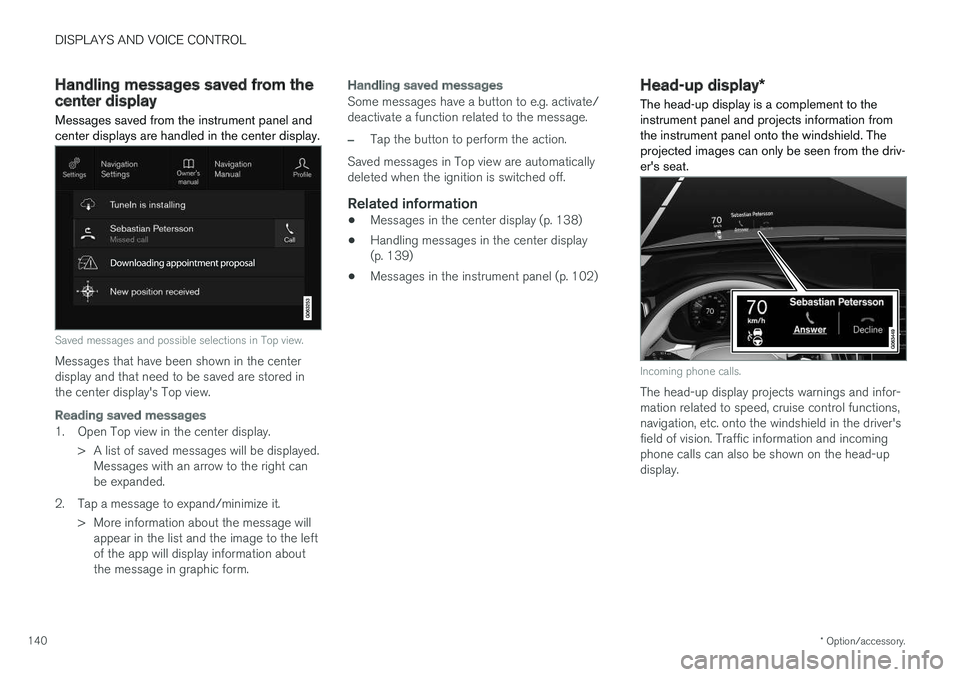
Messages saved from the instrument panel and center displays are handled in the center display.
Saved messages and possible selections in Top view.
Messages that have been shown in the center display and that need to be saved are stored inthe center display's Top view.
Reading saved messages
1. Open Top view in the center display.
> A list of saved messages will be displayed.Messages with an arrow to the right can be expanded.
2. Tap a message to expand/minimize it. > More information about the message willappear in the list and the image to the leftof the app will display information aboutthe message in graphic form.
Handling saved messages
Some messages have a button to e.g. activate/ deactivate a function related to the message.
–Tap the button to perform the action.
Saved messages in Top view are automatically deleted when the ignition is switched off.
Related information
• Messages in the center display (p. 138)
• Handling messages in the center display(p. 139)
• Messages in the instrument panel (p. 102)
Head-up display
*
The head-up display is a complement to the instrument panel and projects information fromthe instrument panel onto the windshield. Theprojected images can only be seen from the driv-er's seat.
Incoming phone calls.
The head-up display projects warnings and infor- mation related to speed, cruise control functions,navigation, etc. onto the windshield in the driver'sfield of vision. Traffic information and incomingphone calls can also be shown on the head-updisplay.
Page 143 of 660
DISPLAYS AND VOICE CONTROL
* Option/accessory.141
NOTE
The driver's ability to see information in the head-up display may be impeded by:
• the use of polarizing sunglasses
• a driving posture in which the driver is notcentered in the seat
• objects on the display unit's glass cover
• unfavorable lighting conditions.
CAUTION
The information is projected from a display unit located in the dashboard. To help preventdamage to the display unit's glass cover, donot place any objects on the glass and pre-vent objects from falling onto it.
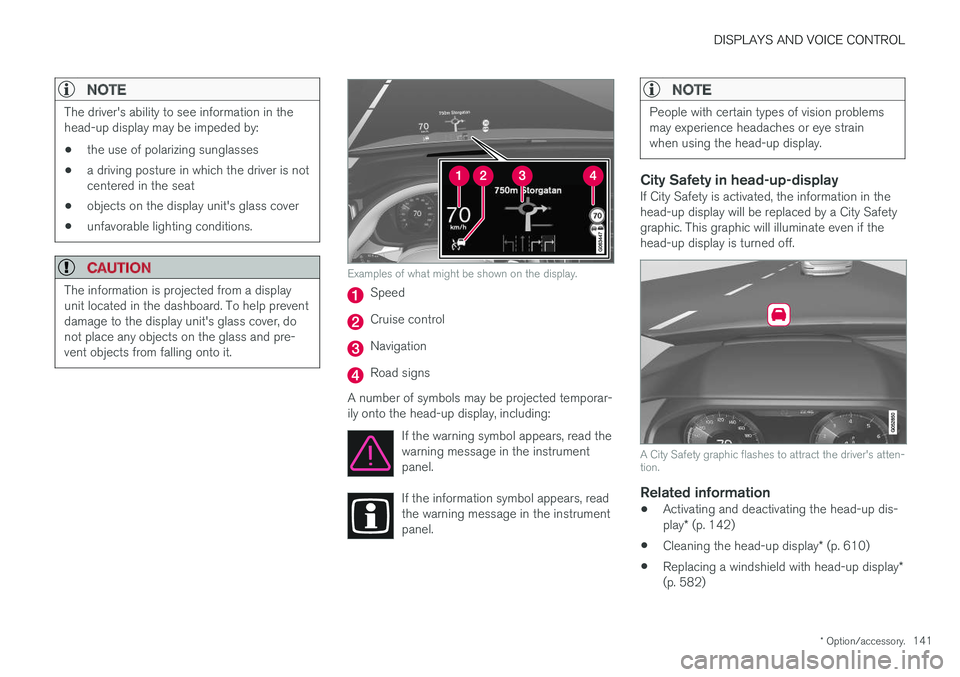
Examples of what might be shown on the display.
Speed
Cruise control
Navigation
Road signs
A number of symbols may be projected temporar- ily onto the head-up display, including: If the warning symbol appears, read thewarning message in the instrumentpanel.
If the information symbol appears, read the warning message in the instrumentpanel.
NOTE
People with certain types of vision problems may experience headaches or eye strainwhen using the head-up display.
City Safety in head-up-displayIf City Safety is activated, the information in the head-up display will be replaced by a City Safety graphic. This graphic will illuminate even if the head-up display is turned off.
A City Safety graphic flashes to attract the driver's atten- tion.
Related information
•Activating and deactivating the head-up dis- play
* (p. 142)
• Cleaning the head-up display
* (p. 610)
• Replacing a windshield with head-up display
*
(p. 582)
Page 144 of 660
DISPLAYS AND VOICE CONTROL
* Option/accessory.
142
Activating and deactivating the
head-up display *
The head-up display can be activated and deac- tivated when the vehicle has been started.
Press the Head-up Displaybutton in the center display's Function view. An indicator lightin the button will illuminatewhen the function is activated.
Related information
• Head-up display settings
* (p. 142)
• Head-up display
* (p. 140)
Head-up display settings *
Adjusting settings for the head-up display.
Settings can be adjusted in the center display's Settings menu when the vehicle is started and aprojected image is displayed on the windshield. This setting is stored as a personal setting in the driver profile.
Selecting display optionsSelect the functions to be shown in the head-updisplay. 1. Tap
Settings in the center display's Top
view.
2. Tap
My CarDisplaysHead-Up
Display Options.
3. Select one or more functions:
•
Show Navigation
•Show Road Sign Information
•Show Driver Support
•Show Phone.
Adjusting brightness and height position
1.Press the Head-up Display Adjustmentsbutton in the center display's Function view.
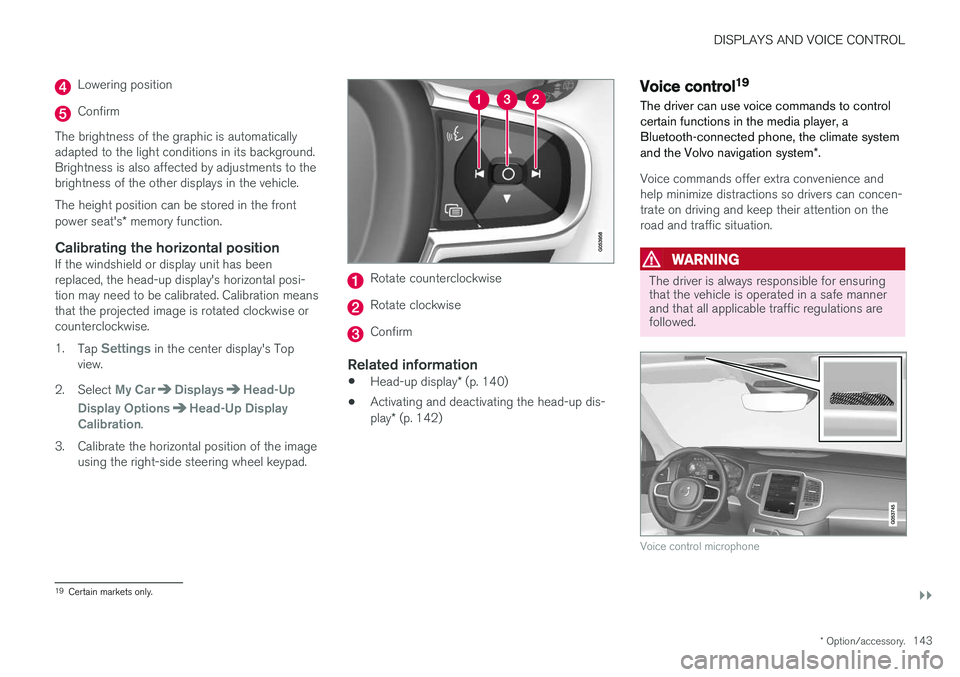
2. Adjust the brightness of the projected image and the height position in the driver's field of vision using the right-side steering wheellever.
Decreasing brightness
Increasing brightness
Raising position
Page 145 of 660
DISPLAYS AND VOICE CONTROL
}}
* Option/accessory.143
Lowering position
Confirm
The brightness of the graphic is automatically adapted to the light conditions in its background.Brightness is also affected by adjustments to thebrightness of the other displays in the vehicle. The height position can be stored in the front power seat's * memory function.
Calibrating the horizontal positionIf the windshield or display unit has been replaced, the head-up display's horizontal posi-tion may need to be calibrated. Calibration meansthat the projected image is rotated clockwise orcounterclockwise. 1.
Tap
Settings in the center display's Top
view.
2. Select
My CarDisplaysHead-Up
Display Options
Head-Up Display
Calibration.
3. Calibrate the horizontal position of the image using the right-side steering wheel keypad.
Rotate counterclockwise
Rotate clockwise
Confirm
Related information
• Head-up display
* (p. 140)
• Activating and deactivating the head-up dis- play
* (p. 142)
Voice control19
The driver can use voice commands to control certain functions in the media player, aBluetooth-connected phone, the climate system and the Volvo navigation system *.
Voice commands offer extra convenience and help minimize distractions so drivers can concen-trate on driving and keep their attention on theroad and traffic situation.
WARNING
The driver is always responsible for ensuring that the vehicle is operated in a safe mannerand that all applicable traffic regulations arefollowed.
Voice control microphone
19
Certain markets only.