towing capacity VOLVO XC60 2018 Owner´s Manual
[x] Cancel search | Manufacturer: VOLVO, Model Year: 2018, Model line: XC60, Model: VOLVO XC60 2018Pages: 660, PDF Size: 11.77 MB
Page 16 of 660
14
SPECIFICATIONS
Type designations630
Dimensions 633
Weights 635
Towing capacity and tongue weight 636
Engine specifications 637
Engine oil specifications 638
Coolant specifications 639
Transmission fluid specifications 639
Brake fluid specifications 639
Fuel tank volume 640
Air conditioning specifications 640
Approved tire pressure 641
INDEX
Index 643
Page 318 of 660
||
DRIVER SUPPORT
* Option/accessory.
316
The driver is responsible for ensuring that the vehicle maintains a suitable distancefrom such obstacles.
• The camera and radar sensors do nothave the capacity to detect all oncomingobjects and obstacles in traffic environ-ments, e.g. potholes, stationary obstaclesor objects that completely or partiallyblock the route.
• Pilot Assist does not "see" pedestrians,animals, etc.
• The recommended steering input is lim-ited in force, which means that it cannotalways help the driver to steer and keepthe vehicle within the lane.
• Pilot Assist is switched off if the powersteering is working with reduced power -e.g. during cooling due to overheating(see section "Speed-dependent steeringforce").
The driver can always correct or adjust steeringassistance provided by Pilot Assist by turning thesteering wheel to the desired position.
Steep roads and/or heavy loadsPilot Assist is primarily intended to be driven onflat roads. The function may not be able to main-tain the correct time interval to the vehicle aheadwhen driving down steep hills. The driver should be extra attentive and prepared to apply thebrakes.
• Do not use Pilot Assist if the vehicle is carry-ing a heavy load or towing a trailer.
NOTE
Pilot Assist cannot be activated if a trailer, bike carrier or similar is connected to thevehicle electrical system.
Other limitations
•
The Off Road drive mode cannot be
selected when Pilot Assist is activated.
NOTE
The function uses the vehicle's camera unit, which has some general limitations – see thesection "Camera unit limitations".
NOTE
The function uses the vehicle's radar unit, which has some general limitations – see thesection "Radar unit limitations".
Related information
• Pilot Assist (p. 303)
• Speed-dependent steering wheel resistance (p. 264)
Pilot Assist
* symbols and messages
A number of symbols and messages relating to Pilot Assist may be displayed in the instrument panel and/or the head-up display *.
Page 445 of 660
STARTING AND DRIVING
}}
443
Installing the ball holder1. If necessary, remove the cotter pin from thelocking bolt and slide the locking bolt out of the towbar assembly.
2. Slide the ball holder into the towbar assem- bly.
3. Align the hole in the ball holder with the one in the towbar assembly.
4. Slide the locking bolt through the towbar assembly/ball holder.
5. Insert the cotter pin in the hole at the end of the locking bolt.
WARNING
• Be sure the towbar is securely locked in position before attaching anything to it.
• Always attach the trailer's safety wiresecurely to the towbar's safety wireattachment bracket.
Removing the ball holder1. Remove the cotter pin from the locking bolt
and slide the locking bolt out of the ballholder/towbar assembly.
2. Pull the ball holder out of the towbar assem- bly.
Stowing the ball holder
WARNING
When not in use, the detachable ball holder should always be properly stowed in the des-ignated location under the floor of the cargocompartment.
Related information
• Driving with a trailer (p. 443)
• Towing capacity and tongue weight (p. 636)
Driving with a trailer
There are a number of things to consider when towing a trailer, such as the towbar, the trailerand how the load is distributed in the trailer.
Load-carrying capacity is determined by the vehi- cle's curb weight. The total weight of all passen-gers and any installed accessories, e.g. towbar,reduces the vehicle's load-carrying capacity bythe corresponding amount. • Towbars used on the vehicle must be approved for the applicable use.
• Distribute the load on the trailer so that theweight on the towbar complies with thespecified maximum towball weight. Thetongue weight is calculated as part of thevehicle's payload.
• Increase the tire pressure to the recom-mended pressure for a full load.
• The engine is subjected to more load thanusual when towing a trailer.
• Towing a trailer affects the vehicle's han-dling, durability and driving economy.
• Do not drive with a heavy trailer when thevehicle is very new. Wait until the mileagehas reached at least 1000 km (620 miles).
• On long and steep downgrades, the vehicle'sbrakes are subjected to much more loadthan usual. When manually shifting, down-shift and adapt speed accordingly.
Page 447 of 660
STARTING AND DRIVING
}}
* Option/accessory.445
The automatic transmission selects the optimal gear for the current load and engine speed.
Steep inclines
Do not lock the automatic transmission into a higher gear than what the engine can handle
‒ it
is not always preferable to drive in high gears at low rpm.
Parking on a hill
1. Depress the brake pedal.
2. Apply the parking brake.3. Put the gear selector in P.
4. Release the brake pedal.Put chocks behind the wheels when the vehicle is parked on a hill with a trailer attached.
Starting on a hill
1. Depress the brake pedal. 2. Put the gear selector in D.
3. Release the parking brake.
4. Release the brake pedal and start driving.
Related information
• Trailer Stability Assist
* (p. 445)
• Checking trailer lights (p. 446)
• Towing capacity and tongue weight (p. 636)
• Overheating of engine and transmission (p. 440)
Trailer Stability Assist
*
Trailer Stability Assist (TSA 9
) is a function
designed to help stabilize a vehicle that is tow- ing a trailer when the vehicle and trailer havebegun to sway. The function is part of the Elec- tronic Stability Control system ESC 10
.
Reasons for swayingA vehicle towing a trailer may begin to sway for various reasons. Normally this only occurs at highspeeds. However, if the trailer is overloaded orunevenly distributed, e.g. too far back, there is arisk of swaying even at low speeds. Swaying may be caused by factors such as:
• The vehicle and trailer are hit by a sudden, strong crosswind.
• The vehicle and trailer are traveling on anuneven road or over a bump.
• Sudden movements of the steering wheel.
Once swaying has begun, it can be difficult orimpossible to stop it. This makes the vehicle andtrailer difficult to control and there is a risk ofswerving into oncoming traffic or driving off theroad.
Trailer Stability Assist functionTrailer Stability Assist continuously monitors thevehicle's movements, particularly lateral move- ments. If swaying is detected, the brakes areapplied individually on the front wheels, which hasa stabilizing effect on the vehicle and trailer. Thisis often enough to enable the driver to regaincontrol of the vehicle. If the Trailer Stability Assist function's first attempt is not adequate to stop the swayingmotion, the brakes are applied on all wheels andengine power is temporarily reduced. As theswaying motion begins to decrease and the vehi-cle and trailer have once again become stable,TSA stops regulating the brakes/engine powerand the driver regains control of the vehicle.
NOTE
Trailer Stability Assist is deactivated if the driver selects the sport mode by deactivating
ESC in the center display's menu system.
Trailer Stability Assist may not intervene if the driver tries to compensate for the swaying motionby moving the steering wheel rapidly, becausethe system will then not be able to determine if itis the trailer or the driver causing the swaying.
9
Trailer Stability Assist
10 Electronic Stability Control
Page 552 of 660
||
WHEELS AND TIRES
550
Related information
•Recommended tire pressure (p. 531)
• Using the tire sealing system (p. 545)
• Tire sealing system (p. 545)
Determining the vehicle's permittedweight
Properly loading your vehicle will provide maxi- mum return of vehicle design performance.
Weight designationsBefore loading your vehicle, familiarize yourself with the following terms for determining yourvehicle's weight ratings, with or without a trailer,from the vehicle's Federal/Canadian Motor Vehi-cle Safety Standards (FMVSS/CMVSS) label, andthe vehicle's tire information placard:
Curb weight
The weight of the vehicle including a full tank of fuel and all standard equipment. It does notinclude passengers, cargo, or optional equipment.
Capacity weight
All weight added to the curb weight, including cargo and optional equipment. When towing, tow-bar weight is also part of cargo weight.
Permissible axle weight
The maximum allowable weight that can be car- ried by a single axle (front or rear). These num-bers are shown on the Federal/Canadian MotorVehicle Safety Standards (FMVSS/CMVSS) label.The total load on each axle must never exceed itsmaximum permissible weight.
Gross vehicle weight (GVW)
The vehicle's curb weight + cargo + passengers.
Steps for Determining Correct Load Limit
1. Locate the statement "the combined weight of occupants and cargo should never exceed XXX kg or XXX lbs." on your vehicle's plac-ard.
2. Determine the combined weight of the driver and passengers that will be riding in yourvehicle.
3. Subtract the combined weight of the driver and passengers from XXX kg or XXX lbs.
4. The resulting figure equals the available amount of cargo and luggage load capacity.For example, if the "XXX" amount equals1400 lbs. and there will be five 150 lb. pas-sengers in your vehicle, the amount of availa-ble cargo and luggage load capacity is 650lbs. (1400 - 750 (5 × 150) = 650 lbs.)
5. Determine the combined weight of luggage and cargo being loaded on the vehicle. Thatweight may not safely exceed the availablecargo and luggage load capacity calculatedin Step 4.
6. If your vehicle will be towing a trailer, load from your trailer will be transferred to yourvehicle. Consult this manual to determinehow this reduces the available cargo and lug-gage load capacity of your vehicle.
Page 563 of 660
LOADING, STORAGE AND PASSENGER COMPARTMENT
}}
* Option/accessory.561
Cargo compartment The vehicle has a flexible cargo compartment that makes it possible to carry and secure largeobjects.
The cargo capacity of the vehicle can be consid- erably increased by folding down the rear seatbackrests. To make loading and unloading easier,the rear section of the vehicle can be raised and lowered using the level control function *. Use the
load anchoring eyelets or grocery bag holders to help secure objects in place, and the retractable cargo compartment cover * to help conceal
objects in the cargo compartment. The towing eyelet and tire sealing system, or the temporary spare tire *, are located under the
cargo compartment floor.
Related information
• Loading recommendations (p. 561)
• Grocery bag holders (p. 563)
• Load anchoring eyelets (p. 563)
• Installing and removing the cargo compart-ment cover
* (p. 564)
Loading recommendations
There are a number of things to consider when carrying loads in or on the vehicle.
Load-carrying capacity is determined by the vehi- cle's curb weight. The total weight of all passen-gers and any installed accessories reduces thevehicle's load-carrying capacity by the corres-ponding amount.
WARNING
The vehicle's driving characteristics change depending on the weight and position of theload.
Loading in the trunk and cargo compartment
• Position objects so they are pressing against the rear seat backrests.
• Distribute the load evenly.
• Heavy objects should be positioned as lowas possible. Avoid placing heavy objects onfolded-down seat backrests.
• Cover sharp corners with a soft cloth or simi-lar to help prevent damage to the upholstery.
• Use the load anchoring eyelets and tension-ing straps or similar to secure all objects.
WARNING
In a head-on collision at a speed of 50 km/h (30 mph), an unsecured object weighing 20kg (44 pounds) can reach a projectile weightequivalent to 1000 kg (2200 pounds).
WARNING
If objects are loaded higher than the upper edge of the side windows, leave a 10 cm (4in.) space between the objects and the win-dow. Objects placed closer to this couldimpede the function of the inflatable curtainconcealed inside the headlining.
WARNING
Always secure the load. Otherwise, it may shift during heavy braking and injure people in thevehicle. Cover sharp edges and sharp corners with something soft. Turn off the engine and apply the parking brake when loading/unloading long objects.Otherwise, it is possible for the load to reachthe gear lever or gear selector and move it toa drive position – which could cause the vehi-cle to begin rolling.
Page 637 of 660
SPECIFICATIONS
635
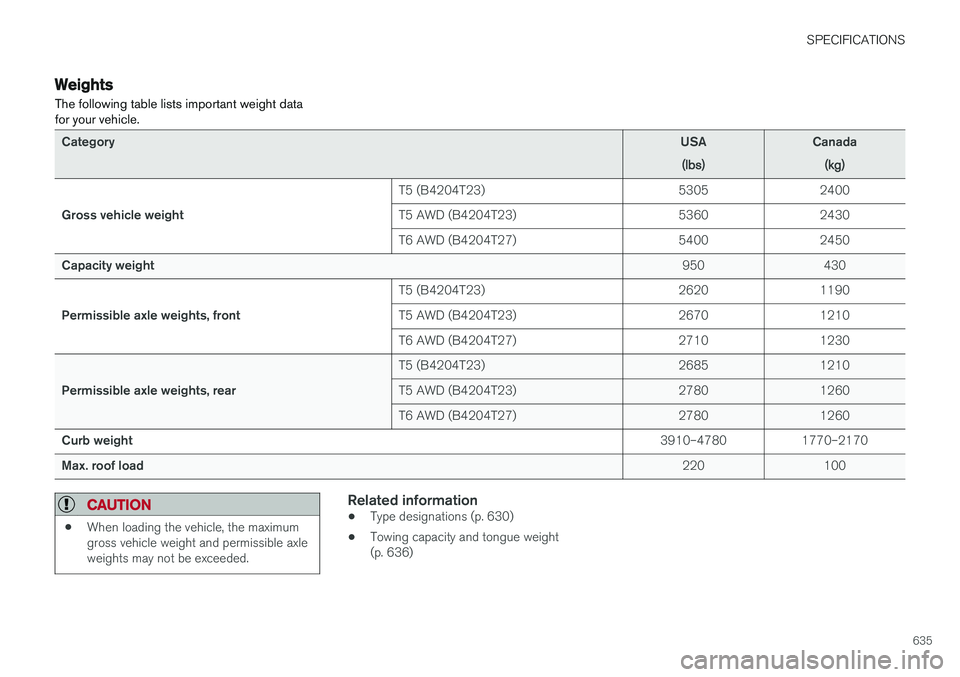
Weights The following table lists important weight data for your vehicle.
CategoryUSA
(lbs)Canada(kg)
Gross vehicle weight T5 (B4204T23) 5305 2400
T5 AWD (B4204T23) 5360 2430
T6 AWD (B4204T27) 5400 2450
Capacity weight 950 430
Permissible axle weights, front T5 (B4204T23) 2620 1190
T5 AWD (B4204T23) 2670 1210
T6 AWD (B4204T27) 2710 1230
Permissible axle weights, rear T5 (B4204T23) 2685 1210
T5 AWD (B4204T23) 2780 1260
T6 AWD (B4204T27) 2780 1260
Curb weight 3910–4780 1770–2170
Max. roof load 220 100
CAUTION
•When loading the vehicle, the maximum gross vehicle weight and permissible axleweights may not be exceeded.
Related information
•Type designations (p. 630)
• Towing capacity and tongue weight (p. 636)
Page 638 of 660
SPECIFICATIONS
* Option/accessory.
636
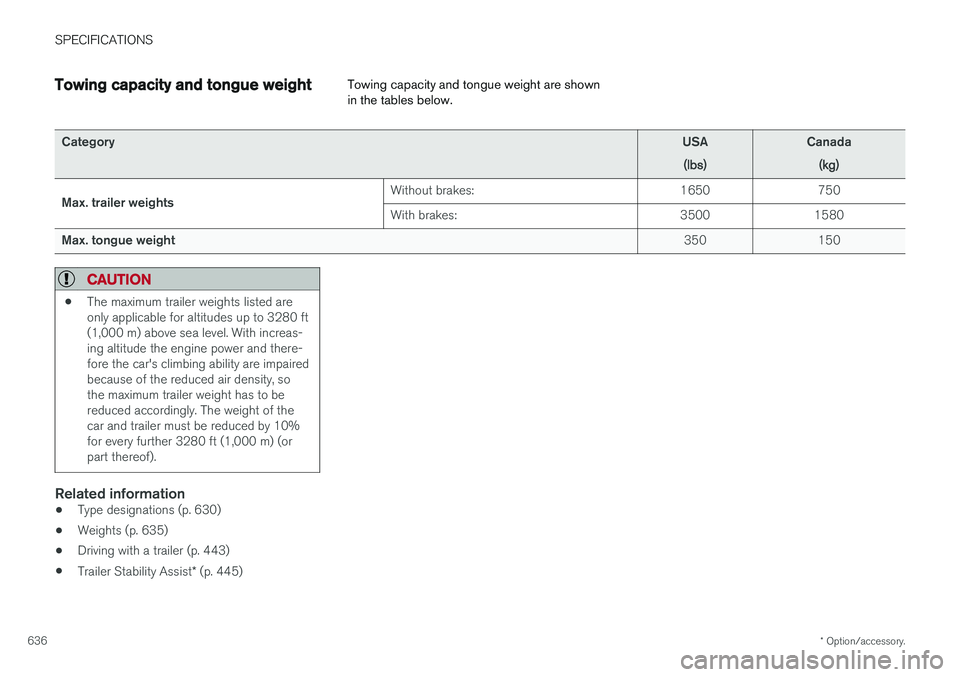
Towing capacity and tongue weight Towing capacity and tongue weight are shown in the tables below.
Category
USA
(lbs)Canada(kg)
Max. trailer weights Without brakes: 1650 750 With brakes:
3500 1580
Max. tongue weight 350 150
CAUTION
•The maximum trailer weights listed are only applicable for altitudes up to 3280 ft(1,000 m) above sea level. With increas-ing altitude the engine power and there-fore the car's climbing ability are impairedbecause of the reduced air density, sothe maximum trailer weight has to bereduced accordingly. The weight of thecar and trailer must be reduced by 10%for every further 3280 ft (1,000 m) (orpart thereof).
Related information
•
Type designations (p. 630)
• Weights (p. 635)
• Driving with a trailer (p. 443)
• Trailer Stability Assist
* (p. 445)
Page 648 of 660
INDEX
646CZIP (Clean Zone Interior Package) 204
D
Data
recording 33 transferring between vehicle and work-
shop 574
Data sharing 508
Daytime running lights 152Decals location of 630
Defrosting 220
Detection of cyclist 331
Dimensions 633
Dipstick, electronic 584
Direction of rotation 524
Disengaging the shiftlock 415
Display lighting 162
Distance Alert 283, 284, 285 limitations 286
DivX ®
484
Door mirrors 169, 170 compass 454
dimming 170
outer 169, 170
power folding 170
resetting 170
Driveline transmission 411
Drive mode 417 changing 419
Driver Alert Control 355 operation 356, 357
Driver Alert Control limitations 357
Driver performance 88, 89
Driver profile 135 edit 137
select 136
Driver support system 264 Driving cooling system 440
with a trailer 443
Driving economy 432
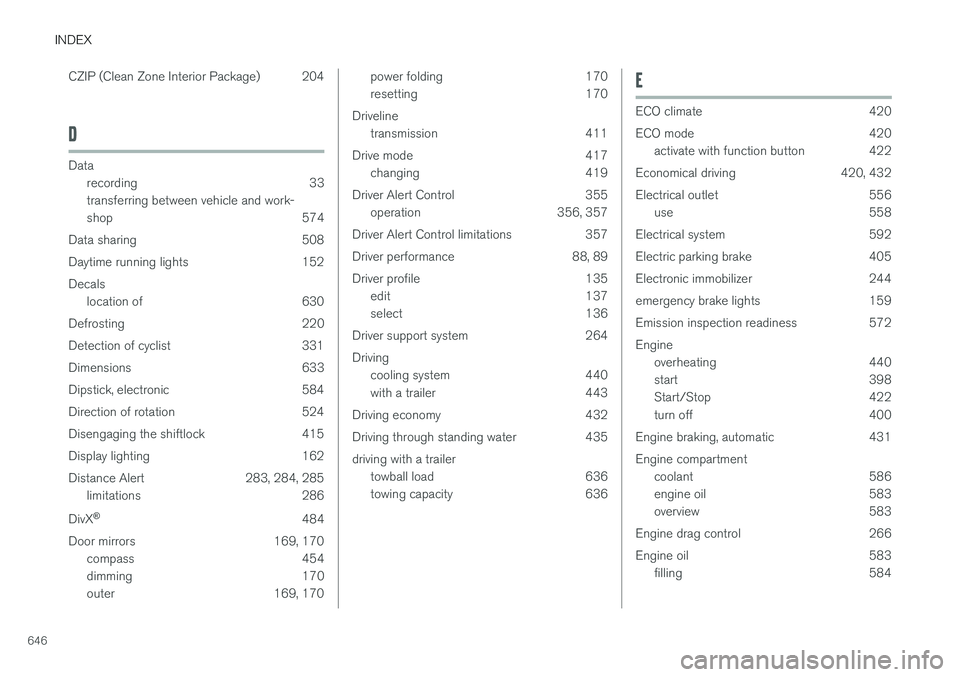
Driving through standing water 435 driving with a trailer towball load 636
towing capacity 636E
ECO climate 420
ECO mode 420
activate with function button 422
Economical driving 420, 432
Electrical outlet 556 use 558
Electrical system 592
Electric parking brake 405
Electronic immobilizer 244
emergency brake lights 159
Emission inspection readiness 572 Engine overheating 440
start 398
Start/Stop 422
turn off 400
Engine braking, automatic 431 Engine compartment coolant 586
engine oil 583
overview 583
Engine drag control 266
Engine oil 583 filling 584
Page 656 of 660
INDEX
654Stop/start function 422
Storage compartments 554
center console 555
glove compartment 559
sun visor 560
Sunroof pinch protection 166
Sun shade panoramic roof 172, 175
pinch protection 166
Sun visor 560 mirror lighting 162
Support battery 595 Symbols indicator symbols 91
Symbols and messages Adaptive Cruise Control 301
center display's status bar 122
Collision warner with auto-brake 339
Symbols and messages for Assistance at
risk of collision 373
system updates 575
T
Tailgate locking/unlocking 235, 248
open/close with foot movement 257
power 253
unlocking from inside 251
Technician certification 37 Temperature adjusting 225, 226, 227
perceived 201
Temporary spare spare tire 541
Temporary tire sealing system execution, checking 545
Inflating tires 549
location 545
overview 545
sealing compound 545
Terms and conditions services 34
users 508
Tire dimensions 526, 536
Tire pressure decal 531 Tire pressure monitoring calibrating 533
Tires 522 direction of rotation 524
glossary of terms 525
inflation pressure table 641
mounting 540
pressure 641
removal 538
rotation 523
specifications 526, 641
storage 522
tire pressure monitoring 531
tire sealing 545
Tread depth 543
tread wear indicator 525
winter tires 543, 544
Tire sealing system 545
Tire tread 525
Tools 536Top tether anchors (child restraint sys- tems) 72
Total airing function 231, 249
Towbar 442 removable, attaching, installing, mount-
ing 442
removable, removing, detaching 442
Towing 447
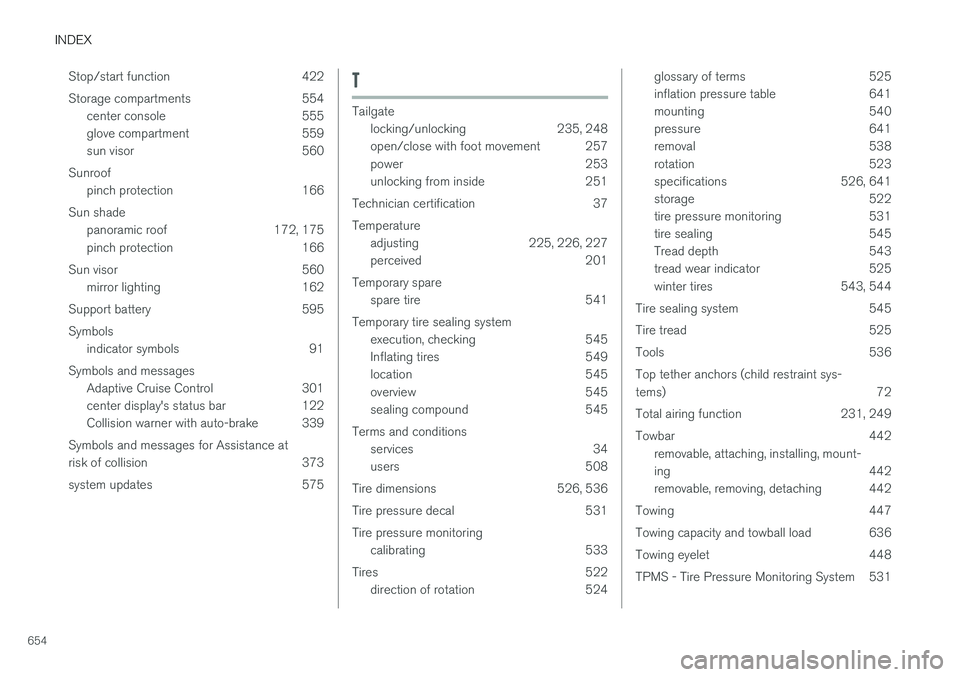
Towing capacity and towball load 636
Towing eyelet 448
TPMS - Tire Pressure Monitoring System 531