transmission VOLVO XC60 2018 Owner´s Manual
[x] Cancel search | Manufacturer: VOLVO, Model Year: 2018, Model line: XC60, Model: VOLVO XC60 2018Pages: 660, PDF Size: 11.77 MB
Page 11 of 660
9
Starting the Park Assist Camera384
Park Assist Camera limitations 384
Recommended maintenance of the Park Assist Camera 386
Park Assist Camera symbols andmessages 387
Park Assist Pilot *
388
Types of parking with Park Assist Pilot 388
Parking with Park Assist Pilot 389
Leaving a parking space with ParkAssist Pilot 392
Park Assist Pilot * limitations
393
Recommended maintenance forPark Assist Pilot 395
Park Assist Pilot * messages
396
STARTING AND DRIVING
Starting the vehicle
398
Switching off the vehicle 400
Ignition modes 401
Selecting ignition mode 402
Brake functions 402
Brakes 403
Brake Assist System 404
Braking on wet roads 404
Braking on salted roads 405
Maintenance of the brake system 405
Parking brake 405
Activating and deactivating the park- ing brake 406
Settings for automatically activatingthe parking brake 407
Parking on a hill 408
Parking brake malfunction 408
Auto-hold brakes 409
Activating and deactivating Auto-hold at a standstill 410
Hill Start Assist 410
Braking assist after a collision 411
Transmission 411
Gear selector positions for automatictransmissions 412
Using the steering wheel paddles
* to
shift 413
Shiftlock 415
Deactivating the automatic shiftlock 415
The kickdown function 416
Gear indicator *
416
All Wheel Drive (AWD) *
417
Drive modes *
417
Changing drive mode *
419
ECO drive mode 420
Activating and deactivating ECO drive mode using the function button 422
Start/Stop function 422
Driving with the Start/Stop function 422
Temporarily deactivating the Start/Stop function 424
Conditions for the Start/Stop function 424
Leveling control * and suspension
426
Leveling control settings *
429
Low Speed Control *
429
Activating and deactivating Low Speed Control * using the function button 430
Hill Descent Control *
431
Activating and deactivating HillDescent Control * using the function
button 432
Page 12 of 660
10
Economical driving432
Preparing for a long trip 433
Winter driving 434
Driving through standing water 435
Opening/closing the fuel filler door 435
Refueling 436
Fuel 436
Octane rating 437
Emission controls 439
Overheating of engine and transmission 440
Battery drain 441
Jump starting using another battery 441
Detachable towbar *
442
Driving with a trailer 443
Trailer Stability Assist *
445
Checking trailer lights 446
Towing using a towline 447
Attaching and removing the towing eyelet 448
Recovery 450
HomeLink ®
* 450
Programming HomeLink ®
* 451
Using HomeLink 452
Type approval for HomeLink ®
* 453
Compass 454
Activating and deactivating the compass454
Calibrating the compass 454
AUDIO, MEDIA AND INTERNET
Audio, media and Internet458
Sound settings 458
Apps 459
Download apps 460
Updating apps 461
Deleting apps 462
Radio 462
Starting the radio 463
Changing waveband and radio station 463
Searching for a radio station 464
Storing radio favorites 465
Radio settings 465
RBDS 466
HD Radio ™
466
Activating and deactivating the HD Radio ™ 468
HD Radio ™ sub-channels
468
HD Radio ™ limitations
469
SiriusXM ®
Satellite radio * 470
Using SiriusXM ®
Satellite radio *471
Settings for SiriusXM ®
Satellite radio *472
SiriusXM Travel Link ®
* 474
SiriusXM Travel Link ®
* - Weather 475
SiriusXM Travel Link ®
* - Notifications 476
Page 16 of 660
14
SPECIFICATIONS
Type designations630
Dimensions 633
Weights 635
Towing capacity and tongue weight 636
Engine specifications 637
Engine oil specifications 638
Coolant specifications 639
Transmission fluid specifications 639
Brake fluid specifications 639
Fuel tank volume 640
Air conditioning specifications 640
Approved tire pressure 641
INDEX
Index 643
Page 81 of 660
DISPLAYS AND VOICE CONTROL
* Option/accessory.79
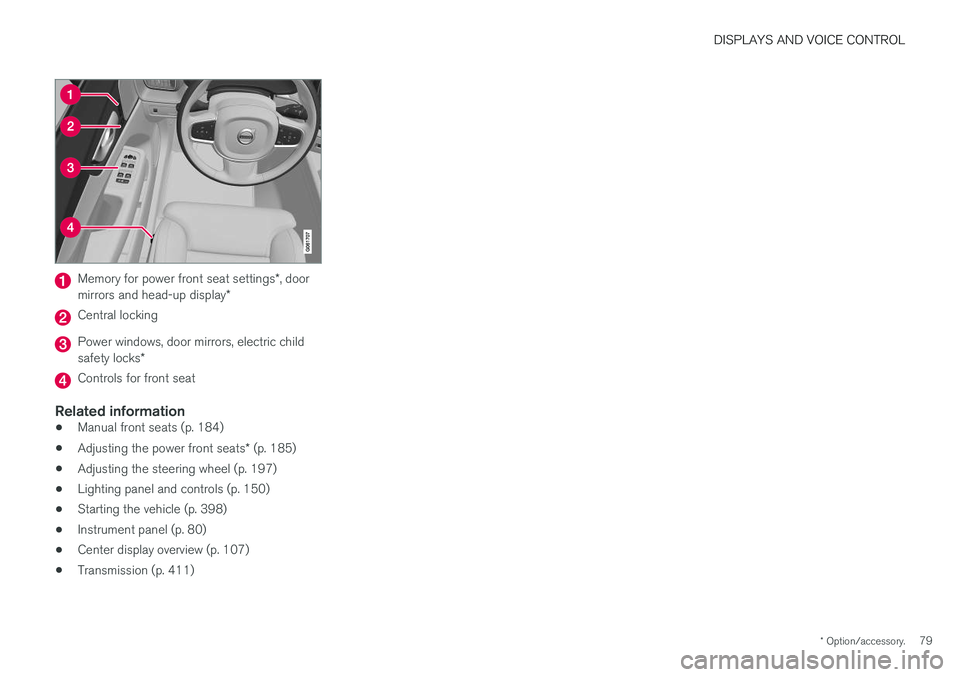
Memory for power front seat settings *, door
mirrors and head-up display *
Central locking
Power windows, door mirrors, electric child safety locks*
Controls for front seat
Related information
•Manual front seats (p. 184)
• Adjusting the power front seats
* (p. 185)
• Adjusting the steering wheel (p. 197)
• Lighting panel and controls (p. 150)
• Starting the vehicle (p. 398)
• Instrument panel (p. 80)
• Center display overview (p. 107)
• Transmission (p. 411)
Page 198 of 660
||
SEATS AND STEERING WHEEL
* Option/accessory.
196 Tap the
Headrest Fold button
to activate/deactivate folding.
Manually push the head restraint until it clicks into position.
WARNING
Do not lower the head restraint if there are passengers in any of the rear seats.
WARNING
The head restraint must be locked in the upright position after it has been folded up.
Manually folding down the rear seat's outboard head restraints
For models with electrically folding backrests *,
the outboard head restraints are folded manually using the control on the top of the seat (see illus- tration
). For vehicles without electrically fold-
ing backrests, fold down the outboard head restraints using the inner control on the top of the seat (see illustration
).
Related information
• Folding down the rear seat backrests (p. 192)
Steering wheel controls and horn The steering wheel has a horn and controls for e.g. driver support systems and voice control.
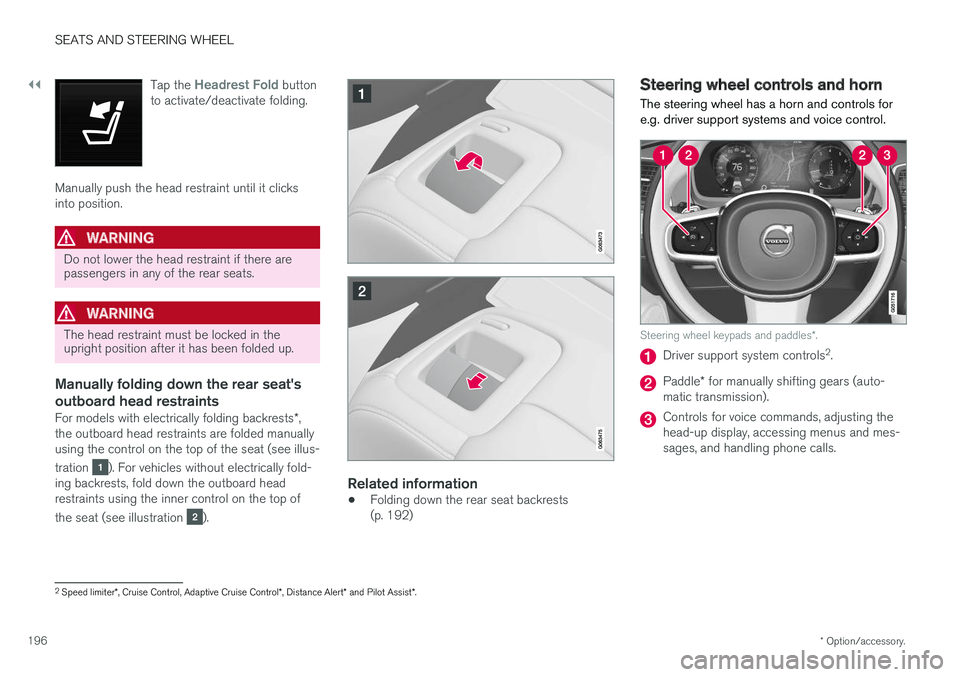
Steering wheel keypads and paddles
*.
Driver support system controls 2
.
Paddle * for manually shifting gears (auto-
matic transmission).
Controls for voice commands, adjusting the head-up display, accessing menus and mes-sages, and handling phone calls.
2 Speed limiter *, Cruise Control, Adaptive Cruise Control *, Distance Alert * and Pilot Assist *.
Page 294 of 660
DRIVER SUPPORT
* Option/accessory.
292
Managing Adaptive Cruise Controlspeed
Adaptive Cruise Control (ACC 45
) can be set to
various speeds.
Setting/changing set speed
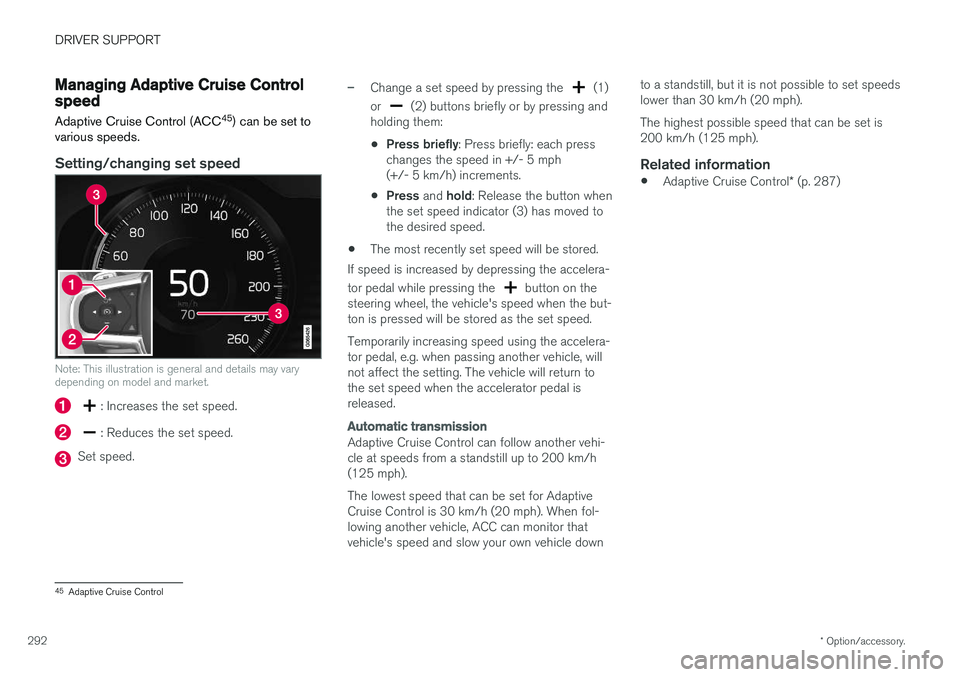
Note: This illustration is general and details may vary depending on model and market.
: Increases the set speed.
: Reduces the set speed.
Set speed.
–Change a set speed by pressing the (1)
or
(2) buttons briefly or by pressing and
holding them:
• Press briefly
: Press briefly: each press
changes the speed in +/- 5 mph (+/- 5 km/h) increments.
• Press
and hold: Release the button when
the set speed indicator (3) has moved tothe desired speed.
• The most recently set speed will be stored.
If speed is increased by depressing the accelera- tor pedal while pressing the
button on the
steering wheel, the vehicle's speed when the but- ton is pressed will be stored as the set speed. Temporarily increasing speed using the accelera- tor pedal, e.g. when passing another vehicle, willnot affect the setting. The vehicle will return tothe set speed when the accelerator pedal isreleased.
Automatic transmission
Adaptive Cruise Control can follow another vehi- cle at speeds from a standstill up to 200 km/h(125 mph). The lowest speed that can be set for Adaptive Cruise Control is 30 km/h (20 mph). When fol-lowing another vehicle, ACC can monitor thatvehicle's speed and slow your own vehicle down to a standstill, but it is not possible to set speedslower than 30 km/h (20 mph). The highest possible speed that can be set is 200 km/h (125 mph).
Related information
•
Adaptive Cruise Control
* (p. 287)
45
Adaptive Cruise Control
Page 311 of 660
DRIVER SUPPORT
}}
309
–Change a set speed by pressing the (1)
or
(2) buttons briefly or by pressing and
holding them:
• Press briefly
: Press briefly: each press
changes the speed in +/- 5 mph (+/- 5 km/h) increments.
• Press
and hold: Release the button when
the set speed indicator (3) has moved tothe desired speed.
• The most recently set speed will be stored.
If speed is increased by depressing the accelera- tor pedal while pressing the
button on the
steering wheel, the vehicle's speed when the but- ton is pressed will be stored as the set speed. Temporarily increasing speed using the accelera- tor pedal, e.g. when passing another vehicle, willnot affect the setting. The vehicle will return tothe set speed when the accelerator pedal isreleased.
Automatic transmission
Pilot Assist can follow another vehicle at speeds from a standstill up to 200 km/h (125 mph). The lowest speed that can be set for Pilot Assist is 30 km/h (20 mph). When following anothervehicle, ACC can monitor that vehicle's speedand slow your own vehicle down to a standstill,but it is not possible to set speeds lower than30 km/h (20 mph). The highest possible speed that can be set is200 km/h (125 mph).
Related information
•
Pilot Assist (p. 303)
Setting a time interval for PilotAssist
Pilot Assist can be set to different time intervals.
Different time intervals to the vehicle ahead can be selectedand are shown in the instru-ment panel as 1–5 horizontalbars. The more bars, the longerthe time interval. One bar rep-resents an interval of
approx. 1 second to the vehicle ahead. 5 barsrepresents approx. 3 seconds.
NOTE
When the symbol in the instrument panel shows a vehicle and a steering wheel, PilotAssist follows a vehicle ahead at a presettime interval. When only a steering wheel is shown, there is no vehicle ahead within a reasonable dis-tance.
Page 401 of 660
STARTING AND DRIVING
}}
399
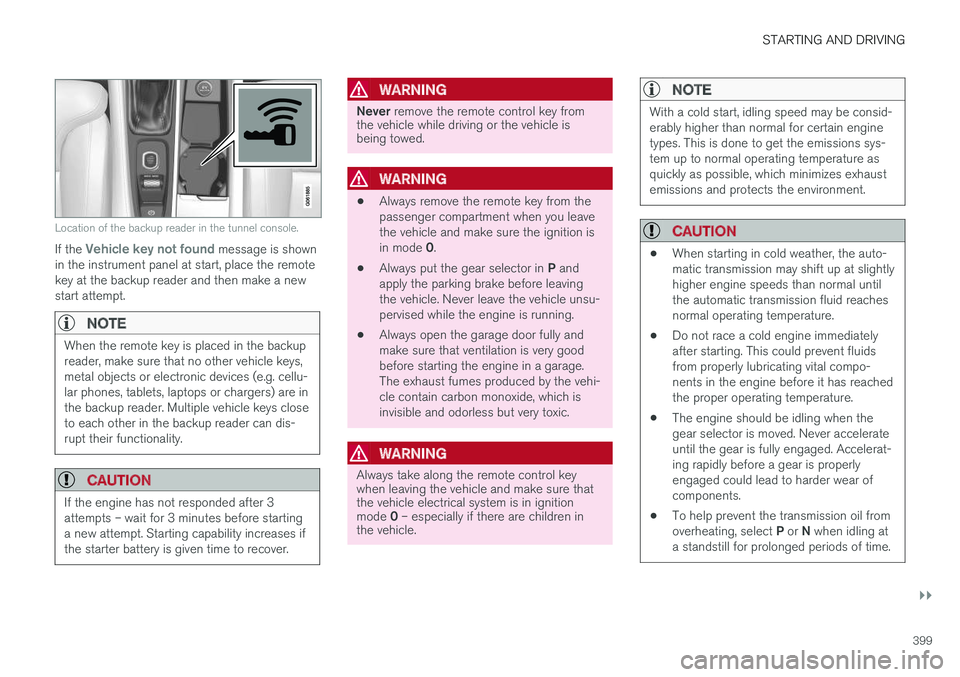
Location of the backup reader in the tunnel console.
If the Vehicle key not found message is shown
in the instrument panel at start, place the remote key at the backup reader and then make a newstart attempt.
NOTE
When the remote key is placed in the backup reader, make sure that no other vehicle keys,metal objects or electronic devices (e.g. cellu-lar phones, tablets, laptops or chargers) are inthe backup reader. Multiple vehicle keys closeto each other in the backup reader can dis-rupt their functionality.
CAUTION
If the engine has not responded after 3 attempts – wait for 3 minutes before startinga new attempt. Starting capability increases ifthe starter battery is given time to recover.
WARNING
Never remove the remote control key from
the vehicle while driving or the vehicle is being towed.
WARNING
• Always remove the remote key from the passenger compartment when you leavethe vehicle and make sure the ignition is in mode
0.
• Always put the gear selector in
P and
apply the parking brake before leaving the vehicle. Never leave the vehicle unsu-pervised while the engine is running.
• Always open the garage door fully andmake sure that ventilation is very goodbefore starting the engine in a garage.The exhaust fumes produced by the vehi-cle contain carbon monoxide, which isinvisible and odorless but very toxic.
WARNING
Always take along the remote control key when leaving the vehicle and make sure thatthe vehicle electrical system is in ignition mode
0 – especially if there are children in
the vehicle.
NOTE
With a cold start, idling speed may be consid- erably higher than normal for certain enginetypes. This is done to get the emissions sys-tem up to normal operating temperature asquickly as possible, which minimizes exhaustemissions and protects the environment.
CAUTION
• When starting in cold weather, the auto- matic transmission may shift up at slightlyhigher engine speeds than normal untilthe automatic transmission fluid reachesnormal operating temperature.
• Do not race a cold engine immediatelyafter starting. This could prevent fluidsfrom properly lubricating vital compo-nents in the engine before it has reachedthe proper operating temperature.
• The engine should be idling when thegear selector is moved. Never accelerateuntil the gear is fully engaged. Accelerat-ing rapidly before a gear is properlyengaged could lead to harder wear ofcomponents.
• To help prevent the transmission oil from overheating, select
P or N when idling at
a standstill for prolonged periods of time.
Page 404 of 660
STARTING AND DRIVING
* Option/accessory.
402
Selecting ignition mode
The vehicle's ignition can be put in various modes (levels) to make different functions availa-ble.
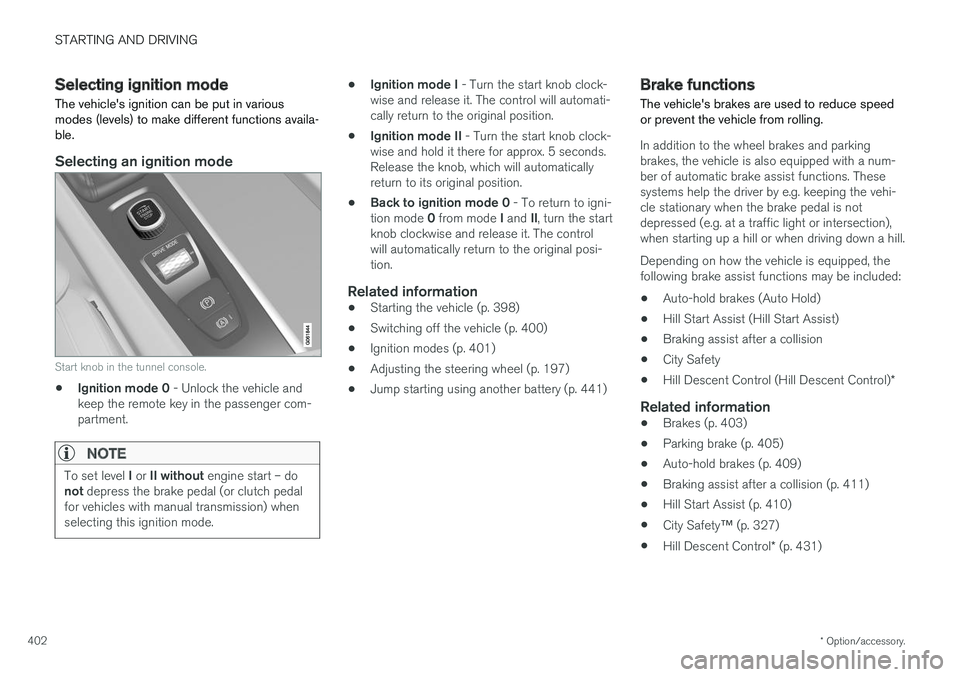
Selecting an ignition mode
Start knob in the tunnel console.
• Ignition mode 0
- Unlock the vehicle and
keep the remote key in the passenger com- partment.
NOTE
To set level I or II without engine start – do
not depress the brake pedal (or clutch pedal
for vehicles with manual transmission) when selecting this ignition mode.
• Ignition mode I
- Turn the start knob clock-
wise and release it. The control will automati- cally return to the original position.
• Ignition mode II
- Turn the start knob clock-
wise and hold it there for approx. 5 seconds.Release the knob, which will automaticallyreturn to its original position.
• Back to ignition mode 0
- To return to igni-
tion mode 0 from mode I and II, turn the start
knob clockwise and release it. The controlwill automatically return to the original posi-tion.
Related information
• Starting the vehicle (p. 398)
• Switching off the vehicle (p. 400)
• Ignition modes (p. 401)
• Adjusting the steering wheel (p. 197)
• Jump starting using another battery (p. 441)
Brake functions
The vehicle's brakes are used to reduce speed or prevent the vehicle from rolling.
In addition to the wheel brakes and parking brakes, the vehicle is also equipped with a num-ber of automatic brake assist functions. Thesesystems help the driver by e.g. keeping the vehi-cle stationary when the brake pedal is notdepressed (e.g. at a traffic light or intersection),when starting up a hill or when driving down a hill. Depending on how the vehicle is equipped, the following brake assist functions may be included:
• Auto-hold brakes (Auto Hold)
• Hill Start Assist (Hill Start Assist)
• Braking assist after a collision
• City Safety
• Hill Descent Control (Hill Descent Control)
*
Related information
•Brakes (p. 403)
• Parking brake (p. 405)
• Auto-hold brakes (p. 409)
• Braking assist after a collision (p. 411)
• Hill Start Assist (p. 410)
• City Safety
™ (p. 327)
• Hill Descent Control
* (p. 431)
Page 410 of 660
STARTING AND DRIVING
408
Parking on a hill
Always use the parking brake when parking on a hill.
WARNING
Always apply the parking brake when parking on an incline. Selecting a gear or putting the automatic transmission in P may not be suffi-
cient to keep the vehicle stationary in all sit- uations.
If the vehicle is pointing uphill: • Turn the front wheels so they are pointing away from
the curb.
If the vehicle is pointing downhill:
• Turn the front wheels so they are pointingtoward
the curb.
Heavy load uphill
Heavy loads, such as a trailer, could cause the vehicle to roll backward when the parking brakeis released automatically on steep uphill gradi-ents. To help avoid this, pull the control upwardwhile you are driving away. Release the controlwhen the vehicle gains traction.
Related information
•Activating and deactivating the parking brake(p. 406)
Parking brake malfunction
If you are unable to deactivate or activate the parking brake after several attempts, contact anauthorized Volvo workshop.
A audible warning signal will sound if the parking brake is applied while the vehicle is being driven. If the vehicle must be parked before the problem is rectified, turn the wheels as when parking on an incline and put the gear selector in P.
Low battery charge levelIf the battery charge level is too low, it will not be possible to apply or release the parking brake.Connect an auxiliary battery to the vehicle if thebattery is discharged.
Replacing brake padsDue to the design of the electric parking brake,the rear brake pads must be replaced by a work-shop. An authorized Volvo workshop is recom-mended.
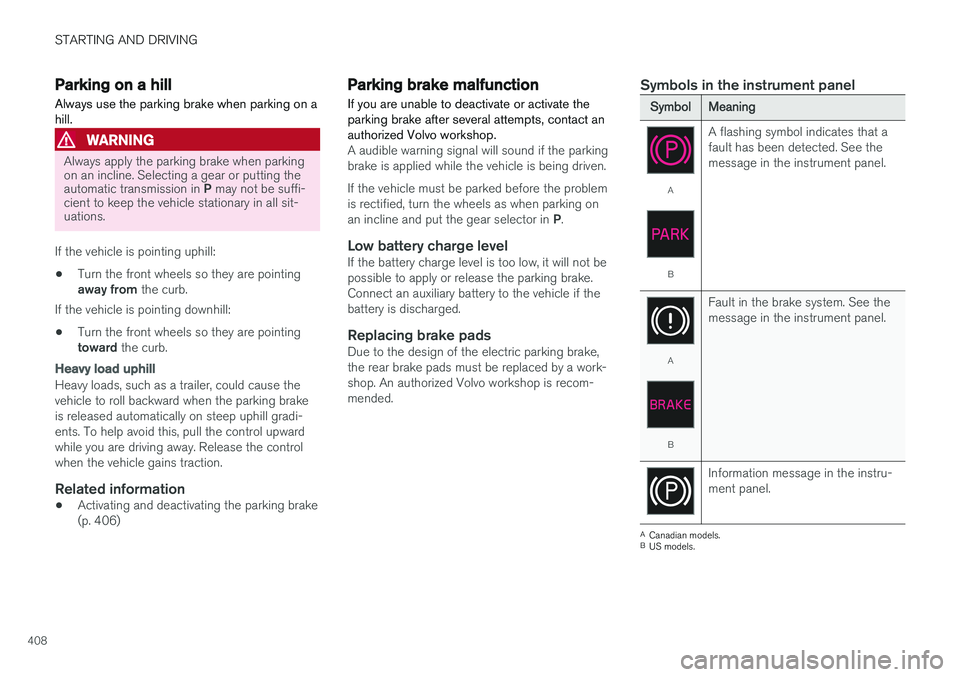
Symbols in the instrument panel
SymbolMeaning
A
B A flashing symbol indicates that a fault has been detected. See themessage in the instrument panel.
A
B
Fault in the brake system. See the message in the instrument panel.
Information message in the instru- ment panel.
A
Canadian models.
B US models.