lock VOLVO XC60 T8 2018 Owner´s Manual
[x] Cancel search | Manufacturer: VOLVO, Model Year: 2018, Model line: XC60 T8, Model: VOLVO XC60 T8 2018Pages: 674, PDF Size: 11.93 MB
Page 337 of 674
DRIVER SUPPORT
}}
335
City Safety limitations
City Safety functionality may be reduced in cer- tain situations.
Surroundings
Low objects
Hanging objects, such as flags for overhanging loads or accessories such as auxiliary lights orfront protective grids that extend beyond theheight of the hood, may limit City Safety function-ality.
Slippery road conditions
The extended braking distance on slippery roads may reduce City Safety's capacity to help avoid acollision. In these types of situations, the Anti-lock Braking System and Electronic Stability Con- trol (ESC 76
) will help provide optimal braking
power with maintained stability.
Backlighting
The visual warning signal in the windshield may be difficult to detect in bright sunlight, if there arereflections, or if the driver is wearing sunglassesor not looking straight ahead.
Heat
If the temperature in the passenger compartment is high due to e.g. bright sunlight, the visual warn-ing signal in the windshield may be temporarilydisabled.
Camera and radar sensor's field of vision
The camera's field of vision is limited and in cer- tain situations, it may be unable to detect pedes-trians, large animals, cyclists or vehicles, or it maydetect them later than expected. Vehicles that are dirty may be detected later than clean vehicles, and in dark conditions, motorcy-cles may be detected late or not at all. If a text message displayed in the instrument panel indicates that the camera/radar sensor isobstructed, it may be difficult for City Safety todetect pedestrians, large animals, cyclists, vehi-cles or lane markings in front of the vehicle. CitySafety functionality may therefore be reduced. Text messages may not be displayed for all situa- tions in which the windshield sensors areblocked. The driver must therefore always keepthe windshield in front of the camera/radar sen-sor clean.
CAUTION
Maintenance and replacement of City Safety components may only be performed by aworkshop – an authorized Volvo workshop isrecommended.
Driver intervention
Backing up
City Safety is temporarily deactivated when the vehicle is backing up.
Low speed
City Safety is not activated at very low speeds under 4 km/h (3 mph). The system will thereforenot intervene in situations in which your vehicle isapproaching another vehicle very slowly, such aswhen parking.
Active driver
Action by the driver always has priority. City Safety will therefore not react or will react at alater stage with a warning or intervention in situa-tions in which the driver is clearly steering andoperating the accelerator pedal, even if a collisionis unavoidable. An active and aware driving style may therefore delay collision warnings and intervention in order to minimize unnecessary warnings.
76 Electronic Stability Control
Page 347 of 674
DRIVER SUPPORT
}}
* Option/accessory.345
Activating/deactivating Cross TrafficAlert
The driver can choose to deactivate the CTA 89
function as follows:
Press the Cross Traffic Alertbutton in the center display's Function view.
• GRAY button indicator light - CTA is deacti- vated.
• GREEN button indicator light - CTA is acti-vated.
CTA is automatically activated each time theengine is started.
Related information
• Cross Traffic Alert
* (p. 344)
Cross Traffic Alert limitations
CTA 90
functionality may be reduced in certain
situations.
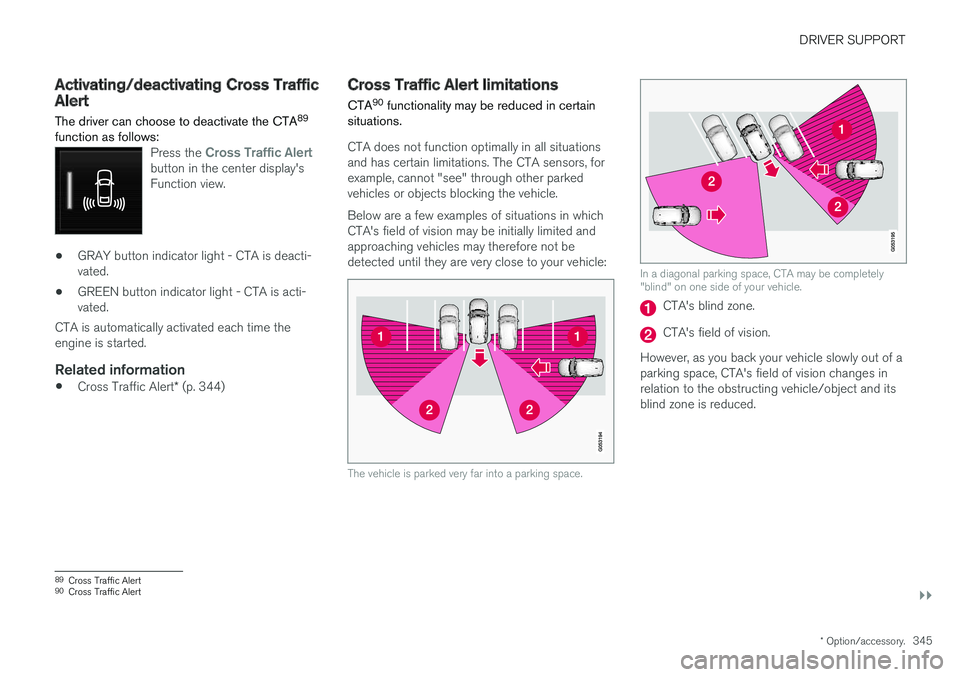
CTA does not function optimally in all situations and has certain limitations. The CTA sensors, forexample, cannot "see" through other parkedvehicles or objects blocking the vehicle. Below are a few examples of situations in which CTA's field of vision may be initially limited andapproaching vehicles may therefore not bedetected until they are very close to your vehicle:
The vehicle is parked very far into a parking space.
In a diagonal parking space, CTA may be completely "blind" on one side of your vehicle.
CTA's blind zone.
CTA's field of vision.
However, as you back your vehicle slowly out of a parking space, CTA's field of vision changes inrelation to the obstructing vehicle/object and itsblind zone is reduced.
89 Cross Traffic Alert
90 Cross Traffic Alert
Page 362 of 674
DRIVER SUPPORT
360
Lane Keeping Aid symbols andmessages
A number of symbols and messages related to Lane Keeping Aid LKA 112
may be displayed in
the instrument panel.
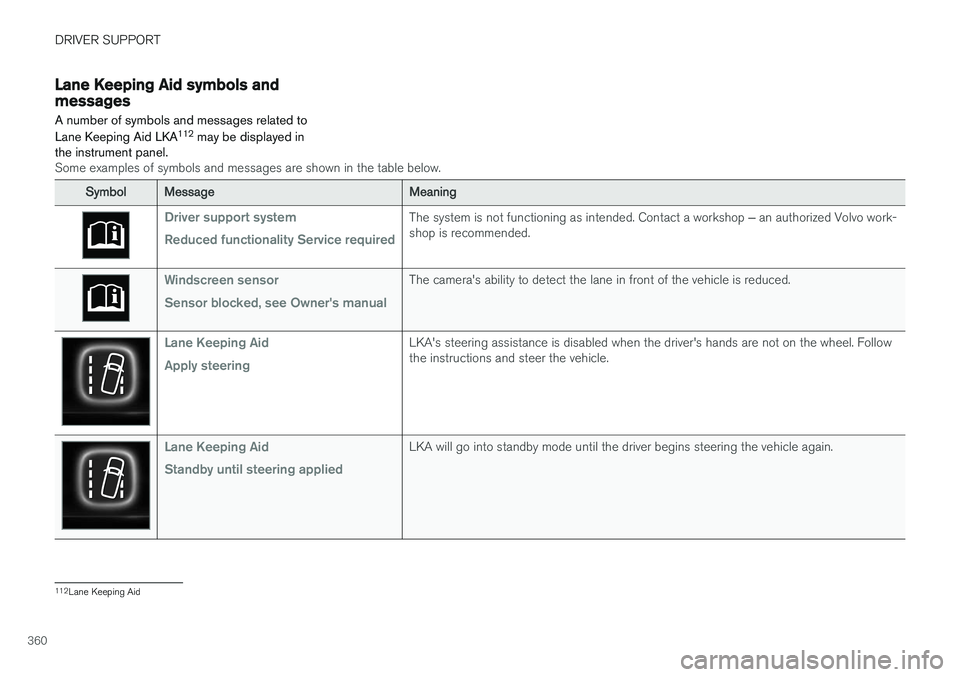
Some examples of symbols and messages are shown in the table below.
SymbolMessageMeaning
Driver support system Reduced functionality Service requiredThe system is not functioning as intended. Contact a workshop ‒ an authorized Volvo work-
shop is recommended.
Windscreen sensor Sensor blocked, see Owner's manualThe camera's ability to detect the lane in front of the vehicle is reduced.
Lane Keeping Aid Apply steeringLKA's steering assistance is disabled when the driver's hands are not on the wheel. Follow the instructions and steer the vehicle.
Lane Keeping Aid Standby until steering appliedLKA will go into standby mode until the driver begins steering the vehicle again.
112 Lane Keeping Aid
Page 373 of 674
DRIVER SUPPORT
371
Symbols and messages for steeringassistance during collision risks A number of symbols and messages related to the function may be displayed in the instrumentpanel.
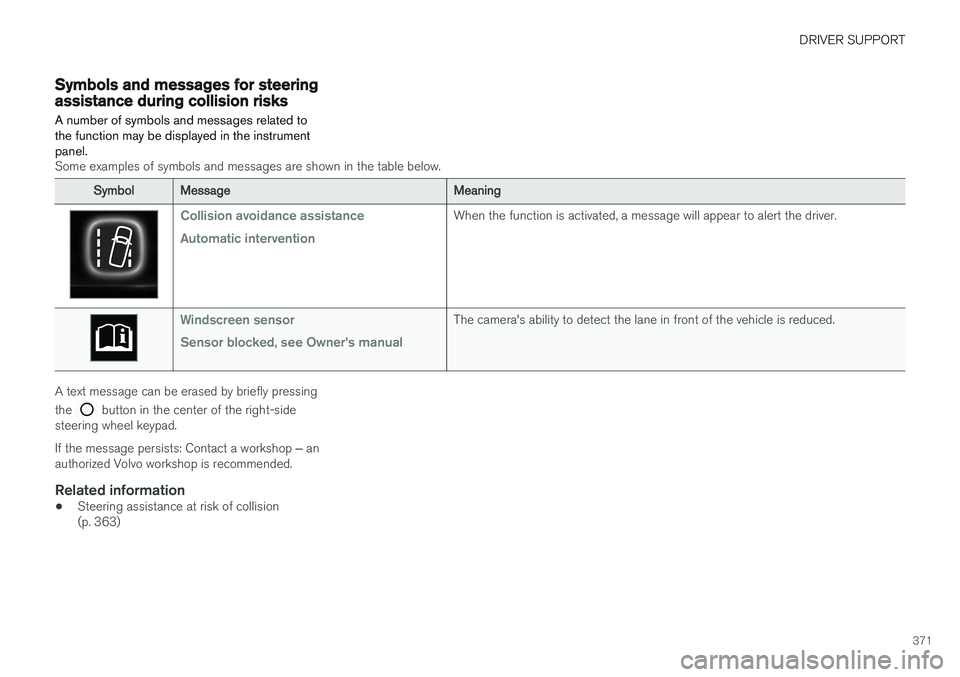
Some examples of symbols and messages are shown in the table below.
SymbolMessageMeaning
Collision avoidance assistance Automatic interventionWhen the function is activated, a message will appear to alert the driver.
Windscreen sensor Sensor blocked, see Owner's manualThe camera's ability to detect the lane in front of the vehicle is reduced.
A text message can be erased by briefly pressing the
button in the center of the right-side
steering wheel keypad. If the message persists: Contact a workshop ‒ an
authorized Volvo workshop is recommended.
Related information
• Steering assistance at risk of collision (p. 363)
Page 378 of 674
DRIVER SUPPORT
* Option/accessory.
376
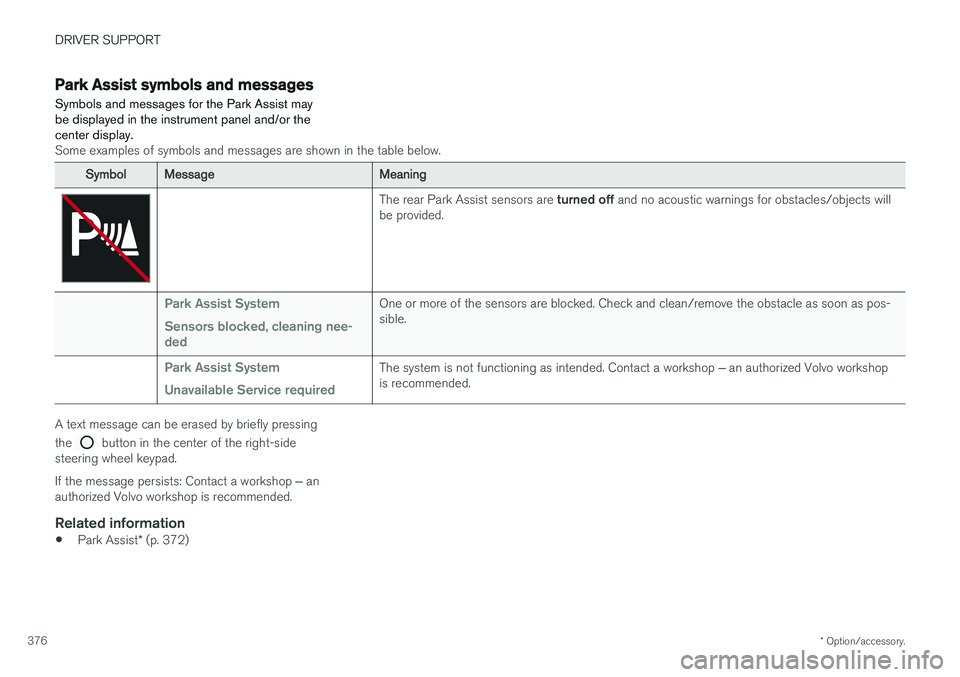
Park Assist symbols and messages
Symbols and messages for the Park Assist may be displayed in the instrument panel and/or thecenter display.
Some examples of symbols and messages are shown in the table below.
SymbolMessageMeaning
The rear Park Assist sensors are turned off and no acoustic warnings for obstacles/objects will
be provided.
Park Assist System Sensors blocked, cleaning nee- dedOne or more of the sensors are blocked. Check and clean/remove the obstacle as soon as pos- sible.
Park Assist System Unavailable Service requiredThe system is not functioning as intended. Contact a workshop ‒ an authorized Volvo workshop
is recommended.
A text message can be erased by briefly pressing the
button in the center of the right-side
steering wheel keypad. If the message persists: Contact a workshop ‒ an
authorized Volvo workshop is recommended.
Related information
• Park Assist
* (p. 372)
Page 387 of 674
DRIVER SUPPORT
* Option/accessory.385
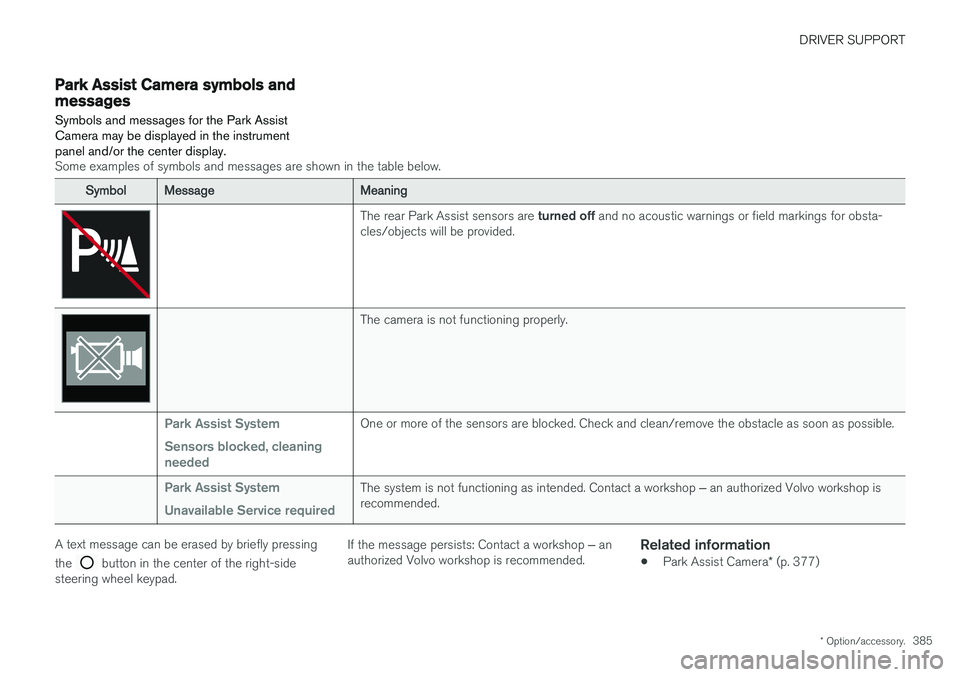
Park Assist Camera symbols andmessages
Symbols and messages for the Park Assist Camera may be displayed in the instrumentpanel and/or the center display.
Some examples of symbols and messages are shown in the table below.
SymbolMessageMeaning
The rear Park Assist sensors are turned off and no acoustic warnings or field markings for obsta-
cles/objects will be provided.
The camera is not functioning properly.
Park Assist System Sensors blocked, cleaning neededOne or more of the sensors are blocked. Check and clean/remove the obstacle as soon as possible.
Park Assist System Unavailable Service requiredThe system is not functioning as intended. Contact a workshop ‒ an authorized Volvo workshop is
recommended.
A text message can be erased by briefly pressing the
button in the center of the right-side
steering wheel keypad. If the message persists: Contact a workshop
‒ an
authorized Volvo workshop is recommended.
Related information
• Park Assist Camera
* (p. 377)
Page 393 of 674
DRIVER SUPPORT
}}
* Option/accessory.391
Park Assist Pilot * limitations
Park Assist Pilot PAP 126
may not be able to
detect all conditions in all situations and func- tionality may therefore be limited.WARNING
• The PAP function is supplementary driver support intended to facilitate driving andhelp make it safer – it cannot handle allsituations in all traffic, weather and roadconditions.
• Pay particular attention to people andanimals near the vehicle.
• Bear in mind that the front end of thevehicle may swing out towards oncomingtraffic during the parking maneuver.
• Objects situated higher than the detec-tion area of the sensors are not includedwhen the parking maneuver is calculated,which could cause PAP to swing into theparking space too early. Such parkingspaces should be avoided for this reason.
• PAP is not a substitute for the driver'sattention and judgment. The driver isalways responsible for ensuring the vehi-cle is driven in a safe manner, at theappropriate speed, with an appropriatedistance to other vehicles, and in accord-ance with current traffic rules and regula-tions.
The driver should be aware of the following limi-tations for Park Assist Pilot:
The parking sequence is cancelledA parking sequence will be cancelled if:
• the driver moves the steering wheel
• the vehicle's speed exceeds 7 km/h (4 mph)
• the driver taps
Cancel in the center display
• when the anti-lock brakes or the Electronic stability control are engaged - e.g. when awheel loses grip on a slippery road
• when the power steering works at reduced power - e.g. during cooling due to overheat- ing (see section "Speed-dependent steeringforce").
A message in the center display will explain whythe parking sequence was cancelled.
CAUTION
Under certain circumstances, PAP may not be able to find parking spaces – one reason maybe that the sensors are disrupted by externalsound sources that emit the same ultrasonicfrequencies that the system works with. Examples of such sources include horns, wet tires on asphalt, pneumatic brakes, exhaustnoise from motorcycles, etc.
126 Park Assist Pilot
Page 396 of 674
DRIVER SUPPORT
* Option/accessory.
394
Park Assist Pilot * messages
Messages for Park Assist Pilot PAP 130
may be
displayed in the instrument panel and/or the center display.
Some examples of symbols and messages are shown in the table below.
MessageMeaning
Park Assist System Sensors blocked, cleaning neededOne or more of the sensors are blocked. Check and clean/remove the obstacle as soon as possible.
Park Assist System Unavailable Service requiredThe system is not functioning as intended. Contact a workshop ‒ an authorized Volvo workshop is recommended.
A text message can be erased by briefly pressing the
button in the center of the right-side
steering wheel keypad. If the message persists: Contact a workshop ‒ an
authorized Volvo workshop is recommended.
Related information
• Park Assist Pilot
* (p. 386)
130
Park Assist Pilot
Page 403 of 674
HYBRID INFORMATION
}}
401
WARNING
•The charging cable's residual current breaker helps protect the vehicle's charg-ing system but cannot ensure that an cur-rent overload will never occur.
• Never use visibly worn or damaged elec-trical sockets. Doing so could lead to firesor serious injury.
• Never connect the charging cable to anextension cord.
• Maintenance or replacement of the hybridbattery may only be performed by atrained and qualified Volvo service techni-cian.
Related information
• Charge cable (p. 399)
• Charging status in the charging cable'scharging module (p. 405)
Charging cable temperaturemonitoring
To help ensure the vehicle's hybrid battery is reli- ably charged each time it is connected, chargingis stopped if the temperature in the chargingcable becomes too high and reaches a criticallimit.
CAUTION
If charging is often inadvertently interrupted, have the charging cable and the vehicle'scharging system inspected by a trained andqualified Volvo service technician.
Related information
• Charge cable (p. 399)
Opening and closing the chargingsocket cover
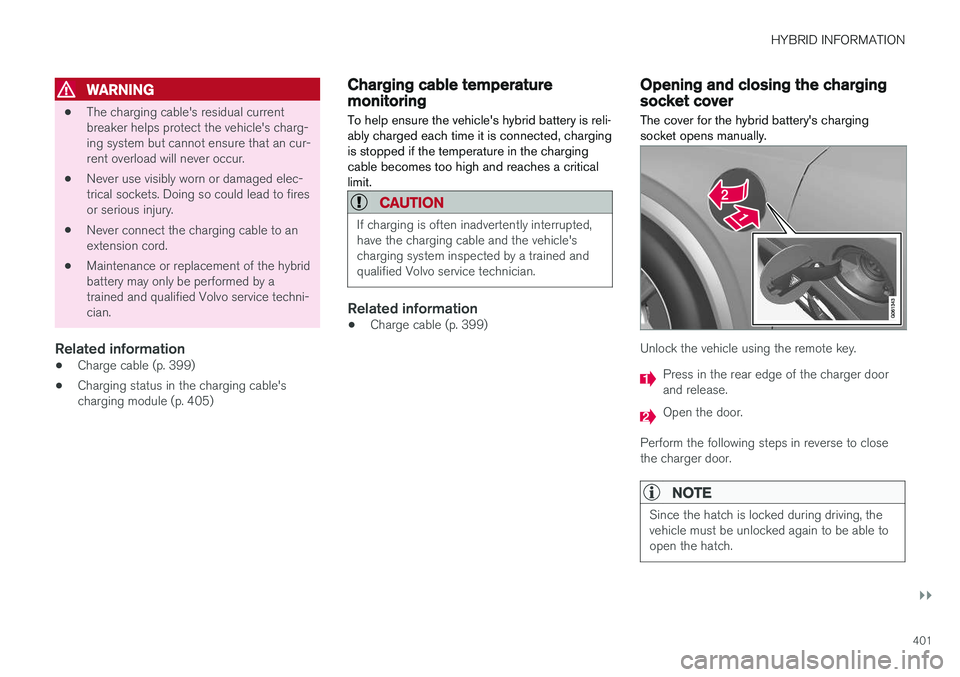
The cover for the hybrid battery's charging socket opens manually.
Unlock the vehicle using the remote key.
Press in the rear edge of the charger door and release.
Open the door.
Perform the following steps in reverse to close the charger door.
NOTE
Since the hatch is locked during driving, the vehicle must be unlocked again to be able toopen the hatch.
Page 405 of 674
HYBRID INFORMATION
}}
403
•Disconnect the charger from the wall out- let before cleaning it.
• Never connect the charging cable to anextension cord or a multiple plug socket.
Also, refer to the manufacturer's instructions for using the charging cable and its compo-nents.
CAUTION
Make sure that the 120/240 V outlet (AC, alternating current) has a power capacity suf-ficient for charging electric vehicles. If you areuncertain of the capacity, have the outletchecked by a licensed electrician.
Take out the charging cable from the storage compartment under the cargo area. Note that the ignition must be switched off completely beforecharging.
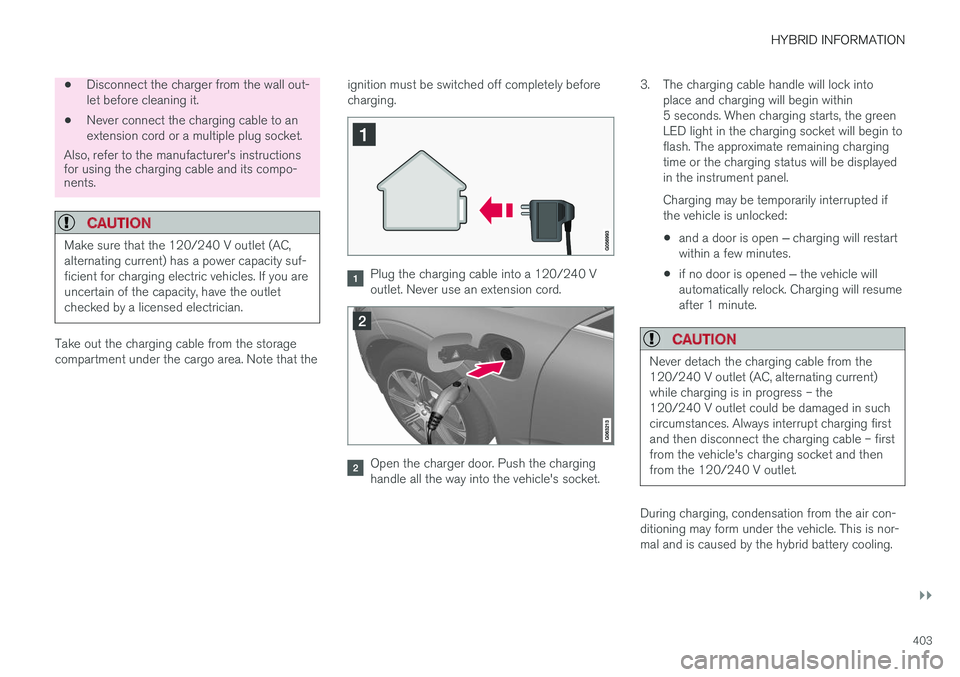
Plug the charging cable into a 120/240 V outlet. Never use an extension cord.
Open the charger door. Push the charging handle all the way into the vehicle's socket.3. The charging cable handle will lock into
place and charging will begin within5 seconds. When charging starts, the greenLED light in the charging socket will begin toflash. The approximate remaining chargingtime or the charging status will be displayedin the instrument panel. Charging may be temporarily interrupted if the vehicle is unlocked:
• and a door is open
‒ charging will restart
within a few minutes.
• if no door is opened
‒ the vehicle will
automatically relock. Charging will resumeafter 1 minute.
CAUTION
Never detach the charging cable from the 120/240 V outlet (AC, alternating current)while charging is in progress – the120/240 V outlet could be damaged in suchcircumstances. Always interrupt charging firstand then disconnect the charging cable – firstfrom the vehicle's charging socket and thenfrom the 120/240 V outlet.
During charging, condensation from the air con- ditioning may form under the vehicle. This is nor-mal and is caused by the hybrid battery cooling.