check engine light VOLVO XC60 T8 2018 Owner´s Manual
[x] Cancel search | Manufacturer: VOLVO, Model Year: 2018, Model line: XC60 T8, Model: VOLVO XC60 T8 2018Pages: 674, PDF Size: 11.93 MB
Page 467 of 674
STARTING AND DRIVING
* Option/accessory.465
Checking trailer lights
When connecting a trailer, make sure that all of the lights on the trailer are functioning beforestarting to drive.
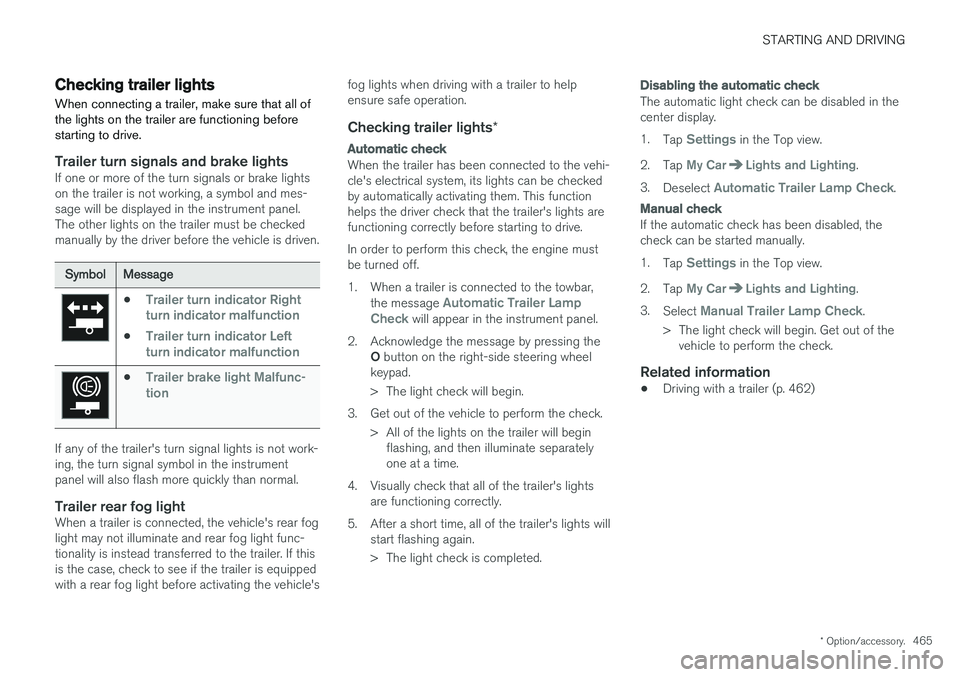
Trailer turn signals and brake lightsIf one or more of the turn signals or brake lights on the trailer is not working, a symbol and mes-sage will be displayed in the instrument panel.The other lights on the trailer must be checkedmanually by the driver before the vehicle is driven.
SymbolMessage
•Trailer turn indicator Right
turn indicator malfunction
•Trailer turn indicator Left
turn indicator malfunction
•Trailer brake light Malfunc-
tion
If any of the trailer's turn signal lights is not work- ing, the turn signal symbol in the instrumentpanel will also flash more quickly than normal.
Trailer rear fog lightWhen a trailer is connected, the vehicle's rear foglight may not illuminate and rear fog light func-tionality is instead transferred to the trailer. If thisis the case, check to see if the trailer is equippedwith a rear fog light before activating the vehicle's fog lights when driving with a trailer to helpensure safe operation.
Checking trailer lights
*
Automatic check
When the trailer has been connected to the vehi- cle's electrical system, its lights can be checkedby automatically activating them. This functionhelps the driver check that the trailer's lights arefunctioning correctly before starting to drive. In order to perform this check, the engine must be turned off.
1. When a trailer is connected to the towbar,
the message
Automatic Trailer Lamp
Check will appear in the instrument panel.
2. Acknowledge the message by pressing the O button on the right-side steering wheel
keypad.
> The light check will begin.
3. Get out of the vehicle to perform the check. > All of the lights on the trailer will beginflashing, and then illuminate separately one at a time.
4. Visually check that all of the trailer's lights are functioning correctly.
5. After a short time, all of the trailer's lights will start flashing again.
> The light check is completed.
Disabling the automatic check
The automatic light check can be disabled in the center display. 1.Tap
Settings in the Top view.
2. Tap
My CarLights and Lighting.
3. Deselect
Automatic Trailer Lamp Check.
Manual check
If the automatic check has been disabled, the check can be started manually. 1.Tap
Settings in the Top view.
2. Tap
My CarLights and Lighting.
3. Select
Manual Trailer Lamp Check.
> The light check will begin. Get out of the vehicle to perform the check.
Related information
• Driving with a trailer (p. 462)
Page 554 of 674
||
WHEELS AND TIRES
* Option/accessory.
552
NOTE
Always remember to calibrate the Tire Pres- sure Monitoring System when the wheelshave been changed or the tire inflation pres-sure has been corrected according to the tirepressure decal or tire inflation pressure table. If correct reference values have not been set, the system cannot issue low tire pressurealerts correctly. The vehicle must be stationary with the engine running to access the calibration but-ton and to start the calibration process.
WARNING
The exhaust gases contain carbon monoxide, which is invisible and odorless but very poi-sonous. For this reason, always perform thecalibration procedure outdoors or in a work-shop with exhaust gas evacuation equipment.
Related information
• Recommended tire pressure (p. 549)
• Adjusting tire pressure (p. 548)
• Viewing tire pressure status in the center display
* (p. 552)
• Action when warned of low tire pressure (p. 553)
• Tire pressure monitoring system
* (p. 549)
Viewing tire pressure status in the
center display *
With the system for tire pressure monitoring, Tyre Pressure Monitoring System (TPMS), tirepressure status can be viewed in the center dis-play.
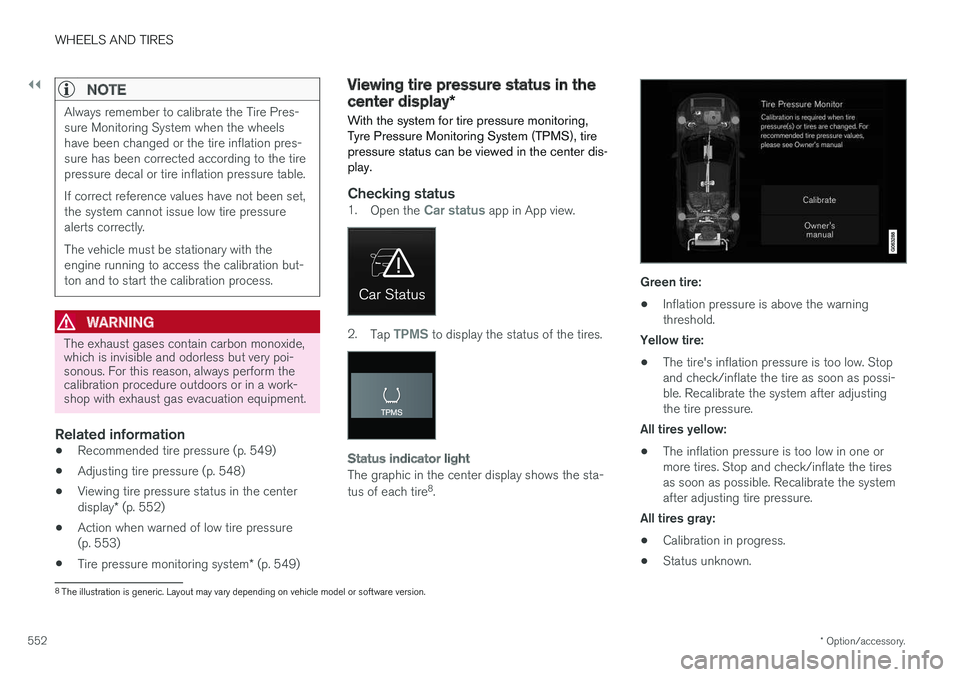
Checking status1. Open the Car status app in App view.
2.Tap TPMS to display the status of the tires.
Status indicator light
The graphic in the center display shows the sta- tus of each tire 8
.
Green tire:
• Inflation pressure is above the warning threshold.
Yellow tire:
• The tire's inflation pressure is too low. Stopand check/inflate the tire as soon as possi-ble. Recalibrate the system after adjustingthe tire pressure.
All tires yellow:
• The inflation pressure is too low in one ormore tires. Stop and check/inflate the tiresas soon as possible. Recalibrate the systemafter adjusting tire pressure.
All tires gray: • Calibration in progress.
• Status unknown.
8
The illustration is generic. Layout may vary depending on vehicle model or software version.
Page 591 of 674
MAINTENANCE AND SERVICE
}}
589
Periodic maintenance helps minimize
emissions
NOTE
•Refer to your Service and Warranty Book- let for a comprehensive service and main-tenance schedule up to 240,000 km(150,000 miles). This program containsinspections and services necessary forthe proper function of your vehicle andincludes components that affect vehicleemissions.
• The Warranty and Service Records Infor-mation booklet also contains detailedinformation concerning the warrantiesthat apply to your vehicle.
On-board Diagnostic SystemOBD II is part of your vehicle's computerized engine management system. It stores diagnosticinformation about your vehicle's emission con-trols. It can light the Check Engine light (MIL) if itdetects an emission control "fault." A "fault" is acomponent or system that is not performingwithin an expected range. A fault may be perma-nent or temporary. OBD II will store a messageabout any fault.
Emission inspection readiness
How do states use OBD II for emission
inspections?
Many states connect a computer directly to a vehicle's OBD II system. The inspector can thenread "faults." In some states, this type of inspec-tion has replaced the tailpipe emission test.
How can my vehicle fail OBD II emission
inspection?
Your vehicle can fail OBD II emission inspection for any of the following reasons:
• If your Check Engine (MIL) light is lit, yourvehicle may fail inspection.
• If your vehicle's Check Engine light was lit,but went out without any action on your part,OBD II will still have a recorded fault. Yourvehicle may pass or fail, depending on theinspection practices in your area.
• If you had recent service that required dis-connecting the battery, OBD II diagnosticinformation may be incomplete and "notready" for inspection. A vehicle that is notready may fail inspection.
How can I prepare for my next OBD II
emission inspection?
• If your Check Engine (MIL) light is lit - or was lit but went out without service, have your vehicle diagnosed and, if necessary, servicedby a qualified Volvo technician.
• If you recently had service for a lit CheckEngine light, or if you had service thatrequired disconnecting the battery, a periodof driving is necessary to bring the OBD IIsystem to "ready" for inspection. Two half-hour trips of mixed stop-and-go/highwaydriving are typically needed to allow OBD II toreach readiness. Your Volvo retailer can pro-vide you with more information on planning atrip.
• Maintain your vehicle in accordance with yourvehicle's maintenance schedule.
Owner maintenancePeriodic maintenance requirements and intervalsare described in your vehicle's Warranty andService Records Information booklet. The following points can be carried out between the normally scheduled maintenance services.
Each time the car is refueled:
•Check the engine oil level.
• Clean the windshield, windshield wipers, headlights, and taillights.
Page 661 of 674
INDEX
659
Charge level
vehicle function 449
Charging hybrid battery 397 opening and closing the charging
door 401
start charging 402
Status 404, 405, 406
stop charging 408
Charging cable 399
Charging current 398
Checking engine oil level 601
Child restraints 63, 65 booster cushions 71
convertible seats 69
infant seats 67
ISOFIX/LATCH anchors 74
lower attachment points 73
recalls and registration 65
top tether anchors 72
Child safety 63
Child safety locks 249
Circuit breaker 400
City Safety 325, 326, 328, 329, 335, 337
City Safety during evasive maneuver 333
City Safety in crossing traffic 331, 332
City Safety when evasive maneuver preven- ted 334
Cleaning 625, 627, 628 automatic car wash 631
car wash 628, 629, 631, 632, 633, 634
center display 623
Seat belts 625
textile upholstery 623, 625, 626
upholstery 623, 625, 626, 627, 628
wheels 634
Cleaning wheels 634
Cleaning wiper blades 632
Clean Zone 199
Clean Zone Interior Package 200
Climate 196 auto-regulation 212
blower control 218
parking 220
perceived temperature 197
Sensors 196
temperature control 218, 219
voice control 197
zones 196
Climate controls 208 center display 208
rear seat 208Climate system 196, 208
Refrigerant 654
repairs 598
Clock, setting 89
Collision 42, 47, 52, 61Collision warner detection of pedestrians 329
radar sensor 316
Collision warning 325, 338
Color code, paintwork 636
Color codes 636
Compass 471, 472 calibration 472
Condensation in headlights 629, 631, 632, 633
Connecting vehicle to Internet No connection or poor connection 524
via a mobile device (WiFi) 521
via mobile device (Bluetooth) 521
via vehicle's modem 522
Connect phone 511
Contact information 26
Convertible seats 69
coolant 653
Coolant, filling 602
Page 664 of 674
INDEX
662Gear indicator 432 Gear selector positions
automatic transmission 429
Glass laminated/reinforced 162
Glove compartment 575 Gracenote ® 501
Grocery bag holders 579
Gross vehicle weight 649
GSI - Gear shift indicator 432
Guide lines for Park Assist Camera 379
H
Handbrake 422, 423
Hand wash 629 Hard disk space 528
Hazard warning flashers 157
HDC 444
HD radio 484
Head restraint 191
Head-up display 138 activate and deactivate 140
cleaning 624
replacing windshield 598
settings 140
Heated washer nozzles 173 Heating Seats 209, 210
steering wheel 211, 212
windows 215, 217
Height adjustment 440, 443
high beams 152, 153
High engine temperature 458
Hill Descent Control 444, 445 activate with function button 445
Hill Start Assist 427 Hill Start Assist (HSA) 427
Hoisting the vehicle 595 HomeLink ® 468
programming 469
use 470
HomeLink ® remote control
programmable 468
Home safe lighting 157
Honk 192
Hood, opening 597
Horn 192
Hybrid battery 609 Charging 397Hybrid battery gauge 84
Hybrid gauge 83
I
IAQS (Interior Air Quality System) 200
IC (Inflatable Curtain) 60
ID, Volvo 26
Identification number 38
Ignition mode 417, 418
Immobilizer 242Electronic immobilizer 242
Indicator symbols 90
Individual drive mode 435
Infant seats 67
Inflatable curtain 60
Inflatable Curtain 60
Inflating tires 567 Inflation pressure adjusting 548
Checking 547
recommended 549
Inflation pressure monitoring 549 action 553
Status 552