clock VOLVO XC60 T8 2018 Owner´s Manual
[x] Cancel search | Manufacturer: VOLVO, Model Year: 2018, Model line: XC60 T8, Model: VOLVO XC60 T8 2018Pages: 674, PDF Size: 11.93 MB
Page 243 of 674
KEY, LOCKS AND ALARM
}}
241
Locking and unlocking withdetachable key blade
The detachable key blade can be used to unlock the vehicle from the outside, e.g. if the battery inthe remote key is discharged.
Unlocking
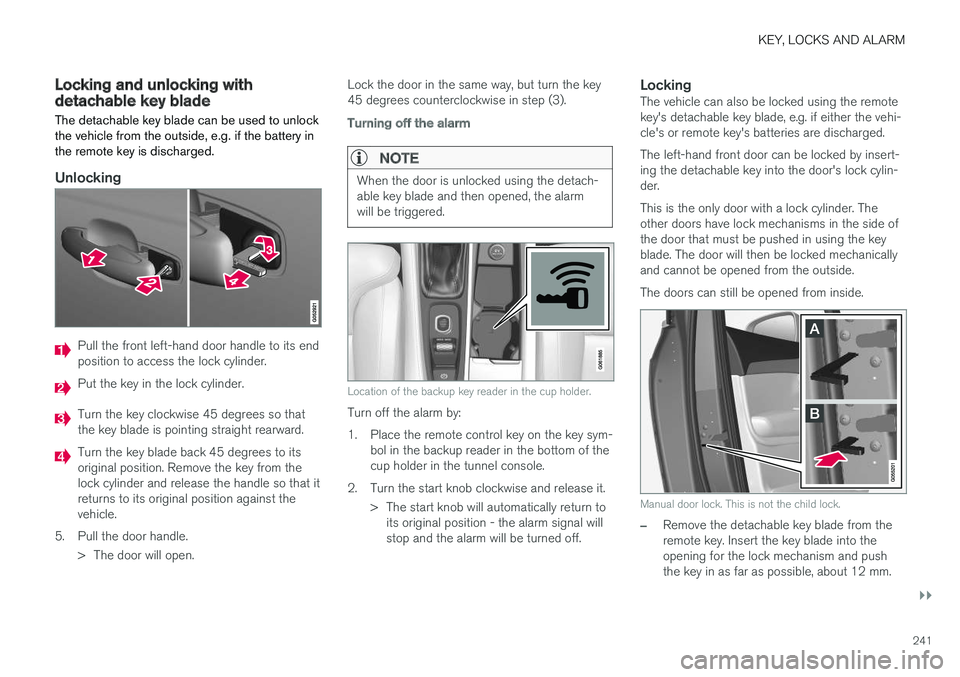
Pull the front left-hand door handle to its end position to access the lock cylinder.
Put the key in the lock cylinder.
Turn the key clockwise 45 degrees so that the key blade is pointing straight rearward.
Turn the key blade back 45 degrees to its original position. Remove the key from thelock cylinder and release the handle so that itreturns to its original position against thevehicle.
5. Pull the door handle. > The door will open. Lock the door in the same way, but turn the key45 degrees counterclockwise in step (3).
Turning off the alarm
NOTE
When the door is unlocked using the detach- able key blade and then opened, the alarmwill be triggered.
Location of the backup key reader in the cup holder.
Turn off the alarm by:
1. Place the remote control key on the key sym-
bol in the backup reader in the bottom of the cup holder in the tunnel console.
2. Turn the start knob clockwise and release it. > The start knob will automatically return toits original position - the alarm signal willstop and the alarm will be turned off.
LockingThe vehicle can also be locked using the remotekey's detachable key blade, e.g. if either the vehi-cle's or remote key's batteries are discharged. The left-hand front door can be locked by insert- ing the detachable key into the door's lock cylin-der. This is the only door with a lock cylinder. The other doors have lock mechanisms in the side ofthe door that must be pushed in using the keyblade. The door will then be locked mechanicallyand cannot be opened from the outside. The doors can still be opened from inside.
Manual door lock. This is not the child lock.
–Remove the detachable key blade from the remote key. Insert the key blade into theopening for the lock mechanism and pushthe key in as far as possible, about 12 mm.
Page 260 of 674
||
KEY, LOCKS AND ALARM
258
Related information
•Private Locking (p. 256)
Alarm
The alarm emits sound and light signals if any- one without a valid remote key attempts to breakinto the vehicle or interferes with the start batteryor alarm siren.
When armed, the alarm will be triggered if:
• the hood, tailgate or any door is opened.
• a battery cable is disconnected
• the alarm siren is disconnected.
Alarm signalsThe following occurs if the alarm is triggered:
• A siren will sound for 30 seconds or until the alarm is turned off.
• All turn signals will flash for 5 minutes oruntil the alarm is turned off.
If the reason the alarm was triggered is not recti- fied, the alarm cycle will repeat up to 10 times 20
.
Alarm indicator
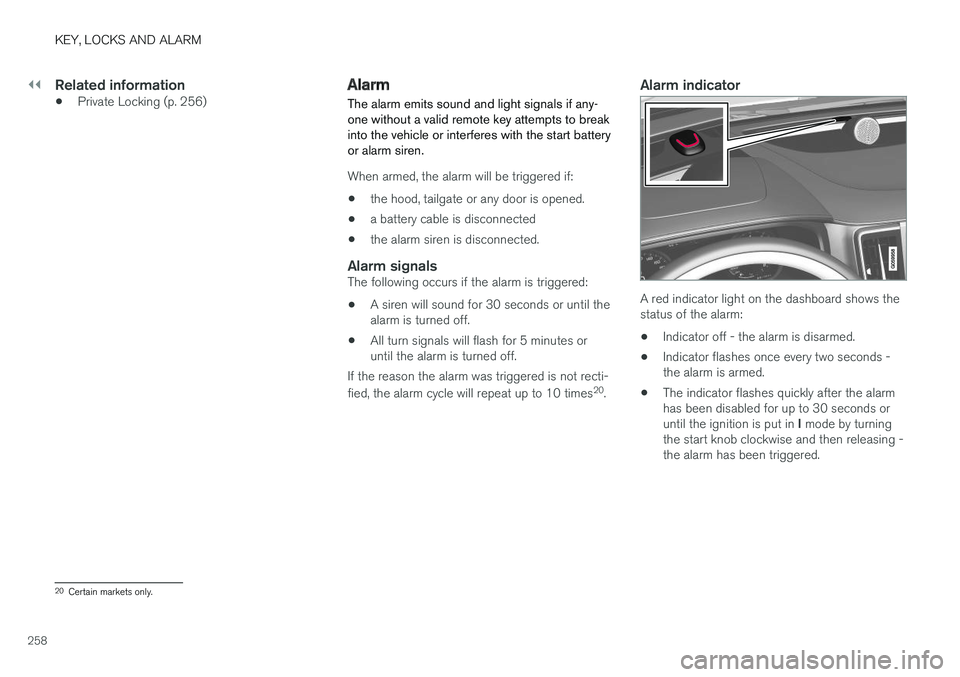
A red indicator light on the dashboard shows the status of the alarm:
• Indicator off - the alarm is disarmed.
• Indicator flashes once every two seconds -the alarm is armed.
• The indicator flashes quickly after the alarmhas been disabled for up to 30 seconds or until the ignition is put in
I mode by turning
the start knob clockwise and then releasing - the alarm has been triggered.
20 Certain markets only.
Page 262 of 674
||
KEY, LOCKS AND ALARM
* Option/accessory.
260
Disarming the alarm without a functioning
remote key
The vehicle can be unlocked and disarmed even if the remote key is not functioning, e.g. if thebattery is discharged.
1. Open the driver's door using the detachable
key blade.
> This will trigger the alarm.
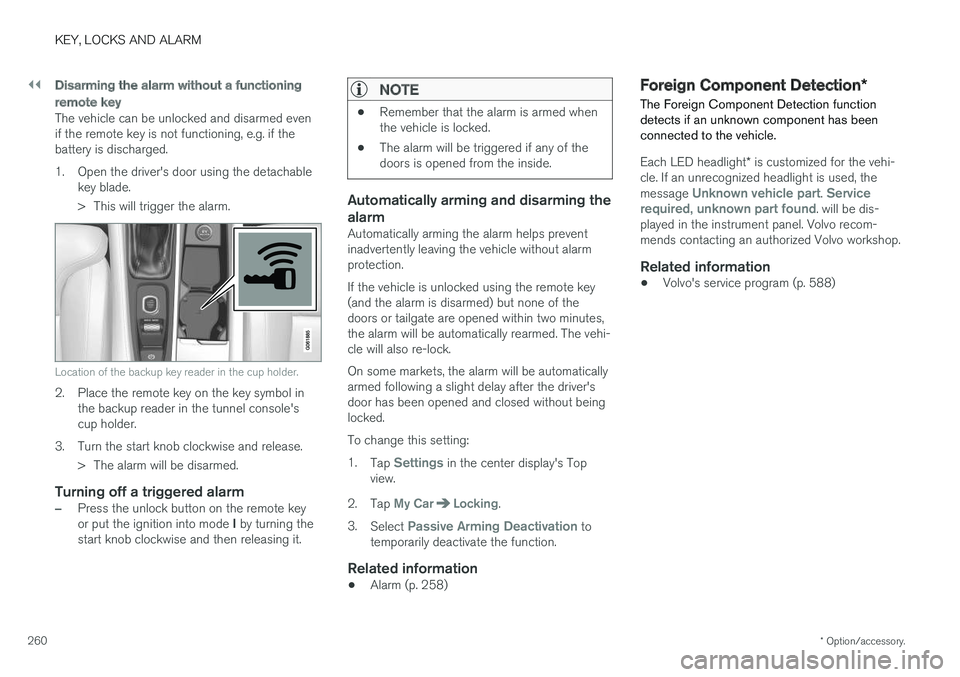
Location of the backup key reader in the cup holder.
2. Place the remote key on the key symbol inthe backup reader in the tunnel console's cup holder.
3. Turn the start knob clockwise and release. > The alarm will be disarmed.
Turning off a triggered alarm
–Press the unlock button on the remote key or put the ignition into mode I by turning the
start knob clockwise and then releasing it.
NOTE
• Remember that the alarm is armed when the vehicle is locked.
• The alarm will be triggered if any of thedoors is opened from the inside.
Automatically arming and disarming the alarm
Automatically arming the alarm helps prevent inadvertently leaving the vehicle without alarmprotection. If the vehicle is unlocked using the remote key (and the alarm is disarmed) but none of thedoors or tailgate are opened within two minutes,the alarm will be automatically rearmed. The vehi-cle will also re-lock. On some markets, the alarm will be automatically armed following a slight delay after the driver'sdoor has been opened and closed without beinglocked. To change this setting:1.
Tap
Settings in the center display's Top
view.
2. Tap
My CarLocking.
3. Select
Passive Arming Deactivation to
temporarily deactivate the function.
Related information
• Alarm (p. 258)
Foreign Component Detection
*
The Foreign Component Detection function detects if an unknown component has beenconnected to the vehicle.
Each LED headlight * is customized for the vehi-
cle. If an unrecognized headlight is used, the message
Unknown vehicle part. Service
required, unknown part found. will be dis-
played in the instrument panel. Volvo recom- mends contacting an authorized Volvo workshop.
Related information
• Volvo's service program (p. 588)
Page 409 of 674
HYBRID INFORMATION
407
NOTE
If the instrument panel is not used, it will go dark after a period of time. To reactivate thedisplay: •depress the brake pedal,
• open one of the doors, or
• put the ignition in mode
I by turning the
START knob clockwise and then releas-
ing.
Related information
• Charging the hybrid battery (p. 397)
• Twin Engine symbols and messages in the instrument panel (p. 409)
• Charging status in the vehicle's chargingsocket (p. 404)
• Charging status in the charging cable'scharging module (p. 405)
• Stopping hybrid battery charging (p. 408)
Page 416 of 674
STARTING AND DRIVING
* Option/accessory.
414
Starting the vehicle
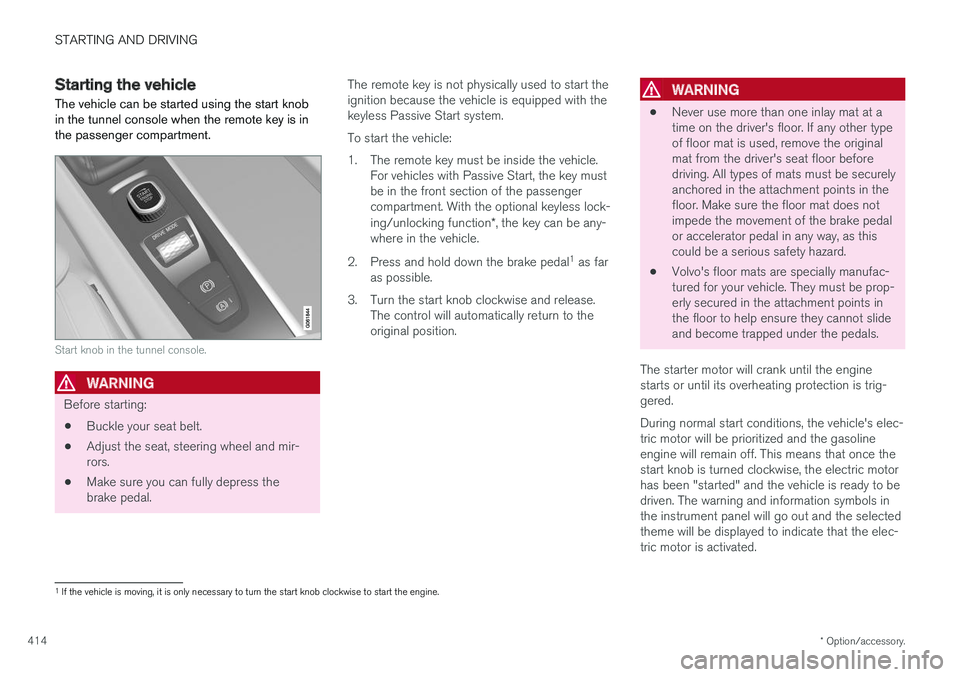
The vehicle can be started using the start knob in the tunnel console when the remote key is inthe passenger compartment.
Start knob in the tunnel console.
WARNING
Before starting:
• Buckle your seat belt.
• Adjust the seat, steering wheel and mir- rors.
• Make sure you can fully depress thebrake pedal. The remote key is not physically used to start theignition because the vehicle is equipped with thekeyless Passive Start system. To start the vehicle:
1. The remote key must be inside the vehicle.
For vehicles with Passive Start, the key must be in the front section of the passengercompartment. With the optional keyless lock- ing/unlocking function *, the key can be any-
where in the vehicle.
2. Press and hold down the brake pedal 1
as far
as possible.
3. Turn the start knob clockwise and release. The control will automatically return to the original position.
WARNING
• Never use more than one inlay mat at a time on the driver's floor. If any other typeof floor mat is used, remove the originalmat from the driver's seat floor beforedriving. All types of mats must be securelyanchored in the attachment points in thefloor. Make sure the floor mat does notimpede the movement of the brake pedalor accelerator pedal in any way, as thiscould be a serious safety hazard.
• Volvo's floor mats are specially manufac-tured for your vehicle. They must be prop-erly secured in the attachment points inthe floor to help ensure they cannot slideand become trapped under the pedals.
The starter motor will crank until the enginestarts or until its overheating protection is trig-gered. During normal start conditions, the vehicle's elec- tric motor will be prioritized and the gasolineengine will remain off. This means that once thestart knob is turned clockwise, the electric motorhas been "started" and the vehicle is ready to bedriven. The warning and information symbols inthe instrument panel will go out and the selectedtheme will be displayed to indicate that the elec-tric motor is activated.
1 If the vehicle is moving, it is only necessary to turn the start knob clockwise to start the engine.
Page 417 of 674
STARTING AND DRIVING
}}
415
In some situations, such as in cold weather or if the hybrid battery's charge level is too low, thegasoline engine will start instead. The vehicle should not be started with the charg- ing cable connected. However, if the cable can-not be pulled out or if the vehicle incorrectlydetects a cable that is not connected, the vehiclecan be started using an override procedure:
1. Press the brake pedal and turn the start
knob clockwise.
2.
Charge cable Remove before start will
appear in the instrument panel.
3. Turn the start knob clockwise again. 4.
Removed? Turn and hold start knob 7swill appear. Turn the knob clockwise and hold it for 7 seconds to start the vehicle.
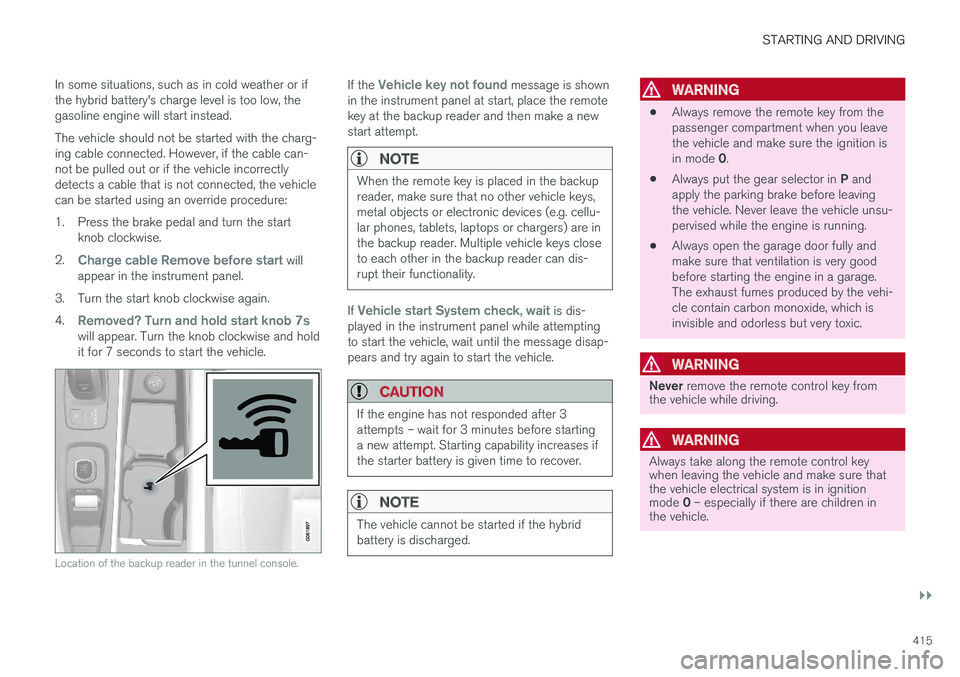
Location of the backup reader in the tunnel console.
If the Vehicle key not found message is shown
in the instrument panel at start, place the remote key at the backup reader and then make a newstart attempt.
NOTE
When the remote key is placed in the backup reader, make sure that no other vehicle keys,metal objects or electronic devices (e.g. cellu-lar phones, tablets, laptops or chargers) are inthe backup reader. Multiple vehicle keys closeto each other in the backup reader can dis-rupt their functionality.
If Vehicle start System check, wait is dis-
played in the instrument panel while attempting to start the vehicle, wait until the message disap-pears and try again to start the vehicle.
CAUTION
If the engine has not responded after 3 attempts – wait for 3 minutes before startinga new attempt. Starting capability increases ifthe starter battery is given time to recover.
NOTE
The vehicle cannot be started if the hybrid battery is discharged.
WARNING
• Always remove the remote key from the passenger compartment when you leavethe vehicle and make sure the ignition is in mode
0.
• Always put the gear selector in
P and
apply the parking brake before leaving the vehicle. Never leave the vehicle unsu-pervised while the engine is running.
• Always open the garage door fully andmake sure that ventilation is very goodbefore starting the engine in a garage.The exhaust fumes produced by the vehi-cle contain carbon monoxide, which isinvisible and odorless but very toxic.
WARNING
Never
remove the remote control key from
the vehicle while driving.
WARNING
Always take along the remote control key when leaving the vehicle and make sure thatthe vehicle electrical system is in ignition mode 0 – especially if there are children in
the vehicle.
Page 418 of 674
||
STARTING AND DRIVING
416
NOTE
With a cold start, idling speed may be consid- erably higher than normal for certain enginetypes. This is done to get the emissions sys-tem up to normal operating temperature asquickly as possible, which minimizes exhaustemissions and protects the environment.
CAUTION
•When starting in cold weather, the auto- matic transmission may shift up at slightlyhigher engine speeds than normal untilthe automatic transmission fluid reachesnormal operating temperature.
• Do not race a cold engine immediatelyafter starting. This could prevent fluidsfrom properly lubricating vital compo-nents in the engine before it has reachedthe proper operating temperature.
• The engine should be idling when thegear selector is moved. Never accelerateuntil the gear is fully engaged. Accelerat-ing rapidly before a gear is properlyengaged could lead to harder wear ofcomponents.
• To help prevent the transmission oil from overheating, select
P or N when idling at
a standstill for prolonged periods of time.
Related information
• Switching off the vehicle (p. 416)
• Ignition modes (p. 417)
• Adjusting the steering wheel (p. 193)
• Jump starting using another battery (p. 459)
• Selecting ignition mode (p. 418)
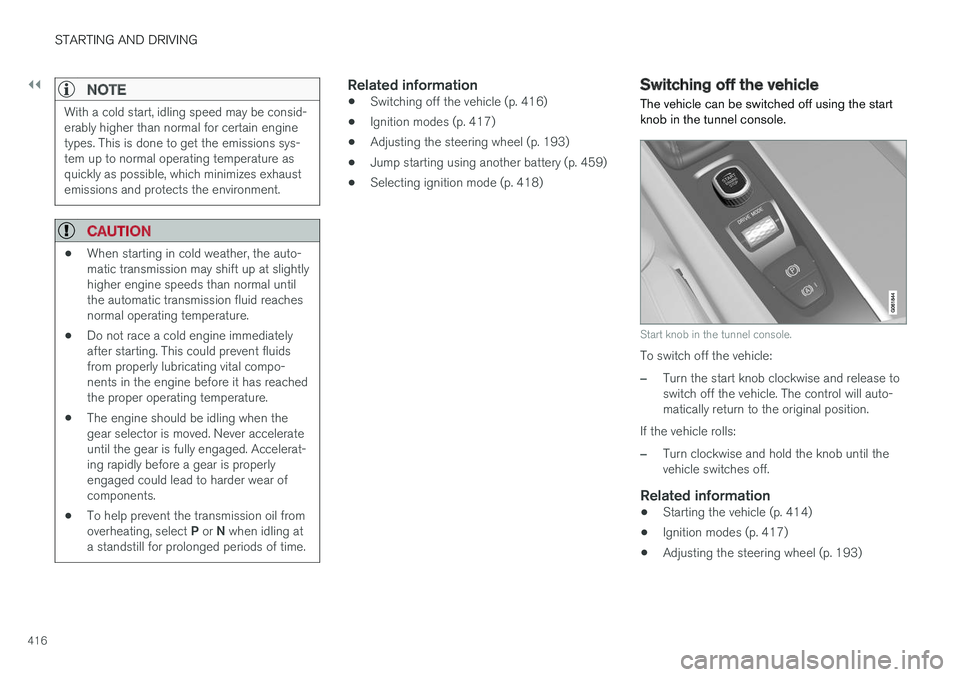
Switching off the vehicle The vehicle can be switched off using the start knob in the tunnel console.
Start knob in the tunnel console.
To switch off the vehicle:
–Turn the start knob clockwise and release to switch off the vehicle. The control will auto-matically return to the original position.
If the vehicle rolls:
–Turn clockwise and hold the knob until the vehicle switches off.
Related information
• Starting the vehicle (p. 414)
• Ignition modes (p. 417)
• Adjusting the steering wheel (p. 193)
Page 419 of 674
STARTING AND DRIVING
}}
* Option/accessory.417
•
Jump starting using another battery (p. 459)
• Selecting ignition mode (p. 418)
Ignition modes
The vehicle's ignition can be put in various modes (levels) to make different functions availa-ble.
To enable the use of a limited number of func- tions when the engine is not running, the ignition can be put in one of three different levels: 0, I
and II. These levels are referred to as "ignition
modes" in the Owner's Manual. The following table shows which functions are available in each ignition mode:
ModeFunctions
0 •The odometer, clock and tem- perature gauge are illuminated A
.
• The power seats
* can be
adjusted.
• The power windows can be used.
• The center display is activatedand can be used A
.
• The 12 V outlet in the cargo com- partment
* can be used.
• The infotainment system can be used A
.
In this ignition mode, the functions are available for a limited time and then switch off automatically.
I •The panoramic roof, power win-dows, 12 V outlet in passengercompartment, Bluetooth, naviga-tion, phone, blower and wind-shield wipers can be used.
• The power seats can be adjusted.
• The 12 V outlet in the cargo com-partment can be used.
Electrical current will be takenfrom the battery in this ignitionmode.
Page 420 of 674
||
STARTING AND DRIVING
418
ModeFunctions
II •The headlights illuminate.
• Warning/indicator lights illumi- nate for 5 seconds.
• A number of other systems areactivated. However, seat and rearwindow heating can only be acti-vated when the engine is running.
This ignition mode uses a lot ofcurrent from the battery andshould be avoided whenever pos-sible!
A Also activated when the door is opened.
Related information
• Starting the vehicle (p. 414)
• Adjusting the steering wheel (p. 193)
• Jump starting using another battery (p. 459)
• Selecting ignition mode (p. 418)
Selecting ignition mode
The vehicle's ignition can be put in various modes (levels) to make different functions availa-ble.
Selecting an ignition mode
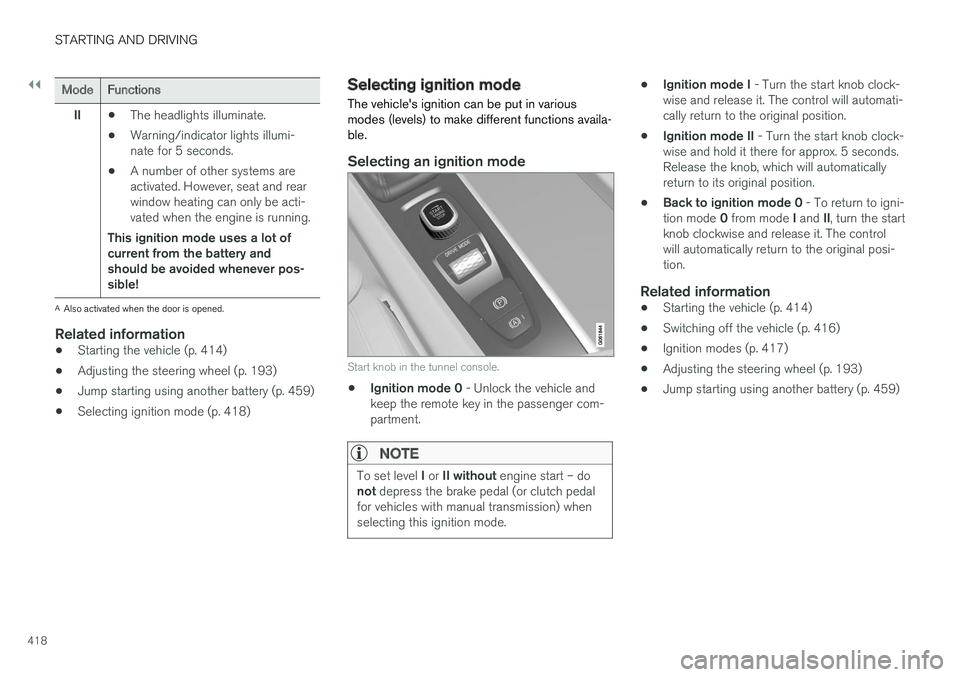
Start knob in the tunnel console.
• Ignition mode 0
- Unlock the vehicle and
keep the remote key in the passenger com- partment.
NOTE
To set level I or II without engine start – do
not depress the brake pedal (or clutch pedal
for vehicles with manual transmission) when selecting this ignition mode.
• Ignition mode I
- Turn the start knob clock-
wise and release it. The control will automati- cally return to the original position.
• Ignition mode II
- Turn the start knob clock-
wise and hold it there for approx. 5 seconds.Release the knob, which will automaticallyreturn to its original position.
• Back to ignition mode 0
- To return to igni-
tion mode 0 from mode I and II, turn the start
knob clockwise and release it. The controlwill automatically return to the original posi-tion.
Related information
• Starting the vehicle (p. 414)
• Switching off the vehicle (p. 416)
• Ignition modes (p. 417)
• Adjusting the steering wheel (p. 193)
• Jump starting using another battery (p. 459)
Page 462 of 674
||
STARTING AND DRIVING
4601.
Put the ignition in mode 0.
2. Make sure the auxiliary battery (the battery used to jump start the discharged battery) has a voltage of 12 volts.
3. If the auxiliary battery is in another vehicle, turn off that vehicle's engine and make surethat the vehicles are not touching each other.
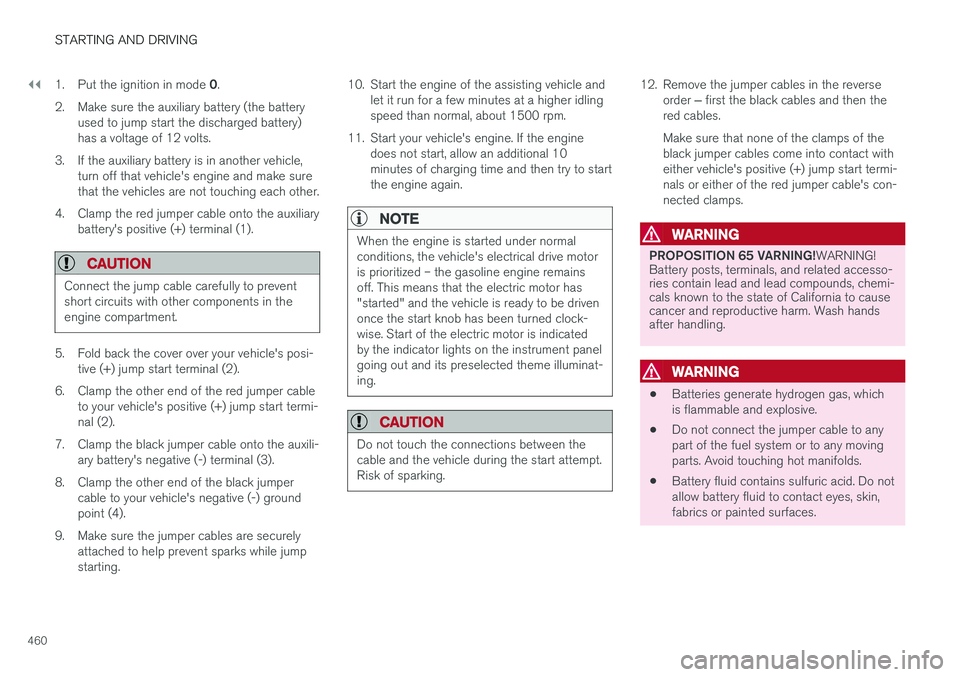
4. Clamp the red jumper cable onto the auxiliary battery's positive (+) terminal (1).
CAUTION
Connect the jump cable carefully to prevent short circuits with other components in theengine compartment.
5. Fold back the cover over your vehicle's posi- tive (+) jump start terminal (2).
6. Clamp the other end of the red jumper cable to your vehicle's positive (+) jump start termi- nal (2).
7. Clamp the black jumper cable onto the auxili- ary battery's negative (-) terminal (3).
8. Clamp the other end of the black jumper cable to your vehicle's negative (-) groundpoint (4).
9. Make sure the jumper cables are securely attached to help prevent sparks while jumpstarting. 10. Start the engine of the assisting vehicle and
let it run for a few minutes at a higher idlingspeed than normal, about 1500 rpm.
11. Start your vehicle's engine. If the engine does not start, allow an additional 10minutes of charging time and then try to startthe engine again.
NOTE
When the engine is started under normal conditions, the vehicle's electrical drive motoris prioritized – the gasoline engine remainsoff. This means that the electric motor has"started" and the vehicle is ready to be drivenonce the start knob has been turned clock-wise. Start of the electric motor is indicatedby the indicator lights on the instrument panelgoing out and its preselected theme illuminat-ing.
CAUTION
Do not touch the connections between the cable and the vehicle during the start attempt.Risk of sparking.
12. Remove the jumper cables in the reverse
order ‒ first the black cables and then the
red cables. Make sure that none of the clamps of the black jumper cables come into contact witheither vehicle's positive (+) jump start termi-nals or either of the red jumper cable's con-nected clamps.
WARNING
PROPOSITION 65 VARNING! WARNING!
Battery posts, terminals, and related accesso- ries contain lead and lead compounds, chemi-cals known to the state of California to causecancer and reproductive harm. Wash handsafter handling.
WARNING
• Batteries generate hydrogen gas, which is flammable and explosive.
• Do not connect the jumper cable to anypart of the fuel system or to any movingparts. Avoid touching hot manifolds.
• Battery fluid contains sulfuric acid. Do notallow battery fluid to contact eyes, skin,fabrics or painted surfaces.