cooling VOLVO XC60 T8 2018 Owner´s Manual
[x] Cancel search | Manufacturer: VOLVO, Model Year: 2018, Model line: XC60 T8, Model: VOLVO XC60 T8 2018Pages: 674, PDF Size: 11.93 MB
Page 369 of 674
DRIVER SUPPORT
}}
* Option/accessory.367
Related information
•Steering assistance at risk of collision (p. 363)
Activating/deactivating Steeringassistance during collision riskswith oncoming vehicles The driver can choose to have this function
On
or Off .
To switch off the function:
1. Select
SettingsMy CarIntelliSafe in
the center display's Top view.
2. Deselect
Collision avoidance assistance.
> The function will be deactivated.
NOTE
When the Collision avoidance assistancefunction is deactivated, all subfunctions of the following are deactivated: • Steering assistance at risk of run-off
• Steering assistance at risk of head-on collision
• Steering assistance during collision risks from behind
*
Although it is possible to deactivate the func- tion, the driver is advised to keep it activatedsince it can help improve driving safety inmost cases.
Related information
• Steering assistance at risk of collision (p. 363)
Limitations of steering assistanceduring collision risks fromoncoming traffic The function may have limited functionality in certain situations and not intervene, e.g.:
•
for smaller vehicles such as motorcycles
• on roads that do not have clear lane mark- ings
• if more than half of your vehicle has movedinto the adjacent lane
• outside the speed range 60-140 km/h(37-87 mph)
• when the power steering works at reducedpower - e.g. during cooling due to overheat-ing (see section "Speed-dependent steeringforce").
Functionality may also be reduced in other situa-tions, such as: • road work
• winter driving conditions
• narrow roads
• poor road surfaces
• a very sporty driving style
• bad weather with reduced visibility.
In these demanding driving conditions, the func-tion may not be able to properly assist the driver.In these situations, it is recommended that it isturned off.
Page 371 of 674
DRIVER SUPPORT
}}
* Option/accessory.369
Related information
•Steering assistance at risk of collision (p. 363)
Activating/deactivating Steeringassistance during collision risks
from behind
*
The driver can choose to have this function On
or Off .
To switch it off:
1. Select
SettingsMy CarIntelliSafe in
the center display's Top view.
2. Deselect
Collision avoidance assistance.
> The function will be deactivated.
NOTE
When the Collision avoidance assistancefunction is deactivated, all subfunctions of the following are deactivated: • Steering assistance at risk of run-off
• Steering assistance at risk of head-on collision
• Steering assistance during collision risks from behind
*
Although it is possible to deactivate the func- tion, the driver is advised to keep it activatedsince it can help improve driving safety inmost cases.
Related information
• Steering assistance at risk of collision (p. 363)
Limitations of steering assistanceduring collision risks from behind The function may have limited functionality in certain situations and not intervene, e.g.:
•
for smaller vehicles such as motorcycles
• if more than half of your vehicle has moved into the adjacent lane
• on roads/lanes with indistinct or no side lanemarkings
• outside the speed range 60-140 km/h(37-87 mph)
• when the power steering works at reducedpower - e.g. during cooling due to overheat-ing (see section "Speed-dependent steeringforce").
Functionality may also be reduced in other situa-tions, such as: • road work
• winter driving conditions
• narrow roads
• poor road surfaces
• a very sporty driving style
• bad weather with reduced visibility.
In these demanding driving conditions, the func-tion may not be able to properly assist the driver.In these situations, it is recommended that it isturned off.
Page 393 of 674
DRIVER SUPPORT
}}
* Option/accessory.391
Park Assist Pilot * limitations
Park Assist Pilot PAP 126
may not be able to
detect all conditions in all situations and func- tionality may therefore be limited.WARNING
• The PAP function is supplementary driver support intended to facilitate driving andhelp make it safer – it cannot handle allsituations in all traffic, weather and roadconditions.
• Pay particular attention to people andanimals near the vehicle.
• Bear in mind that the front end of thevehicle may swing out towards oncomingtraffic during the parking maneuver.
• Objects situated higher than the detec-tion area of the sensors are not includedwhen the parking maneuver is calculated,which could cause PAP to swing into theparking space too early. Such parkingspaces should be avoided for this reason.
• PAP is not a substitute for the driver'sattention and judgment. The driver isalways responsible for ensuring the vehi-cle is driven in a safe manner, at theappropriate speed, with an appropriatedistance to other vehicles, and in accord-ance with current traffic rules and regula-tions.
The driver should be aware of the following limi-tations for Park Assist Pilot:
The parking sequence is cancelledA parking sequence will be cancelled if:
• the driver moves the steering wheel
• the vehicle's speed exceeds 7 km/h (4 mph)
• the driver taps
Cancel in the center display
• when the anti-lock brakes or the Electronic stability control are engaged - e.g. when awheel loses grip on a slippery road
• when the power steering works at reduced power - e.g. during cooling due to overheat- ing (see section "Speed-dependent steeringforce").
A message in the center display will explain whythe parking sequence was cancelled.
CAUTION
Under certain circumstances, PAP may not be able to find parking spaces – one reason maybe that the sensors are disrupted by externalsound sources that emit the same ultrasonicfrequencies that the system works with. Examples of such sources include horns, wet tires on asphalt, pneumatic brakes, exhaustnoise from motorcycles, etc.
126 Park Assist Pilot
Page 405 of 674
HYBRID INFORMATION
}}
403
•Disconnect the charger from the wall out- let before cleaning it.
• Never connect the charging cable to anextension cord or a multiple plug socket.
Also, refer to the manufacturer's instructions for using the charging cable and its compo-nents.
CAUTION
Make sure that the 120/240 V outlet (AC, alternating current) has a power capacity suf-ficient for charging electric vehicles. If you areuncertain of the capacity, have the outletchecked by a licensed electrician.
Take out the charging cable from the storage compartment under the cargo area. Note that the ignition must be switched off completely beforecharging.
Plug the charging cable into a 120/240 V outlet. Never use an extension cord.
Open the charger door. Push the charging handle all the way into the vehicle's socket.3. The charging cable handle will lock into
place and charging will begin within5 seconds. When charging starts, the greenLED light in the charging socket will begin toflash. The approximate remaining chargingtime or the charging status will be displayedin the instrument panel. Charging may be temporarily interrupted if the vehicle is unlocked:
• and a door is open
‒ charging will restart
within a few minutes.
• if no door is opened
‒ the vehicle will
automatically relock. Charging will resumeafter 1 minute.
CAUTION
Never detach the charging cable from the 120/240 V outlet (AC, alternating current)while charging is in progress – the120/240 V outlet could be damaged in suchcircumstances. Always interrupt charging firstand then disconnect the charging cable – firstfrom the vehicle's charging socket and thenfrom the 120/240 V outlet.
During charging, condensation from the air con- ditioning may form under the vehicle. This is nor-mal and is caused by the hybrid battery cooling.
Page 437 of 674
STARTING AND DRIVING
}}
* Option/accessory.435
Drive modes
Drive modes affect the vehicle's driving charac- teristics in different ways to enhance and sim-plify the driving experience in certain types of sit-uations.
Drive modes enable easy access to the vehicle's many functions and settings in different drivingsituations. The following systems are adapted tohelp optimize driving characteristics in each drivemode: • Steering
• Engine/transmission/all-wheel drive
• Brakes
• Pneumatic suspension
* and shock absorbers
• Instrument panel
• Climate control settings
Select the drive mode that is best suited to the current driving conditions. Keep in mind that notall drive modes are available in all situations.
Available drive modes
WARNING
Keep in mind that the vehicle does not emit any engine noise when using the electricmotor and may therefore be difficult to detectfor children, pedestrians, cyclists or animals.This is particularly true at low speeds, e.g. inparking lots.
WARNING
Do not leave the vehicle in an unventilated area with a drive mode activated and the com-bustion engine switched off. The engine willstart automatically if the charge level in thehybrid battery is low and the resulting exhaustgases can be very harmful to people and ani-mals.
HYBRID
• This is the default mode in which the electric motor and combustion engine work together.
The vehicle starts in Hybrid mode. The control system uses both the electric motor and the gas-oline engine - separately or in tandem - and cal-culates optimal utilization with regard to perform-ance, fuel consumption and comfort. At highspeeds, ground clearance is automatically low- ered 4
to reduce air resistance. Driving capacity on
the electric motor alone is determined by factors such as the hybrid battery's charge level, the need for heat/cooling in the passenger compart-ment, etc. If there is sufficient charge in the battery, it is possible to drive solely on electric power. Whenthe accelerator pedal is pressed, only the electricmotor will be activated until the battery reaches acertain charge level. Above this level, the currentin the battery cannot supply the power requestedby the accelerator pedal and the combustionengine will start. When the hybrid battery's charge level is low, the combustion engine will start more frequently tosave the remaining current in the battery. Chargethe hybrid battery from a 120-240 volt outlet using a charging cable, or activate
Charge in
Function view to reset the option of only using the electric motor. This drive mode is designed for low energy con- sumption with an optimized mix between theelectric motor and gasoline engine, without com-promising on climate comfort or driving experi-ence. When faster acceleration is requested bythe driver, the electric driveline will be utilized tohelp provide maximum additional power. Thevehicle also monitors the driving conditions andautomatically engages all-wheel drive if neces-sary. All-wheel drive and extra electric power arealways available regardless of the battery'scharging status.
4 For vehicles with pneumatic suspension.
Page 458 of 674
||
STARTING AND DRIVING
456
Minimum octane
Decals
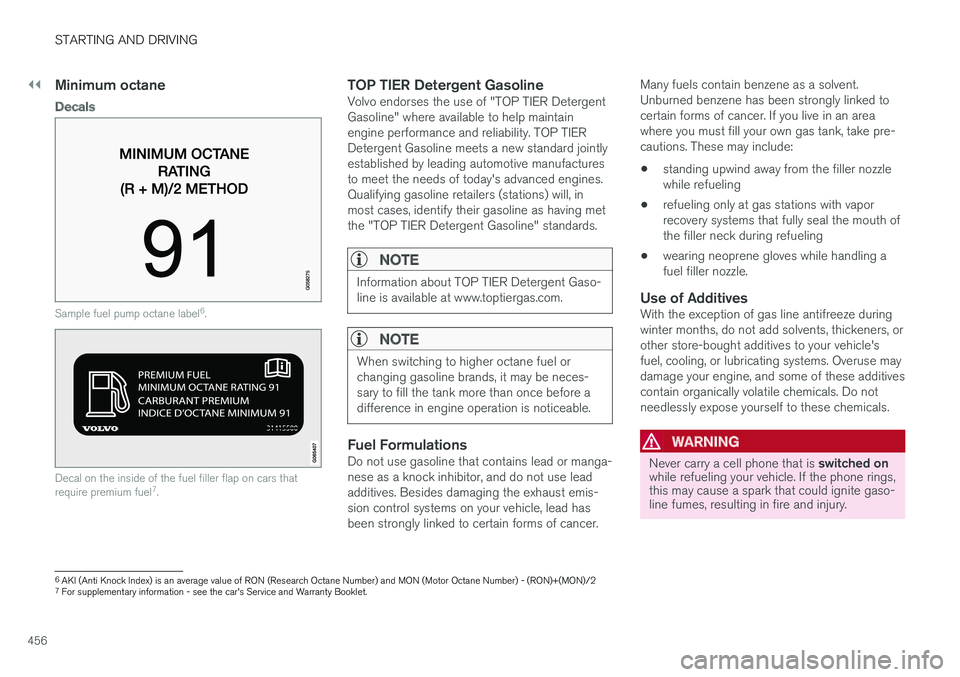
Sample fuel pump octane label6
.
Decal on the inside of the fuel filler flap on cars that require premium fuel 7
.
TOP TIER Detergent GasolineVolvo endorses the use of "TOP TIER Detergent Gasoline" where available to help maintainengine performance and reliability. TOP TIERDetergent Gasoline meets a new standard jointlyestablished by leading automotive manufacturesto meet the needs of today's advanced engines.Qualifying gasoline retailers (stations) will, inmost cases, identify their gasoline as having metthe "TOP TIER Detergent Gasoline" standards.
NOTE
Information about TOP TIER Detergent Gaso- line is available at www.toptiergas.com.
NOTE
When switching to higher octane fuel or changing gasoline brands, it may be neces-sary to fill the tank more than once before adifference in engine operation is noticeable.
Fuel FormulationsDo not use gasoline that contains lead or manga- nese as a knock inhibitor, and do not use leadadditives. Besides damaging the exhaust emis-sion control systems on your vehicle, lead hasbeen strongly linked to certain forms of cancer. Many fuels contain benzene as a solvent.Unburned benzene has been strongly linked tocertain forms of cancer. If you live in an areawhere you must fill your own gas tank, take pre-cautions. These may include: •
standing upwind away from the filler nozzle while refueling
• refueling only at gas stations with vaporrecovery systems that fully seal the mouth ofthe filler neck during refueling
• wearing neoprene gloves while handling afuel filler nozzle.
Use of AdditivesWith the exception of gas line antifreeze duringwinter months, do not add solvents, thickeners, orother store-bought additives to your vehicle'sfuel, cooling, or lubricating systems. Overuse maydamage your engine, and some of these additivescontain organically volatile chemicals. Do notneedlessly expose yourself to these chemicals.
WARNING
Never carry a cell phone that is
switched on
while refueling your vehicle. If the phone rings, this may cause a spark that could ignite gaso-line fumes, resulting in fire and injury.
6 AKI (Anti Knock Index) is an average value of RON (Research Octane Number) and MON (Motor Octane Number) - (RON)+(MON)/2
7 For supplementary information - see the car's Service and Warranty Booklet.
Page 460 of 674
STARTING AND DRIVING
* Option/accessory.
458
Overheating of engine andtransmission
In demanding driving conditions, such as driving in mountainous areas or hot weather, there is arisk of the engine or transmission overheating,especially when carrying heavy loads.
• Engine power may be temporarily limited.
• Remove any auxiliary lights mounted in front of the grille when driving in hot weather.
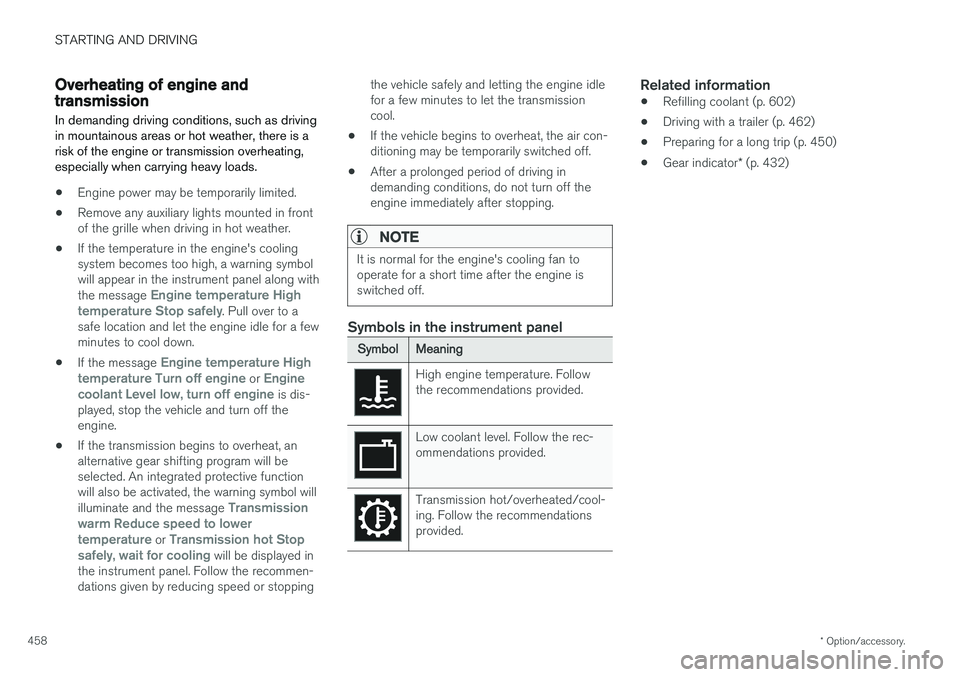
• If the temperature in the engine's coolingsystem becomes too high, a warning symbolwill appear in the instrument panel along with the message
Engine temperature High
temperature Stop safely. Pull over to a
safe location and let the engine idle for a few minutes to cool down.
• If the message
Engine temperature High
temperature Turn off engine or Engine
coolant Level low, turn off engine is dis-
played, stop the vehicle and turn off the engine.
• If the transmission begins to overheat, analternative gear shifting program will beselected. An integrated protective functionwill also be activated, the warning symbol will illuminate and the message
Transmission
warm Reduce speed to lower
temperature or Transmission hot Stop
safely, wait for cooling will be displayed in
the instrument panel. Follow the recommen- dations given by reducing speed or stopping the vehicle safely and letting the engine idle for a few minutes to let the transmissioncool.
• If the vehicle begins to overheat, the air con-ditioning may be temporarily switched off.
• After a prolonged period of driving indemanding conditions, do not turn off theengine immediately after stopping.
NOTE
It is normal for the engine's cooling fan to operate for a short time after the engine isswitched off.
Symbols in the instrument panel
SymbolMeaning
High engine temperature. Follow the recommendations provided.
Low coolant level. Follow the rec- ommendations provided.
Transmission hot/overheated/cool- ing. Follow the recommendationsprovided.
Related information
• Refilling coolant (p. 602)
• Driving with a trailer (p. 462)
• Preparing for a long trip (p. 450)
• Gear indicator
* (p. 432)
Page 578 of 674
||
LOADING, STORAGE AND PASSENGER COMPARTMENT
* Option/accessory.
576
The illustration is generic – the design may vary.
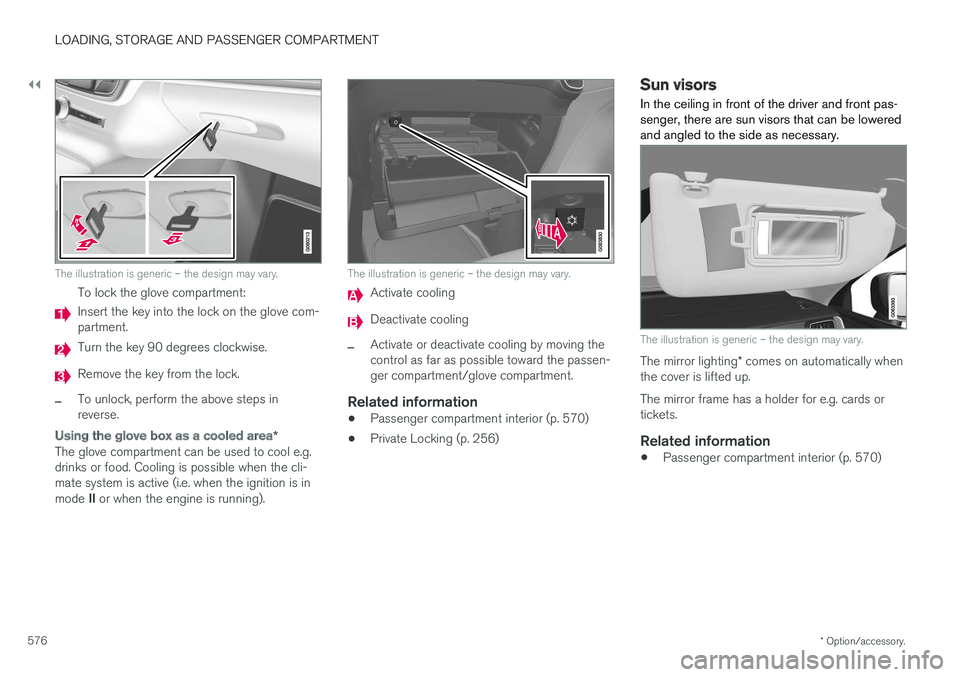
To lock the glove compartment:
Insert the key into the lock on the glove com- partment.
Turn the key 90 degrees clockwise.
Remove the key from the lock.
–To unlock, perform the above steps in reverse.
Using the glove box as a cooled area *
The glove compartment can be used to cool e.g. drinks or food. Cooling is possible when the cli-mate system is active (i.e. when the ignition is in mode II or when the engine is running).
The illustration is generic – the design may vary.
Activate cooling
Deactivate cooling
–Activate or deactivate cooling by moving the control as far as possible toward the passen-ger compartment/glove compartment.
Related information
• Passenger compartment interior (p. 570)
• Private Locking (p. 256)
Sun visors In the ceiling in front of the driver and front pas- senger, there are sun visors that can be loweredand angled to the side as necessary.
The illustration is generic – the design may vary.
The mirror lighting
* comes on automatically when
the cover is lifted up. The mirror frame has a holder for e.g. cards or tickets.
Related information
• Passenger compartment interior (p. 570)
Page 601 of 674
MAINTENANCE AND SERVICE
599
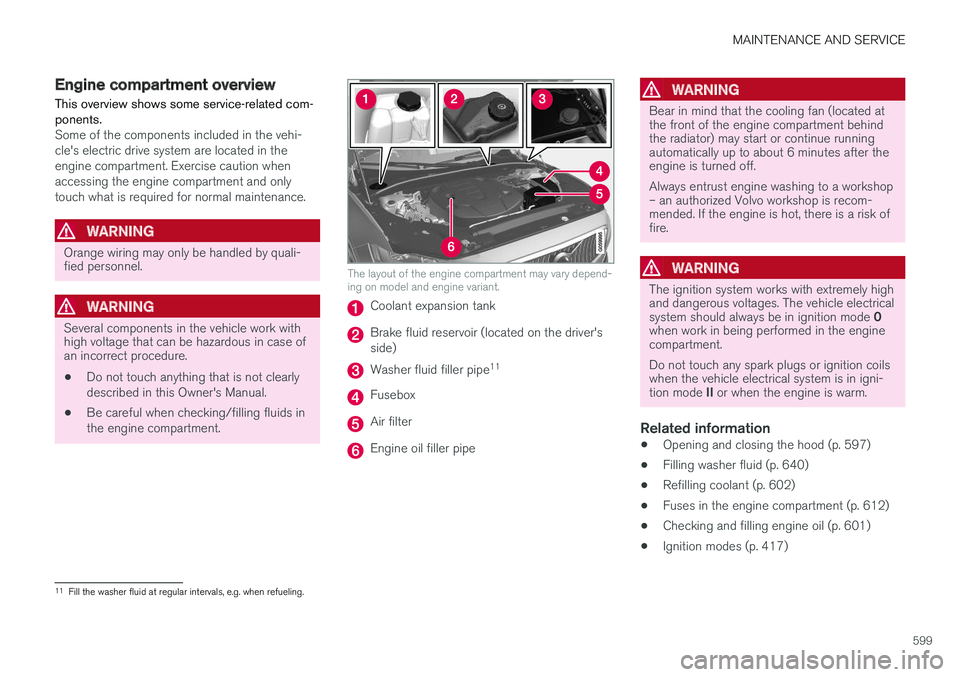
Engine compartment overview
This overview shows some service-related com- ponents.
Some of the components included in the vehi- cle's electric drive system are located in theengine compartment. Exercise caution whenaccessing the engine compartment and onlytouch what is required for normal maintenance.
WARNING
Orange wiring may only be handled by quali- fied personnel.
WARNING
Several components in the vehicle work with high voltage that can be hazardous in case ofan incorrect procedure.
• Do not touch anything that is not clearly described in this Owner's Manual.
• Be careful when checking/filling fluids inthe engine compartment.
The layout of the engine compartment may vary depend- ing on model and engine variant.
Coolant expansion tank
Brake fluid reservoir (located on the driver's side)
Washer fluid filler pipe 11
Fusebox
Air filter
Engine oil filler pipe
WARNING
Bear in mind that the cooling fan (located at the front of the engine compartment behindthe radiator) may start or continue runningautomatically up to about 6 minutes after theengine is turned off. Always entrust engine washing to a workshop – an authorized Volvo workshop is recom-mended. If the engine is hot, there is a risk offire.
WARNING
The ignition system works with extremely high and dangerous voltages. The vehicle electrical system should always be in ignition mode
0
when work in being performed in the engine compartment. Do not touch any spark plugs or ignition coils when the vehicle electrical system is in igni- tion mode II or when the engine is warm.
Related information
• Opening and closing the hood (p. 597)
• Filling washer fluid (p. 640)
• Refilling coolant (p. 602)
• Fuses in the engine compartment (p. 612)
• Checking and filling engine oil (p. 601)
• Ignition modes (p. 417)
11
Fill the washer fluid at regular intervals, e.g. when refueling.
Page 604 of 674
||
MAINTENANCE AND SERVICE
602
NOTE
If the conditions for measuring oil level are not properly fulfilled (time after engine shut-down, vehicle inclination, ambient tempera- ture, etc.) the message
No value availablewill be shown in the center display. This does not mean that anything is wrong in the vehi-
cle systems.
Related information
• Engine oil (p. 600)
• Engine oil specifications (p. 652)
• Ignition modes (p. 417)
• Vehicle status (p. 592)
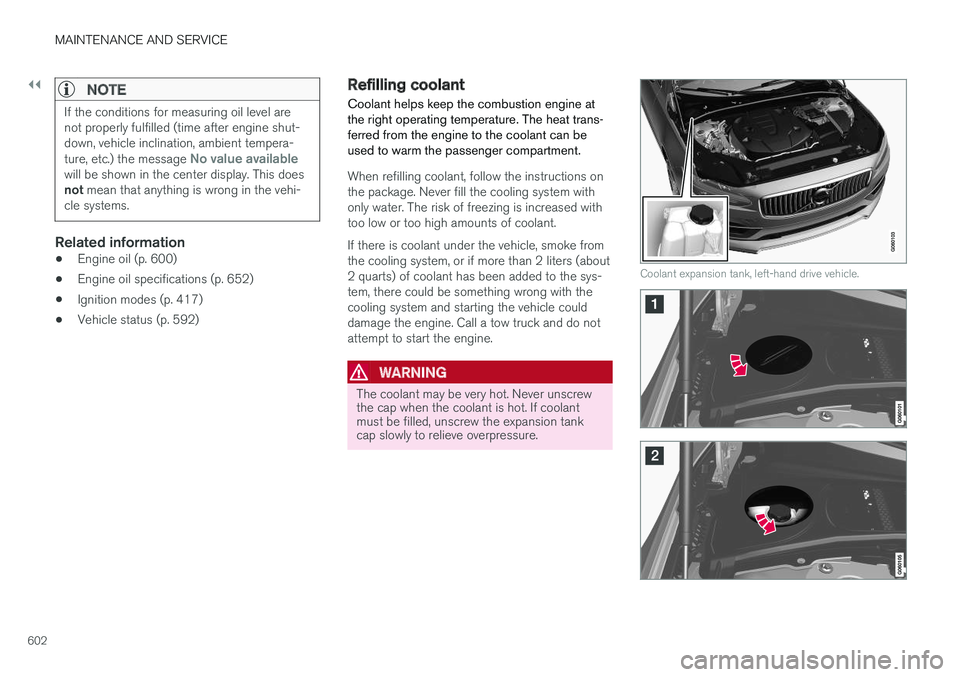
Refilling coolant
Coolant helps keep the combustion engine at the right operating temperature. The heat trans-ferred from the engine to the coolant can beused to warm the passenger compartment.
When refilling coolant, follow the instructions on the package. Never fill the cooling system withonly water. The risk of freezing is increased withtoo low or too high amounts of coolant. If there is coolant under the vehicle, smoke from the cooling system, or if more than 2 liters (about2 quarts) of coolant has been added to the sys-tem, there could be something wrong with thecooling system and starting the vehicle coulddamage the engine. Call a tow truck and do notattempt to start the engine.
WARNING
The coolant may be very hot. Never unscrew the cap when the coolant is hot. If coolantmust be filled, unscrew the expansion tankcap slowly to relieve overpressure.
Coolant expansion tank, left-hand drive vehicle.