power steering VOLVO XC60 T8 2018 Owner´s Manual
[x] Cancel search | Manufacturer: VOLVO, Model Year: 2018, Model line: XC60 T8, Model: VOLVO XC60 T8 2018Pages: 674, PDF Size: 11.93 MB
Page 449 of 674
STARTING AND DRIVING
}}
447
Driving
•Choose the Pure drive mode to help mini- mize electric power consumption.
• Maintain a steady speed and a generous fol-lowing distance to traffic ahead to minimizebraking. This drive mode has the lowestpower consumption.
• Balance energy requirements using theaccelerator pedal. Use the indicator on theinstrument panel to see available electricpower and avoid starting the combustionengine unnecessarily. The electric motor ismore effective than the combustion engine,especially at low speeds.
• When braking is necessary, brake gentlyusing the brake pedal. This will recharge thehybrid battery. A regenerative function isintegrated in the brake pedal and can beaugmented by the electric motor's brakingcapacity when the gear selector is in mode B
.
• Higher speeds increase energy consumption - air resistance increases with speed.
• Activate the
Hold function in the Function
view at high speeds when traveling farther than is possible using the hybrid battery'scapacity.
• Whenever possible, avoid using the
Chargefunction to charge the hybrid battery. Charg- ing the battery using the combustion engine increases fuel consumption and carbon diox-ide emissions.
• In a cold climate, reduce heating of the wind-shield/rear window, mirrors, seats and thesteering wheel.
• Maintain the correct pressure in the tires andcheck pressure regularly.
• The type of tires used could affect energyconsumption - consult a retailer for advice onsuitable tires.
• Remove unnecessary items from the vehicle- the heavier the load, the higher the fuelconsumption.
• Roof loads increase air resistance andincrease fuel consumption. Remove roofboxes, ski racks, etc. that are not in use.
• Avoid driving with the windows open.
• Do not keep the vehicle still on an upwardgradient by using the accelerator pedal. Usethe brakes instead.
Related information
•
Drive-E
‒
purer driving pleasure (p. 27)
• Factors affecting electric motor range(p. 448)
• Using the electric motor only (p. 447)
• Hybrid gauge (p. 83)
• Checking tire pressure (p. 547)
Using the electric motor only
When using the electric motor, Volvo Twin Engine provides a combination of good fueleconomy, low emissions and high performance.
For energy-efficient driving:
• Select the Pure drive mode to help maximize driving range using only the electric motor.
• Balance energy requirements using theaccelerator pedal. Use the indicator on theinstrument panel's hybrid gauge to see avail-able electric power and avoid starting thecombustion engine unnecessarily.
• When braking is necessary, brake gentlyusing the brake pedal. This will recharge thehybrid battery.
• Activate the
Hold function in the Function
view at high speeds when traveling farther than is possible using the hybrid battery'scapacity.
• Reduce current consumption in the passen-ger compartment by reducing e.g. fan speed,electric heating, or air conditioning use.
Also follow the general economical driving adviceregarding speed, tires and load to maximizerange.
Related information
• General information about Twin Engine(p. 396)
• Economical driving (p. 446)
Page 466 of 674
STARTING AND DRIVING
* Option/accessory.
464
Trailer Stability Assist *
Trailer Stability Assist (TSA 8
) is a function
designed to help stabilize a vehicle that is tow- ing a trailer when the vehicle and trailer havebegun to sway. The function is part of the Elec- tronic Stability Control system ESC 9
.
Reasons for swayingA vehicle towing a trailer may begin to sway for various reasons. Normally this only occurs at highspeeds. However, if the trailer is overloaded orunevenly distributed, e.g. too far back, there is arisk of swaying even at low speeds. Swaying may be caused by factors such as:
• The vehicle and trailer are hit by a sudden, strong crosswind.
• The vehicle and trailer are traveling on anuneven road or over a bump.
• Sudden movements of the steering wheel.
Once swaying has begun, it can be difficult orimpossible to stop it. This makes the vehicle andtrailer difficult to control and there is a risk ofswerving into oncoming traffic or driving off theroad.
Trailer Stability Assist functionTrailer Stability Assist continuously monitors thevehicle's movements, particularly lateral move- ments. If swaying is detected, the brakes areapplied individually on the front wheels, which hasa stabilizing effect on the vehicle and trailer. Thisis often enough to enable the driver to regaincontrol of the vehicle. If the Trailer Stability Assist function's first attempt is not adequate to stop the swayingmotion, the brakes are applied on all wheels andengine power is temporarily reduced. As theswaying motion begins to decrease and the vehi-cle and trailer have once again become stable,TSA stops regulating the brakes/engine powerand the driver regains control of the vehicle.
NOTE
Trailer Stability Assist is deactivated if the driver selects the sport mode by deactivating
ESC in the center display's menu system.
Trailer Stability Assist may not intervene if the driver tries to compensate for the swaying motionby moving the steering wheel rapidly, becausethe system will then not be able to determine if itis the trailer or the driver causing the swaying.
When Trailer Stability Assist is activated, the
ESC symbol is
displayed in the instrument panel.
Related information
• Driving with a trailer (p. 462)
• Electronic Stability Control (p. 264)
8
Trailer Stability Assist
9 Electronic Stability Control
Page 489 of 674
AUDIO, MEDIA AND INTERNET
487
Selecting sub-channels
To listen to a station's sub-channel(s), tap the station on the screen or press the forward/backarrow keys on the right-side steering wheel key-pad or below the screen. Sub-channels can also be saved as radio favor- ites. If you tap a sub-channel favorite, it may take up to 6 seconds before the channel becomes audi-
ble. If you tap a station while you are out of digital range of the transmitter,
No reception will be
displayed.
Related information
• HD Radio
™ (p. 484)
• Activating and deactivating the HD Radio
™
(p. 486)
• Changing waveband and radio station (p. 481)
• Searching for a radio station (p. 482)
• HD Radio
™ limitations (p. 487)
HD Radio™ limitations
Limitations
• Main channel vs. sub-channels (FM only)
:
The main channel is the only channel that can receive in hybrid mode (both digital andanalog). If a frequency has sub-channels,they are broadcast in digital mode only. Themain FM channel will be displayed as, forexample, "WRIF-FM HD1". The sub-FMchannels will be displayed as"WRIF-FMHD2", "WRIF-FM HD3", etc.
• Reception coverage area
: Due to current
IBOC transmitter power limitations, thereception coverage area in digital mode issomewhat more limited than the station'sanalog coverage area. Be aware that, like allradio transmission technology, terrain, time ofday, vegetation and buildings can have apositive or negative effect on radio reception.
• Analog to digital/digital to analog blend-ing
: Analog to digital blending will occur as
the signal strength reaches a preset thresh-old in the receiver. This will be noticeable infringe areas (areas with weak reception) andis normal.
NOTE
There may be a noticeable difference in sound quality when a change from analogueto digital or digital to analogue occurs, suchas:
• Volume increase or decrease
• Equalizer settings, i.e., Bass/ Midrange/Treble cut or boost
• Time alignment (Digital program materialin extreme cases can be as much as 8seconds behind the analogue). This willnoticeable as a "stuttering" effect.
The above items are dependant on thebroadcaster's equipment settings and donot indicate a fault in the vehicle's radioreceiver or antenna systems .
Related information
•HD Radio
™ (p. 484)
• Activating and deactivating the HD Radio
™
(p. 486)
• HD Radio
™
sub-channels (p. 486)
Page 616 of 674
||
MAINTENANCE AND SERVICE
* Option/accessory.
614
FunctionAA
Left-side headlight, some mod- els with LED B 15
Right-side headlight, some mod- els with LED
B 15
– –
Heated windshield
*, left side Shunt
Heated windshield
*, left side 40
Headlight washers
*25
Windshield washer 25
– –
Horn 20
Alarm siren
* 5
Brake system control module (valves, parking brake) 40
Wipers 30
Rear window washer 25
Heated windshield
*, right side 40
Parking heater
* 20
FunctionAA
Brake system control module (ABS pump) 40
– –
Heated windshield
*, right side Shunt
Fed when ignition is on: Engine control module; transmissioncomponents, electrical powersteering, central electrical mod-ule 5
Exterior vehicle sound (certain markets)
5
Right-side headlight 7.5 Right-side headlight, some mod- els with LED
B 15
– –
– –
– –
Airbags 5
Left-side headlight 7.5 Left-side headlight, some mod- els with LED
B 15
FunctionAA
Accelerator pedal sensor 5
Transmission control module; gear selector control module 15
Engine control module 5
– –
– –
– –
– –
Engine control module; actuator; throttle unit; turbo-charger valve20
Solenoids; valve; engine cooling system thermostat10
Vacuum regulators; valve 7.5
Spoiler shutter control module; radiator shutter control module 5
– –
Heated oxygen sensor, front; heated oxygen sensor, rear15
Oil pump solenoid; A/C mag- netic coupling; heated oxygensensor (center)15
Page 619 of 674
MAINTENANCE AND SERVICE
}}
* Option/accessory.617
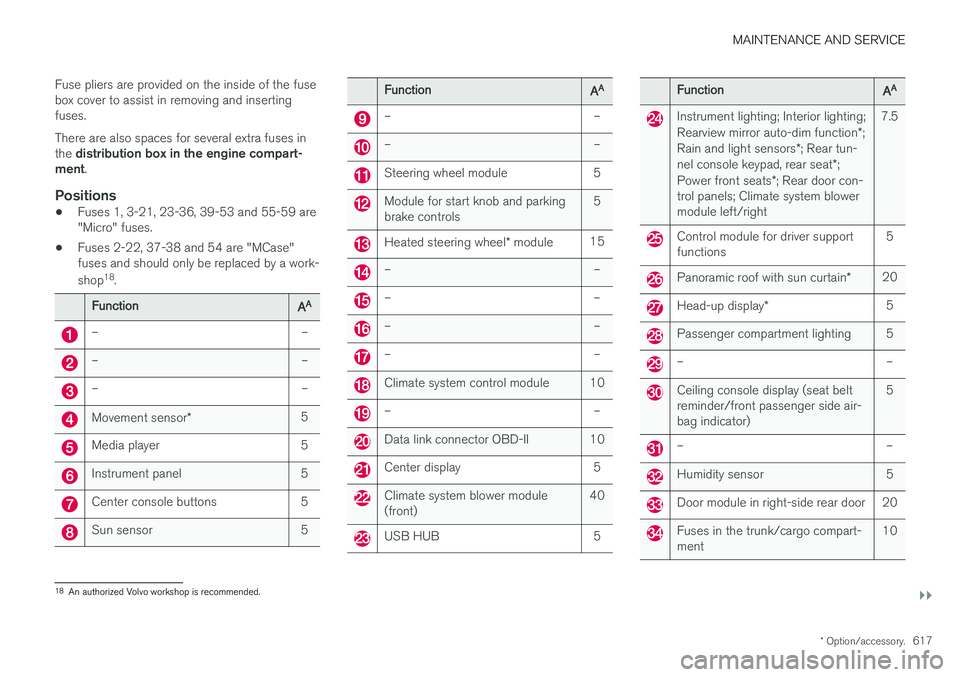
Fuse pliers are provided on the inside of the fuse box cover to assist in removing and insertingfuses. There are also spaces for several extra fuses in the
distribution box in the engine compart-
ment .
Positions
•Fuses 1, 3-21, 23-36, 39-53 and 55-59 are "Micro" fuses.
• Fuses 2-22, 37-38 and 54 are "MCase"fuses and should only be replaced by a work- shop 18
.
FunctionAA
– –
– –
– –
Movement sensor * 5
Media player 5
Instrument panel 5
Center console buttons 5
Sun sensor 5
FunctionAA
– –
– –
Steering wheel module 5
Module for start knob and parking brake controls 5
Heated steering wheel
* module 15
– –
– –
– –
– –
Climate system control module 10
– –
Data link connector OBD-II 10
Center display 5
Climate system blower module (front) 40
USB HUB 5
FunctionAA
Instrument lighting; Interior lighting; Rearview mirror auto-dim function
*;
Rain and light sensors *; Rear tun-
nel console keypad, rear seat *;
Power front seats *; Rear door con-
trol panels; Climate system blower module left/right 7.5
Control module for driver support functions
5
Panoramic roof with sun curtain
*20
Head-up display
* 5
Passenger compartment lighting 5
– –
Ceiling console display (seat belt reminder/front passenger side air-bag indicator) 5
– –
Humidity sensor 5
Door module in right-side rear door 20
Fuses in the trunk/cargo compart- ment
10
18
An authorized Volvo workshop is recommended.
Page 667 of 674
INDEX
665
in cellular phone 20
in the center display 17, 18
P
Paddle at steering wheel 192 Paint
color code 636
paint damage and touch-up 635, 636
Panoramic roof opening and closing 169
pinch protection 162
sun shade 168, 171
ventilation position 170
PAP – Park Assist Pilot 386, 387, 390, 391, 393, 394
Park Assist Camera 377, 378, 379, 381, 382, 384, 385
settings 382
Park Assist Camera limitations 382
Park Assist Pilot 386, 387, 390, 391, 393, 394
function 386, 387, 391, 393, 394
limitations 391
operation 387, 390
Symbols and messages 394
Park Assist Pilot – PAP 386, 387, 390, 391, 393, 394
parking on hills 424
Parking Assist 372, 373, 374, 375, 376 function 372, 373, 374
Parking brake 422 activate and deactivate 423
automatic activation 424
Low battery charge level 425
Parking climate 220 Symbols and messages 226
Passenger compartment filter 201
Passenger compartment interior 570 center console 571
electrical outlet 572
glove compartment 575
sun visor 576
Passenger compartment lighting 158, 159 auto switch 158
Passing assistance 294, 311
personal information (Privacy Policy) 34
Phone 510 changing to another 514
connect 511
connect automatically 513
connect manually 513
delete 515disconnect 514
phone call 515, 517
text message 516
voice control 143
Pilot Assist 301, 304, 305, 306, 307, 309, 311, 312, 313, 314
pass 311
pinch protection 162 resetting 163
PIN code 523
Polishing 629
Position lights 150
Power 651 electric motor 651
Power folding door mirrors 166
Power panoramic roof 168
Power save mode 459
Power seats 181
Power tailgate 251
Power windows 163, 164 pinch protection 162
Preconditioning 221 start/stop 222
timer 223
Pressure wash 632
Privacy Policy 34
Page 670 of 674
INDEX
668Steering assistance at risk of colli-
sion 363, 364, 365, 366, 367, 368, 369, 371 Steering assistance at risk of rear-end col-
lision 368, 369 Steering power level, see Steering wheel
resistance 262 Steering resistance at risk of head-on colli-
sion 366, 367
Steering wheel 192, 193
heating 211, 212
keypad 192
paddle 192
steering wheel adjustment 193
Steering wheel keypad 192
Steering wheel paddles 431 Steering wheel resistance, speed-depend- ent 262
Stone chips and scratches 635, 636
Storage compartments 570 center console 571
glove compartment 575
sun visor 576
Sunroof pinch protection 162
Sun shade panoramic roof 168, 171
pinch protection 162
Sun visor 576mirror lighting 159
Symbols indicator symbols 90
Symbols and messages Adaptive Cruise Control 299
center display's status bar 120
Collision warner with auto-brake 337
hybrid-related 409
parking climate 226
Symbols and messages for Assistance at
risk of collision 371
system updates 591
T
Tailgate locking/unlocking 233, 246
open/close with foot movement 255
power 251
unlocking from inside 249
Technician certification 37 Temperature adjusting 218, 219
perceived 197
Temperature monitoring 401
Temporary spare spare tire 559
Temporary tire sealing system execution, checking 563
Inflating tires 567
location 562
overview 562
sealing compound 562
Terms and conditions services 34
users 526
Tire dimensions 544, 554
Tire pressure decal 549 Tire pressure monitoring calibrating 551
Tires 540 direction of rotation 542
glossary of terms 543
inflation pressure table 655
mounting 558
pressure 655
removal 556
rotation 541
specifications 544, 655
storage 540
tire pressure monitoring 549
tire sealing 562
Tread depth 561