brake light VOLVO XC60 T8 2018 Owner´s Manual
[x] Cancel search | Manufacturer: VOLVO, Model Year: 2018, Model line: XC60 T8, Model: VOLVO XC60 T8 2018Pages: 674, PDF Size: 11.93 MB
Page 446 of 674
||
STARTING AND DRIVING
444
NOTE
When LSC with HDC is activated in the OFF ROAD drive mode, the feel of the acceleratorpedal and engine response will change.
NOTE
This drive mode is not designed to be used for normal street driving.
NOTE
The function is deactivated when driving at high speeds and must be reactivated at lowerspeeds if so desired.
Related information
•Activating and deactivating Low Speed Con- trol using the function button (p. 444)
• Changing drive mode (p. 439)
• Hill Descent Control (p. 444)
• All Wheel Drive (AWD) (p. 433)
Activating and deactivating LowSpeed Control using the functionbutton
Vehicles that are not equipped with drive mode controls in the tunnel console have a function button for Low Speed Control with
Hill Descent
Control in the center display's Function view.
Selecting Low Speed Control in the center display's Function view
–Tap the Hill Descent Control button to
activate or deactivate the function.
> An indicator light in the button will illumi- nate when the function is activated.
When the engine is switched off, the function will be automatically deactivated.
NOTE
The function is deactivated when driving at high speeds and must be reactivated at lowerspeeds if so desired.
Related information
• Low Speed Control (p. 443)
• Changing drive mode (p. 439)
Hill Descent Control The function for assisting when driving downhill, Hill Descent Control (HDC), is a low-speedfunction with increased engine braking. Thefunction makes it possible to increase ordecrease the vehicle's speed on steep downhillgradients by only using the accelerator pedal,without applying the brakes. The function is included in the Off Road drive mode.
HDC is designed for driving on rough roads at low speeds and downhill gradients with slipperyor otherwise difficult road surfaces. The driverdoes not need to use the brake pedal but caninstead focus on steering.
WARNING
HDC is only intended to be a supplementary braking aid and it does not function in all sit-uations. The driver is always ultimately responsible for operating the vehicle in a safe manner.
FunctionHill Descent Control allows the vehicle to move forward or backward at very low speeds assistedby the brake system. The driver can increase thespeed by pressing the accelerator pedal. Whenthe accelerator pedal is released, the vehicle willreturn to very low speed regardless of how steep
Page 447 of 674
STARTING AND DRIVING
}}
445
the hill is and without the brakes needing to be applied. The brake lights will illuminate when thefunction is activated. The driver can brake to stop or slow the vehicle at any time by depressing the brake pedal. HDC is activated along with Low Speed Control (LSC), which facilitates and improves traction andcontrol on rough and slippery surfaces. The sys-tem is intended to be used at low speeds, up toapproximately 40 km/h (25 mph).
To keep in mind when using HDC
•
If the function is switched off while driving ona steep downhill gradient, braking effect willbe gradually reduced.
• HDC can be used in gear positions
D and R,
and in manual gears 1 or 2.
• It is not possible to manually shift to thirdgear or higher when HDC is active.
NOTE
When LSC with HDC is activated in the OFF ROAD drive mode, the feel of the acceleratorpedal and engine response will change.
NOTE
This drive mode is not designed to be used for normal street driving.
NOTE
The function is deactivated when driving at high speeds and must be reactivated at lowerspeeds if so desired.
Related information
• Activating and deactivating Hill Descent Con- trol using the function button (p. 445)
• Changing drive mode (p. 439)
• Low Speed Control (p. 443)
• All Wheel Drive (AWD) (p. 433)
Activating and deactivating HillDescent Control using the functionbutton
Vehicles that are not equipped with drive mode controls in the tunnel console have a function button for Hill Descent Control with
Hill
Descent Control in the center display's Func-
tion view.
Selecting Hill Descent Control in the center display's Function view
HDC only works at low speeds.
–Tap the Hill Descent Control button to
activate or deactivate the function.
> An indicator light in the button will illumi- nate when the function is activated.
When the engine is switched off, the function will be automatically deactivated.
NOTE
The function is deactivated when driving at high speeds and must be reactivated at lowerspeeds if so desired.
Page 452 of 674
||
STARTING AND DRIVING
450
Charge
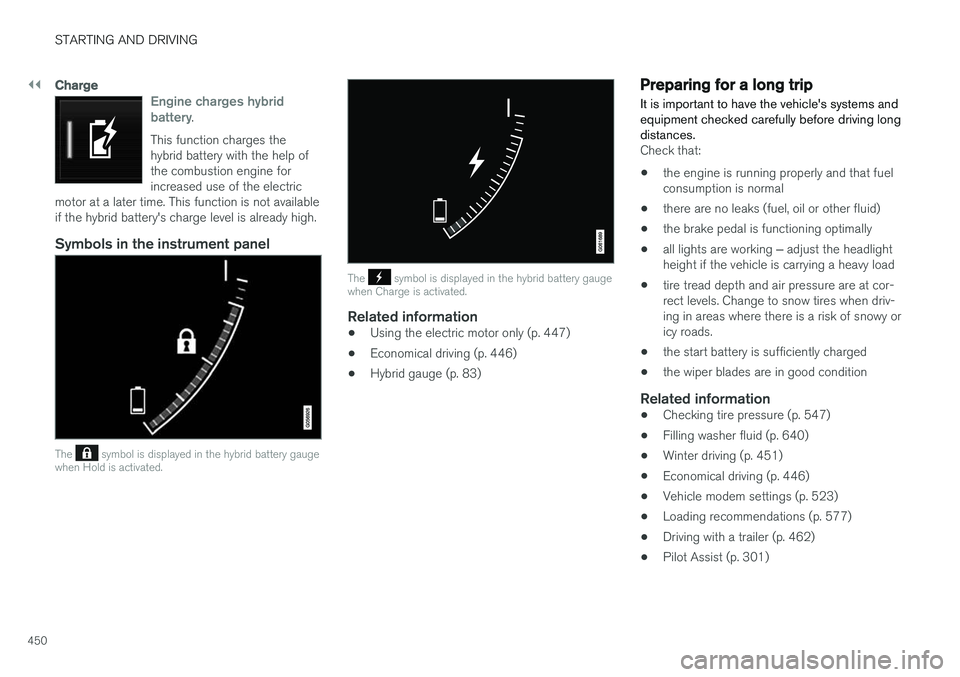
Engine charges hybrid battery.
This function charges the hybrid battery with the help ofthe combustion engine forincreased use of the electric
motor at a later time. This function is not availableif the hybrid battery's charge level is already high.
Symbols in the instrument panel
The symbol is displayed in the hybrid battery gauge
when Hold is activated.
The symbol is displayed in the hybrid battery gauge
when Charge is activated.
Related information
• Using the electric motor only (p. 447)
• Economical driving (p. 446)
• Hybrid gauge (p. 83)
Preparing for a long trip
It is important to have the vehicle's systems and equipment checked carefully before driving longdistances.
Check that:
• the engine is running properly and that fuel consumption is normal
• there are no leaks (fuel, oil or other fluid)
• the brake pedal is functioning optimally
• all lights are working
‒ adjust the headlight
height if the vehicle is carrying a heavy load
• tire tread depth and air pressure are at cor-rect levels. Change to snow tires when driv-ing in areas where there is a risk of snowy oricy roads.
• the start battery is sufficiently charged
• the wiper blades are in good condition
Related information
• Checking tire pressure (p. 547)
• Filling washer fluid (p. 640)
• Winter driving (p. 451)
• Economical driving (p. 446)
• Vehicle modem settings (p. 523)
• Loading recommendations (p. 577)
• Driving with a trailer (p. 462)
• Pilot Assist (p. 301)
Page 454 of 674
STARTING AND DRIVING
452
Driving through standing water
Driving the vehicle through a deep pool of stand- ing water on a water-covered roadway is calledfording. This must be done with great caution.
To prevent damage to the vehicle when driving through water (e.g. on flooded roads): • Do not drive in water higher than the floor of the vehicle. If possible, check the depth ofthe water at its deepest point before drivingthrough it. Be particularly careful when driv-ing through flowing water.
• Always select the
Off Road drive mode
before driving in water to ensure the gasoline engine is running.
• Do not drive faster than walking speed.
• Do not stop the vehicle in the water. Drivecarefully forward or back the vehicle out ofthe water.
• Remember that waves created by passingvehicles could cause the water level to riseabove the vehicle's floor level.
• Avoid driving through salt water to help avoidthe risk of corrosion.
CAUTION
Parts of the vehicle (e.g. engine, transmission, driveline, electrical components, etc.) can bedamaged if the vehicle is driven through waterhigher than its floor level. Damage to anycomponents caused by flooding, vapor lock orinsufficient oil is not covered under warranty. If the engine stalls while the vehicle is in water, do not attempt to restart it. Have thevehicle towed on the bed of a tow truck to aworkshop - an authorized Volvo workshop isrecommended.
When you have passed the water, press lightly on the brake pedal and check that the brakes arefunctioning properly. Water, mud, slush, etc. canmake the brake linings slippery, resulting indelayed braking effect. If the vehicle is equipped with a trailer coupling contact, clean the contact after driving in water ormud.
Related information
•
Recovery (p. 467)
• Low Speed Control (p. 443)
Opening/closing the fuel filler door A button on the instrument panel is used to unlock the fuel filler door.
An arrow next to the fuel pump symbol in the instrument panelindicates the side of the vehicleon which the fuel filler door islocated.
Page 465 of 674
STARTING AND DRIVING
* Option/accessory.463
CAUTION
•Bumper-attached trailer hitches must not be used on Volvos, nor should safetychains be attached to the bumper.
• Trailer hitches attaching to the vehiclerear axle must not be used.
• Never connect a trailer's hydraulic brakesystem directly to the vehicle brake sys-tem, nor a trailer's lighting system directlyto the vehicle lighting system. Consultyour nearest authorized Volvo retailer forcorrect installation.
• When towing a trailer, the trailer's safetychains or wire must be correctly fastenedto the attachment points provided in thetrailer hitch on the vehicle. The safetychain or wire must never be fastened toor wound around the towing ball.
NOTE
The optional detachable trailer hitch may not be available in all markets or on all models.Consult your Volvo retailer.
NOTE
Extreme weather conditions, towing a trailer, driving at high altitudes and fuel quality arefactors that significantly increase a vehicle'sfuel consumption.
Trailer weights
WARNING
Please adhere to the recommendations provi- ded for trailer weight. If the recommendationsare not followed, the vehicle and trailer maybe difficult to control during evasive maneu-vers and braking.
NOTE
The specified maximum trailer weights are those permitted by Volvo. National vehicleregulations may set additional restrictions ontrailer weight and speed. The trailer hitchesmay be certified for higher towing weightsthan the vehicle is permitted to tow.
Self-leveling suspension
*The vehicle's self-leveling system attempts to keep the vehicle at a constant level, regardless ofload (up to the maximum permitted weight).When the vehicle is stationary, the rear end of thevehicle will be slightly lowered, which is normal.
Driving in hilly terrain or hot weatherIn certain conditions, there is a risk of overheat-ing when driving with a trailer. If overheating ofthe engine and drive system is detected, a warn-ing symbol will illuminate in the instrument panelalong with a message. The automatic transmission selects the optimalgear for the current load and engine speed.
Steep inclines
Do not lock the automatic transmission into a higher gear than what the engine can handle
‒ it
is not always preferable to drive in high gears at low rpm.
Parking on a hill
1. Depress the brake pedal.
2. Apply the parking brake.3. Put the gear selector in P.
4. Release the brake pedal.Put chocks behind the wheels when the vehicle is parked on a hill with a trailer attached.
Starting on a hill
1. Depress the brake pedal. 2. Put the gear selector in D.
3. Release the parking brake.
4. Release the brake pedal and start driving.
Related information
• Trailer Stability Assist
* (p. 464)
• Checking trailer lights (p. 465)
• Towing capacity and tongue weight (p. 650)
• Overheating of engine and transmission (p. 458)
Page 467 of 674
STARTING AND DRIVING
* Option/accessory.465
Checking trailer lights
When connecting a trailer, make sure that all of the lights on the trailer are functioning beforestarting to drive.
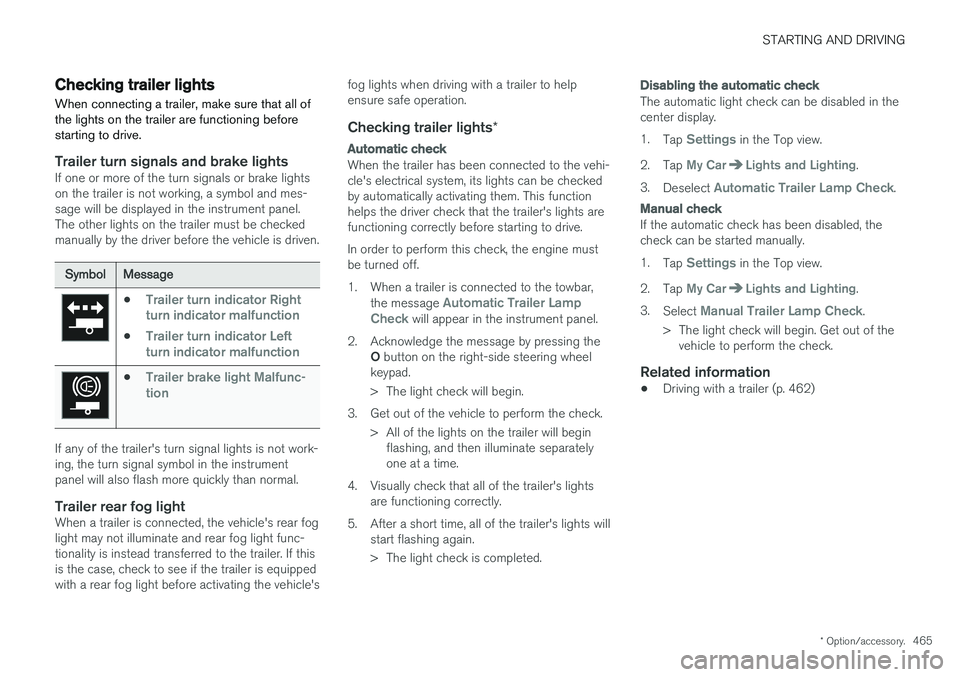
Trailer turn signals and brake lightsIf one or more of the turn signals or brake lights on the trailer is not working, a symbol and mes-sage will be displayed in the instrument panel.The other lights on the trailer must be checkedmanually by the driver before the vehicle is driven.
SymbolMessage
•Trailer turn indicator Right
turn indicator malfunction
•Trailer turn indicator Left
turn indicator malfunction
•Trailer brake light Malfunc-
tion
If any of the trailer's turn signal lights is not work- ing, the turn signal symbol in the instrumentpanel will also flash more quickly than normal.
Trailer rear fog lightWhen a trailer is connected, the vehicle's rear foglight may not illuminate and rear fog light func-tionality is instead transferred to the trailer. If thisis the case, check to see if the trailer is equippedwith a rear fog light before activating the vehicle's fog lights when driving with a trailer to helpensure safe operation.
Checking trailer lights
*
Automatic check
When the trailer has been connected to the vehi- cle's electrical system, its lights can be checkedby automatically activating them. This functionhelps the driver check that the trailer's lights arefunctioning correctly before starting to drive. In order to perform this check, the engine must be turned off.
1. When a trailer is connected to the towbar,
the message
Automatic Trailer Lamp
Check will appear in the instrument panel.
2. Acknowledge the message by pressing the O button on the right-side steering wheel
keypad.
> The light check will begin.
3. Get out of the vehicle to perform the check. > All of the lights on the trailer will beginflashing, and then illuminate separately one at a time.
4. Visually check that all of the trailer's lights are functioning correctly.
5. After a short time, all of the trailer's lights will start flashing again.
> The light check is completed.
Disabling the automatic check
The automatic light check can be disabled in the center display. 1.Tap
Settings in the Top view.
2. Tap
My CarLights and Lighting.
3. Deselect
Automatic Trailer Lamp Check.
Manual check
If the automatic check has been disabled, the check can be started manually. 1.Tap
Settings in the Top view.
2. Tap
My CarLights and Lighting.
3. Select
Manual Trailer Lamp Check.
> The light check will begin. Get out of the vehicle to perform the check.
Related information
• Driving with a trailer (p. 462)
Page 616 of 674
||
MAINTENANCE AND SERVICE
* Option/accessory.
614
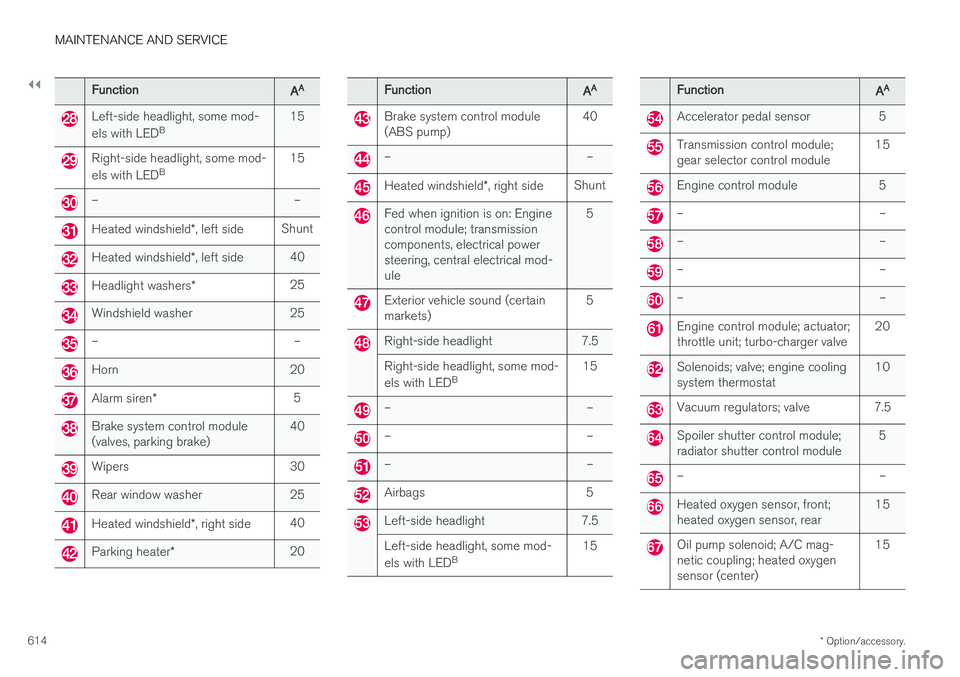
FunctionAA
Left-side headlight, some mod- els with LED B 15
Right-side headlight, some mod- els with LED
B 15
– –
Heated windshield
*, left side Shunt
Heated windshield
*, left side 40
Headlight washers
*25
Windshield washer 25
– –
Horn 20
Alarm siren
* 5
Brake system control module (valves, parking brake) 40
Wipers 30
Rear window washer 25
Heated windshield
*, right side 40
Parking heater
* 20
FunctionAA
Brake system control module (ABS pump) 40
– –
Heated windshield
*, right side Shunt
Fed when ignition is on: Engine control module; transmissioncomponents, electrical powersteering, central electrical mod-ule 5
Exterior vehicle sound (certain markets)
5
Right-side headlight 7.5 Right-side headlight, some mod- els with LED
B 15
– –
– –
– –
Airbags 5
Left-side headlight 7.5 Left-side headlight, some mod- els with LED
B 15
FunctionAA
Accelerator pedal sensor 5
Transmission control module; gear selector control module 15
Engine control module 5
– –
– –
– –
– –
Engine control module; actuator; throttle unit; turbo-charger valve20
Solenoids; valve; engine cooling system thermostat10
Vacuum regulators; valve 7.5
Spoiler shutter control module; radiator shutter control module 5
– –
Heated oxygen sensor, front; heated oxygen sensor, rear15
Oil pump solenoid; A/C mag- netic coupling; heated oxygensensor (center)15
Page 619 of 674
MAINTENANCE AND SERVICE
}}
* Option/accessory.617
Fuse pliers are provided on the inside of the fuse box cover to assist in removing and insertingfuses. There are also spaces for several extra fuses in the
distribution box in the engine compart-
ment .
Positions
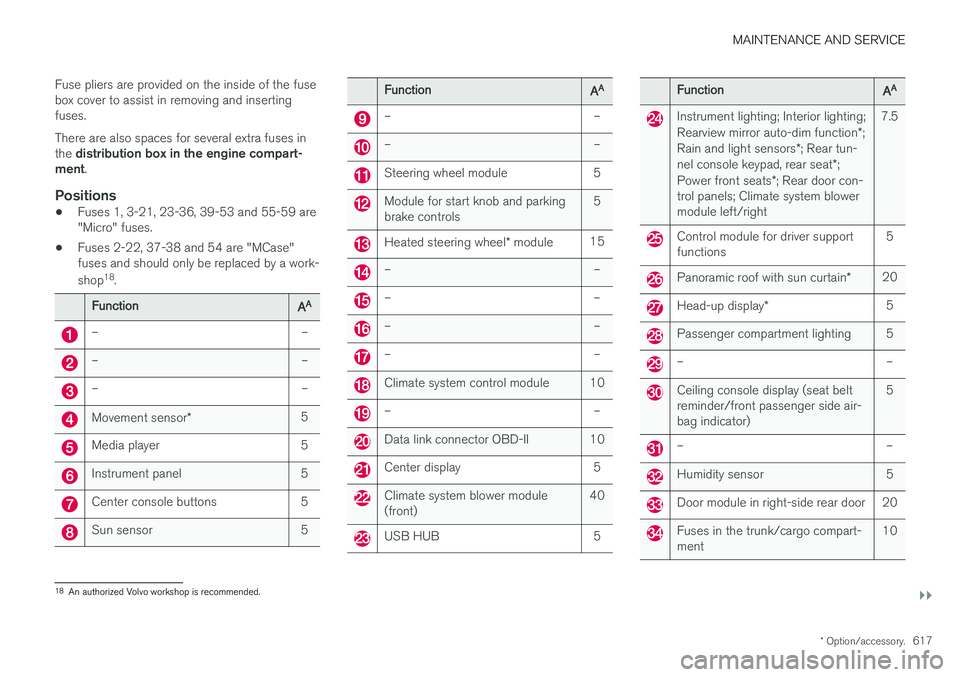
•Fuses 1, 3-21, 23-36, 39-53 and 55-59 are "Micro" fuses.
• Fuses 2-22, 37-38 and 54 are "MCase"fuses and should only be replaced by a work- shop 18
.
FunctionAA
– –
– –
– –
Movement sensor * 5
Media player 5
Instrument panel 5
Center console buttons 5
Sun sensor 5
FunctionAA
– –
– –
Steering wheel module 5
Module for start knob and parking brake controls 5
Heated steering wheel
* module 15
– –
– –
– –
– –
Climate system control module 10
– –
Data link connector OBD-II 10
Center display 5
Climate system blower module (front) 40
USB HUB 5
FunctionAA
Instrument lighting; Interior lighting; Rearview mirror auto-dim function
*;
Rain and light sensors *; Rear tun-
nel console keypad, rear seat *;
Power front seats *; Rear door con-
trol panels; Climate system blower module left/right 7.5
Control module for driver support functions
5
Panoramic roof with sun curtain
*20
Head-up display
* 5
Passenger compartment lighting 5
– –
Ceiling console display (seat belt reminder/front passenger side air-bag indicator) 5
– –
Humidity sensor 5
Door module in right-side rear door 20
Fuses in the trunk/cargo compart- ment
10
18
An authorized Volvo workshop is recommended.
Page 628 of 674
||
MAINTENANCE AND SERVICE
* Option/accessory.
626
WARNING
• Never use more than one inlay mat at a time on the driver's floor. If any other typeof floor mat is used, remove the originalmat from the driver's seat floor beforedriving. All types of mats must be securelyanchored in the attachment points in thefloor. Make sure the floor mat does notimpede the movement of the brake pedalor accelerator pedal in any way, as thiscould be a serious safety hazard.
• Volvo's floor mats are specially manufac-tured for your vehicle. They must be prop-erly secured in the attachment points inthe floor to help ensure they cannot slideand become trapped under the pedals.
After vacuuming, a specially designed textilecleaning agent should be used to remove stainson floor mats. Floor mats should be cleaned withproducts recommended by Volvo retailers.
Related information
• Cleaning the interior (p. 623)
• Cleaning the center display (p. 623)
• Cleaning fabric upholstery and ceiling liner(p. 625)
• Cleaning the seat belt (p. 625)
• Cleaning leather upholstery (p. 626) •
Cleaning the leather steering wheel(p. 627)
• Cleaning interior plastic, metal and wood sur-faces (p. 628)
Cleaning leather upholstery
Only use cleaning agents and car care products recommended by Volvo. Clean regularly andtreat stains immediately for best results. It isimportant to vacuum before using a cleaningagent.
Leather upholstery *Volvo's leather upholstery is treated to protect its original appearance. Over time, sunlight, grease,dirt, etc. could break down the protective layer.This could result in scratches and cracking. Leather upholstery is a natural product that changes and acquires a beautiful patina overtime. Regular cleaning and treatments arerequired to preserve the qualities and color of theleather. Volvo offers a comprehensive product,Volvo Leather Care Kit/Wipes, for cleaning andtreating leather upholstery that, when used asdirected, preserves the leather's protective coa-ting. For best results, Volvo recommends cleaning and applying protective cream one to four times ayear (or more as needed). Volvo Leather Care Kit951 0251 and Volvo Leather Softener 9437429 are available for purchase at Volvo retailers.
Page 633 of 674
MAINTENANCE AND SERVICE
631
Automatic car washes The vehicle should be washed as soon as it becomes dirty. This makes the vehicle easier toclean because dirt does not attach as strongly. Italso reduces the risk of scratches and keeps thevehicle looking new.
Automatic car washesAn automatic car wash is a fast and easy way to keep your vehicle clean, but it does not reach allareas of the vehicle. For best results, Volvo rec-ommends hand washing your vehicle or supple-menting automatic car washes with a hand wash.
NOTE
Volvo recommends not washing the vehicle in an automatic car wash during the first fewmonths; the paintwork on new vehicles takessome time to fully harden.
CAUTION
Before driving the vehicle into a car wash, deactivate the Automatic Braking when Sta-tionary and Automatic Parking Brake Applica-tion functions. If the functions are not deacti-vated, the brake system will seize when thevehicle is stationary and the vehicle will not beable to roll.
CAUTION
For automatic car washes in which the vehicle is pulled forward on rolling wheels:
1. Before washing the vehicle, make surethat the automatic rain sensor is deacti- vated. If it is not deactivated and inadver-tently starts, the wiper arms could bedamaged.
2. To help prevent damage from the auto- matic car wash machinery, make surethat the door mirrors are folded in, anten-nas retracted or removed, and any auxili-ary lights secured.
3. Drive into the automatic car wash.
4. Turn off the "Automatic Braking when Stationary" function using the switch in the tunnel console.
5. Turn off the "Automatic Parking Brake Application" function in the center dis-play's Top view.
6. Turn off the engine by turning the start knob in the tunnel console clockwise.Hold the knob in position for at least2 seconds.
The vehicle is now ready for the automatic carwash.
CAUTION
The system will automatically change to P
mode if the above steps are not followed. In P
mode, the wheels are locked, which they should not be when the vehicle is beingwashed in a car wash.
Related information
• Cleaning the exterior (p. 628)
• Polishing and waxing (p. 629)
• Hand washing (p. 629)
• High-pressure washing (p. 632)
• Cleaning the wiper blades (p. 632)
• Cleaning exterior plastic, rubber and trim components (p. 633)
• Cleaning rims (p. 634)
• Corrosion protection (p. 634)