tow VOLVO XC60 T8 2018 Owner´s Manual
[x] Cancel search | Manufacturer: VOLVO, Model Year: 2018, Model line: XC60 T8, Model: VOLVO XC60 T8 2018Pages: 674, PDF Size: 11.93 MB
Page 578 of 674
||
LOADING, STORAGE AND PASSENGER COMPARTMENT
* Option/accessory.
576
The illustration is generic – the design may vary.
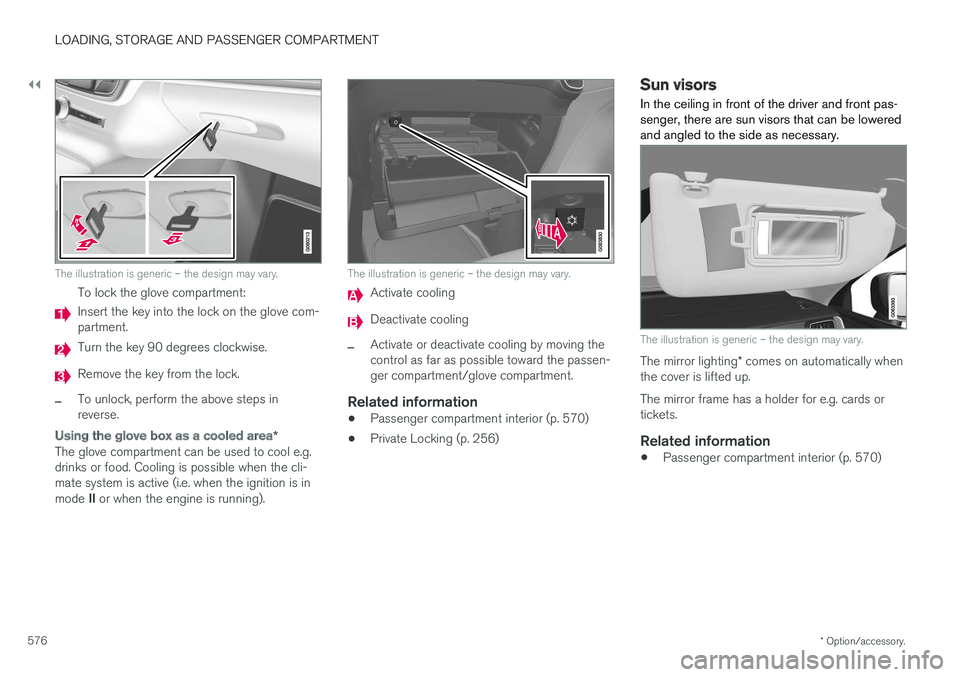
To lock the glove compartment:
Insert the key into the lock on the glove com- partment.
Turn the key 90 degrees clockwise.
Remove the key from the lock.
–To unlock, perform the above steps in reverse.
Using the glove box as a cooled area *
The glove compartment can be used to cool e.g. drinks or food. Cooling is possible when the cli-mate system is active (i.e. when the ignition is in mode II or when the engine is running).
The illustration is generic – the design may vary.
Activate cooling
Deactivate cooling
–Activate or deactivate cooling by moving the control as far as possible toward the passen-ger compartment/glove compartment.
Related information
• Passenger compartment interior (p. 570)
• Private Locking (p. 256)
Sun visors In the ceiling in front of the driver and front pas- senger, there are sun visors that can be loweredand angled to the side as necessary.
The illustration is generic – the design may vary.
The mirror lighting
* comes on automatically when
the cover is lifted up. The mirror frame has a holder for e.g. cards or tickets.
Related information
• Passenger compartment interior (p. 570)
Page 579 of 674
LOADING, STORAGE AND PASSENGER COMPARTMENT
}}
* Option/accessory.577
Cargo compartment The vehicle has a flexible cargo compartment that makes it possible to carry and secure largeobjects.
The cargo capacity of the vehicle can be consid- erably increased by folding down the rear seatbackrests. To make loading and unloading easier,the rear section of the vehicle can be raised and lowered using the level control function *. Use the
load anchoring eyelets or grocery bag holders to help secure objects in place, and the retractable cargo compartment cover * to help conceal
objects in the cargo compartment. If the vehicle is equipped with a temporary spare tire, this is secured to the cargo compartmentfloor under the cover. The towing eyelet and tiresealing system are located under the cargo com-partment floor.
Related information
• Loading recommendations (p. 577)
• Grocery bag holders (p. 579)
• Load anchoring eyelets (p. 579)
• Installing and removing the cargo compart- ment cover
* (p. 580)
Loading recommendations
There are a number of things to consider when carrying loads in or on the vehicle.
Load-carrying capacity is determined by the vehi- cle's curb weight. The total weight of all passen-gers and any installed accessories reduces thevehicle's load-carrying capacity by the corres-ponding amount.
WARNING
The vehicle's driving characteristics change depending on the weight and position of theload.
Loading in the trunk and cargo compartment
• Position objects so they are pressing against the rear seat backrests.
• Distribute the load evenly.
• Heavy objects should be positioned as lowas possible. Avoid placing heavy objects onfolded-down seat backrests.
• Cover sharp corners with a soft cloth or simi-lar to help prevent damage to the upholstery.
• Use the load anchoring eyelets and tension-ing straps or similar to secure all objects.
WARNING
In a head-on collision at a speed of 50 km/h (30 mph), an unsecured object weighing 20kg (44 pounds) can reach a projectile weightequivalent to 1000 kg (2200 pounds).
WARNING
If objects are loaded higher than the upper edge of the side windows, leave a 10 cm (4in.) space between the objects and the win-dow. Objects placed closer to this couldimpede the function of the inflatable curtainconcealed inside the headlining.
WARNING
Always secure the load. Otherwise, it may shift during heavy braking and injure people in thevehicle. Cover sharp edges and sharp corners with something soft. Turn off the engine and apply the parking brake when loading/unloading long objects.Otherwise, it is possible for the load to reachthe gear lever or gear selector and move it toa drive position – which could cause the vehi-cle to begin rolling.
Page 592 of 674
||
MAINTENANCE AND SERVICE
590
Monthly:
•Check cold tire pressure in all tires. Inspect the tires for wear.
• Check that engine coolant and other fluidlevels are between the indicated "min" and"max" markings.
• Clean interior glass surfaces with a glasscleaner and soft paper towels.
• Wipe driver information displays with a softcloth.
• Visually inspect battery terminals for corro-sion. Corrosion may indicate a loose terminalconnector, or a battery near the end of itsuseful service life. Consult your Volvo retailerfor additional information.
As needed:
Wash the car, including the undercarriage, to reduce wear that can be caused by a buildup ofdirt, and corrosion that can be caused by salt res-idues. Clean leaves and twigs from air intake vents at the base of the windshield, and from other placeswhere they may collect.
NOTE
Complete service information for qualified technicians is available online for purchase orsubscription at www.volvotechinfo.com.
Related information
•Vehicle status (p. 592)
• Scheduling service and repairs (p. 593)
• Connecting equipment to the vehicle's data link connector (p. 36)
• Technician certification (p. 37)
• Climate control system service (p. 598)
• Maintenance of the brake system (p. 422)
• Engine compartment overview (p. 599)
Data transfer between vehicle andworkshop over Wi-Fi
Volvo workshops have a designated Wi-Fi net- work for secure data transfer between your vehi-cle and the workshop. Your visit to the workshopwill be easier and more effective when diagnos-tics information and software can be transferredover the workshop's network.
When you arrive at the workshop, your technician can connect your vehicle to the workshop's Wi-Finetwork to perform troubleshooting and down-load software. For this type of communication,the vehicle only connects to the workshop's net-work. The vehicle can only be connected to thedesignated workshop networks, not to any othernetwork, e.g. your home network.
Manual connection to workshop Wi-FiManual connection is usually performed by aservice technician. Because the technician usesthe buttons on your remote key to connect thevehicle, it is important that you bring a key withbuttons when taking the vehicle in to a workshop.Pressing the lock button on the remote key threetimes will connect the vehicle to the workshop'sWi-Fi network. When the car is connected to a Wi-Fi network, the
symbol appears in the center display.
Page 604 of 674
||
MAINTENANCE AND SERVICE
602
NOTE
If the conditions for measuring oil level are not properly fulfilled (time after engine shut-down, vehicle inclination, ambient tempera- ture, etc.) the message
No value availablewill be shown in the center display. This does not mean that anything is wrong in the vehi-
cle systems.
Related information
• Engine oil (p. 600)
• Engine oil specifications (p. 652)
• Ignition modes (p. 417)
• Vehicle status (p. 592)
Refilling coolant
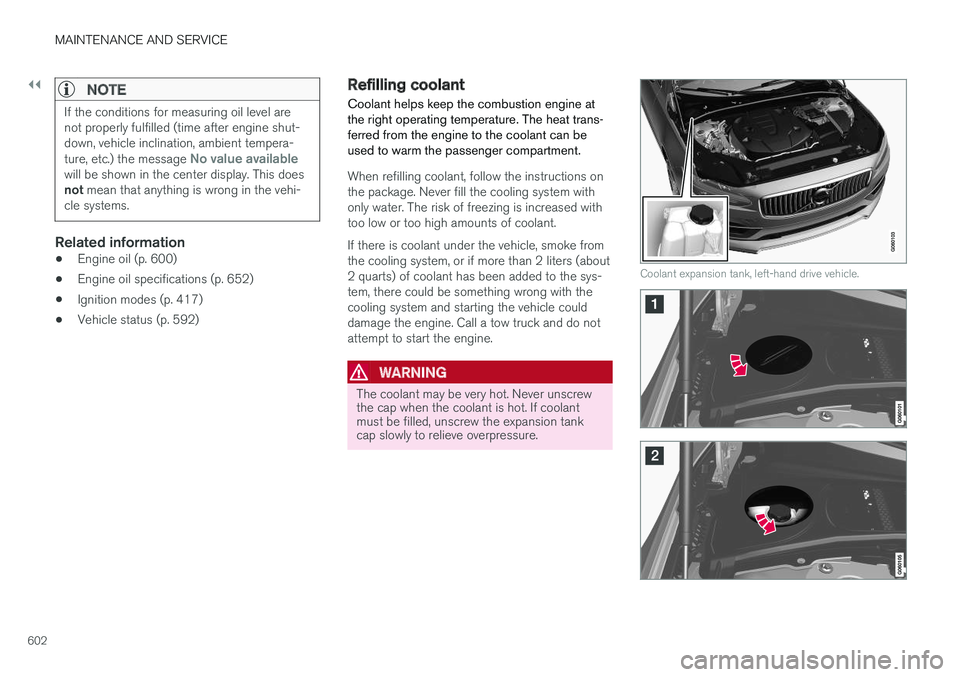
Coolant helps keep the combustion engine at the right operating temperature. The heat trans-ferred from the engine to the coolant can beused to warm the passenger compartment.
When refilling coolant, follow the instructions on the package. Never fill the cooling system withonly water. The risk of freezing is increased withtoo low or too high amounts of coolant. If there is coolant under the vehicle, smoke from the cooling system, or if more than 2 liters (about2 quarts) of coolant has been added to the sys-tem, there could be something wrong with thecooling system and starting the vehicle coulddamage the engine. Call a tow truck and do notattempt to start the engine.
WARNING
The coolant may be very hot. Never unscrew the cap when the coolant is hot. If coolantmust be filled, unscrew the expansion tankcap slowly to relieve overpressure.
Coolant expansion tank, left-hand drive vehicle.
Page 609 of 674
MAINTENANCE AND SERVICE
}}
607
Location
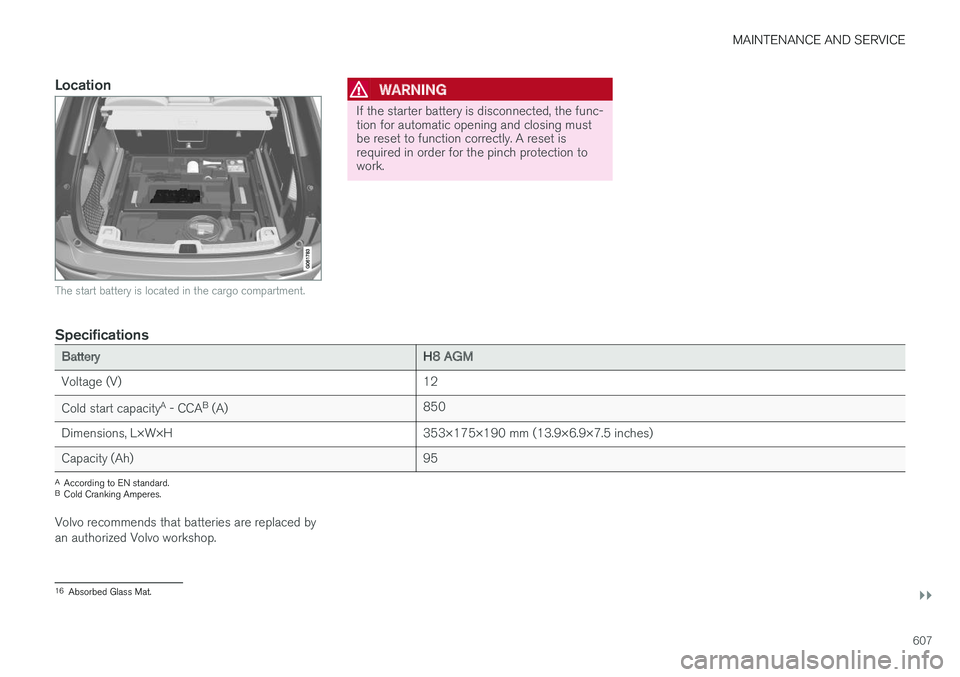
The start battery is located in the cargo compartment.
WARNING
If the starter battery is disconnected, the func- tion for automatic opening and closing mustbe reset to function correctly. A reset isrequired in order for the pinch protection towork.
Specifications
BatteryH8 AGM
Voltage (V) 12
Cold start capacity A
- CCA B
(A) 850
Dimensions, L×W×H 353×175×190 mm (13.9×6.9×7.5 inches)
Capacity (Ah) 95
A
According to EN standard.
B Cold Cranking Amperes.
Volvo recommends that batteries are replaced by an authorized Volvo workshop.
16 Absorbed Glass Mat.
Page 623 of 674
MAINTENANCE AND SERVICE
}}
* Option/accessory.621
Positions
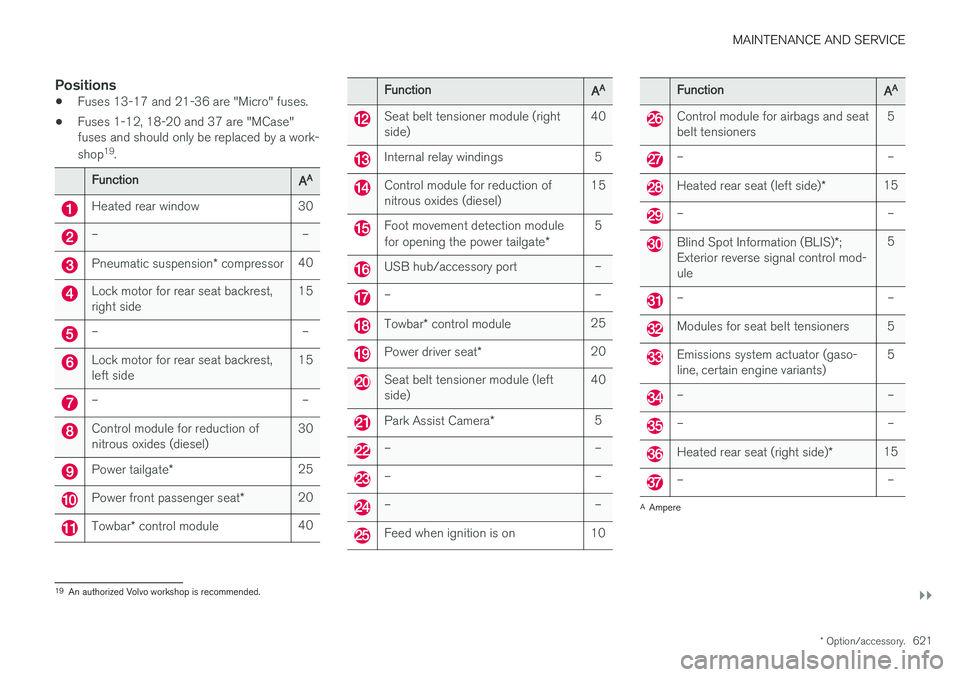
•Fuses 13-17 and 21-36 are "Micro" fuses.
• Fuses 1-12, 18-20 and 37 are "MCase" fuses and should only be replaced by a work- shop 19
.
FunctionAA
Heated rear window 30
– –
Pneumatic suspension * compressor 40
Lock motor for rear seat backrest, right side 15
– –
Lock motor for rear seat backrest, left side15
– –
Control module for reduction of nitrous oxides (diesel)30
Power tailgate
* 25
Power front passenger seat
*20
Towbar
* control module 40
FunctionAA
Seat belt tensioner module (right side) 40
Internal relay windings 5
Control module for reduction of nitrous oxides (diesel)15
Foot movement detection module for opening the power tailgate
*5
USB hub/accessory port –
– –
Towbar
* control module 25
Power driver seat
* 20
Seat belt tensioner module (left side) 40
Park Assist Camera
*5
– –
– –
– –
Feed when ignition is on 10
FunctionAA
Control module for airbags and seat belt tensioners 5
– –
Heated rear seat (left side)
*15
– –
Blind Spot Information (BLIS)
*;
Exterior reverse signal control mod- ule 5
– –
Modules for seat belt tensioners 5
Emissions system actuator (gaso- line, certain engine variants)
5
– –
– –
Heated rear seat (right side)
*15
– –
A
Ampere
19 An authorized Volvo workshop is recommended.
Page 626 of 674
||
MAINTENANCE AND SERVICE
* Option/accessory.
624
CAUTION
The microfiber cloth must be free of sand and dirt when cleaning the center display.
CAUTION
When cleaning the center display, apply only light pressure to the screen. Pressing toohard could damage the screen.
CAUTION
Do not spray liquid or corrosive chemicals directly onto the center display. Do not usewindow cleaners, cleaning agents, aerosolsprays, solvents, alcohol, ammonia or deter-gents that contain abrasives. Never use abrasive cloths, paper towels or tis- sue paper, as these may scratch the centerdisplay.
Related information
• Cleaning the interior (p. 623)
• Cleaning fabric upholstery and ceiling liner (p. 625)
• Cleaning the seat belt (p. 625)
• Cleaning floor mats and inlay mats (p. 625)
• Cleaning leather upholstery (p. 626) •
Cleaning the leather steering wheel(p. 627)
• Cleaning interior plastic, metal and wood sur-faces (p. 628)
Cleaning the head-up display
*
Carefully wipe the glass covering the head-up display unit with a clean and dry microfiber cloth.If necessary, the cloth may be slightly moistened.
Never use strong stain removers. For difficult cleaning conditions, a special cleaning agent canbe purchased at a Volvo retailer.
Related information
• Activating and deactivating the head-up dis- play
* (p. 140)
• Head-up display
* (p. 138)
Page 629 of 674
MAINTENANCE AND SERVICE
627
Cleaning the leather upholstery
1. Apply the leather cleaner to a damp spongeand squeeze it until the cleaner foams.
2. Move the sponge in circular motions to apply the foam to the stain.
3. Dampen the stain thoroughly with the sponge. Let the sponge absorb the stain and do not rub.
4. Dry the stain using a soft towel and let the leather dry completely.
Protecting the leather upholstery
1. Apply a small amount of leather protector toa cloth and then apply the protector to the leather using light circular movements.
2. Let it dry for approximately 20 minutes. Protecting the leather upholstery makes it better able to withstand sunlight's harmful UV rays.
Related information
• Cleaning the interior (p. 623)
• Cleaning the center display (p. 623)
• Cleaning fabric upholstery and ceiling liner(p. 625)
• Cleaning the seat belt (p. 625)
• Cleaning floor mats and inlay mats (p. 625)
• Cleaning the leather steering wheel(p. 627)
• Cleaning interior plastic, metal and wood sur-faces (p. 628)
Cleaning the leather steering wheel
Only use cleaning agents and car care products recommended by Volvo. Clean regularly andtreat stains immediately for best results. It isimportant to vacuum before using a cleaningagent.
Leather steering wheelLeather needs to breathe. Never cover the leather steering wheel with a plastic protector.Volvo Leather Care Kit 951 0251 and LeatherSoftener 943 7429 are recommended for clean-ing the leather steering wheel. First, remove dirt,dust, etc. with a damp sponge or cloth.
CAUTION
Sharp objects such as rings could damage the leather on the steering wheel.
If there are stains on the steering wheel:
Type 1 (ink, wine, coffee, milk, sweat or blood)
–Use a soft cloth or sponge. Wipe the steering wheel using a solution of 5% ammonia. Forblood stains, mix approximately 2 dl(1 cup) ofwater with 25 g (one ounce) of salt and wipethe stain.
Type 2 (grease, oil, sauces or chocolate)
1. Same procedure as for Type 1 stains.
2. Finish by wiping the wheel with an absorbent paper or towel. Type 3
(dry dirt or dust)
1. Remove the dirt/dust using a soft brush.
2. Same procedure as for Type 1 stains.
Related information
• Cleaning the interior (p. 623)
• Cleaning the center display (p. 623)
• Cleaning fabric upholstery and ceiling liner (p. 625)
• Cleaning the seat belt (p. 625)
• Cleaning floor mats and inlay mats (p. 625)
• Cleaning leather upholstery (p. 626)
• Cleaning interior plastic, metal and wood sur-faces (p. 628)
Page 639 of 674
MAINTENANCE AND SERVICE
}}
637
It is important to use the right color.
Related information
•
Paintwork (p. 635)
• Touching up minor paint damage (p. 635)
Changing rear window wipers
The wiper blades help remove water from the windshield and rear window. Along with thewasher fluid, they clean the glass and helpimprove visibility while driving. The windshieldand rear window wiper blades can be replaced.
Changing rear window wipers
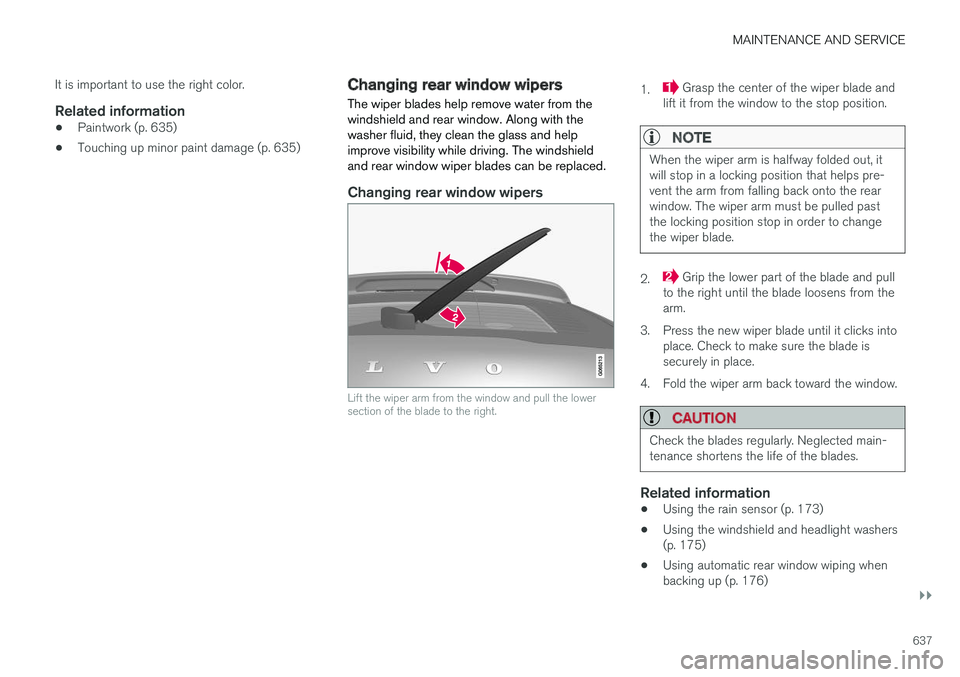
Lift the wiper arm from the window and pull the lower section of the blade to the right.
1. Grasp the center of the wiper blade and
lift it from the window to the stop position.
NOTE
When the wiper arm is halfway folded out, it will stop in a locking position that helps pre-vent the arm from falling back onto the rearwindow. The wiper arm must be pulled pastthe locking position stop in order to changethe wiper blade.
2. Grip the lower part of the blade and pull
to the right until the blade loosens from the arm.
3. Press the new wiper blade until it clicks into place. Check to make sure the blade issecurely in place.
4. Fold the wiper arm back toward the window.
CAUTION
Check the blades regularly. Neglected main- tenance shortens the life of the blades.
Related information
• Using the rain sensor (p. 173)
• Using the windshield and headlight washers (p. 175)
• Using automatic rear window wiping whenbacking up (p. 176)
Page 640 of 674
MAINTENANCE AND SERVICE
* Option/accessory.
638 •
Heated windshield washer nozzles
* (p. 173)
• Using the rain sensor's memory function (p. 174)
• Using the rear window wiper/washer(p. 176)
• Filling washer fluid (p. 640)
• Windshield wipers in the service position(p. 639)
• Replacing windshield wiper blades (p. 638)
• Using the windshield wipers (p. 172)
Replacing windshield wiper blades
The wiper blades help remove water from the windshield and rear window. Along with thewasher fluid, they clean the glass and helpimprove visibility while driving. The windshieldand rear window wiper blades can be replaced.
Replacing wiper blades
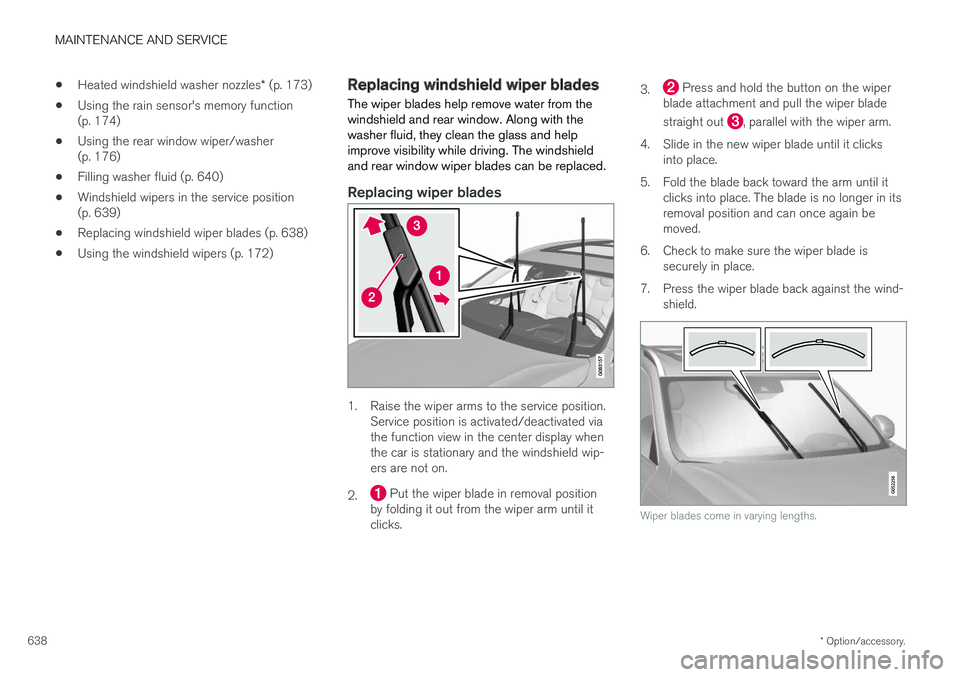
1. Raise the wiper arms to the service position. Service position is activated/deactivated via the function view in the center display whenthe car is stationary and the windshield wip-ers are not on.
2.
Put the wiper blade in removal position
by folding it out from the wiper arm until it clicks. 3.
Press and hold the button on the wiper
blade attachment and pull the wiper blade straight out
, parallel with the wiper arm.
4. Slide in the new wiper blade until it clicks into place.
5. Fold the blade back toward the arm until it clicks into place. The blade is no longer in its removal position and can once again bemoved.
6. Check to make sure the wiper blade is securely in place.
7. Press the wiper blade back against the wind- shield.
Wiper blades come in varying lengths.