ESP VOLVO XC60 T8 2018 Owner´s Manual
[x] Cancel search | Manufacturer: VOLVO, Model Year: 2018, Model line: XC60 T8, Model: VOLVO XC60 T8 2018Pages: 674, PDF Size: 11.93 MB
Page 370 of 674
||
DRIVER SUPPORT
* Option/accessory.
368
NOTE
The function uses the vehicle's camera unit, which has some general limitations – see thesection "Camera unit limitations".
NOTE
The function uses the vehicle's radar unit, which has some general limitations – see thesection "Radar unit limitations".
Related information
• Steering assistance at risk of collision (p. 363)
• Speed-dependent steering wheel resistance(p. 262)
Steering assistance during collision
risks from behind
*
If you become distracted and do not notice your vehicle starting to veer out of the lane whileanother vehicle is approaching from behind or isin your vehicle's blind spot, this sub-function canhelp provide assistance.
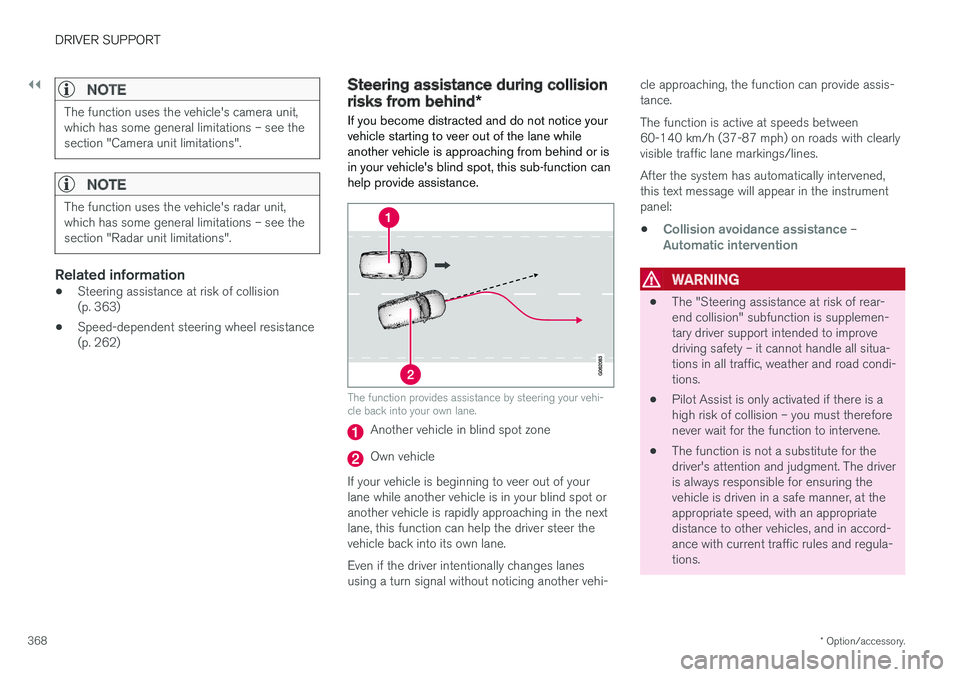
The function provides assistance by steering your vehi- cle back into your own lane.
Another vehicle in blind spot zone
Own vehicle
If your vehicle is beginning to veer out of your lane while another vehicle is in your blind spot oranother vehicle is rapidly approaching in the next lane, this function can help the driver steer the vehicle back into its own lane. Even if the driver intentionally changes lanes using a turn signal without noticing another vehi- cle approaching, the function can provide assis-tance. The function is active at speeds between 60-140 km/h (37-87 mph) on roads with clearlyvisible traffic lane markings/lines. After the system has automatically intervened, this text message will appear in the instrumentpanel:
•
Collision avoidance assistance –Automatic intervention
WARNING
• The "Steering assistance at risk of rear- end collision" subfunction is supplemen-tary driver support intended to improvedriving safety – it cannot handle all situa-tions in all traffic, weather and road condi-tions.
• Pilot Assist is only activated if there is ahigh risk of collision – you must thereforenever wait for the function to intervene.
• The function is not a substitute for thedriver's attention and judgment. The driveris always responsible for ensuring thevehicle is driven in a safe manner, at theappropriate speed, with an appropriatedistance to other vehicles, and in accord-ance with current traffic rules and regula-tions.
Page 374 of 674
DRIVER SUPPORT
* Option/accessory.
372
Park Assist *
The Park Assist function can help the driver
when maneuvering in tight spaces by indicating distances to obstacles using audible signals andgraphics in the center display.
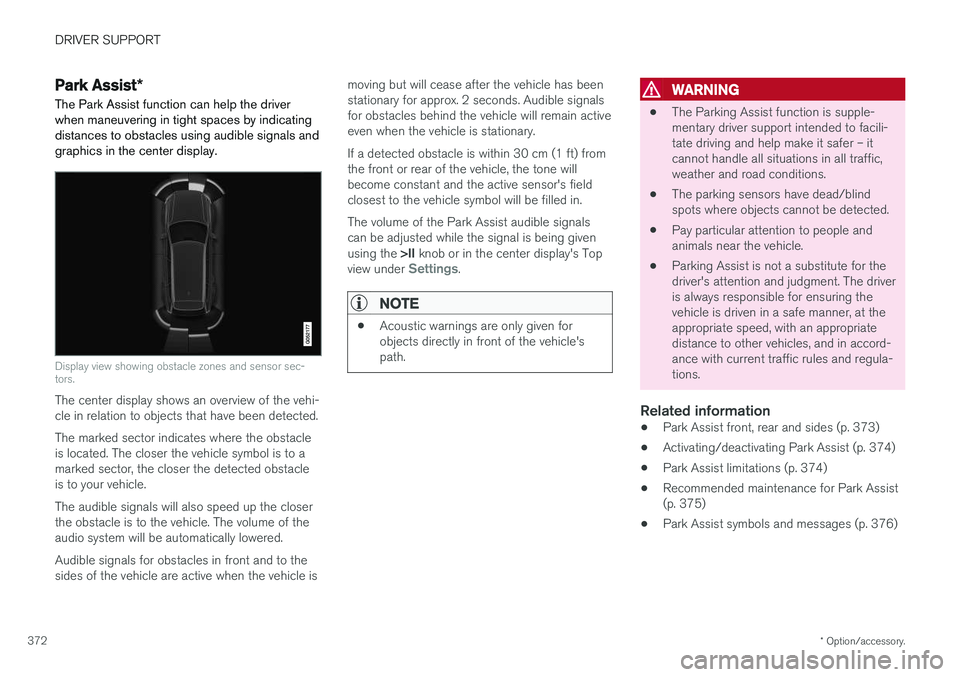
Display view showing obstacle zones and sensor sec- tors.
The center display shows an overview of the vehi- cle in relation to objects that have been detected. The marked sector indicates where the obstacle is located. The closer the vehicle symbol is to amarked sector, the closer the detected obstacleis to your vehicle. The audible signals will also speed up the closer the obstacle is to the vehicle. The volume of theaudio system will be automatically lowered. Audible signals for obstacles in front and to the sides of the vehicle are active when the vehicle is moving but will cease after the vehicle has beenstationary for approx. 2 seconds. Audible signalsfor obstacles behind the vehicle will remain activeeven when the vehicle is stationary. If a detected obstacle is within 30 cm (1 ft) from the front or rear of the vehicle, the tone willbecome constant and the active sensor's fieldclosest to the vehicle symbol will be filled in. The volume of the Park Assist audible signals can be adjusted while the signal is being given using the
>II knob or in the center display's Top
view under
Settings.
NOTE
• Acoustic warnings are only given for objects directly in front of the vehicle'spath.
WARNING
•The Parking Assist function is supple- mentary driver support intended to facili-tate driving and help make it safer – itcannot handle all situations in all traffic,weather and road conditions.
• The parking sensors have dead/blindspots where objects cannot be detected.
• Pay particular attention to people andanimals near the vehicle.
• Parking Assist is not a substitute for thedriver's attention and judgment. The driveris always responsible for ensuring thevehicle is driven in a safe manner, at theappropriate speed, with an appropriatedistance to other vehicles, and in accord-ance with current traffic rules and regula-tions.
Related information
•Park Assist front, rear and sides (p. 373)
• Activating/deactivating Park Assist (p. 374)
• Park Assist limitations (p. 374)
• Recommended maintenance for Park Assist(p. 375)
• Park Assist symbols and messages (p. 376)
Page 379 of 674
DRIVER SUPPORT
* Option/accessory.377
Park Assist Camera *
The Park Assist Camera can help provide the driver when maneuvering in tight spaces by alert-ing the driver to obstacles using the camerascreen and graphics in the center display.
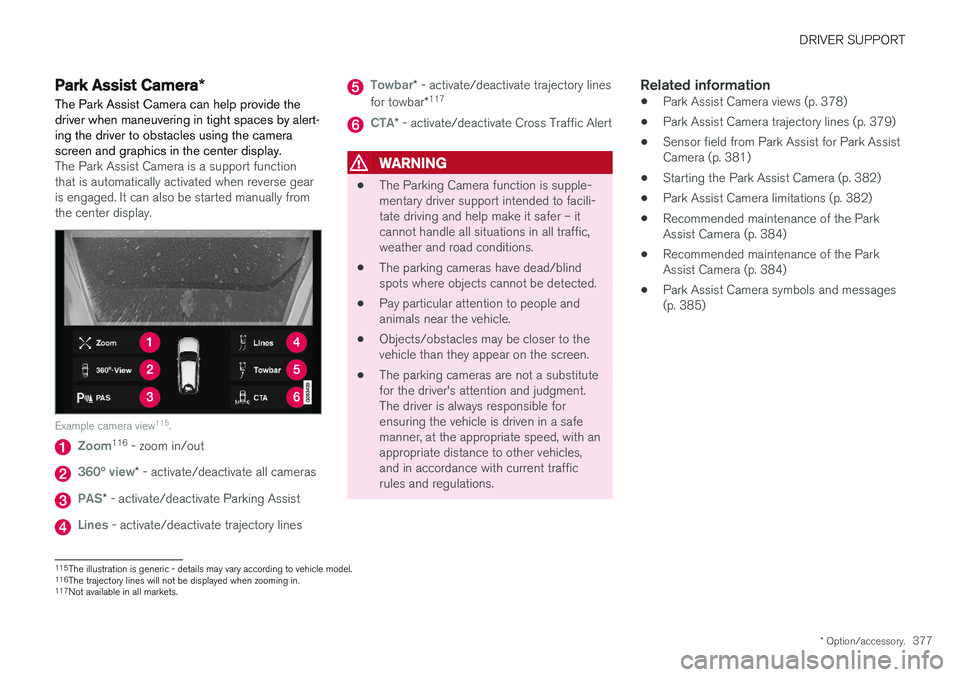
The Park Assist Camera is a support function that is automatically activated when reverse gearis engaged. It can also be started manually fromthe center display.
Example camera view 115
.
Zoom116
- zoom in/out
360° view* - activate/deactivate all cameras
PAS* - activate/deactivate Parking Assist
Lines - activate/deactivate trajectory lines
Towbar* - activate/deactivate trajectory lines
for towbar *117
CTA*
- activate/deactivate Cross Traffic Alert
WARNING
• The Parking Camera function is supple- mentary driver support intended to facili-tate driving and help make it safer – itcannot handle all situations in all traffic,weather and road conditions.
• The parking cameras have dead/blindspots where objects cannot be detected.
• Pay particular attention to people andanimals near the vehicle.
• Objects/obstacles may be closer to thevehicle than they appear on the screen.
• The parking cameras are not a substitutefor the driver's attention and judgment.The driver is always responsible forensuring the vehicle is driven in a safemanner, at the appropriate speed, with anappropriate distance to other vehicles,and in accordance with current trafficrules and regulations.
Related information
•Park Assist Camera views (p. 378)
• Park Assist Camera trajectory lines (p. 379)
• Sensor field from Park Assist for Park AssistCamera (p. 381)
• Starting the Park Assist Camera (p. 382)
• Park Assist Camera limitations (p. 382)
• Recommended maintenance of the ParkAssist Camera (p. 384)
• Recommended maintenance of the ParkAssist Camera (p. 384)
• Park Assist Camera symbols and messages(p. 385)
115
The illustration is generic - details may vary according to vehicle model.
116 The trajectory lines will not be displayed when zooming in.
117 Not available in all markets.
Page 388 of 674
DRIVER SUPPORT
* Option/accessory.
386
Park Assist Pilot *
Park Assist Pilot (PAP 123
) helps the driver pull
into and out of parking spaces.
PAP first checks whether there is sufficient space and then steers the car into the space. The center display uses symbols, graphics and messages to inform the driver of what steps needto be taken and when.
WARNING
• The PAP function is supplementary driver support intended to facilitate driving andhelp make it safer – it cannot handle allsituations in all traffic, weather and roadconditions.
• Pay particular attention to people andanimals near the vehicle.
• PAP is not a substitute for the driver'sattention and judgment. The driver isalways responsible for ensuring the vehi-cle is driven in a safe manner, at theappropriate speed, with an appropriatedistance to other vehicles, and in accord-ance with current traffic rules and regula-tions.
NOTE
The PAP function measures the space and steers the vehicle – the driver's role is to:
• keep close watch of the area around thevehicle
• follow the instructions on the center dis-play
• change gears (reverse/forward) – a"ping" sound indicates when the drivershould change gears
• regulate and maintain a safe speed
• apply the brakes and stop.
Related information
•Types of parking with Park Assist Pilot (p. 386)
• Parking with Park Assist Pilot (p. 387)
• Leaving a parking space with Park AssistPilot (p. 390)
• Park Assist Pilot
* limitations (p. 391)
• Recommended maintenance for Park AssistPilot (p. 393)
• Park Assist Pilot
* messages (p. 394)
Types of parking with Park AssistPilot
Park Assist Pilot (PAP 124
) can be used for the
following types of parking.
123 Park Assist Pilot
124 Park Assist Pilot
Page 390 of 674
||
DRIVER SUPPORT
388
NOTE
The distance between the vehicle and parking spots should be 0.5-1.5 meters (1.6-5.0 ft)when PAP is looking for parking.
ParkingPAP parks the vehicle using the following steps:
1. The system searches for and measurespotential parking spaces.
2. The vehicle is steered while it is backing into the parking space.
3. The vehicle is positioned in the parking space (the driver may be prompted to shift gears).
Searching for and measuring potential
parking spots
The function can be activated in the center display's Functionview. It can also be accessed from the camera views.
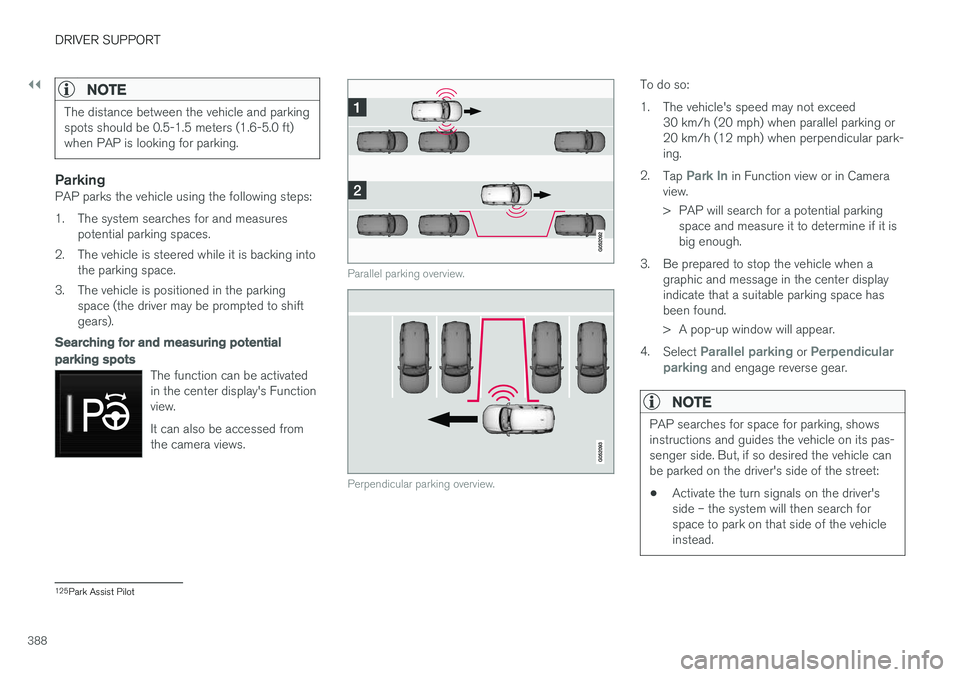
Parallel parking overview.
Perpendicular parking overview.
To do so:
1. The vehicle's speed may not exceed30 km/h (20 mph) when parallel parking or 20 km/h (12 mph) when perpendicular park-ing.
2. Tap
Park In in Function view or in Camera
view.
> PAP will search for a potential parking space and measure it to determine if it is big enough.
3. Be prepared to stop the vehicle when a graphic and message in the center displayindicate that a suitable parking space hasbeen found.
> A pop-up window will appear.
4. Select
Parallel parking or Perpendicular
parking and engage reverse gear.
NOTE
PAP searches for space for parking, shows instructions and guides the vehicle on its pas-senger side. But, if so desired the vehicle canbe parked on the driver's side of the street: • Activate the turn signals on the driver's side – the system will then search forspace to park on that side of the vehicleinstead.
125
Park Assist Pilot
Page 393 of 674
DRIVER SUPPORT
}}
* Option/accessory.391
Park Assist Pilot * limitations
Park Assist Pilot PAP 126
may not be able to
detect all conditions in all situations and func- tionality may therefore be limited.WARNING
• The PAP function is supplementary driver support intended to facilitate driving andhelp make it safer – it cannot handle allsituations in all traffic, weather and roadconditions.
• Pay particular attention to people andanimals near the vehicle.
• Bear in mind that the front end of thevehicle may swing out towards oncomingtraffic during the parking maneuver.
• Objects situated higher than the detec-tion area of the sensors are not includedwhen the parking maneuver is calculated,which could cause PAP to swing into theparking space too early. Such parkingspaces should be avoided for this reason.
• PAP is not a substitute for the driver'sattention and judgment. The driver isalways responsible for ensuring the vehi-cle is driven in a safe manner, at theappropriate speed, with an appropriatedistance to other vehicles, and in accord-ance with current traffic rules and regula-tions.
The driver should be aware of the following limi-tations for Park Assist Pilot:
The parking sequence is cancelledA parking sequence will be cancelled if:
• the driver moves the steering wheel
• the vehicle's speed exceeds 7 km/h (4 mph)
• the driver taps
Cancel in the center display
• when the anti-lock brakes or the Electronic stability control are engaged - e.g. when awheel loses grip on a slippery road
• when the power steering works at reduced power - e.g. during cooling due to overheat- ing (see section "Speed-dependent steeringforce").
A message in the center display will explain whythe parking sequence was cancelled.
CAUTION
Under certain circumstances, PAP may not be able to find parking spaces – one reason maybe that the sensors are disrupted by externalsound sources that emit the same ultrasonicfrequencies that the system works with. Examples of such sources include horns, wet tires on asphalt, pneumatic brakes, exhaustnoise from motorcycles, etc.
126 Park Assist Pilot
Page 394 of 674
||
DRIVER SUPPORT
* Option/accessory.
392
NOTE
Dirt, ice and snow covering the sensors reduce their function and can make measure-ment impossible.
Driver responsibilityThe driver should keep in mind that PAP is a parking aid ‒ not an infallible fully automatic sys-
tem. The driver must always be prepared to take control and cancel a parking sequence if neces-sary. There are a number of things to keep in mind when parking, including:
• The driver is always responsible for determin-ing if the space suggested by PAP is suita-ble for parking.
• Do not use PAP when using snow chains ora temporary spare tire.
• Do not use PAP if there are any objects pro-truding from the vehicle.
• Heavy rain or snowfall may inhibit PAP's abil-ity to accurately measure a parking space.
• While searching and measuring the parkingspace, PAP may be unable to detect objectslocated far into the space.
• PAP may not suggest parking spaces onnarrow streets if it does not detect sufficientspace for maneuvering the vehicle. •
Use approved tires 127
inflated to the correct
tire pressure because this affects PAP's abil-ity to provide parking assistance.
• PAP's function is based on the way the vehi-cles are parked behind and in front of yourparking space. If they are, for example,parked too close to the curb, there is a riskthat your vehicle's tires or wheel rims couldbe damaged by the curb during the parkingprocedure.
• Perpendicular parking spaces may not bedetected or may be suggested unnecessarilyif a parked vehicle is sticking out more thanother parked vehicles.
• PAP is intended to provide parking assis-tance on straight streets, not sections ofstreet with sharp curves or bends. Alwaysmake sure that your vehicle is parallel to rel-evant parking spaces when PAP is measur-ing the parking space.
CAUTION
Switching to another approved wheel and/or tire dimension could change the tire circum-ference, which would then require the PAPsystem to be updated. Consult a workshop –an authorized Volvo workshop is recom-mended.
Related information
•
Park Assist Pilot
* (p. 386)
• Speed-dependent steering wheel resistance (p. 262)
127
"Approved tires" refers to tires of the same type and make as the vehicle's original, factory-installed tires.
Page 398 of 674
HYBRID INFORMATION
396
General information about TwinEngine
Twin Engine vehicles are driven just like any other vehicle, but certain functions differ from avehicle powered exclusively by gasoline. Theelectric motor powers the vehicle primarily at lowspeeds; the gasoline engine is used at higherspeeds or during more active driving.
The instrument panel displays Twin Engine-spe- cific information - charging information, selecteddrive mode, distance to discharged battery andhybrid battery charge level. Different drive modes can be selected while driv- ing, e.g. electric power only or, if more power isneeded, a combination of electric and gasolinepower. The vehicle calculates the optimal combi-nation of driveability, driving experience, environ-mental impact and fuel economy for the selecteddrive mode. In order to function optimally, the hybrid battery (and its electrical drive systems) and the gasolineengine (and its drive systems) must be at thecorrect operating temperature. Battery capacitycan be considerably reduced if the battery is toocold or too hot. Preconditioning prepares thevehicle's drive systems and passenger compart-ment before driving to help reduce both wear andenergy consumption. It also helps increase thehybrid battery's range. The hybrid battery, which powers the electric motor, is recharged using the charging cable. Itcan also be recharged during light braking and through engine braking in gear position
B. The
combustion engine can also help recharge thehybrid battery.
Important
No electrical current
Keep in mind that if there is no electrical current to the vehicle, i.e. the ignition is switched off orthe start battery is discharged, certain functionssuch as brakes, power steering, etc. will not work.
WARNING
If the vehicle does not have electrical current and both the electric motor and the gasolineengine are switched off, the brakes cannot beused to stop the vehicle.
Towing not permitted
Never tow a Twin Engine vehicle behind another vehicle, as this could damage the electric motor.
Exterior engine noise
WARNING
Keep in mind that the vehicle does not emit any engine noise when using the electricmotor and may therefore be difficult to detectfor children, pedestrians, cyclists or animals.This is especially true at low speeds, e.g. inparking lots.
High-voltage electrical current
WARNING
Several components in the vehicle work with high voltage that can be hazardous in case ofan incorrect procedure. These componentsand any orange wiring in the vehicle may onlybe handled by trained and qualified Volvoservice technicians.
Do not touch anything that is not clearly descri- bed in this Owner's Manual.
Related information
• Charging the hybrid battery (p. 397)
• Hybrid gauge (p. 83)
• Drive modes (p. 435)
• Starting and stopping preconditioning(p. 222)
• Hybrid battery (p. 609)
• Factors affecting electric motor range(p. 448)
• Gear selector positions for automatic trans-missions (p. 429)
• Towing using a towline (p. 466)
Page 417 of 674
STARTING AND DRIVING
}}
415
In some situations, such as in cold weather or if the hybrid battery's charge level is too low, thegasoline engine will start instead. The vehicle should not be started with the charg- ing cable connected. However, if the cable can-not be pulled out or if the vehicle incorrectlydetects a cable that is not connected, the vehiclecan be started using an override procedure:
1. Press the brake pedal and turn the start
knob clockwise.
2.
Charge cable Remove before start will
appear in the instrument panel.
3. Turn the start knob clockwise again. 4.
Removed? Turn and hold start knob 7swill appear. Turn the knob clockwise and hold it for 7 seconds to start the vehicle.
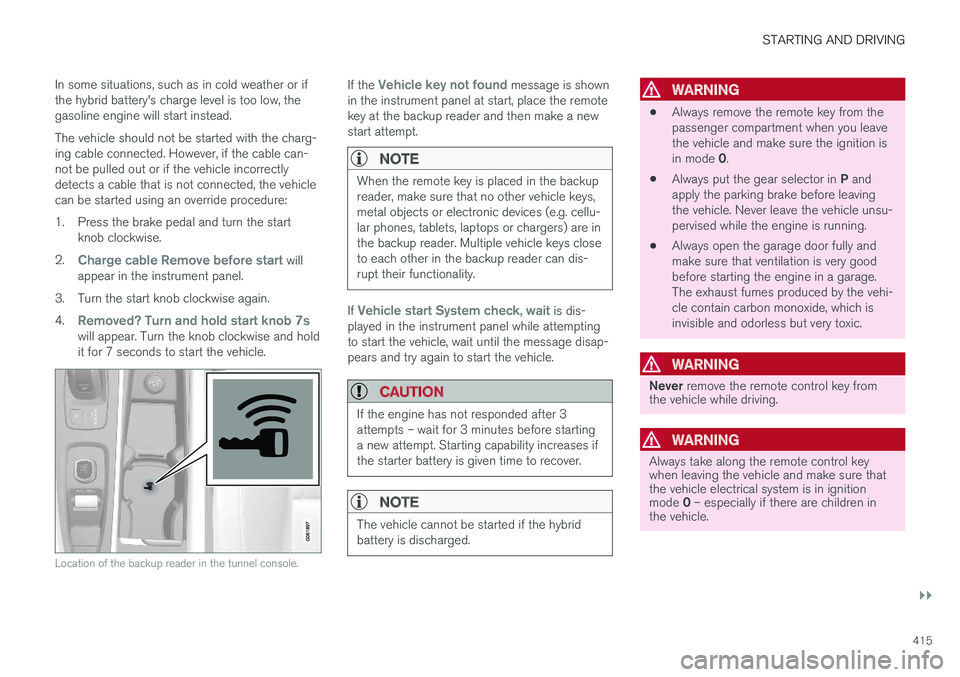
Location of the backup reader in the tunnel console.
If the Vehicle key not found message is shown
in the instrument panel at start, place the remote key at the backup reader and then make a newstart attempt.
NOTE
When the remote key is placed in the backup reader, make sure that no other vehicle keys,metal objects or electronic devices (e.g. cellu-lar phones, tablets, laptops or chargers) are inthe backup reader. Multiple vehicle keys closeto each other in the backup reader can dis-rupt their functionality.
If Vehicle start System check, wait is dis-
played in the instrument panel while attempting to start the vehicle, wait until the message disap-pears and try again to start the vehicle.
CAUTION
If the engine has not responded after 3 attempts – wait for 3 minutes before startinga new attempt. Starting capability increases ifthe starter battery is given time to recover.
NOTE
The vehicle cannot be started if the hybrid battery is discharged.
WARNING
• Always remove the remote key from the passenger compartment when you leavethe vehicle and make sure the ignition is in mode
0.
• Always put the gear selector in
P and
apply the parking brake before leaving the vehicle. Never leave the vehicle unsu-pervised while the engine is running.
• Always open the garage door fully andmake sure that ventilation is very goodbefore starting the engine in a garage.The exhaust fumes produced by the vehi-cle contain carbon monoxide, which isinvisible and odorless but very toxic.
WARNING
Never
remove the remote control key from
the vehicle while driving.
WARNING
Always take along the remote control key when leaving the vehicle and make sure thatthe vehicle electrical system is in ignition mode 0 – especially if there are children in
the vehicle.
Page 434 of 674
STARTING AND DRIVING
* Option/accessory.
432
Shiftlock The automatic transmission's shiftlock function helps prevent inadvertently moving the gearselector between different positions.
Automatic shiftlockThe automatic shiftlock has a separate safety system.
From Park - P
To move the gear selector from the P position,
the brake pedal must be depressed and the igni- tion in mode II.
From Neutral - N
If the gear selector is in N and the vehicle has
been stationary for at least 3 seconds (with or without the engine running), the gear selector willbe locked in that position. To move the gear selector from N to another
gear, the brake pedal must be depressed and the ignition in mode II.
Messages in the instrument panelIf the gear selector is locked in position, a mes- sage will appear in the instrument panel, e.g.
Gear lever Press brake pedal to activate
gear lever.
There is no mechanical shiftlock function.
Related information
• Gear selector positions for automatic trans- missions (p. 429)
The kickdown function
Kickdown is used when maximum acceleration is needed, e.g. when passing.
When the accelerator pedal is depressed all the way to the floor (past the normal full acceleratorposition), the transmission will automaticallyengage kickdown, i.e. immediately shift down to alower gear. If the accelerator pedal is released from the kick- down position, the transmission will automaticallyshift up again.
Safety function
The transmission control module is equipped with a downshift protection feature to help prevent theengine from overheating. In some conditions, the transmission will prevent downshifting/kickdown if this would lead to suchhigh engine speed (rpm) that the engine couldbe damaged. If the driver still attempts downshift-ing or kickdown at a high rpm, nothing will hap-pen and the original gear will remain selected. With kickdown, the vehicle can downshift one or more steps at a time depending on the enginespeed. The vehicle upshifts when the engine rea-ches its maximum rpm to prevent engine dam-age.
Related information
• Gear selector positions for automatic trans-missions (p. 429)
Gear indicator
*
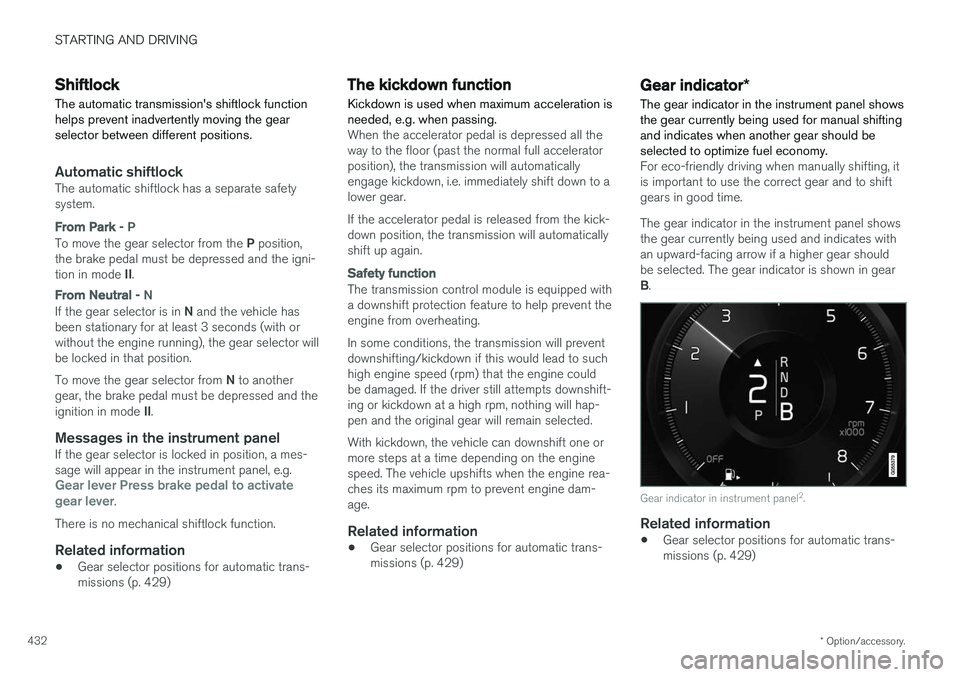
The gear indicator in the instrument panel shows the gear currently being used for manual shiftingand indicates when another gear should beselected to optimize fuel economy.
For eco-friendly driving when manually shifting, it is important to use the correct gear and to shiftgears in good time. The gear indicator in the instrument panel shows the gear currently being used and indicates withan upward-facing arrow if a higher gear shouldbe selected. The gear indicator is shown in gear B .
Gear indicator in instrument panel 2
.
Related information
• Gear selector positions for automatic trans- missions (p. 429)