instrument panel VOLVO XC60 TWIN ENGINE 2019 Owners Manual
[x] Cancel search | Manufacturer: VOLVO, Model Year: 2019, Model line: XC60 TWIN ENGINE, Model: VOLVO XC60 TWIN ENGINE 2019Pages: 695, PDF Size: 14.96 MB
Page 477 of 695
STARTING AND DRIVING
}}
475
Emission controls
Three-way catalytic converter
Keep your engine properly tuned. Certainengine malfunctions, particularly involving theelectrical, fuel or distributor ignition systems,may cause unusually high three-way catalyticconverter temperatures. Do not continue tooperate your vehicle if you detect enginemisfire, noticeable loss of power or otherunusual operating conditions, such as engineoverheating or backfiring. A properly tunedengine will help avoid malfunctions thatcould damage the three-way catalytic con-verter.
Do not park your vehicle over combustiblematerials, such as grass or leaves, which cancome into contact with the hot exhaust sys-tem and cause such materials to ignite undercertain wind and weather conditions.
Excessive starter cranking (in excess of oneminute), or an intermittently firing or floodedengine can cause three-way catalytic con-verter or exhaust system overheating.
Remember that tampering or unauthorizedmodifications to the engine, the Engine Con-trol Module, or the vehicle may be illegal andcan cause three-way catalytic converter orexhaust system overheating. This includes:altering fuel injection settings or compo-nents, altering emission system components
or location or removing components, and/orrepeated use of leaded fuel.
NOTE
Unleaded fuel is required for vehicles withthree-way catalytic converters.
Heated oxygen sensors
The heated oxygen sensors monitor the oxygencontent of the exhaust gases. Readings are fedinto a control module that continuously monitorsengine functions and controls fuel injection. Theratio of fuel to air into the engine is continuouslyadjusted for efficient combustion to help reduceharmful emissions.
Related information
Octane rating (p. 473)
Fuel (p. 472)
Overheating of engine andtransmission
In demanding driving conditions, such as drivingin mountainous areas or hot weather, there is arisk of the engine or transmission overheating,especially when carrying heavy loads.
Engine power may be temporarily limited.
Remove any auxiliary lights mounted in frontof the grille when driving in hot weather.
If the temperature in the engine's coolingsystem becomes too high, a warning symbolwill appear in the instrument panel along withthe message Engine temperature Hightemperature Stop safely. Pull over to asafe location and let the engine idle for a fewminutes to cool down.
If the message Engine temperature Hightemperature Turn off engine or Enginecoolant Level low, turn off engine is dis-played, stop the vehicle and turn off theengine.
If the transmission begins to overheat, analternative gear shifting program will beselected. An integrated protective functionwill also be activated, the warning symbol willilluminate and the message Transmissionwarm Reduce speed to lowertemperature or Transmission hot Stopsafely, wait for cooling will be displayed inthe instrument panel. Follow the recommen-dations given by reducing speed or stopping
Page 478 of 695
||
STARTING AND DRIVING
476
the vehicle safely and letting the engine idlefor a few minutes to let the transmissioncool.
If the vehicle begins to overheat, the air con-ditioning may be temporarily switched off.
After a prolonged period of driving indemanding conditions, do not turn off theengine immediately after stopping.
NOTE
It is normal for the engine's cooling fan tooperate for a short time after the engine isswitched off.
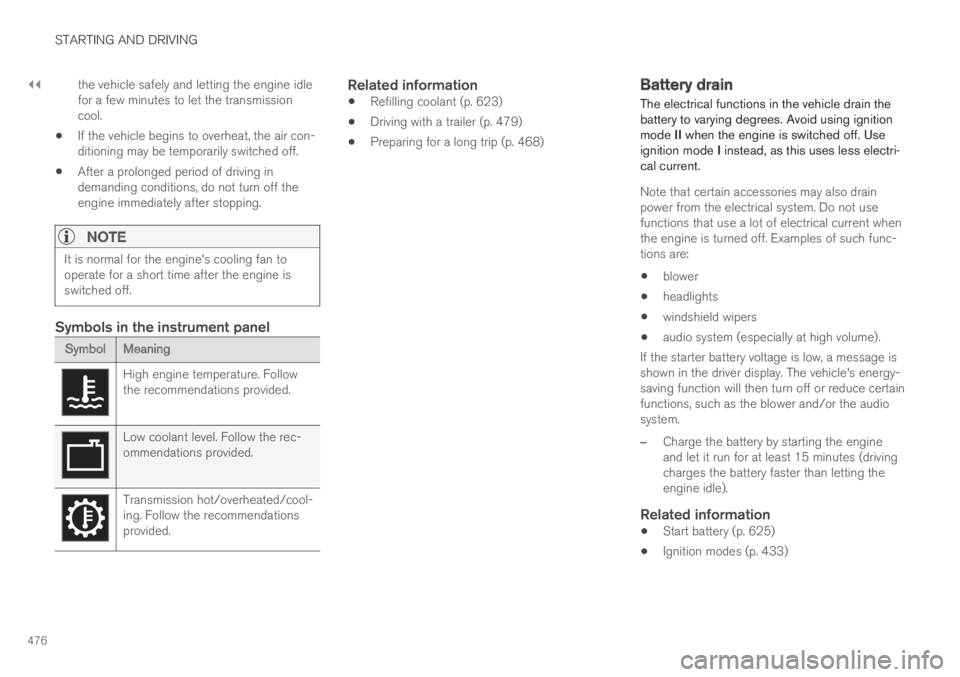
Symbols in the instrument panel
SymbolMeaning
High engine temperature. Followthe recommendations provided.
Low coolant level. Follow the rec-ommendations provided.
Transmission hot/overheated/cool-ing. Follow the recommendationsprovided.
Related information
Refilling coolant (p. 623)
Driving with a trailer (p. 479)
Preparing for a long trip (p. 468)
Battery drain
The electrical functions in the vehicle drain thebattery to varying degrees. Avoid using ignitionmode II when the engine is switched off. Useignition mode I instead, as this uses less electri-cal current.
Note that certain accessories may also drainpower from the electrical system. Do not usefunctions that use a lot of electrical current whenthe engine is turned off. Examples of such func-tions are:
blower
headlights
windshield wipers
audio system (especially at high volume).
If the starter battery voltage is low, a message isshown in the driver display. The vehicle's energy-saving function will then turn off or reduce certainfunctions, such as the blower and/or the audiosystem.
–Charge the battery by starting the engineand let it run for at least 15 minutes (drivingcharges the battery faster than letting theengine idle).
Related information
Start battery (p. 625)
Ignition modes (p. 433)
Page 479 of 695
STARTING AND DRIVING
}}
477
Jump starting using another battery
If the start battery is discharged, current fromanother battery can be used to start the vehicle.
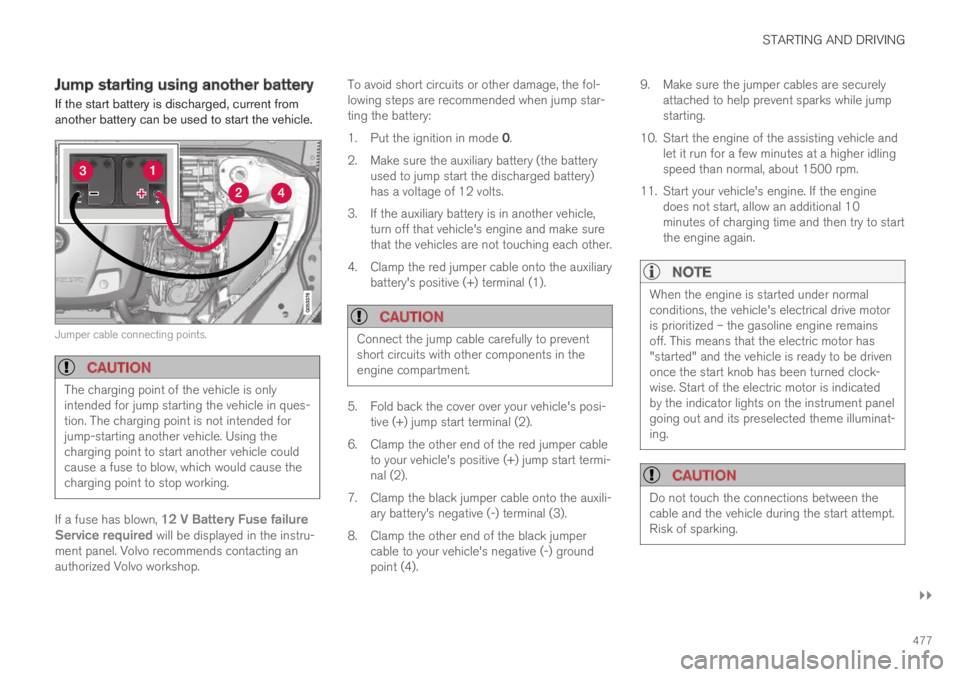
Jumper cable connecting points.
CAUTION
The charging point of the vehicle is onlyintended for jump starting the vehicle in ques-tion. The charging point is not intended forjump-starting another vehicle. Using thecharging point to start another vehicle couldcause a fuse to blow, which would cause thecharging point to stop working.
If a fuse has blown, 12 V Battery Fuse failureService required will be displayed in the instru-ment panel. Volvo recommends contacting anauthorized Volvo workshop.
To avoid short circuits or other damage, the fol-lowing steps are recommended when jump star-ting the battery:
1.Put the ignition in mode 0.
2.Make sure the auxiliary battery (the batteryused to jump start the discharged battery)has a voltage of 12 volts.
3. If the auxiliary battery is in another vehicle,turn off that vehicle's engine and make surethat the vehicles are not touching each other.
4. Clamp the red jumper cable onto the auxiliarybattery's positive (+) terminal (1).
CAUTION
Connect the jump cable carefully to preventshort circuits with other components in theengine compartment.
5. Fold back the cover over your vehicle's posi-tive (+) jump start terminal (2).
6.Clamp the other end of the red jumper cableto your vehicle's positive (+) jump start termi-nal (2).
7. Clamp the black jumper cable onto the auxili-ary battery's negative (-) terminal (3).
8. Clamp the other end of the black jumpercable to your vehicle's negative (-) groundpoint (4).
9. Make sure the jumper cables are securelyattached to help prevent sparks while jumpstarting.
10. Start the engine of the assisting vehicle andlet it run for a few minutes at a higher idlingspeed than normal, about 1500 rpm.
11. Start your vehicle's engine. If the enginedoes not start, allow an additional 10minutes of charging time and then try to startthe engine again.
NOTE
When the engine is started under normalconditions, the vehicle's electrical drive motoris prioritized – the gasoline engine remainsoff. This means that the electric motor has"started" and the vehicle is ready to be drivenonce the start knob has been turned clock-wise. Start of the electric motor is indicatedby the indicator lights on the instrument panelgoing out and its preselected theme illuminat-ing.
CAUTION
Do not touch the connections between thecable and the vehicle during the start attempt.Risk of sparking.
Page 482 of 695
||
STARTING AND DRIVING
* Option/accessory.480
Follow applicable regulations regarding per-mitted speed and weight.
Drive slowly when towing a trailer up a longand steep incline.
The maximum trailer weights given only applyto altitudes up to 1000 meters (3280 feet)above sea level. At higher altitudes, enginepower (and thus the vehicle's climbing ability)is decreased due to the reduced air density,and the maximum trailer weight must there-fore be reduced. The weight of the vehicleand trailer must be decreased by 10% foreach additional 1000 m (3280 feet) or partthereof.
Avoid driving with a trailer on inclines of morethan 12%.
Avoid overloading and other incorrect use.
The trailer's brakes must be balanced withthe vehicle's brakes to help ensure safestops (follow applicable local regulations).
NOTE
To facilitate towing a trailer in a vehicle equip-ped with pneumatic suspension*, select: the
Suspension ControlDynamic setting inIndividual drive mode.
CAUTION
Bumper-attached trailer hitches must notbe used on Volvos, nor should safetychains be attached to the bumper.
Trailer hitches attaching to the vehiclerear axle must not be used.
Never connect a trailer's hydraulic brakesystem directly to the vehicle brake sys-tem, nor a trailer's lighting system directlyto the vehicle lighting system. Consultyour nearest authorized Volvo retailer forcorrect installation.
When towing a trailer, the trailer's safetychains or wire must be correctly fastenedto the attachment points provided in thetrailer hitch on the vehicle. The safetychain or wire must never be fastened toor wound around the towing ball.
NOTE
The optional detachable trailer hitch may notbe available in all markets or on all models.Consult your Volvo retailer.
NOTE
Extreme weather conditions, towing a trailer,driving at high altitudes and fuel quality arefactors that significantly increase a vehicle'sfuel consumption.
Trailer weights
WARNING
Please adhere to the recommendations provi-ded for trailer weight. If the recommendationsare not followed, the vehicle and trailer maybe difficult to control during evasive maneu-vers and braking.
NOTE
The specified maximum trailer weights arethose permitted by Volvo. National vehicleregulations may set additional restrictions ontrailer weight and speed. The trailer hitchesmay be certified for higher towing weightsthan the vehicle is permitted to tow.
Self-leveling suspension *
The vehicle's self-leveling system attempts tokeep the vehicle at a constant level, regardless ofload (up to the maximum permitted weight).When the vehicle is stationary, the rear end of thevehicle will be slightly lowered, which is normal.
Driving in hilly terrain or hot weather
In certain conditions, there is a risk of overheat-ing when driving with a trailer. If overheating ofthe engine and drive system is detected, a warn-ing symbol will illuminate in the instrument panelalong with a message.
Page 484 of 695
||
STARTING AND DRIVING
* Option/accessory.482
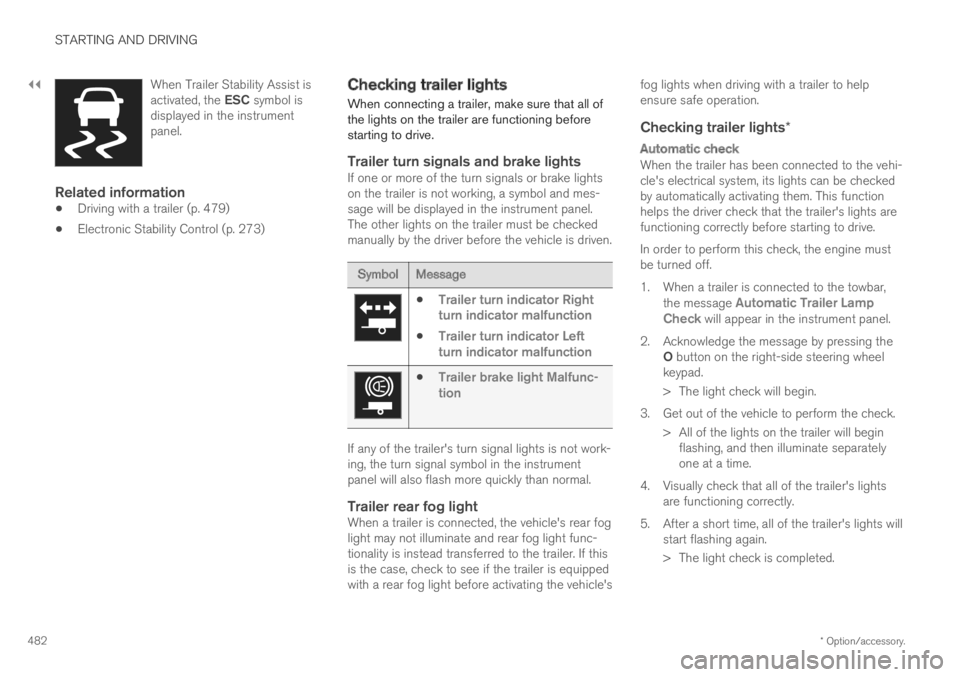
When Trailer Stability Assist isactivated, the ESC symbol isdisplayed in the instrumentpanel.
Related information
Driving with a trailer (p. 479)
Electronic Stability Control (p. 273)
Checking trailer lights
When connecting a trailer, make sure that all ofthe lights on the trailer are functioning beforestarting to drive.
Trailer turn signals and brake lights
If one or more of the turn signals or brake lightson the trailer is not working, a symbol and mes-sage will be displayed in the instrument panel.The other lights on the trailer must be checkedmanually by the driver before the vehicle is driven.
SymbolMessage
Trailer turn indicator Rightturn indicator malfunction
Trailer turn indicator Leftturn indicator malfunction
Trailer brake light Malfunc-tion
If any of the trailer's turn signal lights is not work-ing, the turn signal symbol in the instrumentpanel will also flash more quickly than normal.
Trailer rear fog light
When a trailer is connected, the vehicle's rear foglight may not illuminate and rear fog light func-tionality is instead transferred to the trailer. If thisis the case, check to see if the trailer is equippedwith a rear fog light before activating the vehicle's
fog lights when driving with a trailer to helpensure safe operation.
Checking trailer lights *
Automatic check
When the trailer has been connected to the vehi-cle's electrical system, its lights can be checkedby automatically activating them. This functionhelps the driver check that the trailer's lights arefunctioning correctly before starting to drive.
In order to perform this check, the engine mustbe turned off.
1. When a trailer is connected to the towbar,the message Automatic Trailer LampCheck will appear in the instrument panel.
2.Acknowledge the message by pressing theO button on the right-side steering wheelkeypad.
> The light check will begin.
3. Get out of the vehicle to perform the check.
> All of the lights on the trailer will beginflashing, and then illuminate separatelyone at a time.
4. Visually check that all of the trailer's lightsare functioning correctly.
5. After a short time, all of the trailer's lights willstart flashing again.
> The light check is completed.
Page 500 of 695
AUDIO, MEDIA AND INTERNET
498
Changing waveband and radio station(p. 498)
Storing radio favorites (p. 499)
Radio settings (p. 500)
Voice control for radio and media (p. 148)
Changing waveband and radiostation
Instructions for changing wavebands, wavebandlists and radio stations in the selected list areprovided here.
Changing wavebands
Swipe from App view on the center display andselect the desired waveband (e.g. FM) or openthe App menu in the instrument panel with theright-side steering wheel keypad and make yourselection there.
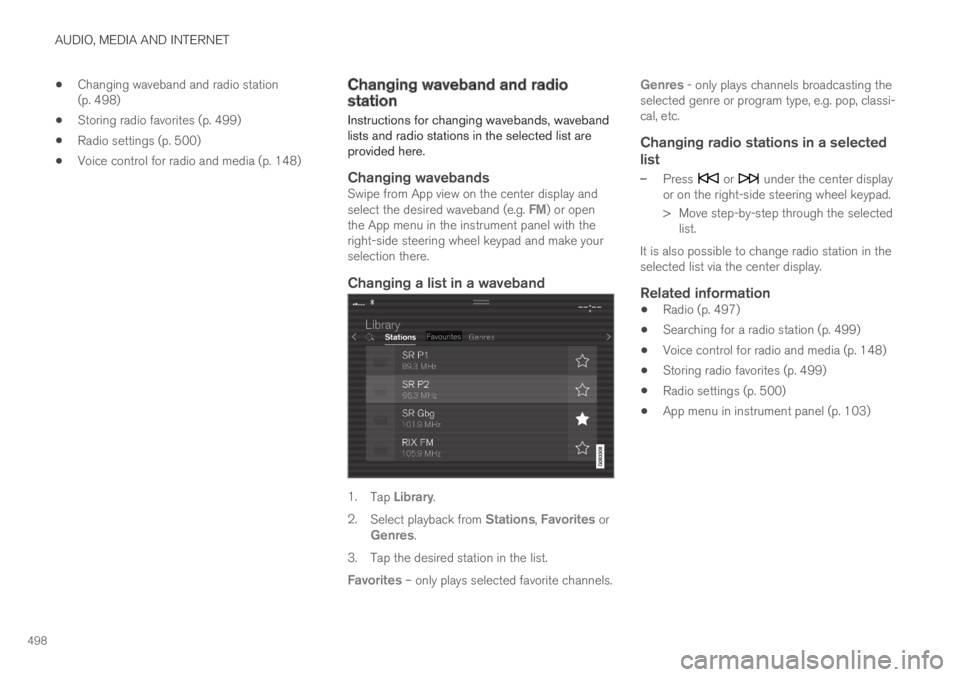
Changing a list in a waveband
1.Tap Library.
2.Select playback from Stations, Favorites orGenres.
3.Tap the desired station in the list.
Favorites – only plays selected favorite channels.
Genres - only plays channels broadcasting theselected genre or program type, e.g. pop, classi-cal, etc.
Changing radio stations in a selected
list
–Press or under the center displayor on the right-side steering wheel keypad.
>Move step-by-step through the selectedlist.
It is also possible to change radio station in theselected list via the center display.
Related information
Radio (p. 497)
Searching for a radio station (p. 499)
Voice control for radio and media (p. 148)
Storing radio favorites (p. 499)
Radio settings (p. 500)
App menu in instrument panel (p. 103)
Page 502 of 695
AUDIO, MEDIA AND INTERNET
* Option/accessory.500
Voice control for radio and media (p. 148)
Radio settings (p. 500)
App menu in instrument panel (p. 103)
Radio settings
There are a number of different radio functionsthat can be activated and deactivated.
Canceling a traffic message
A current broadcast (e.g. a traffic message) can
be temporarily interrupted by pressing in theright-side steering wheel keypad or tappingCancel in the center display.
Activating and deactivating radio
functions
Pull down Top view and select SettingsMedia and the desired waveband to see availablefunctions.
FM Radio
HD Radio FM: HD Radio™ Technology:makes it possible to achieve a sound qualitycomparable with a CD.
Show Broadcast Information: showsinformation on program content, artists, etc.
Freeze Program Name: select to stop theprogram service name from scrolling continu-ously. Instead it freezes after 20 seconds.
SiriusXM ®
Satellite radio *
Pull down Top view and select Settings
MediaSiriusXM to show a list of availableoptions.
Related information
Radio (p. 497)
Settings for SiriusXM® Satellite radio*(p. 507)
Symbols in the center display status bar(p. 124)
Page 517 of 695
AUDIO, MEDIA AND INTERNET
* Option/accessory.515
CD *
1. Insert a CD.
2.Open the CD app from App view.
3.Select the track you would like to play.
> Playback will begin.
USB flash drive
1. Inset a USB flash drive.
2.Open the USB app from App view.
3.Select the track you would like to play.
> Playback will begin.
MP3 player and iPod ®
NOTE
To start playback from an iPod, the iPod appmust be used (not USB).
When an iPod is used as source, the car'saudio and media system has a menu struc-ture similar to the iPod player's own menustructure.
1. Connect a media source.
2.Start playback in the connected mediasource.
3.Open the app (iPod, USB) from App view.
>Playback will begin.
Bluetooth-connected device
1. Activate Bluetooth in the media source.
2. Connect a media source.
3. Start playback in the connected mediasource.
4.Open the Bluetooth app from App view.
>Playback will begin.
Media with Internet connection
Medial playback from apps with Internet connec-tion:
1. Connect the vehicle to the Internet.
2. Open the app from the App view.
> Playback will begin.
Read the separate section on how to downloadapps.
Video
1. Connect a media source.
2.Open the USB app from App view.
3.Tap the title you would like to play.
> Playback will begin.
Apple CarPlay
CarPlay is described in a separate section.
Android Auto
Android Auto is described in a separate section.
Related information
Handling the App menu in the instrumentpanel (p. 104)
Radio (p. 497)
Controlling and changing media (p. 516)
Connecting a device via the USB port(p. 521)
Connecting a device via Bluetooth®
(p. 520)
Download apps (p. 495)
Internet-connected vehicle* (p. 537)
Video (p. 518)
Apple® CarPlay®* (p. 523)
Android Auto* (p. 526)
Voice control for radio and media (p. 148)
Compatible file formats for media (p. 522)
Page 525 of 695
AUDIO, MEDIA AND INTERNET
}}
* Option/accessory.523
Apple® CarPlay®*
With CarPlay, you can listen to music, makephone calls, get driving instructions, send/receive messages and use Siri, all while remain-ing focused on driving.
CarPlay works with selectApple devices. If the car doesnot already support CarPlay,this can be retrofitted. Contacta Volvo retailer to installCarPlay.
Information about supported apps and compati-ble phones is available on the Apple website:www.apple.com/ios/carplay/. Using apps that arenot compatible with CarPlay could cause the con-nection between iPhone and the vehicle to belost. Please note that Volvo is not responsible forthe content of CarPlay.
When using map navigation via CarPlay, guidancewill only be shown on the center display and notin the instrument panel or head-up display.
CarPlay apps can be controlled from the centerdisplay, a phone or with the right-side steeringwheel keypad (for certain functions). The appscan also be voice-controlled using Siri. Press and
hold the button on the steering wheel tostart voice control with Siri. Press briefly to acti-vate the vehicle's own voice control system. If Siri
cuts off too soon, press and hold the 6 but-ton on the steering wheel.
By using Apple CarPlay you acknowledgethe following: Apple CarPlay is a serviceprovided by Apple Inc. under its terms andconditions. Volvo Cars is thus notresponsible for Apple CarPlay or itsfeatures/applications. When using AppleCarPlay, certain information from your car(including its position) is transferred to youriPhone. In relation to Volvo Cars, you arefully responsible for your and any othersperson
Page 528 of 695
AUDIO, MEDIA AND INTERNET
* Option/accessory.526
Android Auto*
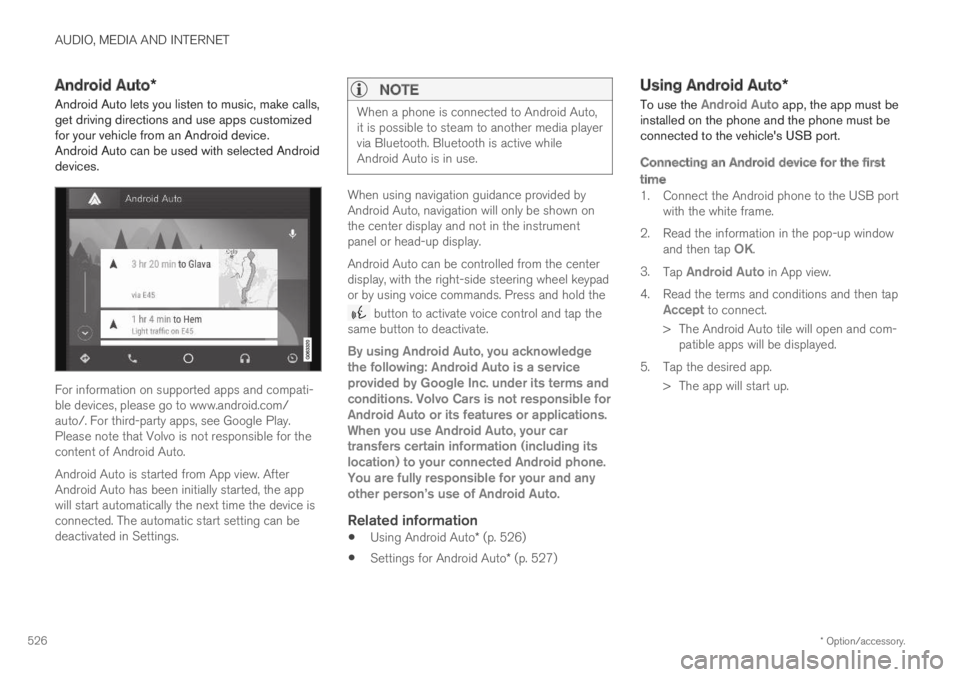
Android Auto lets you listen to music, make calls,get driving directions and use apps customizedfor your vehicle from an Android device.Android Auto can be used with selected Androiddevices.
For information on supported apps and compati-ble devices, please go to www.android.com/auto/. For third-party apps, see Google Play.Please note that Volvo is not responsible for thecontent of Android Auto.
Android Auto is started from App view. AfterAndroid Auto has been initially started, the appwill start automatically the next time the device isconnected. The automatic start setting can bedeactivated in Settings.
NOTE
When a phone is connected to Android Auto,it is possible to steam to another media playervia Bluetooth. Bluetooth is active whileAndroid Auto is in use.
When using navigation guidance provided byAndroid Auto, navigation will only be shown onthe center display and not in the instrumentpanel or head-up display.
Android Auto can be controlled from the centerdisplay, with the right-side steering wheel keypador by using voice commands. Press and hold the
button to activate voice control and tap thesame button to deactivate.
By using Android Auto, you acknowledgethe following: Android Auto is a serviceprovided by Google Inc. under its terms andconditions. Volvo Cars is not responsible forAndroid Auto or its features or applications.When you use Android Auto, your cartransfers certain information (including itslocation) to your connected Android phone.You are fully responsible for your and anyother person