climate control VOLVO XC60 TWIN ENGINE 2019 Owner's Manual
[x] Cancel search | Manufacturer: VOLVO, Model Year: 2019, Model line: XC60 TWIN ENGINE, Model: VOLVO XC60 TWIN ENGINE 2019Pages: 695, PDF Size: 14.96 MB
Page 208 of 695
||
CLIMATE CONTROL
206
Related information
Climate (p. 200)
Adjusting air distribution (p. 206)
Opening, closing and directing air vents(p. 207)
Air distribution options (p. 209)
Adjusting air distribution
Air distribution can be adjusted manually if nee-ded.
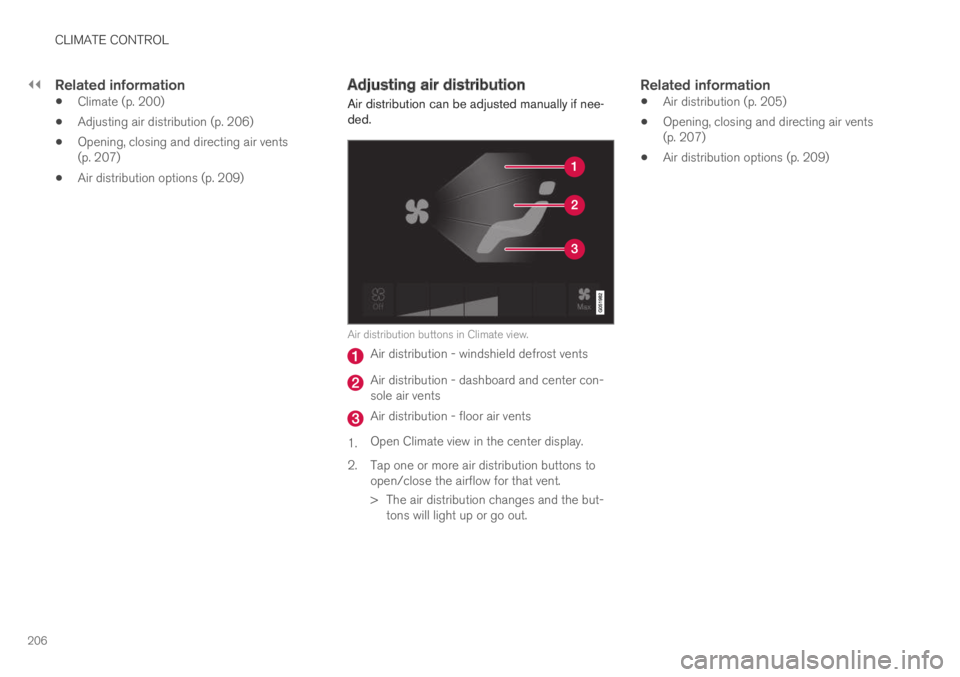
Air distribution buttons in Climate view.
Air distribution - windshield defrost vents
Air distribution - dashboard and center con-sole air vents
Air distribution - floor air vents
1.Open Climate view in the center display.
2.Tap one or more air distribution buttons toopen/close the airflow for that vent.
> The air distribution changes and the but-tons will light up or go out.
Related information
Air distribution (p. 205)
Opening, closing and directing air vents(p. 207)
Air distribution options (p. 209)
Page 209 of 695
CLIMATE CONTROL
}}
207
Opening, closing and directing airvents
Some of the air vents in the passenger compart-ment can be individually opened, closed anddirected.
Misting can be eliminated by directing the outerair vents towards the door windows.
Direct the outer air vents into the passengercompartment to maintain a comfortable tempera-ture in warm weather.
Opening and closing the air vents
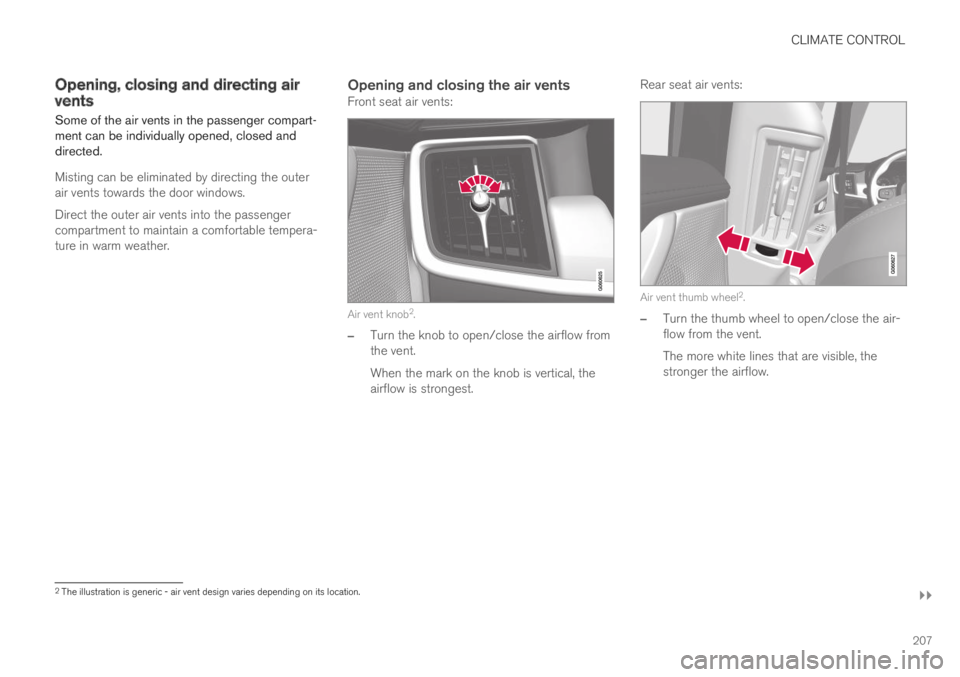
Front seat air vents:
Air vent knob2.
–Turn the knob to open/close the airflow fromthe vent.
When the mark on the knob is vertical, theairflow is strongest.
Rear seat air vents:
Air vent thumb wheel2.
–Turn the thumb wheel to open/close the air-flow from the vent.
The more white lines that are visible, thestronger the airflow.
2The illustration is generic - air vent design varies depending on its location.
Page 210 of 695
||
CLIMATE CONTROL
208
Directing air flow
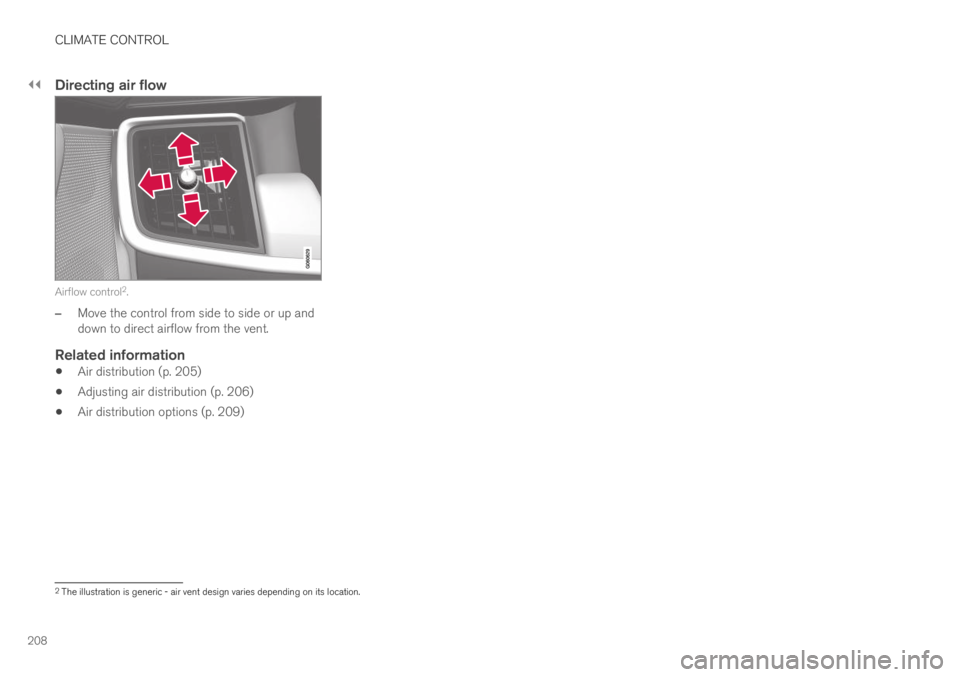
Airflow control2.
–Move the control from side to side or up anddown to direct airflow from the vent.
Related information
Air distribution (p. 205)
Adjusting air distribution (p. 206)
Air distribution options (p. 209)
2The illustration is generic - air vent design varies depending on its location.
Page 211 of 695
CLIMATE CONTROL
}}
209
Air distribution options
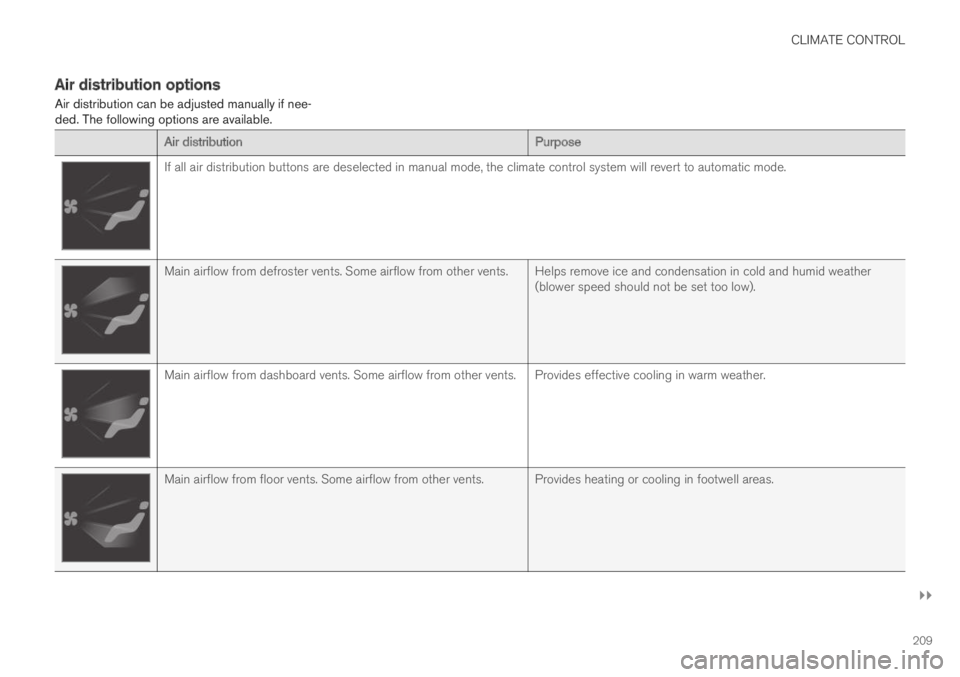
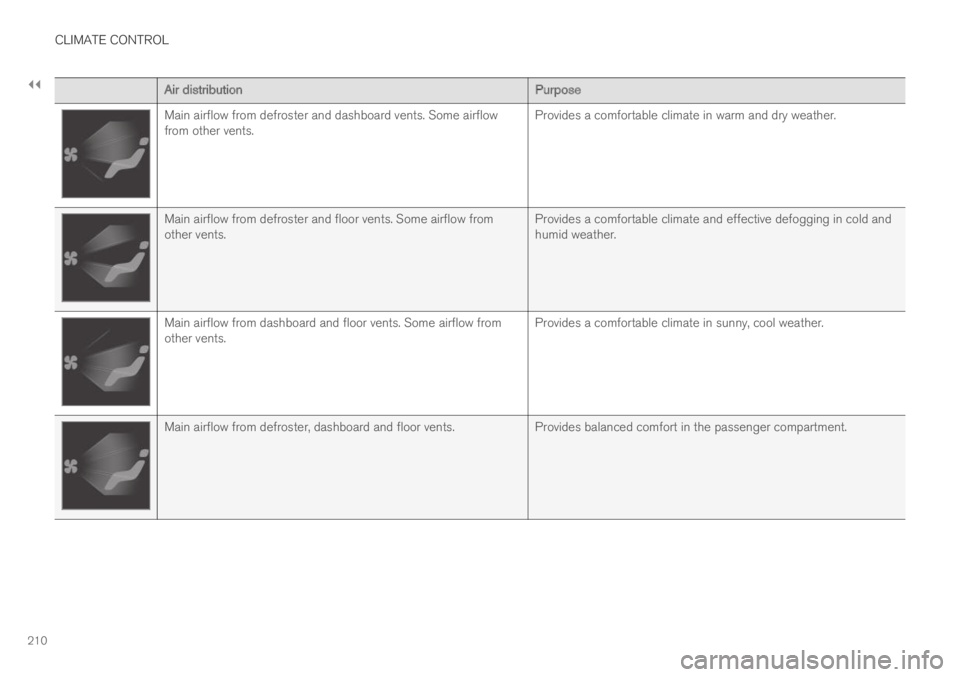
Air distribution can be adjusted manually if nee-ded. The following options are available.
Air distributionPurpose
If all air distribution buttons are deselected in manual mode, the climate control system will revert to automatic mode.
Main airflow from defroster vents. Some airflow from other vents. Helps remove ice and condensation in cold and humid weather(blower speed should not be set too low).
Main airflow from dashboard vents. Some airflow from other vents. Provides effective cooling in warm weather.
Main airflow from floor vents. Some airflow from other vents. Provides heating or cooling in footwell areas.
Page 212 of 695
||
CLIMATE CONTROL
210
Air distributionPurpose
Main airflow from defroster and dashboard vents. Some airflowfrom other vents.Provides a comfortable climate in warm and dry weather.
Main airflow from defroster and floor vents. Some airflow fromother vents.Provides a comfortable climate and effective defogging in cold andhumid weather.
Main airflow from dashboard and floor vents. Some airflow fromother vents.Provides a comfortable climate in sunny, cool weather.
Main airflow from defroster, dashboard and floor vents.Provides balanced comfort in the passenger compartment.
Page 213 of 695

CLIMATE CONTROL
211
Related information
Air distribution (p. 205)
Opening, closing and directing air vents(p. 207)
Adjusting air distribution (p. 206)
Page 214 of 695
CLIMATE CONTROL
* Option/accessory.212
Climate system controls
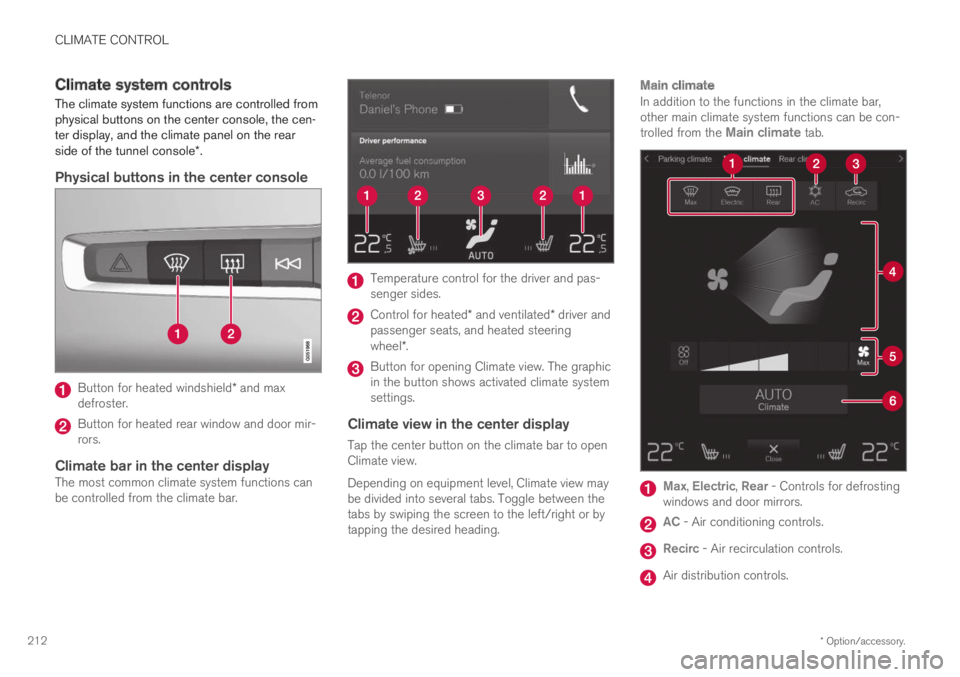
The climate system functions are controlled fromphysical buttons on the center console, the cen-ter display, and the climate panel on the rearside of the tunnel console*.
Physical buttons in the center console
Button for heated windshield* and maxdefroster.
Button for heated rear window and door mir-rors.
Climate bar in the center display
The most common climate system functions canbe controlled from the climate bar.
Temperature control for the driver and pas-senger sides.
Control for heated* and ventilated* driver andpassenger seats, and heated steeringwheel*.
Button for opening Climate view. The graphicin the button shows activated climate systemsettings.
Climate view in the center display
Tap the center button on the climate bar to openClimate view.
Depending on equipment level, Climate view maybe divided into several tabs. Toggle between thetabs by swiping the screen to the left/right or bytapping the desired heading.
Main climate
In addition to the functions in the climate bar,other main climate system functions can be con-trolled from the Main climate tab.
Max, Electric, Rear - Controls for defrostingwindows and door mirrors.
AC - Air conditioning controls.
Recirc - Air recirculation controls.
Air distribution controls.
Page 215 of 695
CLIMATE CONTROL
}}
* Option/accessory.213
Blower control.
AUTO - Automatic climate control.
Parking climate
Parking climate functions can be controlled fromthe Parking climate tab.
Climate controls on the rear side of the
tunnel console *
If the vehicle is equipped with heated rear seats*,there are physical buttons on the rear side of thetunnel console to control this.
Related information
Climate (p. 200)
Activating and deactivating power frontseats* (p. 213)
Activating and deactivating the heated rearseats* (p. 214)
Activating and deactivating front seat ventila-tion* (p. 215)
Activating and deactivating the heated steer-ing wheel* (p. 215)
Activating auto climate control (p. 216)
Activating and deactivating recirculation(p. 217)
Activating and deactivating max defroster(p. 218)
Activating and deactivating the heated wind-shield* (p. 219)
Activating and deactivating the heated rearwindow and door mirrors (p. 221)
Setting the blower speed for the front seats(p. 222)
Synchronize temperature (p. 223)
Activating and deactivating air conditioning(p. 224)
Activating and deactivating power
front seats*
The seats can be heated for added comfort forthe driver and passengers in cold weather.
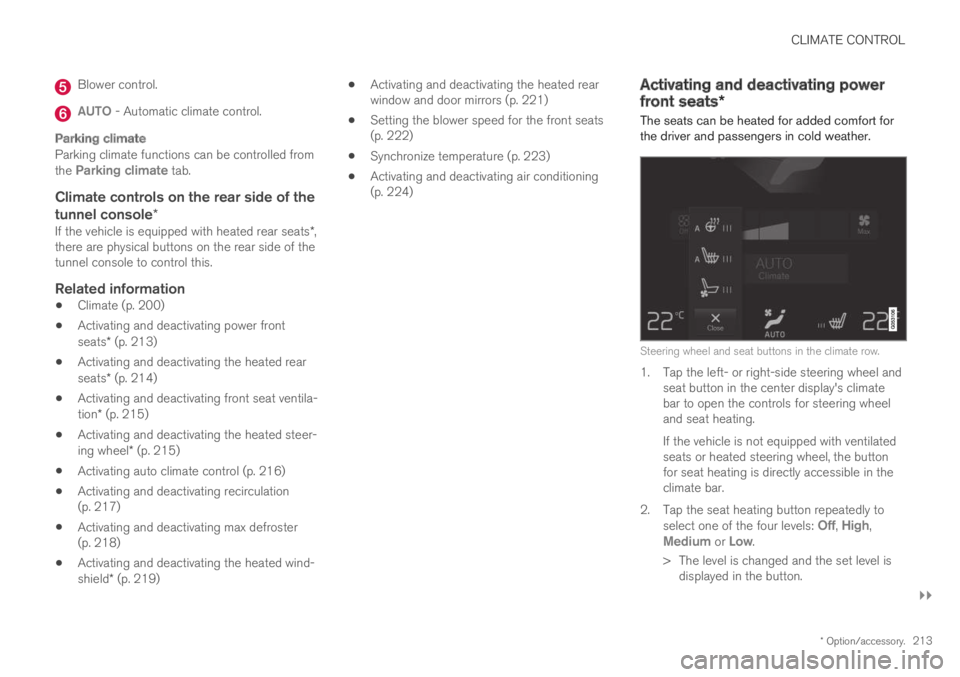
Steering wheel and seat buttons in the climate row.
1. Tap the left- or right-side steering wheel andseat button in the center display's climatebar to open the controls for steering wheeland seat heating.
If the vehicle is not equipped with ventilatedseats or heated steering wheel, the buttonfor seat heating is directly accessible in theclimate bar.
2.Tap the seat heating button repeatedly toselect one of the four levels: Off, High,Medium or Low.
>The level is changed and the set level isdisplayed in the button.
Page 216 of 695
||
CLIMATE CONTROL
* Option/accessory.214
Related information
Climate system controls (p. 212)
Activating and deactivating the heated frontseat* (p. 214)
Activating and deactivating the
heated front seat*
The seats can be heated for added comfort forthe driver and passengers in cold weather.
Seat heating can be set to automatically activatewhen the engine is started. When set to automat-ically activate, heating will be turned on at lowambient temperatures.
1.Tap Settings in the Top view in the centerdisplay.
2.Tap Climate.
3.Select Auto Driver Seat Heating Leveland Auto Passenger Seat Heating Levelto activate/deactivate automatic start ofheated driver's and passenger seat.
4.Select Low, Medium or High to select levelafter the function has been activated.
Related information
Climate system controls (p. 212)
Activating and deactivating power frontseats* (p. 213)
Activating and deactivating the
heated rear seats*
The seats can be heated for added comfort forthe driver and passengers in cold weather.
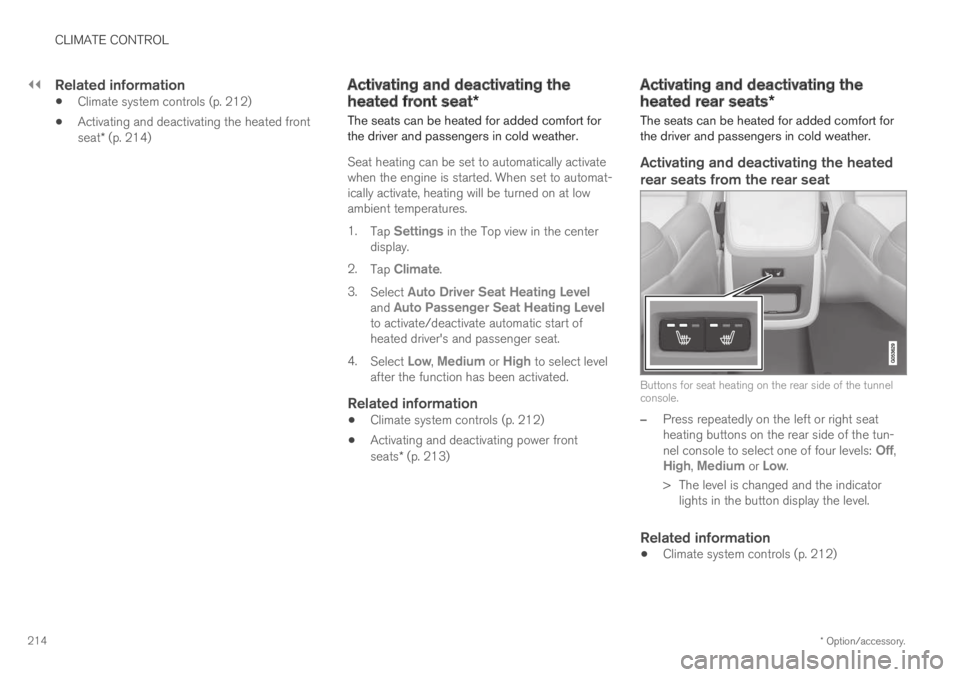
Activating and deactivating the heated
rear seats from the rear seat
Buttons for seat heating on the rear side of the tunnelconsole.
–Press repeatedly on the left or right seatheating buttons on the rear side of the tun-nel console to select one of four levels: Off,High, Medium or Low.
>The level is changed and the indicatorlights in the button display the level.
Related information
Climate system controls (p. 212)
Page 217 of 695
CLIMATE CONTROL
}}
* Option/accessory.215
Activating and deactivating front
seat ventilation*
The seats can be ventilated to provide increasedcomfort in warm weather.
The ventilation system consists of fans in theseats and backrest that draw air through the seatupholstery. The cooler the passenger compart-ment is, the greater the cooling effect of the ven-tilation. The system can be activated when theengine is running.
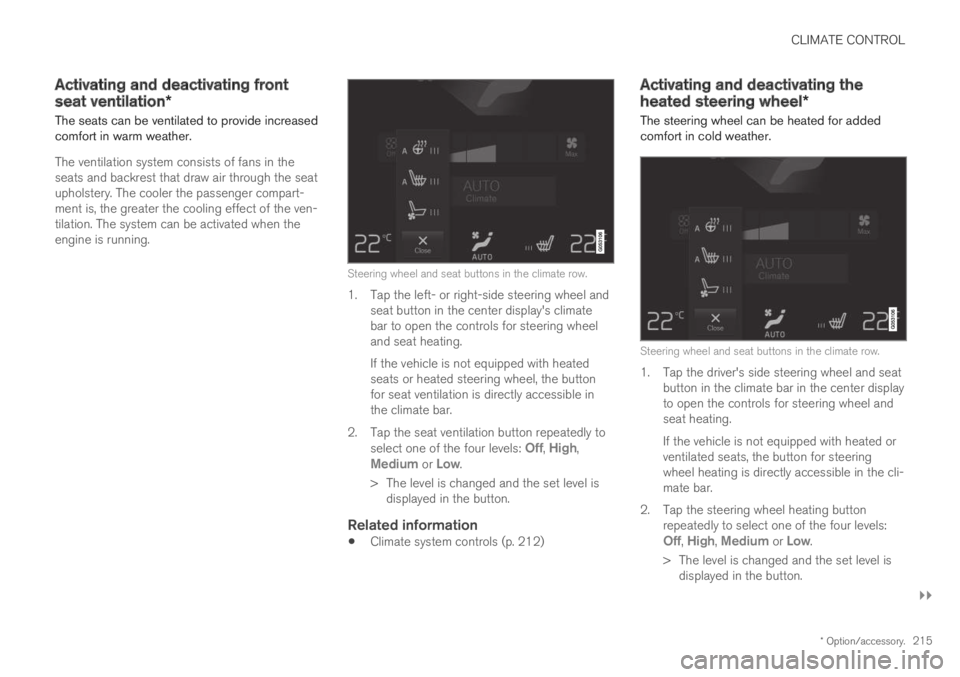
Steering wheel and seat buttons in the climate row.
1. Tap the left- or right-side steering wheel andseat button in the center display's climatebar to open the controls for steering wheeland seat heating.
If the vehicle is not equipped with heatedseats or heated steering wheel, the buttonfor seat ventilation is directly accessible inthe climate bar.
2.Tap the seat ventilation button repeatedly toselect one of the four levels: Off, High,Medium or Low.
>The level is changed and the set level isdisplayed in the button.
Related information
Climate system controls (p. 212)
Activating and deactivating the
heated steering wheel*
The steering wheel can be heated for addedcomfort in cold weather.
Steering wheel and seat buttons in the climate row.
1. Tap the driver's side steering wheel and seatbutton in the climate bar in the center displayto open the controls for steering wheel andseat heating.
If the vehicle is not equipped with heated orventilated seats, the button for steeringwheel heating is directly accessible in the cli-mate bar.
2.Tap the steering wheel heating buttonrepeatedly to select one of the four levels:Off, High, Medium or Low.
>The level is changed and the set level isdisplayed in the button.