wheel VOLVO XC60 TWIN ENGINE 2020 Owners Manual
[x] Cancel search | Manufacturer: VOLVO, Model Year: 2020, Model line: XC60 TWIN ENGINE, Model: VOLVO XC60 TWIN ENGINE 2020Pages: 687, PDF Size: 14.65 MB
Page 305 of 687
DRIVER SUPPORT
}}
* Option/accessory.303
Automatic transmission
The driver support functions can follow another vehicle at speeds from a standstill upto 200 km/h (125 mph). Pilot Assist can provide steering assistance from near-stationary speeds up to 140 km/h(87 mph). The lowest speed that can be set is 30 km/h (20 mph). When following another vehicle,ACC can monitor that vehicle's speed andslow your own vehicle down to a standstill,but it is not possible to set speeds lower than30 km/h (20 mph).
Related information
Driver support systems (p. 272)
Cruise control (p. 279)
Adaptive Cruise Control
* (p. 282)
Pilot Assist
* (p. 291)
Setting time interval to the vehicle ahead The time interval to the vehicle ahead can be set for the functions Adaptive Cruise Control *,
Pilot Assist * and Distance Alert *.
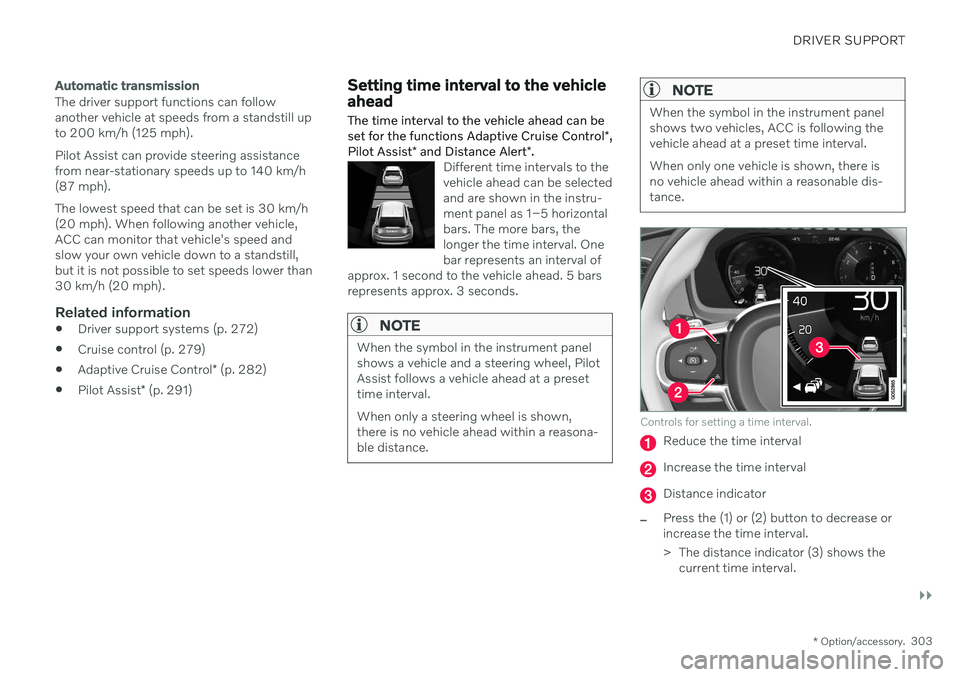
Different time intervals to the vehicle ahead can be selectedand are shown in the instru-ment panel as 1–5 horizontalbars. The more bars, thelonger the time interval. Onebar represents an interval of
approx. 1 second to the vehicle ahead. 5 barsrepresents approx. 3 seconds.
NOTE
When the symbol in the instrument panel shows a vehicle and a steering wheel, PilotAssist follows a vehicle ahead at a presettime interval. When only a steering wheel is shown, there is no vehicle ahead within a reasona-ble distance.
NOTE
When the symbol in the instrument panel shows two vehicles, ACC is following thevehicle ahead at a preset time interval. When only one vehicle is shown, there is no vehicle ahead within a reasonable dis-tance.
Controls for setting a time interval.
Reduce the time interval
Increase the time interval
Distance indicator
–Press the (1) or (2) button to decrease or increase the time interval.
> The distance indicator (3) shows the current time interval.
Page 306 of 687
||
DRIVER SUPPORT
* Option/accessory.
304 In order to help your vehicle follow the vehicle ahead as smoothly and comfortably as possi-ble, Adaptive Cruise Control allows the timeinterval to vary noticeably in certain situations.At low speeds, when the distance to the vehi-cle ahead is short, Adaptive Cruise Controlincreases the time interval slightly.
NOTE
The greater the vehicles' speed, the greater the distance between them fora set time interval.
Only use the time intervals permittedby local traffic regulations.
If driver support does not seem torespond with a speed increase whenactivated, it may be because the timeinterval to the vehicle ahead is shorterthan the set time interval.
WARNING
Only use a time interval suitable for the current traffic conditions.
The driver should be aware that shorttime intervals give them limited time toreact and act to any unforeseen trafficsituation.
Related information
Driver support systems (p. 272)
Adaptive Cruise Control
* (p. 282)
Pilot Assist
* (p. 291)
Distance Alert
* (p. 277)
Head-up display
* (p. 145)
Auto-hold braking with driver support
The driver support functions Adaptive Cruise Control * and Pilot Assist * have a special brake
function in slow traffic and while stationary.
Braking function in slow traffic and at a standstill
In slow-moving, stop-and-go traffic or when stopped at a traffic light, driving will resumeautomatically if the vehicle is stopped for lessthan approx. 3 seconds. If it takes more than 3seconds for the vehicle ahead to begin movingagain, the driver support function will go intostandby mode and the auto-hold brake func-tion will activate.
–The function can be reactivated by:
Pressing the
button on the steer-
ing wheel keypad.
Pressing the accelerator pedal.
> The function will resume following the vehicle ahead if it begins to move within approx. 6 seconds.
WARNING
A noticeable increase in speed may follow when the speed is resumed with the
steering wheel button.
Page 328 of 687

DRIVER SUPPORT
326
City Safety steering assistance for evasive maneuver City Safety steering assistance can help the driver steer away from a vehicle/obstaclewhen it is not possible to avoid a collision bybraking alone. City Safety steering assistanceis always activated and cannot be switchedoff.
Your vehicle swerves away
Slow-moving/stationary vehicle or obsta- cle.
City Safety helps provide assistance bystrengthening the driver's steering move-ments, but only if the driver has begun evasiveaction and the system detects that the driver'ssteering movements are not sufficient to avoida collision. The brake system is used simultaneously to further strengthen steering movements. The function also helps stabilize the vehicle after ithas passed the obstacle. City Safety steering assistance can detect:
vehicles
cyclists
pedestrians
large animals
Related information
City Safety
™ (p. 318)
City Safety limitations (p. 328)
City Safety steering assistance limitations during evasivemaneuvers
City Safety steering assistance may have lim- ited functionality in certain situations and notintervene, e.g.:
at speeds outside the range of 50-100 km/h (30-62 mph)
if the driver does not take evasive action
if speed-dependent power steering wheelresistance is working at reduced power –e.g. during cooling due to overheating.
NOTE
The function uses the vehicle's camera and radar sensor, which has certain generallimitations.
Related information
City Safety steering assistance for evasive maneuver (p. 326)
City Safety limitations (p. 328)
Speed-dependent steering wheel resis-tance (p. 272)
Camera/radar sensor limitations (p. 313)
Page 330 of 687

||
DRIVER SUPPORT
328
your lane must have clear side lane mark- ings
your vehicle must be positioned straight inyour lane
the oncoming vehicle must be positionedwithin your vehicle's lane markings
the oncoming vehicle's headlights mustbe on
the function can only handle “front-to-front” collisions
the function can only detect vehicles withfour wheels.
WARNING
Warnings and brake interventions due to an imminent collision with an oncomingvehicle always come very late.
Related information
City Safety
™ (p. 318)
City Safety limitations (p. 328)
City Safety limitations
City Safety 61
functionality may be reduced in
certain situations.
Surroundings
Low objects
Hanging objects, such as flags for overhang- ing loads or accessories such as auxiliarylights or front protective grids that extendbeyond the height of the hood, may limit City Safety functionality.
Slippery road conditions
The extended braking distance on slippery roads may reduce City Safety's capacity tohelp avoid a collision. In these types of situa-tions, the Anti-lock Braking System and Elec- tronic Stability Control (ESC 62
) are designed
for optimal braking power with maintained stability.
Backlighting
The visual warning signal in the windshield may be difficult to detect in bright sunlight, ifthere are reflections, or if the driver is wearingsunglasses or not looking straight ahead.
Heat
If the temperature in the passenger compart- ment is high due to e.g. bright sunlight, thevisual warning signal in the windshield may betemporarily disabled.
Camera and radar sensor's field of vision
The camera's field of vision is limited and in certain situations, it may be unable to detectpedestrians, large animals, cyclists or vehicles,or it may detect them later than expected. Vehicles that are dirty may be detected later than clean vehicles, and in dark conditions,motorcycles may be detected late or not at all. If a text message displayed in the instrument panel indicates that the camera/radar sensoris obstructed, it may be difficult for City Safetyto detect pedestrians, large animals, cyclists,vehicles or lane markings in front of the vehi-cle. City Safety functionality may therefore bereduced. Text messages may not be displayed for all sit- uations in which the windshield sensors areblocked. The driver must therefore alwayskeep the windshield in front of the camera/radar sensor clean.
CAUTION
Only a workshop may perform mainte- nance on driver support components – anauthorized Volvo workshop is recom-mended.
61 This function is not available on all markets.
62 Electronic Stability Control
Page 333 of 687
DRIVER SUPPORT
331
City Safety messages
A number of messages related to City Safety may be displayed in the instrument panel.Several examples are provided below.
Message Meaning
City Safety Automatic interventionWhen City Safety is braking or has activated the automatic braking function, one or more symbols may illuminate in the instrument panel and a text message may be displayed.
City Safety Reduced functionality Service requiredThe system is not functioning as intended. Contact a workshop A
.
A An authorized Volvo workshop is recommended.
A text message can be erased by briefly press- ing the
button in the center of the right-
side steering wheel keypad. If a message cannot be erased, contact a workshop A
.
Related information
City Safety
™ (p. 318)
Page 338 of 687

DRIVER SUPPORT
* Option/accessory.
336
BLIS messages
A number of messages related to BLIS 70
may
be displayed in the instrument panel. Several examples are provided below.
Message Meaning
Blind spot sensor Service requiredThe system is not functioning as intended. Contact a workshop A
.
Blind spot system off Trailer attachedBLIS and CTA B
have been deactivated because a trailer has been connected to the vehicle's electrical system.
A An authorized Volvo workshop is recommended.
B Cross Traffic Alert *
A text message can be erased by briefly press- ing the
button in the center of the right-
side steering wheel keypad. If a message cannot be erased, contact a workshop A
.
Related information
BLIS
* (p. 333)
Cross Traffic Alert
* (p. 337)
70
Blind Spot Information
Page 342 of 687
DRIVER SUPPORT
* Option/accessory.
340
Cross Traffic Alert *75
messages
A number of messages related to Cross Traffic Alert (CTA) may be displayed in the instrument panel. Several examples are provi-ded below.
Message Meaning
Blind spot sensor Service requiredThe system is not functioning as intended. Contact a workshop
A
.
Blind spot system off Trailer attachedBLIS B
and CTA have been deactivated because a trailer has been connected to the vehicle's electrical system.
A An authorized Volvo workshop is recommended.
B Blind Spot Information System
A text message can be erased by briefly press- ing the
button in the center of the right-
side steering wheel keypad. If a message cannot be erased, contact a workshop A
.
Related information
Cross Traffic Alert
* (p. 337)
BLIS
* (p. 333)
Cross Traffic Alert
* limitations (p. 338)
75
Warning for crossing traffic when the vehicle is backing up.
Page 348 of 687

DRIVER SUPPORT
* Option/accessory.
346
Driver Alert Control
The Driver Alert Control (DAC) function is designed to help alert the driver to erraticbehavior, e.g. if the driver is distracted orshowing signs of fatigue.
The objective of DAC is to detect slowly dete- riorating driving behavior and is primarilyintended to be used on major roads. The func-tion is not intended for use in city traffic. DAC is activated when the vehicle's speed exceeds 65 km/h (40 mph) and remainsactive as long as speeds are above 60 km/h(37 mph).
DAC detects the vehicle's position in the traffic lane.
A camera monitors the traffic lane's marker lines and compares the direction of the roadwith the driver's movements of the steeringwheel.
The vehicle is moving erratically in the lane.
If driving behavior becomes considerably erratic, thedriver will be alerted by thissymbol in the instrumentpanel, an audible signal and the message
Time for a
break.
If the vehicle is equipped with Sensus Navigation * and the Rest Stop Guidancefunction is activated, suggestions will also be provided for suitable places to take a break. The warning will be repeated after a short time if driving behavior does not improve.
WARNING
Driver Alert Control must not be used to extend a period of driving. The drivershould plan in breaks at regular intervalsand make sure they are well rested.
WARNING
An alarm from Driver Alert Control should be taken very seriously since a sleepy driveris often not aware of their own condition. If the alarm sounds or you feel fatigued:
Stop the vehicle safely as soon as pos- sible and rest.
Studies have shown that it is just as dan- gerous to drive while tired as it is to driveunder the influence of alcohol or otherstimulants.
Page 350 of 687

DRIVER SUPPORT
* Option/accessory.
348
Driver Alert Control limitations
Driver Alert Control (DAC) functionality may be reduced in certain situations.
In certain situations, the system may provide a warning even if it has not detected a change indriving behavior, e.g.: in strong crosswinds
on grooved road surfaces.
WARNING
In certain cases, driving behavior might not be affected despite the driver's fatigue – when using the Pilot Assist
* function –
resulting in the driver not getting a warning from DAC. It is therefore very important to always stop and take a break at the slightest signof fatigue, regardless of whether the func-tion has issued a warning or not.
NOTE
The function uses the vehicle's camera and radar sensor, which has certain generallimitations.
Related information
Driver Alert Control (p. 346)
Camera/radar sensor limitations (p. 313)
Lane Keeping Aid
Lane Keeping Aid (LKA 89
) is designed to
actively steer the vehicle on freeways, high- ways and other major roads to help the driverreduce the risk of the vehicle unintentionallyveering out of the lane.
Lake Keeping Aid steers the vehicle back into the lane and/or alerts the driver using vibra-tions in the steering wheel. Lane Keeping Aid is active at speeds between 65–200 km/h (40–125 mph) on roads withclearly visible traffic lane marker lines. On narrow roads, the function may be unavail- able and go into standby mode. The functionwill become available again when the roadbecomes sufficiently wide.
A camera monitors the road/traffic lane's marker lines.
Lane Keeping Aid steers the vehicle back into its lane.
89 Lane Keeping Aid
Page 351 of 687
DRIVER SUPPORT
}}
349
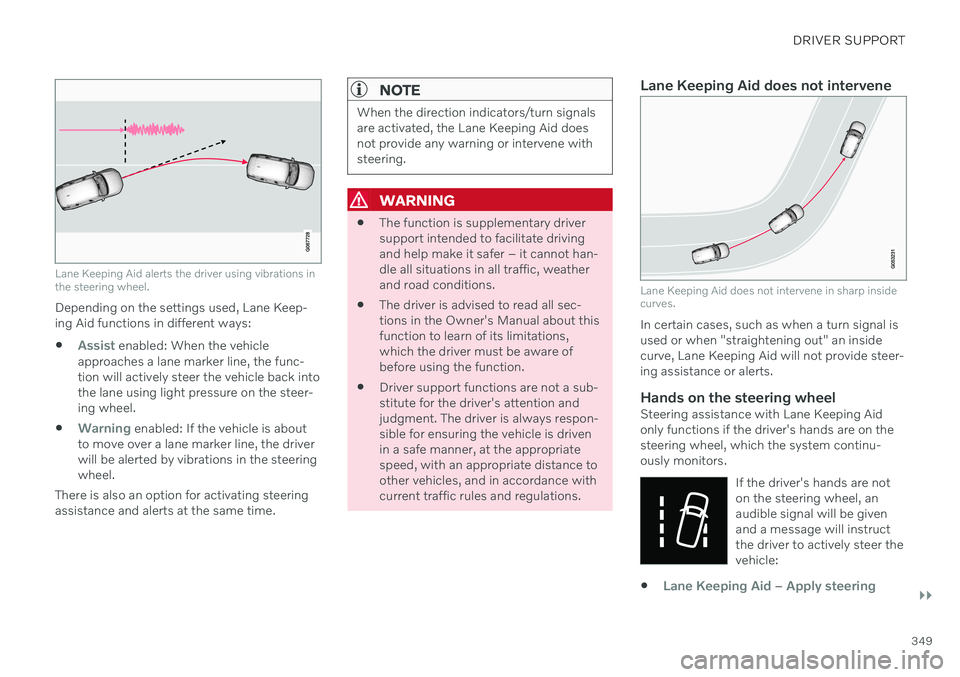
Lane Keeping Aid alerts the driver using vibrations in the steering wheel.
Depending on the settings used, Lane Keep- ing Aid functions in different ways:
Assist enabled: When the vehicle
approaches a lane marker line, the func- tion will actively steer the vehicle back intothe lane using light pressure on the steer-ing wheel.
Warning enabled: If the vehicle is about
to move over a lane marker line, the driver will be alerted by vibrations in the steeringwheel.
There is also an option for activating steeringassistance and alerts at the same time.
NOTE
When the direction indicators/turn signals are activated, the Lane Keeping Aid doesnot provide any warning or intervene withsteering.
WARNING
The function is supplementary driver support intended to facilitate drivingand help make it safer – it cannot han-dle all situations in all traffic, weatherand road conditions.
The driver is advised to read all sec-tions in the Owner's Manual about thisfunction to learn of its limitations,which the driver must be aware ofbefore using the function.
Driver support functions are not a sub-stitute for the driver's attention andjudgment. The driver is always respon-sible for ensuring the vehicle is drivenin a safe manner, at the appropriatespeed, with an appropriate distance toother vehicles, and in accordance withcurrent traffic rules and regulations.
Lane Keeping Aid does not intervene
Lane Keeping Aid does not intervene in sharp inside curves.
In certain cases, such as when a turn signal is used or when "straightening out" an insidecurve, Lane Keeping Aid will not provide steer-ing assistance or alerts.
Hands on the steering wheelSteering assistance with Lane Keeping Aidonly functions if the driver's hands are on thesteering wheel, which the system continu-ously monitors.
If the driver's hands are noton the steering wheel, anaudible signal will be givenand a message will instructthe driver to actively steer thevehicle:
Lane Keeping Aid – Apply steering