automatic transmission VOLVO XC60 TWIN ENGINE 2020 User Guide
[x] Cancel search | Manufacturer: VOLVO, Model Year: 2020, Model line: XC60 TWIN ENGINE, Model: VOLVO XC60 TWIN ENGINE 2020Pages: 687, PDF Size: 14.65 MB
Page 419 of 687

STARTING AND DRIVING
* Option/accessory.417
Automatic transmission
In vehicles with an automatic transmission, the system selects the gear so that drivingwill be as energy-efficient as possible. Thetransmission also has a manual mode.
Overview of gear selector and gear shift pattern in the instrument panel
The instrument panel shows which gear is cur- rently in use: R , N , D or B. P position is electric.
For manual shifting, the gear indicator in the instrument panel displays the gear currentlybeing used.
CAUTION
Check the operating temperature of the transmission to help avoid damage to anyof the drive system components. If there isa risk of overheating, a warning symbol willappear in the instrument panel and a textmessage will be displayed. Follow the rec-ommendations given.
Symbols in the instrument panelIf a problem should occur with the transmis- sion, a symbol and a message will appear inthe instrument panel.
Symbol Meaning
Information and messages rela- ted to the transmission. Followthe recommendations provided.
Hot or overheated transmission. Follow the recommendationsprovided.
Reduced performance/Accel-
eration performance reduced
In the event of a temporary fault in the driveline, the vehicle maygo into a "limp home" mode withreduced power output to helpavoid damage to the driveline.
Related information
Gear selector positions for automatic transmissions (p. 418)
Using the steering wheel paddles
* to shift
(p. 419)
Shiftlock (p. 420)
The kickdown function (p. 421)
Page 420 of 687
STARTING AND DRIVING
418
Gear selector positions for automatic transmissions
With an automatic transmission, a suitable gear is selected automatically according tocurrent speed and power requirements.
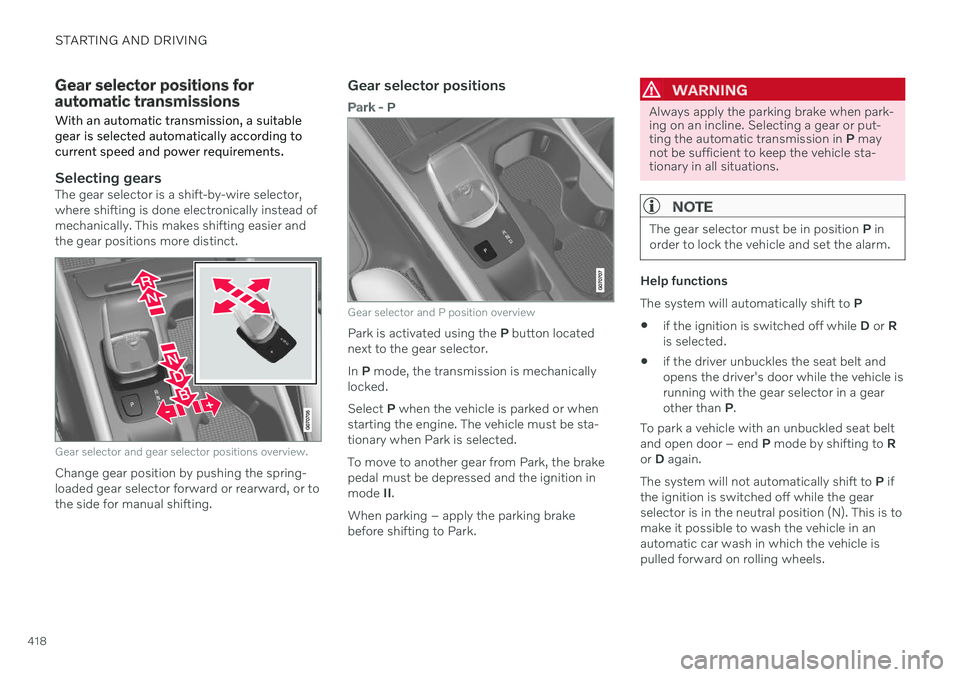
Selecting gearsThe gear selector is a shift-by-wire selector, where shifting is done electronically instead ofmechanically. This makes shifting easier andthe gear positions more distinct.
Gear selector and gear selector positions overview.
Change gear position by pushing the spring- loaded gear selector forward or rearward, or tothe side for manual shifting.
Gear selector positions
Park - P
Gear selector and P position overview
Park is activated using the P button located
next to the gear selector. In P mode, the transmission is mechanically
locked.Select P when the vehicle is parked or when
starting the engine. The vehicle must be sta- tionary when Park is selected. To move to another gear from Park, the brake pedal must be depressed and the ignition inmode II.
When parking – apply the parking brake before shifting to Park.
WARNING
Always apply the parking brake when park- ing on an incline. Selecting a gear or put-ting the automatic transmission in P may
not be sufficient to keep the vehicle sta-tionary in all situations.
NOTE
The gear selector must be in position P in
order to lock the vehicle and set the alarm.
Help functions The system will automatically shift to P
if the ignition is switched off while
D or R
is selected.
if the driver unbuckles the seat belt and opens the driver's door while the vehicle isrunning with the gear selector in a gearother than
P.
To park a vehicle with an unbuckled seat beltand open door – end P mode by shifting to R
or D again.
The system will not automatically shift to P if
the ignition is switched off while the gearselector is in the neutral position (N). This is tomake it possible to wash the vehicle in anautomatic car wash in which the vehicle ispulled forward on rolling wheels.
Page 421 of 687

STARTING AND DRIVING
}}
* Option/accessory.419
Reverse - R
Select R when backing up. The vehicle must
be stationary when Reverse is selected.
Neutral - N
No gear is selected and the engine can be started. Apply the parking brake if the vehicleis stationary with the gear selector in N.
To move the gear selector from N to another
gear, the brake pedal must be depressed andthe ignition in mode II.
D drive mode
D is the normal driving gear position. The
transmission shifts up or down automatically depending on acceleration and speed. The vehicle must be stationary when the gear selector is moved from R to D.
Brake - B
Brake position in instrument panel overview.
From the B position, it is possible to shift
manually. B can be selected at any time while
driving. When the accelerator pedal is released, the electric motor brakes the vehicleand the hybrid battery is recharged at thesame time. This offers additional opportunitiesto recharge the hybrid battery, since the bat-tery is charged even when the brake pedal isnot depressed. Select brake by moving the gear selector rear- ward from the D position. The currently
selected gear will be displayed in the instru-ment panel.
Push the gear selector to the right toward"
+ " (plus) and release to shift up one gear.
Push the gear selector to the left toward"
– " (minus) and release to shift down one
gear.
Push the gear selector rearward to returnto
D mode.
For smooth shifting and engine performance,the transmission will shift down automaticallyif the vehicle's speed becomes too low for theselected gear.
Related information
Automatic transmission (p. 417)
Shiftlock (p. 420)
Using the steering wheel paddles
* to shift
(p. 419)
The kickdown function (p. 421)
Using the steering wheel paddles
*
to shift
The steering wheel paddles are a supplement to the gear selector and make it possible toshift manually without removing your handsfrom the steering wheel.
" -": Shift down one gear.
" + ": Shift up one gear.
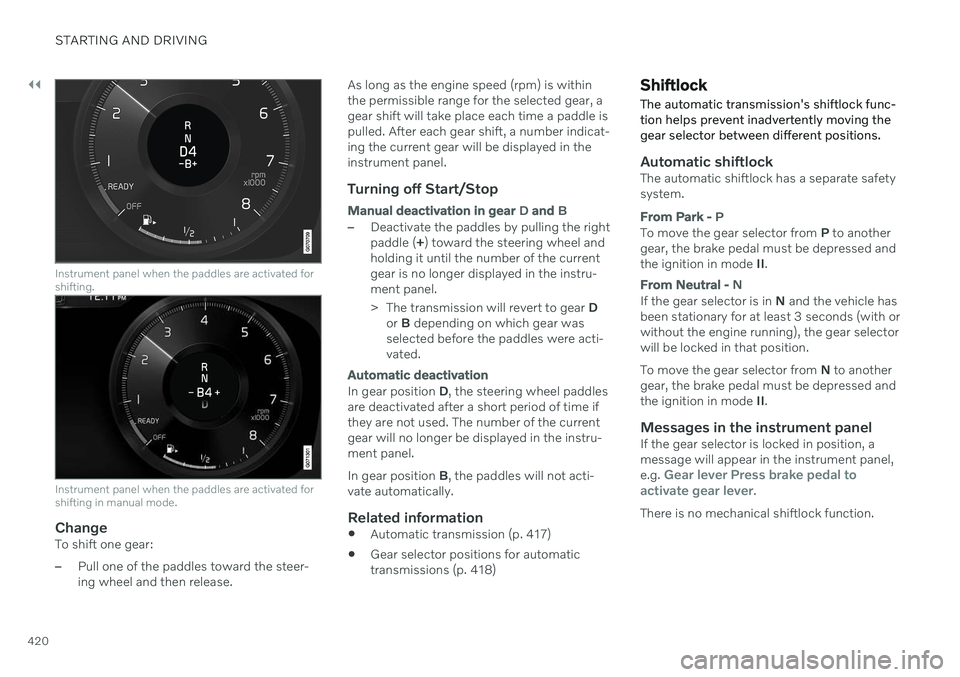
Activating the steering wheel paddlesIn order to shift gears using the paddles, they must first be activated:
–Pull one of the paddles toward the steer- ing wheel.
> A number in the instrument panel indi-
cates the current gear being used.
Page 422 of 687
||
STARTING AND DRIVING
420
Instrument panel when the paddles are activated for shifting.
Instrument panel when the paddles are activated for shifting in manual mode.
ChangeTo shift one gear:
–Pull one of the paddles toward the steer- ing wheel and then release.As long as the engine speed (rpm) is withinthe permissible range for the selected gear, agear shift will take place each time a paddle ispulled. After each gear shift, a number indicat-ing the current gear will be displayed in theinstrument panel.
Turning off Start/Stop
Manual deactivation in gear
D and B
–Deactivate the paddles by pulling the right paddle ( +) toward the steering wheel and
holding it until the number of the currentgear is no longer displayed in the instru-ment panel.
> The transmission will revert to gear D
or B depending on which gear was
selected before the paddles were acti- vated.
Automatic deactivation
In gear position D, the steering wheel paddles
are deactivated after a short period of time if they are not used. The number of the currentgear will no longer be displayed in the instru-ment panel. In gear position B, the paddles will not acti-
vate automatically.
Related information
Automatic transmission (p. 417)
Gear selector positions for automatic transmissions (p. 418)
Shiftlock The automatic transmission's shiftlock func- tion helps prevent inadvertently moving thegear selector between different positions.
Automatic shiftlockThe automatic shiftlock has a separate safety system.
From Park -
P
To move the gear selector from P to another
gear, the brake pedal must be depressed and the ignition in mode II.
From Neutral - N
If the gear selector is in N and the vehicle has
been stationary for at least 3 seconds (with or without the engine running), the gear selectorwill be locked in that position. To move the gear selector from N to another
gear, the brake pedal must be depressed and the ignition in mode II.
Messages in the instrument panelIf the gear selector is locked in position, amessage will appear in the instrument panel, e.g.
Gear lever Press brake pedal to
activate gear lever.
There is no mechanical shiftlock function.
Page 423 of 687

STARTING AND DRIVING
421
Related information
Automatic transmission (p. 417)
Gear selector positions for automatic transmissions (p. 418)
The kickdown function Kickdown can be used when maximum acceleration is needed, e.g. when passing.
When the accelerator pedal is depressed all the way to the floor (past the normal full accel-erator position), the transmission will auto-matically engage kickdown, i.e. immediatelyshift down to a lower gear. If the accelerator pedal is released from the kickdown position, the transmission will auto-matically shift up again.
Safety function
The transmission control module is equipped with a downshift protection feature to helpprevent the engine from overheating. In some conditions, the transmission will pre- vent downshifting/kickdown if this would leadto such high engine speed (rpm) that theengine could be damaged. If the driver stillattempts downshifting or kickdown at a highrpm, nothing will happen and the original gearwill remain selected. With kickdown, the vehicle can downshift one or more steps at a time depending on theengine speed. The vehicle upshifts when theengine reaches its maximum rpm to preventengine damage.
Related information
Automatic transmission (p. 417)
All Wheel Drive (AWD)
All-wheel drive (AWD 5
), also called four-
wheel drive, means that power is distributed to all four wheels, which improves traction.
The electric motor that powers the rear wheels enables electronic all-wheel drive functionality.All-wheel drive reacts differently depending onwhich drive mode is selected.
Related information
Drive modes (p. 423)
Low Speed Control (p. 435)
Transmission (p. 416)
5
All Wheel Drive
Page 425 of 687

STARTING AND DRIVING
}}
* Option/accessory.423
Starting and stopping the combustion engine in Twin Enginevehicles An advanced control system determines the distance that the vehicle can be driven on thecombustion engine, electric motor, or both atthe same time. When driving on only theelectric motor, the vehicle may automaticallystart the combustion engine due to outsidecircumstances, e.g. low ambient tempera-tures. This is completely normal. The com-bustion engine will also always start whenthe hybrid battery is nearly fully discharged.
Climate settings at low temperaturesAt low ambient temperatures, the combustion engine will sometimes start automatically tohelp achieve the desired passenger compart-ment temperature and air quality. The amountof time the combustion engine is running canbe affected by lowering the temperature
reducing blower speed
activating
Pure drive mode.
Using the electric motor in hot or cold
weather
At very low or high ambient temperatures, the electric motor's driving range and power maybe reduced and affect how often the combus-tion engine automatically starts.
Emission control systemTo help ensure that the emission control sys-tem is as energy-efficient as possible, thecombustion engine will run for several minutesafter it is started. The amount of time the com-bustion engine needs to be used variesdepending on the temperature of the three-way catalytic converter.
WARNING
California Proposition 65 Operating, servicing and maintaining a pas- senger vehicle can expose you to chemi-cals including engine exhaust, carbon mon-oxide, phthalates, and lead, which areknown to the State of California to causecancer and birth defects or other reproduc-tive harm. To minimize exposure, avoidbreathing exhaust, do not idle the engineexcept as necessary, service your vehicle ina well ventilated area and wear gloves orwash your hands frequently when servicingyour vehicle. For more information go towww.P65Warnings.ca.gov/passenger-vehicle.
Related information
Drive systems (p. 422)
Economical driving (p. 438)
Drive modes (p. 423)
Drive modes
Drive modes affect the vehicle's driving cha- racteristics in different ways to enhance andsimplify the driving experience in certaintypes of situations.
Drive modes enable easy access to the vehi- cle's many functions and settings in differentdriving situations. Each drive mode is adaptedto help optimize driving characteristics. Steering
Engine/transmission/all-wheel drive
Brakes
Pneumatic suspension
* and shock absorb-
ers
Instrument panel
Climate control settings
Select the drive mode that is adapted to the current driving conditions. Keep in mind thatnot all drive modes are available in all situa-tions.
Page 460 of 687

||
STARTING AND DRIVING
* Option/accessory.
458
NOTE
Extreme weather conditions, towing a trailer, high altitude and lower fuel gradethan recommended are factors that cansignificantly increase the vehicle's fuel con-sumption.
Trailer weights
WARNING
Please adhere to the recommendations provided for trailer weight. If the recom-mendations are not followed, the vehicleand trailer may be difficult to control duringevasive maneuvers and braking.
NOTE
The specified maximum trailer weights are those permitted by Volvo. National vehicleregulations may set additional restrictionson trailer weight and speed. The trailerhitches may be certified for higher towingweights than the vehicle is permitted totow.
Self-leveling suspension *The vehicle's self-leveling system attempts to keep the vehicle at a constant level, regardlessof load (up to the maximum permitted weight).When the vehicle is stationary, the rear end of the vehicle will be slightly lowered, which isnormal.
Driving in hilly terrain or hot weatherIn certain conditions, there is a risk of over-heating when driving with a trailer. If overheat-ing of the engine and drive system is detected,a warning symbol will illuminate in the instru-ment panel and a message will appear. The automatic transmission selects the opti- mal gear for the current load and enginespeed.
Steep inclines
Do not lock the automatic transmission into a higher gear than what the engine can handle
‒
it is not always preferable to drive in highgears at low rpm.
Parking on a hill
1. Depress the brake pedal.
2. Apply the parking brake.
3. Put the gear selector in P.
4. Release the brake pedal.Put chocks behind the wheels when the vehi- cle is parked on a hill with a trailer attached.
Starting on a hill
1. Depress the brake pedal.
2. Put the gear selector in D.
3. Release the parking brake.
4. Release the brake pedal and start driving.
Related information
Trailer Stability Assist
* (p. 459)
Checking trailer lights (p. 460)
Towing capacity and tongue weight (p. 660)
Overheating of engine and transmission(p. 450)
Retractable hitch
* (p. 453)
Page 618 of 687

||
MAINTENANCE AND SERVICE
616Fuse pliers are provided on the inside of the fuse box cover to assist in removing andinserting fuses.
There are also spaces for several extra fuses inthe fusebox.
PositionsThere is a decal with a diagram of the loca-tions of the fuses on the inside of the cover.
Function
Ampere Type
– – Micro
–– Micro
–– Micro
Control module for actuator for engaging/changing gears, automatic transmission 5 Micro
High-voltage coolant heater control module5 Micro
Control module for A/C; heat exchanger cut-off valve; cut-off valve for coolant through the climate system 5 Micro
Hybrid battery control module; high-voltage converter for combined high-voltage generator/starter motor with 500 V– 12 V voltage converter5 Micro
–
– Micro
Converter for controlling feed to rear axle electric motor10 Micro
Hybrid battery control module; high-voltage converter for combined high-voltage generator/starter motor with 500 V– 12 V voltage converter10 Micro
Charge module
5 Micro
Cut-off valve for hybrid battery coolant; coolant pump 1 for hybrid battery15 Micro
Coolant pump for electric drive system15 Micro
Page 665 of 687

SPECIFICATIONS
663
Coolant specifications
Recommended grade: Volvo-approved pre-
mixed coolant. If concentrated coolant is used, mix with 50% water of acceptablequality (i.e. not salt water, etc.). Consult aVolvo retailer if you have any questions.
To avoid deterioration of the cooling system, engine trouble, etc., only approved Volvo cool-ant should be used.
WARNING
Coolant is hazardous if ingested and could cause damage to organs (kidneys). Theproduct contains ethylene glycol, inhibitor,water, etc.
Related information
Refilling coolant (p. 604)
Transmission fluid specifications
Under normal driving conditions, the trans- mission fluid will not need to be changed dur-ing the transmission's service life. However,it may need to be changed if the vehicle isdriven frequently in adverse driving condi-tions.
Automatic transmission
Prescribed transmission fluid: AW-1
Related information
Type designations (p. 654)
Brake fluid specifications
The medium in the hydraulic brake system is called brake fluid and is used to transfer brak-ing force from e.g. pressure on the brakepedal via a master brake cylinder to one ormore slave cylinders, which in turn act on amechanical brake.
Recommended grade: Volvo Original or simi-
lar fluid that meets a combination of Dot 4, 5.1 and ISO 4925 class 6.
NOTE
Changing or filling brake fluid should be entrusted to an authorized Volvo work-shop.
Related information
Engine compartment overview (p. 601)
Page 670 of 687
INDEX
668Automatic relocking 240, 254
Automatic transmission 417, 418
kickdown 421
oil 663
Trailer 457
Auxiliary heater 233
B
Backrest front seat, adjusting 188, 189, 192, 193 , 194, 195
rear seat, folding 198
Battery Hybrid 611
jump-start 451
Maintenance 607
recycling 612
start 607
symbols on the battery 612
BLIS 333 activating/deactivating 334
limitations 335
Symbols and messages 336
Blower adjusting 222
air distribution 210
air vents 211
Bluetooth
connect 497
connecting vehicle to Internet 517
phone 507
settings 515
Book service and repair 595
Booster cushions 74Brake assist after collision 416
Brake energy 408, 422Brake fluid grade 663
Brake functions 407
Brake position 418
Brakes 407 anti-lock brakes, ABS 407
automatic when stationary 414
Brake Assist System, BAS 409
brake lights 164
brake system 407
emergency brake lights 164
Maintenance 410
on salted roads 410
on wet roads 410
parking brake 411
brake system fluid 663C
Camera sensorsee Camera 312
Camera unit 312 limitations 313
maintenance and cleaning 317
Capacity weight 566, 659
Cargo compartment 577 attachment points 580
cargo net 586
electrical outlet 572, 574
Lighting 166
Cargo compartment cover 581, 583
cargo net 586
Cargo net 586
Car wash 638, 639, 641, 642, 643, 644
Catalytic converter 449 recovery 461
CD player 495
Cell phone, see Phone 508
Center console 571Center display change appearance 134
cleaning 633
climate controls 215
Function view 125