battery location VOLVO XC60 TWIN ENGINE 2020 User Guide
[x] Cancel search | Manufacturer: VOLVO, Model Year: 2020, Model line: XC60 TWIN ENGINE, Model: VOLVO XC60 TWIN ENGINE 2020Pages: 687, PDF Size: 14.65 MB
Page 538 of 687

VOLVO ON CALL
536
Planning and scheduling vehicle charging with the Volvo On Callapp With the Volvo On Call app, you can plan and schedule charging for your vehicle.
You can schedule charging for the charging locations that you have saved in your app,which can be practical of you want to e.g. plana charging stop along a travel route or plancharging intervals for your vehicle at home orin your neighborhood. 1.From the
home tab, select Fuel range orBattery charge.
> In the view that appears, you can see your saved charging locations under
Saved locations. If you haven't saved
any charging locations yet or you want to add new locations, e.g. stationsalong a route or in your neighborhood, you can choose
Add location (you can
save up to eight charging locations).
2. Choose the location you want to schedule a charging at.
> A view for the saved location will open.
3. Select a start time for the charging.
4. Select an end time for the charging. 5. Go back to the view for fuel.
> A charging icon will appear next to thesaved location you scheduled charging at. When the icon disappears, thescheduled charging is saved and input.
Page 611 of 687
MAINTENANCE AND SERVICE
}}
609
NOTE
If the starter battery becomes discharged too many times, it will shorten its servicelife. The service life of the starter battery is affected by several factors, such as drivingconditions and climate. The startingcapacity of the battery reduces graduallyover time. The battery must therefore berecharged if the vehicle is not used or along period of time or if it is only drivenshort distances. Severe cold further limitsthe starting capacity. To keep the starter battery in a good condi- tion, the vehicle should be driven at least15 minutes per week or the battery shouldbe connected to a battery charger withautomatic trickle charging. A starter battery that is always kept fully charged has the maximum service life.Location
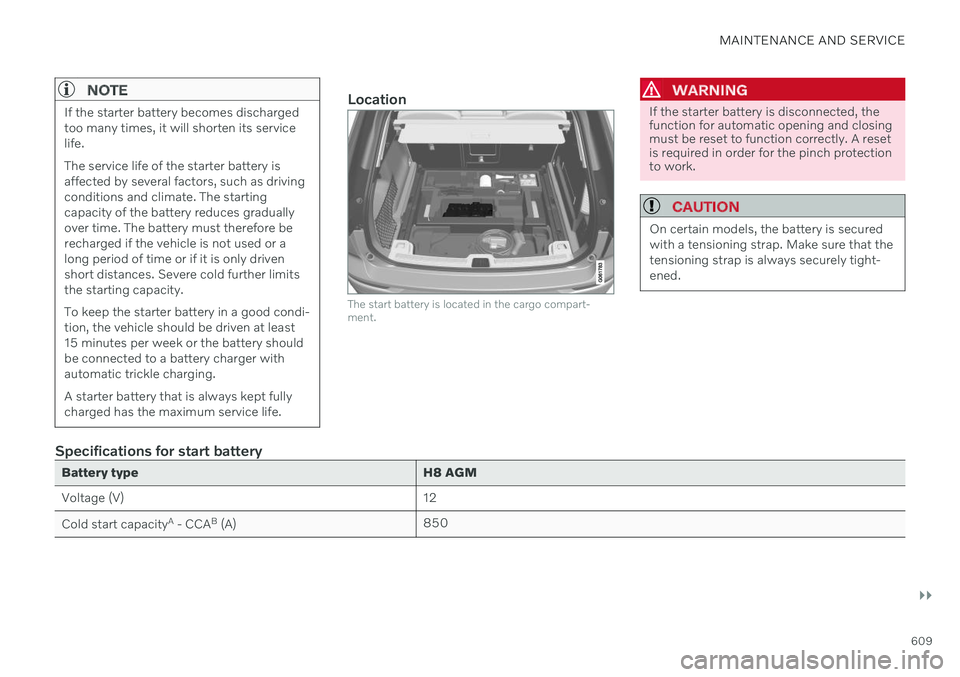
The start battery is located in the cargo compart- ment.
WARNING
If the starter battery is disconnected, the function for automatic opening and closingmust be reset to function correctly. A resetis required in order for the pinch protectionto work.
CAUTION
On certain models, the battery is secured with a tensioning strap. Make sure that thetensioning strap is always securely tight-ened.
Specifications for start battery
Battery typeH8 AGM
Voltage (V) 12
Cold start capacity A
- CCA B
(A) 850
Page 676 of 687

INDEX
674
K
Key 238
Keyboard 129, 132change language 132
Keyless locking/unlocking 254
settings 255
touch-sensitive surfaces 253
Key tag 238
L
Labels location 654
Laminated glass 170 Lamps changing 606
Trailer 460
Lane Keeping Aid 348 activating/deactivating 350
display 354
limitations 351
see Lane Keeping Aid 348
select assistance option 350
Symbols and messages 352
Language 135
Large Animal Detection (LAD) 322 Leather upholstery, cleaning instruc-
tions 636
Leveling control 430 settings 433
License agreement 101, 525
Lifting tools 553Light bulbs changing 606
Light control 156, 167Lighting Active Bending Lights 162
approach lighting 165
automatic high beam 161
brake lights 164
control, instrument, display 167
controls 156, 165
daytime running lights 158
emergency brake lights 164
Hazard warning flashers 164
high beams 160, 161
home safe lighting 165
in passenger compartment 165
low beams 159
position lights 158
rear fog light 163
settings 157
Turn signals 162Lighting, replacing bulbs 606
Limp home 416Load anchoring eyeletscargo compartment 580
Load anchoring hooks 579
Load carriers 579
Load index 542Loading general 577
load anchoring eyelets 580
long load 578
Lock indication 236 setting 237
Locking/unlocking Tailgate 242, 256
Locking wheel bolts 553 Locks locking/unlocking 240
Long-term storage 399Low battery charge level start battery 451
Low beams 159
Lower the rear end 578
Low oil level 603
Low-speed driving 435 activate with function button 436