center console VOLVO XC60 TWIN ENGINE 2020 User Guide
[x] Cancel search | Manufacturer: VOLVO, Model Year: 2020, Model line: XC60 TWIN ENGINE, Model: VOLVO XC60 TWIN ENGINE 2020Pages: 687, PDF Size: 14.65 MB
Page 218 of 687
||
CLIMATE CONTROL
* Option/accessory.
216
Blower control.
AUTO - Automatic climate control.
Parking climate
Parking climate functions can be controlled from the Parking climate tab.
Climate controls on the rear side of
the tunnel console *
If the vehicle is equipped with heated rear seats*, there are physical buttons on the rear
side of the tunnel console to control this func- tion.
Related information
Climate (p. 204)
Activating and deactivating power front seats
* (p. 216)
Activating and deactivating the heatedrear seats
* (p. 217)
Activating and deactivating front seat ven-tilation
* (p. 217)
Activating and deactivating the heatedsteering wheel
* (p. 218)
Activating auto climate control (p. 219)
Activating and deactivating recirculation (p. 219)
Activating and deactivating max defroster(p. 220)
Activating and deactivating the heatedrear window and door mirrors (p. 221)
Setting the blower speed for the frontseats (p. 222)
Synchronize temperature (p. 224)
Activating and deactivating air condition-ing (p. 225)
Activating and deactivating power front seats
*
The seats can be heated for added comfort for the driver and passengers in cold weather.
1. Tap the left- or right-side steering wheel and seat button in the center display's cli- mate bar to open the controls for steeringwheel and seat heating. If the vehicle is not equipped with ventila- ted seats or heated steering wheel (for thedriver's side), the button for seat heating isdirectly accessible in the climate bar.
2. Tap the seat heating button repeatedly to
select one of the four levels: Off, High,Medium or Low.
> The level is changed and the set level is displayed in the button.
Related information
Climate system controls (p. 215)
Activating and deactivating the heated front seat
* (p. 217)
Page 219 of 687
CLIMATE CONTROL
}}
* Option/accessory.217
Activating and deactivating the heated front seat *
The seats can be heated for added comfort for the driver and passengers in cold weather.
Seat heating can be set to automatically acti- vate when the engine is started. When set toautomatically activate, heating will be turnedon at low ambient temperatures. 1. Tap
Settings in the Top view in the center
display.
2. Tap
Climate.
3. Select
Auto Driver Seat Heating Leveland Auto Passenger Seat Heating Levelto activate/deactivate automatic start of heated driver's and passenger seat.
> An "A" will be displayed next to the rel-
evant seat heating button in the climate bar when auto start has been activated.
4. Select
Low, Medium or High to select
level after the function has been activated.
Related information
Climate system controls (p. 215)
Activating and deactivating power front seats
* (p. 216)
Activating and deactivating the heated rear seats *
The seats can be heated for added comfort for the driver and passengers in cold weather.
Activating and deactivating the heated rear seats from the rear seat
Buttons for seat heating on the rear side of the tun- nel console.
–Press repeatedly on the left or right seat heating buttons on the rear side of thetunnel console to select one of four levels:
Off, High, Medium or Low.
> The level is changed and the indicator lights in the button display the level.
Related information
Climate system controls (p. 215)
Activating and deactivating front seat ventilation
*
The seats can be ventilated to provide increased comfort in warm weather.
The ventilation system consists of fans in the seats and backrest that draw air through theseat upholstery. The cooler the passengercompartment is, the greater the cooling effectof the ventilation. The system can be activatedwhen the engine is running.
1. Tap the left- or right-side steering wheel and seat button in the center display's cli- mate bar to open the controls for steeringwheel and seat heating. If the vehicle is not equipped with heated seats or heated steering wheel (for thedriver's side), the button for seat ventila-tion is directly accessible in the climatebar.
Page 222 of 687
||
CLIMATE CONTROL
220
Related information
Climate system controls (p. 215)
Activating and deactivating the recircula- tion timer setting (p. 220)
Activating and deactivating the recirculation timer setting
The climate system's recirculation function helps shut out smog, smoke, exhaust fumes,etc. by reusing the air in the passenger com-partment.
When the recirculation timer is activated, air recirculation will switch off automatically after20 minutes. 1. Tap
Settings in the Top view in the center
display.
2. Tap
Climate.
3. Tap
Recirculation Timer to activate/
deactivate the recirculation timer.
Related information
Activating and deactivating recirculation (p. 219)
Activating and deactivating max defroster
Max defroster is used to quickly remove con- densation and ice from windows.
Max defroster deactivates automatic climate control and air recirculation, activates the air conditioning, and changes blower speed to
5and temperature to HI.
NOTE
The volume increases when the blower speed is changed to 5.
When max defroster is deactivated, the cli- mate system reverts to the previous settings.
Activating and deactivating max defroster from the center console
A button in the center console offers quickaccess to the max defroster.
Page 223 of 687
CLIMATE CONTROL
}}
221
Button in center console.
–Tap the button.
> The max defroster is activated/deacti-vated and the button lights up/goes out.
Activating and deactivating max defroster from the center display
1. Tap the symbol in the center of the climate bar to open Climate view in the center dis- play.
2.Tap Max.
> The max defroster is activated/deacti- vated and the button lights up/goes out.
Related information
Climate system controls (p. 215)
Activating and deactivating the heated rear window and doormirrors The heated rear window and door mirrors are used to quickly remove condensation and icefrom the glass.
Activating and deactivating the heated rear window and door mirrors fromthe center console
A button in the center console offers quick access to the heated rear window and doormirrors functions.
Button in center console.
–Tap the button.
> Heated windows and door mirrors are
activated and the button lights up/goes out.
Page 271 of 687

KEY, LOCKS AND ALARM
}}
* Option/accessory.269
Arming and disarming the alarm
The alarm is armed when the vehicle is locked.
Arming the alarmLock and arm the vehicle by
pressing the lock button on the remote key
.
touch the marked surface on the outside of the door handle or the rubberized pres- sure plate on the tailgate 16
.
If the vehicle is equipped with both keyless locking/unlocking * and power tailgate *, the
button
on the lower edge of the tailgate
can also be used to lock and arm the vehicle.
A red LED light on the dashboard will flash every other second when the vehicle is locked and thealarm is armed.
Disarming the alarmUnlock and disarm the vehicle alarm by
pressing the unlock button on the remote key
.
grip a door handle or lightly press the tail- gate's rubberized button 16
.
Disarming the alarm without a functioning
remote key
The vehicle can be unlocked and disarmed even if the remote key is not functioning, e.g. ifthe battery is discharged.
1. Open the driver's door using the detacha- ble key blade.
> This will trigger the alarm.
Location of the backup key reader in the cup holder.
2. Place the remote key on the key symbol inthe backup reader in the tunnel console's cup holder. 3. Turn the start knob clockwise and release.
> The alarm will be disarmed.
Turning off a triggered alarm–Press the unlock button on the remote key or put the ignition into mode I by turning
the start knob clockwise and then releas-ing it.
Automatically arming and disarming the alarm
Automatically arming the alarm helps prevent inadvertently leaving the vehicle without alarmprotection. If the vehicle is unlocked using the remote key (and the alarm is disarmed) but none of thedoors or tailgate are opened within twominutes, the alarm will be automaticallyrearmed. The vehicle will also re-lock. On some markets, the alarm will be automati- cally armed following a slight delay after thedriver's door has been opened and closedwithout being locked. To change this setting:1. Tap
Settings in the center display's Top
view.
2. Tap
My CarLocking.
3. Select
Passive Arming Deactivation to
temporarily deactivate the function.
16 Vehicles with keyless locking and unlocking *.
Page 430 of 687
||
STARTING AND DRIVING
* Option/accessory.
428
Related information
Changing drive mode (p. 428)
Economical driving (p. 438)
Energy distribution in hybrid mode using map data
* (p. 429)
Hybrid gauge (p. 89)
General information about Twin Engine (p. 384)
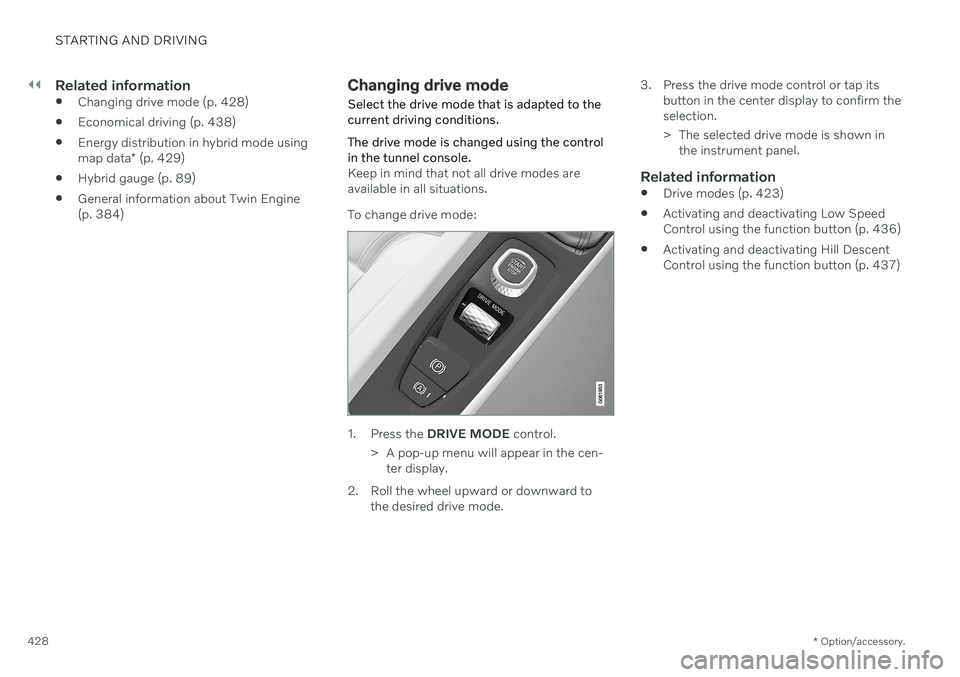
Changing drive mode Select the drive mode that is adapted to the current driving conditions. The drive mode is changed using the control in the tunnel console.
Keep in mind that not all drive modes are available in all situations. To change drive mode:
1. Press the
DRIVE MODE control.
> A pop-up menu will appear in the cen- ter display.
2. Roll the wheel upward or downward to the desired drive mode. 3. Press the drive mode control or tap its
button in the center display to confirm the selection.
> The selected drive mode is shown inthe instrument panel.
Related information
Drive modes (p. 423)
Activating and deactivating Low Speed Control using the function button (p. 436)
Activating and deactivating Hill DescentControl using the function button (p. 437)
Page 438 of 687
STARTING AND DRIVING
436
Activating and deactivating Low Speed Control using the functionbutton There is a function button for driving at low speeds with
Hill Descent Control in the cen-
ter display's Function view if the vehicle is not equipped with a drive mode control in thetunnel console.
Selecting Low Speed Control in the center display's Function view
–Tap the Hill Descent Control button to
activate or deactivate the function.
> An indicator light in the button will illu- minate when the function is activated.
When the engine is switched off, the function will be automatically deactivated.
NOTE
The function is deactivated when driving at high speeds and must be reactivated atlower speeds if so desired.
Related information
Low Speed Control (p. 435)
Changing drive mode (p. 428)
Hill Descent Control
The function for assisting when driving down- hill (HDC 12
) is a low-speed function with
increased engine braking. The function makes it possible to increase or decrease thevehicle's speed on steep downhill gradientsby only using the accelerator pedal, withoutapplying the brakes. The function is included in the
Off Road drive
mode.
HDC is designed for driving on rough roads at low speeds and downhill gradients with slip-pery or otherwise difficult road surfaces. Thedriver does not need to use the brake pedalbut can instead focus on steering.
WARNING
HDC is only intended to be a supplemen- tary braking aid and it does not function inall situations. The driver is always ultimately responsible for operating the vehicle in a safe manner.
FunctionHill Descent Control allows the vehicle to move forward or backward at very low speedsassisted by the brake system. The driver canincrease the speed by pressing the acceleratorpedal. When the accelerator pedal is released,
12 Hill Descent Control
Page 439 of 687

STARTING AND DRIVING
}}
437
the vehicle will return to very low speed regardless of how steep the hill is and withoutthe brakes needing to be applied. The brakelights will illuminate when the function is acti-vated. The driver can brake to stop or slow the vehi- cle at any time by depressing the brake pedal. HDC is activated along with Low Speed Con- trol (LSC
13
), which facilitates and improves
traction and control on rough and slippery sur- faces. The system is intended to be used atlow speeds, up to approximately 40 km/h (25mph).
To keep in mind when using HDC
If the function is switched off while drivingon a steep downhill gradient, brakingeffect will be gradually reduced.
HDC can be used in gear positions
D and
R , and in manual gears 1 or 2.
It is not possible to manually shift to thirdgear or higher when HDC is active.
NOTE
When LSC with HDC is activated in theOff Road drive mode, the feel of the accel-
erator pedal and engine response will change.
NOTE
This drive mode is not designed to be used for normal street driving.
NOTE
The function is deactivated when driving at high speeds and must be reactivated atlower speeds if so desired.
Related information
Activating and deactivating Hill Descent Control using the function button (p. 437)
Changing drive mode (p. 428)
Low Speed Control (p. 435)
All Wheel Drive (AWD) (p. 421)
Activating and deactivating Hill Descent Control using the functionbutton There is a function button for assistance on steep gradients with
Hill Descent Control in
the center display's Function view if the vehi- cle is not equipped with a drive mode controlin the tunnel console.
Selecting Hill Descent Control in the center display's Function view
HDC only works at low speeds.
–Tap the Hill Descent Control button to
activate or deactivate the function.
> An indicator light in the button will illu- minate when the function is activated.
When the engine is switched off, the function will be automatically deactivated.
NOTE
The function is deactivated when driving at high speeds and must be reactivated atlower speeds if so desired.
13 Low Speed Control
Page 486 of 687

||
AUDIO, MEDIA AND INTERNET
* Option/accessory.
484 5. The song/artist/team will now be added to
the list of alerts. Favorite sports teams can also be added to the list using “GameAlert” in the SiriusXM satellite radio set-tings.
> When your choice is being broadcaston a channel, you will be informed by a pop-up.
iTunes taggingFrom the center display's Top view, tapSiriusXM Settings. Tap the iTunes Taggingmenu. Tap the iTunes Tagging box to acti-
vate/deactivate this function and tap Close to
return to Home view. Tap Tags List to display
a list of all tagged songs. If the function is activated, the
iTunes tagbutton will be displayed in Home view. If a song is played that you would like to buy inthe iTunes store, tap this button while the song is playing to tag it. If a song with
iTunes
Tagging information is available, the button
will be selectable. Tap the button to tag the song. If you would like to buy a tagged songvia iTunes, Tap the iTunes tag button. To buy a song in iTunes, begin by connecting an iPhone/iPod/iPad to the USB port in thetunnel console. The iTunes tagging list willautomatically be transferred to the device andremoved from the list in the vehicle. If thedevice is connected when a song is tagged,the data will automatically be saved in the device. To purchase the song, consult theiTunes support page.
Related information
SiriusXM ®
Satellite radio * (p. 482)
Entering characters, letters and words byhand in the center display (p. 132)
Settings for SiriusXM ®
Satellite radio *
(p. 484)
Settings for SiriusXM ®
Satellite radio *
(p. 484)
Connecting a device via the USB port(p. 498)
Settings for SiriusXM ®
Satellite
radio *
There are numerous settings that can be made to enhance your SiriusXM ®
Satellite
radio listening experience.
SettingsDrag down the top view and tap on Settings
MediaSiriusXM. The following alterna-
tives will be displayed:
Page 572 of 687
LOADING, STORAGE AND PASSENGER COMPARTMENT
* Option/accessory.
570
Passenger compartment interior
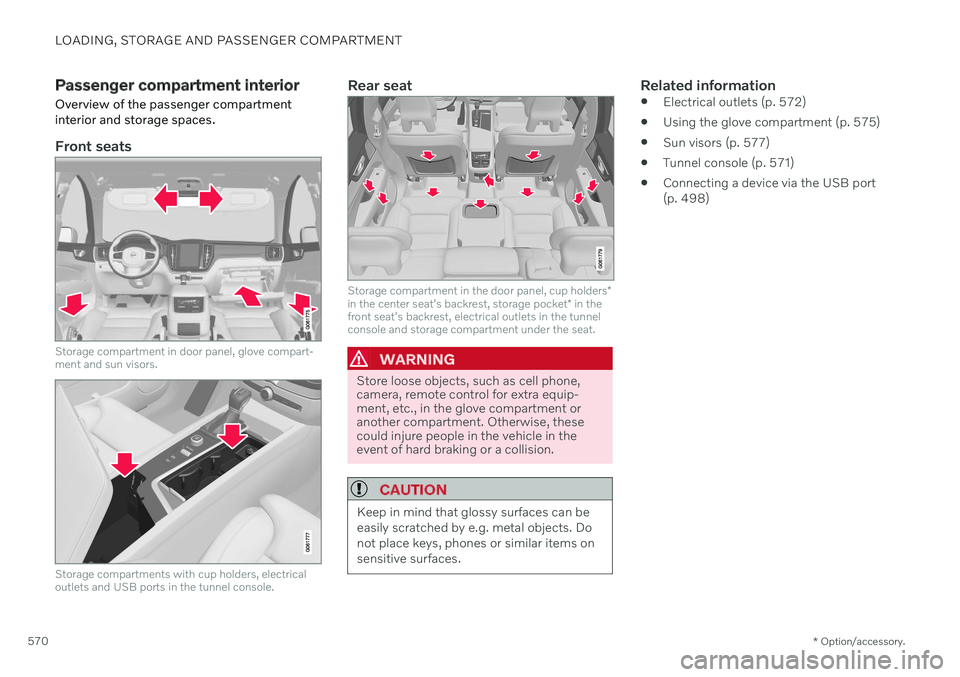
Overview of the passenger compartment interior and storage spaces.
Front seats
Storage compartment in door panel, glove compart- ment and sun visors.
Storage compartments with cup holders, electrical outlets and USB ports in the tunnel console.
Rear seat
Storage compartment in the door panel, cup holders *
in the center seat's backrest, storage pocket * in the
front seat's backrest, electrical outlets in the tunnel console and storage compartment under the seat.
WARNING
Store loose objects, such as cell phone, camera, remote control for extra equip-ment, etc., in the glove compartment oranother compartment. Otherwise, thesecould injure people in the vehicle in theevent of hard braking or a collision.
CAUTION
Keep in mind that glossy surfaces can be easily scratched by e.g. metal objects. Donot place keys, phones or similar items onsensitive surfaces.
Related information
Electrical outlets (p. 572)
Using the glove compartment (p. 575)
Sun visors (p. 577)
Tunnel console (p. 571)
Connecting a device via the USB port (p. 498)