trailer VOLVO XC60 TWIN ENGINE 2020 User Guide
[x] Cancel search | Manufacturer: VOLVO, Model Year: 2020, Model line: XC60 TWIN ENGINE, Model: VOLVO XC60 TWIN ENGINE 2020Pages: 687, PDF Size: 14.65 MB
Page 337 of 687

DRIVER SUPPORT
* Option/accessory.335
BLIS limitations
BLIS 68
functionality may be reduced in cer-
tain situations.
Keep the marked area clean (on both the left and right sides of the vehicle) 69
.
Examples of limitations:
Dirt, ice and snow covering the sensors may reduce functionality and prevent thesystem from providing warnings.
The BLIS function is automatically deacti-vated if a trailer, bicycle holder or similar isconnected to the vehicle's electrical sys-tem.
For BLIS to function effectively, bicycleholders, luggage racks or similar shouldnot be mounted on the vehicle's towbar.
WARNING
BLIS does not work in sharp curves.
BLIS does not work when the vehicle is being reversed.
NOTE
The function uses the vehicle's camera and radar sensor, which has certain generallimitations.
Related information
BLIS
* (p. 333)
Camera/radar sensor limitations (p. 313)
68
Blind Spot Information
69 Note: This illustration is general and details may vary depending on model.
Page 338 of 687

DRIVER SUPPORT
* Option/accessory.
336
BLIS messages
A number of messages related to BLIS 70
may
be displayed in the instrument panel. Several examples are provided below.
Message Meaning
Blind spot sensor Service requiredThe system is not functioning as intended. Contact a workshop A
.
Blind spot system off Trailer attachedBLIS and CTA B
have been deactivated because a trailer has been connected to the vehicle's electrical system.
A An authorized Volvo workshop is recommended.
B Cross Traffic Alert *
A text message can be erased by briefly press- ing the
button in the center of the right-
side steering wheel keypad. If a message cannot be erased, contact a workshop A
.
Related information
BLIS
* (p. 333)
Cross Traffic Alert
* (p. 337)
70
Blind Spot Information
Page 341 of 687

DRIVER SUPPORT
* Option/accessory.339
The vehicle is parked very far into a parking space.
In a diagonal parking space, CTA may be completely "blind" on one side of your vehicle.
CTA's blind zone.
CTA's field of vision.
However, as you back your vehicle slowly out of a parking space, CTA's field of vision changes in relation to the obstructing vehicle/object and its blind zone is reduced.
Examples of further limitations
The
auto brake sub-function only detects
vehicles in motion and may therefore not
"see" and brake for e.g. stationary obsta- cles, a cyclists or a pedestrian.
Dirt, ice and snow covering the sensorsmay reduce functionality and prevent thesystem from providing warnings.
CTA is automatically deactivated if atrailer, bicycle holder or similar is con-nected to the vehicle's electrical system.
For CTA to function effectively, bicycleholders, luggage racks or similar shouldnot be mounted on the vehicle's towbar.
NOTE
The function uses the vehicle's camera and radar sensor, which has certain generallimitations.
Related information
Cross Traffic Alert
* (p. 337)
Camera/radar sensor limitations (p. 313)
Page 342 of 687
DRIVER SUPPORT
* Option/accessory.
340
Cross Traffic Alert *75
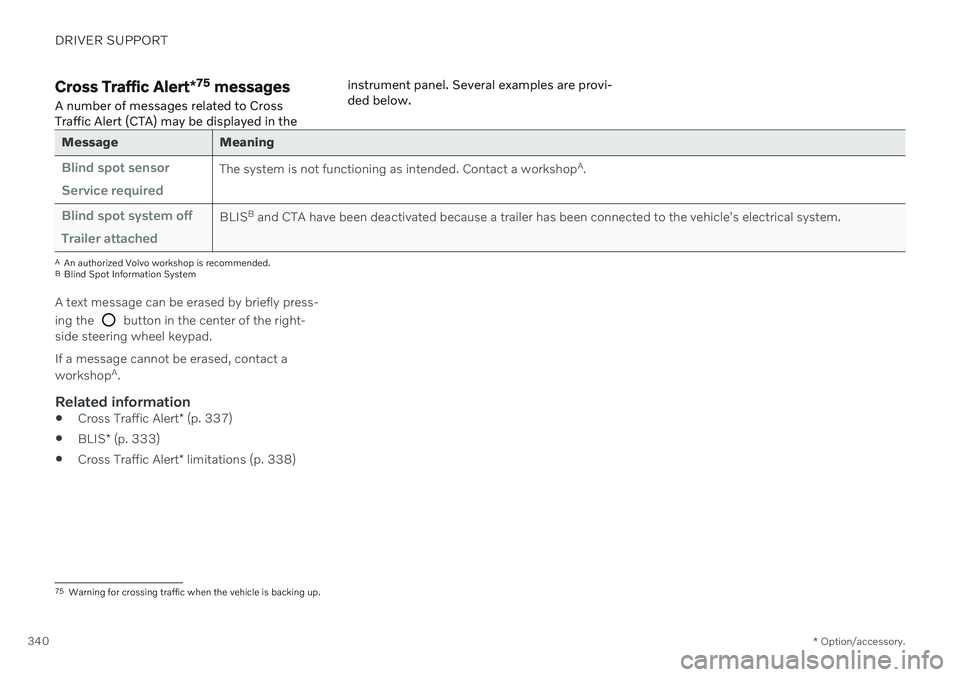
messages
A number of messages related to Cross Traffic Alert (CTA) may be displayed in the instrument panel. Several examples are provi-ded below.
Message Meaning
Blind spot sensor Service requiredThe system is not functioning as intended. Contact a workshop
A
.
Blind spot system off Trailer attachedBLIS B
and CTA have been deactivated because a trailer has been connected to the vehicle's electrical system.
A An authorized Volvo workshop is recommended.
B Blind Spot Information System
A text message can be erased by briefly press- ing the
button in the center of the right-
side steering wheel keypad. If a message cannot be erased, contact a workshop A
.
Related information
Cross Traffic Alert
* (p. 337)
BLIS
* (p. 333)
Cross Traffic Alert
* limitations (p. 338)
75
Warning for crossing traffic when the vehicle is backing up.
Page 347 of 687

DRIVER SUPPORT
* Option/accessory.345
to receive an audible alert if the vehicle is approaching a speed camera. To adjust the audible alert settings:
1. Select
SettingsMy CarIntelliSafe
Road Sign Information in the center
display's Top view.
2. Select/deselect
Speed Camera Audio
Warning to activate/deactivate the speed
camera audible alert.
Related information
Road Sign Information
* (p. 341)
Speed limit and speed camera warnings from Road Sign Information
* (p. 343)
Road Sign Information
* limitations
(p. 345)
Road Sign Information * limitations
Road Sign Information (RSI 86
) functionality
may be reduced in certain situations.
The function could have reduced functionality due to e.g.: faded road signs
signs located in a curve in the road
twisted or damaged signs
signs positioned high above the road
fully/partially obstructed or poorly posi- tioned signs
signs partially or fully covered by frost,snow and/or dirt
digital road maps 87
that are outdated,
incorrect or do not contain speed informa- tion 88
.
NOTE
In certain markets, the Road Sign Informa- tion * function is only available in combina-
tion with Sensus Navigation *.
NOTE
Certain types of bike carriers that are con- nected to the trailer socket may be inter-preted as a connected trailer by the RSIfunction. In such cases, the instrumentpanel may indicate incorrect speed infor-mation.
NOTE
The function uses the vehicle's camera and radar sensor, which has certain generallimitations.
Related information
Road Sign Information
* (p. 341)
Camera/radar sensor limitations (p. 313)
86
Road Sign Information
87 Vehicles equipped with Sensus Navigation *.
88 Map data and speed information is not available for all areas.
Page 364 of 687

DRIVER SUPPORT
* Option/accessory.
362
Park Assist front, rear and sides *
Park Assist behaves differently depending on which part of the vehicle is approaching anobstacle.
Front camera
The warning signal has a continuous tone when the obstacle is less than approx. 30 cm (1 ft) from thevehicle.
The Park Assist system's front sensors are automatically activated when the engine isstarted. They are active at speedsbelow 10 km/h (6 mph). The distance monitored extends approx. 80 cm (2.5 ft) in front of the vehicle.
NOTE
The Park Assist system is deactivated when the parking brake is used or when P
is selected on vehicles with automatictransmission.
CAUTION
When installing auxiliary lights: Make sure these do not obscure the sensors – theauxiliary lights could be perceived as anobstacle.
Back
The warning signal has a continuous tone when the obstacle is less than approx. 30 cm (1 ft) from thevehicle.
The rear sensors will be activated if the vehicle begins rolling backward or if reverse gear isengaged. The distance monitored extends approx. 1.5 meters (5 ft) behind the vehicle. The Park Assist system's rear sensors will be automatically deactivated if the vehicle isbacking up with a trailer connected to thevehicle's electrical system.
NOTE
When reversing with e.g. a trailer or bike carrier on the trailer hitch – without Volvooriginal trailer cables – the Parking Assistsystem may have to be turned off manuallyto prevent the sensors from reacting tothese.
Page 365 of 687

DRIVER SUPPORT
}}
* Option/accessory.363
Side sensors
The warning signal will begin pulsating rapidly when the obstacle is less than approx. 25 cm (0.8 ft) fromthe vehicle.
Park Assist's side sensors are automatically activated when the engine is started. They areactive at speeds below 10 km/h (6 mph). The distance monitored is approx. 25 cm (0.8 ft) out from the sides. The detection area of the side sensors increa- ses significantly, however, when the steeringangle of the front wheel increases anddepending on the position of the steeringwheel, obstacles up to approx. 90 cm (3 ft)diagonally behind or in front of the vehicle canbe detected.
Related information
Park Assist
* (p. 361)
Park Assist sensor field (p. 371)
Activating or deactivating Park Assist
*
The Park Assist function can be activated or deactivated.
Park Assist's front and side sensors are auto- matically activated when the engine is started.The rear sensors are activated if the vehicle ismoving backward or reverse gear is engaged.
Activate or deactivate thefunction using this button inthe center display's Functionview.
GREEN button indicator light – the func- tion is activated.
GRAY button indicator light – the functionis deactivated.
In vehicles equipped with Park Assist Cam- era *, Park Assist can also be activated or deac-
tivated from the relevant camera view.
Related information
Park Assist
* (p. 361)
Park Assist limitations (p. 363)
Park Assist limitations Park Assist may not be able to detect all con- ditions in all situations and functionality maytherefore be limited in certain cases.
The driver should be aware of the following limitations for Park Assist:
WARNING
The parking sensors have dead/blind spots where objects cannot bedetected.
Pay particular attention to people andanimals near the vehicle.
Bear in mind that the front end of thevehicle may swing out towards oncom-ing traffic during the parking maneuver.
WARNING
Be extra cautious when reversing if this symbol isshown when a trailer, bikecarrier or similar isattached and electricallyconnected to the vehicle. The symbol indicates that
the rear parking assist sensors are deacti-
vated and will not warn of any obstacles.
Page 366 of 687

||
DRIVER SUPPORT
* Option/accessory.
364
CAUTION
Objects such as chains, thin and glossy poles or low obstacles may end up in the"signal shadow" and then go temporarilyundetected by the sensors – the pulsatingtone may then unexpectedly stop insteadof becoming a constant tone as expected. The sensors cannot detect high objects, such as protruding ramps. In such situations, pay extra attention and maneuver/drive the vehicle veryslowly or stop the current parkingmaneuver – there may be a high risk ofdamage to the vehicle or other objectssince information from the sensors isnot always reliable in such situations.
CAUTION
In some circumstances, the Park Assist System may produce false warnings due toexternal sound sources with the sameultrasonic frequencies as those the systemworks with. Examples of such sources are horns, wet tires on asphalt, pneumatic brakes, exhaustnoise from motorcycles, etc.
NOTE
When a trailer hitch is configured with the vehicle electrical system, the trailer hitchprotrusion is included when the functionmeasures the distance to objects behindthe vehicle.
Related information
Park Assist
* (p. 361)
Page 371 of 687

DRIVER SUPPORT
}}
* Option/accessory.369
Side cameras
The side cameras are located in the rearview mirrors.
The side cameras can show views along each side of the vehicle.
Related information
Park Assist Camera
* (p. 366)
Activating Park Assist Camera (p. 372)
Camera/radar sensor limitations (p. 313)
Park Assist Camera trajectory lines
*
The Park Assist Cameras use trajectory lines and fields on the screen to indicate the vehi-cle's position in relation to its immediate sur-roundings.
Example of trajectory lines.
The trajectory lines show the anticipated tra- jectory for the vehicle's outermost dimensionsbased on the current position of the steering wheel and can help simplify parallel parking,backing into tight spaces or attaching a trailer. The lines on the screen are projected as if they were painted lines on the ground behind thevehicle and are directly affected by the way inwhich the steering wheel is turned. Thismakes it possible for the driver to see path thevehicle will take, even if he/she turns thesteering wheel. These lines also indicate the outermost limits that any object (towbar, rearview mirrors, cor-ners of the body, etc.) extends out from thevehicle.
NOTE
When reversing with a trailer that is not electrically connected to the vehi-cle, the screen guide lines show thepath the
vehicle will take – not the
trailer.
The screen does not show guide lineswhen a trailer is electrically connectedto the vehicle's electrical system.
Guide lines are not shown when zoom-ing in.
Page 372 of 687

||
DRIVER SUPPORT
* Option/accessory.
370
CAUTION
Bear in mind that when the rearward camera view is selected, the screenonly shows the area behind the vehicle– pay attention to the sides and frontof the vehicle when steering whilereversing.
The same applies to the reverse – payattention to what is happening withthe rear parts of the vehicle when thefront camera view is selected.
Note that the guide lines show theshortest
path – pay extra attention to
ensure that the vehicle sides do notcome in contact with/travel over any-thing when steering while driving for-ward or that the vehicle front movestoward/over anything when steeringwhile reversing.
Trajectory lines in 360° view *
360° view with trajectory lines.
In the 360° view, trajectory lines are shown behind, in front of, or to the sides of the vehi-cle, depending on the direction of travel. When driving forward: Front lines
When backing up: Side lines and rear lines.
When the front or rear camera is selected, thetrajectory lines will be shown regardless of thevehicle's direction of travel. With a side camera selected, the trajectory lines will only be shown if the vehicle is back-ing up.
Trajectory lines for a towbar *
Towbar with trajectory line.
Towbar - activate trajectory lines for tow-
bar.
Zoom - zoom in/out.
The camera can help make hitching a trailer easier by showing an anticipated trajectoryline for the towbar's path toward the trailer.