change time VOLVO XC60 TWIN ENGINE 2020 Owner's Manual
[x] Cancel search | Manufacturer: VOLVO, Model Year: 2020, Model line: XC60 TWIN ENGINE, Model: VOLVO XC60 TWIN ENGINE 2020Pages: 687, PDF Size: 14.65 MB
Page 243 of 687

KEY, LOCKS AND ALARM
241
Unlocking with remote key
–Press the button on the remote key to
unlock the vehicle.
Automatic relockingIf none of the doors or tailgate are opened within two minutes after being unlocked, theywill automatically relock. This function reducesthe risk of inadvertently leaving the vehicleunlocked.
Remote key not working
NOTE
Move closer to the vehicle and try to unlock it again.
If the remote key is not working to lock or unlock the vehicle, its battery may be dis-charged. Use the detachable key blade tolock/unlock the driver's door instead.
Related information
Settings for remote and inside door unlock(p. 241)
Unlocking the tailgate using the remotekey (p. 242)
Remote key (p. 238)
Replacing the remote key's battery(p. 243)
Locking and unlocking with detachablekey blade (p. 250)
Settings for remote and inside door unlock Several different sequences are available for remote unlocking.
To change this setting: 1.
Tap
Settings in the center display's Top
view.
2. Tap
My CarLockingRemote and
Interior Unlock.
3. Select alternative:
All Doors – unlocks all doors at the
same time.
Single Door – unlocks the driver's
door. Press the remote key unlock but- ton twice to unlock all doors.
The settings made here also affect centrallocking using the inside door handle.
Related information
Locking and unlocking using the remotekey (p. 240)
Locking and unlocking from inside thevehicle (p. 257)
Page 250 of 687
KEY, LOCKS AND ALARM
* Option/accessory.
248
Settings for Red Key *
The holder of a regular remote key can adjust settings for a Red Key. Certain driver supportfunctions are always active, however.
To change this setting:
1. Unlock the vehicle using a regular remote key.
2. Tap
Settings in the center display's Top
view.
3. Tap
SystemDriver ProfilesRed
Key.
> The following settings can be made:
Set Time Gap For Adaptive Cruise Control*
Reduced Maximum Volume
Max Speed Limit
Speed Limit Warning
Details and default settings
Set Time Gap For Adaptive Cruise Control
Set the time gap (1 is the shortest and 5 is the longest gap).
The default setting is
5.0.
Reduced Maximum Volume
Lower maximum volume for media sources.
The function is "On" by default.
Max Speed Limit
Set a maximum speed for this key.
By default, the function is "On" and the speed is 120 km/h (75 mph). Setting interval: 50-250 km/h (30-160 mph)
Increments: 1 km/h (1 mph)
Speed limit symbol.
Speed Limit Warning
Warns when vehicle moves above set values.
By default, the function is "On" and the values are 50, 70 and 90 km/h (30, 45 and 55 mph). Setting interval: 0-250 km/h (0-160 mph)
Increments: 1 km/h (1 mph)
Maximum number of simultaneous reminders: 6
Driver support functionsThe following driver support functions willalways be active for a Red Key user:
Blind Spot Information (BLIS)
*
Lane Keeping Aid (LKA)
*
Distance Alert
*
City Safety
Driver Alert Control (DAC)
*
Road Sign Information
*
Related information
Red Key - restricted remote key
* (p. 247)
Page 255 of 687
KEY, LOCKS AND ALARM
}}
* Option/accessory.253
This device complies with part 15 of the FCC rules. Operation is subject to the followingtwo conditions: (1) This device may not cause harmful interfer- ence, and (2) this device must accept any interference received, including interference that maycause undesired operation. Any changes or modification not expressly approved by the party responsible for compli-ance could void the user's authority to operatethis equipment. Canada-IC:3659A-VO3134This device complies with Industry Canada license-exempt RSS standards. Operation issubject to the following two conditions: (1) This device may not cause harmful interfer- ence, and (2) this device must accept anyinterference received, including interferencethat may cause undesired operation.
Related information
Remote key (p. 238)
Keyless and touch-sensitive surfaces
*
With the keyless locking and unlocking func- tion, the remote key only needs to be withinrange, e.g. in a pocket or bag. The vehicle canthen be locked or unlocked by touching thepressure-sensitive surface on the door han-dle.
Pressure-sensitive surfaces
Door handle
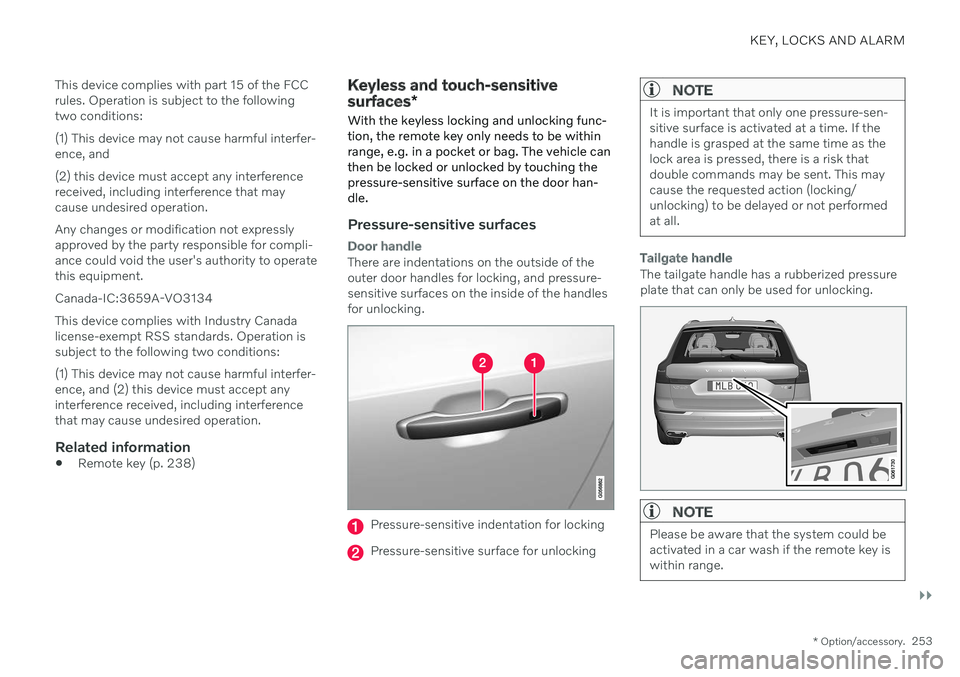
There are indentations on the outside of the outer door handles for locking, and pressure-sensitive surfaces on the inside of the handlesfor unlocking.
Pressure-sensitive indentation for locking
Pressure-sensitive surface for unlocking
NOTE
It is important that only one pressure-sen- sitive surface is activated at a time. If thehandle is grasped at the same time as thelock area is pressed, there is a risk thatdouble commands may be sent. This maycause the requested action (locking/unlocking) to be delayed or not performedat all.
Tailgate handle
The tailgate handle has a rubberized pressure plate that can only be used for unlocking.
NOTE
Please be aware that the system could be activated in a car wash if the remote key iswithin range.
Page 257 of 687
KEY, LOCKS AND ALARM
* Option/accessory.255
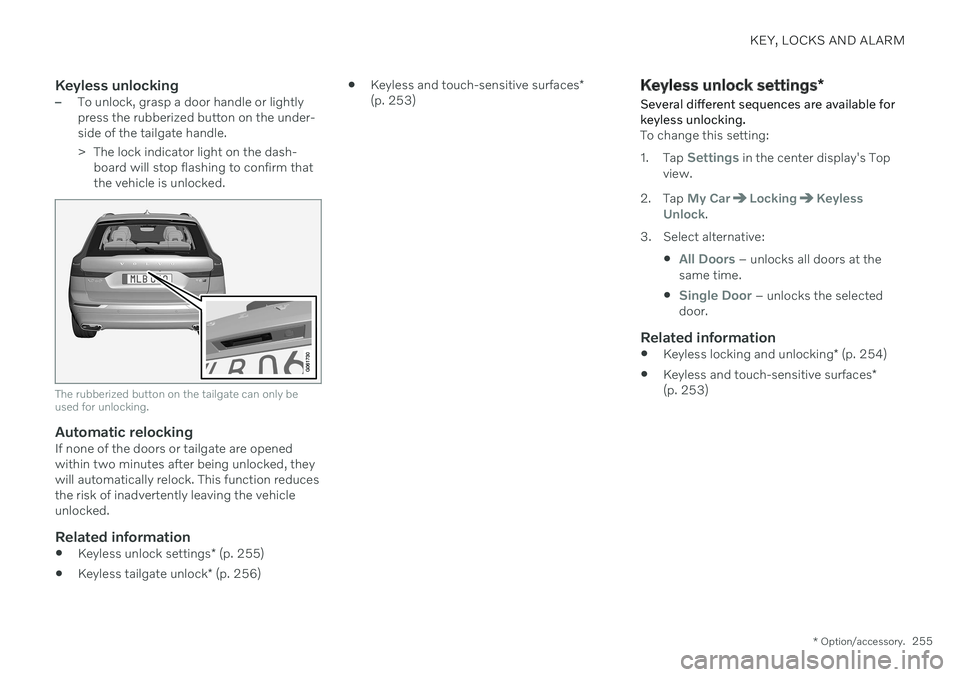
Keyless unlocking–To unlock, grasp a door handle or lightly press the rubberized button on the under-side of the tailgate handle.
> The lock indicator light on the dash-
board will stop flashing to confirm that the vehicle is unlocked.
The rubberized button on the tailgate can only be used for unlocking.
Automatic relockingIf none of the doors or tailgate are opened within two minutes after being unlocked, theywill automatically relock. This function reducesthe risk of inadvertently leaving the vehicleunlocked.
Related information
Keyless unlock settings
* (p. 255)
Keyless tailgate unlock
* (p. 256)
Keyless and touch-sensitive surfaces
*
(p. 253)
Keyless unlock settings *
Several different sequences are available for keyless unlocking.
To change this setting: 1. Tap
Settings in the center display's Top
view.
2. Tap
My CarLockingKeyless
Unlock.
3. Select alternative:
All Doors – unlocks all doors at the
same time.
Single Door – unlocks the selected
door.
Related information
Keyless locking and unlocking
* (p. 254)
Keyless and touch-sensitive surfaces
*
(p. 253)
Page 268 of 687

||
KEY, LOCKS AND ALARM
* Option/accessory.
266
Kicking motion within the sensor's activation area.
Related information
Keyless and touch-sensitive surfaces
*
(p. 253)
Opening and closing the power tailgate
*
(p. 261)
Remote key range (p. 242)
Private Locking The tailgate can be locked using the private locking function to prevent it from beingopened, e.g. when the vehicle is left at aworkshop or with a valet.
The function button for pri- vate locking is located in thecenter display's Functionview. Depending on the cur-rent status of the lock,
Private Locking Unlockedor Private Locking Lockedwill be displayed.
Related information
Activating and deactivating private locking (p. 266)
Activating and deactivating private locking
Private locking is activated using the function button in the center display and a PIN code.
NOTE
For the valet lock function to be activated the car must be in at least ignition mode I.
Two codes are used for private locking:
A security code, which is created the first time the function is used.
A PIN code, which is changed each timethe function is activated.
Entering security code before initial
use
The first time the function is used, a securitycode must be selected. This code can then beused to deactivate private locking if theselected PIN code has been forgotten or lost.The security code functions as a PUK (secur-ity) code for all PIN codes used for privatelocking. Save the security code in a safe place.
Page 287 of 687
DRIVER SUPPORT
}}
* Option/accessory.285
your vehicle's current speed must be at least 15 km/h (9 mph).
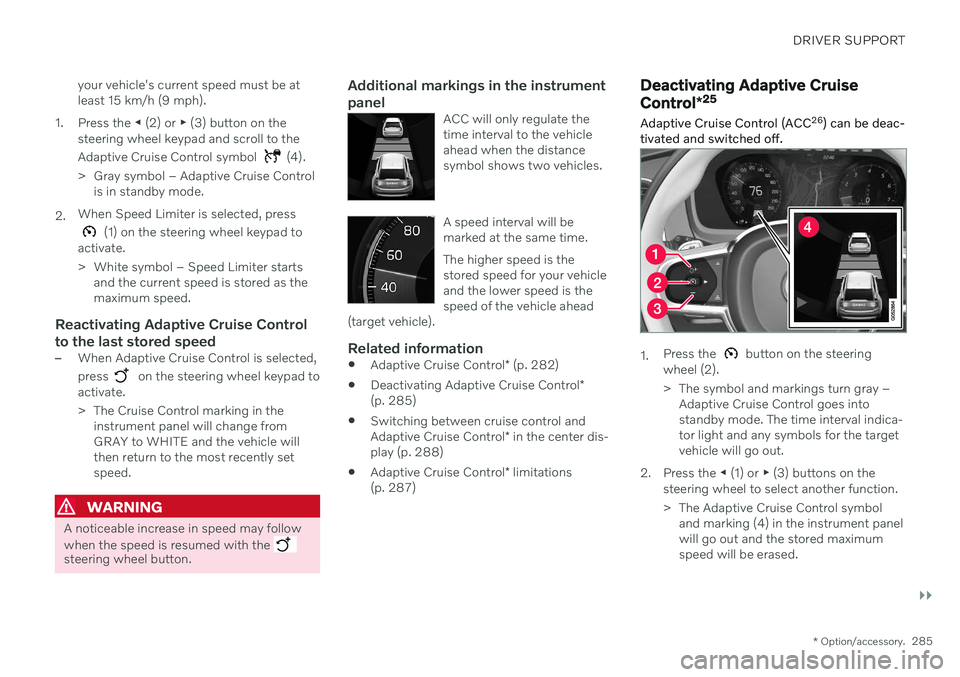
1. Press the ◀ (2) or ▶ (3) button on the
steering wheel keypad and scroll to the Adaptive Cruise Control symbol
(4).
> Gray symbol – Adaptive Cruise Control is in standby mode.
2. When Speed Limiter is selected, press
(1) on the steering wheel keypad to
activate.
> White symbol – Speed Limiter starts and the current speed is stored as the maximum speed.
Reactivating Adaptive Cruise Control to the last stored speed
–When Adaptive Cruise Control is selected, press
on the steering wheel keypad to
activate.
> The Cruise Control marking in the instrument panel will change from GRAY to WHITE and the vehicle willthen return to the most recently setspeed.
WARNING
A noticeable increase in speed may follow when the speed is resumed with the
steering wheel button.
Additional markings in the instrument panel
ACC will only regulate the time interval to the vehicleahead when the distancesymbol shows two vehicles.
A speed interval will be marked at the same time. The higher speed is the stored speed for your vehicleand the lower speed is thespeed of the vehicle ahead
(target vehicle).
Related information
Adaptive Cruise Control
* (p. 282)
Deactivating Adaptive Cruise Control
*
(p. 285)
Switching between cruise control and Adaptive Cruise Control
* in the center dis-
play (p. 288)
Adaptive Cruise Control
* limitations
(p. 287)
Deactivating Adaptive Cruise Control *25
Adaptive Cruise Control (ACC 26
) can be deac-
tivated and switched off.
1. Press the button on the steering
wheel (2).
> The symbol and markings turn gray – Adaptive Cruise Control goes into standby mode. The time interval indica-tor light and any symbols for the targetvehicle will go out.
2. Press the ◀ (1) or ▶ (3) buttons on the
steering wheel to select another function.
> The Adaptive Cruise Control symbol and marking (4) in the instrument panel will go out and the stored maximumspeed will be erased.
Page 293 of 687
DRIVER SUPPORT
}}
* Option/accessory.291
Pilot Assist*38
Pilot Assist can help the driver keep the vehi- cle in the current traffic lane by providingsteering assistance and maintaining an evenspeed and a set time interval to the vehicleahead.
How Pilot Assist worksThe Pilot Assist function is primarily intended for use on highways and other major roadswhere it can help provide a more comfortableand relaxing driving experience.
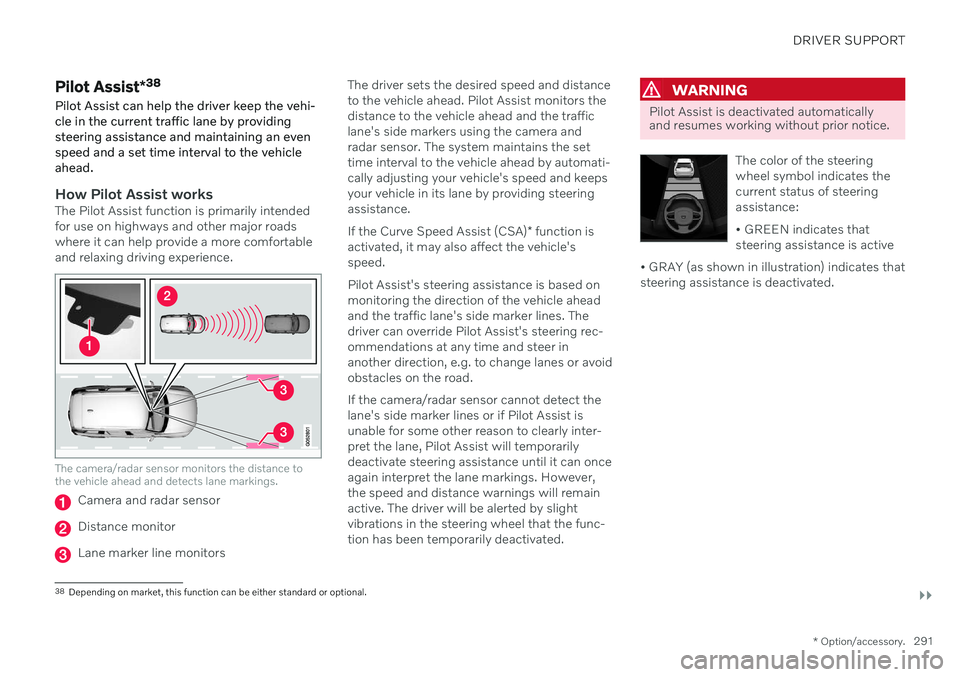
The camera/radar sensor monitors the distance to the vehicle ahead and detects lane markings.
Camera and radar sensor
Distance monitor
Lane marker line monitors The driver sets the desired speed and distance to the vehicle ahead. Pilot Assist monitors thedistance to the vehicle ahead and the trafficlane's side markers using the camera andradar sensor. The system maintains the settime interval to the vehicle ahead by automati-cally adjusting your vehicle's speed and keepsyour vehicle in its lane by providing steeringassistance. If the Curve Speed Assist (CSA)
* function is
activated, it may also affect the vehicle's speed. Pilot Assist's steering assistance is based on monitoring the direction of the vehicle aheadand the traffic lane's side marker lines. Thedriver can override Pilot Assist's steering rec-ommendations at any time and steer inanother direction, e.g. to change lanes or avoidobstacles on the road. If the camera/radar sensor cannot detect the lane's side marker lines or if Pilot Assist isunable for some other reason to clearly inter-pret the lane, Pilot Assist will temporarilydeactivate steering assistance until it can onceagain interpret the lane markings. However,the speed and distance warnings will remainactive. The driver will be alerted by slightvibrations in the steering wheel that the func-tion has been temporarily deactivated.
WARNING
Pilot Assist is deactivated automatically and resumes working without prior notice.
The color of the steering wheel symbol indicates thecurrent status of steeringassistance: • GREEN indicates that steering assistance is active
• GRAY (as shown in illustration) indicates thatsteering assistance is deactivated.
38 Depending on market, this function can be either standard or optional.
Page 297 of 687
DRIVER SUPPORT
* Option/accessory.295
NOTE
Note that the Pilot Assist function only works when the driver's hands are on thesteering wheel.
Additional markings in the instrument panel
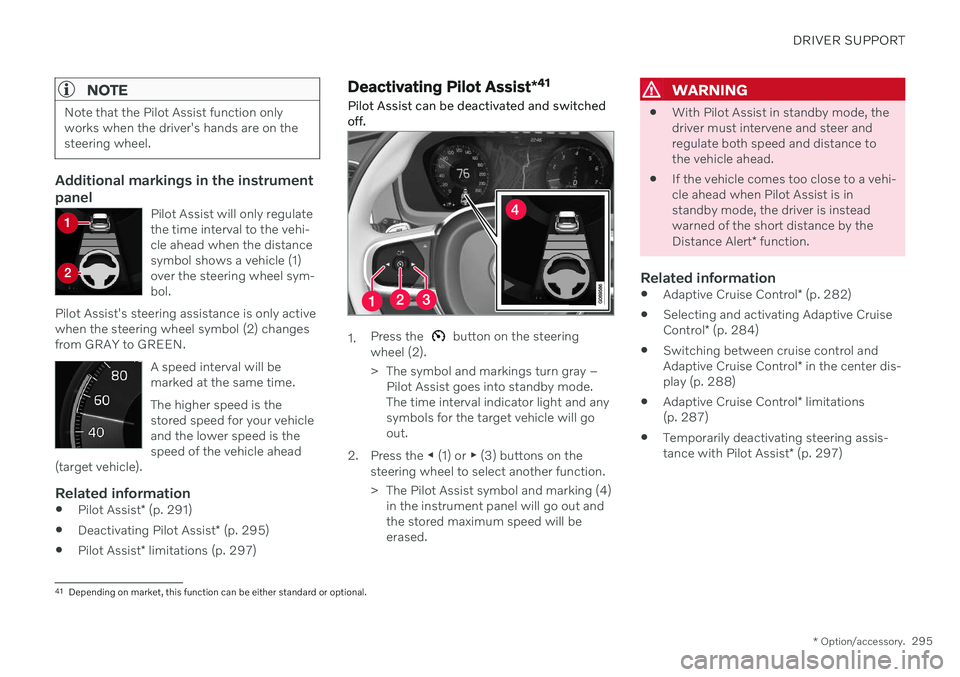
Pilot Assist will only regulate the time interval to the vehi-cle ahead when the distancesymbol shows a vehicle (1)over the steering wheel sym-bol.
Pilot Assist's steering assistance is only activewhen the steering wheel symbol (2) changesfrom GRAY to GREEN.
A speed interval will be marked at the same time. The higher speed is the stored speed for your vehicleand the lower speed is thespeed of the vehicle ahead
(target vehicle).
Related information
Pilot Assist
* (p. 291)
Deactivating Pilot Assist
* (p. 295)
Pilot Assist
* limitations (p. 297)
Deactivating Pilot Assist *41
Pilot Assist can be deactivated and switched off.
1. Press the button on the steering
wheel (2).
> The symbol and markings turn gray – Pilot Assist goes into standby mode. The time interval indicator light and anysymbols for the target vehicle will goout.
2. Press the ◀ (1) or ▶ (3) buttons on the
steering wheel to select another function.
> The Pilot Assist symbol and marking (4) in the instrument panel will go out and the stored maximum speed will beerased.
WARNING
With Pilot Assist in standby mode, the driver must intervene and steer andregulate both speed and distance tothe vehicle ahead.
If the vehicle comes too close to a vehi-cle ahead when Pilot Assist is instandby mode, the driver is insteadwarned of the short distance by the Distance Alert
* function.
Related information
Adaptive Cruise Control
* (p. 282)
Selecting and activating Adaptive CruiseControl
* (p. 284)
Switching between cruise control andAdaptive Cruise Control
* in the center dis-
play (p. 288)
Adaptive Cruise Control
* limitations
(p. 287)
Temporarily deactivating steering assis-tance with Pilot Assist
* (p. 297)
41
Depending on market, this function can be either standard or optional.
Page 304 of 687
||
DRIVER SUPPORT
* Option/accessory.
302
WARNING
When driver support follows another vehi- cle at speeds over approx. 30 km/h
(20 mph) and changes target vehicle –from a moving vehicle to a stationary one –driver support will ignore the stationary
vehicle and instead accelerate to the storedspeed. The driver must then intervene and apply the brakes.
Automatic standby mode when switching targets
Driver support disengages and goes into standby mode if:
your vehicle's speed goes under 5 km/h(3 mph) and driver support cannot deter-mine if the target vehicle is stationary or ifit is another object, e.g. a speed bump.
your vehicle's speed goes under 5 km/h(3 mph) and the vehicle ahead turns sothat driver support no longer has a vehicleto follow.
Related information
Driver support systems (p. 272)
Adaptive Cruise Control
* (p. 282)
Pilot Assist
* (p. 291)
Adjusting set speed for driver support
It is possible to adjust set speeds for the Adaptive Cruise Control * and Pilot Assist *
functions.
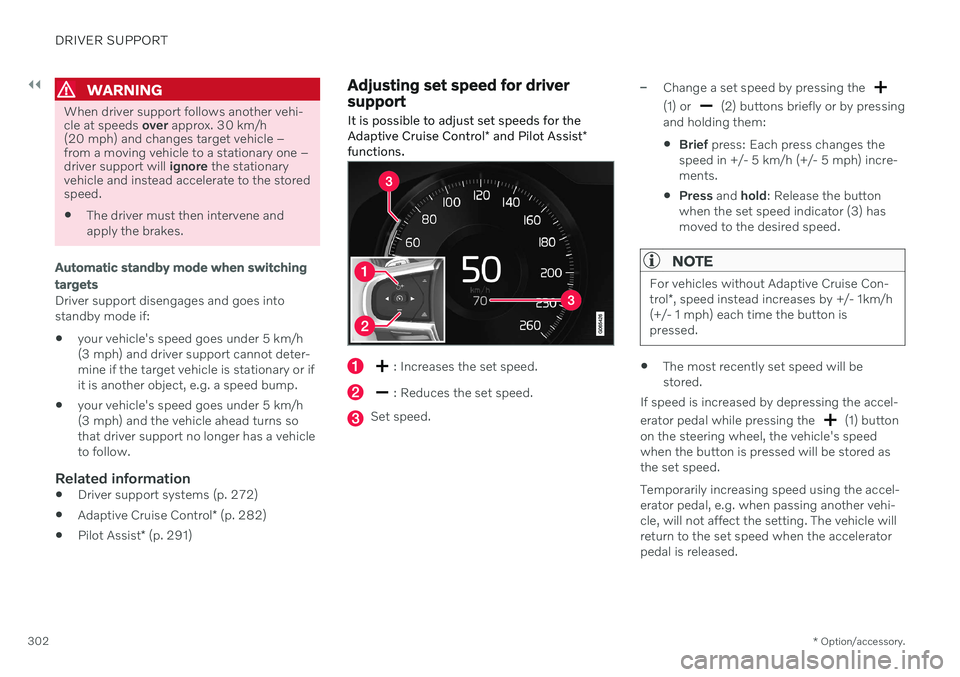
: Increases the set speed.
: Reduces the set speed.
Set speed.
–Change a set speed by pressing the
(1) or (2) buttons briefly or by pressing
and holding them:
Brief
press: Each press changes the
speed in +/- 5 km/h (+/- 5 mph) incre- ments.
Press
and hold: Release the button
when the set speed indicator (3) hasmoved to the desired speed.
NOTE
For vehicles without Adaptive Cruise Con- trol *, speed instead increases by +/- 1km/h
(+/- 1 mph) each time the button is pressed.
The most recently set speed will be stored.
If speed is increased by depressing the accel- erator pedal while pressing the
(1) button
on the steering wheel, the vehicle's speed when the button is pressed will be stored as the set speed. Temporarily increasing speed using the accel- erator pedal, e.g. when passing another vehi-cle, will not affect the setting. The vehicle willreturn to the set speed when the acceleratorpedal is released.
Page 311 of 687

DRIVER SUPPORT
* Option/accessory.309
WARNING
The driver should be aware that if condi- tions suddenly change when using PassingAssistance, the function may implement anundesired acceleration in certain condi-tions. Some situations should be avoided, e.g. if: the vehicle is approaching an exit in the same direction as passing would nor-mally occur
the vehicle ahead slows before yourvehicle has had time to switch to thepassing lane
traffic in the passing lane slows down
Situations of this type can be avoided by tem-porarily putting Adaptive Cruise Control or
Pilot Assist in standby mode.
Related information
Passing assistance (p. 308)
Adaptive Cruise Control
* (p. 282)
Pilot Assist
* (p. 291)
Adaptive Cruise Control
* standby mode
(p. 286)
Pilot Assist
* standby mode (p. 296)
Radar sensor
The radar sensor is used by several driver support systems to detect other vehicles.
Location of radar sensor.
The radar sensor is used by the following func- tions:
Distance Alert
*
Adaptive Cruise Control
*
Pilot Assist
*
Lane Keeping Aid
City Safety
Any modifications to the radar sensor maymake its use illegal.
Related information
Driver support systems (p. 272)
Camera/radar sensor limitations (p. 313)
Recommended camera and radar sensormaintenance (p. 317)
Radar sensor type approval (p. 310)