child lock VOLVO XC60 TWIN ENGINE 2020 Owner's Manual
[x] Cancel search | Manufacturer: VOLVO, Model Year: 2020, Model line: XC60 TWIN ENGINE, Model: VOLVO XC60 TWIN ENGINE 2020Pages: 687, PDF Size: 14.65 MB
Page 251 of 687
KEY, LOCKS AND ALARM
* Option/accessory.249
Detachable key blade
The remote key contains a detachable metal key blade that can be used to activate a num-ber of functions and preform certain actions.
A Volvo workshop can provide you with the key blade's unique code, which is recom-mended in case you need to order a new keyblade.
Using the detachable key bladeThe detachable key blade can be used to
manually open the left-side front door ifcentral locking cannot be activated withthe remote key
emergency lock all doors
activate/deactivate the rear door mechani-cal child safety locks
The button-less key 8
does not have a detacha-
ble key blade. If needed, use the standardremote key's detachable key blade.
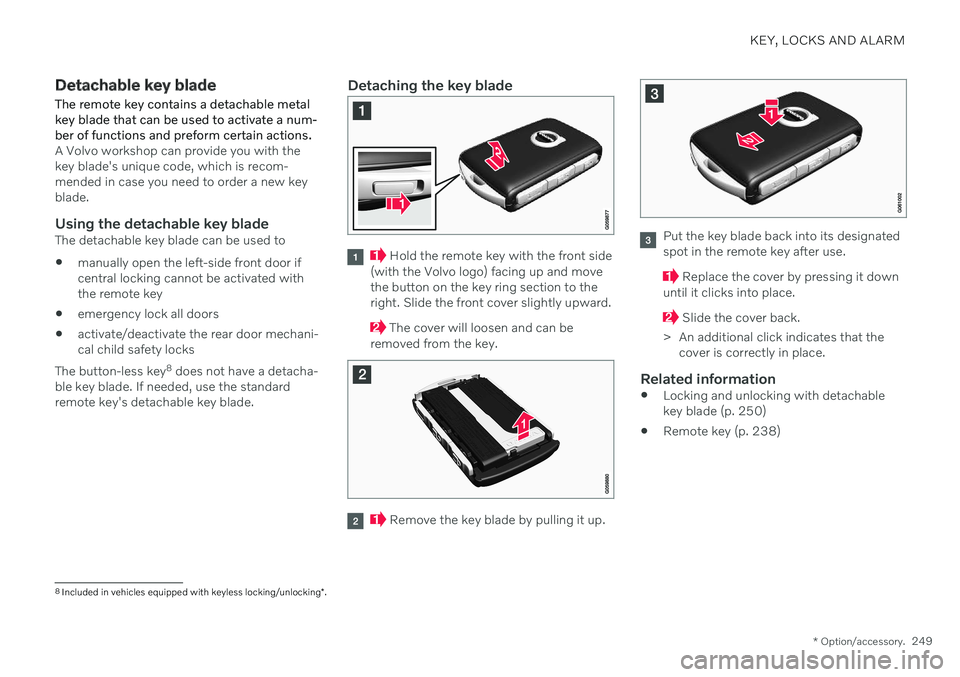
Detaching the key blade
Hold the remote key with the front side
(with the Volvo logo) facing up and move the button on the key ring section to theright. Slide the front cover slightly upward.
The cover will loosen and can be
removed from the key.
Remove the key blade by pulling it up.
Put the key blade back into its designated spot in the remote key after use.
Replace the cover by pressing it down
until it clicks into place.
Slide the cover back.
> An additional click indicates that the cover is correctly in place.
Related information
Locking and unlocking with detachable key blade (p. 250)
Remote key (p. 238)
8
Included in vehicles equipped with keyless locking/unlocking *.
Page 252 of 687

KEY, LOCKS AND ALARM
250
Locking and unlocking with detachable key blade
The detachable key blade can be used to unlock the vehicle from the outside, e.g. if thebattery in the remote key is discharged.
Unlocking
Pull the front left-hand door handle to its end position to access the lock cylinder.
Put the key in the lock cylinder.
Turn the key clockwise 45 degrees so that the key blade is pointing straight rear-ward.
Turn the key blade back 45 degrees to its original position. Remove the key from thelock cylinder and release the handle sothat it returns to its original positionagainst the vehicle.
5. Pull the door handle. > The door will open. Lock the door in the same way, but turn thekey 45 degrees counterclockwise in step (3).
Disarming the alarm and starting the vehicle
NOTE
When the door is unlocked using the detachable key blade and then opened, thealarm will be triggered.
Location of the backup key reader in the cup holder.
Turn off the alarm by:
1. Place the remote control key on the key
symbol in the backup reader in the bottom of the cup holder in the tunnel console.
2. Turn the start knob clockwise and release it.
> The alarm signal will stop and the alarmwill switch off.
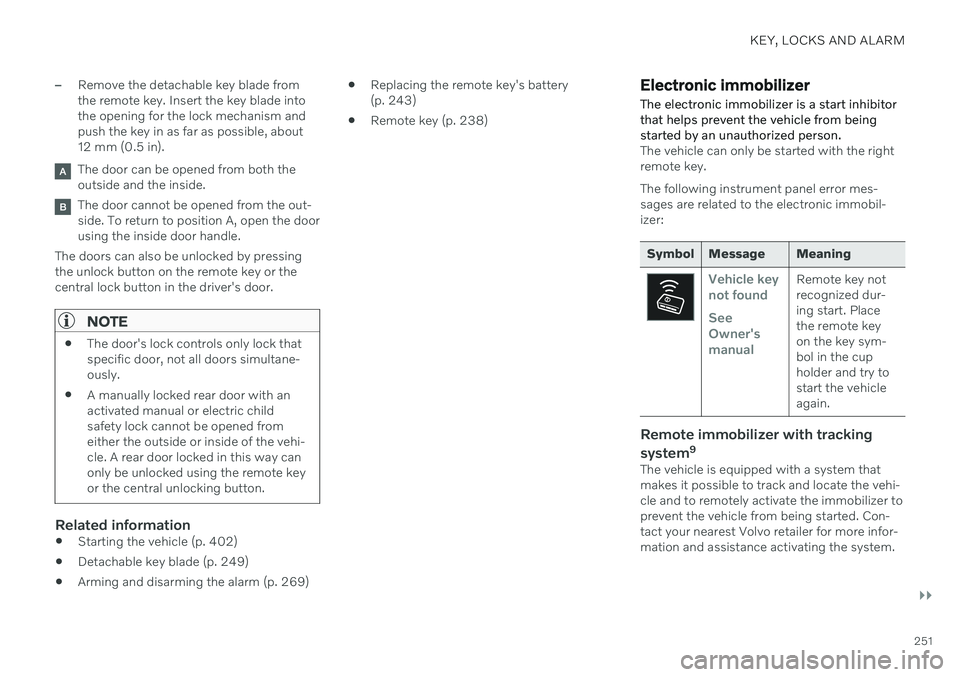
LockingThe vehicle can also be locked using the remote key's detachable key blade, e.g. ifeither the vehicle's or remote key's batteriesare discharged. The left-hand front door can be locked by inserting the detachable key into the door'slock cylinder. This is the only door with a lock cylinder. The other doors have lock mechanisms in the sideof the door that must be pushed in using thekey blade. The door will then be lockedmechanically and cannot be opened from theoutside. The doors can still be opened from inside.
Manual door lock. This is not the child lock.
Page 253 of 687
KEY, LOCKS AND ALARM
}}
251
–Remove the detachable key blade from the remote key. Insert the key blade intothe opening for the lock mechanism andpush the key in as far as possible, about12 mm (0.5 in).
The door can be opened from both the outside and the inside.
The door cannot be opened from the out- side. To return to position A, open the doorusing the inside door handle.
The doors can also be unlocked by pressingthe unlock button on the remote key or thecentral lock button in the driver's door.
NOTE
The door's lock controls only lock that specific door, not all doors simultane-ously.
A manually locked rear door with anactivated manual or electric childsafety lock cannot be opened fromeither the outside or inside of the vehi-cle. A rear door locked in this way canonly be unlocked using the remote keyor the central unlocking button.
Related information
Starting the vehicle (p. 402)
Detachable key blade (p. 249)
Arming and disarming the alarm (p. 269)
Replacing the remote key's battery (p. 243)
Remote key (p. 238)
Electronic immobilizer The electronic immobilizer is a start inhibitor that helps prevent the vehicle from beingstarted by an unauthorized person.
The vehicle can only be started with the right remote key. The following instrument panel error mes- sages are related to the electronic immobil-izer:
Symbol Message Meaning
Vehicle key not found See Owner'smanualRemote key not recognized dur-ing start. Placethe remote keyon the key sym-bol in the cupholder and try tostart the vehicleagain.
Remote immobilizer with tracking system 9
The vehicle is equipped with a system that makes it possible to track and locate the vehi-cle and to remotely activate the immobilizer toprevent the vehicle from being started. Con-tact your nearest Volvo retailer for more infor-mation and assistance activating the system.
Page 260 of 687

||
KEY, LOCKS AND ALARM
* Option/accessory.
258
Locking using the rear door button *
Button with indicator light for locking/unlocking in rear door.
The lock buttons in the rear doors lock/unlock that particular door.
Unlocking the rear door1. Pull the opening handle to unlock the rear
door.
2. Pull the opening handle again to open the rear door 12
.
Related information
Settings for remote and inside door unlock(p. 241)
Unlocking the tailgate from inside thevehicle (p. 258)
Activating and deactivating child safetylocks (p. 259)
Unlocking the tailgate from inside the vehicle The tailgate can be unlocked from the inside using the button on the dashboard.
–Press the button on the dashboard.
> The tailgate will unlock and can be opened from the outside by pressing the rubberized button on the handle.
With the optional power tailgate *:
–Press and hold the button on the
dashboard.
> The tailgate will open.
12 Provided the child safety lock is not activated.
Page 261 of 687
KEY, LOCKS AND ALARM
}}
* Option/accessory.259
Related information
Locking and unlocking from inside the vehicle (p. 257)
Opening and closing the power tailgate
*
(p. 261)
Activating and deactivating child safety locks The child safety locks help prevent the rear doors from being able to be opened from theinside.
The child safety locks can be either manual or electric *.
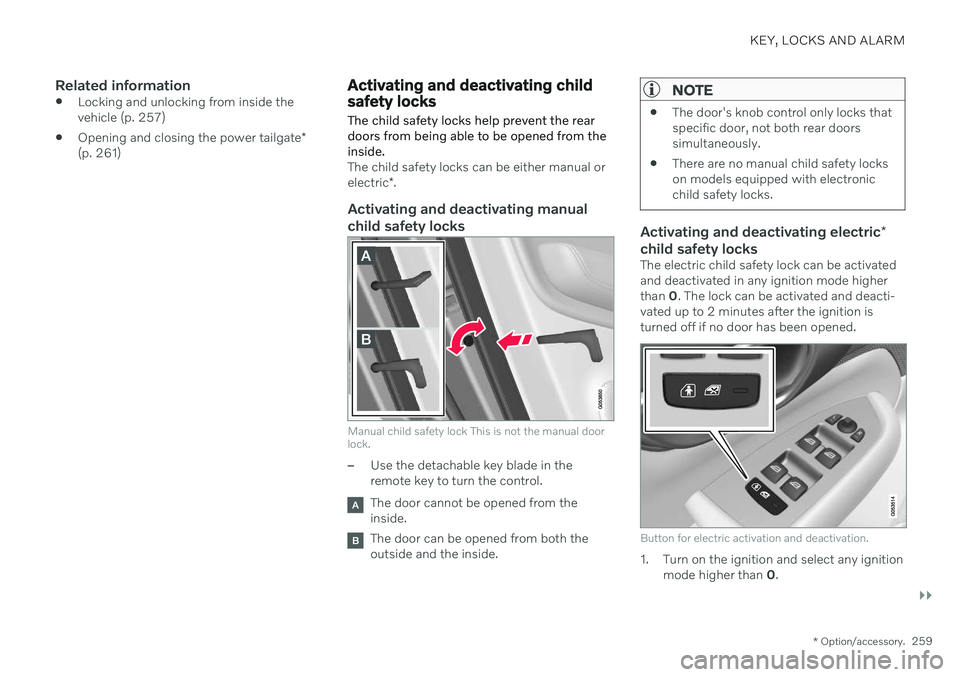
Activating and deactivating manual
child safety locks
Manual child safety lock This is not the manual door lock.
–Use the detachable key blade in the remote key to turn the control.
The door cannot be opened from the inside.
The door can be opened from both the outside and the inside.
NOTE
The door's knob control only locks that specific door, not both rear doorssimultaneously.
There are no manual child safety lockson models equipped with electronicchild safety locks.
Activating and deactivating electric
*
child safety locks
The electric child safety lock can be activated and deactivated in any ignition mode higherthan 0. The lock can be activated and deacti-
vated up to 2 minutes after the ignition isturned off if no door has been opened.
Button for electric activation and deactivation.
1. Turn on the ignition and select any ignition mode higher than 0.
Page 262 of 687
||
KEY, LOCKS AND ALARM
2602. Press the button on the driver's door con-
trol panel. >The message
Rear child lock
Activated will be shown in the instru-
ment panel and the indicator light will illuminate to show that the child safetylocks are activated.
When the electric child safety locks are acti-vated
the rear windows can only be openedusing the driver's door control panel
the rear doors cannot be opened from theinside.
To deactivate the child safety locks:
–Press the button on the driver's door con- trol panel. > The message
Rear child lock
Deactivated will be shown in the
instrument panel and the indicator light will go out to show that the child safetylocks are deactivated.
When the ignition is switched off, the currentsetting will be saved. If the child safety lockswere activated when the ignition wasswitched off, they will remain activated thenext time the ignition is started.
Symbol Message Meaning
Rear child lock Acti-
vatedThe child safety locks are acti-vated.
Rear child lock Deacti-
vatedThe child safety locks are deacti-vated.
Related information
Locking and unlocking from inside the vehicle (p. 257)
Detachable key blade (p. 249)
Automatic locking when driving
The doors and tailgate will automatically lock when the vehicle begins to move.
Related information
Locking and unlocking from inside the vehicle (p. 257)
Page 457 of 687

STARTING AND DRIVING
}}
* Option/accessory.455
NOTE
Volvo recommends only using Volvo origi- nal accessories. Follow the instructionssupplied with the product.
CAUTION
Never use towbar adapters or towbar extenders
Only use ball mount for towing. Do notmount accessories directly on the ballmount. Use accessories designed tobe mounted in the towbar's squarebracket. Do not use accessoriesdesigned to be secured around the ballmount.
Loading the bicycle holderThe greater the distance between the load and the bicycle holder, the greater the load on thehitch and on the vehicle. Keep the following points in mind: Mount the heaviest bicycle closest to the vehicle.
If possible, mount the bicycles symmetri-cally, as close as possible to the center ofthe vehicle.
Remove loose objects from the bicycle,such as baskets, batteries or child seats.This will help reduce the load on the hitchand the bicycle holder.
Do not place a cover over the bicycle asthis could lead to increased load on thehitch.
Related information
Detachable towbar
* (p. 455)
Driving with a trailer (p. 457)
Detachable towbar
*
Volvo recommends the use of Volvo towbars that are specially designed for the vehicle.
NOTE
The optional detachable trailer hitch may not be available in all markets or on allmodels. Consult your Volvo retailer.
Ball holder
Cotter pin
Towbar assembly
Locking bolt
Safety wire attachment bracket
Page 577 of 687
LOADING, STORAGE AND PASSENGER COMPARTMENT
}}
* Option/accessory.575
3. Disconnect the device by pulling out the
plug (do not pull on the cord). Pull up the cover when the outlet is not in use or is left unattended.
CAUTION
The maximum power is 150 W.
WARNING
Do not attempt to alter or repair the high- voltage outlet on your own. Volvo recom-mends contacting an authorized Volvoworkshop.
WARNING
Only use accessories that are not dam- aged or malfunctioning. The accesso-ries must be CE marked, UL marked orhave an equivalent safety marking.
Accessories must be designed for 120V and 60 Hz, with plugs intended forthe outlet.
New let outlets, plugs or accessoriescome into contact with water oranother fluid. Do not touch or use theoutlet if it appears damaged or hasbeen in contact with water or anotherfluid.
Do not connect power strips, adaptersor extension cords to the outlet hasthis could cause the outlet's safetyfunctions to malfunction.
The outlet is equipped with a petguard. Make sure that no one picks ator damages the outlet in such a waythat the guard is disabled. Childrenshould not be left unsupervised in thevehicle when the outlet is active.
Failure to follow the above could lead to severe or fatal electrical shocks.
Related information
Electrical outlets (p. 572)
Passenger compartment interior (p. 570)
Using the glove compartment
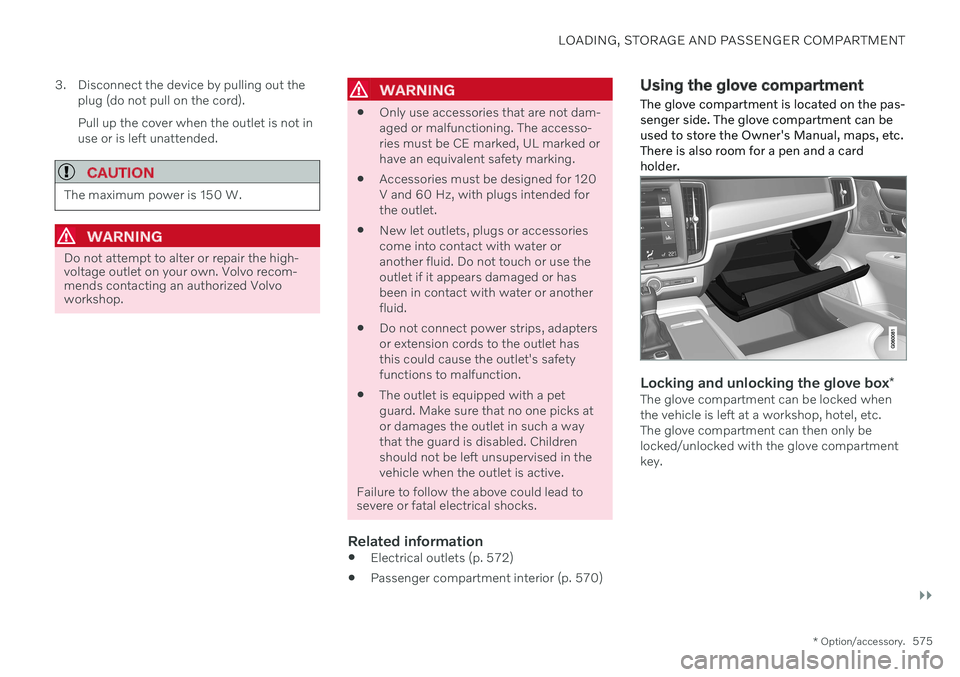
The glove compartment is located on the pas- senger side. The glove compartment can beused to store the Owner's Manual, maps, etc.There is also room for a pen and a cardholder.
Locking and unlocking the glove box *The glove compartment can be locked when the vehicle is left at a workshop, hotel, etc.The glove compartment can then only belocked/unlocked with the glove compartmentkey.
Page 671 of 687

INDEX
669
keyboard 129
messages 143, 144
operation 115, 118, 122, 127
overview 113
settings 135, 136
switch off and change volume 134
symbols in status bar 127
views 118
Central locking 257
Change of owner 137
Changing a wheel 552 Charge vehicle function 441
Charge level vehicle function 441
Charging hybrid battery 385 opening and closing the charging
door 390
start charging 390
Status 392, 393, 394
stop charging 396
Charging cable 387
Charging current 387
Checking engine oil level 603
Child restraints 65, 67 booster cushions 74
convertible seats 71
infant seats 69
integrated booster cushion 78
ISOFIX/LATCH anchors 77
lower attachment points 76
recalls and registration 67
top tether anchors 75
Child safety 65
Child safety locks 259
Circuit breaker 389
City Safety 318 braking for oncoming vehicles 327
crossing traffic 324
delayed evasive maneuver 327
detecting obstacles 322
evasive maneuver 326
limitations 328
limitations for evasive maneuvers 326
limitations in crossing traffic 325
setting warning distance 321
sub-functions 319
Symbols and messages 331
Cleaning 635, 637 automatic car wash 641
car wash 638, 639, 641, 642, 643, 644
center display 633
Seat belts 635
textile upholstery 633, 635, 636upholstery 633, 635, 636, 637
wheels 644
Cleaning wheels 644
Cleaning wiper blades 642
Clean Zone 207
Clean Zone Interior Package 208
Climate 204 auto-regulation 219
blower control 222
parking 225
perceived temperature 205
Sensors 204
temperature control 223, 224
voice control 205
zones 204
Climate controls 215 center display 215
rear seat 215
Climate system 204, 215 Refrigerant 664
repairs 599
Clock, setting 96
Collision 44, 49, 54, 63 Collision warner crossing traffic rear 337
see City Safety 318
Page 680 of 687

INDEX
678
S
Safety 44pregnancy 45
Safety belt, see Seat belt 49
Safety defects, reporting 46
Safety mode 63 starting/moving 64
Sealing compound 561
Seat, see Seats 188
Seat belt reminder 53
Seat belts 49 Automatic locking retractor/Emer-
gency locking retractor 67
buckling/unbuckling 50
pregnancy 45
seat belt reminder 53
seat belt tensioner 52
securing child restraint systems 69, 71, 74
Seat belt tensioner 52 resetting 53
Seats heating 216, 217
manual front seat 188
power front seats 189
store position 190, 191
ventilation 217
whiplash protection 48
Security code 266 Sensors air quality 209
Camera unit 312
climate 204
Radar unit 309
Sensus connection and entertainment 32
Sensus Navigation Road Sign Information 343
Service position 649
Service program 590
Set time interval for Distance Alert 303settings Categories 138
contextual 136
resetting 137
Shiftlock 420
Side airbag 62
Side Impact Protection System 62
SIM card 519
SIPS (Side Impact Protection System) 62 Sirius Satellite radio Travel link 486SiriusXM ® Satellite radio
traffic information 482, 483, 484
Ski hatch 580
Slippery conditions 442, 443
Slippery road conditions 443
Snow chains 560
Software updates 35
Sound experience 471
Sound settings 470, 513 phone 514
playing media 492, 493
text message 513
Spare tire 557 handling 558
Speed camera information 343 Speed Limiter change speed 302
Speed symbols, tires 542
Spin control 273
Stability and traction control system 273 sport mode 274, 275
Symbols and messages 276
Stains 633, 635, 636, 637 Start and lock system type designations 252