instrument panel VOLVO XC60 TWIN ENGINE 2020 Owner's Manual
[x] Cancel search | Manufacturer: VOLVO, Model Year: 2020, Model line: XC60 TWIN ENGINE, Model: VOLVO XC60 TWIN ENGINE 2020Pages: 687, PDF Size: 14.65 MB
Page 96 of 687

||
DISPLAYS AND VOICE CONTROL
943. Scroll down to the option buttons to
choose which information to show in the instrument panel: Odometer
Distance to empty tank
Distance to discharged battery
Tourist (alternative speedometer)
Mileage for trip odometer TM, TA or no display of mileage
Current fuel consumption, average fuelconsumption for TM or TA, or no dis-play of fuel consumption
Select or clear a selection using the O but-
ton (4). The change will apply immedi-ately.
Related information
Trip computer (p. 91)
Resetting the trip odometer (p. 94)
Resetting the trip odometer Resetting the trip odometer using the left- side steering wheel lever.
–Reset all information in trip odometer TM (i.e. mileage, average fuel consumption,average speed and driving time) by press-ing and holding the
RESET button on the
left-hand steering wheel lever. Tapping the RESET button only resets the
distance driven.
The TA trip odometer can not be manually reset. It resets automatically if the vehicle isnot used for four hours or more.
Related information
Trip computer (p. 91)
Displaying trip statistics in the center display Trip computer statistics can be displayed graphically in the center display, providing anoverview that facilitates more fuel-efficientdriving.
Open the Driver
performance app in the App
view to display trip statistics. Each bar in the graph repre- sents a driving distance of 1kilometers, 10 kilometers or
100 kilometers (or miles). The bars are addedfrom the right as you drive. The bar at the farright shows the data for the current trip. Average fuel consumption and total driving time are calculated from the most recent resetof the trip statistics. Fuel and electricity consumption are shown in separate graphs. The electricity consumptionshows "net" consumption, i.e. consumed cur-rent minus regenerated current generated bybraking.
Page 98 of 687

DISPLAYS AND VOICE CONTROL
* Option/accessory.
96
Date and time The clock is displayed in both the instrument panel and the center display.
Location of clock
Certain messages and other information may obscure the clock in the instrument panel. In the center display, the clock is located on the upper right-hand side in the status bar.
Settings for date and time–Select SettingsSystemDate and
Time in the center display's Top view to
change settings for time and date format. Adjust the date and time by tapping the up or down arrows on the touchscreen.
Automatic time for vehicles with GPS
When the vehicle is equipped with a naviga- tion system, Auto Time is also available. The time zone will then be automatically set to the vehicle's location. In some navigation systems,the current location must also be set to deter- mine the correct time zone. If
Auto Time is
not selected, the time and date can be adjusted using the up and down arrows on thetouchscreen.
Daylight savings time
In some countries, the Auto Daylight Saving
Time setting can be selected to automatically
change to daylight savings time. For other countries, the
Daylight Saving Time setting
can be selected manually.
Related information
Instrument panel (p. 86)
Changing settings in the center display's Top view (p. 135)
Ambient temperature sensor
The ambient temperature is shown in the instrument panel.
The sensor detects the temperature outside the vehicle.
If the vehicle has been stationary, the sensor reading may be higher than the actual tem- perature.
When the ambient temperature isbetween –5 °C and +2 °C (23 °F
and 36 °F), a snowflake symbol will
illuminate to alert the driver of the
risk of slippery conditions. The symbol is also temporarily lit in the head- up display * if the vehicle is equipped with one.
Change the measurement standard for the temperature sensor etc. via system settings in the center display's Top view.
Page 99 of 687
DISPLAYS AND VOICE CONTROL
}}
97
Related information
Instrument panel (p. 86)
Changing system units of measurement (p. 135)
Indicator symbols in the instrument panel
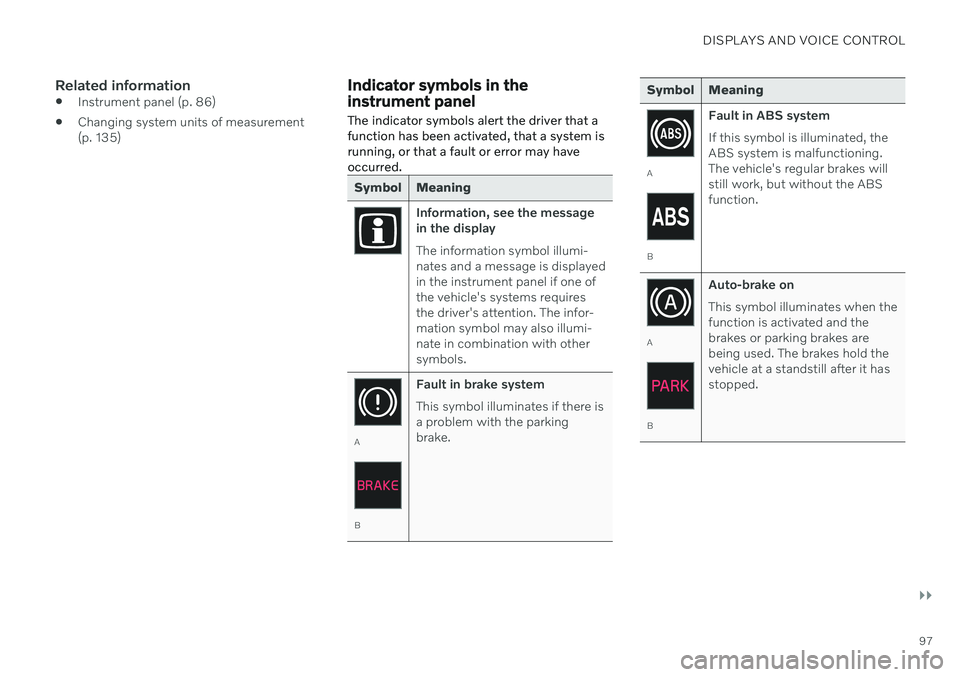
The indicator symbols alert the driver that a function has been activated, that a system isrunning, or that a fault or error may haveoccurred.
Symbol Meaning
Information, see the message in the display The information symbol illumi- nates and a message is displayedin the instrument panel if one ofthe vehicle's systems requiresthe driver's attention. The infor-mation symbol may also illumi-nate in combination with othersymbols.
A
B Fault in brake system This symbol illuminates if there is a problem with the parkingbrake.
Symbol Meaning
A
BFault in ABS system If this symbol is illuminated, the ABS system is malfunctioning.The vehicle's regular brakes willstill work, but without the ABSfunction.
A
BAuto-brake on This symbol illuminates when the function is activated and thebrakes or parking brakes arebeing used. The brakes hold thevehicle at a standstill after it hasstopped.
Page 101 of 687

DISPLAYS AND VOICE CONTROL
99
Symbol Meaning
Stability system This symbol flashes when the stability system is actively work-ing to stabilize the vehicle. If thesymbol glows steadily, there is afault in the system.
Stability system, Sport mode This symbol illuminates when Sport mode is activated. Sportmode offers a more active drivingexperience. If the system detectsthat accelerator pedal, steeringwheel and cornering movementsare more active than in normaldriving, it allows a certain level ofcontrolled lateral movement ofthe rear wheels before interven-ing and stabilizing the vehicle.
Symbol Meaning
Lane Keeping Aid White symbol: Lane Keeping Aid is on and lane marker lines aredetected. Gray symbol: Lane Keeping Aid is on but no lane marker lines aredetected. Amber-colored symbol: Lane Keeping Aid is alerting/interven-ing.
Lane Keeping Aid and rain sen- sor White symbol: Lane Keeping Aid is on and lane marker lines aredetected. The rain sensor is on. Gray symbol: Lane Keeping Aid is on but no lane marker lines aredetected. The rain sensor is on.
Reduced performance In the event of a temporary fault in the driveline, the vehicle maygo into a "limp home" mode withreduced power output to helpavoid damage to the driveline.
ACanadian models.
B US models.
Related information
Instrument panel (p. 86)
Warning symbols in the instrument panel (p. 100)
Page 102 of 687
DISPLAYS AND VOICE CONTROL
100
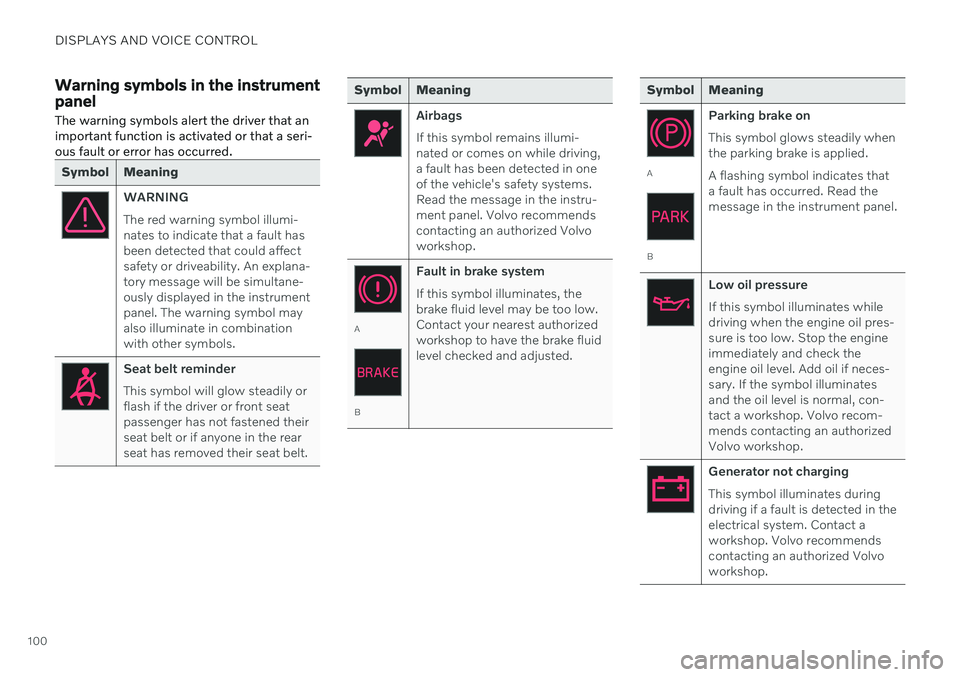
Warning symbols in the instrument panelThe warning symbols alert the driver that an important function is activated or that a seri-ous fault or error has occurred.
Symbol Meaning
WARNING The red warning symbol illumi- nates to indicate that a fault hasbeen detected that could affectsafety or driveability. An explana-tory message will be simultane-ously displayed in the instrumentpanel. The warning symbol mayalso illuminate in combinationwith other symbols.
Seat belt reminder This symbol will glow steadily or flash if the driver or front seatpassenger has not fastened theirseat belt or if anyone in the rearseat has removed their seat belt.
Symbol Meaning
Airbags If this symbol remains illumi- nated or comes on while driving,a fault has been detected in oneof the vehicle's safety systems.Read the message in the instru-ment panel. Volvo recommendscontacting an authorized Volvoworkshop.
A
B Fault in brake system If this symbol illuminates, the brake fluid level may be too low.Contact your nearest authorizedworkshop to have the brake fluidlevel checked and adjusted.
Symbol Meaning
A
B
Parking brake on This symbol glows steadily when the parking brake is applied. A flashing symbol indicates that a fault has occurred. Read themessage in the instrument panel.
Low oil pressure If this symbol illuminates while driving when the engine oil pres-sure is too low. Stop the engineimmediately and check theengine oil level. Add oil if neces-sary. If the symbol illuminatesand the oil level is normal, con-tact a workshop. Volvo recom-mends contacting an authorizedVolvo workshop.
Generator not charging This symbol illuminates during driving if a fault is detected in theelectrical system. Contact aworkshop. Volvo recommendscontacting an authorized Volvoworkshop.
Page 103 of 687

DISPLAYS AND VOICE CONTROL
}}
101
Symbol Meaning
Collision risk City Safety warns the driver if there is a risk of a collision withanother vehicle, pedestrian,cyclist or large animal.
System error This symbol illuminates during driving if a fault is detected in thedrive system. An explanatorymessage will be simultaneouslydisplayed in the instrumentpanel.
High engine temperature The symbol will illuminate while driving when the engine tem-perature is too high. An explana-tory message will be simultane-ously displayed in the instrumentpanel.
ACanadian models.
B US models.
Related information
Indicator symbols in the instrument panel (p. 97)
Instrument panel (p. 86)
Instrument panel licenses
A license is an agreement on the right to con- duct a certain activity or the right to usesomeone else's right according to terms andconditions specified in the agreement. Thefollowing text is Volvo's agreement with themanufacturer or developer.
Boost Software License 1.0
Permission is hereby granted, free of charge, to any person or organization obtaining a copyof the software and accompanyingdocumentation covered by this license (the"Software") to use, reproduce, display,distribute, execute, and transmit the Software,and to prepare derivative works of theSoftware, and to permit third-parties to whomthe Software is furnished to do so, all subjectto the following: The copyright notices in theSoftware and this entire statement, includingthe above license grant, this restriction andthe following disclaimer, must be included inall copies of the Software, in whole or in part,and all derivative works of the Software,unless such copies or derivative works aresolely in the form of machine-executableobject code generated by a source languageprocessor. THE SOFTWARE IS PROVIDED "AS IS", WITHOUT WARRANTY OF ANY KIND,EXPRESS OR IMPLIED, INCLUDING BUTNOT LIMITED TO THE WARRANTIES OFMERCHANTABILITY, FITNESS FOR A PARTICULAR PURPOSE, TITLE AND NON-INFRINGEMENT. IN NO EVENT SHALL THECOPYRIGHT HOLDERS OR ANYONEDISTRIBUTING THE SOFTWARE BE LIABLEFOR ANY DAMAGES OR OTHER LIABILITY,WHETHER IN CONTRACT, TORT OROTHERWISE, ARISING FROM, OUT OF ORIN CONNECTION WITH THE SOFTWARE ORTHE USE OR OTHER DEALINGS IN THESOFTWARE.
Page 109 of 687
![VOLVO XC60 TWIN ENGINE 2020 Owners Manual DISPLAYS AND VOICE CONTROL
}}
107
SGI Free Software B License Version 2.0.
SGI FREE SOFTWARE LICENSE B (Version 2.0, Sept. 18, 2008) Copyright (C) [dates of first publication] Silicon Graphics, Inc. A](/img/45/59296/w960_59296-108.png "VOLVO XC60 TWIN ENGINE 2020 Owners Manual DISPLAYS AND VOICE CONTROL
}}
107
SGI Free Software B License Version 2.0.
SGI FREE SOFTWARE LICENSE B (Version 2.0, Sept. 18, 2008) Copyright (C) [dates of first publication] Silicon Graphics, Inc. A")
DISPLAYS AND VOICE CONTROL
}}
107
SGI Free Software B License Version 2.0.
SGI FREE SOFTWARE LICENSE B (Version 2.0, Sept. 18, 2008) Copyright (C) [dates of first publication] Silicon Graphics, Inc. All Rights Reserved.Permission is hereby granted, free of charge,to any person obtaining a copy of thissoftware and associated documentation files(the "Software"), to deal in the Softwarewithout restriction, including withoutlimitation the rights to use, copy, modify,merge, publish, distribute, sublicense, and/orsell copies of the Software, and to permitpersons to whom the Software is furnished todo so, subject to the following conditions: Theabove copyright notice including the dates offirst publication and either this permissionnotice or a reference to http://oss.sgi.com/projects/FreeB/ shall be included in all copiesor substantial portions of the Software. THE SOFTWARE IS PROVIDED "AS IS", WITHOUT WARRANTY OF ANY KIND,EXPRESS OR IMPLIED, INCLUDING BUTNOT LIMITED TO THE WARRANTIES OFMERCHANTABILITY, FITNESS FOR APARTICULAR PURPOSE ANDNONINFRINGEMENT. IN NO EVENT SHALLSILICON GRAPHICS, INC. BE LIABLE FORANY CLAIM, DAMAGES OR OTHERLIABILITY, WHETHER IN AN ACTION OFCONTRACT, TORT OR OTHERWISE,ARISING FROM, OUT OF OR INCONNECTION WITH THE SOFTWARE ORTHE USE OR OTHER DEALINGS IN THESOFTWARE. Except as contained in this notice, the name of Silicon Graphics, Inc. shall not be used inadvertising or otherwise to promote the sale,use or other dealings in this Software withoutprior written authorization from SiliconGraphics, Inc.
Related information
Instrument panel (p. 86)
App menu in instrument panel
The application menu (App menu) in the instrument panel provides quick access tocommonly used functions for certain apps.
The illustration is generic.
The App menu in the instrument panel can be used instead of the center display and is thencontrolled using the right-side steering wheelkeypad. The app menu makes it easier toswitch between different apps or functionswithin the apps without having to let go of thesteering wheel.
App menu functionsDifferent apps provide access to differenttypes of functions. The following apps andtheir functions can be controlled from the Appmenu:
Page 110 of 687

||
DISPLAYS AND VOICE CONTROL
108
App Functions Trip com- puterSelect a trip odometer,change instrument panel dis-play settings, etc.
Mediaplayer Select active source formedia player.
Phone Call a contact from the call list.
Navigation Guide to destination, etc.
Related information
Instrument panel (p. 86)
Center display overview (p. 113)
Handling the App menu in the instrument panel (p. 108)
Handling the App menu in the instrument panel
The App (application) menu in the instrument panel is controlled using the right-side steer-ing wheel keypad.
App menu and right-side steering wheel keypad. The illustration is generic.
Open/close
Left/right
Up/down
Confirm
Opening and closing the app menu–Tap open/close (1).
> The App men opens/closes.
NOTE
The App menu cannot be opened while there is an unacknowledged message inthe instrument panel. The message mustbe acknowledged before the App menucan be opened.
The App menu turns off automatically after a period of inactivity or after certain selectionsare made.
Navigating and making selections in the App menu
1. Navigate between apps by tapping left or right (2).
> Functions for the previous/next app willbe shown in the App menu.
2. Scroll through the functions for the selected app using the up or down arrows (3).
3. Confirm or make a selection for the func- tion by pressing confirm (4).
> The function will be activated and, forsome selections, the App menu will then close.
Page 111 of 687

DISPLAYS AND VOICE CONTROL
}}
109
The next time the App menu is opened, the functions for the most recently selected appwill be displayed automatically.
Related information
App menu in instrument panel (p. 107)
Messages in the instrument panel(p. 109)
Messages in the instrument panel
The instrument panel shows messages in certain circumstances to inform or assist thedriver.
Example of message in the instrument panel. The illustration is generic - details may vary according tovehicle model. Example of message in the instrument panel.
High-priority messages for the driver are dis- played in the instrument panel. The messages may appear in different parts of the instrument panel depending on what otherinformation is currently being displayed. Themessage will disappear from the instrumentpanel after a short period of time or after it hasbeen acknowledged or any required action hasbeen taken. Messages that need to be saved are stored in the
Car Status app, which can
be opened from the App view in the center display. The message may be shown along withgraphics, symbols or buttons to e.g. acknowl-edge the message or accept a request.
Page 112 of 687

||
DISPLAYS AND VOICE CONTROL
110
Service messages
The following table lists a selection of impor- tant service messages and what they mean.
Message Meaning
Stop safelyAStop and switch off the engine. Serious risk ofdamage - contact a workshop B
.
Turn off engineA Stop and switch off the engine. Serious risk ofdamage - contact a workshop
B
.
Service urgent Drive to work- shop
A Contact a workshop
B
to
have the vehicle inspec- ted immediately.
Service requiredA Contact a workshop
B
to
have the vehicle inspec- ted as soon as possible.
Regular main- tenance Book time for maintenanceTime for service - contact a workshop B
. Shown
before the next service date.
Regular main- tenance Time for main- tenanceTime for service - contact a workshop B
. Shown on
the next service date.
Message Meaning
Regular main- tenance Maintenance overdueTime for service - contact a workshop B
. Shown
when the date for service has passed.
Temporarily offA A function has been tem- porarily deactivated andwill be reactivated auto-matically while driving orafter the engine is restar-ted.
A
Part of message, shown along with information on the loca- tion of the problem.
B An authorized Volvo workshop is recommended.
Related information
Handling messages in the instrument panel (p. 110)
Handling messages saved from the instru- ment panel (p. 111)
Messages in the center display (p. 143)
Handling messages in the instrument panel
Messages in the instrument panel are con- trolled using the right-side steering wheelkeypad.
Examples of messages in the instrument panel and the right-side steering wheel keypad. The illustrationis generic - details may vary according to vehiclemodel.
Left/right
Confirm
Some messages in the instrument panel con- tain one or more buttons for e.g. confirmingthe message or accepting a request.