park assist VOLVO XC60 TWIN ENGINE 2020 Owner's Manual
[x] Cancel search | Manufacturer: VOLVO, Model Year: 2020, Model line: XC60 TWIN ENGINE, Model: VOLVO XC60 TWIN ENGINE 2020Pages: 687, PDF Size: 14.65 MB
Page 369 of 687

DRIVER SUPPORT
}}
* Option/accessory.367
WARNING
The function is supplementary driver support intended to facilitate drivingand help make it safer – it cannot han-dle all situations in all traffic, weatherand road conditions.
The driver is advised to read all sec-tions in the Owner's Manual about thisfunction to learn of its limitations,which the driver must be aware ofbefore using the function.
Driver support functions are not a sub-stitute for the driver's attention andjudgment. The driver is always respon-sible for ensuring the vehicle is drivenin a safe manner, at the appropriatespeed, with an appropriate distance toother vehicles, and in accordance withcurrent traffic rules and regulations.
Related information
Driver support systems (p. 272)
Location and field of vision of Park Assist Cameras
* (p. 367)
Park Assist Camera trajectory lines
*
(p. 369)
Park Assist sensor field (p. 371)
Activating Park Assist Camera (p. 372)
Park Assist Camera symbols and mes- sages (p. 374)
Camera/radar sensor limitations (p. 313)
Park Assist
* (p. 361)
Cross Traffic Alert
* (p. 337)
Location and field of vision of Park Assist Cameras *
PAC can display a 360° panoramic view as well as separate views for each of the othercameras: rear, front, left and right.
Page 370 of 687

||
DRIVER SUPPORT
* Option/accessory.
368
360° view *
The location of the cameras and their approximate fields of vision.
The 360° view function activates all Park
Assist Cameras and all four sides of the vehi- cle are shown in the center display at once tohelp the driver see what is around the vehiclewhile maneuvering at low speeds. From the 360° view, each camera view can be activated separately:
Tap the screen to select the camera's fieldof vision, e.g. in the area in front/above thefront camera.
The active cameras will beindicated by a camera symbolon the vehicle symbol in thecenter display.
If the vehicle is equipped with Park Assist
System* , the distance to detected obstacles
will be illustrated by fields in different colors. The cameras can be activated automatically or manually.
Back
The rear camera is located above the license plate.
The rear camera shows a wide area behind the vehicle. On certain models, part of the bumperand the towbar (if installed) may be visible. Objects on the center display may appear to be leaning slightly. This is normal.
Front camera
The front Park Assist Camera is located in the grille.
The front camera can be useful when pulling out from areas with limited visibility, such as adriveway surrounded by a hedge. The frontcamera is active at speeds up to 25 km/h(16 mph) and is automatically turned off whenthe vehicle exceeds this speed. If the vehicle does not reach a speed of 50 km/h (30 mph) and speed falls below22 km/h (14 mph) within 1 minute after thefront camera turns off, the camera will bereactivated.
Page 371 of 687

DRIVER SUPPORT
}}
* Option/accessory.369
Side cameras
The side cameras are located in the rearview mirrors.
The side cameras can show views along each side of the vehicle.
Related information
Park Assist Camera
* (p. 366)
Activating Park Assist Camera (p. 372)
Camera/radar sensor limitations (p. 313)
Park Assist Camera trajectory lines
*
The Park Assist Cameras use trajectory lines and fields on the screen to indicate the vehi-cle's position in relation to its immediate sur-roundings.
Example of trajectory lines.
The trajectory lines show the anticipated tra- jectory for the vehicle's outermost dimensionsbased on the current position of the steering wheel and can help simplify parallel parking,backing into tight spaces or attaching a trailer. The lines on the screen are projected as if they were painted lines on the ground behind thevehicle and are directly affected by the way inwhich the steering wheel is turned. Thismakes it possible for the driver to see path thevehicle will take, even if he/she turns thesteering wheel. These lines also indicate the outermost limits that any object (towbar, rearview mirrors, cor-ners of the body, etc.) extends out from thevehicle.
NOTE
When reversing with a trailer that is not electrically connected to the vehi-cle, the screen guide lines show thepath the
vehicle will take – not the
trailer.
The screen does not show guide lineswhen a trailer is electrically connectedto the vehicle's electrical system.
Guide lines are not shown when zoom-ing in.
Page 373 of 687

DRIVER SUPPORT
}}
* Option/accessory.371
1.
Tap
Towbar (1).
> The trajectory line for the towbar's anticipated path toward the vehicle will appear and the vehicle's trajectory lineswill disappear. Trajectory lines cannot be displayed for both the vehicle and the towbar at thesame time.
2. Tap
Zoom (2) for a close-up view for more
precise maneuvering.
> The camera will zoom in.
Related information
Park Assist Camera
* (p. 366)
Location and field of vision of Park Assist Cameras
* (p. 367)
Camera/radar sensor limitations (p. 313)
Park Assist sensor field
If the vehicle is equipped with Park Assist *,
distances will be shown in the 360° view with colored fields for each sensor that hasdetected an obstacle.
Front and rear sensors
The screen can display colored sensor fields on the vehicle symbol.
The front and rear fields change colors (from YELLOW to ORANGE to RED) as the vehiclemoves closer to an obstacle.
Field color
rearward Distance in meters
(feet)
Yellow 0.6-1.5 (2.0-4.9)
Orange 0.3–0.6 (1.0–2.0) Red 0-0.3 (0-1.0)
Field color for- ward Distance in meters
(feet)
Yellow 0.6–0.8 (2.0–2.6)
Orange 0.3–0.6 (1.0–2.0)
Red 0-0.3 (0-1.0)
When the sensor field color is red, the audible pulsing sounds will change to a continuoustone.
Page 374 of 687

||
DRIVER SUPPORT
* Option/accessory.
372
Side sensor fields
Warning signals vary depending on the vehi- cle's intended direction of travel. Dependingon the steering wheel position, warnings maybe given for obstacles diagonally in front of orbehind the vehicle, not only directly behind thevehicle.
Parking sensor sectors where obstacles can be detected.
Left-side front sensor field
Obstacle sector in the vehicle's intended direction of travel forward – varies accord-ing to steering wheel position
Sector with RED field color and rapidly pulsing tone
Right-side rear sensor field
Obstacle sector in the vehicle's intended direction of travel rearward – variesaccording to steering wheel position.
The color of the side field changes as the vehi-cle moves closer to the object – from YEL-LOW to RED.
Side field color Distance in meters
(feet)
Yellow 0,25–0,9 (0,8–3,0) Red 0–0,25 (0–0,8)
When the sensor field is RED, the audible pulsing signal will become more rapid.
Related information
Park Assist
* (p. 361)
Park Assist Camera
* (p. 366)
Location and field of vision of Park Assist Cameras
* (p. 367)
Camera/radar sensor limitations (p. 313)
Activating Park Assist Camera
The Park Assist Camera is automatically acti- vated when reverse gear is engaged or canbe started manually using one of the centerdisplay's function buttons.
Camera view when backing upWhen reverse gear is engaged, the screen shows the rear view 99
.
Camera view when manually
activating the camera
Activate the Park Assist Cam- era using this button in thecenter display's Functionview. The screen will first show the most recently used camera
view. However, each time the engine isstarted, the previous side view will be replacedby the 360° view and a previously displayedzoomed-in rear view will be replaced by theregular rear view.
GREEN button indicator light – the func- tion is activated.
GRAY button indicator light – the functionis deactivated.
99
In Canada, it is also possible to choose the 360° view. For the US, rear view is standard and cannot be changed.
Page 375 of 687

DRIVER SUPPORT
* Option/accessory.373
Automatically deactivating the cameraFront view switches off when the vehicle's speed reaches 25 km/h (16 mph) to help avoiddistracting the driver. It will be automaticallyreactivated if the vehicle's speed falls below22 km/h (14 mph) within 1 minute as long asthe vehicle's speed has not exceeded 50 km/h(31 mph). Other camera views switch off at 15 km/h (9 mph) and are not reactivated.
Related information
Park Assist Camera
* (p. 366)
Park Assist limitations (p. 363)
Camera/radar sensor limitations (p. 313)
Page 376 of 687

DRIVER SUPPORT
* Option/accessory.
374
Park Assist Camera symbols and messages
Symbols and messages for the Park Assist Camera may be displayed in the instrument panel and/or the center display. Severalexamples are provided below.
Symbol Message Meaning
The rear Park Assist sensors are
turned off and no acoustic warnings or field markings for
obstacles/objects will be provided.
The camera is not functioning properly.
Park Assist System Sensors blocked, cleaning nee- dedOne or more of the sensors are blocked. Check and clean/remove the obstacle as soon as possible.
Park Assist System Unavailable Service requiredThe system is not functioning as intended. Contact a workshop A
.
A An authorized Volvo workshop is recommended.
A text message can be erased by briefly press- ing the
button in the center of the right-
side steering wheel keypad. If a message cannot be erased, contact a workshop
A
.
Related information
Park Assist Camera
* (p. 366)
Camera/radar sensor limitations (p. 313)
Page 377 of 687
DRIVER SUPPORT
* Option/accessory.375
Park Assist Pilot *
Park Assist Pilot (PAP 100
) can help the driver
maneuver the vehicle when parking. The function can also assist with steering whenpulling out from a parallel parking space.
The function first checks whether there is suf- ficient space and then helps the driver steerthe vehicle into the space. The center display uses symbols, graphics and messages to inform the driver of what stepsneed to be taken and when.
WARNING
The function is supplementary driver support intended to facilitate drivingand help make it safer – it cannot han-dle all situations in all traffic, weatherand road conditions.
The driver is advised to read all sec-tions in the Owner's Manual about thisfunction to learn of its limitations,which the driver must be aware ofbefore using the function.
Driver support functions are not a sub-stitute for the driver's attention andjudgment. The driver is always respon-sible for ensuring the vehicle is drivenin a safe manner, at the appropriatespeed, with an appropriate distance toother vehicles, and in accordance withcurrent traffic rules and regulations.
Related information
Driver support systems (p. 272)
Types of parking with Park Assist Pilot
*
(p. 376)
Using Park Assist Pilot
* (p. 377)
Leaving a parallel parking space with Park Assist Pilot
* (p. 379)
Park Assist Pilot
* limitations (p. 380)
Park Assist Pilot
* messages (p. 382)
100
Park Assist Pilot
Page 378 of 687
DRIVER SUPPORT
* Option/accessory.
376
Types of parking with Park Assist Pilot *
Park Assist Pilot (PAP 101
) can be used for
both parallel and perpendicular parking.
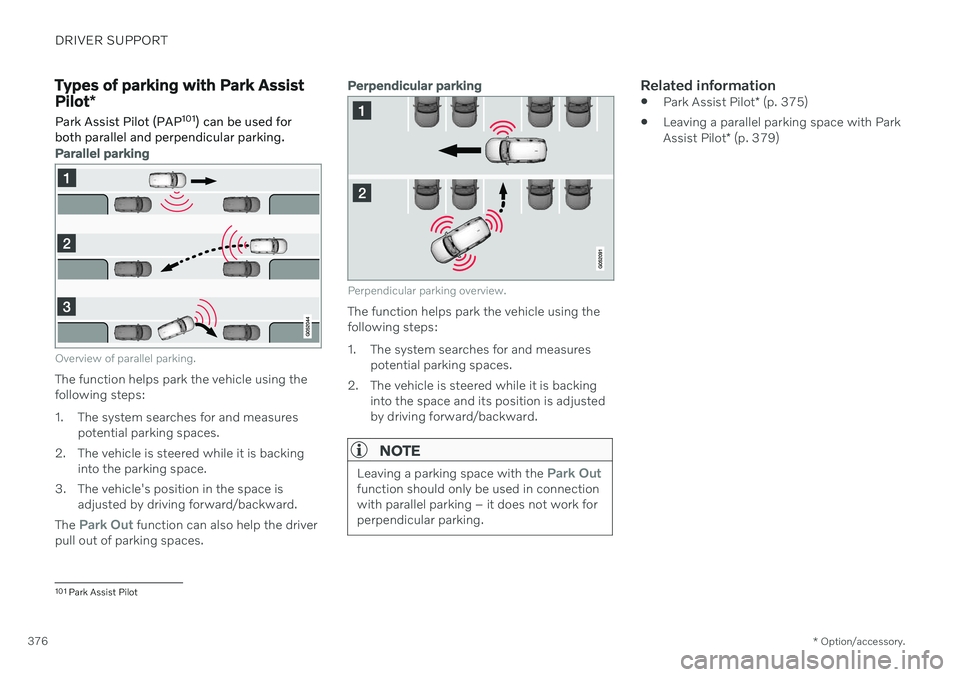
Parallel parking
Overview of parallel parking.
The function helps park the vehicle using the following steps:
1. The system searches for and measures potential parking spaces.
2. The vehicle is steered while it is backing into the parking space.
3. The vehicle's position in the space is adjusted by driving forward/backward.
The
Park Out function can also help the driver
pull out of parking spaces.
Perpendicular parking
Perpendicular parking overview.
The function helps park the vehicle using the following steps:
1. The system searches for and measures potential parking spaces.
2. The vehicle is steered while it is backing into the space and its position is adjusted by driving forward/backward.
NOTE
Leaving a parking space with the Park Outfunction should only be used in connection with parallel parking – it does not work forperpendicular parking.
Related information
Park Assist Pilot
* (p. 375)
Leaving a parallel parking space with Park Assist Pilot
* (p. 379)
101
Park Assist Pilot
Page 379 of 687

DRIVER SUPPORT
}}
* Option/accessory.377
Using Park Assist Pilot *
Park Assist Pilot (PAP 102
) helps the driver
park using three different steps. The function can also help the driver pull out of a parkingspace.
The function measures the space and steers the vehicle. The driver's role is to:
keep close watch of the area around thevehicle
follow the instructions on the center dis-play
change gears (reverse/forward) – an audi-ble signal indicates when the driver needsto change gears
regulating and maintaining a safe speed
applying the brakes and stopping the vehi-cle.
Information about the actions required by thedriver are provided in the center display usingsymbols, graphics and/or text. The function can be activated if the following criteria have been met after the engine isstarted:
No trailer is hitched to the vehicle
Your vehicle's speed is lower than30 km/h (20 mph).
NOTE
The distance between the vehicle and parking spots should be 0.5–1.5 meters(1.6–5.0 ft) when the function is lookingfor parking.
Parking with Park Assist PilotThe function helps park the vehicle using the following steps:
1. The system searches for and measures
potential parking spaces.
2. The vehicle is steered while it is backing into the parking space.
3. The vehicle is positioned in the parking space (the driver may be prompted to shift gears and apply the brakes).
Searching and measuring potential parking spots
The function can be activated in the center display's Func-tion view. It can also be accessed from the camera views.
GREEN button indicator light – the func- tion is activated.
GRAY button indicator light – the functionis deactivated.
Parallel parking search overview.
Perpendicular parking search overview.
The vehicle's speed may not exceed 30 km/h (20 mph) when parallel parking or 20 km/h(12 mph) when perpendicular parking.
102
Park Assist Pilot