turn signal VOLVO XC70 2003 User Guide
[x] Cancel search | Manufacturer: VOLVO, Model Year: 2003, Model line: XC70, Model: VOLVO XC70 2003Pages: 257, PDF Size: 5.33 MB
Page 176 of 257
2003 VOLVO XC70
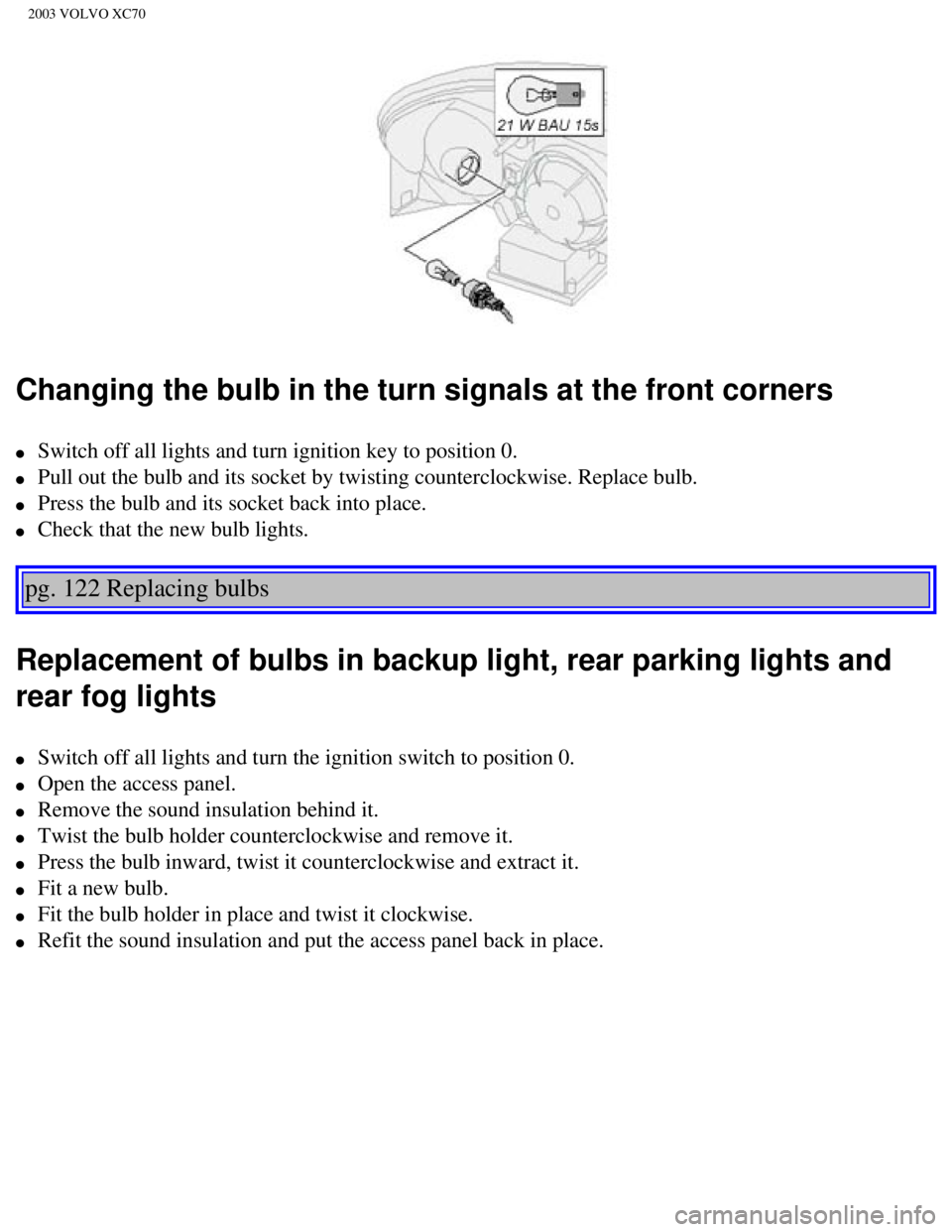
Changing the bulb in the turn signals at the front corners
l Switch off all lights and turn ignition key to position 0.
l Pull out the bulb and its socket by twisting counterclockwise. Replace b\
ulb.
l Press the bulb and its socket back into place.
l Check that the new bulb lights.
pg. 122 Replacing bulbs
Replacement of bulbs in backup light, rear parking lights and
rear fog lights
l Switch off all lights and turn the ignition switch to position 0.
l Open the access panel.
l Remove the sound insulation behind it.
l Twist the bulb holder counterclockwise and remove it.
l Press the bulb inward, twist it counterclockwise and extract it.
l Fit a new bulb.
l Fit the bulb holder in place and twist it clockwise.
l Refit the sound insulation and put the access panel back in place.
file:///K|/ownersdocs/2003/2003_XC70/03xc70_08a.htm (11 of 21)12/30/20\
06 4:18:03 PM
Page 177 of 257
2003 VOLVO XC70
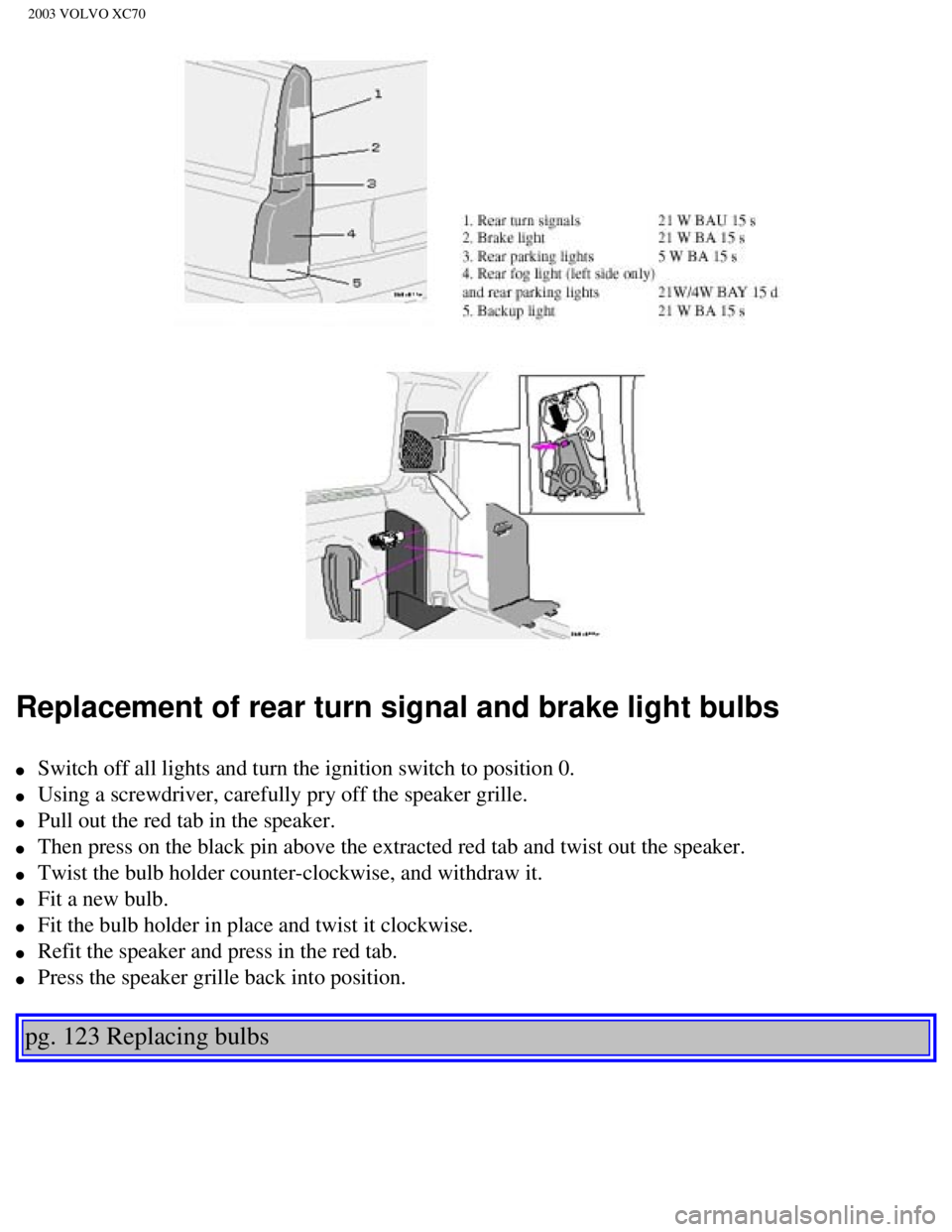
Replacement of rear turn signal and brake light bulbs
l Switch off all lights and turn the ignition switch to position 0.
l Using a screwdriver, carefully pry off the speaker grille.
l Pull out the red tab in the speaker.
l Then press on the black pin above the extracted red tab and twist out th\
e speaker.
l Twist the bulb holder counter-clockwise, and withdraw it.
l Fit a new bulb.
l Fit the bulb holder in place and twist it clockwise.
l Refit the speaker and press in the red tab.
l Press the speaker grille back into position.
pg. 123 Replacing bulbs
file:///K|/ownersdocs/2003/2003_XC70/03xc70_08a.htm (12 of 21)12/30/20\
06 4:18:03 PM
Page 220 of 257
 or the SOURCE button (HU-8")
2003 VOLVO XC70
If you have a key pad in the steering wheel press the right or left arro\
w to switch between preset stations.
Scan function
Press the SCAN button (HU-613) or the SOURCE button (HU-803) to star\
t the station scan function.
When a station is found, scanning stops for several seconds, after which\
scanning will continue.
Press the SCAN or SOURCE button when a station has been found if you wou\
ld like to listen to that
station and to discontinue the scan function.
pg. 156 Audio systems HU-613/HU-803 - radio
A - Automatic station preset
This function seeks and stores up to 10 strong AM or FM stations in a se\
parate memory. This function is
especially useful in areas where you are not familiar with the radio sta\
tions.
1. Press in the "AUTO" button for at least 2 seconds. A number of strong\
signal stations (max. 10) from
the currently selected waveband are now stored automatically in the memo\
ry. An "A" and "AUTO" is
displayed. If there is no station with sufficient signal strength "NO ST\
ATION" is displayed.
2. Turn "1-20/DISC" button if you wish to change to another of the auto-\
stored stations.
Another auto-stored station is selected with each turn.
file:///K|/ownersdocs/2003/2003_XC70/03xc70_10a.htm (7 of 10)12/30/200\
6 4:18:06 PM
Page 221 of 257

2003 VOLVO XC70
Programming stations
1. Tune in the desired frequency.
2. Press the "1-20/DISC" button. Select a number by turning forwards or \
backwards. Press again to store
the selected frequency and station.
Preset
To choose a pre-set station, turn "1-20/DISC" button to the stored numbe\
r. The currently selected station
is displayed.
Radio Data System (RDS, also referred to as RBDS) -HU- 803
only
This feature, which may not work in your area, functions only with FM br\
oadcasts. The HU-803 radio in
your car is equipped with an advanced system allowing information from b\
roadcasters to be transmitted
visually, as text, together with the audio signal. This information is t\
hen decoded by the radio and made
available for several new and unique features.
The RDS or Radio Data System operates in the FM band only, and the infor\
mation transmitted is
supplied exclusively by participating broadcasters. Volvo has no control over the accuracy of the data
or information. Please refer to the following pages regarding specific d\
escriptions and operation of these
functions.
Coverage by local broadcasters may be limited at this time, but as the t\
echnology and benefits grow, you
will find the radio in your car is equipped to take advantage of this sy\
stem.
pg. 157 Audio systems HU-803 - radio
file:///K|/ownersdocs/2003/2003_XC70/03xc70_10a.htm (8 of 10)12/30/200\
6 4:18:06 PM
Page 222 of 257
 -HU- 803 only
This feature may not be apply in your area and only functions with FM br\
oadcasts. (See previous
page)
Push the \"TP\" button for traffic inform")
2003 VOLVO XC70
Traffic information (TP) -HU- 803 only
This feature may not be apply in your area and only functions with FM br\
oadcasts. (See previous
page)
Push the "TP" button for traffic information from RDS stations. "TP" is \
displayed when the function is
connected.
When the unit is in Cassette or CD mode, the FM radio function will seek\
in the background for a station
with a strong signal broadcasting traffic information. If a cassette or \
CD are playing when the radio
receives a traffic bulletin, that function is interrupted and the bullet\
in is broadcast with the volume pre-
selected for traffic information.
When the bulletin is finished the unit immediately returns to the previo\
usly set volume and continues
playing the cassette or CD.
l Traffic information can only be heard when TP is displayed.
l If only TP is displayed, this indicates that no traffic information is b\
eing received at the time.
l If you do not wish to listen to an ongoing traffic bulletin, press the "\
TP" button. The TP function will
remain active and the radio will continue to monitor traffic information\
.
l To turn the TP function off, press the TP button. TP is no longer shown in the display.
News on/off - HU-803 only
This feature may not apply in your area and only functions with FM broad\
casts. (See previous
page)
Press the "NEWS" button to activate the news function. The text NEWS is \
displayed. Press the "NEWS"
button again if you want to switch off the function.
As soon as a news broadcast begins, the news program will interrupt the \
Cassette, CD or CD changer.
If you do not wish to listen to the news program, press the "NEWS" butto\
n again. The news function
file:///K|/ownersdocs/2003/2003_XC70/03xc70_10a.htm (9 of 10)12/30/200\
6 4:18:06 PM
Page 227 of 257
.
The following functions are available on the HU-803 only:
l AF SWITCHING ON/OFF (automatic frequency update) - The AF function ens\
ures tha")
2003 VOLVO XC70
l BACK without SAVE (See above).
The following functions are available on the HU-803 only:
l AF SWITCHING ON/OFF (automatic frequency update) - The AF function ens\
ures that the strongest
available transmitter for a program is selected.
l REGIONAL ON/OFF (regional radio program) - This function makes it poss\
ible to continue to listen
to a regional transmitter, even if the signal is weak.
l EON (Enhanced Other Networks) LOCAL/DISTANT - This function determines\
whether the radio
program you are listening to is to be switched off before e.g. a traffic\
report or news broadcast (if these
functions are selected) only if the signal is strong (LOCAL) or wheth\
er the radio must also try to capture
weaker signals (DISTANT).
l NETWORK ALL/TUNED - With this function you can decide whether the radio \
program you are
listening to is to be switched off before e.g. a traffic report or news \
broadcast (if these functions are
selected) only if the report is on the channel you are listening to (T\
UNED), or whether the program is to
be switched off regardless of which radio channel the report/broadcast i\
s on (ALL).
pg. 160 Audio system HU-613/HU-803 - CD player
CD player - on
HU-613: Insert a CD.
HU-803: Insert a CD. If you would like to insert another disc (a maximum of 4 C\
D's can be inserted in
the player), turn the "1-20/DISC" button so that "CD 2 Load Disc" is di\
splayed. Insert the CD. Repeat
this procedure for discs 3 and 4.
Once the disc(s) have been inserted, select the CD function by turning\
the "SOURCE" knob.
Selecting a disc (HU-803 only)
file:///K|/ownersdocs/2003/2003_XC70/03xc70_10b.htm (4 of 13)12/30/200\
6 4:18:07 PM
Page 252 of 257

2003 VOLVO XC70
Timing belt 132
Tire pressure
110
Tires
108 -111
Tires - changing
112, 113
Tool bag
72
Towing a trailer
101
Towing eyelet
99
Towing the car
99, 100
Trailer towing
101
Trailer weight - maximum
143
Transmission - automatic
90-94
Trip computer
32
Trip odometer
27
Turn signals
36
U
Uniform tire quality grading
111
Unlocking the tailgate
79
Upholstery - cleaning
128
V
Vanity mirror lights - replacing
124
Vehicle Identification Number (VIN)
142
Vehicle loading
110
Ventilation
46
Volvo On Call
149
Volumes (oils and fluids)
146
W
Warning flashers
38
Warning light - center
28
Warning lights
28, 29
Warranty
129
Washer fluid reservoir
133
Washer fluid solvent
104
file:///K|/ownersdocs/2003/2003_XC70/03xc70_12.htm (11 of 12)12/30/200\
6 4:18:09 PM