change time VOLVO XC70 2003 Owners Manual
[x] Cancel search | Manufacturer: VOLVO, Model Year: 2003, Model line: XC70, Model: VOLVO XC70 2003Pages: 257, PDF Size: 5.33 MB
Page 4 of 257
 may indicate a fault.
Important
Before you operate your car for the first time, please familiarize yours\
elf with the new-engine oil
consumption information")
2003 VOLVO XC70
("Check Engine" light) may indicate a fault.
Important
Before you operate your car for the first time, please familiarize yours\
elf with the new-engine oil
consumption information on
page 135. You should also be familiar with the information in the
chapters one, two and four of this manual.
Information contained in the balance of the manual is extremely useful a\
nd should be read after
operating the vehicle for the first time.
The manual is structured so that it can be used for reference. For this \
reason, it should be kept in
the car for ready access.
Do not export your Volvo to another country before investigating that co\
untry's applicable safety
and exhaust emission requirements. In some cases it may be difficult or \
impossible to comply with
these requirements. Modifications to the emission control system(s) ma\
y render your Volvo not
certifiable for legal operation in the U.S., Canada and other countries.\
All information, illustrations and specifications contained in this manu\
al are based on the latest
product information available at the time of publication. Please note th\
at some vehicles may be
equipped differently, depending on special legal requirements and that o\
ptional equipment
described in this manual may not be available in all markets.
Volvo reserves the right to make model changes at any time, or to change\
specifications or design,
without notice and without incurring obligation.
CALIFORNIA Proposition 65 Warning
WARNING! Engine exhaust, some of its constituents, and certain vehicle c\
omponents contain or
emit chemicals known to the state of California to cause cancer, and bir\
th defects or other
reproductive harm. In addition, certain fluids contained in vehicles an\
d certain products of
component wear contain or emit chemicals known to the State of Californi\
a to cause cancer, and birth
defects or other reproductive harm.
Volvo and the environment
Volvo is committed to the well being of our customers. As a natural part\
of this commitment, we care
about the environment in which we all live. Caring for the environment m\
eans an everyday involvement
in reducing our environmental impact.
file:///K|/ownersdocs/2003/2003_XC70/03xc70_00.htm (4 of 6)12/30/2006 \
4:17:50 PM
Page 45 of 257
2003 VOLVO XC70
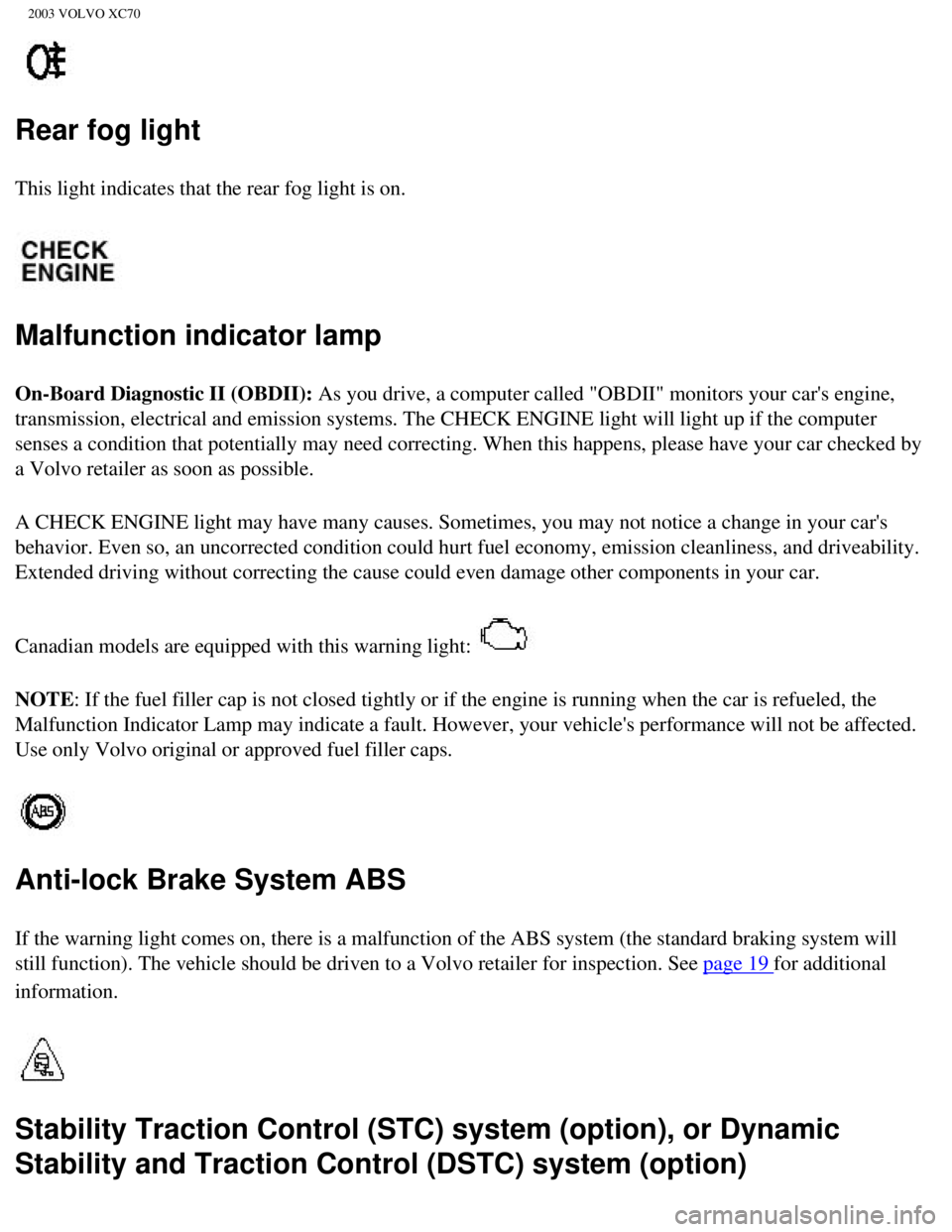
Rear fog light
This light indicates that the rear fog light is on.
Malfunction indicator lamp
On-Board Diagnostic II (OBDII): As you drive, a computer called "OBDII" monitors your car's engine,
transmission, electrical and emission systems. The CHECK ENGINE light wi\
ll light up if the computer
senses a condition that potentially may need correcting. When this happe\
ns, please have your car checked by
a Volvo retailer as soon as possible.
A CHECK ENGINE light may have many causes. Sometimes, you may not notice\
a change in your car's
behavior. Even so, an uncorrected condition could hurt fuel economy, emi\
ssion cleanliness, and driveability.
Extended driving without correcting the cause could even damage other co\
mponents in your car.
Canadian models are equipped with this warning light:
NOTE: If the fuel filler cap is not closed tightly or if the engine is runni\
ng when the car is refueled, the
Malfunction Indicator Lamp may indicate a fault. However, your vehicle's\
performance will not be affected.
Use only Volvo original or approved fuel filler caps.
Anti-lock Brake System ABS
If the warning light comes on, there is a malfunction of the ABS system \
(the standard braking system will
still function). The vehicle should be driven to a Volvo retailer for i\
nspection. See
page 19 for additional
information.
Stability Traction Control (STC) system (option), or Dynamic
Stability and Traction Control (DSTC) system (option)
file:///K|/ownersdocs/2003/2003_XC70/03xc70_02a.htm (8 of 13)12/30/200\
6 4:17:53 PM
Page 77 of 257
2003 VOLVO XC70
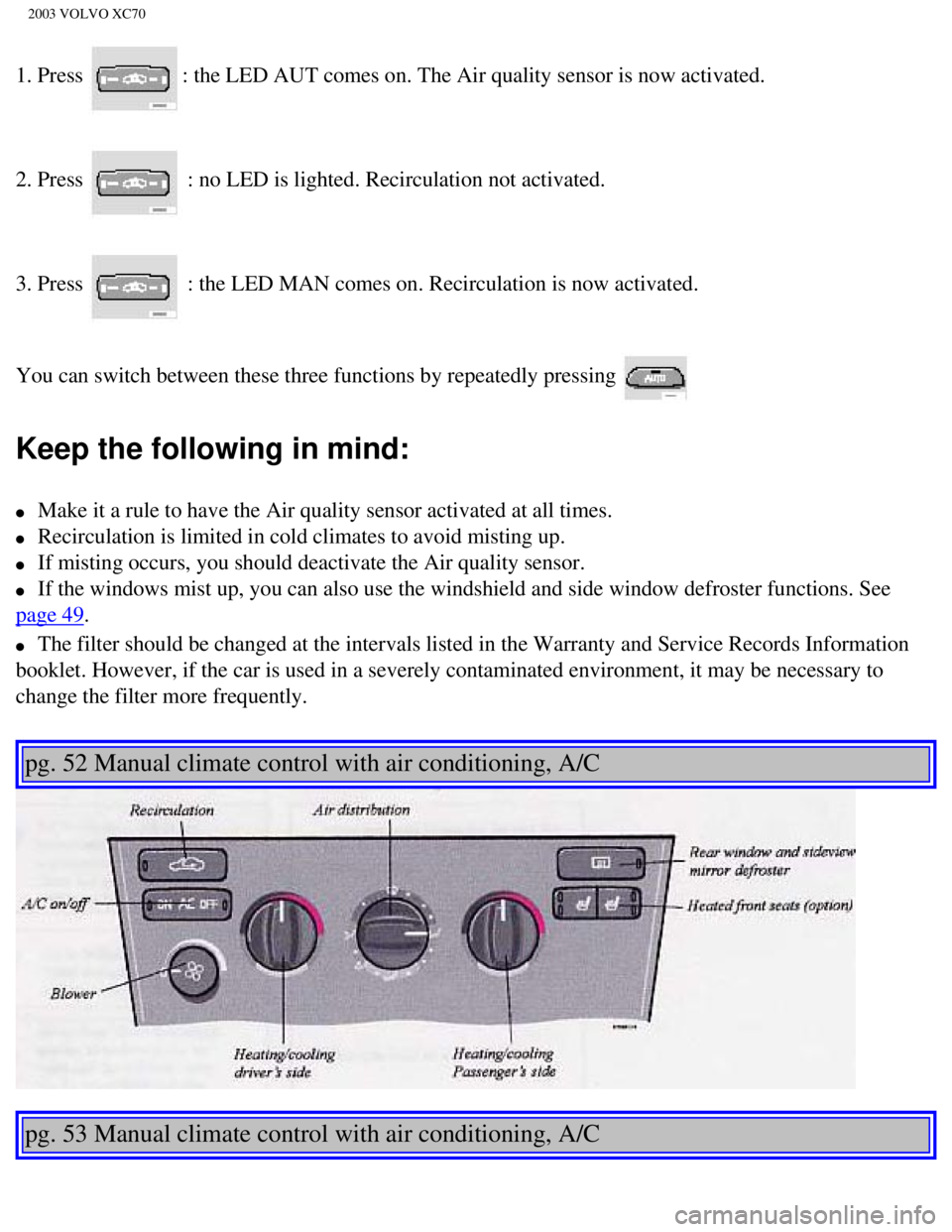
1. Press : the LED AUT comes on. The Air quality sensor is now activated.
2. Press
: no LED is lighted. Recirculation not activated.
3. Press
: the LED MAN comes on. Recirculation is now activated.
You can switch between these three functions by repeatedly pressing
Keep the following in mind:
l Make it a rule to have the Air quality sensor activated at all times.
l Recirculation is limited in cold climates to avoid misting up.
l If misting occurs, you should deactivate the Air quality sensor.
l If the windows mist up, you can also use the windshield and side window \
defroster functions. See
page 49.
l The filter should be changed at the intervals listed in the Warranty and\
Service Records Information
booklet. However, if the car is used in a severely contaminated environm\
ent, it may be necessary to
change the filter more frequently.
pg. 52 Manual climate control with air conditioning, A/C
pg. 53 Manual climate control with air conditioning, A/C
file:///K|/ownersdocs/2003/2003_XC70/03xc70_03.htm (9 of 12)12/30/2006\
4:17:55 PM
Page 111 of 257

2003 VOLVO XC70
The courtesy light stays on for 10 minutes if one of the doors is left o\
pen after the car is unlocked. The
courtesy light switches off if:
l The engine is started.
l The car is locked from the outside with the key or remote control.
The interior courtesy light can be switched on or off at any time by pre\
ssing the center button in the
panel above the rearview mirror. When switched on with the engine off, t\
he light will stay on for 10
minutes. When switched on with the engine running, the light will stay o\
n indefinitely. The light may be
switched off at any time by pressing the center button a second time.
The courtesy light timer periods can be changed. Consult your Volvo reta\
iler.
Overriding the Interior Courtesy Lights
Normally if a car door is left open with the engine turned off, the inte\
rior courtesy light will stay on for
10 minutes.
If a car door is left open or the interior courtesy lights are turned on\
while the engine is left running, the
interior courtesy lights will stay on indefinitely.
At times, you may wish to be assured that the courtesy lights will stay \
off regardless of door or tailgate
position.
To switch off the interior and tailgate courtesy lights indefinitely, pr\
ess and hold the center button in the
panel above the rearview mirror for 3 seconds. The courtesy lights will \
go off and remain off until the
center button is pressed again.
Rear reading lights
file:///K|/ownersdocs/2003/2003_XC70/03xc70_04b.htm (20 of 21)12/30/20\
06 4:17:57 PM
Page 115 of 257

2003 VOLVO XC70
Exterior courtesy lights
Home Safe System
When you leave your car at night, you can make use of the courtesy light\
ing function:
l Remove the key from the ignition switch.
l Pull the direction indicator lever towards the steering wheel (as when \
activating the high beams).
l Exit the car and lock the doors.
The headlights, parking lights, license plate lights and the lights in t\
he sideview mirrors will now come
on and remain on for 30, 60 or 90 seconds (the time interval is at your\
discretion and can be changed by
an authorized Volvo retailer).
Approach lighting
When approaching the car at night, press the yellow button in the centra\
l locking remote control (see
illustration on
page 77). This lights up the interior courtesy light, parking lights, license \
plate lights and
the lights in the sideview mirrors.
pg. 77 Remote keyless entry system
Remote keyless entry system
Your car is equipped with a remote control transmitter. This transmitter\
uses a radio frequency which
will allow "keyless" entry into the passenger compartment or the tailgat\
e. Your car is supplied with two
coded key ring transmitters, which will enable you to lock/ unlock all d\
oors and the tailgate from a
distance of 10-15 feet (3-5 meters). The remote transmitter will also \
activate or deactivate the your car's
file:///K|/ownersdocs/2003/2003_XC70/03xc70_05.htm (3 of 11)12/30/2006\
4:17:58 PM
Page 201 of 257

2003 VOLVO XC70
Windshield wiper blades
Lift the wiper arm off the windshield and hold the blade at a 45° ang\
le to the arm. Press the end of the
plastic clip located on the arm.
Slide the wiper blade along the arm to release it from the hook. The ent\
ire hooked part of the wiper arm
must pass through the opening in the wiper blade.
Pull the old blade free of the wiper arm. Install the new blade (instal\
lation is the reverse of removal) and
make sure that it is properly attached to the wiper arm.
NOTE: For reasons of safety, you should change the windshield wiper blades as \
soon as they start to
leave marks on the windshield or fail to wipe efficiently and cleanly.
To obtain maximum lifetime from a set of wiper blades, clean them with a\
stiff-bristle brush and warm,
file:///K|/ownersdocs/2003/2003_XC70/03xc70_08b.htm (15 of 16)12/30/20\
06 4:18:04 PM
Page 222 of 257
 -HU- 803 only
This feature may not be apply in your area and only functions with FM br\
oadcasts. (See previous
page)
Push the \"TP\" button for traffic inform")
2003 VOLVO XC70
Traffic information (TP) -HU- 803 only
This feature may not be apply in your area and only functions with FM br\
oadcasts. (See previous
page)
Push the "TP" button for traffic information from RDS stations. "TP" is \
displayed when the function is
connected.
When the unit is in Cassette or CD mode, the FM radio function will seek\
in the background for a station
with a strong signal broadcasting traffic information. If a cassette or \
CD are playing when the radio
receives a traffic bulletin, that function is interrupted and the bullet\
in is broadcast with the volume pre-
selected for traffic information.
When the bulletin is finished the unit immediately returns to the previo\
usly set volume and continues
playing the cassette or CD.
l Traffic information can only be heard when TP is displayed.
l If only TP is displayed, this indicates that no traffic information is b\
eing received at the time.
l If you do not wish to listen to an ongoing traffic bulletin, press the "\
TP" button. The TP function will
remain active and the radio will continue to monitor traffic information\
.
l To turn the TP function off, press the TP button. TP is no longer shown in the display.
News on/off - HU-803 only
This feature may not apply in your area and only functions with FM broad\
casts. (See previous
page)
Press the "NEWS" button to activate the news function. The text NEWS is \
displayed. Press the "NEWS"
button again if you want to switch off the function.
As soon as a news broadcast begins, the news program will interrupt the \
Cassette, CD or CD changer.
If you do not wish to listen to the news program, press the "NEWS" butto\
n again. The news function
file:///K|/ownersdocs/2003/2003_XC70/03xc70_10a.htm (9 of 10)12/30/200\
6 4:18:06 PM
Page 235 of 257

2003 VOLVO XC70
pg. 166 Audio systems - general information
Cassettes
l Store cassettes in their cases.
l Do not touch the tape surface with your fingers.
l Tapes should not be exposed to direct sunlight or extreme temperatures. \
l Keep tapes away from oil, grease and other contaminants.
l For optimal tape deck performance Volvo does not recommend the use of C-\
120 tapes.
l Take up slack using a pen or a pencil before inserting a cassette in the\
cassette slot.
Cassette cleaning
We recommend the use of the Volvo Cleaning Cassette available as a genui\
ne Volvo accessory. Regular
use improves sound quality, cleans vital parts and prevents tape tangle.\
Compact disc care
l Before using a new disc for the first time, remove any burrs in the cent\
er/outer edge by running the
stem of a pen or similar object around the hole/edge of the disc.
l Use high quality discs only.
l Keep the discs clean. Wipe them with a soft, clean, lint-free cloth, wor\
king from the center outwards.
If necessary, dampen the cloth with a neutral soap solution. Dry thoroug\
hly before using.
l Never use cleaning spray or antistatic liquid. Use only cleaners specifi\
cally made for CD's.
l Use discs of the correct size only (3.5" discs should never be used). \
l Do not put tape or labels on the disc itself.
l Volvo does not recommend the use of plastic outer rings on the disc.
l Condensation may occur on discs/optical components of the changer in col\
d winter weather. The disc
can be dried with a clean, lint-free cloth. Optical components in the CD\
changer may, however, take up
to one hour to dry off.
l Never attempt to play a disc which is damaged in any way.
l When not in use, the discs should be stored in their covers. Avoid stori\
ng discs in excessive heat,
direct sunlight or dusty locations.
file:///K|/ownersdocs/2003/2003_XC70/03xc70_10b.htm (12 of 13)12/30/20\
06 4:18:07 PM
Page 255 of 257

2003 VOLVO XC70
driving safely. Distraction can lead to a serious accident.
l In addition to this general warning, we offer the following guidance reg\
arding specific newer features
that may be found in your vehicles:
l Never use a hand-held cellular telephone while driving. Some jurisdictio\
ns prohibit cellular telephone
use by a driver while the vehicle is moving.
l If your car is equipped with a navigation system, set and make changes t\
o your travel itinerary only
with the vehicle parked.
l Never program your audio system while the vehicle is moving. Program rad\
io presets with the vehicle
parked, and use your programmed presets to make radio use quicker and si\
mpler.
l Never use portable computers or personal digital assistants while the ve\
hicle is moving.
A driver has a responsibility to do everything possible to ensure his or\
her own safety and the safety of
passengers in the vehicle and others sharing the roadway. Avoiding distr\
actions is part of that
responsibility.
The following should be checked regularly: *
1 Washer fluid reservoir should be filled with water and solvent (wintertime: windshie\
ld washer anti-
freeze). See
page 133.
2 Power steering - When cold, the level must not be above the COLD mark and when hot it \
must not be
above the HOT mark. Top up if the level drops to the ADD mark with ATF f\
luid. See
page 137.
3 Coolant level should be between the expansion tank marks. Mixture: 50% anti-fre\
eze and 50% water.
See
page 131.
file:///K|/ownersdocs/2003/2003_XC70/03xc70_13.htm (2 of 4)12/30/2006 \
4:18:09 PM