engine VOLVO XC70 2007 User Guide
[x] Cancel search | Manufacturer: VOLVO, Model Year: 2007, Model line: XC70, Model: VOLVO XC70 2007Pages: 283, PDF Size: 9.63 MB
Page 54 of 283
2007 Volvo XC70
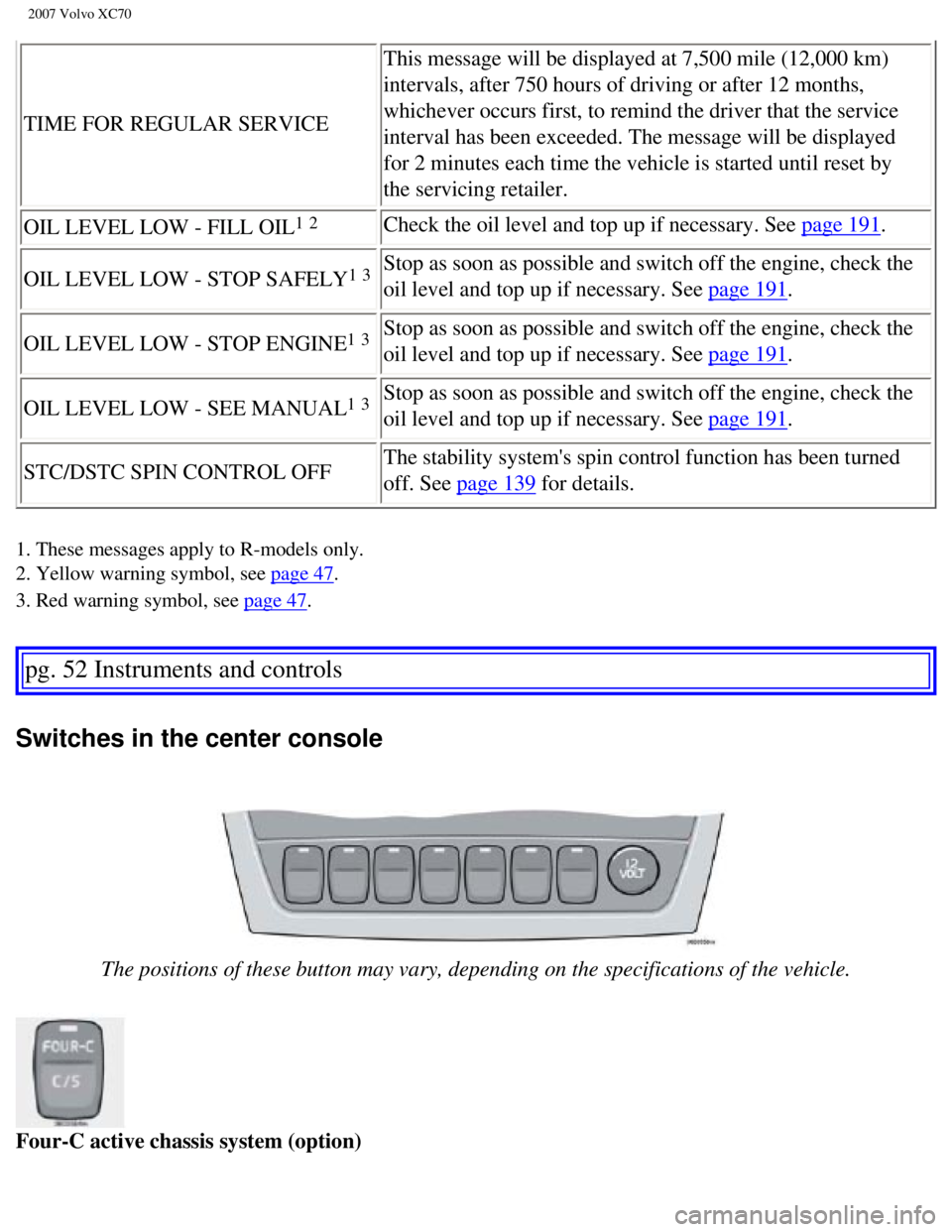
TIME FOR REGULAR SERVICEThis message will be displayed at 7,500 mile (12,000 km)
intervals, after 750 hours of driving or after 12 months,
whichever occurs first, to remind the driver that the service
interval has been exceeded. The message will be displayed
for 2 minutes each time the vehicle is started until reset by
the servicing retailer.
OIL LEVEL LOW - FILL OIL
1 2Check the oil level and top up if necessary. See page 191.
OIL LEVEL LOW - STOP SAFELY
1 3Stop as soon as possible and switch off the engine, check the
oil level and top up if necessary. See
page 191.
OIL LEVEL LOW - STOP ENGINE
1 3Stop as soon as possible and switch off the engine, check the
oil level and top up if necessary. See
page 191.
OIL LEVEL LOW - SEE MANUAL
1 3Stop as soon as possible and switch off the engine, check the
oil level and top up if necessary. See
page 191.
STC/DSTC SPIN CONTROL OFF The stability system's spin control function has been turned
off. See
page 139 for details.
1. These messages apply to R-models only.
2. Yellow warning symbol, see
page 47.
3. Red warning symbol, see
page 47.
pg. 52 Instruments and controls
Switches in the center console
The positions of these button may vary, depending on the specifications \
of the vehicle.
Four-C active chassis system (option)
file:///K|/ownersdocs/2007/2007_XC70/07xc70_02.htm (10 of 35)12/30/200\
6 5:51:30 PM
Page 56 of 283

2007 Volvo XC70
Power child safety locks (option)
See
page 115 for more information.
pg. 53 Instruments and controls
Switches in the center console
Active Bi-Xenon headlights (ABL) - option
The beams of ABL headlights adjust laterally to help light up a curve ac\
cording to movements of the
steering wheel when the vehicle is turning. This function is activated a\
utomatically when the engine is
started and can be deactivated/reactivated by pressing the button. The i\
ndicator light in the button is on
when the function is activated. See also
page 55.
pg. 54 Instruments and controls
Steering wheel adjustment
Both the height and the reach of the steering wheel can be adjusted to a\
comfortable position for the
file:///K|/ownersdocs/2007/2007_XC70/07xc70_02.htm (12 of 35)12/30/200\
6 5:51:30 PM
Page 58 of 283
: Turn the headlight switch to pos\
ition 0 to activate a
daylight sensor, which automatically switches the low beams on or off, d\
epending")
2007 Volvo XC70
NOTE: Active Bi-Xenon headlights (option): Turn the headlight switch to pos\
ition 0 to activate a
daylight sensor, which automatically switches the low beams on or off, d\
epending on ambient light
conditions. When driving in daylight, the headlights will switch off and\
the daytime running lights will
come on. In darkness, the daytime running lights will switch off and the\
Active Bi-Xenon headlights
will switch on.
Active Bi-Xenon headlights (ABL) - option
When the ABL function is activated, the headlight beams adjust laterally\
to help light up a curve
according to movements of the steering wheel (see the right-pointing be\
am in the illustration above).
This function is activated automatically when the engine is started and \
can be deactivated/ reactivated by
pressing the ABL button (see
page 53).
1. On Canadian models, the daytime running lights will remain on with th\
e light switch in this position.
pg. 56 Instruments and controls
Lighting panel
Fog lights
Front fog lights (option)
The front fog lights can be used in combination with either the headligh\
ts or the parking lights.
- Turn the ignition key to position II.
- Press button 2 to turn on the front fog lights.
An indicator light in the button illuminates when the front fog lights a\
re on.
Rear fog light
The single rear fog light is located in the driver's side tail light clu\
ster.
The rear fog light will only function in combination with the high/low b\
eam headlights or the optional
file:///K|/ownersdocs/2007/2007_XC70/07xc70_02.htm (14 of 35)12/30/200\
6 5:51:30 PM
Page 65 of 283

2007 Volvo XC70
Trip computer
The trip computer stores information gathered from several systems in yo\
ur vehicle and has four menus
that can be displayed in the text window.
l Driving distance on current fuel reserve
l Average fuel consumption
l Current fuel consumption
l Average speed
l Current speed in mph (Canadian models only)
l STC/DSTC (see page 125 for detailed information)
NOTE: Warning messages from the vehicle's monitoring systems will override th\
e trip computer
function. If a warning message is displayed in the text window while you\
are using the trip computer,
you must acknowledge the message by pressing button A. Press button A ag\
ain to return to the trip
computer function.
Trip computer controls and functions
The four
1 trip computer functions can be accessed by twisting control B one step \
at a time in either
direction. Twisting a fifth
2 time returns you to the original function. The trip computer can be res\
et
(current data will be erased from system memory) by pressing RESET (b\
utton C).
1. Driving distance on current fuel reserve
This function shows the approximate distance that can be driven on the f\
uel remaining in the tank. This
calculation is based on average fuel consumption during the last 20 mile\
s (30 km) of driving and the
amount of fuel remaining in the tank when the reading was taken. When th\
e driving distance on current
fuel reserve is less than 12 miles (20 km), "----" will be displayed i\
n the text window.
2. Average fuel consumption
This value indicates fuel consumption since the last time the trip compu\
ter was reset (by pressing
RESET, button C). When the engine is switched off, information on fuel \
consumption is stored and
remains in system memory until the RESET (button C) is pressed again.
3. Current fuel consumption
This value indicates the current fuel consumption, based on readings tak\
en once per second. When the
file:///K|/ownersdocs/2007/2007_XC70/07xc70_02.htm (21 of 35)12/30/200\
6 5:51:30 PM
Page 66 of 283
")
2007 Volvo XC70
vehicle is not moving, "----" will be displayed.
4. Average speed
This value indicates average speed since the last time the trip computer\
was reset (by pressing RESET,
button C). When the engine is switched off, information on average spee\
d is stored and remains in
system memory until the RESET (button C) is pressed again.
5. Current speed in miles per hour (Canadian models only)
This function provides the driver with an instantaneous conversion of th\
e vehicle's current speed from
km/h to mph.
NOTE: Trip computer readings may vary slightly depending on the circumference \
of the tires on the
vehicle and driving style.
1. Five functions on Canadian models.
2. A sixth time on Canadian models.
pg. 62 Instruments and controls
Cruise control
Cruise control
The cruise control panel is located on the left side of the steering whe\
el hub and may differ in
appearance, depending on the model.
Engaging cruise control
Press the CRUISE button. CRUISE will be displayed in the information win\
dow in the instrument panel.
NOTE: This does not set the vehicle's speed.
file:///K|/ownersdocs/2007/2007_XC70/07xc70_02.htm (22 of 35)12/30/200\
6 5:51:30 PM
Page 67 of 283

2007 Volvo XC70
Setting speed
Press + or - to set the current speed. CRUISE-ON will be displayed in th\
e information window in the
instrument panel.
Increasing or decreasing speed
Use + or - in the following ways to increase or decrease the vehicle's s\
peed:
l Press and hold down + or - until the vehicle reaches the desired speed. \
l Press + or - for approximately a half second and release the button to i\
ncrease or decrease vehicle
speed by approximately 1 mph (1.6 km/h).
NOTE: Cruise control will not function at speeds below approximately 20 mph (\
30 km/h).
Braking
l Cruise control is automatically disengaged when the brake pedal is depre\
ssed. The currently set speed
is stored in memory.
l Pressing resume will return the vehicle to the previously set speed.
Acceleration
Momentary acceleration, such as when passing another vehicle, does not a\
ffect cruise control operation.
The vehicle will automatically return to the previously set speed when y\
ou release the accelerator pedal.
Disengaging cruise control
To disengage cruise control, press the CRUISE button. CRUISE or CRUISE-O\
N will no longer be
displayed in the information window in the instrument panel.
NOTE: Cruise control is automatically disengaged if:
l the engine is switched off
l the gear selector is placed in (N)eutral
l the wheels start to spin or lock
l if an increase in speed is maintained for more than one minute
file:///K|/ownersdocs/2007/2007_XC70/07xc70_02.htm (23 of 35)12/30/200\
6 5:51:30 PM
Page 70 of 283

2007 Volvo XC70
The auxiliary sockets can also be used for cigarette lighters, which are\
available at your Volvo retailer.
NOTE: Volvo vehicles in North America do not have an ashtray in the front sea\
t as standard equipment.
If you want to have an ashtray in the front seat, please contact your Vo\
lvo retailer.
pg. 65 Instruments and controls
Power windows
The power windows are controlled by buttons in the arm rests. The igniti\
on switch must be ON1
(ignition key in position I, II or the engine running) for the electri\
cally operated windows to function.
To lower: Press down the front edge of the button to the first detent (\
"stop").
To raise: Lightly pull up the front edge of the button to the first dete\
nt ("stop").
Auto up/down function (front doors only):
Either front door window can be opened or closed automatically.
Auto down: Press the front part of the button as far down as possible and release \
it immediately. To
stop the window at any time, pull the button up.
Auto up: Pull the front part of the button up as far as possible and release it \
immediately. To stop the
window at any time, press the button down.
NOTE: The electrically operated windows in the front seat have an overload pr\
otecting circuit breaker
which reverses movement of the electrically operated windows to their st\
arting points if they are
obstructed in any way. Thereafter the windows will operate normally agai\
n.
file:///K|/ownersdocs/2007/2007_XC70/07xc70_02.htm (26 of 35)12/30/200\
6 5:51:30 PM
Page 73 of 283

2007 Volvo XC70
Rearview mirror
To reduce glare from the headlights of following vehicles, use the contr\
ol to switch between the normal
and night-driving positions.
A. Normal position
B. Night position, reduces glare from following headlights
Autodim function (option)
The autodim function reacts to headlights from following traffic and aut\
omatically reduces glare.
NOTE: This function is automatically switched off when the gear selector is p\
laced in the Reverse
position.
Rearview mirror with compass (option)
The upper left-hand corner of the rearview mirror has an integrated disp\
lay that shows the compass
direction toward which the car is pointing. Eight different directions c\
an be displayed: N, NE, E, SE, S,
SW, W and NW. The display shows your car's orientation with respect to t\
rue north.
If the compass is activated, it will be displayed automatically when the\
ignition is in postilion II or when
the engine is running. The compass can be switched off or on by pressing\
the inset button on the rear
file:///K|/ownersdocs/2007/2007_XC70/07xc70_02.htm (29 of 35)12/30/200\
6 5:51:30 PM
Page 77 of 283

2007 Volvo XC70
Power moonroof
To operate the moonroof, turn the ignition key to position I or II, or s\
tart the engine. The moonroof can
be operated in two ways:
A. Tilt position
B. Sliding moonroof
A. Tilt position
Open: With the moonroof closed, push up the rear edge of the switch (positio\
n 5 in the illustration
below).
Close: Pull down and hold the rear edge of the switch (position 6 in the illu\
stration below) until the
moonroof has closed completely.
B. Sliding moonroof
Manual open: Pull the switch rearward to position 3 and hold it until the moonroof h\
as opened to the
position of your choice.
Auto open: Pull the switch as far back as possible (position 4) and release it t\
o automatically slide open
the moonroof to the "comfort"
1 position. Pull the switch rearward again to open the moonroof
completely.
Manual close: Push the switch to position 2 and hold it until the moonroof has closed\
completely or to
file:///K|/ownersdocs/2007/2007_XC70/07xc70_02.htm (33 of 35)12/30/200\
6 5:51:30 PM
Page 80 of 283

2007 Volvo XC70
2 0 0 7
VOLVO XC70
Climate
pg. 73 Climate
pg. 74 Climate
Climate control systems - general information
Condensation on the inside of the windows
Keeping the insides of the windows clean will help reduce the amount of \
condensation that forms on the windows.
Use a commercial window cleaning agent to clean the windows.
Ice and snow
Always keep the air intake grille at the base of the windshield free of \
snow.
Cabin air filter
Replace the cabin air filter with a new one at the recommended intervals\
. Please refer to your Warranty and Service
Records Information booklet, or consult your Volvo retailer for these in\
tervals. The filter should be replaced more
often when driving under dirty and dusty conditions. The filter cannot b\
e cleaned and therefore should always be
replaced with a new one.
Sensors
The sunlight sensor on the dashboard and passenger compartment temperatu\
re sensor in the ECC control panel
should not be covered in any way as this could cause incorrect informati\
on to be sent to the ECC system.
Parking the vehicle in warm weather
If your vehicle has been parked in the sun in warm weather, opening the \
windows and moonroof (option) for several
minutes before driving will help release the warm air from the passenger\
compartment. When the engine is running,
close the windows and moonroof and use the recirculation function for se\
veral minutes to enable the air
conditioning to cool the compartment as quickly as possible.
Windows and optional moonroof
The ECC system will function best if the windows and optional moonroof a\
re closed. If you drive with the
moonroof open, we recommend that you manually adjust the temperature and\
blower control (the LED in the
AUTO switch should be off).
Acceleration
file:///K|/ownersdocs/2007/2007_XC70/07xc70_03.htm (1 of 11)12/30/2006\
5:51:31 PM