mirror VOLVO XC70 2007 User Guide
[x] Cancel search | Manufacturer: VOLVO, Model Year: 2007, Model line: XC70, Model: VOLVO XC70 2007Pages: 283, PDF Size: 9.63 MB
Page 75 of 283

2007 Volvo XC70
complete.
Calibrating the compass
- Stop the car in a large, open area, away from traffic.
- Turn off as many electrical devices in the car as possible to avoid in\
terference with the compass (e.g.
audio system, etc).
- Using a pen or similar object, hold the button (1) depressed for at \
least 6 seconds. "CAL" will be
displayed.
- Drive slowly in a circle at a maximum speed of 5 m.p.h. (8 km/h) unt\
il CAL is no longer displayed.
NOTE: This step can also be done by driving normally until CAL is no longer d\
isplayed. Calibration is
complete.
pg. 69 Instruments and controls
Rearview mirror/sideview mirrors
Power sideview mirrors
The mirror control switches are located on the driver's door armrest.
Driver's side: Press the L switch (an LED in the switch will light up) to activate t\
he adjustment control
and then use this control to adjust the driver's door mirror.
Passenger's door: Press the R switch (an LED in the switch will light up) and then use \
the adjustment
control to adjust the passenger's door mirror.
After you have adjusted the mirror(s), press the L or R switch again (\
the LED will go out) to deactivate
the adjustment control.
file:///K|/ownersdocs/2007/2007_XC70/07xc70_02.htm (31 of 35)12/30/200\
6 5:51:30 PM
Page 76 of 283

2007 Volvo XC70
WARNING!
The mirrors should always be adjusted prior to driving. Objects seen in \
the passenger's side wide-
angle sideview mirror are closer than they appear to be.
Remote central locking and sideview mirror memory-option
If you lock the vehicle and later unlock it with the same remote control and open the driver's door, the
sideview mirrors (and the driver's seat) will automatically move to th\
e position they were in when you
left the vehicle. This feature will work in the same way with all of the\
remote control transmitters (up to
3) that you use with your vehicle. This feature will not function if yo\
u lock your vehicle with the key.
Water repellent glass-option on certain models
The side door windows can be treated with a water repellent coating. The\
symbol to the left indicates
these windows have this coating. The optional laminated side windows alw\
ays have this coating.
The coating improves vision by causing the water to run off quickly.
See
page 179 for information on cleaning this type of glass.
CAUTION!
Use only suitable plastic scrapers to remove ice or snow from the mirror\
s. Using a metal ice scraper
could damage the water repellent coating.
pg. 70 Instruments and controls
Power moonroof (option)
file:///K|/ownersdocs/2007/2007_XC70/07xc70_02.htm (32 of 35)12/30/200\
6 5:51:30 PM
Page 83 of 283

2007 Volvo XC70
pg. 77 Climate
Electronic climate control, ECC
AUTO
This function automatically regulates the Electronic Climate Control sys\
tem so that the selected
temperatures are maintained. The blower, heating, air distribution (air\
flow), air conditioning, and optional
air quality sensor are controlled. If you prefer to manually set any of these functions, the remaining fun\
ctions will
still be controlled automatically. Pressing the AUTO button overrides an\
y settings that were previously made
manually.
Rear window and sideview mirror defrosters
This function defrosts/ de-ices the rear window and sideview mirrors. Th\
e LED in the switch will light up to
indicate that the heating function is engaged. See
page 60 for additional information on this function.
Never use ice scrapers made of metal as they can easily scratch the mirr\
or surface.
Temperature
file:///K|/ownersdocs/2007/2007_XC70/07xc70_03.htm (4 of 11)12/30/2006\
5:51:31 PM
Page 87 of 283

2007 Volvo XC70
pg. 81 Climate
Manual climate control with air conditioning, A/C
A/C - ON/OFF
The air conditioning function is engaged by pressing ON and disengaged b\
y pressing OFF.
When you select Defroster
, the air conditioning is automatically engaged if the blower is not se\
t to position
0.
Heated front seats (option)
Please see
page 78 for more information on this function.
Heated rear window/ sideview mirrors
This function demists/ de-ices the rear window and sideview mirrors. The\
LED in the switch will light up to
indicate that the heating function is engaged. See
page 77 for additional information on this function.
file:///K|/ownersdocs/2007/2007_XC70/07xc70_03.htm (8 of 11)12/30/2006\
5:51:31 PM
Page 95 of 283

2007 Volvo XC70
WARNING!
l Because the driver's seat can be adjusted with the ignition off, childre\
n should never be left
unattended in the vehicle.
l Movement of the seat can be STOPPED at any time by pressing any button o\
n the power seat
control panel.
l Do not adjust the seat while driving. The seat should be adjusted so tha\
t the brake pedal can be
depressed fully. In addition, position the seat as far rearward as comfo\
rt and control allow.
l The seat rails on the floor must not be obstructed in any way when the s\
eat is in motion.
Programming the memory (option)
Three different seating and door mirror positions can be stored in the d\
river seat's memory.
The following example explains how button 1 can be programmed. Buttons 2\
and 3 can be programmed
in the same way.
To program (store) a seat position in button 1:
- Move the seat to the desired position using the seat adjustment contro\
ls (see the previous page).
- Press and hold down the MEM (memory) button.
- With the MEM button depressed, press button 1 briefly to store the sea\
t's current position.
To move the seat to the position that it was in when button 1 was progra\
mmed:
Press and hold down button 1 until the seat stops moving.
As a safety precaution, the seat will stop automatically if the button i\
s released before the seat has
reached the preset position.
pg. 88 Interior
Interior lighting
file:///K|/ownersdocs/2007/2007_XC70/07xc70_04.htm (5 of 29)12/30/2006\
5:51:33 PM
Page 97 of 283

2007 Volvo XC70
The courtesy lights will come on and remain on for approximately 10 minu\
tes when:
l One of the doors is opened (assuming the courtesy lighting has not prev\
iously been switched off)
The courtesy lighting will go off when:
l The engine is started
l The vehicle is locked from the outside with the remote control or key
The automatic function can be disconnected by pressing button 2 for more\
than 3 seconds.
Briefly pressing the button again automatically reconnects the function.\
The courtesy light timer periods can be changed. Contact your Volvo reta\
iler.
1. This function is light dependent and is only activated in dark condit\
ions.
pg. 89 Interior
Interior lighting
Vanity mirror
The light comes on when you open the cover.
file:///K|/ownersdocs/2007/2007_XC70/07xc70_04.htm (7 of 29)12/30/2006\
5:51:33 PM
Page 138 of 283

2007 Volvo XC70
WARNING!
Before starting, check that the seat, steering wheel and mirrors are adj\
usted properly. Make sure the
brake pedal can be depressed completely. Adjust the seat if necessary. S\
ee page
84 and 86.
- Apply the parking brake (hand brake) if not already set. The gear se\
lector (automatic transmission) is
locked in the (P)ark position (SHIFTLOCK). Manual transmission: the clutch must be fully depressed.
- Without touching the accelerator pedal, turn the ignition key
1 to the starting position. Allow the starter
to operate for up to 10 seconds. Release the key as soon as the engine s\
tarts. If the engine fails to start,
repeat this step.
NOTE:
l If the key blade section of the remote is not fully folded out when star\
ting the vehicle, the immobilizer
function may make it impossible to start the engine.
l After a cold start, idle speed may be noticeably higher than normal for \
a short period. This is done to
help bring components in the emission control system to their normal ope\
rating temperature as quickly
as possible, which enables them to control emissions and help reduce the\
vehicle's impact on the
environment.
l For cold starts at altitudes above 6000 ft (1800 meters), depress the \
accelerator pedal halfway and turn
the key to the starting position. Release the pedal slowly when the engi\
ne starts.
l To release the gear selector from the (P)ark position, the engine must be running (or the ignition key
must be in position II) and the brake pedal must be depressed.
l Select the desired gear. The gear engages after a very slight delay whic\
h is especially noticeable when
selecting R.
NOTE: Your vehicle is equipped with a KEYLOCK system (automatic transmission). When the engine
is switched off, the gear selector must be in the (P)ark position before the key can be removed from the
ignition switch.
When starting in cold weather, the transmission may shift up at slightly\
higher engine speeds than
normal until the automatic transmission fluid reaches normal operating t\
emperature.
1. If two of the keys to your vehicle are close together, e.g. on the sa\
me key ring, when you try to start the
vehicle, this could cause interference in the immobilizer system and res\
ult in the vehicle not starting. If this
should occur, remove one of the keys from the key ring before trying to \
start the vehicle again.
file:///K|/ownersdocs/2007/2007_XC70/07xc70_06.htm (7 of 41)12/30/2006\
5:51:37 PM
Page 223 of 283

2007 Volvo XC70
pg. 198 Maintenance and servicing
Replacing bulbs
When replacing bulbs, keep the following points in mind:
l Never touch the glass of bulbs with your fingers. Grease and oils from y\
our fingers vaporize in the
heat and will leave a deposit on the reflector, which will damage it.
l The optional Active Bi-Xenon headlight bulbs contain trace amounts of me\
rcury. These bulbs should
always be disposed of by an authorized Volvo retailer.
l The following bulbs should only be replaced by an authorized Volvo servi\
ce technician:
- Active Bi-Xenon headlights,
- Courtesy (dome) lighting,
- Reading lights,
- Glove compartment lights
- Turn signals and courtesy lights in the side door mirrors
- High-mounted brake lights
- Diodes in the rear tail lights
Replacing bulbs at the front of the vehicle
All front bulbs (except the optional front fog lights) are replaced fr\
om the engine compartment.
WARNING!
Active Bi-Xenon headlights (option) - due to the high voltage used by \
these headlights, these bulbs
should only be replaced by an authorized Volvo service technician.
file:///K|/ownersdocs/2007/2007_XC70/07xc70_09.htm (20 of 38)12/30/200\
6 5:51:43 PM
Page 232 of 283
2007 Volvo XC70
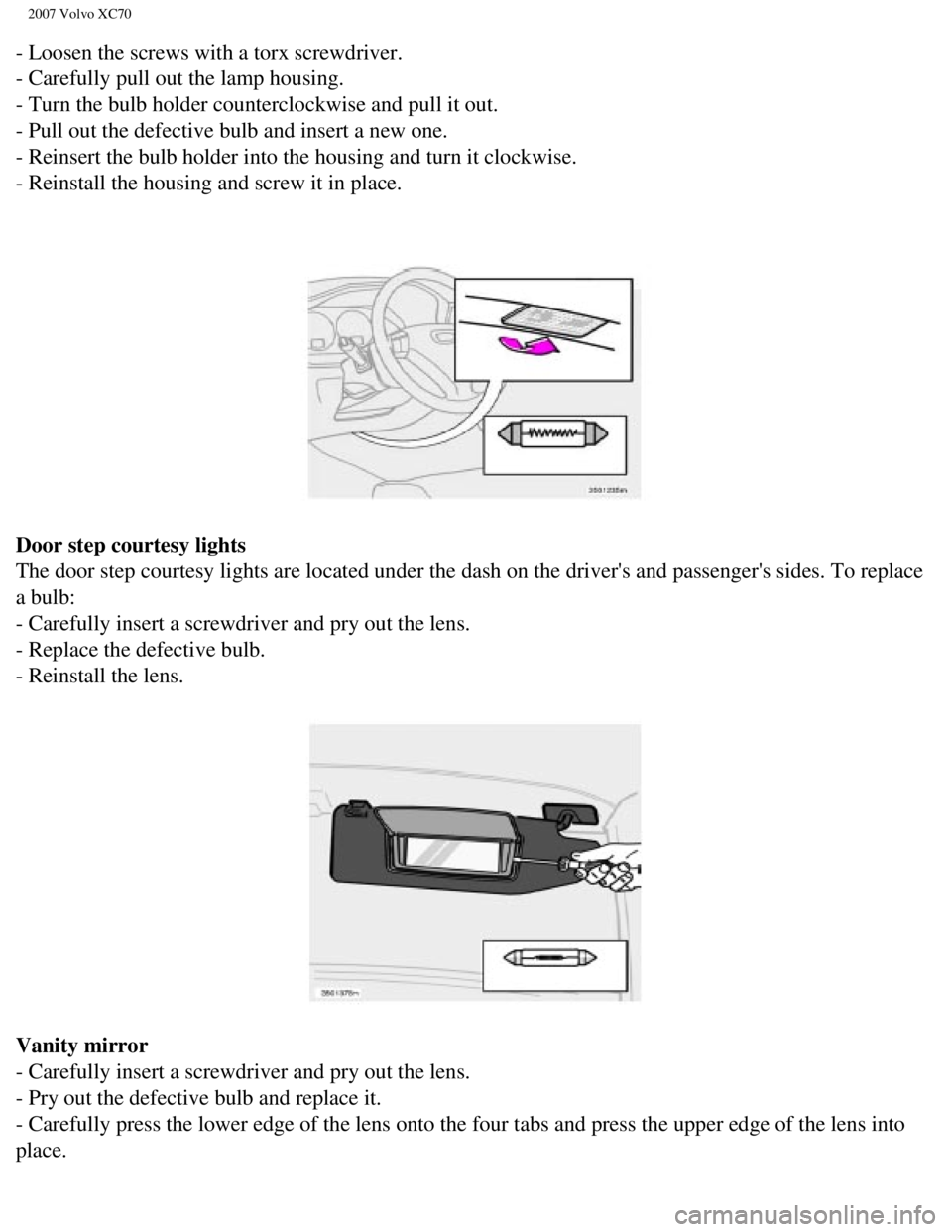
- Loosen the screws with a torx screwdriver.
- Carefully pull out the lamp housing.
- Turn the bulb holder counterclockwise and pull it out.
- Pull out the defective bulb and insert a new one.
- Reinsert the bulb holder into the housing and turn it clockwise.
- Reinstall the housing and screw it in place.
Door step courtesy lights
The door step courtesy lights are located under the dash on the driver's\
and passenger's sides. To replace
a bulb:
- Carefully insert a screwdriver and pry out the lens.
- Replace the defective bulb.
- Reinstall the lens.
Vanity mirror
- Carefully insert a screwdriver and pry out the lens.
- Pry out the defective bulb and replace it.
- Carefully press the lower edge of the lens onto the four tabs and pres\
s the upper edge of the lens into
place.
file:///K|/ownersdocs/2007/2007_XC70/07xc70_09.htm (29 of 38)12/30/200\
6 5:51:43 PM
Page 268 of 283

2007 Volvo XC70
Fast forward/back
Press and hold down the
keys to search within a track or the entire disc. The search
continues for as long as the buttons are held in.
The corresponding keys on the optional steering wheel keypad cannot be u\
sed for fast forward/back.
Random play
This function plays the tracks on a CD in random order (shuffle).
l Select CD mode and press the RND button. RND is shown in the display as \
long as the function is
activated. Random tracks from randomly selected discs will be played.
l Press RND again to stop random play.
Scan
This function plays the first 10 seconds of each track on the CD.
l Press SCAN to start the function.
l Press SCAN or EXIT to stop the scan function and listen to an entire tra\
ck.
Scan only works on the selected disc.
pg. 240 Audio
Dolby Surround Pro Logic II - HU-850 only
Dolby Surround Pro Logic II
Dolby Surround Pro Logic II is a further development of the previous ver\
sion of the system and provides
enhanced sound quality. The improved sound is particularly apparent to p\
assengers in the rear seat.
NOTE: Dolby Surround Pro Logic II, together with a center speaker in the dash\
board, offers you a
sound experience very close to a live performance. The normal left-right\
stereo channels are divided to
left-center-right. In addition, surround sound is produced by the rear s\
peakers. This surround sound
mirrors the ambience of a concert hall.
NOTE:
l Dolby Surround Pro Logic II is optimized for CD mode.
l When listening to FM radio stations, Dolby Surround Pro Logic II functio\
ns best in areas with strong
reception. If reception is weak, selecting 2 or 3-channel stereo may pro\
vide better sound quality.
l 3 channel stereo is recommended for AM and FM broadcasts.
file:///K|/ownersdocs/2007/2007_XC70/07xc70_11.htm (16 of 22)12/30/200\
6 5:51:47 PM