reset VOLVO XC70 2009 User Guide
[x] Cancel search | Manufacturer: VOLVO, Model Year: 2009, Model line: XC70, Model: VOLVO XC70 2009Pages: 286, PDF Size: 6.57 MB
Page 131 of 286
04 Comfort and driving pleasure
Audio system
04``131 Introduction
The audio system is available in two versions:
High Performance och Premium Sound. The
system version is shown in the display when
the audio system is switched on.
If the audio system is on when the ignition is
switched off, it will come on automatically the
next time the ignition is put in mode I or higher.
The audio system can be operated without a
key in the ignition slot for 15 minutes at a time
by pressing the POWER button (the driver's
door must be closed on vehicles with the
optional keyless drive).
Some functions are controlled from the menu
system in the center console. For more infor-
mation on menus, see page 120.
Dolby Surround Pro Logic II and the sym-
bol are trademarks of Dolby Laboratories
Licensing Corporation. The Dolby Surround
Pro Logic II System is manufactured under
license from Dolby Laboratories Licensing Cor-
poration.
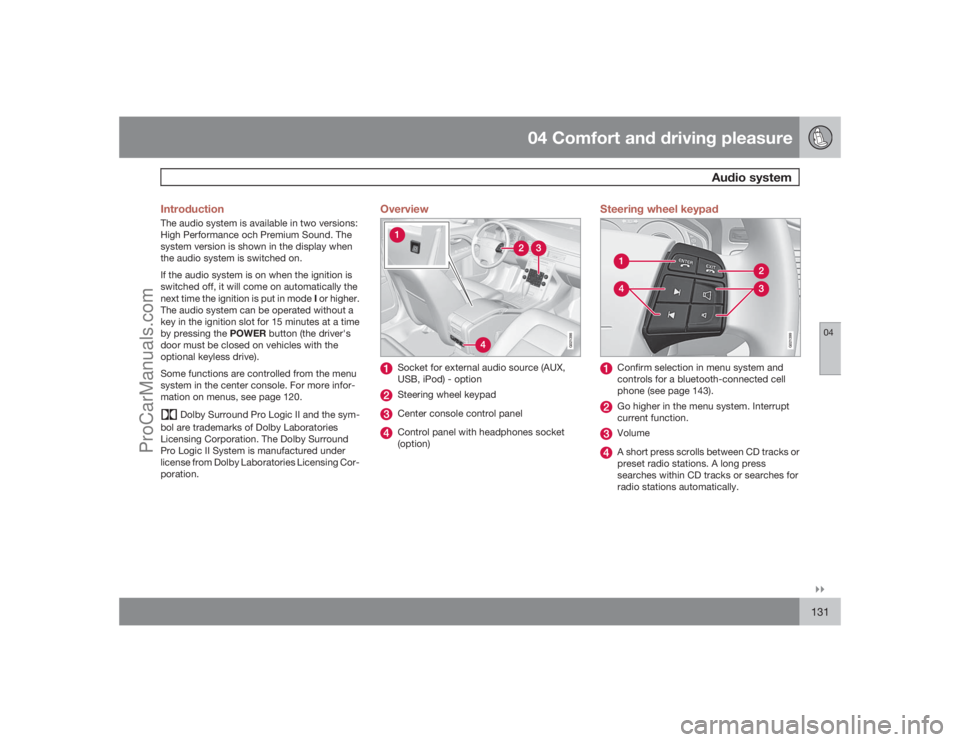
Overview
G021398
Socket for external audio source (AUX,
USB, iPod) - optionSteering wheel keypadCenter console control panelControl panel with headphones socket
(option)
Steering wheel keypad
G021399
Confirm selection in menu system and
controls for a bluetooth-connected cell
phone (see page 143).Go higher in the menu system. Interrupt
current function.VolumeA short press scrolls between CD tracks or
preset radio stations. A long press
searches within CD tracks or searches for
radio stations automatically.
ProCarManuals.com
Page 133 of 286
04 Comfort and driving pleasure
Audio system
04``133
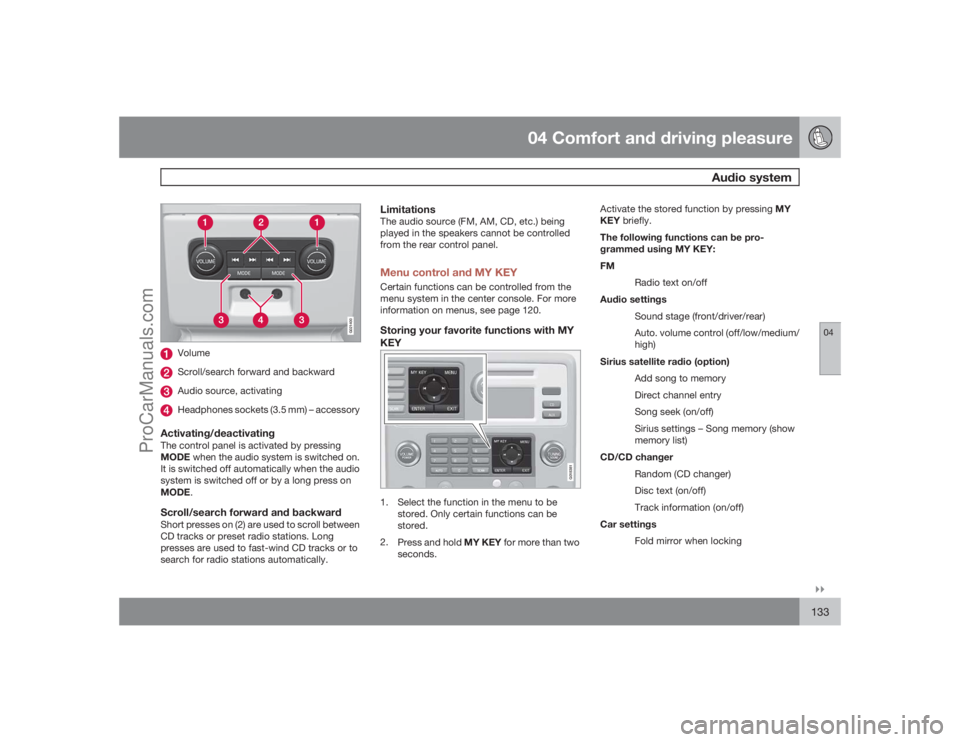
G021400
VolumeScroll/search forward and backwardAudio source, activatingHeadphones sockets (3.5 mm) – accessory
Activating/deactivatingThe control panel is activated by pressing
MODE when the audio system is switched on.
It is switched off automatically when the audio
system is switched off or by a long press on
MODE.Scroll/search forward and backwardShort presses on (2) are used to scroll between
CD tracks or preset radio stations. Long
presses are used to fast-wind CD tracks or to
search for radio stations automatically.
LimitationsThe audio source (FM, AM, CD, etc.) being
played in the speakers cannot be controlled
from the rear control panel.Menu control and MY KEYCertain functions can be controlled from the
menu system in the center console. For more
information on menus, see page 120.Storing your favorite functions with MY
KEY
G018381
1. Select the function in the menu to be
stored. Only certain functions can be
stored.
2.
Press and hold MY KEY for more than two
seconds.Activate the stored function by pressing MY
KEY briefly.
The following functions can be pro-
grammed using MY KEY:
FM
Radio text on/off
Audio settings
Sound stage (front/driver/rear)
Auto. volume control (off/low/medium/
high)
Sirius satellite radio (option)
Add song to memory
Direct channel entry
Song seek (on/off)
Sirius settings – Song memory (show
memory list)
CD/CD changer
Random (CD changer)
Disc text (on/off)
Track information (on/off)
Car settings
Fold mirror when locking
ProCarManuals.com
Page 137 of 286
04 Comfort and driving pleasure
Audio system
04``137
Scan CDThis function plays the first ten seconds of
each CD track/sound file. Press SCAN to acti-
vate. Interrupt with EXIT or SCAN to continue
playing the current CD track/sound file.RandomThis function plays the tracks in random order
(shuffle). The random CD tracks/sound files
can be scrolled through in the normal way.
NOTE
It is only possible to scroll between random
CD tracks on the current disc.Different messages are displayed depending
on which random function has been selected:•
RANDOM
means that the tracks from only
one music CD are played
•
RND ALL
means that all tracks on all
music CDs in the optional CD changer are
played.
•
RANDOM FOLDER
means that the sound
files in a directory on the current CD are
played.
CD playerIf a normal music CD is being played, activate/
deactivate under
Random
.If a disc with sound files is being played, acti-
vate/deactivate under Random
Folder.
CD changerIf a normal music CD is being played under
Random
Single disc or Random
All
discs. The option
All discs
only applies to the
music CDs in the changer.
If a CD with sound files is being played, acti-
vate/deactivate instead under Random
Folder. If you select another CD the function is
deactivated.Disc textIf title information is stored on a music CD it can
be shown on the display
5. Activate/deactivate
in CD mode under CD settings
Disc text.
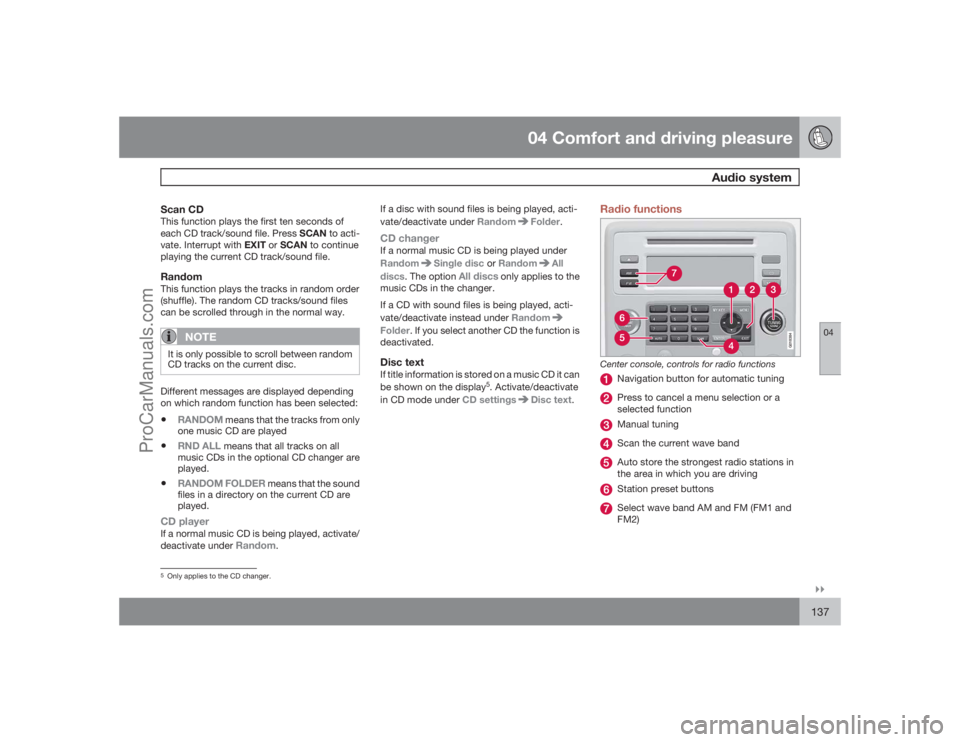
Radio functions
G018384
Center console, controls for radio functions
Navigation button for automatic tuningPress to cancel a menu selection or a
selected functionManual tuningScan the current wave bandAuto store the strongest radio stations in
the area in which you are drivingStation preset buttonsSelect wave band AM and FM (FM1 and
FM2)
5Only applies to the CD changer.
ProCarManuals.com
Page 138 of 286
04 Comfort and driving pleasureAudio system
04138
Automatic tuning1.
Select a wave band using FM or AM.
2.
Press
/
on the navigation button.
Manual tuning1.
Select a wave band using FM or AM.
2.
TurnTUNING to select a station.PresetTen station presets can be stored for each
wave band. FM has two memories for presets:FM1
and
FM2
. Only radio stations played
through the car's speakers can be stored as
presets. The stored presets are selected using
the preset buttons.
Preset storage can be carried out manually or
automatically.
Manually storing preset stations1. Tune into a station.
2. Hold in one of the preset buttons until the
message
Channel stored
appears on the
display.
Automatically storing preset stationsThe function is especially useful in areas where
the radio stations and their frequencies are
unfamiliar. The ten strongest radio stations are
stored automatically in a separate memory.
1.
Select a wave band using FM or AM.2.
Hold in AUTO until
Autostoring…
appears on the display.
OnceAutostoring…
disappears from the dis-
play, the stations are stored. The radio contin-
ues in Auto mode and Auto
appears on the
display. The automatically stored presets can
now be selected using the preset buttons.
Automatic preset storage can be cancelled
usingEXIT.
Auto mode is cancelled by pressing for exam-
pleAUTO or FM.
Returning to Auto mode provides access to the
autostored presets:
1.
PressAUTO.
>
Auto
appears on the display.
2. Press a preset button.
ScanThe function automatically searches the cur-
rent wave band for strong stations. When a
station is found, it is played for approx. eight
seconds before scanning is resumed. While
the station is playing it can be stored as a pre-
set as usual.
1.
Select a wave band using AM or FM.
2.
PressSCAN.
>
SCAN
appears on the display. Close
usingSCAN or EXIT.
Radio textSome stations transmit information on pro-
gram content, artists, etc. This information can
be shown on the display.
Activate/deactivate in FM mode under
Radio
text
.
Sirius satellite radio (option)Listening to satellite radioThe Sirius satellite system consists of a number
of high elevation satellites in geosynchronous
orbit.
NOTE
•
The digital signals from the Sirius satel-
lites are line-of-sight, which means that
physical obstructions such as bridges,
tunnels, etc, may temporarily interfere
with signal reception.
•
Avoid any obstructions, such as metal-
lic objects transported on roof racks or
in a ski box, or other antennas that may
impede signals from the SIRIUS satel-
lites.
Selecting Sirius radio mode1.
PressPower to switch on the audio sys-
tem (see page 134 and see page 137 for
ProCarManuals.com
Page 140 of 286
04 Comfort and driving pleasureAudio system
04140
Storing a channelA total of 20 satellite channels can be stored;
10 channels each for Sirius 1 and 2, see
page 138 for detailed information on storing
channels.•
Along press on one of the number keys
stores the currently tuned channel on that
key.
•
Ashort press on a number key while the
radio is in Sirius 1or 2 mode will tune to the
preset satellite channel stored on that but-
ton, regardless of the currently selected
channel category.
Song Seek and Song MemoryThe
Song Seek
and
Song Memory
functions
provide both audio and visual notification when
Sirius is broadcasting your favorite songs.
Song Seek
enables you to store the name of
the song for future advance notification when
that song is being played. The
Song Memory
feature makes it possible to view all of the cur-
rent songs that are stored in memory.Song memoryUp to ten songs can be saved in the system's
memory.
1.
PressMENU.
2.
Scroll to
Add song to song mem.
and
follow the instructions shown in the dis-
play.If a new song is selected when the memory is
full, you will be prompted to press ENTER to
delete the last song on the list.
NOTE
The remaining songs in the list will move
down one position, and the newly added
song will be placed at the top of the list.Song seekWhen a satellite radio channel plays one of the
songs stored in the song memory, the listener
will be alerted by a text message and an audi-
ble signal.
PressENTER to listen to the song or EXIT to
cancel.
To activate/deactivate the song seek function:
1.
PressMENU
2.
Scroll to
Song seek
3.
PressENTER to activate or deactivate the
function.
NOTE
When the song has ended, the radio will
remain tuned to the channel on which the
song was played.
Radio textThe text that is displayed about the song that
is currently playing can be changed. Use the
AUTO button or the menu to display the Artist,
Title, Composer, or switch radio text off.Advanced settingsThis menu function enables you to make set-
tings on certain Sirius satellite radio functions.
To access this menu:
1.
PressMENU.
2. Scroll to the Sirius menu.
3.
Select
Advanced Sirius settings
.
WARNING
Settings should be made when the vehicle
is at a standstill.The following settings can be made in the Sir-
ius menu:•
The list of saved songs can be displayed
•
Channel skip settings can be made
•
Channel lock settings can be made
•
The channel access code can be displayed
or changed
•
Your Sirius ID can be displayed
ProCarManuals.com
Page 152 of 286
04 Comfort and driving pleasureTrip computer
04152
Introduction
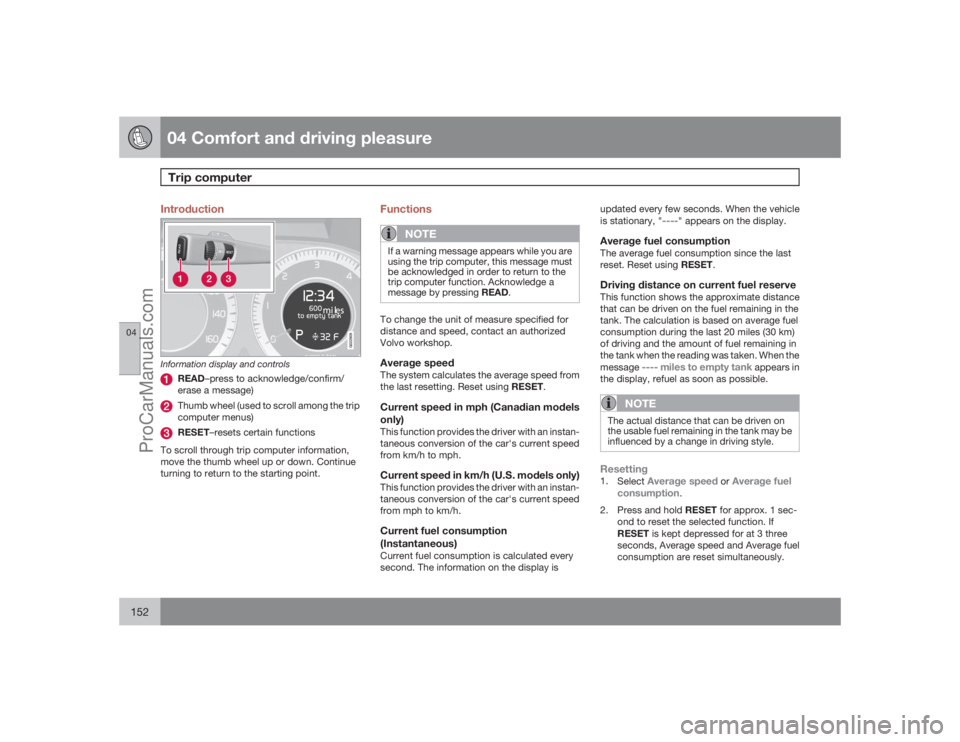
G022909
Information display and controls
READ–press to acknowledge/confirm/
erase a message)Thumb wheel (used to scroll among the trip
computer menus)RESET–resets certain functions
To scroll through trip computer information,
move the thumb wheel up or down. Continue
turning to return to the starting point.
Functions
NOTE
If a warning message appears while you are
using the trip computer, this message must
be acknowledged in order to return to the
trip computer function. Acknowledge a
message by pressing READ.To change the unit of measure specified for
distance and speed, contact an authorized
Volvo workshop.Average speedThe system calculates the average speed from
the last resetting. Reset using RESET.Current speed in mph (Canadian models
only)This function provides the driver with an instan-
taneous conversion of the car's current speed
from km/h to mph.Current speed in km/h (U.S. models only)This function provides the driver with an instan-
taneous conversion of the car's current speed
from mph to km/h.Current fuel consumption
(Instantaneous)Current fuel consumption is calculated every
second. The information on the display isupdated every few seconds. When the vehicle
is stationary, "
----
" appears on the display.
Average fuel consumptionThe average fuel consumption since the last
reset. Reset using RESET.Driving distance on current fuel reserveThis function shows the approximate distance
that can be driven on the fuel remaining in the
tank. The calculation is based on average fuel
consumption during the last 20 miles (30 km)
of driving and the amount of fuel remaining in
the tank when the reading was taken. When the
message
---- miles to empty tank
appears in
the display, refuel as soon as possible.
NOTE
The actual distance that can be driven on
the usable fuel remaining in the tank may be
influenced by a change in driving style.Resetting1.
Select
Average speed
or
Average fuel
consumption
.
2.
Press and hold RESET for approx. 1 sec-
ond to reset the selected function. If
RESET is kept depressed for at 3 three
seconds, Average speed and Average fuel
consumption are reset simultaneously.
ProCarManuals.com
Page 155 of 286
04 Comfort and driving pleasure
Stability system
04``155 Introduction
The Dynamic Stability and Traction Control
system (DSTC) consists of a number of func-
tions designed help reduce wheel spin, coun-
teract skidding, and to generally help improve
directional stability.
CAUTION
A pulsating sound will be audible when the
system is actively operating and is normal.Traction control (TC)This function is designed to help reduce wheel
spin by transferring power from a drive wheel
that begins to lose traction to the wheel on the
opposite side of the vehicle (on the same axle).
TC is most active at low speeds.
This is one of DSTC's permanent functions and
cannot be switched off.Active Yaw Control (AYC)This function helps maintain directional stabil-
ity, for example when cornering, by braking
one or more of the wheels if the vehicle shows
a tendency to skid or slide laterally.
This is one of DSTC's permanent functions and
cannot be switched off.
Spin control (SC)The spin control function is designed to help
prevent the drive wheels from spinning while
the vehicle is accelerating.
Under certain circumstances, such as when
driving with snow chains, or driving in deep
snow or loose sand, it may be advisable to
temporarily switch off this function for maxi-
mum tractive force.
WARNING
The car's handling and stability characteris-
tics will be altered if the spin control function
has been disabled.Operation
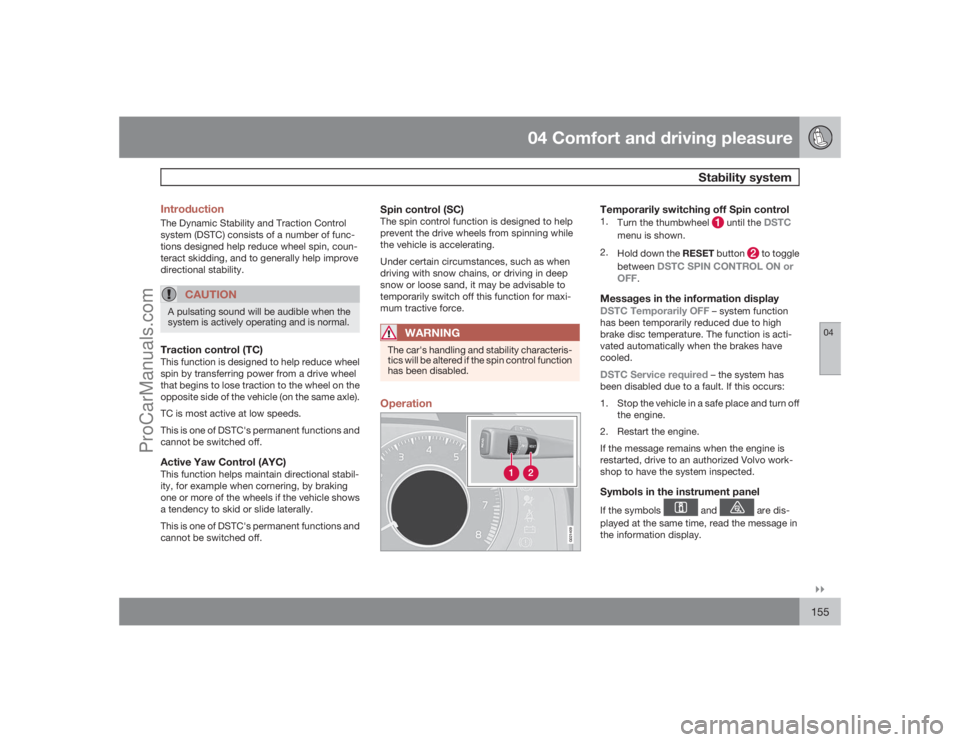
G021409
Temporarily switching off Spin control1.
Turn the thumbwheel
until the
DSTC
menu is shown.
2.
Hold down the RESET button
to toggle
between
DSTC SPIN CONTROL ON or
OFF
.
Messages in the information displayDSTC Temporarily OFF
– system function
has been temporarily reduced due to high
brake disc temperature. The function is acti-
vated automatically when the brakes have
cooled.
DSTC Service required
– the system has
been disabled due to a fault. If this occurs:
1. Stop the vehicle in a safe place and turn off
the engine.
2. Restart the engine.
If the message remains when the engine is
restarted, drive to an authorized Volvo work-
shop to have the system inspected.
Symbols in the instrument panelIf the symbols
and
are dis-
played at the same time, read the message in
the information display.
ProCarManuals.com
Page 158 of 286
04 Comfort and driving pleasureCruise control
04158
Operation
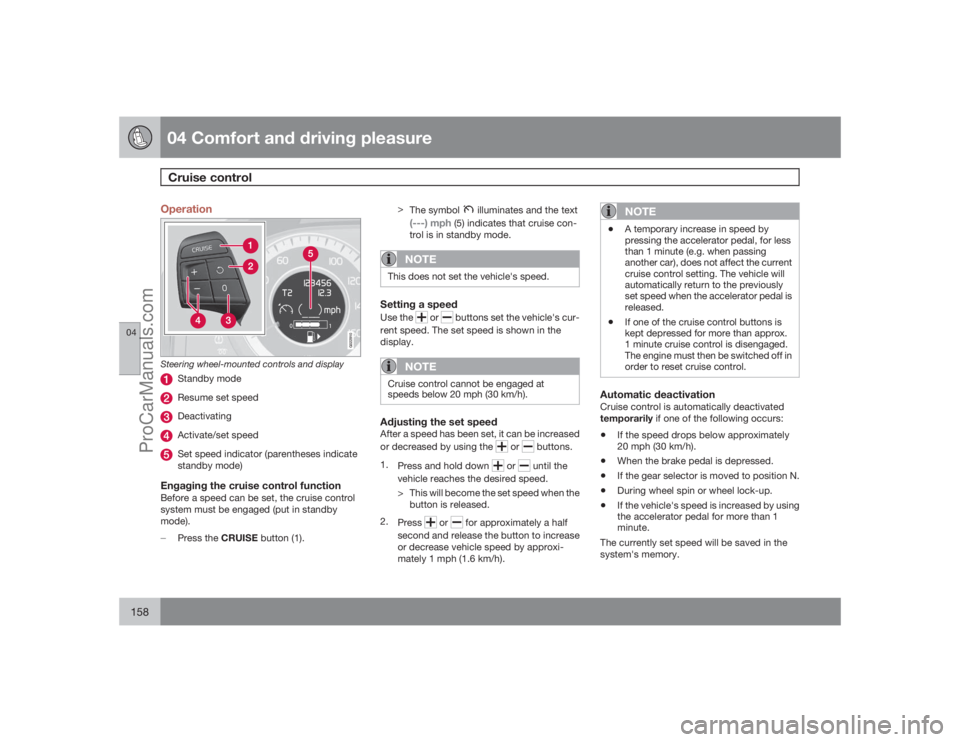
G022910
Steering wheel-mounted controls and display
Standby modeResume set speedDeactivatingActivate/set speedSet speed indicator (parentheses indicate
standby mode)
Engaging the cruise control functionBefore a speed can be set, the cruise control
system must be engaged (put in standby
mode).
±
Press the CRUISE button (1).>
The symbol
illuminates and the text
(---) mph
(5) indicates that cruise con-
trol is in standby mode.
NOTE
This does not set the vehicle's speed.Setting a speedUse the
or
buttons set the vehicle's cur-
rent speed. The set speed is shown in the
display.
NOTE
Cruise control cannot be engaged at
speeds below 20 mph (30 km/h).Adjusting the set speedAfter a speed has been set, it can be increased
or decreased by using the
or
buttons.
1.
Press and hold down
or
until the
vehicle reaches the desired speed.
> This will become the set speed when the
button is released.
2.
Press
or
for approximately a half
second and release the button to increase
or decrease vehicle speed by approxi-
mately 1 mph (1.6 km/h).
NOTE
•
A temporary increase in speed by
pressing the accelerator pedal, for less
than 1 minute (e.g. when passing
another car), does not affect the current
cruise control setting. The vehicle will
automatically return to the previously
set speed when the accelerator pedal is
released.
•
If one of the cruise control buttons is
kept depressed for more than approx.
1 minute cruise control is disengaged.
The engine must then be switched off in
order to reset cruise control.
Automatic deactivationCruise control is automatically deactivated
temporarily if one of the following occurs:•
If the speed drops below approximately
20 mph (30 km/h).
•
When the brake pedal is depressed.
•
If the gear selector is moved to position N.
•
During wheel spin or wheel lock-up.
•
If the vehicle's speed is increased by using
the accelerator pedal for more than 1
minute.
The currently set speed will be saved in the
system's memory.
ProCarManuals.com
Page 168 of 286
04 Comfort and driving pleasureAdaptive Cruise Control–ACC (option)
04168
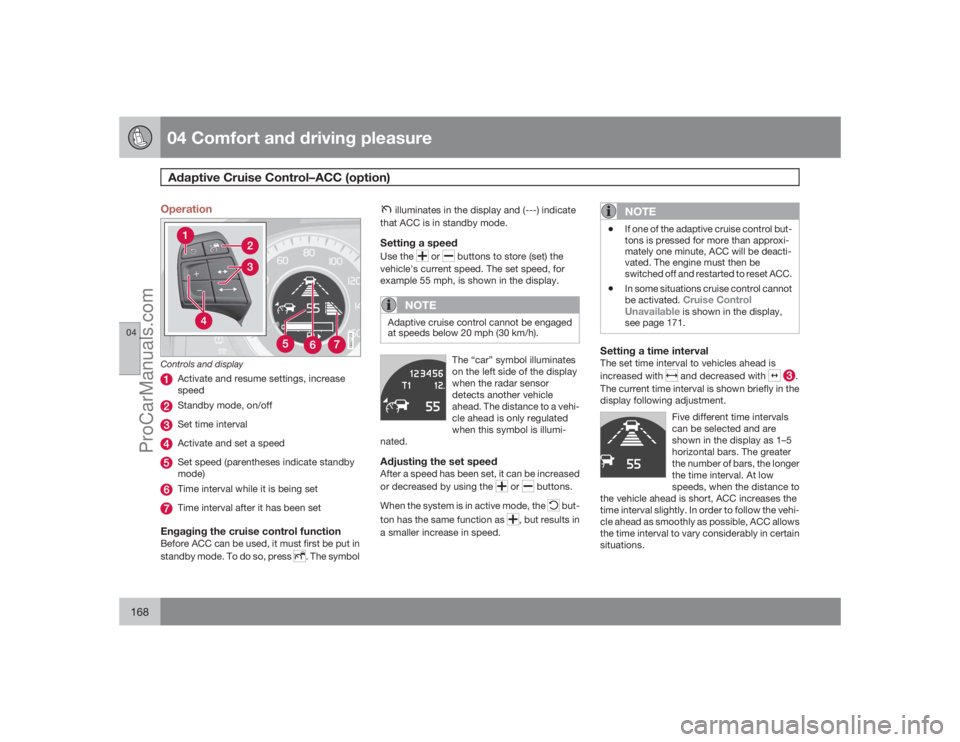
Operation
G027123
Controls and display
Activate and resume settings, increase
speedStandby mode, on/offSet time intervalActivate and set a speedSet speed (parentheses indicate standby
mode)Time interval while it is being setTime interval after it has been set
Engaging the cruise control functionBefore ACC can be used, it must first be put in
standby mode. To do so, press
. The symbol
illuminates in the display and (---) indicate
that ACC is in standby mode.Setting a speedUse the
or
buttons to store (set) the
vehicle's current speed. The set speed, for
example 55 mph, is shown in the display.
NOTE
Adaptive cruise control cannot be engaged
at speeds below 20 mph (30 km/h).
The “car” symbol illuminates
on the left side of the display
when the radar sensor
detects another vehicle
ahead. The distance to a vehi-
cle ahead is only regulated
when this symbol is illumi-
nated.
Adjusting the set speedAfter a speed has been set, it can be increased
or decreased by using the
or
buttons.
When the system is in active mode, the
but-
ton has the same function as
, but results in
a smaller increase in speed.
NOTE
•
If one of the adaptive cruise control but-
tons is pressed for more than approxi-
mately one minute, ACC will be deacti-
vated. The engine must then be
switched off and restarted to reset ACC.
•
In some situations cruise control cannot
be activated.
Cruise Control
Unavailable is shown in the display,
see page 171.
Setting a time intervalThe set time interval to vehicles ahead is
increased with
and decreased with
.
The current time interval is shown briefly in the
display following adjustment.
Five different time intervals
can be selected and are
shown in the display as 1–5
horizontal bars. The greater
the number of bars, the longer
the time interval. At low
speeds, when the distance to
the vehicle ahead is short, ACC increases the
time interval slightly. In order to follow the vehi-
cle ahead as smoothly as possible, ACC allows
the time interval to vary considerably in certain
situations.
ProCarManuals.com
Page 187 of 286
04 Comfort and driving pleasure
Blind Spot Information System (option)
04
187
switched off, and a text message is dis-
played.
•
BLIS can be switched on again by pressing
the button. The indicator light in the button
will illuminate and a new text message will
be displayed. Press the READ button (see
page 121) to erase the message.
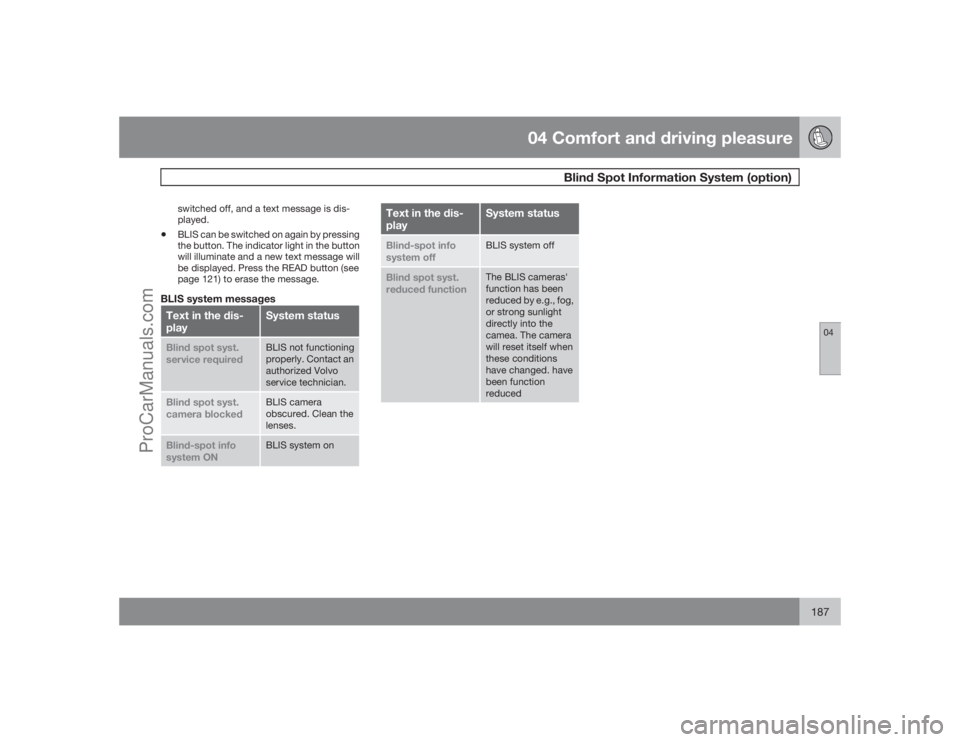
BLIS system messagesText in the dis-
play
System status
Blind spot syst.
service required
BLIS not functioning
properly. Contact an
authorized Volvo
service technician.
Blind spot syst.
camera blocked
BLIS camera
obscured. Clean the
lenses.
Blind-spot info
system ON
BLIS system on
Text in the dis-
play
System status
Blind-spot info
system off
BLIS system off
Blind spot syst.
reduced function
The BLIS cameras'
function has been
reduced by e.g., fog,
or strong sunlight
directly into the
camea. The camera
will reset itself when
these conditions
have changed. have
been function
reduced
ProCarManuals.com