radio VOLVO XC70 2009 Owners Manual
[x] Cancel search | Manufacturer: VOLVO, Model Year: 2009, Model line: XC70, Model: VOLVO XC70 2009Pages: 286, PDF Size: 6.57 MB
Page 9 of 286
Introduction
Important warnings
9 Driver distraction
A driver has a responsibility to do everything
possible to ensure his or her own safety and
the safety of passengers in the vehicle and oth-
ers sharing the roadway. Avoiding distractions
is part of that responsibility.
Driver distraction results from driver activities
that are not directly related to controlling the
vehicle in the driving environment. Your new
Volvo is, or can be, equipped with many fea-
ture-rich entertainment and communication
systems. These include hands-free cellular tel-
ephones, navigation systems, and multipur-
pose audio systems. You may also own other
portable electronic devices for your own con-
venience. When used properly and safely, they
enrich the driving experience. Improperly used,
any of these could cause a distraction.
For all of these systems, we want to provide the
following warning that reflects the strong Volvo
concern for your safety.Never use these devi-
ces or any feature of your vehicle in a way that
distracts you from the task of driving safely.
Distraction can lead to a serious accident. In
addition to this general warning, we offer the
following guidance regarding specific newer
features that may be found in your vehicle•
Never use a hand-held cellular telephone
while driving. Some jurisdictions prohibitcellular telephone use by a driver while the
vehicle is moving.
•
If your vehicle is equipped with a naviga-
tion system, set and make changes to your
travel itinerary only with the vehicle parked.
•
Never program your audio system while
the vehicle is moving. Program radio pre-
sets with the vehicle parked, and use your
programmed presets to make radio use
quicker and simpler.
•
Never use portable computers or personal
digital assistants while the vehicle is mov-
ing.
Accessory installation•
We strongly recommend that Volvo owners
install only genuine, Volvo-approved
accessories, and that accessory installa-
tions be performed only by a trained and
qualified Volvo service technician.
•
Genuine Volvo accessories are tested to
ensure compatibility with the performance,
safety, and emission systems in your vehi-
cle. Additionally, a trained and qualified
Volvo service technician knows where
accessories may and may not be safely
installed in your Volvo. In all cases, please
consult a trained and qualified Volvo serv-
ice technician before installing any acces-
sory in or on your vehicle.
•
Accessories that have not been approved
by Volvo may or may not be specifically
tested for compatibility with your vehicle.
Additionally, an inexperienced installer
may not be familiar with some of your car's
systems.
•
Any of your car's performance and safety
systems could be adversely affected if you
install accessories that Volvo has not tes-
ted, or if you allow accessories to be instal-
led by someone unfamiliar with your vehi-
cle.
•
Damage caused by unapproved or
improperly installed accessories may not
be covered by your new vehicle warranty.
See your Warranty and Service Records
Information booklet for more warranty
information. Volvo assumes no responsi-
bility for death, injury, or expenses that
may result from the installation of non-gen-
uine accessories.
ProCarManuals.com
Page 100 of 286
03 Your driving environmentHomeLink® Wireless Control System (option)
03100
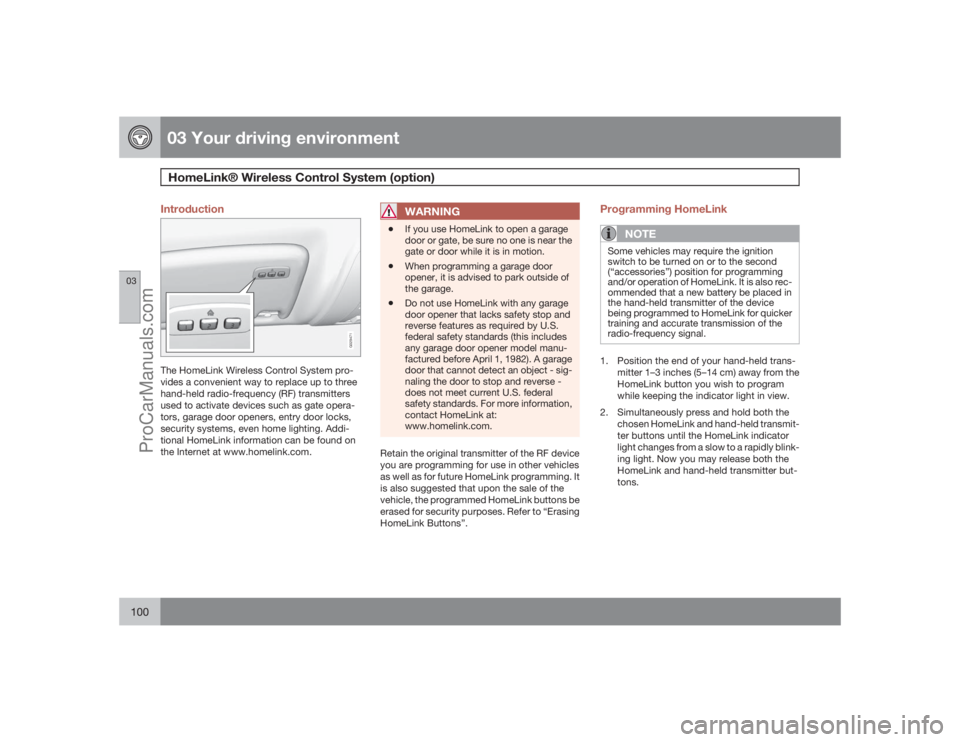
Introduction
G029471
The HomeLink Wireless Control System pro-
vides a convenient way to replace up to three
hand-held radio-frequency (RF) transmitters
used to activate devices such as gate opera-
tors, garage door openers, entry door locks,
security systems, even home lighting. Addi-
tional HomeLink information can be found on
the Internet at www.homelink.com.
WARNING
•
If you use HomeLink to open a garage
door or gate, be sure no one is near the
gate or door while it is in motion.
•
When programming a garage door
opener, it is advised to park outside of
the garage.
•
Do not use HomeLink with any garage
door opener that lacks safety stop and
reverse features as required by U.S.
federal safety standards (this includes
any garage door opener model manu-
factured before April 1, 1982). A garage
door that cannot detect an object - sig-
naling the door to stop and reverse -
does not meet current U.S. federal
safety standards. For more information,
contact HomeLink at:
www.homelink.com.
Retain the original transmitter of the RF device
you are programming for use in other vehicles
as well as for future HomeLink programming. It
is also suggested that upon the sale of the
vehicle, the programmed HomeLink buttons be
erased for security purposes. Refer to “Erasing
HomeLink Buttons”.
Programming HomeLink
NOTE
Some vehicles may require the ignition
switch to be turned on or to the second
(“accessories”) position for programming
and/or operation of HomeLink. It is also rec-
ommended that a new battery be placed in
the hand-held transmitter of the device
being programmed to HomeLink for quicker
training and accurate transmission of the
radio-frequency signal.1. Position the end of your hand-held trans-
mitter 1–3 inches (5–14 cm) away from the
HomeLink button you wish to program
while keeping the indicator light in view.
2. Simultaneously press and hold both the
chosen HomeLink and hand-held transmit-
ter buttons until the HomeLink indicator
light changes from a slow to a rapidly blink-
ing light. Now you may release both the
HomeLink and hand-held transmitter but-
tons.
ProCarManuals.com
Page 101 of 286
03 Your driving environment
HomeLink® Wireless Control System (option)
03``101
NOTE
Some devices may require you to replace
this Programming Step 2 with procedures
noted in the “Gate Operator / Canadian Pro-
gramming” section. If the HomeLink indica-
tor light does not change to a rapidly
blinking light after performing these steps,
contact HomeLink at www.homelink.com.3.
Firmlypress, hold for five seconds and
release the programmed HomeLink but-
ton up to two separate times to activate the
door. If the door does not activate, press
and hold the just-trained HomeLink button
and observe the indicator light.
•If the indicator light stays on con-
stantly, programming is complete
and your device should activate when
the HomeLink button is pressed and
released.•If the indicator light blinks rapidly for
two seconds and then turns to a con-
stant light continue with “Program-
ming” steps 4-6 to complete the pro-
gramming of a rolling code equipped
device (most commonly a garage door
opener).
4. At the garage door opener receiver (motor-
head unit) in the garage, locate the “learn”
or “smart” button. This can usually befound where the hanging antenna wire is
attached to the motor-head unit.
5. Firmly press and release the “learn” or
“smart” button. (The name and color of the
button may vary by manufacturer.) There
are 30 seconds to initiate step 6.
6. Return to the vehicle and firmly press, hold
for two seconds and release the pro-
grammed HomeLink button. Repeat the
“press/hold/release” sequence a second
time, and, depending on the brand of the
garage door opener (or other rolling code
equipped device), repeat this sequence a
third time to complete the programming
process.
HomeLink should now activate your rolling
code equipped device.
Gate Operator/Canadian ProgrammingCanadian radio-frequency laws require trans-
mitter signals to “time-out” (or quit) after sev-
eral seconds of transmission – which may not
be long enough for HomeLink to pick up the
signal during programming. Similar to this
Canadian law, some U.S. gate operators are
designed to “time-out” in the same manner.
If you live in Canada or you are having difficul-
ties programming a gate operator or garage
door opener by using the “Programming” pro-cedures,replace “Programming HomeLink”
step 2 with the following:
•
Continue to press and hold the HomeLink
button while you press and release -
every two seconds (“cycle”) your hand-
held transmitter until the HomeLink indica-
tor light changes from a slow to a rapidly
blinking light. Now you may release both
the HomeLink and hand-held transmitter
buttons.
Proceed with “Programming” step 3 to com-
plete.
Using HomeLinkTo operate, simply press and release the pro-
grammed HomeLink button. Activation will
now occur for the trained device (i.e., garage
door opener, gate operator, security system,
entry door lock, home/office lighting, etc.). For
convenience, the hand-held transmitter of the
device may also be used at any time. In the
event that there are still programming difficul-
ties or questions, contact HomeLink at:
www.homelink.com.
ProCarManuals.com
Page 121 of 286
04 Comfort and driving pleasure
Menus and messages
04``121
Light settings
Lock settings
Reduced guard
1
Parking camera settings (accessory)
Steering force level (option)
Information
Climate settings
Automatic blower adjust
Recirculation timer
Auto. rear defroster
Reset climate settings
Main menu AMAudio settings
2
Sound stage
Equalizer, front
Equalizer, rear
Auto. volume control
Resets all audio settings.
Main menu FMFM settings
Radio text
Advanced radio settings
Audio settingsMain menu CDRandom
Off
Folder
Disc
Single disc
All discs
CD settings
Disc text (option)
Audio settingsMain menu AUXVolume, AUX input
Audio settings
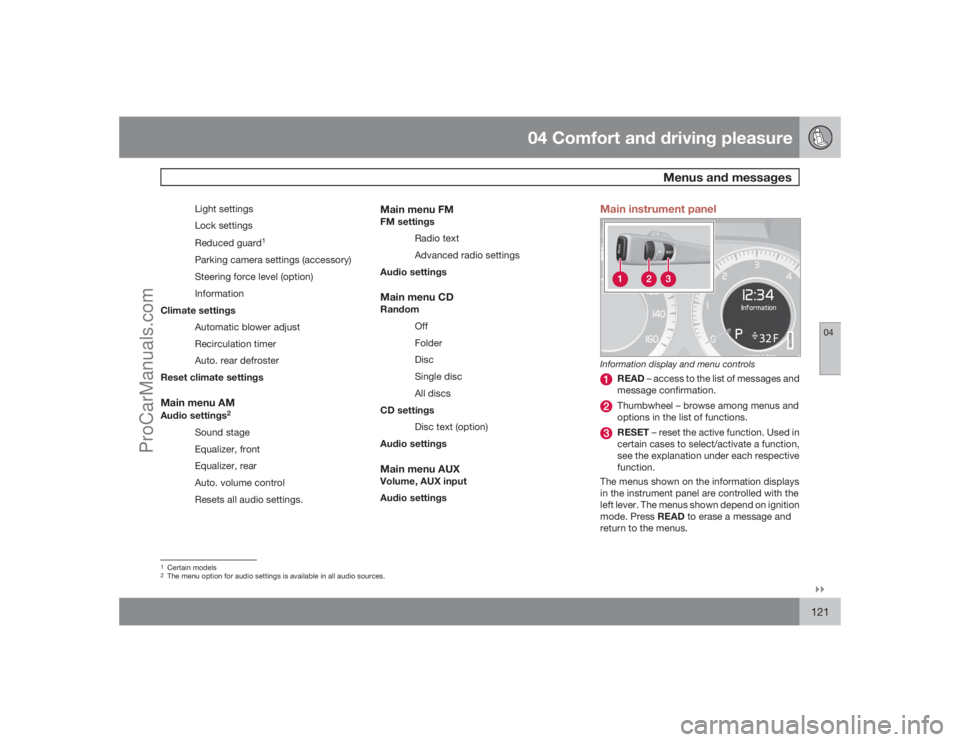
Main instrument panel
G022908
Information display and menu controls
READ – access to the list of messages and
message confirmation.Thumbwheel – browse among menus and
options in the list of functions.RESET – reset the active function. Used in
certain cases to select/activate a function,
see the explanation under each respective
function.
The menus shown on the information displays
in the instrument panel are controlled with the
left lever. The menus shown depend on ignition
mode. Press READ to erase a message and
return to the menus.
1Certain models2The menu option for audio settings is available in all audio sources.
ProCarManuals.com
Page 131 of 286
04 Comfort and driving pleasure
Audio system
04``131 Introduction
The audio system is available in two versions:
High Performance och Premium Sound. The
system version is shown in the display when
the audio system is switched on.
If the audio system is on when the ignition is
switched off, it will come on automatically the
next time the ignition is put in mode I or higher.
The audio system can be operated without a
key in the ignition slot for 15 minutes at a time
by pressing the POWER button (the driver's
door must be closed on vehicles with the
optional keyless drive).
Some functions are controlled from the menu
system in the center console. For more infor-
mation on menus, see page 120.
Dolby Surround Pro Logic II and the sym-
bol are trademarks of Dolby Laboratories
Licensing Corporation. The Dolby Surround
Pro Logic II System is manufactured under
license from Dolby Laboratories Licensing Cor-
poration.
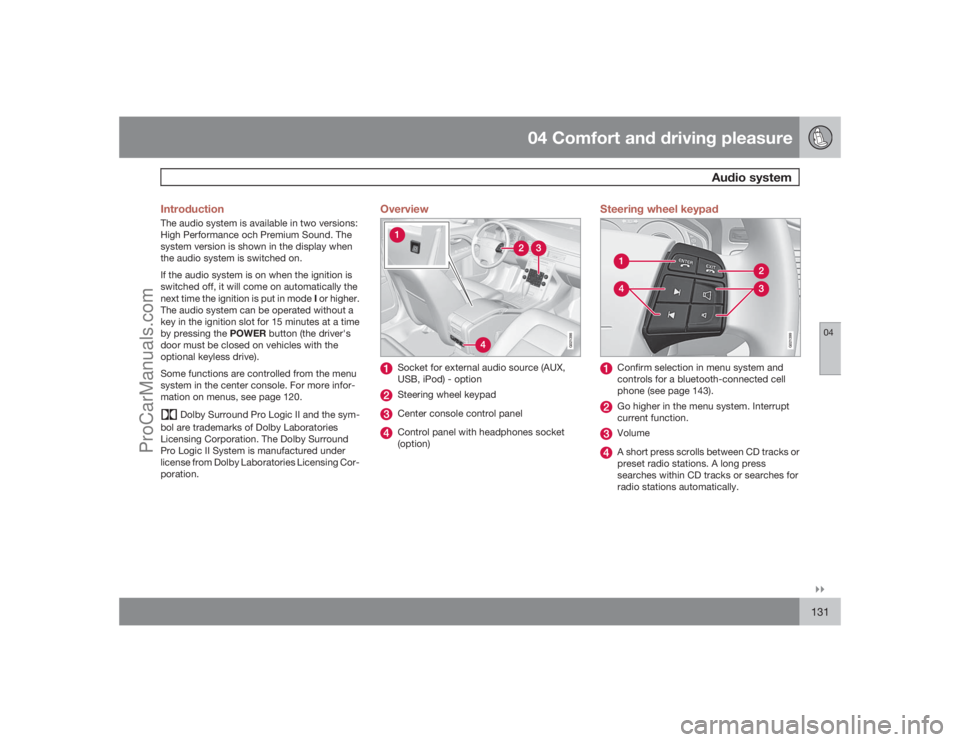
Overview
G021398
Socket for external audio source (AUX,
USB, iPod) - optionSteering wheel keypadCenter console control panelControl panel with headphones socket
(option)
Steering wheel keypad
G021399
Confirm selection in menu system and
controls for a bluetooth-connected cell
phone (see page 143).Go higher in the menu system. Interrupt
current function.VolumeA short press scrolls between CD tracks or
preset radio stations. A long press
searches within CD tracks or searches for
radio stations automatically.
ProCarManuals.com
Page 133 of 286
04 Comfort and driving pleasure
Audio system
04``133
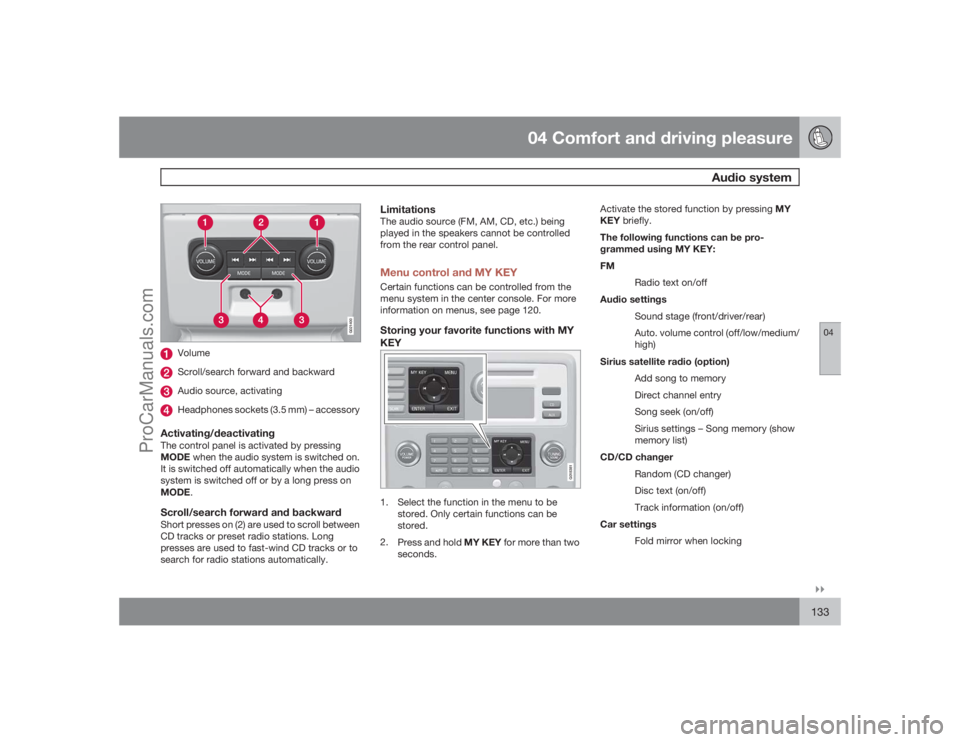
G021400
VolumeScroll/search forward and backwardAudio source, activatingHeadphones sockets (3.5 mm) – accessory
Activating/deactivatingThe control panel is activated by pressing
MODE when the audio system is switched on.
It is switched off automatically when the audio
system is switched off or by a long press on
MODE.Scroll/search forward and backwardShort presses on (2) are used to scroll between
CD tracks or preset radio stations. Long
presses are used to fast-wind CD tracks or to
search for radio stations automatically.
LimitationsThe audio source (FM, AM, CD, etc.) being
played in the speakers cannot be controlled
from the rear control panel.Menu control and MY KEYCertain functions can be controlled from the
menu system in the center console. For more
information on menus, see page 120.Storing your favorite functions with MY
KEY
G018381
1. Select the function in the menu to be
stored. Only certain functions can be
stored.
2.
Press and hold MY KEY for more than two
seconds.Activate the stored function by pressing MY
KEY briefly.
The following functions can be pro-
grammed using MY KEY:
FM
Radio text on/off
Audio settings
Sound stage (front/driver/rear)
Auto. volume control (off/low/medium/
high)
Sirius satellite radio (option)
Add song to memory
Direct channel entry
Song seek (on/off)
Sirius settings – Song memory (show
memory list)
CD/CD changer
Random (CD changer)
Disc text (on/off)
Track information (on/off)
Car settings
Fold mirror when locking
ProCarManuals.com
Page 134 of 286
04 Comfort and driving pleasureAudio system
04134
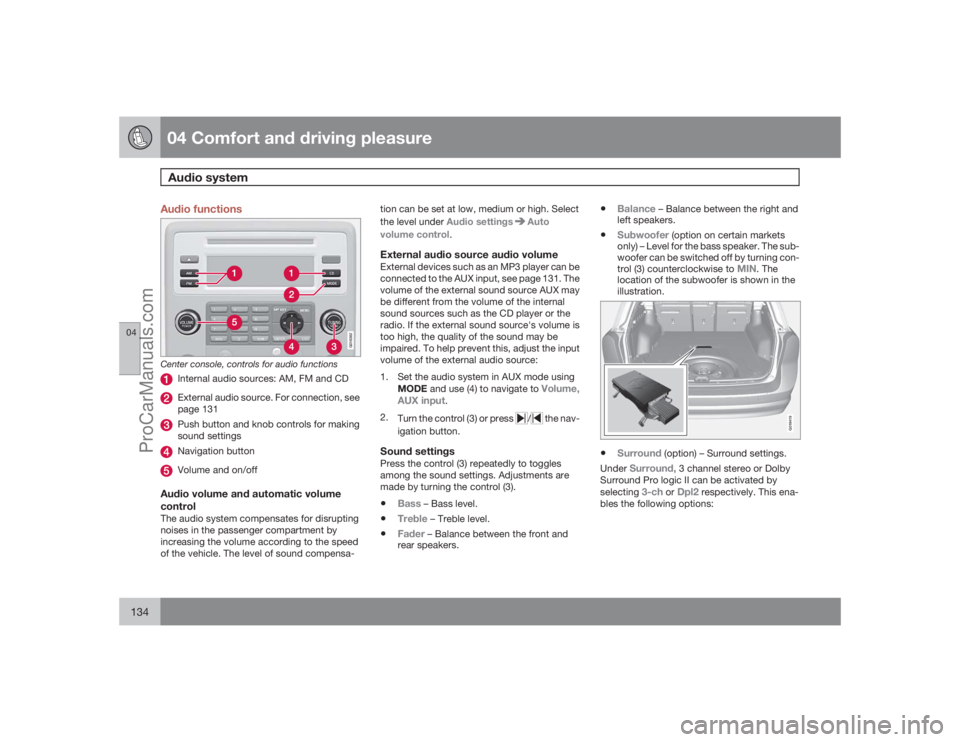
Audio functions
G018382
Center console, controls for audio functions
Internal audio sources: AM, FM and CDExternal audio source. For connection, see
page 131Push button and knob controls for making
sound settingsNavigation buttonVolume and on/off
Audio volume and automatic volume
controlThe audio system compensates for disrupting
noises in the passenger compartment by
increasing the volume according to the speed
of the vehicle. The level of sound compensa-tion can be set at low, medium or high. Select
the level under Audio settings
Auto
volume control.
External audio source audio volumeExternal devices such as an MP3 player can be
connected to the AUX input, see page 131. The
volume of the external sound source AUX may
be different from the volume of the internal
sound sources such as the CD player or the
radio. If the external sound source's volume is
too high, the quality of the sound may be
impaired. To help prevent this, adjust the input
volume of the external audio source:
1. Set the audio system in AUX mode using
MODE and use (4) to navigate to
Volume,
AUX input
.
2.
Turn the control (3) or press
/
the nav-
igation button.
Sound settingsPress the control (3) repeatedly to toggles
among the sound settings. Adjustments are
made by turning the control (3).•
Bass
– Bass level.
•
Treble
– Treble level.
•
Fader
– Balance between the front and
rear speakers.
•
Balance
– Balance between the right and
left speakers.
•
Subwoofer
(option on certain markets
only) – Level for the bass speaker. The sub-
woofer can be switched off by turning con-
trol (3) counterclockwise to
MIN
. The
location of the subwoofer is shown in the
illustration.
G019419
•
Surround
(option) – Surround settings.
Under
Surround,
3 channel stereo or Dolby
Surround Pro logic II can be activated by
selecting
3-ch
or
Dpl2
respectively. This ena-
bles the following options:
ProCarManuals.com
Page 135 of 286
04 Comfort and driving pleasure
Audio system
04``135
•
Center level
1 – Level for the center
speaker.
•
Surround level
1 – Level for surround
sound.
EqualizerSound levels for different frequencies can be
adjusted separately using the equalizer
2.
1.
Go to
Audio settings
and select
Equalizer Front
or
Equalizer Rear
.
The sound level for the frequency is
adjusted with
/
on the navigation but-
ton. Press
/
to select another fre-
quency.
2.
UseENTER to save or EXIT to close.
Sound stage
3
The sound experience can be optimized for the
driver's seat, both front seats or the rear seat.
Select one of the options under
Audio settings
Soundstage.
Optimal sound reproductionThe audio system is calibrated for optimal
sound reproduction using digital signal pro-
cessing.This calibration takes into account factors such
as the speakers, amplifier, cabin acoustics, the
listeners' seating positions, etc., for each com-
bination of vehicle/audio system.
There is also a dynamic calibration that takes
into consideration the volume level, radio
reception, and the speed of the vehicle.
The settings that are described in this manual,
such as
Bass
,Treble
, and
Equalizer
are only
intended to enable the user to adapt sound
reproduction to his/her personal tastes.
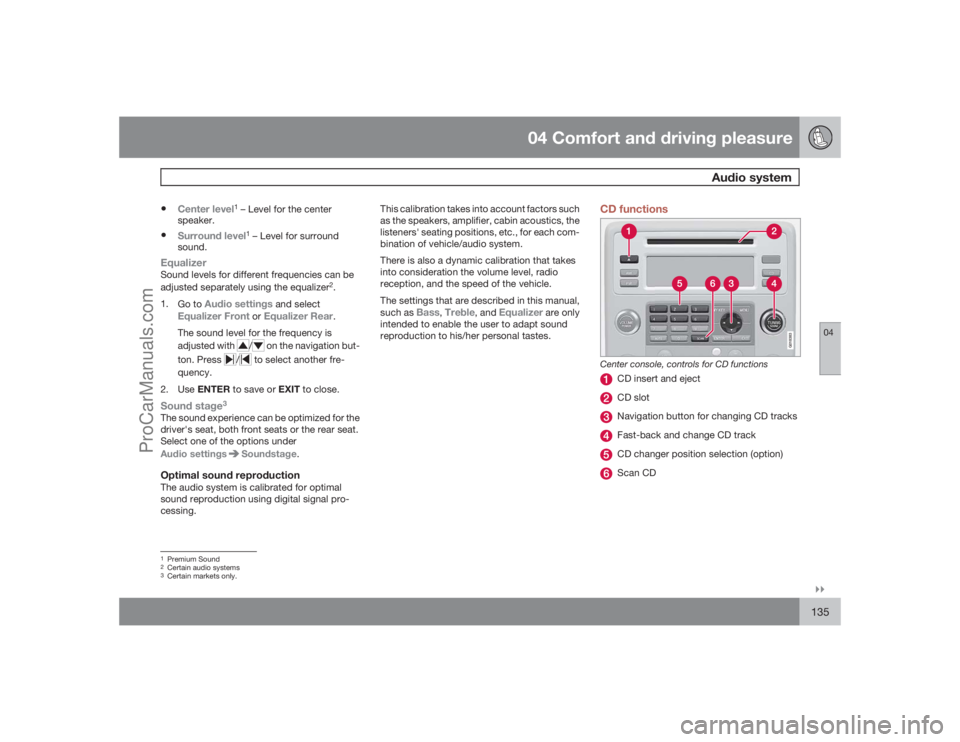
CD functions
G018383
Center console, controls for CD functions
CD insert and ejectCD slotNavigation button for changing CD tracksFast-back and change CD trackCD changer position selection (option)Scan CD
1Premium Sound2Certain audio systems3Certain markets only.
ProCarManuals.com
Page 137 of 286
04 Comfort and driving pleasure
Audio system
04``137
Scan CDThis function plays the first ten seconds of
each CD track/sound file. Press SCAN to acti-
vate. Interrupt with EXIT or SCAN to continue
playing the current CD track/sound file.RandomThis function plays the tracks in random order
(shuffle). The random CD tracks/sound files
can be scrolled through in the normal way.
NOTE
It is only possible to scroll between random
CD tracks on the current disc.Different messages are displayed depending
on which random function has been selected:•
RANDOM
means that the tracks from only
one music CD are played
•
RND ALL
means that all tracks on all
music CDs in the optional CD changer are
played.
•
RANDOM FOLDER
means that the sound
files in a directory on the current CD are
played.
CD playerIf a normal music CD is being played, activate/
deactivate under
Random
.If a disc with sound files is being played, acti-
vate/deactivate under Random
Folder.
CD changerIf a normal music CD is being played under
Random
Single disc or Random
All
discs. The option
All discs
only applies to the
music CDs in the changer.
If a CD with sound files is being played, acti-
vate/deactivate instead under Random
Folder. If you select another CD the function is
deactivated.Disc textIf title information is stored on a music CD it can
be shown on the display
5. Activate/deactivate
in CD mode under CD settings
Disc text.
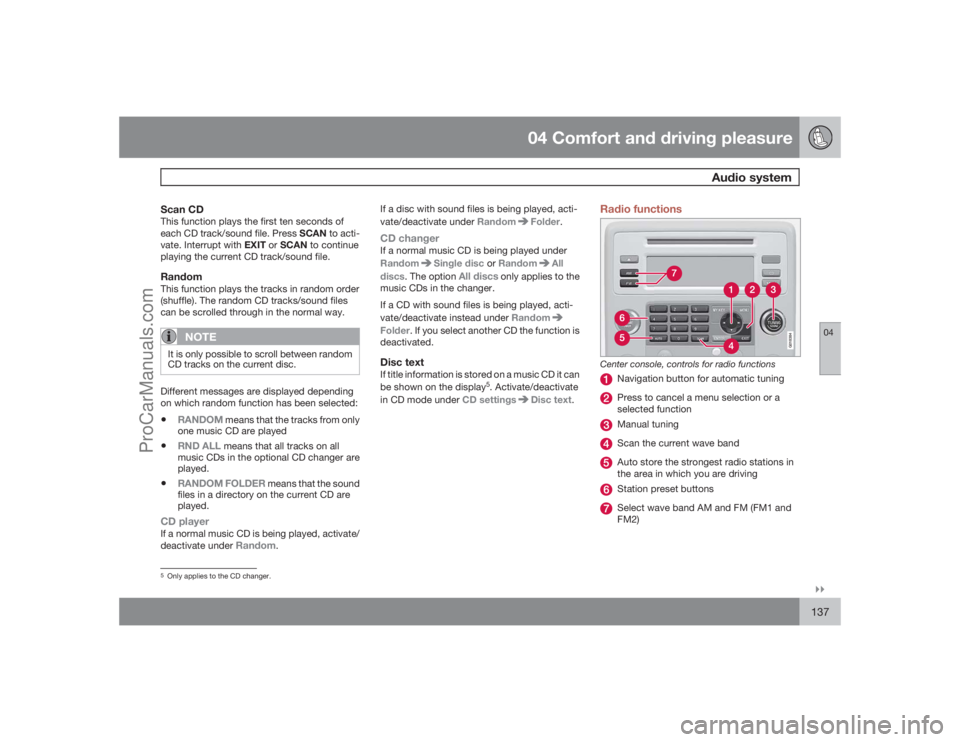
Radio functions
G018384
Center console, controls for radio functions
Navigation button for automatic tuningPress to cancel a menu selection or a
selected functionManual tuningScan the current wave bandAuto store the strongest radio stations in
the area in which you are drivingStation preset buttonsSelect wave band AM and FM (FM1 and
FM2)
5Only applies to the CD changer.
ProCarManuals.com
Page 138 of 286
04 Comfort and driving pleasureAudio system
04138
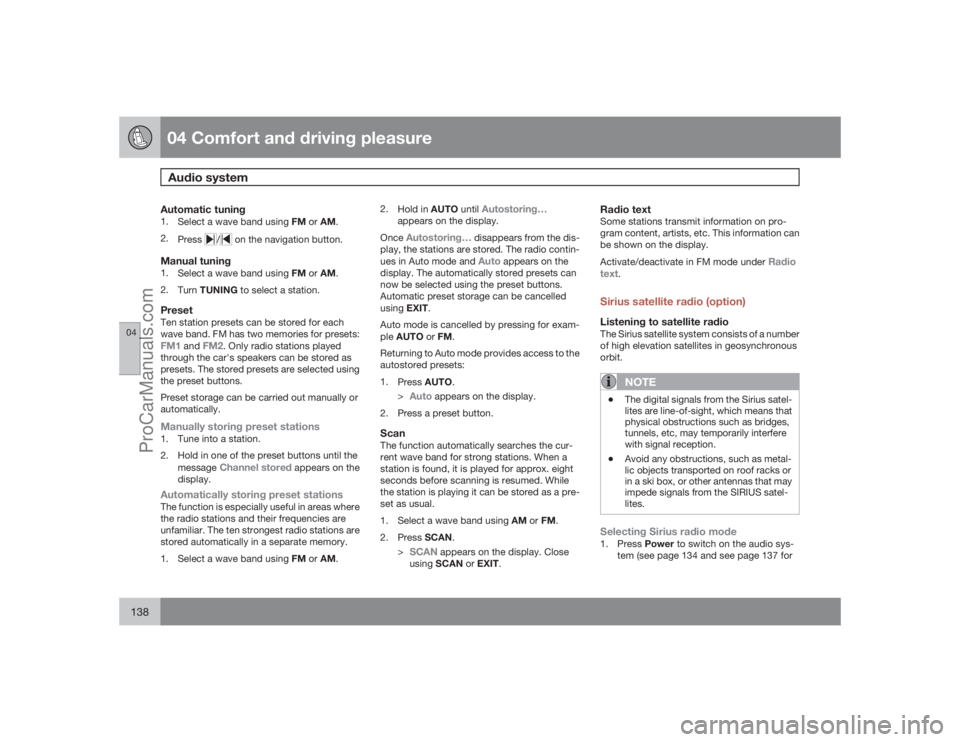
Automatic tuning1.
Select a wave band using FM or AM.
2.
Press
/
on the navigation button.
Manual tuning1.
Select a wave band using FM or AM.
2.
TurnTUNING to select a station.PresetTen station presets can be stored for each
wave band. FM has two memories for presets:FM1
and
FM2
. Only radio stations played
through the car's speakers can be stored as
presets. The stored presets are selected using
the preset buttons.
Preset storage can be carried out manually or
automatically.
Manually storing preset stations1. Tune into a station.
2. Hold in one of the preset buttons until the
message
Channel stored
appears on the
display.
Automatically storing preset stationsThe function is especially useful in areas where
the radio stations and their frequencies are
unfamiliar. The ten strongest radio stations are
stored automatically in a separate memory.
1.
Select a wave band using FM or AM.2.
Hold in AUTO until
Autostoring…
appears on the display.
OnceAutostoring…
disappears from the dis-
play, the stations are stored. The radio contin-
ues in Auto mode and Auto
appears on the
display. The automatically stored presets can
now be selected using the preset buttons.
Automatic preset storage can be cancelled
usingEXIT.
Auto mode is cancelled by pressing for exam-
pleAUTO or FM.
Returning to Auto mode provides access to the
autostored presets:
1.
PressAUTO.
>
Auto
appears on the display.
2. Press a preset button.
ScanThe function automatically searches the cur-
rent wave band for strong stations. When a
station is found, it is played for approx. eight
seconds before scanning is resumed. While
the station is playing it can be stored as a pre-
set as usual.
1.
Select a wave band using AM or FM.
2.
PressSCAN.
>
SCAN
appears on the display. Close
usingSCAN or EXIT.
Radio textSome stations transmit information on pro-
gram content, artists, etc. This information can
be shown on the display.
Activate/deactivate in FM mode under
Radio
text
.
Sirius satellite radio (option)Listening to satellite radioThe Sirius satellite system consists of a number
of high elevation satellites in geosynchronous
orbit.
NOTE
•
The digital signals from the Sirius satel-
lites are line-of-sight, which means that
physical obstructions such as bridges,
tunnels, etc, may temporarily interfere
with signal reception.
•
Avoid any obstructions, such as metal-
lic objects transported on roof racks or
in a ski box, or other antennas that may
impede signals from the SIRIUS satel-
lites.
Selecting Sirius radio mode1.
PressPower to switch on the audio sys-
tem (see page 134 and see page 137 for
ProCarManuals.com