start warning VOLVO XC70 2013 Owner´s Manual
[x] Cancel search | Manufacturer: VOLVO, Model Year: 2013, Model line: XC70, Model: VOLVO XC70 2013Pages: 382, PDF Size: 6.78 MB
Page 84 of 382
03 Your driving environment
Ignition modes
03
82* Option/accessory, for more information, see Introduction.
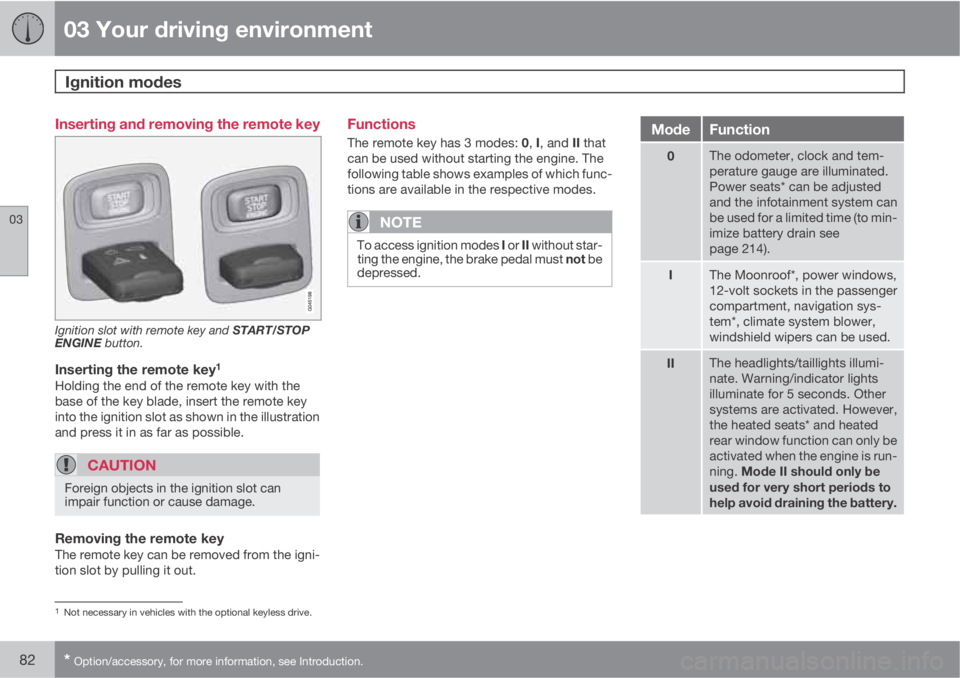
Inserting and removing the remote key
Ignition slot with remote key and START/STOP
ENGINE button.
Inserting the remote key1
Holding the end of the remote key with the
base of the key blade, insert the remote key
into the ignition slot as shown in the illustration
and press it in as far as possible.
CAUTION
Foreign objects in the ignition slot can
impair function or cause damage.
Removing the remote keyThe remote key can be removed from the igni-
tion slot by pulling it out.
Functions
The remote key has 3 modes: 0, I, and II that
can be used without starting the engine. The
following table shows examples of which func-
tions are available in the respective modes.
NOTE
To access ignition modes I or II without star-
ting the engine, the brake pedal must not be
depressed.
ModeFunction
0The odometer, clock and tem-
perature gauge are illuminated.
Power seats* can be adjusted
and the infotainment system can
be used for a limited time (to min-
imize battery drain see
page 214).
IThe Moonroof*, power windows,
12-volt sockets in the passenger
compartment, navigation sys-
tem*, climate system blower,
windshield wipers can be used.
IIThe headlights/taillights illumi-
nate. Warning/indicator lights
illuminate for 5 seconds. Other
systems are activated. However,
the heated seats* and heated
rear window function can only be
activated when the engine is run-
ning. Mode II should only be
used for very short periods to
help avoid draining the battery.
1Not necessary in vehicles with the optional keyless drive.
Page 115 of 382
03 Your driving environment
Starting the engine
03
* Option/accessory, for more information, see Introduction.113 Start
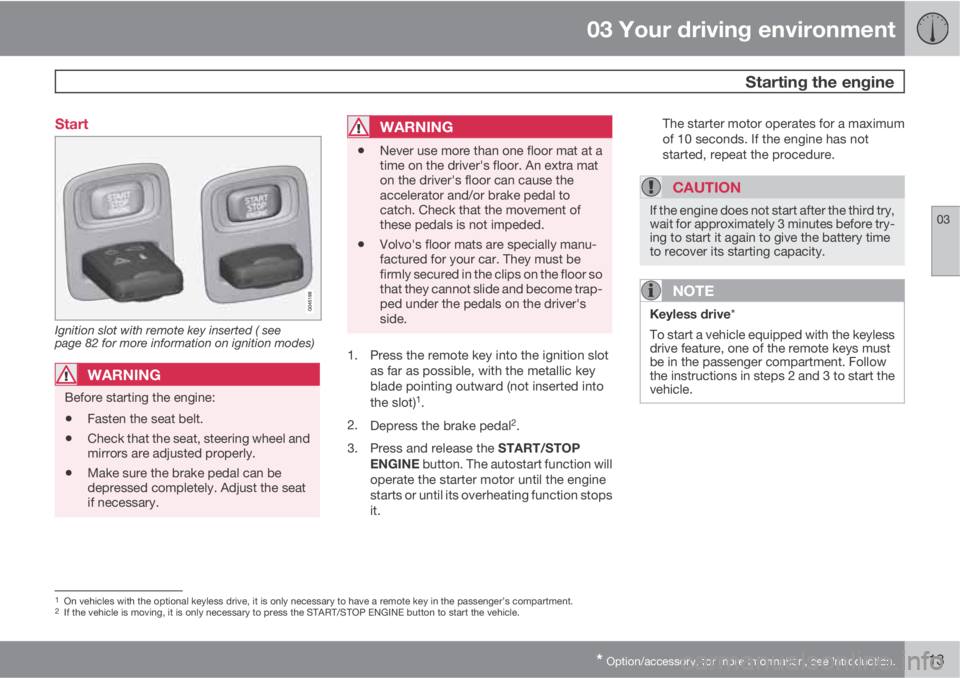
Ignition slot with remote key inserted ( see
page 82 for more information on ignition modes)
WARNING
Before starting the engine:
•Fasten the seat belt.
•Check that the seat, steering wheel and
mirrors are adjusted properly.
•Make sure the brake pedal can be
depressed completely. Adjust the seat
if necessary.
WARNING
•Never use more than one floor mat at a
time on the driver's floor. An extra mat
on the driver's floor can cause the
accelerator and/or brake pedal to
catch. Check that the movement of
these pedals is not impeded.
•Volvo's floor mats are specially manu-
factured for your car. They must be
firmly secured in the clips on the floor so
that they cannot slide and become trap-
ped under the pedals on the driver's
side.
1. Press the remote key into the ignition slot
as far as possible, with the metallic key
blade pointing outward (not inserted into
the slot)
1.
2.
Depress the brake pedal
2.
3.
Press and release the START/STOP
ENGINE button. The autostart function will
operate the starter motor until the engine
starts or until its overheating function stops
it.The starter motor operates for a maximum
of 10 seconds. If the engine has not
started, repeat the procedure.
CAUTION
If the engine does not start after the third try,
wait for approximately 3 minutes before try-
ing to start it again to give the battery time
to recover its starting capacity.
NOTE
Keyless drive*
To start a vehicle equipped with the keyless
drive feature, one of the remote keys must
be in the passenger compartment. Follow
the instructions in steps 2 and 3 to start the
vehicle.
1On vehicles with the optional keyless drive, it is only necessary to have a remote key in the passenger’s compartment.2If the vehicle is moving, it is only necessary to press the START/STOP ENGINE button to start the vehicle.
Page 116 of 382
03 Your driving environment
Starting the engine
03
114
WARNING
•Always remove the remote key from the
ignition slot when leaving the vehicle
and ensure that the ignition in mode 0
(see page 83 for information about the
ignition modes), especially if there are
children in the vehicle.
•On vehicles with th optional keyless
drive, never remove the remote key
from the vehicle while it is being driven
or towed.
•Always place the gear selector in Park
and apply the parking brake before
leaving the vehicle. Never leave the
vehicle unattended with the engine run-
ning.
•Always open garage doors fully before
starting the engine inside a garage to
ensure adequate ventilation. The
exhaust gases contain carbon monox-
ide, which is invisible and odorless but
very poisonous.
NOTE
•After a cold start, idle speed may be
noticeably higher than normal for a
short period. This is done to help bring
components in the emission control
system to their normal operating tem-
perature as quickly as possible, which
enables them to control emissions and
help reduce the vehicle's impact on the
environment
3.
CAUTION
•When starting in cold weather, the auto-
matic transmission may shift up at
slightly higher engine speeds than nor-
mal until the automatic transmission
fluid reaches normal operating tem-
perature.
•Do not race a cold engine immediately
after starting. Oil flow may not reach
some lubrication points fast enough to
prevent engine damage.
•The engine should be idling when you
move the gear selector. Never acceler-
ate until after you feel the transmission
engage. Accelerating immediately after
selecting a gear will cause harsh
engagement and premature transmis-
sion wear.
•Selecting P or N when idling at a stand-
still for prolonged periods of time will
help prevent overheating of the auto-
matic transmission fluid.
3If the gear selector is in the D or R positions and the car is not moving, engine speed (rpm) will be lower and it will take longer for the engine to reach normal operating temperature.
Page 117 of 382
03 Your driving environment
Starting the engine
03
* Option/accessory, for more information, see Introduction.115 Engine Remote Start (ERS)*
IntroductionERS is a feature that makes it possible to
remotely start the engine to cool or heat the
passenger compartment before driving.
The climate control system will start using the
same settings as when the engine was
switched off.
When the engine is started using ERS, it will run
for a maximum of 15 minutes before automat-
ically switching off again. After 2 ERS starts,
the engine must be started in the normal way
before ERS can be used again.
NOTE
Always adhere to applicable State, Province
and or Local laws regarding engine idling
when using ERS.
WARNING
Keep the following in mind before using ERS
•The vehicle should be in view.
•The vehicle should be unoccupied.
•The vehicle must not be parked indoors
or in an enclosed area. Exhaust fumes
are harmful to the health.
Using ERS
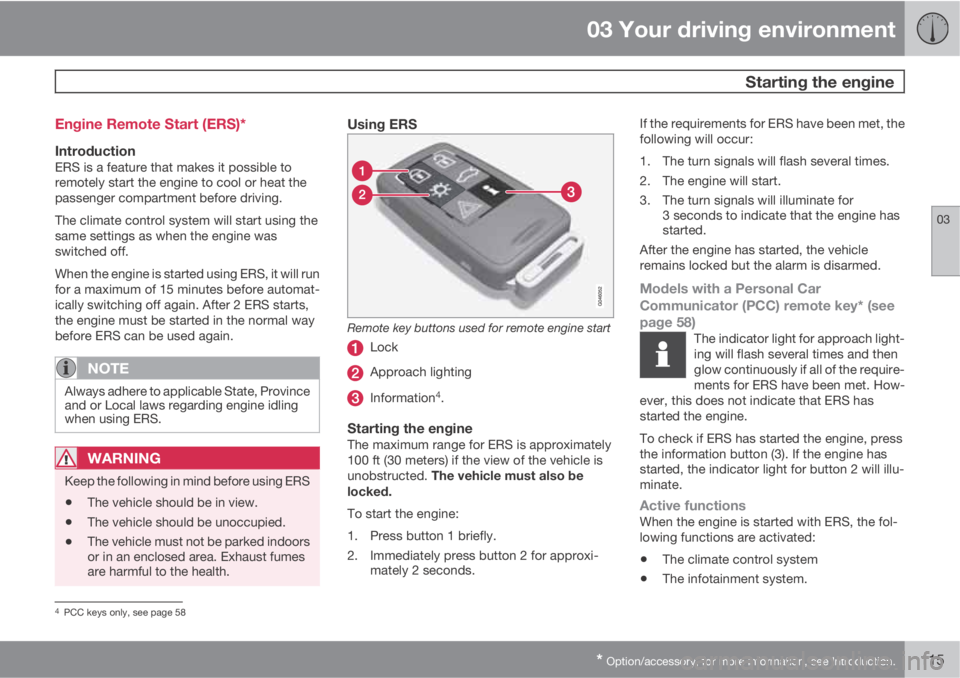
Remote key buttons used for remote engine start
Lock
Approach lighting
Information4.
Starting the engineThe maximum range for ERS is approximately
100 ft (30 meters) if the view of the vehicle is
unobstructed. The vehicle must also be
locked.
To start the engine:
1. Press button 1 briefly.
2. Immediately press button 2 for approxi-
mately 2 seconds.If the requirements for ERS have been met, the
following will occur:
1. The turn signals will flash several times.
2. The engine will start.
3. The turn signals will illuminate for
3 seconds to indicate that the engine has
started.
After the engine has started, the vehicle
remains locked but the alarm is disarmed.
Models with a Personal Car
Communicator (PCC) remote key* (see
page 58)
The indicator light for approach light-
ing will flash several times and then
glow continuously if all of the require-
ments for ERS have been met. How-
ever, this does not indicate that ERS has
started the engine.
To check if ERS has started the engine, press
the information button (3). If the engine has
started, the indicator light for button 2 will illu-
minate.
Active functionsWhen the engine is started with ERS, the fol-
lowing functions are activated:
•The climate control system
•The infotainment system.
4PCC keys only, see page 58
Page 119 of 382
03 Your driving environment
Starting the engine
03
117
WARNING
PROPOSITION 65 WARNING!
Battery posts, terminals, and related acces-
sories contain lead and lead compounds,
chemicals known to the state of California
to cause cancer and reproductive harm.
Wash hands after handling.
CAUTION
Connect the jumper cables carefully to
avoid short circuits with other components
in the engine compartment.
WARNING
•Do not connect the jumper cable to any
part of the fuel system or to any moving
parts. Avoid touching hot manifolds.
•Batteries generate hydrogen gas, which
is flammable and explosive.
•Battery fluid contains sulfuric acid. Do
not allow battery fluid to contact eyes,
skin, fabrics or painted surfaces. If con-
tact occurs, flush the affected area
immediately with water. Obtain medical
help immediately if eyes are affected.
•Never expose the battery to open flame
or electric spark.
•Do not smoke near the battery.
•Failure to follow the instructions for
jump starting can lead to injury.
Page 120 of 382
03 Your driving environment
Transmission
03
118
Automatic transmission
G021351
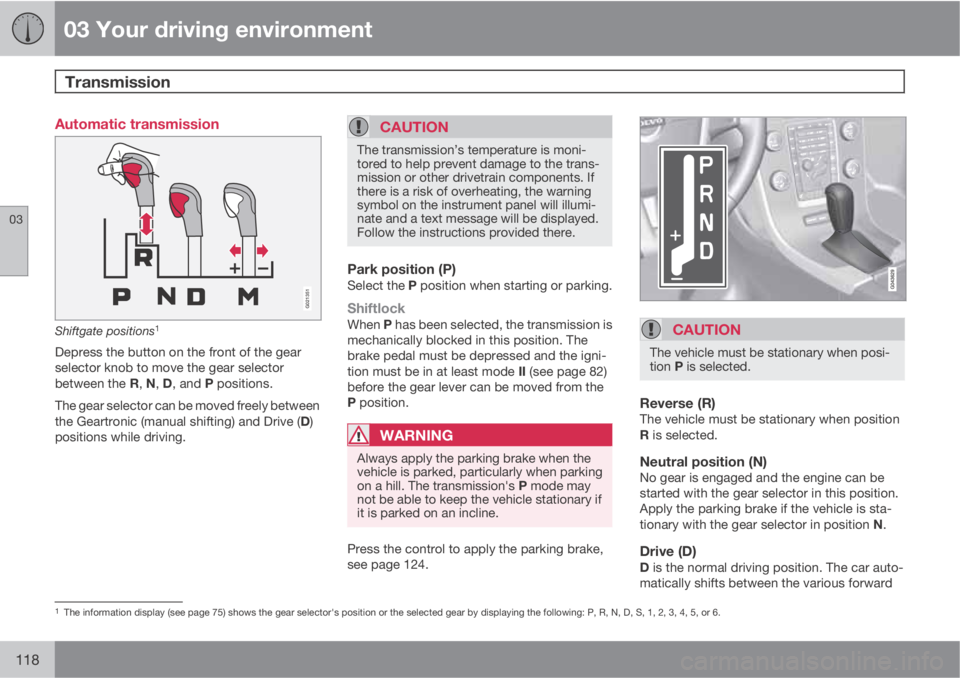
Shiftgate positions1
Depress the button on the front of the gear
selector knob to move the gear selector
between the R, N, D, and P positions.
The gear selector can be moved freely between
the Geartronic (manual shifting) and Drive (D)
positions while driving.
CAUTION
The transmission’s temperature is moni-
tored to help prevent damage to the trans-
mission or other drivetrain components. If
there is a risk of overheating, the warning
symbol on the instrument panel will illumi-
nate and a text message will be displayed.
Follow the instructions provided there.
Park position (P)Select the P position when starting or parking.
ShiftlockWhen P has been selected, the transmission is
mechanically blocked in this position. The
brake pedal must be depressed and the igni-
tion must be in at least mode II (see page 82)
before the gear lever can be moved from the
P position.
WARNING
Always apply the parking brake when the
vehicle is parked, particularly when parking
on a hill. The transmission's P mode may
not be able to keep the vehicle stationary if
it is parked on an incline.
Press the control to apply the parking brake,
see page 124.
CAUTION
The vehicle must be stationary when posi-
tion P is selected.
Reverse (R)The vehicle must be stationary when position
R is selected.
Neutral position (N)No gear is engaged and the engine can be
started with the gear selector in this position.
Apply the parking brake if the vehicle is sta-
tionary with the gear selector in position N.
Drive (D)D is the normal driving position. The car auto-
matically shifts between the various forward
1The information display (see page 75) shows the gear selector's position or the selected gear by displaying the following: P, R, N, D, S, 1, 2, 3, 4, 5, or 6.
Page 125 of 382
03 Your driving environment
Brakes
03
123
NOTE
•When the EBA system is activated, the
brake pedal will go down and pressure
in the brake system immediately increa-
ses to the maximum level. You must
maintain full pressure on the brake
pedal in order to utilize the system com-
pletely. There will be no braking effect if
the pedal is released. EBA is automati-
cally deactivated when the brake pedal
is released.
•When the vehicle has been parked for
some time, the brake pedal may sink
more than usual when the engine is
started. This is normal and the pedal will
return to its usual position when it is
released.
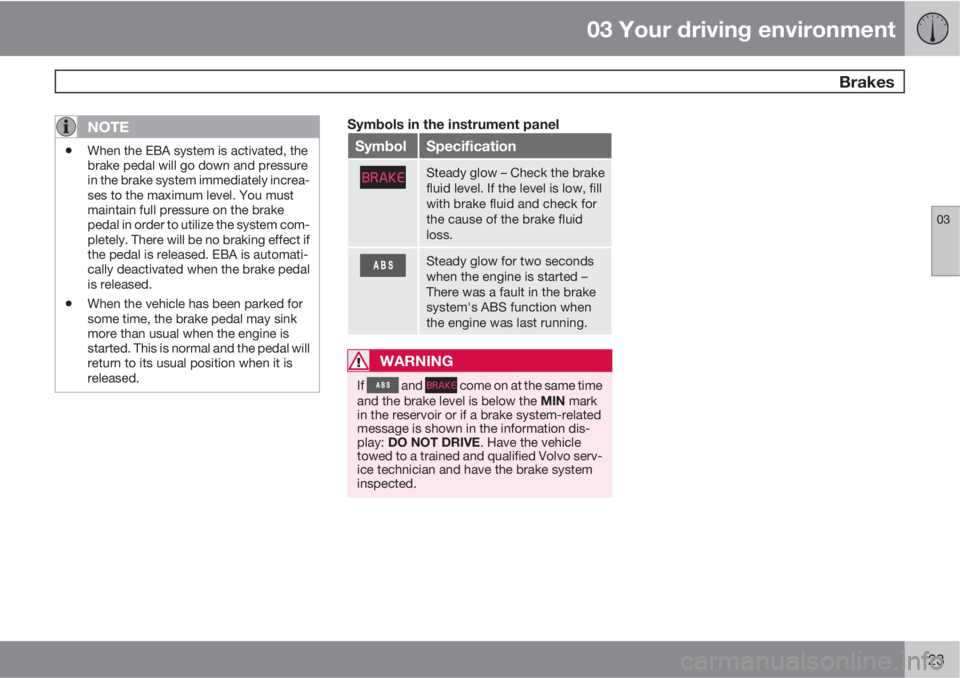
Symbols in the instrument panel
SymbolSpecification
Steady glow – Check the brake
fluid level. If the level is low, fill
with brake fluid and check for
the cause of the brake fluid
loss.
Steady glow for two seconds
when the engine is started –
There was a fault in the brake
system's ABS function when
the engine was last running.
WARNING
If and come on at the same time
and the brake level is below the MIN mark
in the reservoir or if a brake system-related
message is shown in the information dis-
play: DO NOT DRIVE. Have the vehicle
towed to a trained and qualified Volvo serv-
ice technician and have the brake system
inspected.
Page 135 of 382
04 Driver support
Stability system
04
133
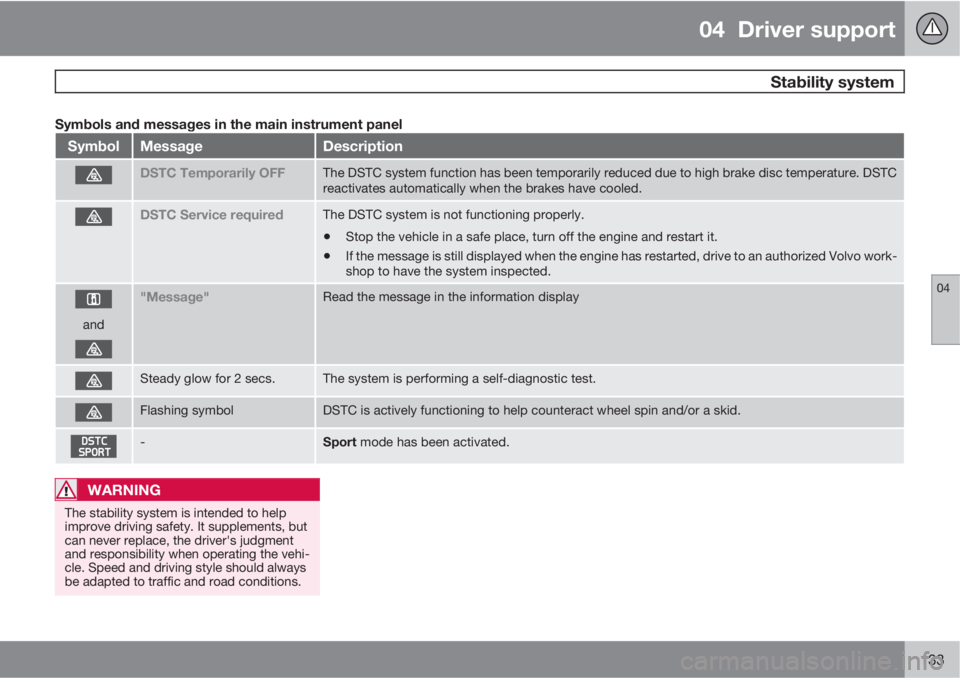
Symbols and messages in the main instrument panel
SymbolMessageDescription
DSTC Temporarily OFFThe DSTC system function has been temporarily reduced due to high brake disc temperature. DSTC
reactivates automatically when the brakes have cooled.
DSTC Service requiredThe DSTC system is not functioning properly.
•Stop the vehicle in a safe place, turn off the engine and restart it.
•If the message is still displayed when the engine has restarted, drive to an authorized Volvo work-
shop to have the system inspected.
and
"Message"Read the message in the information display
Steady glow for 2 secs.The system is performing a self-diagnostic test.
Flashing symbolDSTC is actively functioning to help counteract wheel spin and/or a skid.
-Sport mode has been activated.
WARNING
The stability system is intended to help
improve driving safety. It supplements, but
can never replace, the driver's judgment
and responsibility when operating the vehi-
cle. Speed and driving style should always
be adapted to traffic and road conditions.
Page 143 of 382
04 Driver support
Adaptive Cruise Control (ACC)*
04
* Option/accessory, for more information, see Introduction.141
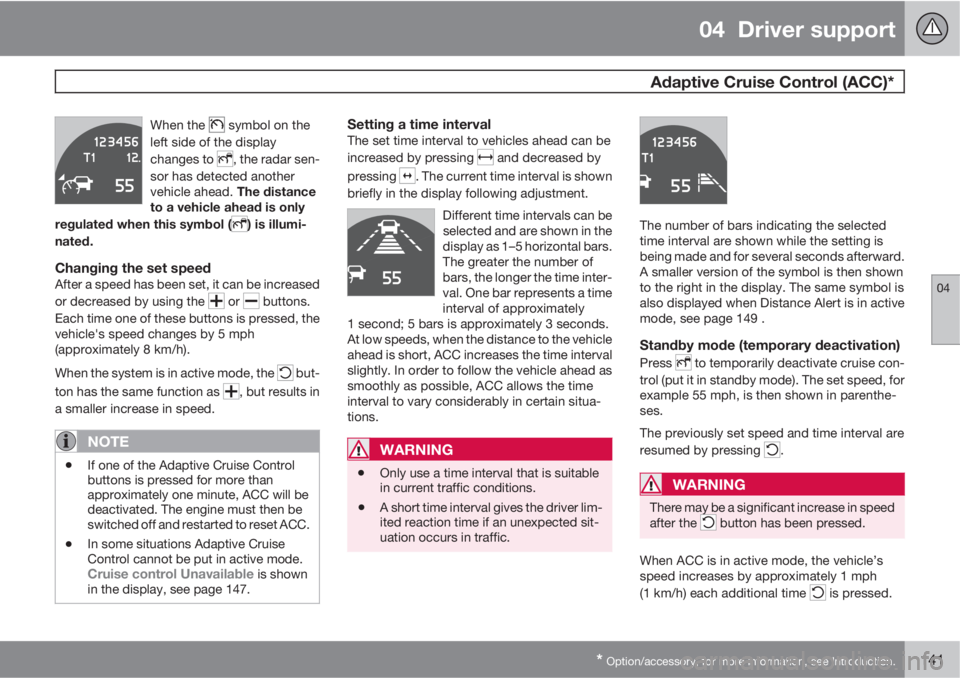
When the symbol on the
left side of the display
changes to
, the radar sen-
sor has detected another
vehicle ahead. The distance
to a vehicle ahead is only
regulated when this symbol (
) is illumi-
nated.
Changing the set speedAfter a speed has been set, it can be increased
or decreased by using the
or buttons.
Each time one of these buttons is pressed, the
vehicle's speed changes by 5 mph
(approximately 8 km/h).
When the system is in active mode, the
but-
ton has the same function as
, but results in
a smaller increase in speed.
NOTE
•If one of the Adaptive Cruise Control
buttons is pressed for more than
approximately one minute, ACC will be
deactivated. The engine must then be
switched off and restarted to reset ACC.
•In some situations Adaptive Cruise
Control cannot be put in active mode.
Cruise control Unavailable is shown
in the display, see page 147.
Setting a time intervalThe set time interval to vehicles ahead can be
increased by pressing
and decreased by
pressing
. The current time interval is shown
briefly in the display following adjustment.
Different time intervals can be
selected and are shown in the
display as 1–5 horizontal bars.
The greater the number of
bars, the longer the time inter-
val. One bar represents a time
interval of approximately
1 second; 5 bars is approximately 3 seconds.
At low speeds, when the distance to the vehicle
ahead is short, ACC increases the time interval
slightly. In order to follow the vehicle ahead as
smoothly as possible, ACC allows the time
interval to vary considerably in certain situa-
tions.
WARNING
•Only use a time interval that is suitable
in current traffic conditions.
•A short time interval gives the driver lim-
ited reaction time if an unexpected sit-
uation occurs in traffic.
The number of bars indicating the selected
time interval are shown while the setting is
being made and for several seconds afterward.
A smaller version of the symbol is then shown
to the right in the display. The same symbol is
also displayed when Distance Alert is in active
mode, see page 149 .
Standby mode (temporary deactivation)
Press to temporarily deactivate cruise con-
trol (put it in standby mode). The set speed, for
example 55 mph, is then shown in parenthe-
ses.
The previously set speed and time interval are
resumed by pressing
.
WARNING
There may be a significant increase in speed
after the button has been pressed.
When ACC is in active mode, the vehicle’s
speed increases by approximately 1 mph
(1 km/h) each additional time
is pressed.
Page 155 of 382
04 Driver support
City Safety™
04
153 Function
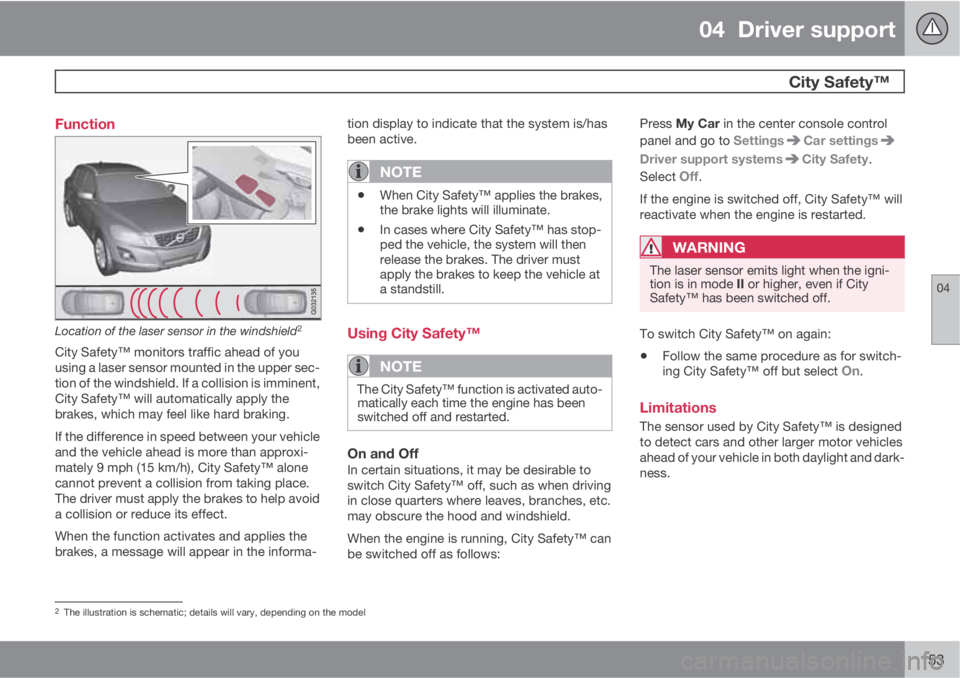
Location of the laser sensor in the windshield2
City Safety™ monitors traffic ahead of you
using a laser sensor mounted in the upper sec-
tion of the windshield. If a collision is imminent,
City Safety™ will automatically apply the
brakes, which may feel like hard braking.
If the difference in speed between your vehicle
and the vehicle ahead is more than approxi-
mately 9 mph (15 km/h), City Safety™ alone
cannot prevent a collision from taking place.
The driver must apply the brakes to help avoid
a collision or reduce its effect.
When the function activates and applies the
brakes, a message will appear in the informa-tion display to indicate that the system is/has
been active.
NOTE
•When City Safety™ applies the brakes,
the brake lights will illuminate.
•In cases where City Safety™ has stop-
ped the vehicle, the system will then
release the brakes. The driver must
apply the brakes to keep the vehicle at
a standstill.
Using City Safety™
NOTE
The City Safety™ function is activated auto-
matically each time the engine has been
switched off and restarted.
On and OffIn certain situations, it may be desirable to
switch City Safety™ off, such as when driving
in close quarters where leaves, branches, etc.
may obscure the hood and windshield.
When the engine is running, City Safety™ can
be switched off as follows:Press My Car in the center console control
panel and go to Settings
Car settings
Driver support systemsCity Safety.
Select
Off.
If the engine is switched off, City Safety™ will
reactivate when the engine is restarted.
WARNING
The laser sensor emits light when the igni-
tion is in mode II or higher, even if City
Safety™ has been switched off.
To switch City Safety™ on again:
•Follow the same procedure as for switch-
ing City Safety™ off but select On.
Limitations
The sensor used by City Safety™ is designed
to detect cars and other larger motor vehicles
ahead of your vehicle in both daylight and dark-
ness.
2The illustration is schematic; details will vary, depending on the model