tow VOLVO XC70 2013 Owner´s Manual
[x] Cancel search | Manufacturer: VOLVO, Model Year: 2013, Model line: XC70, Model: VOLVO XC70 2013Pages: 382, PDF Size: 6.78 MB
Page 124 of 382
03 Your driving environment
Brakes
03
122
•The ABS system activates for more than
approximately a half second
•In the event of sudden braking while the
vehicle is moving at speeds above approx-
imately 6 mph (10 km/h)
When the vehicle has come to a stop, the brake
lights and additional taillights remain on for as
long as the brake pedal is depressed or until
braking force on the vehicle is reduced.
Power brakes function only when the
engine is running
The power brakes utilize vacuum pressure
which is only created when the engine is run-
ning. Never let the vehicle roll to a stop with the
engine switched off.
If the power brakes are not working, consider-
ably higher pressure will be required on the
brake pedal to compensate for the lack of
power assistance. This can happen for exam-
ple when towing your vehicle or if the engine is
switched off when the vehicle is rolling. The
brake pedal feels harder than usual.
Water on brake discs and brake pads
affects braking
Driving in rain and slush or passing through an
automatic car wash can cause water to collect
on the brake discs and pads. This will cause a
delay in braking effect when the pedal is
depressed. To avoid such a delay when thebrakes are needed, depress the pedal occa-
sionally when driving through rain, slush, etc.
This will remove the water from the brakes.
Check that brake application feels normal. This
should also be done after washing or starting
in very damp or cold weather.
Severe strain on the brake systemThe brakes will be subject to severe strain
when driving in mountains or hilly areas, or
when towing a trailer. Vehicle speed is usually
slower, which means that the cooling of the
brakes is less efficient than when driving on
level roads. To reduce the strain on the brakes,
shift into a lower gear and let the engine help
with the braking. Do not forget that if you are
towing a trailer, the brakes will be subjected to
a greater than normal load.
Anti-lock braking system (ABS)The Anti-lock Braking System (ABS) helps to
improve vehicle control (stopping and steering)
during severe braking conditions by limiting
brake lockup. When the system "senses"
impending lockup, braking pressure is auto-
matically modulated in order to help prevent
lockup that could lead to a skid.
The system performs a brief self-diagnostic
test when the engine has been started and
driver releases the brake pedal. Another auto-
matic test may be performed when the vehicle
first reaches a speed of approximately 6 mph(10 km/h). The brake pedal will pulsate several
times and a sound may be audible from the
ABS control module, which is normal.
Cleaning the brake discsCoatings of dirt and water on the brake discs
may result in delayed brake function. This delay
is minimized by cleaning the brake linings.
Cleaning the brake pads is advisable in wet
weather, prior to long-term parking, and after
the vehicle has been washed. Do this by brak-
ing gently for a short period while the vehicle is
moving.
Emergency Brake AssistanceEBA is designed to provide full brake effect
immediately in the event of sudden, hard brak-
ing. The system is activated by the speed with
which the brake pedal is depressed.
When the EBA system is activated, the brake
pedal will go down and pressure in the brake
system immediately increases to the maximum
level. Maintain full pressure on the brake pedal
in order to utilize the system completely. EBA
is automatically deactivated when the brake
pedal is released.
Page 125 of 382
03 Your driving environment
Brakes
03
123
NOTE
•When the EBA system is activated, the
brake pedal will go down and pressure
in the brake system immediately increa-
ses to the maximum level. You must
maintain full pressure on the brake
pedal in order to utilize the system com-
pletely. There will be no braking effect if
the pedal is released. EBA is automati-
cally deactivated when the brake pedal
is released.
•When the vehicle has been parked for
some time, the brake pedal may sink
more than usual when the engine is
started. This is normal and the pedal will
return to its usual position when it is
released.
Symbols in the instrument panel
SymbolSpecification
Steady glow – Check the brake
fluid level. If the level is low, fill
with brake fluid and check for
the cause of the brake fluid
loss.
Steady glow for two seconds
when the engine is started –
There was a fault in the brake
system's ABS function when
the engine was last running.
WARNING
If and come on at the same time
and the brake level is below the MIN mark
in the reservoir or if a brake system-related
message is shown in the information dis-
play: DO NOT DRIVE. Have the vehicle
towed to a trained and qualified Volvo serv-
ice technician and have the brake system
inspected.
Page 126 of 382
03 Your driving environment
Parking brake
03
124
Electric parking brake
An electric parking brake has the same func-
tion as a manual parking brake.
NOTE
•A faint sound from the parking brake's
electric motor can be heard when the
parking brake is being applied. This
sound can also be heard during the
automatic function check of the parking
brake.
•The brake pedal will move slightly when
the electric parking brake is applied or
released.
Low battery voltageIf the battery voltage is too low, the parking
brake cannot be applied or released. Connect
an auxiliary battery if the battery voltage is too
low, see page 116.
Applying the electric parking brake
Parking brake control
1. Press firmly on the brake pedal.
2. Push the control.
>
The
symbol in the instrument
panel flashes while the parking brake is
being applied, and glows steadily when
the parking brake has been fully applied.
3. Release the brake pedal and ensure that
the vehicle is at a standstill.
4. When the vehicle is parked, the gear selec-
tor must be in position P.
NOTE
•In an emergency the parking brake can
be applied when the vehicle is moving
by holding in the control. Braking will be
interrupted when the accelerator pedal
is depressed or the control is released.
•An audible signal will sound during this
procedure if the vehicle is moving at
speeds above 6 mph (10 km/h).
Parking on a hill
•If the vehicle is pointing uphill, turn the front
wheels so that they point away from the
curb.
•If the vehicle is pointing downhill, turn the
front wheels so that they point toward the
curb.
The parking brake should also be applied.
Page 128 of 382
03 Your driving environment
Parking brake
03
126
an authorized Volvo workshop. If you drive off
with this error message showing, a warning
signal sounds.
Parking brake not applied – A fault is pre-
venting the parking brake from being applied.
Try to apply the parking brake and release it
several times. If the problem persists, contact
an authorized Volvo workshop. If you drive off
with this error message showing, a warning
signal sounds.
Parking brake Service required – A fault has
occurred. Try to apply and release. Contact a
Volvo workshop if the fault remains.
WARNING
If the vehicle must be parked before the fault
has been corrected, always put the gear
selector in P and turn the wheels so that
they point away from the curb if the vehicle
is pointing uphill or toward the curb if it is
pointing downhill.
Page 134 of 382
04 Driver support
Stability system
04
132* Option/accessory, for more information, see Introduction.
Introduction
The Dynamic Stability and Traction Control
system (DSTC) consists of a number of func-
tions designed to help reduce wheel spin,
counteract skidding, and to generally help
improve directional stability.
CAUTION
A pulsating sound will be audible when the
system is actively operating and is normal.
Traction control (TC)This function is designed to help reduce wheel
spin by transferring power from a drive wheel
that begins to lose traction to the wheel on the
opposite side of the vehicle (on the same axle).
TC is most active at low speeds.
This is one of DSTC's permanent functions and
cannot be switched off.
Active Yaw Control (AYC)This function helps maintain directional stabil-
ity, for example when cornering, by braking
one or more of the wheels if the vehicle shows
a tendency to skid or slide laterally.This is one of DSTC's permanent functions and
cannot be switched off.
Spin control (SC)The spin control function is designed to help
prevent the drive wheels from spinning while
the vehicle is accelerating.
Trailer Stability Assist – TSA*Trailer Stability Assist helps stabilize a vehicle
that is towing a trailer when the vehicle and
trailer have begun to sway. See page 286 for
more information.
This system is automatically deactivated if the
driver selects Sport mode.
Operation
Sport modeThe stability system is always activated and
cannot be switched off.
However, the driver can select Sport mode,
which offers more active driving characteris-
tics. In this mode, the engine management sys-
tem monitors movement of the accelerator
pedal and steering wheel for sportier driving byallowing more lateral movement of the rear
wheels before DSTC is activated.
Under certain circumstances, such as when
driving with snow chains, or driving in deep
snow or loose sand, it may be advisable to
temporarily use Sport mode for maximum
tractive force.
If the driver releases pressure on the acceler-
ator pedal, DSTC will also activate to help sta-
bilize the vehicle.
To switch to Sport mode:
1.
Press the My Car button in the center con-
sole control panel and select My XC70
DSTC in the menu.
2. Unselect the symbol and leave the menu
by pressing EXIT.
>
This puts DSTC in Sport mode.
Sport mode remains active until the driver
switches it off in the menu or until the engine is
switched off. DSTC will return to normal mode
when the engine is restarted.
Page 136 of 382
04 Driver support
Road sign information (RSI)
04
134
Introduction
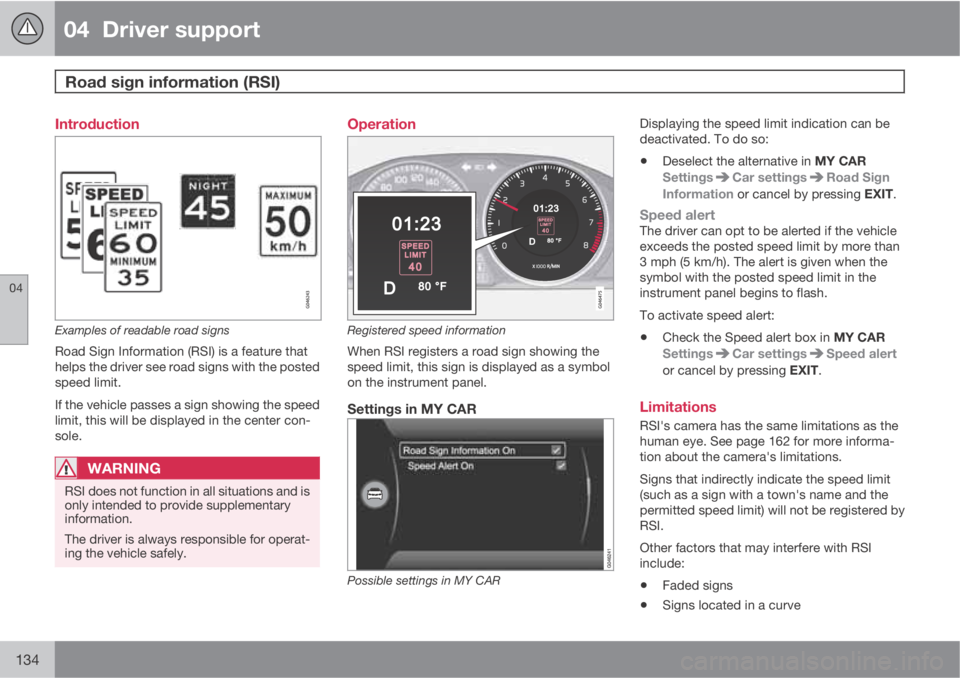
Examples of readable road signs
Road Sign Information (RSI) is a feature that
helps the driver see road signs with the posted
speed limit.
If the vehicle passes a sign showing the speed
limit, this will be displayed in the center con-
sole.
WARNING
RSI does not function in all situations and is
only intended to provide supplementary
information.
The driver is always responsible for operat-
ing the vehicle safely.
Operation
Registered speed information
When RSI registers a road sign showing the
speed limit, this sign is displayed as a symbol
on the instrument panel.
Settings in MY CAR
Possible settings in MY CAR
Displaying the speed limit indication can be
deactivated. To do so:
•Deselect the alternative in MY CAR
Settings
Car settingsRoad Sign
Information or cancel by pressing EXIT.
Speed alertThe driver can opt to be alerted if the vehicle
exceeds the posted speed limit by more than
3 mph (5 km/h). The alert is given when the
symbol with the posted speed limit in the
instrument panel begins to flash.
To activate speed alert:
•Check the Speed alert box in MY CAR
Settings
Car settingsSpeed alert
or cancel by pressing EXIT.
Limitations
RSI's camera has the same limitations as the
human eye. See page 162 for more informa-
tion about the camera's limitations.
Signs that indirectly indicate the speed limit
(such as a sign with a town's name and the
permitted speed limit) will not be registered by
RSI.
Other factors that may interfere with RSI
include:
•Faded signs
•Signs located in a curve
Page 142 of 382
04 Driver support
Adaptive Cruise Control (ACC)*
04
140* Option/accessory, for more information, see Introduction.
WARNING
Adaptive Cruise Control only warns of vehi-
cles detected by the radar sensor, see
page 144. In some cases there may be no
warning or the warning may be delayed. The
driver should always apply the brakes when
necessary.
Steep inclines and/or heavy loadsACC is primarily intended for use on fairly level
roads. The system may have difficulty main-
taining the correct distance to a vehicle ahead
on steep inclines, if the vehicle is carrying a
heavy load or is towing a trailer. In these situa-
tions, the driver should always be prepared to
apply the brakes if necessary.
Operation
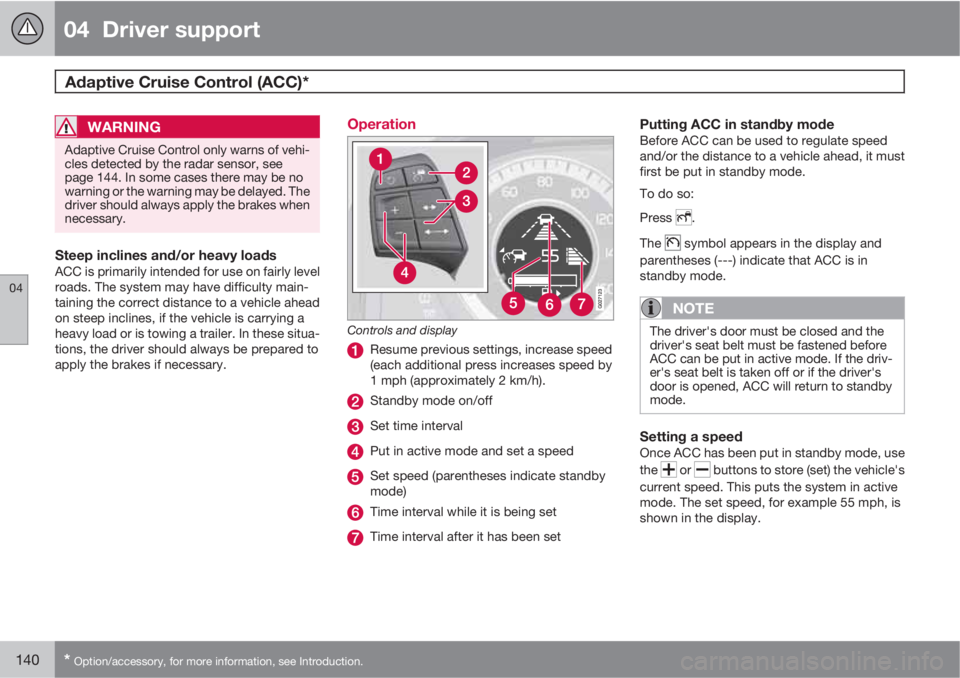
Controls and display
Resume previous settings, increase speed
(each additional press increases speed by
1 mph (approximately 2 km/h).
Standby mode on/off
Set time interval
Put in active mode and set a speed
Set speed (parentheses indicate standby
mode)
Time interval while it is being set
Time interval after it has been set
Putting ACC in standby modeBefore ACC can be used to regulate speed
and/or the distance to a vehicle ahead, it must
first be put in standby mode.
To do so:
Press
.
The
symbol appears in the display and
parentheses (---) indicate that ACC is in
standby mode.
NOTE
The driver's door must be closed and the
driver's seat belt must be fastened before
ACC can be put in active mode. If the driv-
er's seat belt is taken off or if the driver's
door is opened, ACC will return to standby
mode.
Setting a speedOnce ACC has been put in standby mode, use
the
or buttons to store (set) the vehicle's
current speed. This puts the system in active
mode. The set speed, for example 55 mph, is
shown in the display.
Page 144 of 382
04 Driver support
Adaptive Cruise Control (ACC)*
04
142* Option/accessory, for more information, see Introduction.
Standby mode due to action by the driverACC is temporarily deactivated and put in
standby mode:
•if the brakes are applied
•if the gear selector is moved to N
•if the driver drives at a speed higher than
the set speed for more than 1 minute.
In this happens, the driver will have to regulate
the vehicle's speed.
NOTE
If the accelerator pedal is only depressed for
a short time, such as when passing another
vehicle, ACC is deactivated temporarily and
is reactivated when the pedal is released.
Automatic standby modeAdaptive cruise control is linked to other sys-
tems such as the stability and traction control
system (DSTC). If this system is not functioning
properly, adaptive cruise control is automati-
cally deactivated and will go into standby
mode.
In the event of automatic deactivation, an audi-
ble signal will sound and the message
Cruise
control Cancelled is shown in the display.
The driver must then intervene and adapt thevehicle's speed to the surrounding traffic and
regulate the distance to the vehicle ahead.
An automatic switch to standby mode may be
caused if:
•engine speed (rpm) is too high/low
•the vehicle's speed goes below 18 mph
(30 km/h)3
•the wheels lose traction
•brake temperature is high
•the radar sensor is obstructed by, for
example, wet snow or rain.
Resuming the set speedIf ACC is in standby mode, it can be reactivated
by pressing the
button on the steering
wheel keypad. The vehicle will return to the
most recently set speed.
WARNING
The vehicle may accelerate quickly after has been pressed if its current speed is
considerably lower than the set speed.
Passing another vehicleIf your vehicle’s speed is being regulated by
ACC and the driver indicates that he/she would
like to pass the vehicle ahead by using theleft turn signal, ACC can assist by accelerating
briefly.
This function is active at speeds above approx-
imately 45 mph (70 km/h).
WARNING
Please be aware that this function will also
cause the vehicle to accelerate briefly in
certain situations other than passing
another vehicle, for example using the left
turn signal to indicate a lane change or a
turn toward a highway exit at speeds above
approximately 45 mph (70 km/h).
Queue AssistQueue Assist is an added ACC feature that is
linked to your vehicle's automatic transmis-
sion.
Queue Assist consists of the following func-
tions:
•Enhanced speed interval (including when
the vehicle is at a complete stop or is mov-
ing at speed below 18 mph (30 km/h))
•Automatic standby mode when ACC
changes target vehicles
•No automatic braking when at a standstill
•The parking brake is applied automatically
3Does not apply to vehicles equipped with the optional Queue Assist
Page 151 of 382
04 Driver support
Distance Alert*
04
* Option/accessory, for more information, see Introduction.149 Introduction
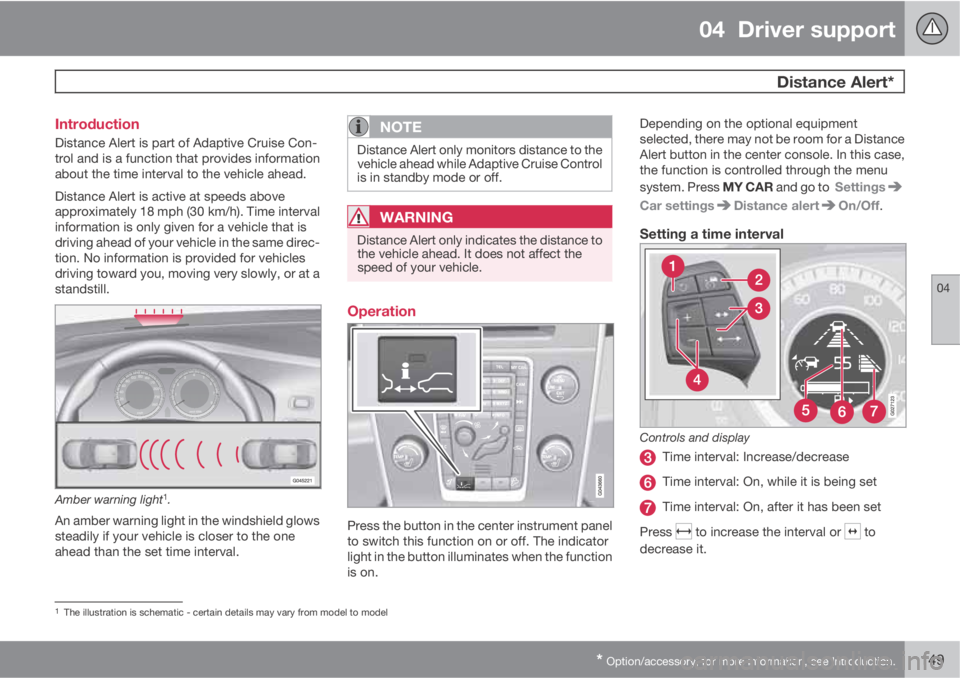
Distance Alert is part of Adaptive Cruise Con-
trol and is a function that provides information
about the time interval to the vehicle ahead.
Distance Alert is active at speeds above
approximately 18 mph (30 km/h). Time interval
information is only given for a vehicle that is
driving ahead of your vehicle in the same direc-
tion. No information is provided for vehicles
driving toward you, moving very slowly, or at a
standstill.
Amber warning light1.
An amber warning light in the windshield glows
steadily if your vehicle is closer to the one
ahead than the set time interval.
NOTE
Distance Alert only monitors distance to the
vehicle ahead while Adaptive Cruise Control
is in standby mode or off.
WARNING
Distance Alert only indicates the distance to
the vehicle ahead. It does not affect the
speed of your vehicle.
Operation
Press the button in the center instrument panel
to switch this function on or off. The indicator
light in the button illuminates when the function
is on.Depending on the optional equipment
selected, there may not be room for a Distance
Alert button in the center console. In this case,
the function is controlled through the menu
system. Press MY CAR and go to Settings
Car settingsDistance alertOn/Off.
Setting a time interval
Controls and display
Time interval: Increase/decrease
Time interval: On, while it is being set
Time interval: On, after it has been set
Press
to increase the interval or to
decrease it.
1The illustration is schematic - certain details may vary from model to model
Page 160 of 382
04 Driver support
Collision warning with Full Auto-brake and Pedestrian Detection*
04
158* Option/accessory, for more information, see Introduction.
Introduction
Collision Warning with Full Auto-brake and
Pedestrian Detection is designed to assist the
driver if there is a risk of a collision with a
pedestrian, a vehicle ahead that is at a stand-
still or one that is moving in the same direction
as your vehicle.
Collision Warning consists of the following
three functions:
•Collision Warning warns the driver of a
potential collision situation.
•Brake Support helps the driver brake effi-
ciently in a critical situation.
•Auto-brake brakes the vehicle automati-
cally if a collision with a pedestrian or
another vehicle cannot be avoided and the
driver does not apply the brakes in time or
steer around the person/vehicle. Auto-
brake can help prevent a collision or
reduce the speed at which a collision
occurs.
Since Collision Warning with Full Auto-brake
and Pedestrian Detection is activated in cir-
cumstances where the driver should have
begun braking much sooner, the system will
not be able to assist the driver in all situations.
This system is designed to activate as late as
possible to help avoid unnecessary interven-
tion.The system should not be used in such a way
that the driver changes his/her way of operat-
ing the vehicle. If the driver relies entirely on the
system, the chances of an accident eventually
occurring increase considerably.
The Collision Warning and City Safety™ sys-
tems supplement each other. See page 152 for
detailed information about City Safety™.
WARNING
No automatic system can be guaranteed to
function 100% correctly in all situations. For
that reason, never test the Auto-brake sys-
tem by driving toward a person or object.
This could result in serious injury or death.
WARNING
•Collision Warning does not work in all
driving, traffic, weather and road condi-
tions. It does not react to vehicles not
traveling in the same direction as your
vehicle.
•Collision Warning does not react to ani-
mals.
•Warnings are only provided when the
risk of collision is high. The "Function"
section provides information about lim-
itations that the driver must be aware of
before using Collision Warning.
•Collision Warning will not provide a
warning or brake the vehicle for pedes-
trians at speeds above 50 mph
(80 km/h).