service VOLVO XC70 2013 Owner´s Manual
[x] Cancel search | Manufacturer: VOLVO, Model Year: 2013, Model line: XC70, Model: VOLVO XC70 2013Pages: 382, PDF Size: 6.78 MB
Page 176 of 382

04 Driver support
Park assist*
04
174* Option/accessory, for more information, see Introduction.
Front park assist
G021424
The distance monitored in front of the vehicle
is approximately 2.5 ft (0.8 m). The audible sig-
nal comes from the audio system's front
speakers.
It may not be possible to combine auxiliary
headlights and front park assist since these
lights could trigger the system's sensors.
NOTE
Front park assist is deactivated when the
parking brake is applied and or when the
gear selector is in the P position.
Faults in the system
If the information symbol illuminates and Park
assist syst Service required is shown on the
information display, this indicates that the sys-
tem is not functioning properly and has been
disengaged. Consult a trained and qualified
Volvo service technician.
CAUTION
In certain circumstances, the park assist
system may give unexpected warning sig-
nals that can be caused by external sound
sources that use the same ultrasound fre-
quencies as the system. This may include
such things as the horns of other vehicles,
wet tires on asphalt, pneumatic brakes,
motorcycle exhaust pipes, etc. This does
not indicate a fault in the system.
Cleaning the sensors
Location of the front sensors
Location of the rear sensors
The sensors must be cleaned regularly to
ensure that they work properly. Clean them
Page 182 of 382
04 Driver support
Blind Spot Information System*
04
180* Option/accessory, for more information, see Introduction.
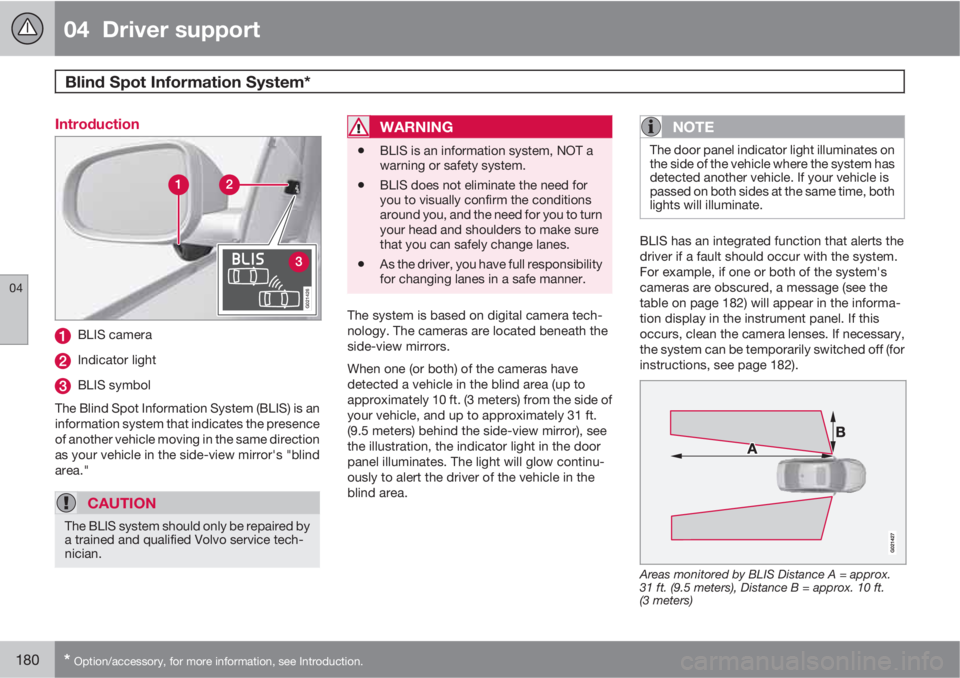
Introduction
G021426
BLIS camera
Indicator light
BLIS symbol
The Blind Spot Information System (BLIS) is an
information system that indicates the presence
of another vehicle moving in the same direction
as your vehicle in the side-view mirror's "blind
area."
CAUTION
The BLIS system should only be repaired by
a trained and qualified Volvo service tech-
nician.
WARNING
•BLIS is an information system, NOT a
warning or safety system.
•BLIS does not eliminate the need for
you to visually confirm the conditions
around you, and the need for you to turn
your head and shoulders to make sure
that you can safely change lanes.
•As the driver, you have full responsibility
for changing lanes in a safe manner.
The system is based on digital camera tech-
nology. The cameras are located beneath the
side-view mirrors.
When one (or both) of the cameras have
detected a vehicle in the blind area (up to
approximately 10 ft. (3 meters) from the side of
your vehicle, and up to approximately 31 ft.
(9.5 meters) behind the side-view mirror), see
the illustration, the indicator light in the door
panel illuminates. The light will glow continu-
ously to alert the driver of the vehicle in the
blind area.
NOTE
The door panel indicator light illuminates on
the side of the vehicle where the system has
detected another vehicle. If your vehicle is
passed on both sides at the same time, both
lights will illuminate.
BLIS has an integrated function that alerts the
driver if a fault should occur with the system.
For example, if one or both of the system's
cameras are obscured, a message (see the
table on page 182) will appear in the informa-
tion display in the instrument panel. If this
occurs, clean the camera lenses. If necessary,
the system can be temporarily switched off (for
instructions, see page 182).
Areas monitored by BLIS Distance A = approx.
31 ft. (9.5 meters), Distance B = approx. 10 ft.
(3 meters)
Page 183 of 382
04 Driver support
Blind Spot Information System*
04
* Option/accessory, for more information, see Introduction.181 When does BLIS function
The system functions when your vehicle is
moving at speeds above 6 mph (10 km/h).
When you pass another vehicle:The system reacts when you pass another
vehicle at a speed of up to 6 mph (10 km/h)
faster than that vehicle.
When you are passed by another vehicle:The system reacts if your vehicle is passed by
another vehicle at a speed of up to 43 mph
(70 km/h) faster than your vehicle.
WARNING
•BLIS does not function in sharp curves.
•BLIS does not function when your vehi-
cle is backing up.
•If you are towing a wide trailer, this may
prevent the BLIS cameras from detect-
ing other vehicles in adjacent lanes.
How BLIS functions in daylight and
darkness
Daylight
BLIS reacts to the shape of surrounding vehi-
cles. The system is designed to help detect
motor vehicles such as cars, trucks, buses,
motorcycles, etc.
DarknessBLIS reacts to the headlights of surrounding
vehicles. In order to be detected by BLIS, a
vehicle in the blind area must have its head-
lights on. This means, for example, that the
system will not detect a trailer without head-
lights that is being towed behind a car or truck.
WARNING
•BLIS does not react to cyclists or
mopeds.
•BLIS does not react to vehicles that are
standing still.
•The BLIS cameras have the same limi-
tation as the human eye. In other words,
their "vision is impaired" by adverse
weather conditions such as heavy
snowfall, intense light directly into the
camera, dense fog, etc.
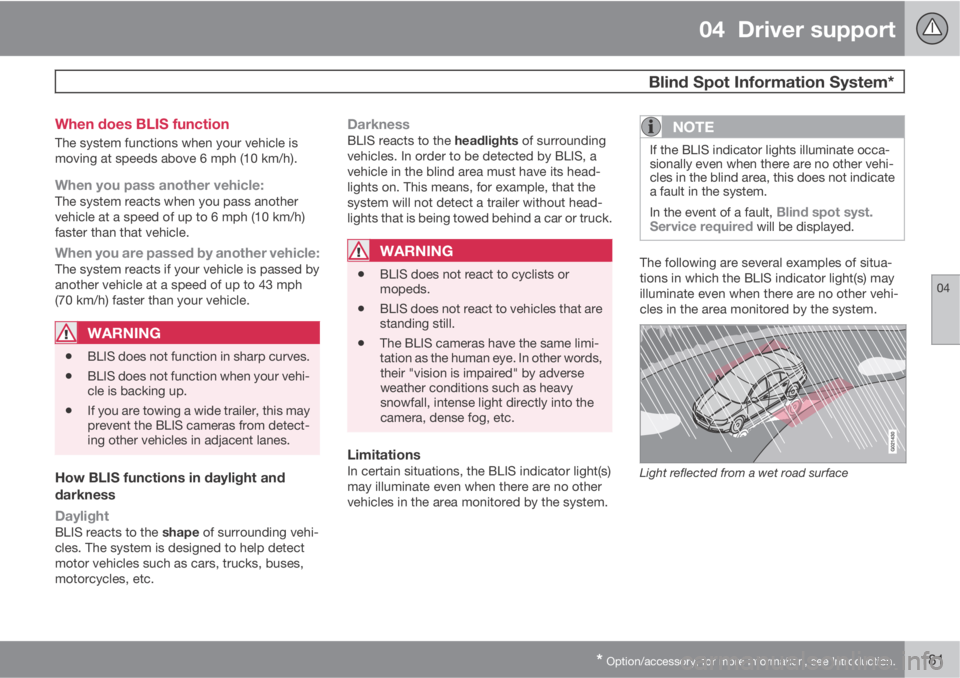
LimitationsIn certain situations, the BLIS indicator light(s)
may illuminate even when there are no other
vehicles in the area monitored by the system.
NOTE
If the BLIS indicator lights illuminate occa-
sionally even when there are no other vehi-
cles in the blind area, this does not indicate
a fault in the system.
In the event of a fault,
Blind spot syst.
Service required will be displayed.
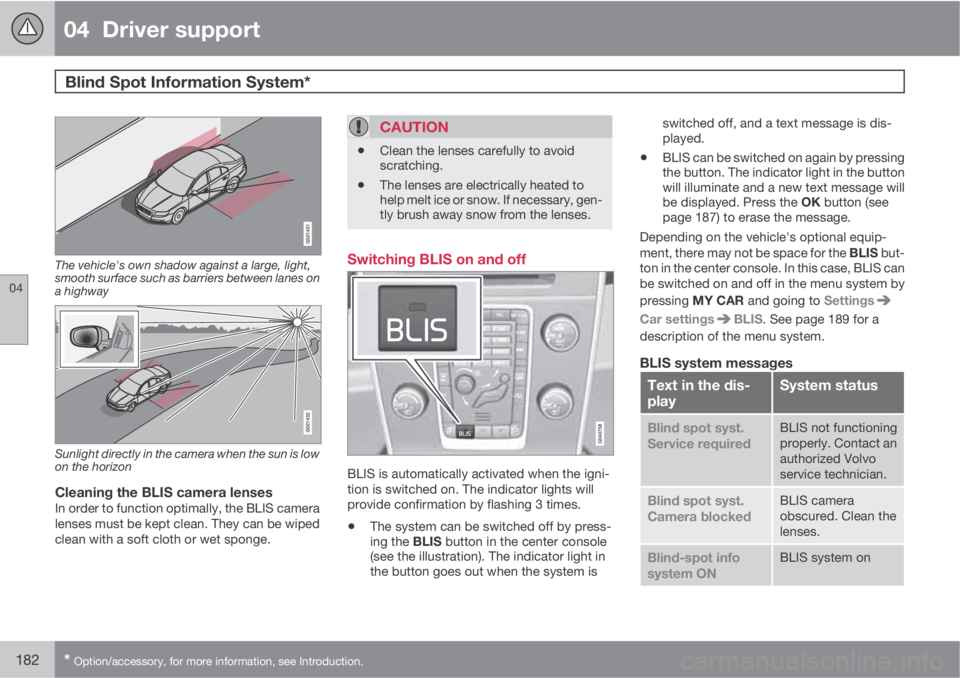
The following are several examples of situa-
tions in which the BLIS indicator light(s) may
illuminate even when there are no other vehi-
cles in the area monitored by the system.
Light reflected from a wet road surface
Page 184 of 382
04 Driver support
Blind Spot Information System*
04
182* Option/accessory, for more information, see Introduction.
The vehicle's own shadow against a large, light,
smooth surface such as barriers between lanes on
a highway
Sunlight directly in the camera when the sun is low
on the horizon
Cleaning the BLIS camera lensesIn order to function optimally, the BLIS camera
lenses must be kept clean. They can be wiped
clean with a soft cloth or wet sponge.
CAUTION
•Clean the lenses carefully to avoid
scratching.
•The lenses are electrically heated to
help melt ice or snow. If necessary, gen-
tly brush away snow from the lenses.
Switching BLIS on and off
BLIS is automatically activated when the igni-
tion is switched on. The indicator lights will
provide confirmation by flashing 3 times.
•The system can be switched off by press-
ing the BLIS button in the center console
(see the illustration). The indicator light in
the button goes out when the system isswitched off, and a text message is dis-
played.
•BLIS can be switched on again by pressing
the button. The indicator light in the button
will illuminate and a new text message will
be displayed. Press the OK button (see
page 187) to erase the message.
Depending on the vehicle's optional equip-
ment, there may not be space for the BLIS but-
ton in the center console. In this case, BLIS can
be switched on and off in the menu system by
pressing MY CAR and going to Settings
Car settingsBLIS. See page 189 for a
description of the menu system.
BLIS system messages
Text in the dis-
playSystem status
Blind spot syst.
Service requiredBLIS not functioning
properly. Contact an
authorized Volvo
service technician.
Blind spot syst.
Camera blockedBLIS camera
obscured. Clean the
lenses.
Blind-spot info
system ONBLIS system on
Page 190 of 382
05 Comfort and driving pleasure
Menus and messages
05
188
MessageDescription
Service urgentAHave the vehicle
checked by an
authorized Volvo
workshop immedi-
ately.
Service requiredAHave the vehicle
checked by an
authorized Volvo
workshop as soon
as possible.
See manualARead the owner's
manual.
Book time for
maintenanceTime to book service
at an authorized
Volvo retailer.
Time for regular
maintenanceTime for regular
service at an author-
ized Volvo work-
shop. The timing is
determined by the
number of miles
driven, number of
months since the
last service, engine
running time.
MessageDescription
Maintenance over-
dueIf the service inter-
vals are not fol-
lowed, the warranty
does not cover any
damaged parts.
Contact an author-
ized Volvo workshop
for service.
Temporarily OFFAA function has been
temporarily
switched off and is
reset automatically
while driving or after
starting again.
Low battery Power
save modeThe audio system is
switched off to save
current. Charge the
battery.
AThere will also be a system-specific part of this message
Page 197 of 382

05 Comfort and driving pleasure
Climate system
05
* Option/accessory, for more information, see Introduction.195 Introduction
Air conditioningThe vehicle is equipped with Electronic Climate
Control (ECC). The climate control system
cools, heats or dehumidifies the air in the pas-
senger compartment.
NOTE
•The air conditioning can be switched
off, but to ensure the best possible cli-
mate comfort in the passenger com-
partment and to prevent the windows
from misting, it should always be on.
•In warm weather, a small amount of
water may accumulate under the car
when it has been parked. This water is
condensation from the A/C system and
is normal.
Sensor location
•The sunlight sensor is located on the top
side of the dashboard.
NOTE
The sunlight sensor monitors which side of
the car that is most exposed to sunlight.
This can mean that the temperature may
differ between the right and left-side air
vents, even if the temperatures set for both
sides of the passenger compartment are the
same.
•The temperature sensor for the passenger
compartment is located below the climate
control panel.
•The outside (ambient) temperature sensor
is located on the door mirror.
•The humidity sensor* is located in the inte-
rior rearview mirror.
NOTE
Do not cover or block the sensors with
clothing or other objects.
Side windows and moonroofTo ensure that the air conditioning works opti-
mally, the side windows, and the optional
moonroof should be closed.
Fog on the inside of the windowsThe defroster function should be used to
remove fog or mist from the inside of the win-
dows. Keeping the windows clean with a com-mercially available window washing spray will
also help prevent fogging or misting.
Temporary shut-off of the air
conditioning
The air conditioning is momentarily disen-
gaged during full-throttle acceleration or when
driving uphill with a trailer. This may result in a
temporary increase in cabin temperature.
Ice and snowAlways keep the air intake grille at the base of
the windshield free of snow.
Climate system maintenanceSpecial tools and equipment are required to
maintain and carry out repairs on the climate
system. Work of this type should only be done
by a trained and qualified Volvo service tech-
nician.
RefrigerantVolvo cares about the environment. The air
conditioning system in your car contains a
CFC-free refrigerant – R134a. This substance
will not deplete the ozone layer. The air condi-
tioning system contains 1.8 lbs (820 g) of
R134a. The systems uses PAG oil.
Passenger compartment filterReplace the cabin air filter with a new one at
the recommended intervals. Please refer to
Page 198 of 382

05 Comfort and driving pleasure
Climate system
05
196
your Warranty and Service Records Informa-
tion booklet, or consult a trained and qualified
Volvo service technician for these intervals.
The filter should be replaced more often when
driving under dirty and dusty conditions. The
filter cannot be cleaned and therefore should
always be replaced with a new one.
NOTE
There are different types of cabin air filters.
Ensure that the correct type is installed.
Interior Air Quality System (IAQS)A multifilter helps reduce gases and particles
in the incoming air, thereby reducing the levels
of odors and contaminants entering the vehi-
cle. The air quality sensor detects increased
levels of contaminants in the outside air. When
the air quality sensor detects contaminated
outside air, the air intake closes and the air
inside the passenger compartment is recircu-
lated, i.e. no outside air enters the vehicle. The
filter also cleans recirculated passenger com-
partment air.
NOTE
Contact your Volvo retailer for IAQS air filter
replacement intervals.
Materials used in the cabinThe materials used in the cabin have been
developed to help minimize the amount of dust
and make the cabin easier to keep clean. All
floor mats can be easily removed for cleaning.
Use car cleaning products recommended by
Volvo. See also the information beginning on
page 351.
Menu settingsThe default settings for four of the climate sys-
tem's functions can be changed in the menu
system.
•Blower speed in automatic mode.
•Recirculation timer for passenger com-
partment air.
•Automatic rear window defrosting.
•The optional Interior Air Quality System
(IAQS).
The functions can also be returned to factory
settings in the menu system.
See page 189 for a description of the menu
system.
Air distribution
G017699
The incoming air is distributed from a number
of different vents in the passenger compart-
ment.
Air distribution is fully automatic in AUTO
mode.
If desired, air distribution can be controlled
manually, see page 202.
Page 240 of 382
06 Infotainment
AUX/USB sockets
06
238
Connecting external devices
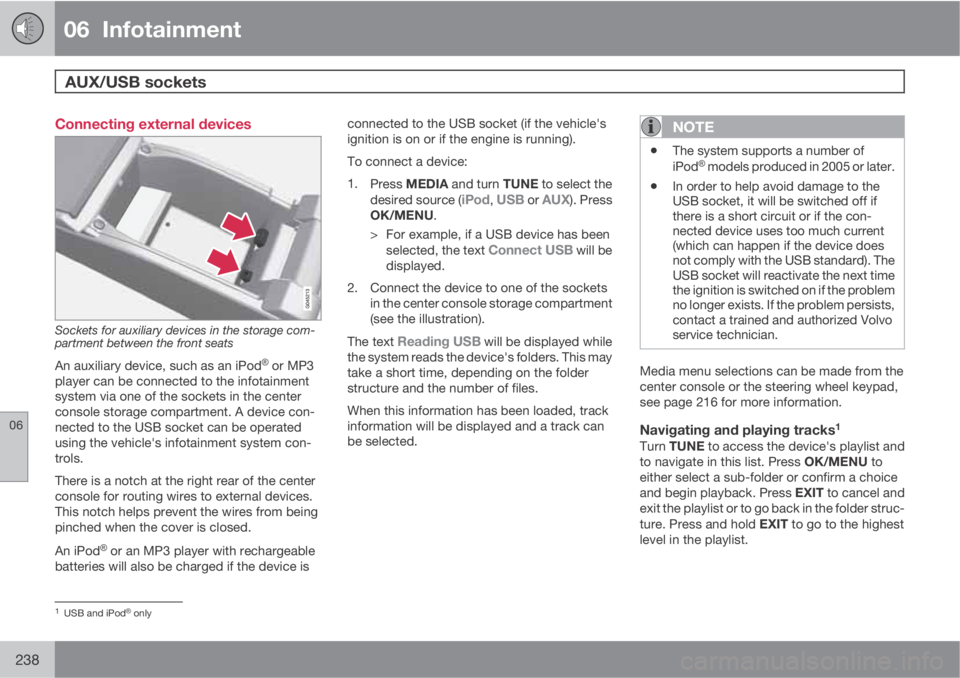
Sockets for auxiliary devices in the storage com-
partment between the front seats
An auxiliary device, such as an iPodŸ or MP3
player can be connected to the infotainment
system via one of the sockets in the center
console storage compartment. A device con-
nected to the USB socket can be operated
using the vehicle's infotainment system con-
trols.
There is a notch at the right rear of the center
console for routing wires to external devices.
This notch helps prevent the wires from being
pinched when the cover is closed.
An iPod
Ÿ or an MP3 player with rechargeable
batteries will also be charged if the device isconnected to the USB socket (if the vehicle's
ignition is on or if the engine is running).
To connect a device:
1.
Press MEDIA and turn TUNE to select the
desired source (
iPod, USB or AUX). Press
OK/MENU.
> For example, if a USB device has been
selected, the text
Connect USB will be
displayed.
2. Connect the device to one of the sockets
in the center console storage compartment
(see the illustration).
The text
Reading USB will be displayed while
the system reads the device's folders. This may
take a short time, depending on the folder
structure and the number of files.
When this information has been loaded, track
information will be displayed and a track can
be selected.
NOTE
•The system supports a number of
iPodŸ models produced in 2005 or later.
•In order to help avoid damage to the
USB socket, it will be switched off if
there is a short circuit or if the con-
nected device uses too much current
(which can happen if the device does
not comply with the USB standard). The
USB socket will reactivate the next time
the ignition is switched on if the problem
no longer exists. If the problem persists,
contact a trained and authorized Volvo
service technician.
Media menu selections can be made from the
center console or the steering wheel keypad,
see page 216 for more information.
Navigating and playing tracks1
Turn TUNE to access the device's playlist and
to navigate in this list. Press OK/MENU to
either select a sub-folder or confirm a choice
and begin playback. Press EXIT to cancel and
exit the playlist or to go back in the folder struc-
ture. Press and hold EXIT to go to the highest
level in the playlist.
1USB and iPodŸ only
Page 267 of 382
06 Infotainment
Remote control*
06
* Option/accessory, for more information, see Introduction.265
ButtonFunction
Stop
Fast forward, change tracks/
songs
DVD menu
Go back one step in a menu, can-
cel a function or delete entered
characters
Navigate up/down
Navigate right/left
Confirm a selection or go to the
current source's main menu
Reduce volume
Increase volume
0-9Use to select preset channels or
enter characters
ButtonFunction
One-button access to frequently
used functions (which must be
programmed into the button, see
page 220
Information about the current
film, song, etc., or to display
information not currently shown
on the screen
Select language for audio tracks
Subtitles, select subtitle lan-
guage
Not in use
Replacing batteriesThe remote control runs on four AA/LR6 bat-
teries.
NOTE
The batteries' normal service life ranges
from 1-4 years, depending on how often the
remote is used. If the remote is not working
properly, try replacing the four AA/LR6 bat-
teries.
It is advisable to have extra batteries on long
trips.
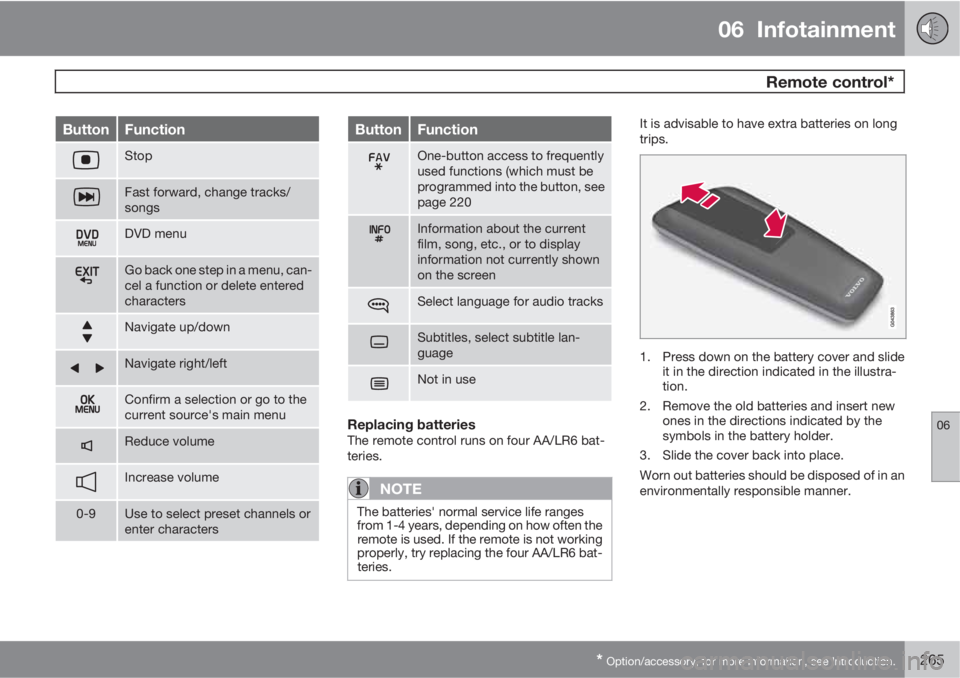
1. Press down on the battery cover and slide
it in the direction indicated in the illustra-
tion.
2. Remove the old batteries and insert new
ones in the directions indicated by the
symbols in the battery holder.
3. Slide the cover back into place.
Worn out batteries should be disposed of in an
environmentally responsible manner.
Page 271 of 382
07 During your trip
Driving recommendations
07
269
tributed so that capacity weight or maximum
permissible axle loads are not exceeded.
Driving through water
•The vehicle can be driven through water up
to a depth of approximately 10 in. (25 cm),
at a maximum speed of 6 mph (10 km/h).
•Take particular care when driving through
flowing water.
•Clean the electrical connections for trailer
wiring after driving in mud or water.
•When driving through water, maintain low
speed and do not stop in the water.
WARNING
After driving through water, press lightly on
the brake pedal to ensure that the brakes
are functioning normally. Water or mud can
make the brake linings slippery, resulting in
delayed braking effect.
CAUTION
•Engine damage will occur if water is
drawn into the air cleaner.
•If the vehicle is driven through water
deeper than 10 in (25 cm), water may
enter the differential and the transmis-
sion. This reduces the oil's lubricating
capacity and may shorten the service
life of these components.
•Do not allow the vehicle to stand in
water up to the door sills longer than
absolutely necessary. This could result
in electrical malfunctions.
•If the engine has been stopped while the
vehicle is in water, do not attempt to
restart it. Have the vehicle towed out of
the water.
Engine and cooling systemUnder special conditions, for example when
driving in hilly terrain, extreme heat or with
heavy loads, there is a risk that the engine and
cooling system will overheat. Proceed as fol-
lows to avoid overheating the engine.
•Maintain a low speed when driving with a
trailer up long, steep hills.
•Do not turn the engine off immediately
when stopping after a hard drive.
WARNING
The cooling fan may start or continue to
operate (for up to 6 minutes) after the engine
has been switched off.
•Remove any auxiliary lights from in front of
the grille when driving in hot weather con-
ditions.
•Do not exceed engine speeds of 4500 rpm
if driving with a trailer in hilly terrain. The oil
temperature could become too high.
Conserving electrical currentKeep the following in mind to help minimize
battery drain:
•When the engine is not running, avoid
using ignition mode II. Many electrical sys-
tems (the audio system, the optional navi-
gation system, power windows, etc) will
function in ignition modes 0 and I. These
modes reduce drain on the battery.
•Please keep in mind that using systems,
accessories, etc., that consume a great
deal of current when the engine is not run-
ning could result in the battery being com-
pletely drained. Driving or having the
engine running for approximately
15 minutes will help keep the battery
charged.
•The optional 12 volt socket in the cargo
area provides electrical current even with