trans VOLVO XC70 2013 Owner´s Manual
[x] Cancel search | Manufacturer: VOLVO, Model Year: 2013, Model line: XC70, Model: VOLVO XC70 2013Pages: 382, PDF Size: 6.78 MB
Page 5 of 382
Contents
* Option/accessory, for more information, see Introduction.3
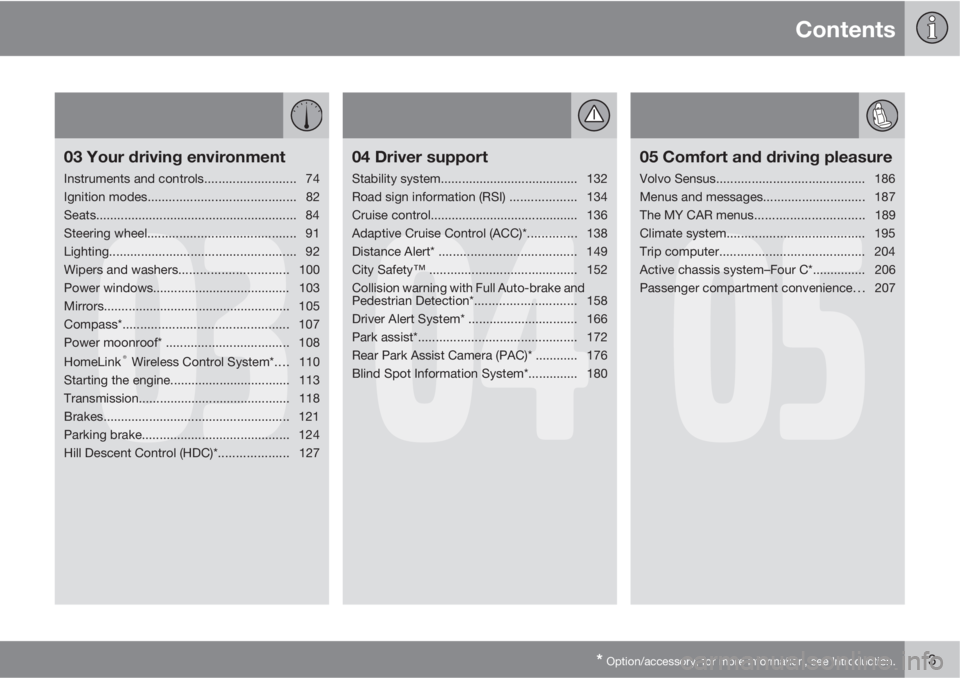
03
03 Your driving environment
Instruments and controls.......................... 74
Ignition modes.......................................... 82
Seats......................................................... 84
Steering wheel.......................................... 91
Lighting..................................................... 92
Wipers and washers...............................100
Power windows....................................... 103
Mirrors..................................................... 105
Compass*............................................... 107
Power moonroof* ................................... 108
HomeLink
® Wireless Control System*.... 110
Starting the engine.................................. 113
Transmission...........................................118
Brakes..................................................... 121
Parking brake.......................................... 124
Hill Descent Control (HDC)*....................127
04
04 Driver support
Stability system....................................... 132
Road sign information (RSI) ...................134
Cruise control.......................................... 136
Adaptive Cruise Control (ACC)*.............. 138
Distance Alert* ....................................... 149
City Safety™ .......................................... 152
Collision warning with Full Auto-brake and
Pedestrian Detection*............................. 158
Driver Alert System* ............................... 166
Park assist*............................................. 172
Rear Park Assist Camera (PAC)* ............ 176
Blind Spot Information System*.............. 180
05
05 Comfort and driving pleasure
Volvo Sensus.......................................... 186
Menus and messages............................. 187
The MY CAR menus...............................189
Climate system....................................... 195
Trip computer......................................... 204
Active chassis system–Four C*............... 206
Passenger compartment convenience. . . 207
Page 12 of 382

Introduction
Important information
10
Furthermore, your vehicle is equipped with a
number of computers whose task is to contin-
uously control and monitor the vehicle’s oper-
ation. They can also register information during
normal driving conditions if they detect a fault
relating to the vehicle’s operation and func-
tionality. Some of the stored information is
required by technicians when carrying out
service and maintenance to enable them to
diagnose and rectify any faults that have
occurred in the vehicle and to enable Volvo to
fulfill legal and other regulatory requirements.
This information may be stored in the vehicle’s
computers for a certain period of time.
Volvo will not contribute to spreading the
above-mentioned information to third parties
without the consent of the vehicle’s owner.
However, due to national legal requirements
and regulations, Volvo may be compelled to
provide information of this type to authorities
such as law enforcement agencies or others
who may assert a legal right to obtain such
information.
Volvo and service and repair facilities with
agreements with Volvo have access to the spe-
cial technical equipment required in order to
read and interpret the information stored by the
vehicle’s computers. Volvo is responsible for
ensuring that the information transmitted to
Volvo during service and maintenance is
stored and handled in a secure manner andthat this handling is done in accordance with
applicable legal requirements. For additional
information, contact:
For additional information, contact:
In the United States
Volvo Cars of North America, LLC
Customer Care Center
1 Volvo Drive, P.O. box 914
Rockleigh, New Jersey 07647
1-800-458-1552
www.volvocars.us
In Canada
Volvo Cars of Canada Corp
National Customer Service
175 Gordon Baker Road
North York, Ontario M2H 2N7
1-800-663-8255
www.volvocars.caVolvo Structural Parts Statement
Volvo has always been and continues to be a
leader in automotive safety. Volvo engineers
and manufactures vehicles designed to help
protect vehicle occupants in the event of a col-
lision.
Volvos are designed to absorb the impact of a
collision. This energy absorption system
including, but not limited to, structural compo-
nents such as bumper reinforcement bars,
bumper energy absorbers, frames, rails, fender
aprons, A-pillars, B-pillars and body panels
must work together to maintain cabin integrity
and protect the vehicle occupants.
The supplemental restraint system including
but not limited to air bags, side curtain air bags,
and deployment sensors work together with
the above components to provide proper tim-
ing for air bag deployment.
Due to the above, Volvo Cars of North America
does not support the use of aftermarket, alter-
native or anything other than original Volvo
parts for collision repair.
In addition Volvo does not support the use or
re-use of structural components from an exist-
ing vehicle that has been previously damaged.
Although these parts may appear equivalent, it
is difficult to tell if the parts have been previ-
ously replaced with non-OE parts or if the part
has been damaged as a result of a prior colli-
Page 19 of 382
01 Safety
Reporting safety defects01
17 Reporting safety defects in the U.S.
If you believe that your vehicle has a
defect which could cause a crash or
could cause injury or death, you
should immediately inform the
National Highway Traffic Safety
Administration (NHTSA) in addition to
notifying Volvo Cars of North Amer-
ica, LLC. If NHTSA receives similar
complaints, it may open an investiga-
tion, and if it finds that a safety defect
exists in a group of vehicles, it may
order a recall and remedy campaign.
However, NHTSA cannot become
involved in individual problems
between you, your retailer, or Volvo
Cars of North America, LLC. To con-
tact NHTSA, you may either call the
Auto Safety Hotline toll-free at
1-888-327-4236
(TTY: 1-800-424-9153) or write to:
NHTSA, U.S. Department of Trans-
portation, Washington D.C. 20590.
You can also obtain other information
about motor vehicle safety from:http://www.safercar.gov
Volvo strongly recommends that if
your vehicle is covered under a serv-
ice campaign, safety or emission
recall or similar action, it should be
completed as soon as possible.
Please check with your local retailer
or Volvo Cars of North America, LLC
if your vehicle is covered under these
conditions.
NHTSA can be reached at:
Internet:
http://www.nhtsa.gov
Telephone:
1-888-DASH-2-DOT
(1-888-327-4236).
Reporting safety defects in Canada
If you believe your vehicle has a defect that
could cause a crash or could cause injury or
death, you should immediately inform Trans-
port Canada in addition to notifying Volvo Cars
of Canada Corp.
Transport Canada can be contacted at:
1-800-333-0510
Teletypewriter (TTY): 613 990-4500
Fax: 1-819-994-3372
Mailing Address: Transport Canada - Road
Safety, 80 rue Noël, Gatineau, (Quebec) J8Z
0A1
Page 37 of 382

01 Safety
Crash mode01
35
Driving after a collisionIf the vehicle has been involved in a collision,
the text Safety mode See manual may
appear in the information display. This indi-
cates that the vehicle's functionality has been
reduced.
NOTE
This text can only be shown if the display is
undamaged and the vehicle's electrical sys-
tem is intact.
Safety mode is a feature that is triggered if one
or more of the safety systems (e.g. front or side
airbags, an inflatable curtain, or one or more of
the seat belt pretensioners) has deployed. The
collision may have damaged an importantfunction in the vehicle, such as the fuel lines,
sensors for one of the safety systems, the
brake system, etc.
WARNING
•Never attempt to repair the vehicle
yourself or to reset the electrical system
after the vehicle has displayed
Safety
mode See manual. This could result in
injury or improper system function.
•Restoring the vehicle to normal operat-
ing status should only be done by a
trained and qualified Volvo service tech-
nician.
•After Safety mode See manual has
been displayed, if you detect the odor
of fuel vapor, or see any signs of fuel
leakage, do not attempt to start the
vehicle. Leave the vehicle immediately.
Attempting to start the vehicleIf damage to the vehicle is minor and there is
no fuel leakage, you may attempt to start the
vehicle. To do so:
1. Remove the remote key from the ignition
slot and open the driver's door. If a mes-
sage is displayed that the ignition is on,
press the start button.2. Close the driver's door and reinsert the
remote key in the ignition slot.
3. Try to start the vehicle.
If the message
Safety mode See manual is
still displayed, the vehicle should not be driven
and must be towed. Concealed faults may
make the vehicle difficult to control.
Moving the vehicle
If the message Normal mode is displayed
when Safety mode See manual is no longer
displayed, the vehicle may be moved carefully
from its present position, if for example, it is
blocking traffic. It should, however, not be
moved farther than is absolutely necessary.
WARNING
Even if the vehicle appears to be drivable
after Safety mode has been set, it should
not be driven or towed (pulled by another
vehicle). There may be concealed damage
that could make it difficult or impossible to
control. The vehicle should be transported
on a flatbed tow truck to a trained and quali-
fied Volvo service technician for inspection/
repairs.
Page 40 of 382
01 Safety
Child safety 01
38
seat of any vehicle with a front passenger
side airbag.
•Drive safely!
Child restraint registration and recalls
Registering a child restraintChild restraints could be recalled for safety
reasons. You must register your child restraint
to be reached in a recall. To stay informed
about child safety seat recalls, be sure to fill out
and return the registration card that comes
with new child restraints.
Child restraint recall information is readily avail-
able in both the U.S. and Canada. For recall
information in the U.S., call the U.S. Govern-
ment's Auto Safety Hotline at 1-800-424-9393.
In Canada, visit Transport Canada's Child
Safety website at http://www.tc.gc.ca/
roadsafety/childsafety/menu.htm.
Page 50 of 382
01 Safety
Integrated booster cushion 01
48* Option/accessory, for more information, see Introduction.
Integrated two-stage booster
cushion*1
Volvo's optional integrated booster cushions
are located in the outboard seating positions.
These booster cushions have been specially
designed to help safeguard children in the rear
seat. They should be stowed (folded down into
the seat cushion) when not in use. When using
an integrated booster cushion, the child must
be secured with the vehicle's three-point seat
belt.
Use these booster cushions only with
children whose weight is between:
•
Stage 1: 48 – 80 lbs (22 – 36 kg)
•
Stage 2: 33 – 55 lbs (15 – 25 kg)
and whose height is between:
•
Stage 1: 45 – 55 in. (115 – 140 cm)
•
Stage 2: 37 – 47 in. (95 – 120 cm)
In Canada, Transport Canada's
weight recommendation is 40 – 80 lbs
(18 – 36 kg).
The booster cushions are designed to raise the
child higher, so that the shoulder strap crosses
over the child's collarbone, not over the child's
neck. If using a booster cushion does not resultin proper positioning of the shoulder strap,
then the child should be placed in a properly
secured child restraint (see page 39). The
shoulder belt must never be placed behind the
child's back or under the arm.
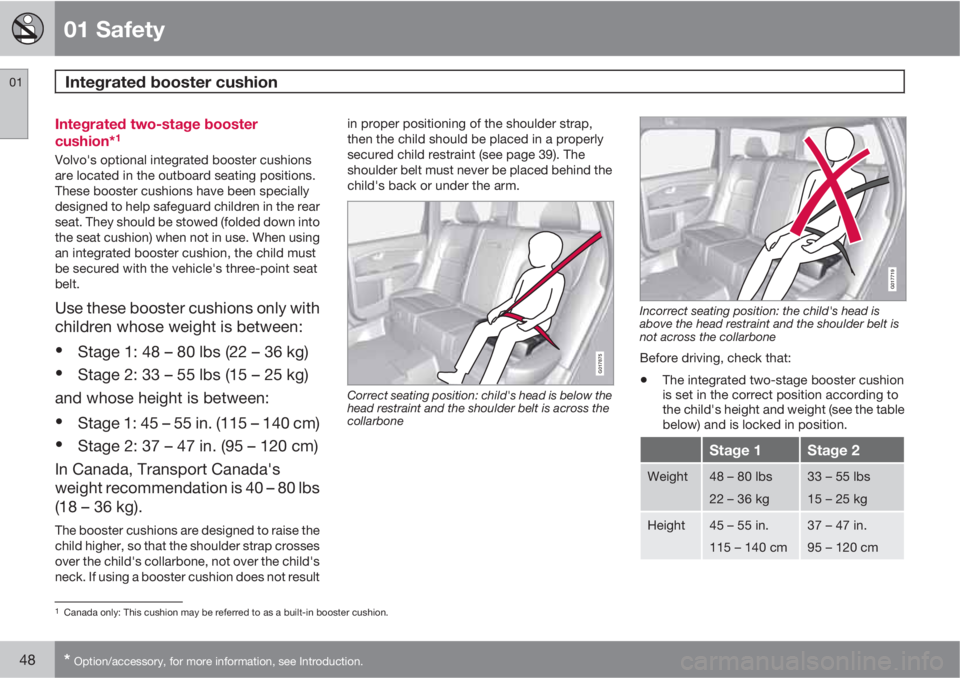
G017875
Correct seating position: child's head is below the
head restraint and the shoulder belt is across the
collarbone
G017719
Incorrect seating position: the child's head is
above the head restraint and the shoulder belt is
not across the collarbone
Before driving, check that:
•The integrated two-stage booster cushion
is set in the correct position according to
the child's height and weight (see the table
below) and is locked in position.
Stage 1Stage 2
Weight48 – 80 lbs
22 – 36 kg33 – 55 lbs
15 – 25 kg
Height45 – 55 in.
115 – 140 cm37 – 47 in.
95 – 120 cm
1Canada only: This cushion may be referred to as a built-in booster cushion.
Page 58 of 382
02 Locks and alarm
Remote key and key blade
02
56
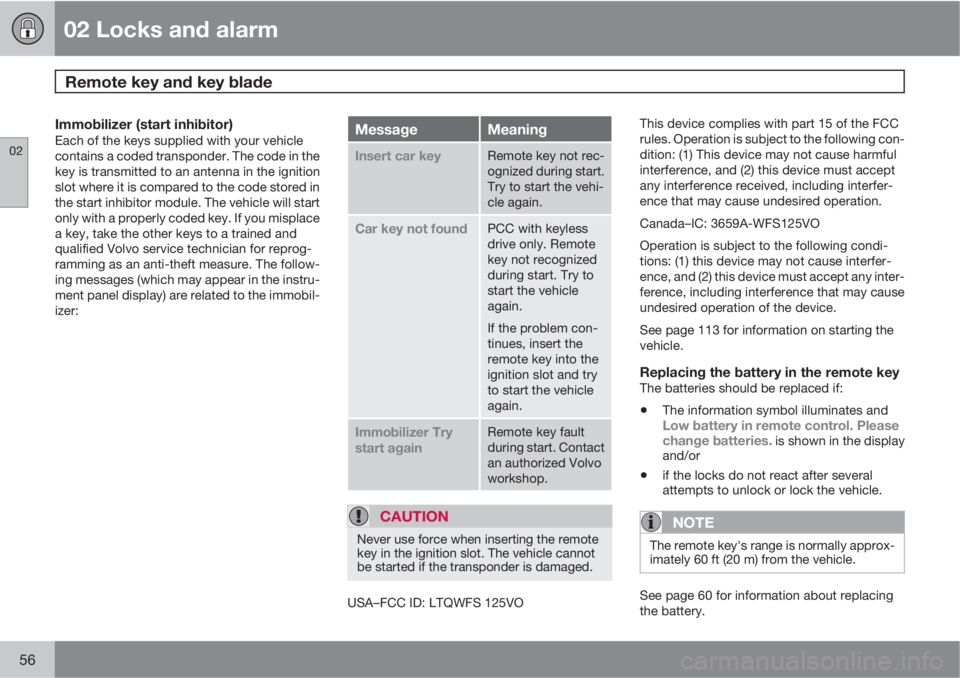
Immobilizer (start inhibitor)Each of the keys supplied with your vehicle
contains a coded transponder. The code in the
key is transmitted to an antenna in the ignition
slot where it is compared to the code stored in
the start inhibitor module. The vehicle will start
only with a properly coded key. If you misplace
a key, take the other keys to a trained and
qualified Volvo service technician for reprog-
ramming as an anti-theft measure. The follow-
ing messages (which may appear in the instru-
ment panel display) are related to the immobil-
izer:MessageMeaning
Insert car keyRemote key not rec-
ognized during start.
Try to start the vehi-
cle again.
Car key not foundPCC with keyless
drive only. Remote
key not recognized
during start. Try to
start the vehicle
again.
If the problem con-
tinues, insert the
remote key into the
ignition slot and try
to start the vehicle
again.
Immobilizer Try
start againRemote key fault
during start. Contact
an authorized Volvo
workshop.
CAUTION
Never use force when inserting the remote
key in the ignition slot. The vehicle cannot
be started if the transponder is damaged.
USA–FCC ID: LTQWFS 125VOThis device complies with part 15 of the FCC
rules. Operation is subject to the following con-
dition: (1) This device may not cause harmful
interference, and (2) this device must accept
any interference received, including interfer-
ence that may cause undesired operation.
Canada–IC: 3659A-WFS125VO
Operation is subject to the following condi-
tions: (1) this device may not cause interfer-
ence, and (2) this device must accept any inter-
ference, including interference that may cause
undesired operation of the device.
See page 113 for information on starting the
vehicle.
Replacing the battery in the remote keyThe batteries should be replaced if:
•The information symbol illuminates andLow battery in remote control. Please
change batteries. is shown in the display
and/or
•if the locks do not react after several
attempts to unlock or lock the vehicle.
NOTE
The remote key's range is normally approx-
imately 60 ft (20 m) from the vehicle.
See page 60 for information about replacing
the battery.
Page 60 of 382

02 Locks and alarm
Remote key and key blade
02
58* Option/accessory, for more information, see Introduction.
NOTE
As an added safety precaution, the parking
lights will come on automatically for a short
period when the tailgate has been opened.
After closing, the tailgate will not automatically
relock. Press Lock to relock it and rearm the
alarm.
See also the section "Unlocking the tailgate
from the passenger compartment."
Panic alarm – This button can be used to
attract attention during emergency situations.
To activate the panic alarm, press and hold this
button for at least 3 seconds or press it twice
within 3 seconds. The turn signals and horn will
be activated. The panic alarm will stop auto-
matically after 2 minutes and 45 seconds.
To deactivate, wait approximately 5 seconds
and press the button again.
The Panic alarm button will not unlock the vehi-
cle.
RangeThe remote key has a range of approximately
60 ft. (20 m) from the vehicle.
NOTE
Buildings or other obstacles may interfere
with the function of the remote key. The
vehicle can also be locked or unlocked with
the key blade, see page 59.
If the remote key is removed from the vehicle
while the engine is running or if the ignition is
in mode I or II and all of the doors are closed,
a message will appear in the instrument panel
display and there will be an audible signal.
When the remote key is returned to the vehicle,
the message will be erased and the audible
signal will stop after one of the following has
been done:
•The remote key is inserted in the ignition
slot
•The vehicle's speed exceeds 20 mph
(30 km/h)
•The OK button on the left steering wheel
lever is pressed
Unique functions—PCC*
Information button
Indicator lights
Pressing the information button provides cer-
tain information about the vehicle with the help
of the indicator lights.
Using the information button1.
Press the information button .
2. All of the indicator lights will flash sequen-
tially for approximately 7 seconds to indi-
cate that the PCC is receiving information
from the vehicle. If any of the buttons are
pressed during this 7-second period,
transmission of information to the PCC will
be interrupted.
Page 61 of 382
02 Locks and alarm
Remote key and key blade
02
59
NOTE
If none of the indicator lights flash when the
information button has been pressed sev-
eral times from different places in relation to
the vehicle, contact an authorized Volvo
service technician.
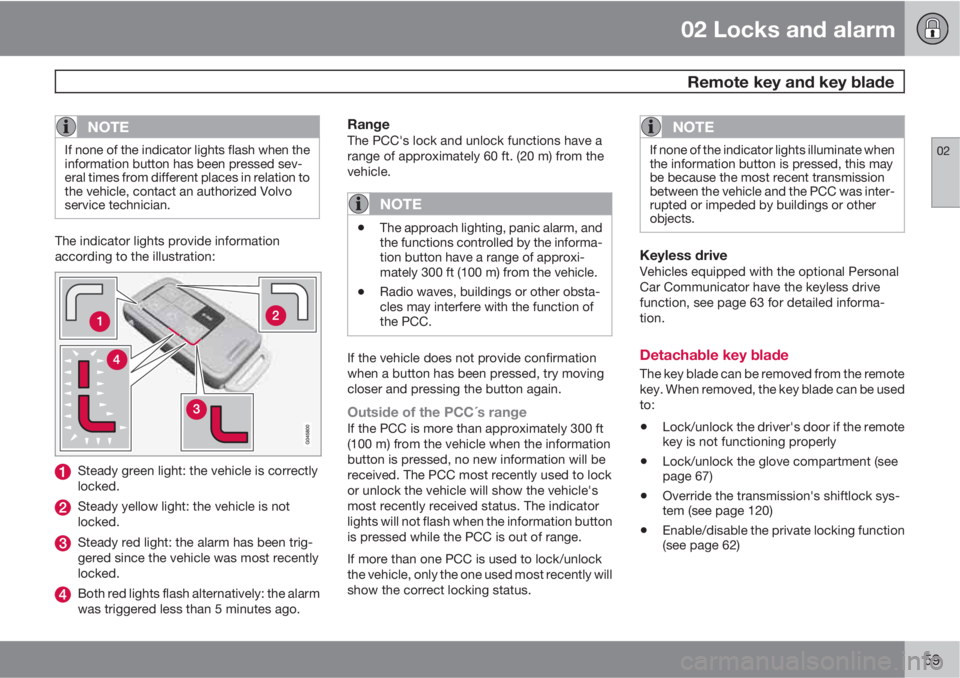
The indicator lights provide information
according to the illustration:
Steady green light: the vehicle is correctly
locked.
Steady yellow light: the vehicle is not
locked.
Steady red light: the alarm has been trig-
gered since the vehicle was most recently
locked.
Both red lights flash alternatively: the alarm
was triggered less than 5 minutes ago.
RangeThe PCC's lock and unlock functions have a
range of approximately 60 ft. (20 m) from the
vehicle.
NOTE
•The approach lighting, panic alarm, and
the functions controlled by the informa-
tion button have a range of approxi-
mately 300 ft (100 m) from the vehicle.
•Radio waves, buildings or other obsta-
cles may interfere with the function of
the PCC.
If the vehicle does not provide confirmation
when a button has been pressed, try moving
closer and pressing the button again.
Outside of the PCC´s rangeIf the PCC is more than approximately 300 ft
(100 m) from the vehicle when the information
button is pressed, no new information will be
received. The PCC most recently used to lock
or unlock the vehicle will show the vehicle's
most recently received status. The indicator
lights will not flash when the information button
is pressed while the PCC is out of range.
If more than one PCC is used to lock/unlock
the vehicle, only the one used most recently will
show the correct locking status.
NOTE
If none of the indicator lights illuminate when
the information button is pressed, this may
be because the most recent transmission
between the vehicle and the PCC was inter-
rupted or impeded by buildings or other
objects.
Keyless driveVehicles equipped with the optional Personal
Car Communicator have the keyless drive
function, see page 63 for detailed informa-
tion.
Detachable key blade
The key blade can be removed from the remote
key. When removed, the key blade can be used
to:
•Lock/unlock the driver's door if the remote
key is not functioning properly
•Lock/unlock the glove compartment (see
page 67)
•Override the transmission's shiftlock sys-
tem (see page 120)
•Enable/disable the private locking function
(see page 62)
Page 74 of 382
72* Option/accessory, for more information, see Introduction.
Instruments and controls........................................................................ 74
Ignition modes........................................................................................ 82
Seats....................................................................................................... 84
Steering wheel........................................................................................ 91
Lighting................................................................................................... 92
Wipers and washers.............................................................................. 100
Power windows..................................................................................... 103
Mirrors................................................................................................... 105
Compass*.............................................................................................. 107
Power moonroof* ................................................................................. 108
HomeLink
® Wireless Control System*.................................................. 110
Starting the engine................................................................................ 113
Transmission......................................................................................... 118
Brakes................................................................................................... 121
Parking brake........................................................................................ 124
Hill Descent Control (HDC)*..................................................................127