my car VOLVO XC70 2015 Owner´s Manual
[x] Cancel search | Manufacturer: VOLVO, Model Year: 2015, Model line: XC70, Model: VOLVO XC70 2015Pages: 408, PDF Size: 11.26 MB
Page 39 of 408
01 Safety
Child safety01
}}
37
Children should be seated safely
Volvo recommends the proper use of restraint systems for all occupants including children.Remember that, regardless of age and size, achild should always be properly restrained ina vehicle. Your vehicle is also equipped with ISOFIX/ LATCH attachments, which make it moreconvenient to install child seats. Some restraint systems for children are designed to be secured in the vehicle by lapbelts or the lap portion of a lap-shoulder belt.Such child restraint systems can help protectchildren in vehicles in the event of an acci-dent only if they are used properly. However,children could be endangered in a crash if thechild restraints are not properly secured in thevehicle. Failure to follow the installationinstructions for your child restraint can resultin your child striking the vehicle's interior in asudden stop. Holding a child in your arms is NOT a suitable substitute for a child restraint system. In anaccident, a child held in a person's arms canbe crushed between the vehicle's interior andan unrestrained person. The child could alsobe injured by striking the interior, or by beingejected from the vehicle during a suddenmaneuver or impact. The same can also hap-pen if the infant or child rides unrestrained onthe seat. Other occupants should also beproperly restrained to help reduce the chanceof injuring or increasing the injury of a child. All states and provinces have legislation gov- erning how and where children should be car-ried in a vehicle. Find out the regulationsexisting in your state or province. Recentaccident statistics have shown that childrenare safer in rear seating positions than frontseating positions when properly restrained. Achild restraint system can help protect a childin a vehicle. Here's what to look for whenselecting a child restraint system: It should have a label certifying that it meets applicable Federal Motor Vehicle SafetyStandards (FMVSS 213) – or in Canada,CMVSS 213. Make sure the child restraint system is approved for the child's height, weight anddevelopment – the label required by thestandard or regulation, or instructions forinfant restraints, typically provide this infor-mation. In using any child restraint system, we urge you to carefully look over the instructions thatare provided with the restraint. Be sure youunderstand them and can use the deviceproperly and safely in this vehicle. A misusedchild restraint system can result in increased
injuries for both the infant or child and otheroccupants in the vehicle. When a child has outgrown the child safety seat, you should use the rear seat with thestandard seat belt fastened. The best way tohelp protect the child here is to place thechild on a cushion so that the seat belt isproperly located on the hips (see the illustra-tion on page 47). Legislation in your state orprovince may mandate the use of a child seator cushion in combination with the seat belt,depending on the child's age and/or size.Please check local regulations. A specially designed and tested booster cushion and backrest can be obtained fromyour Volvo retailer. USA
: for children weighing 33 – 80 lbs. (15 –
36 kg) and 38 – 54 inches (97 – 137 cm) in height Canada : for children weighing 40 – 80 lbs.
(18 – 36 kg) and 40 – 54 inches (102 – 137 cm) in height
Page 40 of 408
01 Safety
Child safety 01
38
WARNING
•Do not use child safety seats or child booster cushions/backrests in thefront passenger's seat. We also rec-ommend that children under 4 feet7 inches (140 cm) in height who haveoutgrown these devices sit in the rearseat with the seat belt fastened.
• On hot days, the temperature in thevehicle interior can rise very quickly.Exposure to these high temperaturesfor even a short period of time cancause heat-related injury or death.Small children are particularly at risk.
Child seat should always be registered. See page 39 for more information.
Automatic Locking Retractor/ Emergency Locking Retractor (ALR/ELR)
To make child seat installation easier, each seat belt (except for the driver's belt) is equip-ped with a locking mechanism to help keepthe seat belt taut.
When attaching the seat belt to a child seat:
1. Attach the seat belt to the child seat
according to the child seat manufactur- er's instructions.
2. Pull the seat belt out as far as possible.
3. Insert the seat belt latch plate into the buckle (lock) in the usual way.
4. Release the seat belt and pull it taut around the child seat.
A sound from the seat belt retractor will be audible at this time and is normal. The beltwill now be locked in place. This function isautomatically disabled when the seat belt isunlocked and the belt is fully retracted.
WARNING
Do not use child safety seats or child booster cushions/backrests in the frontpassenger's seat. We also recommendthat children who have outgrown thesedevices sit in the rear seat with the seatbelt properly fastened.
Volvo's recommendations
Why does Volvo believe that no child should sit in the front seat of a car? It's quite simplereally. A front airbag is a very powerful devicedesigned, by law, to help protect an adult. Because of the size of the airbag and its speed of inflation, a child should never beplaced in the front seat, even if he or she isproperly belted or strapped into a child safetyseat. Volvo has been an innovator in safetyfor over seventy-five years, and we'll continueto do our part. But we need your help. Pleaseremember to put your children in the backseat, and buckle them up.
Volvo has some very specific recommendations:
• Always wear your seat belt.
• Airbags are a SUPPLEMENTAL safety device which, when used with a three-point seat belt can help reduce seriousinjuries during certain types of accidents.Volvo recommends that you do not dis-connect the airbag system in your vehi-cle.
• Volvo strongly recommends that every-one in the vehicle be properly restrained.
• Volvo recommends that ALL occupants(adults and children) shorter than 4 feet7 inches (140 cm) be seated in the back
Page 41 of 408
01 Safety
Child safety01
39
seat of any vehicle with a front passenger side airbag.
• Drive safely!
Child restraint registration and recalls
Registering a child restraintChild restraints could be recalled for safety reasons. You must register your childrestraint to be reached in a recall. To stayinformed about child safety seat recalls, besure to fill out and return the registration cardthat comes with new child restraints. Child restraint recall information is readily available in both the U.S. and Canada. Forrecall information in the U.S., call the U.S.Government's Auto Safety Hotline at1-800-424-9393 or go to http://www-odi.nhtsa.dot.gov/cars/problems/recalls/register/childseat/index.cfm. In Canada, visitTransport Canada's Child Safety website athttp://www.tc.gc.ca/roadsafety/childsafety/menu.htm.
Page 52 of 408
01 Safety
Top tether anchors 01
50
Child restraint anchorages
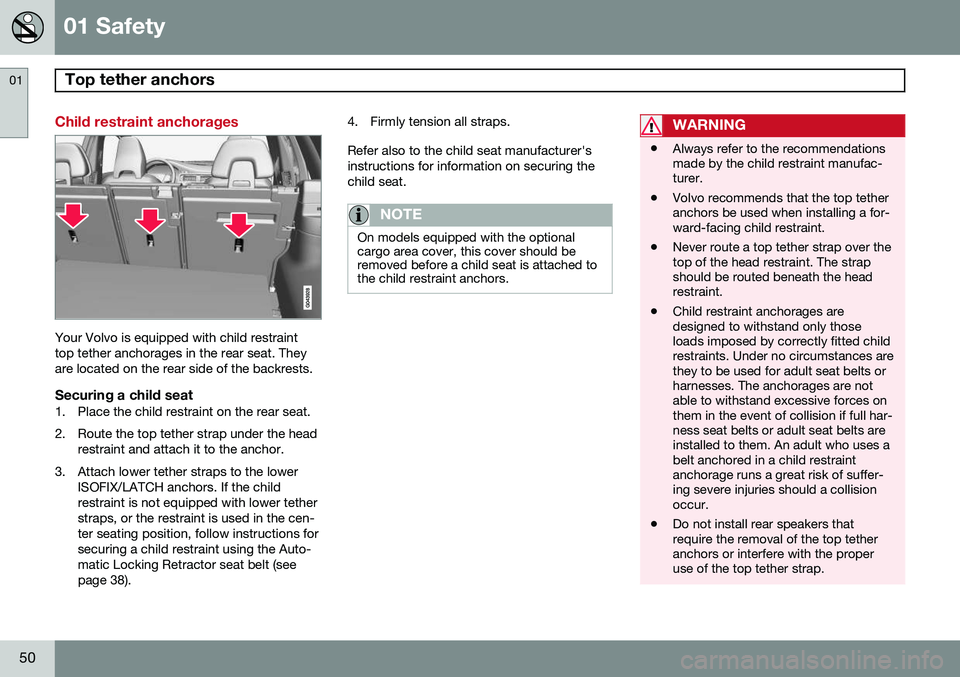
Your Volvo is equipped with child restraint top tether anchorages in the rear seat. Theyare located on the rear side of the backrests.
Securing a child seat1. Place the child restraint on the rear seat.
2. Route the top tether strap under the headrestraint and attach it to the anchor.
3. Attach lower tether straps to the lower ISOFIX/LATCH anchors. If the child restraint is not equipped with lower tetherstraps, or the restraint is used in the cen-ter seating position, follow instructions forsecuring a child restraint using the Auto-matic Locking Retractor seat belt (seepage 38). 4. Firmly tension all straps. Refer also to the child seat manufacturer's instructions for information on securing thechild seat.
NOTE
On models equipped with the optional cargo area cover, this cover should beremoved before a child seat is attached tothe child restraint anchors.
WARNING
•
Always refer to the recommendations made by the child restraint manufac-turer.
• Volvo recommends that the top tetheranchors be used when installing a for-ward-facing child restraint.
• Never route a top tether strap over thetop of the head restraint. The strapshould be routed beneath the headrestraint.
• Child restraint anchorages aredesigned to withstand only thoseloads imposed by correctly fitted childrestraints. Under no circumstances arethey to be used for adult seat belts orharnesses. The anchorages are notable to withstand excessive forces onthem in the event of collision if full har-ness seat belts or adult seat belts areinstalled to them. An adult who uses abelt anchored in a child restraintanchorage runs a great risk of suffer-ing severe injuries should a collisionoccur.
• Do not install rear speakers thatrequire the removal of the top tetheranchors or interfere with the properuse of the top tether strap.
Page 60 of 408
02 Locks and alarm
Remote key and key blade
02
58
Introduction
Two remote keys or optional Personal Car Communicators (PCC) are provided with yourvehicle. They enable you to unlock the doorsand tailgate, and also function as ignitionkeys to start the vehicle or operate electricalcomponents. The remote keys containdetachable metal key blades for manuallylocking or unlocking the driver's door and theglove compartment. The visible ends of thesekey blades are unique to make it easier toidentify "your" remote key. Up to six remotescan be programmed for use on the samevehicle. The PCCs have enhanced functionality com- pared with the standard remote key.
NOTE
In the remainder of this chapter, all refer- ences to the remote key also pertain to thePCC unless otherwise stated.
WARNING
Never leave the remote key in the ignition slot if children are to remain in the vehicle.
See page 88 for more information on the various ignition modes.
Detachable key bladeEach remote key or PCC contains a detacha-ble metal key blade for mechanically lockingor unlocking the driver's door and the glovecompartment, and to enable the private lock-ing function. See page 64 for more informa-tion on the key blade and page 67 for infor-mation on the private locking function. Thekey blades have a unique code, which is usedif new ones need to be produced. This codeis available at an authorized Volvo retailer. The visible ends of these key blades are unique to make it easier to identify "your"remote key.
Loss of a remote keyIf either of the remote keys is lost, the othershould be taken with the car to a Volvoretailer. As an anti-theft measure, the code ofthe lost remote key must be erased from thesystem.
NOTE
Additional or duplicate remote control keys can be obtained from any AuthorizedVolvo Retailer. You can also obtain additional or duplicate remote control keys from certain inde-pendent repair facilities and locksmithsthat are qualified to make remote controlkeys. Each key must be programmed towork with your vehicle. California Only: A list of independent repair facilities and/or locksmiths known to Volvo that can cutand code replacement keys can be found:
• on the Volvo website at http://www.volvocars.com/us/keys
• by calling Volvo Customer Care at1-800-458-1552
The number of registered keys for the vehicle can be found by pressing
MY CAR and going
into
SettingsInformationNumber of
keys. See page 209 for a description of the
menu system. USA-5WK49264FCC ID:KR55WK49264 + Siemens VDO 5WK49236 FCC ID:KR55WK49236, 5WK49266
Page 61 of 408
02 Locks and alarm
Remote key and key blade
02
}}
* Option/accessory, for more information, see Introduction.59
FCC ID:KR55WK49266 + Siemens VDO 5WK49233 FCC ID:KR55WK49233This device complies with part 15 of the FCC rules and RSS-210. Operation is subject tothe following conditions: (1) This device maynot cause harmful interference, and (2) thisdevice must accept any interferencereceived, including interference that maycause undesired operation. Canada-5WK49264IC:267T-5WK49264 + Siemens VDO 5WK49236 IC:267T-5WK49236, 5WK49266IC:267T-5WK49266 + Siemens VDO 5WK49233 IC:267T-5WK49233Operation is subject to the following condi- tions: (1) this device may not cause interfer-ence, and (2) this device must accept anyinterference, including interference that maycause undesired operation of the device.
Key memory: door mirrors and driver's seat
The position of the side door mirrors, power driver's seat* and the selected instrument panel theme
1
are stored in the remote keys
when the vehicle is locked. The next time the
driver's door is unlocked with the same
remote key and the door is opened within 2 minutes , the power driver's seat and side
door mirrors will automatically move to theposition that they were in when the doorswere most recently locked with the sameremote key. If the seat/mirrors have not beenreadjusted since the vehicle was locked, theywill already be in the position stored in thatparticular remote key and will not move. Seepage 91 for more information. See alsopage 92 for more information on this fea-ture. This feature can be activated or deactivated in the vehicle's menu by pressing MY CAR
and going into
SettingsCar settingsCar key memory. See page 209 for a
description of the menu system. See also page 68 for information regarding vehicles with the optional keyless drive.
Confirmation when locking/unlocking the vehicle
Settings can be made in the menu system for audible and visual confirmation when thevehicle has been locked or unlocked. Withthese functions activated, the following willoccur when the vehicle is locked/unlocked:
Locking confirmation
• The turn signals flash once, an audible signal sounds and the door mirrors willfold* in.
Confirmation will only be given when all doors and the tailgate are properly closed andlocked.
NOTE
If you do not receive confirmation when locking the vehicle, check whether a dooror the tailgate is ajar, or if this feature hasbeen turned off in the menu.
Unlocking confirmation
• The turn signals will flash twice and the door mirrors will fold* out.
Making a settingDifferent alternatives for locking/unlocking confirmation can be selected in the menus by
1
Optional digital instrument panel only
Page 62 of 408
02 Locks and alarm
Remote key and key blade
02
60
pressing MY CAR on the center console con-
trol panel. • To activate visual confirmation: go to
SettingsCar settingsLight
settings and select Door lock
confirmation light and/or Unlock
confirmation light by pressing OK/
MENU .
• To activate audible confirmation: go to
SettingsCar settingsLock
settings and select Audible
confirmation by pressing OK/MENU.
See page 209 for a description of the menu system.
Immobilizer (start inhibitor)Each of the keys supplied with your vehiclecontains a coded transponder. The code inthe key is transmitted to an antenna in theignition slot where it is compared to the codestored in the start inhibitor module. The vehi-cle will start only with a properly coded key. Ifyou misplace a key, take the other keys to atrained and qualified Volvo service technicianfor reprogramming as an anti-theft measure.The following messages (which may appearin the instrument panel display) are related tothe immobilizer:
MessageMeaning
Insert car keyRemote key not recognized during start. Try to start thevehicle again.
Car key not foundPCC with keyless drive only. Remote key not recognizedduring start. Try to start thevehicle again. If the problem continues, insert the remote key intothe ignition slot and try tostart the vehicle again.
Immobil- izer TrystartagainRemote key fault during start. Contact an authorizedVolvo workshop.
CAUTION
Never use force when inserting the remote key in the ignition slot. The vehicle cannotbe started if the transponder is damaged.
USA–FCC ID: LTQWFS 125VO This device complies with part 15 of the FCC rules. Operation is subject to the followingcondition: (1) This device may not causeharmful interference, and (2) this device must accept any interference received, includinginterference that may cause undesired opera-tion. Canada–IC: 3659A-WFS125VOOperation is subject to the following condi- tions: (1) this device may not cause interfer-ence, and (2) this device must accept anyinterference, including interference that maycause undesired operation of the device. See page 122 for information on starting the vehicle.
Replacing the battery in the remote keyThe batteries should be replaced if:
• The information symbol illuminates and
Low battery in remote control. Please change batteries. is shown in the dis-
play and/or
• if the locks do not react after several attempts to unlock or lock the vehicle.
NOTE
The remote key's range is normally approximately 60 ft (20 m) from the vehi-cle.
See page 65 for information about replacing the battery.
Page 63 of 408
02 Locks and alarm
Remote key and key blade
02
}}
* Option/accessory, for more information, see Introduction.61
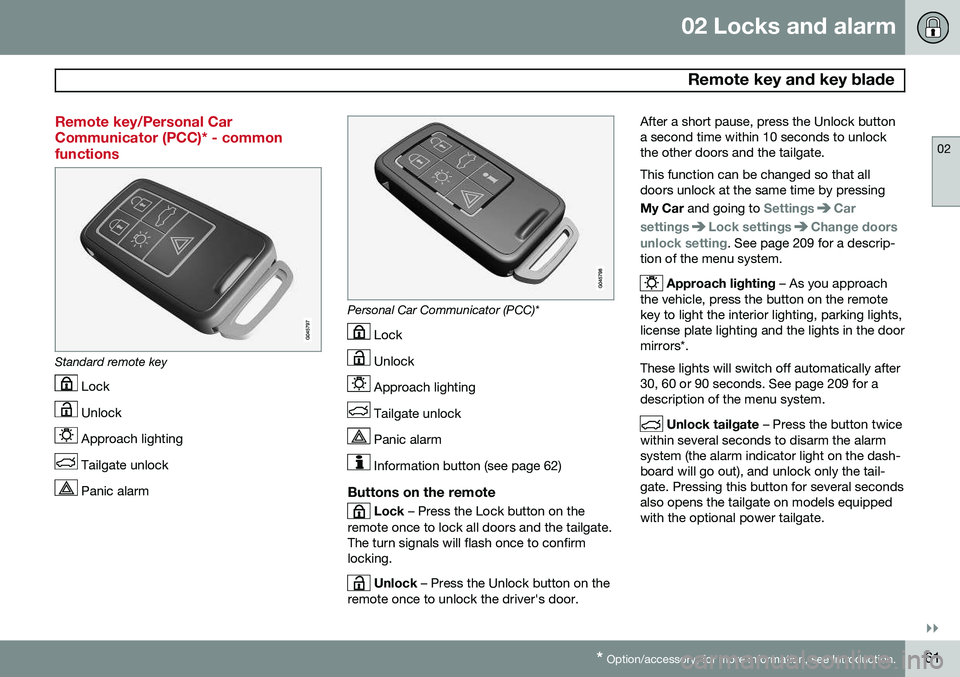
Remote key/Personal Car Communicator (PCC)* - commonfunctions
Standard remote key
Lock
Unlock
Approach lighting
Tailgate unlock
Panic alarm
Personal Car Communicator (PCC)*
Lock
Unlock
Approach lighting
Tailgate unlock
Panic alarm
Information button (see page 62)
Buttons on the remote
Lock – Press the Lock button on the
remote once to lock all doors and the tailgate. The turn signals will flash once to confirmlocking.
Unlock – Press the Unlock button on the
remote once to unlock the driver's door. After a short pause, press the Unlock button a second time within 10 seconds to unlockthe other doors and the tailgate. This function can be changed so that all doors unlock at the same time by pressing My Car
and going to
SettingsCar
settings
Lock settingsChange doors
unlock setting. See page 209 for a descrip-
tion of the menu system.
Approach lighting – As you approach
the vehicle, press the button on the remote key to light the interior lighting, parking lights,license plate lighting and the lights in the doormirrors*. These lights will switch off automatically after 30, 60 or 90 seconds. See page 209 for adescription of the menu system.
Unlock tailgate – Press the button twice
within several seconds to disarm the alarm system (the alarm indicator light on the dash-board will go out), and unlock only the tail-gate. Pressing this button for several secondsalso opens the tailgate on models equippedwith the optional power tailgate.
Page 65 of 408
02 Locks and alarm
Remote key and key blade
02
}}
63
NOTE
If none of the indicator lights flash when the information button has been pressedseveral times from different places in rela-tion to the vehicle, contact an authorizedVolvo service technician.
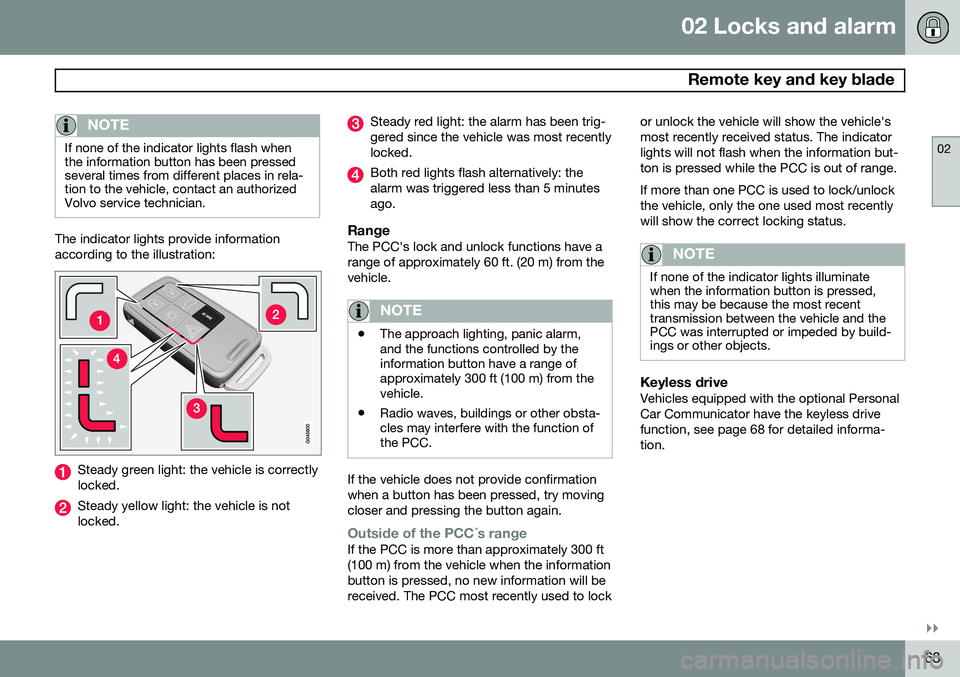
The indicator lights provide information according to the illustration:
Steady green light: the vehicle is correctly locked.
Steady yellow light: the vehicle is not locked.
Steady red light: the alarm has been trig- gered since the vehicle was most recentlylocked.
Both red lights flash alternatively: the alarm was triggered less than 5 minutesago.
RangeThe PCC's lock and unlock functions have arange of approximately 60 ft. (20 m) from thevehicle.
NOTE
•The approach lighting, panic alarm, and the functions controlled by theinformation button have a range ofapproximately 300 ft (100 m) from thevehicle.
• Radio waves, buildings or other obsta-cles may interfere with the function ofthe PCC.
If the vehicle does not provide confirmation when a button has been pressed, try movingcloser and pressing the button again.
Outside of the PCC´s rangeIf the PCC is more than approximately 300 ft (100 m) from the vehicle when the informationbutton is pressed, no new information will bereceived. The PCC most recently used to lock or unlock the vehicle will show the vehicle'smost recently received status. The indicatorlights will not flash when the information but-ton is pressed while the PCC is out of range. If more than one PCC is used to lock/unlock the vehicle, only the one used most recentlywill show the correct locking status.
NOTE
If none of the indicator lights illuminate when the information button is pressed,this may be because the most recenttransmission between the vehicle and thePCC was interrupted or impeded by build-ings or other objects.
Keyless driveVehicles equipped with the optional Personal Car Communicator have the keyless drivefunction, see page 68 for detailed informa-tion.
Page 66 of 408
02 Locks and alarm
Remote key and key blade
02
64* Option/accessory, for more information, see Introduction.
Detachable key blade
The key blade can be removed from the remote key. When removed, the key bladecan be used to:
• Lock/unlock the driver's door if the remote key is not functioning properly
• Lock/unlock the glove compartment (seepage 72)
• Override the transmission's shiftlock sys-tem (see page 130)
• Enable/disable the private locking func-tion (see page 67)
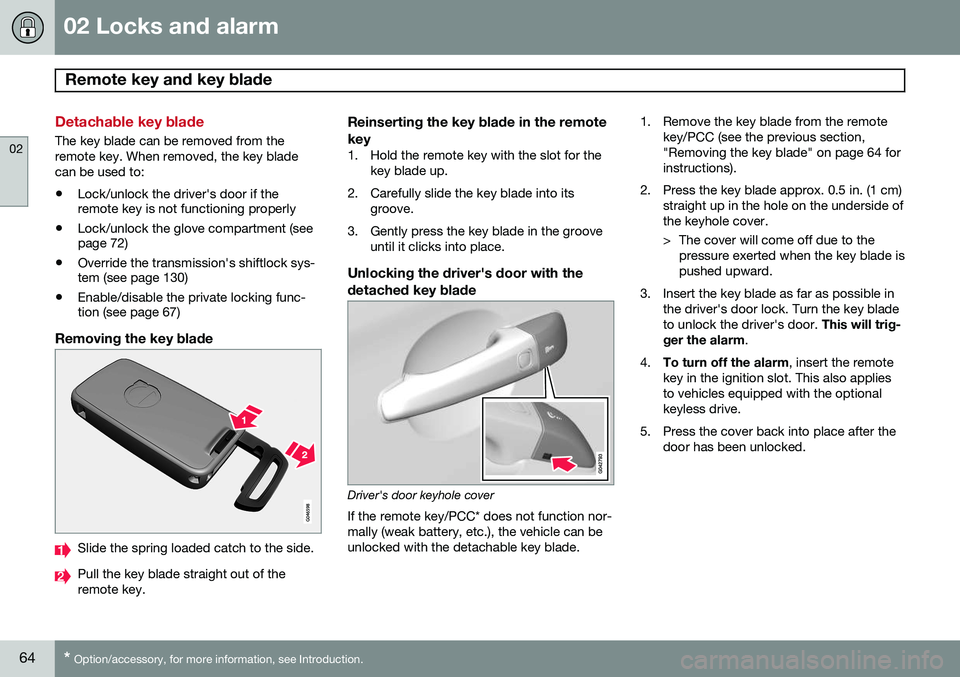
Removing the key blade
Slide the spring loaded catch to the side.
Pull the key blade straight out of the remote key.
Reinserting the key blade in the remote key
1. Hold the remote key with the slot for the
key blade up.
2. Carefully slide the key blade into its groove.
3. Gently press the key blade in the groove until it clicks into place.
Unlocking the driver's door with thedetached key blade
Driver's door keyhole cover If the remote key/PCC* does not function nor- mally (weak battery, etc.), the vehicle can beunlocked with the detachable key blade. 1. Remove the key blade from the remote
key/PCC (see the previous section,"Removing the key blade" on page 64 forinstructions).
2. Press the key blade approx. 0.5 in. (1 cm) straight up in the hole on the underside ofthe keyhole cover.
> The cover will come off due to thepressure exerted when the key blade is pushed upward.
3. Insert the key blade as far as possible in the driver's door lock. Turn the key bladeto unlock the driver's door. This will trig-
ger the alarm .
4. To turn off the alarm , insert the remote
key in the ignition slot. This also appliesto vehicles equipped with the optionalkeyless drive.
5. Press the cover back into place after the door has been unlocked.